
Bootstrap Paste-to-Upload: Clipboard Image Snippet
Bootstrap Paste-to-Upload (Clipboard Image Paste) · Forms · Plain HTML, CSS & JS · Live preview
About this UI Snippet
Bootstrap Paste-to-Upload (Clipboard Image Paste) — HTML, CSS & JavaScript
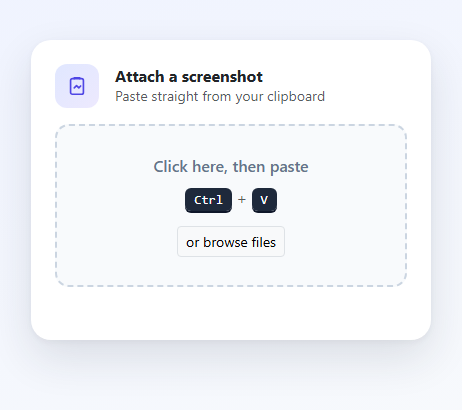
Pasting only works because the drop zone is a real, focusable element — tabindex="0" gives it something a drag-and-drop-only zone lacks: the ability to actually receive keyboard focus, which is a prerequisite for a paste event to ever fire on it at all. Clicking the zone focuses it, and only then does Ctrl+V/Cmd+V dispatch a genuine ClipboardEvent the listener can read from.
The listener reads e.clipboardData.items, finds the first item whose type starts with image/, and calls .getAsFile() to get a real Blob — this correctly ignores a clipboard holding plain copied text (which has no matching item) with an explicit, honest message rather than silently doing nothing or throwing an error.
showImage() revokes any previous object URL with URL.revokeObjectURL(currentUrl) before creating a new one, specifically so pasting a second image doesn't leak the first image's URL — the same object-URL cleanup discipline this collection's bootstrap-image-upload-preview applies per-thumbnail, applied here to a single always-current preview instead of a list.
What's included
Features
Step by step
How to Use
- 1Copy any imageTake a screenshot, or copy an image from another app or webpage, onto your system clipboard.
- 2Click the dashed paste zone on this pageIt focuses with a highlighted border and a "Ready — press paste now" pill.
- 3Press Ctrl+V (or Cmd+V on Mac)The pasted image appears as a preview with badges for its format, pixel dimensions and size in KB.
- 4Try pasting plain copied text insteadA clear message explains no image was found, rather than doing nothing silently.
- 5Click "Upload"A Bootstrap progress bar fills and the button confirms "Uploaded". This is a demo timer; swap it for a fetch POST.
- 6Click "Remove"The preview clears, its object URL is released, and the zone returns to its empty, focused state ready for another paste.
Real-world uses
Common Use Cases
Got questions?
Frequently Asked Questions
Only a focused, focusable element receives a paste event through the standard clipboard shortcut — without tabindex, a plain div can never gain keyboard focus, so Ctrl+V would have nowhere to dispatch its ClipboardEvent to.
The items array is searched for an entry whose type starts with "image/"; when none is found, the zone shows an explicit "no image found" message instead of silently ignoring the paste or throwing an error.
Clipboard paste support for images varies significantly across mobile browsers and is generally less reliable than on desktop. That is why the zone includes an "or browse files" button backed by a normal file input.
The Upload button runs a demo timer. Replace it with a FormData containing the pasted Blob and send it with fetch (or XMLHttpRequest if you need real progress events), then drive the progress bar from the result.
Yes. Attach the paste listener to a ref'd element in a mount hook, store the object URL in component state (revoking the previous one in the same setter, e.g. inside a state updater callback), and clean up on unmount to avoid a leaked URL if the component unmounts mid-preview.
Copy & paste
Source Code
<div class="bspaste-page">
<div class="card bspaste-card">
<div class="card-body p-4">
<div class="d-flex align-items-center gap-3 mb-3">
<span class="bspaste-badge-icon" aria-hidden="true">
<svg viewBox="0 0 24 24" width="22" height="22" fill="none" stroke="currentColor" stroke-width="1.8" stroke-linecap="round" stroke-linejoin="round"><rect x="5" y="4" width="14" height="17" rx="2"/><path d="M9 4V3h6v1"/><path d="M9 14l2.5-2.5L14 14l2-2"/></svg>
</span>
<div>
<h6 class="mb-0 fw-bold">Attach a screenshot</h6>
<div class="small text-muted">Paste straight from your clipboard</div>
</div>
</div>
<div class="bspaste-zone" id="bspasteZone" tabindex="0" aria-label="Paste an image here">
<div id="bspasteEmpty">
<div class="bspaste-ready" aria-hidden="true">Ready — press paste now</div>
<p class="fw-semibold mb-2">Click here, then paste</p>
<p class="mb-3"><kbd id="bspasteKey">Ctrl</kbd> <span class="text-muted">+</span> <kbd>V</kbd></p>
<button type="button" class="btn btn-sm btn-light border" id="bspasteBrowse">or browse files</button>
<input type="file" id="bspasteFile" accept="image/*" hidden>
</div>
<div class="d-none" id="bspastePreviewWrap">
<img id="bspastePreview" alt="Pasted image preview">
<div class="d-flex justify-content-center gap-2 mt-3" id="bspasteMeta"></div>
</div>
</div>
<div class="progress mt-3 d-none" id="bspasteProgress" role="progressbar" aria-label="Upload progress" style="height:8px">
<div class="progress-bar bg-primary" id="bspasteBar" style="width:0%"></div>
</div>
<p class="small text-muted mt-2 mb-0" id="bspasteStatus" aria-live="polite"> </p>
<div class="d-flex gap-2 mt-3 d-none" id="bspasteActions">
<button type="button" class="btn btn-outline-secondary flex-fill" id="bspasteRemove">Remove</button>
<button type="button" class="btn btn-primary flex-fill" id="bspasteUpload">Upload</button>
</div>
</div>
</div>
</div>body { background: linear-gradient(160deg, #eef2ff, #f8fafc 60%); min-height: 100vh; }
.bspaste-page { width: fit-content; max-width: 100%; margin: 0 auto; padding: 40px 16px; }
.bspaste-card { width: 400px; max-width: 100%; border: 0; border-radius: 20px; box-shadow: 0 18px 44px rgba(30, 41, 59, .12), 0 2px 6px rgba(30, 41, 59, .05); }
.bspaste-badge-icon {
width: 44px; height: 44px; flex: none; border-radius: 12px;
display: grid; place-items: center; color: #4f46e5;
background: linear-gradient(135deg, #e0e7ff, #ede9fe);
}
.bspaste-zone {
position: relative; border: 2px dashed #cbd5e1; border-radius: 14px; padding: 28px 20px;
text-align: center; color: #64748b; background: #f8fafc; cursor: pointer;
transition: border-color .15s, background .15s, box-shadow .15s;
}
.bspaste-zone:hover { border-color: #a5b4fc; }
.bspaste-zone:focus, .bspaste-zone:focus-within { outline: none; border-color: #6366f1; background: #f5f6ff; box-shadow: 0 0 0 4px rgba(99, 102, 241, .16); }
.bspaste-zone kbd { background: #1e293b; color: #fff; border-radius: 6px; padding: 4px 9px; font-size: 13px; box-shadow: 0 2px 0 #0f172a; }
.bspaste-ready {
display: none; position: absolute; top: -11px; left: 50%; transform: translateX(-50%);
background: #6366f1; color: #fff; font-size: 11px; font-weight: 700; padding: 3px 12px; border-radius: 20px; white-space: nowrap;
animation: bspastePulse 1.6s ease-in-out infinite;
}
.bspaste-zone:focus .bspaste-ready, .bspaste-zone:focus-within .bspaste-ready { display: block; }
@keyframes bspastePulse { 50% { opacity: .6; } }
#bspastePreview { max-width: 100%; max-height: 190px; border-radius: 10px; display: block; margin: 0 auto; box-shadow: 0 6px 18px rgba(15, 23, 42, .18); }
.bspaste-zone.has-image { cursor: default; border-style: solid; border-color: #e2e8f0; background: #fff; }const zone = document.getElementById('bspasteZone');
const empty = document.getElementById('bspasteEmpty');
const previewWrap = document.getElementById('bspastePreviewWrap');
const previewImg = document.getElementById('bspastePreview');
const meta = document.getElementById('bspasteMeta');
const status = document.getElementById('bspasteStatus');
const actions = document.getElementById('bspasteActions');
const progress = document.getElementById('bspasteProgress');
const bar = document.getElementById('bspasteBar');
const fileInput = document.getElementById('bspasteFile');
const uploadBtn = document.getElementById('bspasteUpload');
const MAX_BYTES = 5 * 1024 * 1024; // 5 MB
let currentUrl = null;
let uploadTimer = null;
// Show the right shortcut for the visitor's OS
if (/Mac|iPhone|iPad/.test(navigator.platform)) document.getElementById('bspasteKey').textContent = '⌘';
function setStatus(text, cls) {
status.textContent = text;
status.className = 'small mt-2 mb-0 ' + (cls || 'text-muted');
}
function badge(text) {
return '<span class="badge text-bg-light border">' + text + '</span>';
}
function showImage(blob) {
if (!blob.type.startsWith('image/')) return setStatus('That is not an image.', 'text-danger');
if (blob.size > MAX_BYTES) return setStatus('Image is too large (max 5 MB).', 'text-danger');
clearTimeout(uploadTimer);
if (currentUrl) URL.revokeObjectURL(currentUrl);
currentUrl = URL.createObjectURL(blob);
previewImg.onload = () => {
meta.innerHTML = badge(blob.type.replace('image/', '').toUpperCase()) +
badge(previewImg.naturalWidth + ' × ' + previewImg.naturalHeight) +
badge(Math.round(blob.size / 1024) + ' KB');
};
previewImg.src = currentUrl;
empty.classList.add('d-none');
previewWrap.classList.remove('d-none');
zone.classList.add('has-image');
actions.classList.remove('d-none');
progress.classList.add('d-none');
uploadBtn.disabled = false;
uploadBtn.textContent = 'Upload';
setStatus('Image ready to upload.', 'text-success');
}
zone.addEventListener('paste', e => {
const items = e.clipboardData ? e.clipboardData.items : [];
const imageItem = Array.from(items).find(item => item.type.startsWith('image/'));
if (!imageItem) {
setStatus('No image on the clipboard. Copy an image or take a screenshot first.');
return;
}
e.preventDefault();
showImage(imageItem.getAsFile());
});
// Fallback for touch devices and anyone who prefers a file picker
document.getElementById('bspasteBrowse').addEventListener('click', e => { e.stopPropagation(); fileInput.click(); });
fileInput.addEventListener('change', () => { if (fileInput.files[0]) showImage(fileInput.files[0]); });
document.getElementById('bspasteRemove').addEventListener('click', () => {
clearTimeout(uploadTimer);
if (currentUrl) { URL.revokeObjectURL(currentUrl); currentUrl = null; }
previewImg.removeAttribute('src');
fileInput.value = '';
previewWrap.classList.add('d-none');
empty.classList.remove('d-none');
zone.classList.remove('has-image');
actions.classList.add('d-none');
progress.classList.add('d-none');
setStatus(' ');
zone.focus();
});
// Demo upload: swap this timer for fetch('/upload', { method: 'POST', body: formData })
uploadBtn.addEventListener('click', () => {
uploadBtn.disabled = true;
uploadBtn.textContent = 'Uploading…';
progress.classList.remove('d-none');
let pct = 0;
(function tick() {
pct = Math.min(100, pct + 8 + Math.random() * 14);
bar.style.width = pct + '%';
if (pct < 100) { uploadTimer = setTimeout(tick, 160); return; }
uploadBtn.textContent = 'Uploaded ✓';
setStatus('Upload complete.', 'text-success');
})();
});Extend with AI
Take This Snippet Further With AI
Hand this snippet to an AI coding assistant like Claude and ask it to also accept a dragged-and-dropped image file on the same zone (combining paste and drag-and-drop into one input method), or to add a max-file-size check with a clear rejection message for an oversized pasted image.
Prompt to recreate it
Copy this into your AI assistant of choice to build the effect from scratch, or as a jumping-off point for your own variant:
Build a Bootstrap 5.3 paste-to-upload zone for clipboard images, using the real Bootstrap CDN framework (bootstrap.min.css and bootstrap.bundle.min.js), not custom CSS made to resemble it.

Requirements:
- A dashed-border zone with tabindex="0" so it can receive keyboard focus, showing instructions to click it and press Ctrl+V/Cmd+V.
- Listen for a real "paste" event on the zone, reading e.clipboardData.items to find the first item whose type starts with "image/", and get it as a real Blob via .getAsFile().
- On a successful image paste, show it as a preview using URL.createObjectURL, with badges for its format, pixel dimensions and size in KB, and reveal Remove and Upload buttons (Upload drives a Bootstrap progress bar).
- Include an "or browse files" button and hidden file input as a fallback, and reject non-images or files over 5 MB with an inline message.
- If the pasted clipboard content contains no image (e.g. plain copied text), show a clear message explaining that instead of doing nothing.
- Revoke the previous object URL before creating a new one on a second paste, and also revoke it when Remove is clicked, so no object URL is ever left un-revoked.
Want to tighten it up first? Run this prompt through the AI Prompt Studio to score it across 8 quality dimensions, catch anti-patterns, and tune the wording for Claude, ChatGPT, or Gemini before you paste it in.