
360° Product Spin Viewer — Drag, Inertia & Views in JS
360° Product Spin Viewer · Media · Plain HTML, CSS & JS · Live preview
About this UI Snippet
360° Product Spin Viewer — Frame Sequences, Drag Inertia, Colourways and a Code-Rendered Demo Product
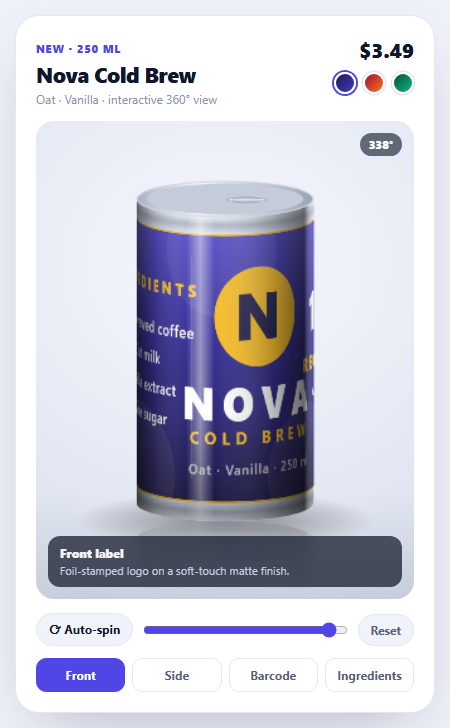
Interactive 360° viewers let shoppers drag a product around and inspect it from every angle, which is why they appear on footwear, watch, cosmetics and furniture pages where shape, texture and material matter more than any single photo can show. This snippet is a complete, reusable viewer: pointer drag with momentum, auto-spin, a scrubber, keyboard control, colourway switching, "jump to view" shortcuts and a loading bar. The demo product is a can that is rendered in code, so it needs no image files, yet the viewer itself works on a frame sequence and takes real photos with a single line.
How real 360° viewers work
A production viewer is a frame sequence: the product sits on a motorised turntable and is photographed at fixed steps (24, 36 or 72 shots for a full turn). The page preloads the images, turns the horizontal drag distance into a frame index and swaps the visible frame. Done quickly, the eye reads it as continuous rotation. This viewer keeps exactly that structure: a frames array, a draw() that shows frames[index], and a FRAME_URL setting. Set FRAME_URL = i => 'shots/spin-' + (i + 1) + '.webp' and the demo is replaced by your photos, with the same progress bar, drag, inertia and views.
A demo that really rotates
Instead of sliding a gradient sideways, the demo draws the can the way a 3D engine would, column by column. For each 0.5 px column across the can the code computes the angle around the cylinder with Math.asin, samples the matching strip of a 1024×512 wrap-around label texture, and stretches it to the column's height. The arcsine gives the correct foreshortening, so text compresses toward the edges and genuinely wraps. A fixed gradient pass adds lighting and a highlight, the lid has a pull-tab that turns with the can, and a faded reflection plus a contact shadow ground it. Each of the 48 frames is rendered into its own canvas in 12 ms slices with setTimeout, so the page stays responsive and the progress bar fills while it works.
Drag, momentum and the wrap-around maths
The stage uses Pointer Events, so mouse, pen and touch share one code path, with setPointerCapture keeping the drag alive outside the element and touch-action: pan-y leaving vertical page scrolling intact. The drag distance is divided by PX_PER_FRAME to get degrees, and angles are normalised with ((a % 360) + 360) % 360 so spinning past either end loops. Release velocity is smoothed with an exponential average while dragging, then decays each frame by FRICTION raised to the elapsed time, giving a natural fling; if the finger paused for 80 ms before lifting there is no fling.
Auto-spin, views and the shortest route
The product turns slowly until the first interaction, and a button or Space toggles it. The four chips (Front, Side, Barcode, Ingredients) animate to a chosen angle with an ease-out curve along the shortest direction, using ((target − angle + 540) % 360) − 180. When the angle is within 34° of a view, a callout appears with a short note, a simple form of "hotspot" that is tied to a rotation range instead of fixed pixels.
Colourways without reloading
The three swatches rebuild the label texture and re-render all frames, and every finished set is cached, so switching back is instant. If the user changes colour mid-load, a token check abandons the stale render. This is the same pattern a real configurator uses to load a different image set per finish.
Accessibility, performance and reduced motion
The stage is focusable and behaves as a slider: arrow keys turn it a frame (Shift for four), Home resets and Space toggles auto-spin, and a real range input offers the same control. aria-valuenow and the callout update live. Canvases are scaled by devicePixelRatio capped at 1.5 to limit memory (48 frames of this size use roughly 45 MB), and prefers-reduced-motion disables auto-spin and inertia. For 3D models rather than photos, see the Babylon.js spinning product, and for a lighter hover effect the 3D card tilt.
What's included
Features
Step by step
How to Use
- 1Drag to spinPress anywhere on the stage and drag left or right. The product follows your finger, and if you let go while moving it keeps turning and slows down with inertia.
- 2Let it auto-spin or scrubThe can turns slowly until your first touch. Use the Auto-spin button (or Space) to toggle it, and the slider under the stage to set an exact angle from 0° to 359°.
- 3Jump to a viewClick Front, Side, Barcode or Ingredients. The viewer animates the short way round and a callout explains what you are looking at. The chip lights up when you are within 34° of that view.
- 4Try a colourwayPick Midnight, Sunset or Mint. The 48 frames re-render with a progress bar, and each set is cached, so going back is instant.
- 5Use your own photosShoot 24 to 72 turntable images, set FRAMES to the count and FRAME_URL to a function like i => "shots/spin-" + String(i + 1).padStart(2, "0") + ".webp". The loader preloads them and the rest keeps working.
- 6Tune the feelPX_PER_FRAME sets drag sensitivity, FRICTION how long the fling lasts, AUTO_SPEED the idle rotation, and VIEWS the labelled angles and their notes.
Real-world uses
Common Use Cases
Got questions?
Frequently Asked Questions
Most commercial viewers use 24 or 36 frames, which feels smooth at normal drag speed while keeping the download small (24 compressed WebP frames at about 40 KB each is under 1 MB). Jewellery and watches sometimes use 72. This viewer defaults to 48 and you can change FRAMES.
Set FRAME_URL to a function that returns the URL of frame i, for example i => "shots/spin-" + String(i + 1).padStart(2, "0") + ".webp", and set FRAMES to the number of images. The loader preloads every frame and shows progress before the first drag, and draw() fits images of any size into the canvas.
It gives true cylinder foreshortening with only 2D canvas calls. Each column uses asin(x / radius) as its angle around the can and samples the label at that position, so text bends and compresses toward the edges just like a photographed can. No WebGL or image files are needed.
While dragging, velocity in degrees per millisecond is smoothed with an exponential average. On release it is applied every frame and multiplied by FRICTION raised to the elapsed time over 16 ms, so it decays the same at 60 Hz and 144 Hz. If you stop moving before letting go, velocity is zeroed so it does not fling.
The stage has touch-action: pan-y, which lets the browser handle vertical swipes while giving horizontal movement to your pointer handlers.
The demo caches 48 canvases at 450 by 570 pixels, roughly 45 MB. Real images are usually lighter because the browser decodes compressed formats lazily. Reduce FRAMES or the canvas scale for low-end devices.
Yes. Keep the frames array and angle in refs, run the animation loop in a mount effect, and cancel requestAnimationFrame and the pointer listeners in the cleanup. Use the export buttons on this page for the markup and styles.
Copy & paste
Source Code
<div class="card">
  <div class="head">
    <div>
      <span class="eyebrow">New · 250 ml</span>
      <h2>Nova Cold Brew</h2>
      <p class="sub">Oat · Vanilla · interactive 360° view</p>
    </div>
    <div class="buy">
      <span class="price">$3.49</span>
      <div class="swatches" id="swatches" role="radiogroup" aria-label="Colourway">
        <button type="button" class="sw" role="radio" aria-checked="true" data-pal="midnight" aria-label="Midnight" style="--a:#1e1b4b;--b:#4338ca"></button>
        <button type="button" class="sw" role="radio" aria-checked="false" data-pal="sunset" aria-label="Sunset" style="--a:#9f1239;--b:#f97316"></button>
        <button type="button" class="sw" role="radio" aria-checked="false" data-pal="mint" aria-label="Mint" style="--a:#064e3b;--b:#10b981"></button>
      </div>
    </div>
  </div>

  <div class="stage" id="stage" tabindex="0" aria-label="360 degree product viewer. Drag, or use the left and right arrow keys, to rotate.">
    <canvas id="view"></canvas>
    <div class="loader" id="loader"><div class="bar"><i id="barFill"></i></div><span id="loadTxt">Rendering frames… 0%</span></div>
    <span class="badge" id="deg" aria-hidden="true">0°</span>
    <div class="hint" id="hint" aria-hidden="true"><svg width="16" height="16" viewBox="0 0 24 24" fill="none" stroke="currentColor" stroke-width="2.2" stroke-linecap="round" stroke-linejoin="round"><path d="M8 8l-4 4 4 4"/><path d="M16 8l4 4-4 4"/><path d="M4 12h16"/></svg>Drag to spin</div>
    <div class="callout" id="callout" aria-live="polite"><b id="coTitle"></b><span id="coText"></span></div>
  </div>

  <div class="row">
    <button type="button" class="pill" id="autoBtn" aria-pressed="true">⟳ Auto-spin</button>
    <label class="scrub"><span class="sr">Rotation in degrees</span><input id="scrub" type="range" min="0" max="359" step="1" value="0"></label>
    <button type="button" class="pill" id="resetBtn">Reset</button>
  </div>

  <div class="chips" id="chips" role="group" aria-label="Jump to a view">
    <button type="button" data-a="0">Front</button>
    <button type="button" data-a="90">Side</button>
    <button type="button" data-a="180">Barcode</button>
    <button type="button" data-a="270">Ingredients</button>
  </div>
</div>*{box-sizing:border-box;margin:0;padding:0}
:root{--bg:#eef1f8;--card:#fff;--line:#e3e7f1;--ink:#0f172a;--ink2:#566079;--ink3:#8a93ab;--acc:#4f46e5;--stage1:#f6f8fd;--stage2:#d8deed;--chip:#f1f3fb;--shadow:0 24px 60px -28px rgba(30,27,75,.35)}
@media(prefers-color-scheme:dark){:root{--bg:#0a0d1d;--card:#131733;--line:#252b52;--ink:#f1f4ff;--ink2:#a9b1d4;--ink3:#6f789f;--acc:#818cf8;--stage1:#222852;--stage2:#0e1230;--chip:#1b2046;--shadow:0 30px 70px -30px rgba(0,0,0,.8)}}
body{font-family:system-ui,-apple-system,'Segoe UI',sans-serif;background:var(--bg);color:var(--ink);min-height:100vh;display:flex;align-items:center;justify-content:center;padding:24px 16px}
.sr{position:absolute;width:1px;height:1px;overflow:hidden;clip:rect(0 0 0 0);white-space:nowrap}
.card{width:100%;max-width:420px;background:var(--card);border:1px solid var(--line);border-radius:24px;padding:20px;box-shadow:var(--shadow)}
.head{display:flex;justify-content:space-between;align-items:flex-start;gap:12px;margin-bottom:14px}
.eyebrow{display:inline-block;font-size:10.5px;font-weight:800;letter-spacing:.1em;text-transform:uppercase;color:var(--acc);margin-bottom:4px}
.head h2{font-size:21px;font-weight:800;letter-spacing:-.02em}
.sub{font-size:12px;color:var(--ink3);margin-top:3px}
.buy{display:flex;flex-direction:column;align-items:flex-end;gap:9px}
.price{font-size:20px;font-weight:800;font-variant-numeric:tabular-nums}
.swatches{display:flex;gap:7px}
.sw{width:22px;height:22px;border-radius:50%;border:2px solid var(--card);background:linear-gradient(135deg,var(--a),var(--b));cursor:pointer;box-shadow:0 0 0 1.5px var(--line);transition:transform .15s,box-shadow .15s}
.sw:hover{transform:scale(1.12)}
.sw[aria-checked="true"]{box-shadow:0 0 0 2px var(--acc)}
.sw:focus-visible,.stage:focus-visible,.pill:focus-visible,.chips button:focus-visible,#scrub:focus-visible{outline:2px solid var(--acc);outline-offset:3px}
.stage{position:relative;border-radius:18px;overflow:hidden;background:radial-gradient(120% 80% at 50% 30%,var(--stage1),var(--stage2));aspect-ratio:300/380;cursor:grab;touch-action:pan-y;user-select:none;-webkit-user-select:none}
.stage.dragging{cursor:grabbing}
.stage::after{content:'';position:absolute;left:0;right:0;bottom:0;height:22%;background:linear-gradient(transparent,rgba(0,0,0,.08));pointer-events:none}
#view{display:block;width:100%;height:100%}
.badge{position:absolute;top:12px;right:12px;font-size:11px;font-weight:800;font-variant-numeric:tabular-nums;color:#fff;background:rgba(15,23,42,.62);backdrop-filter:blur(6px);padding:4px 9px;border-radius:999px}
.hint{position:absolute;left:50%;top:12px;transform:translateX(-50%);display:flex;align-items:center;gap:7px;font-size:11.5px;font-weight:700;color:#fff;background:rgba(15,23,42,.7);backdrop-filter:blur(6px);padding:7px 13px;border-radius:999px;pointer-events:none;transition:opacity .4s,transform .4s;white-space:nowrap;animation:nudge 2.2s ease-in-out infinite}
.hint.gone{opacity:0;transform:translate(-50%,-8px);animation:none}
@keyframes nudge{50%{transform:translateX(calc(-50% + 6px))}}
.callout{position:absolute;left:12px;right:12px;bottom:12px;display:flex;flex-direction:column;gap:2px;padding:9px 12px;border-radius:12px;background:rgba(15,23,42,.72);backdrop-filter:blur(8px);color:#fff;pointer-events:none;opacity:0;transform:translateY(6px);transition:opacity .3s,transform .3s}
.callout.on{opacity:1;transform:none}
.callout b{font-size:12px;font-weight:800}
.callout span{font-size:11px;line-height:1.4;color:#d5dbf3}
.loader{position:absolute;inset:0;display:flex;flex-direction:column;align-items:center;justify-content:center;gap:10px;background:inherit;z-index:2;font-size:12px;font-weight:600;color:var(--ink2);transition:opacity .3s}
.loader.done{opacity:0;pointer-events:none}
.bar{width:55%;height:5px;border-radius:9px;background:var(--line);overflow:hidden}
.bar i{display:block;height:100%;width:0;border-radius:9px;background:linear-gradient(90deg,#6366f1,#a78bfa);transition:width .15s}
.row{display:flex;align-items:center;gap:10px;margin-top:14px}
.pill{font:inherit;font-size:12px;font-weight:700;color:var(--ink2);background:var(--chip);border:1px solid var(--line);border-radius:999px;padding:7px 12px;cursor:pointer;white-space:nowrap;transition:background .15s,color .15s,border-color .15s}
.pill:hover{color:var(--ink)}
.pill[aria-pressed="true"]{background:color-mix(in srgb,var(--acc) 18%,transparent);border-color:var(--acc);color:var(--ink)}
.scrub{flex:1;display:flex}
#scrub{width:100%;accent-color:var(--acc)}
.chips{display:flex;gap:7px;margin-top:12px;flex-wrap:wrap}
.chips button{flex:1;min-width:70px;font:inherit;font-size:12px;font-weight:700;color:var(--ink2);background:transparent;border:1px solid var(--line);border-radius:10px;padding:8px 6px;cursor:pointer;transition:all .15s}
.chips button:hover{color:var(--ink);border-color:var(--acc)}
.chips button.on{background:var(--acc);border-color:var(--acc);color:#fff}
@media(prefers-reduced-motion:reduce){.hint{animation:none}*{transition-duration:.01ms!important}}// ── Config ───────────────────────────────────────────────────────────────────
// To use REAL photography: shoot the product on a turntable, export FRAMES images and set
// FRAME_URL = i => 'shots/spin-' + String(i + 1).padStart(2, '0') + '.webp';
// Everything else (drag, inertia, auto-spin, scrubber, keyboard, views) works on any frame sequence.
const FRAMES = 48; // frames in one full turn
const FRAME_URL = null; // null = render the demo can in code
const PX_PER_FRAME = 6; // horizontal drag needed to advance one frame
const AUTO_SPEED = 0.03; // degrees per ms while auto-spinning
const FRICTION = 0.94; // inertia: velocity kept per 16ms after release
const VIEWS = [
{ a: 0, title: 'Front label', text: 'Foil-stamped logo on a soft-touch matte finish.' },
{ a: 90, title: 'Recyclable', text: '100% aluminium. Rinse, recycle, repeat.' },
{ a: 180, title: 'Barcode', text: 'Scan to reorder or check the batch number.' },
{ a: 270, title: 'Ingredients', text: 'Cold-brewed coffee, oat milk and vanilla.' },
];
const VIEW_WINDOW = 34; // a view counts as "active" within this many degrees
const $ = id => document.getElementById(id);
const stage = $('stage'), view = $('view'), vctx = view.getContext('2d');
const reduce = window.matchMedia && matchMedia('(prefers-reduced-motion: reduce)').matches;
const W = 300, H = 380, S = Math.min(window.devicePixelRatio || 1, 1.5);
view.width = W * S; view.height = H * S;
// ── Demo product: a can drawn column by column so the label really wraps around it ──
const PALETTES = {
midnight: { c1: '#1e1b4b', c2: '#4338ca', accent: '#fbbf24' },
sunset: { c1: '#9f1239', c2: '#f97316', accent: '#fff1d6' },
mint: { c1: '#064e3b', c2: '#10b981', accent: '#fef08a' },
};
function spaced(g, px) { if ('letterSpacing' in g) g.letterSpacing = px + 'px'; }
function buildTexture(p) { // 1024 x 512 wrap-around label. x = 512 is the front, x = 0 / 1024 the back
const c = document.createElement('canvas'); c.width = 1024; c.height = 512;
const g = c.getContext('2d'); g.textAlign = 'center'; g.textBaseline = 'middle';
const bg = g.createLinearGradient(0, 0, 0, 512); bg.addColorStop(0, p.c2); bg.addColorStop(1, p.c1);
g.fillStyle = bg; g.fillRect(0, 0, 1024, 512);
g.fillStyle = 'rgba(255,255,255,.07)';
for (let i = 0; i < 6; i++) { g.beginPath(); g.arc(i * 200 + 40, 60 + (i % 2) * 380, 110, 0, 7); g.fill(); }
[[0, 30], [482, 512]].forEach(b => { // brushed-metal bands top and bottom
const m = g.createLinearGradient(0, b[0], 0, b[1]); m.addColorStop(0, '#e9edf5'); m.addColorStop(.5, '#a8b0c2'); m.addColorStop(1, '#dfe4ee');
g.fillStyle = m; g.fillRect(0, b[0], 1024, b[1] - b[0]);
});
g.fillStyle = p.accent; g.fillRect(0, 30, 1024, 3); g.fillRect(0, 479, 1024, 3);
g.fillStyle = 'rgba(255,255,255,.18)'; [128, 384, 640, 896].forEach(x => g.fillRect(x - 1, 70, 2, 372));
// front (512)
g.fillStyle = p.accent; g.beginPath(); g.arc(512, 170, 84, 0, 7); g.fill();
g.fillStyle = p.c1; g.font = '800 112px system-ui, sans-serif'; g.fillText('N', 512, 178);
g.fillStyle = '#fff'; g.font = '800 78px system-ui, sans-serif'; spaced(g, 14); g.fillText('NOVA', 512, 322);
g.fillStyle = p.accent; g.font = '700 30px system-ui, sans-serif'; spaced(g, 10); g.fillText('COLD BREW', 512, 376);
g.fillStyle = 'rgba(255,255,255,.8)'; g.font = '600 24px system-ui, sans-serif'; spaced(g, 2); g.fillText('Oat · Vanilla · 250 ml', 512, 428);
// side (768): recycle
g.fillStyle = '#fff'; g.font = '800 92px system-ui, sans-serif'; spaced(g, 0); g.fillText('100%', 768, 190);
g.fillStyle = p.accent; g.font = '800 34px system-ui, sans-serif'; spaced(g, 8); g.fillText('RECYCLABLE', 768, 270);
g.fillStyle = 'rgba(255,255,255,.8)'; g.font = '600 24px system-ui, sans-serif'; spaced(g, 6); g.fillText('ALUMINIUM', 768, 320);
g.strokeStyle = p.accent; g.lineWidth = 6; g.beginPath(); g.arc(768, 400, 30, 0.3, 5.4); g.stroke();
// back (0 and 1024, so the seam is invisible): barcode
[0, 1024].forEach(x => {
g.fillStyle = '#fff'; g.fillRect(x - 110, 150, 220, 130);
g.fillStyle = '#111'; for (let i = 0, cx = x - 96; cx < x + 96; i++) { const w = 2 + ((i * 7) % 5); g.fillRect(cx, 162, w, 86); cx += w + 2 + ((i * 3) % 4); }
g.fillStyle = '#111'; g.font = '600 18px system-ui, sans-serif'; spaced(g, 4); g.fillText('5 012345 678900', x, 264);
g.fillStyle = '#fff'; g.font = '700 26px system-ui, sans-serif'; spaced(g, 6); g.fillText('SCAN TO REORDER', x, 330);
g.fillStyle = p.accent; g.font = '600 20px system-ui, sans-serif'; spaced(g, 2); g.fillText('Batch 24-118 · Best before: see lid', x, 380);
});
// ingredients (256)
g.fillStyle = p.accent; g.font = '800 30px system-ui, sans-serif'; spaced(g, 8); g.fillText('INGREDIENTS', 256, 130);
g.fillStyle = '#fff'; g.font = '600 28px system-ui, sans-serif'; spaced(g, 1);
['Cold-brewed coffee', 'Oat milk', 'Vanilla extract', 'Cane sugar'].forEach((t, i) => g.fillText(t, 256, 200 + i * 50));
return c;
}
const Rr = 70, CX = W / 2, TOP = 62, BOT = 304, RY = Rr * 0.2, FLOOR = BOT + RY;
function renderFrame(i, tex) {
const f = document.createElement('canvas'); f.width = W * S; f.height = H * S;
const g = f.getContext('2d'); g.scale(S, S);
const rot = (i / FRAMES) * Math.PI * 2;
// body: each 0.5px column samples the label at its true angle around the cylinder (asin gives the foreshortening)
for (let x = -Rr; x < Rr; x += 0.5) {
const s = x / Rr, th = Math.asin(s); let u = ((th + rot) / (Math.PI * 2) + 0.5) % 1; if (u < 0) u += 1;
const sy = RY * Math.sqrt(1 - s * s);
g.drawImage(tex, Math.min(u * 1024, 1022), 0, 2, 512, CX + x, TOP + sy, 0.9, BOT - TOP);
}
// fixed studio lighting: a shading and highlight pass clipped to the can's silhouette
g.save(); g.beginPath(); g.moveTo(CX - Rr, TOP); g.lineTo(CX - Rr, BOT); g.ellipse(CX, BOT, Rr, RY, 0, Math.PI, 0, true); g.lineTo(CX + Rr, TOP); g.ellipse(CX, TOP, Rr, RY, 0, 0, Math.PI, false); g.closePath(); g.clip();
const sh = g.createLinearGradient(CX - Rr, 0, CX + Rr, 0);
[[0, 'rgba(0,0,0,.6)'], [.1, 'rgba(0,0,0,.2)'], [.28, 'rgba(255,255,255,0)'], [.36, 'rgba(255,255,255,.5)'], [.44, 'rgba(255,255,255,0)'], [.78, 'rgba(0,0,0,.28)'], [.95, 'rgba(0,0,0,.6)'], [1, 'rgba(255,255,255,.12)']].forEach(a => sh.addColorStop(a[0], a[1]));
g.fillStyle = sh; g.fillRect(CX - Rr, TOP - RY, Rr * 2, BOT - TOP + RY * 2);
const vs = g.createLinearGradient(0, TOP, 0, BOT); vs.addColorStop(0, 'rgba(255,255,255,.12)'); vs.addColorStop(.7, 'rgba(0,0,0,0)'); vs.addColorStop(1, 'rgba(0,0,0,.25)');
g.fillStyle = vs; g.fillRect(CX - Rr, TOP - RY, Rr * 2, BOT - TOP + RY * 2);
g.restore();
// lid: silver ring, recessed centre and a pull-tab that turns with the can
const lid = g.createLinearGradient(CX - Rr, 0, CX + Rr, 0); lid.addColorStop(0, '#aab3c5'); lid.addColorStop(.35, '#f5f7fb'); lid.addColorStop(1, '#9aa3b6');
g.fillStyle = lid; g.beginPath(); g.ellipse(CX, TOP, Rr, RY, 0, 0, 7); g.fill();
g.strokeStyle = '#cdd3df'; g.lineWidth = 1; g.stroke();
g.fillStyle = '#c4cbd9'; g.beginPath(); g.ellipse(CX, TOP, Rr - 8, RY - 1.8, 0, 0, 7); g.fill();
g.save(); g.translate(CX + Math.cos(rot + .6) * Rr * .25, TOP + Math.sin(rot + .6) * RY * .25); g.scale(1, RY / Rr); g.rotate(rot + .4);
g.strokeStyle = '#8d96a9'; g.lineWidth = 3; g.beginPath(); g.arc(0, 0, 11, 0, 7); g.stroke();
g.fillStyle = '#dfe4ee'; g.strokeStyle = '#8d96a9'; g.lineWidth = 1.2; g.beginPath(); g.rect(-15, -4.5, 30, 9); g.fill(); g.stroke(); g.restore();
// reflection on the floor (fades out), then the contact shadow behind everything
const rh = 56; g.save(); g.globalAlpha = .28; g.translate(0, 2 * FLOOR); g.scale(1, -1);
g.drawImage(f, 0, (FLOOR - rh) * S, W * S, rh * S, 0, FLOOR - rh, W, rh); g.restore();
g.save(); g.globalCompositeOperation = 'destination-out';
const fade = g.createLinearGradient(0, FLOOR, 0, FLOOR + rh); fade.addColorStop(0, 'rgba(0,0,0,.1)'); fade.addColorStop(1, 'rgba(0,0,0,1)');
g.fillStyle = fade; g.fillRect(0, FLOOR, W, rh); g.restore();
g.save(); g.globalCompositeOperation = 'destination-over'; g.translate(CX, FLOOR); g.scale(1, .2);
const sd = g.createRadialGradient(0, 0, 4, 0, 0, Rr * 1.7); sd.addColorStop(0, 'rgba(0,0,0,.4)'); sd.addColorStop(1, 'rgba(0,0,0,0)');
g.fillStyle = sd; g.beginPath(); g.arc(0, 0, Rr * 1.7, 0, 7); g.fill(); g.restore();
return f;
}
// ── Frame loading with progress (renders the demo, or preloads your images) ──
const cache = {};
let frames = [], palette = 'midnight', loadToken = 0;
function setProgress(p) { $('barFill').style.width = (p * 100) + '%'; $('loadTxt').textContent = 'Rendering frames… ' + Math.round(p * 100) + '%'; }
function loadSet(name) {
const token = ++loadToken;
if (cache[name]) { frames = cache[name]; $('loader').classList.add('done'); draw(true); return; }
$('loader').classList.remove('done'); setProgress(0);
const out = []; let i = 0;
if (FRAME_URL) { // real photos: preload every frame before the first drag
$('loadTxt').textContent = 'Loading photos… 0%';
for (let k = 0; k < FRAMES; k++) {
const im = new Image(); im.onload = im.onerror = () => { i++; $('barFill').style.width = (i / FRAMES * 100) + '%'; $('loadTxt').textContent = 'Loading photos… ' + Math.round(i / FRAMES * 100) + '%'; if (i === FRAMES && token === loadToken) finish(); };
im.src = FRAME_URL(k); out[k] = im;
}
} else {
const tex = buildTexture(PALETTES[name]);
(function step() {
if (token !== loadToken) return; // a newer colourway was picked: abandon this one
const t = performance.now();
do { out[i] = renderFrame(i, tex); i++; } while (i < FRAMES && performance.now() - t < 12); // ~12ms slices keep the page responsive
setProgress(i / FRAMES);
i < FRAMES ? setTimeout(step, 0) : finish();
})();
}
function finish() { cache[name] = frames = out; $('loader').classList.add('done'); draw(true); if (!started) { started = true; if (!reduce) startAuto(); } }
}
// ── Viewer state ──
let angle = 0, shown = -1, auto = false, started = false, dragging = false, velocity = 0, anim = null, raf = 0, last = 0;
const norm = a => ((a % 360) + 360) % 360;
function angDist(a, b) { const d = Math.abs(norm(a) - norm(b)); return Math.min(d, 360 - d); }
function draw(force) {
const idx = Math.round(angle / 360 * FRAMES) % FRAMES;
if (!force && idx === shown) return;
shown = idx;
const fr = frames[idx]; if (!fr) return;
vctx.clearRect(0, 0, view.width, view.height);
const fw = fr.naturalWidth || fr.width, fh = fr.naturalHeight || fr.height, k = Math.min(view.width / fw, view.height / fh);
vctx.drawImage(fr, (view.width - fw * k) / 2, (view.height - fh * k) / 2, fw * k, fh * k); // fits demo canvases and photos of any size
}
function syncUI() {
const a = Math.round(norm(angle)) % 360;
$('deg').textContent = a + '°'; $('scrub').value = a; stage.setAttribute('aria-valuenow', a);
let active = null;
VIEWS.forEach((v, i) => { const on = angDist(angle, v.a) < VIEW_WINDOW; if (on && (!active || angDist(angle, v.a) < angDist(angle, active.a))) active = v; document.querySelectorAll('#chips button')[i].classList.toggle('on', on); });
const co = $('callout'); if (active) { $('coTitle').textContent = active.title; $('coText').textContent = active.text; } co.classList.toggle('on', !!active);
}
function setAngle(a) { angle = norm(a); draw(); syncUI(); }
function tick(ts) {
raf = 0; const dt = Math.min(ts - (last || ts), 50); last = ts;
if (anim) { // eased jump to a chosen view along the shortest way round
const p = Math.min((ts - anim.t0) / anim.dur, 1), e = 1 - Math.pow(1 - p, 3);
setAngle(anim.from + anim.delta * e); if (p >= 1) anim = null;
} else if (!dragging) {
if (Math.abs(velocity) > 0.005) { setAngle(angle + velocity * dt); velocity *= Math.pow(FRICTION, dt / 16); }
else { velocity = 0; if (auto) setAngle(angle + AUTO_SPEED * dt); }
}
if (anim || auto || Math.abs(velocity) > 0.005) raf = requestAnimationFrame(tick); else last = 0;
}
function kick() { if (!raf) { last = 0; raf = requestAnimationFrame(tick); } }
function startAuto() { auto = true; $('autoBtn').setAttribute('aria-pressed', 'true'); kick(); }
function stopAuto() { auto = false; $('autoBtn').setAttribute('aria-pressed', 'false'); }
function goTo(target) {
stopAuto(); velocity = 0;
let delta = ((target - angle + 540) % 360) - 180;
if (reduce) { setAngle(angle + delta); return; }
anim = { from: angle, delta, t0: performance.now(), dur: 650 }; kick();
}
function interacted() { $('hint').classList.add('gone'); }
// ── Pointer: drag to rotate, then keep spinning with inertia ──
let startX = 0, startAngle = 0, lastX = 0, lastT = 0;
stage.addEventListener('pointerdown', e => {
dragging = true; anim = null; velocity = 0; stopAuto(); interacted();
startX = lastX = e.clientX; startAngle = angle; lastT = performance.now();
stage.setPointerCapture(e.pointerId); stage.classList.add('dragging');
});
stage.addEventListener('pointermove', e => {
if (!dragging) return;
const dx = e.clientX - startX, now = performance.now();
setAngle(startAngle - dx / PX_PER_FRAME * (360 / FRAMES)); // dragging right turns the front of the product right
const dt = Math.max(now - lastT, 1); velocity = 0.8 * velocity + 0.2 * (-(e.clientX - lastX) / PX_PER_FRAME * (360 / FRAMES) / dt);
lastX = e.clientX; lastT = now;
});
function release(e) {
if (!dragging) return; dragging = false; stage.classList.remove('dragging');
try { stage.releasePointerCapture(e.pointerId); } catch (err) {}
if (performance.now() - lastT > 80 || reduce) velocity = 0; // paused before letting go: no fling
kick();
}
stage.addEventListener('pointerup', release); stage.addEventListener('pointercancel', release);
// ── Keyboard, scrubber and buttons ──
stage.addEventListener('keydown', e => {
const step = 360 / FRAMES * (e.shiftKey ? 4 : 1);
if (e.key === 'ArrowLeft') { e.preventDefault(); stopAuto(); interacted(); setAngle(angle - step); }
else if (e.key === 'ArrowRight') { e.preventDefault(); stopAuto(); interacted(); setAngle(angle + step); }
else if (e.key === 'Home') { e.preventDefault(); goTo(0); }
else if (e.key === ' ') { e.preventDefault(); auto ? stopAuto() : startAuto(); }
});
$('scrub').addEventListener('input', e => { stopAuto(); anim = null; velocity = 0; interacted(); setAngle(+e.target.value); });
$('autoBtn').addEventListener('click', () => { auto ? stopAuto() : startAuto(); interacted(); });
$('resetBtn').addEventListener('click', () => goTo(0));
document.querySelectorAll('#chips button').forEach(b => b.addEventListener('click', () => { interacted(); goTo(+b.dataset.a); }));
document.querySelectorAll('.sw').forEach(b => b.addEventListener('click', () => {
document.querySelectorAll('.sw').forEach(x => x.setAttribute('aria-checked', String(x === b)));
palette = b.dataset.pal; shown = -1; loadSet(palette);
}));
stage.setAttribute('role', 'slider'); stage.setAttribute('aria-valuemin', '0'); stage.setAttribute('aria-valuemax', '359');
syncUI(); loadSet(palette);Extend with AI
Take This Snippet Further With AI
Paste this snippet's HTML, CSS and JS into an AI coding assistant like Claude and ask it to explain how asin() turns a screen column into an angle around the can, why the shortest-path formula adds 540 before taking the modulo, or how the velocity smoothing and friction create the fling. It is a good base to extend: ask for pinch or wheel zoom with a high-resolution frame set, hotspots with pixel positions per frame, drag in both axes for a multi-row (360 by tilt) sprite grid, lazy loading of frames in two passes (every fourth frame first), or a fullscreen mode. You could also ask it to add a spinning thumbnail strip, a share link that stores the current angle, or an export of the demo frames as a sprite sheet. Treat it as a working prototype to question and rebuild.
Prompt to recreate it
Copy this into your AI assistant of choice to build the effect from scratch, or as a jumping-off point for your own variant:
Build a polished 360° product viewer in plain HTML, CSS and JavaScript, as ONE self-contained HTML file (no libraries, no image files). Light and dark themes via CSS variables.

ENGINE (works on any frame sequence)
- Config constants: FRAMES (48), FRAME_URL (null = render the demo, or a function i => url for real photos), PX_PER_FRAME, AUTO_SPEED, FRICTION, and a VIEWS array of {angle, title, text}.
- A frames array, and draw() that shows frames[round(angle / 360 * FRAMES) % FRAMES] on a visible canvas, fitting any image size (contain). Only redraw when the frame index changes. If FRAME_URL is set, preload every image with a progress bar before enabling interaction.
- Angle state in degrees with wrap-around normalisation (((a % 360) + 360) % 360). One requestAnimationFrame loop that runs only while something moves.

DEMO PRODUCT (rendered in code, no assets)
- A beverage can rendered into 48 offscreen canvases (size 300x380 css, canvas scale min(devicePixelRatio, 1.5)). Build a 1024x512 wrap-around label texture (gradient body, brushed-metal bands top and bottom, big logo and "NOVA COLD BREW" on the front, "100% recyclable" on one side, a barcode on the back drawn at x = 0 and x = 1024 so the seam is invisible, and an ingredient list on the other side).
- For each frame, draw the body column by column (0.5px steps): angle = asin(x / radius), texture u = ((angle + rotation) / 2π + 0.5) mod 1, sample a 2px-wide strip of the texture and stretch it to the column height, offsetting the column's top by the ellipse of the lid for perspective. Add fixed lighting: a clipped horizontal gradient for shading plus a narrow white highlight, and a vertical gradient. Draw the lid ellipse with a recessed centre and a pull-tab (ring and bar) that rotates with the can. Add a faded mirrored reflection under the can (draw the canvas onto itself flipped, then fade with destination-out) and a contact shadow with destination-over.
- Render frames in ~12ms slices using setTimeout so the page stays responsive, with a progress bar. Support three colourways (midnight, sunset, mint) as swatch radio buttons; cache each finished set and abandon stale renders with a token.

INTERACTION
- Pointer Events on the stage with setPointerCapture and touch-action: pan-y. Dragging right turns the front right (angle = startAngle - dx / PX_PER_FRAME * (360 / FRAMES)). Track release velocity with an exponential moving average; on release apply velocity per frame and multiply by FRICTION^(dt/16); no fling if the pointer paused for 80ms.
- Auto-spin slowly until the first interaction (toggle button and Space). A range input 0 to 359 bound to the angle. Reset button.
- View chips (Front 0, Side 90, Barcode 180, Ingredients 270) animate to the angle along the shortest way, delta = ((target - angle + 540) % 360) - 180, with a 650ms ease-out cubic. When within 34 degrees of a view, show a callout with its title and text, and highlight its chip.
- A "Drag to spin" hint pill that fades permanently on first interaction, and a degree badge.

QUALITY
- The stage is focusable with slider semantics (role=slider, aria-valuemin/max/now), arrow keys turn one frame (Shift = four), Home resets. Visible focus rings, an aria-live callout, prefers-reduced-motion disables auto-spin, inertia and animation (jump instantly), and the layout works from 320px wide.

Return only the finished single HTML file.
Want to tighten it up first? Run this prompt through the AI Prompt Studio to score it across 8 quality dimensions, catch anti-patterns, and tune the wording for Claude, ChatGPT, or Gemini before you paste it in.