
GSAP quickTo Cursor: Magnetic Frame, Labels & Stretch
GSAP quickTo Cursor · Animations · Plain HTML, CSS & JS · Live preview
About this UI Snippet
GSAP quickTo Cursor — One Retargeted Tween per Property, Four Cursor Modes
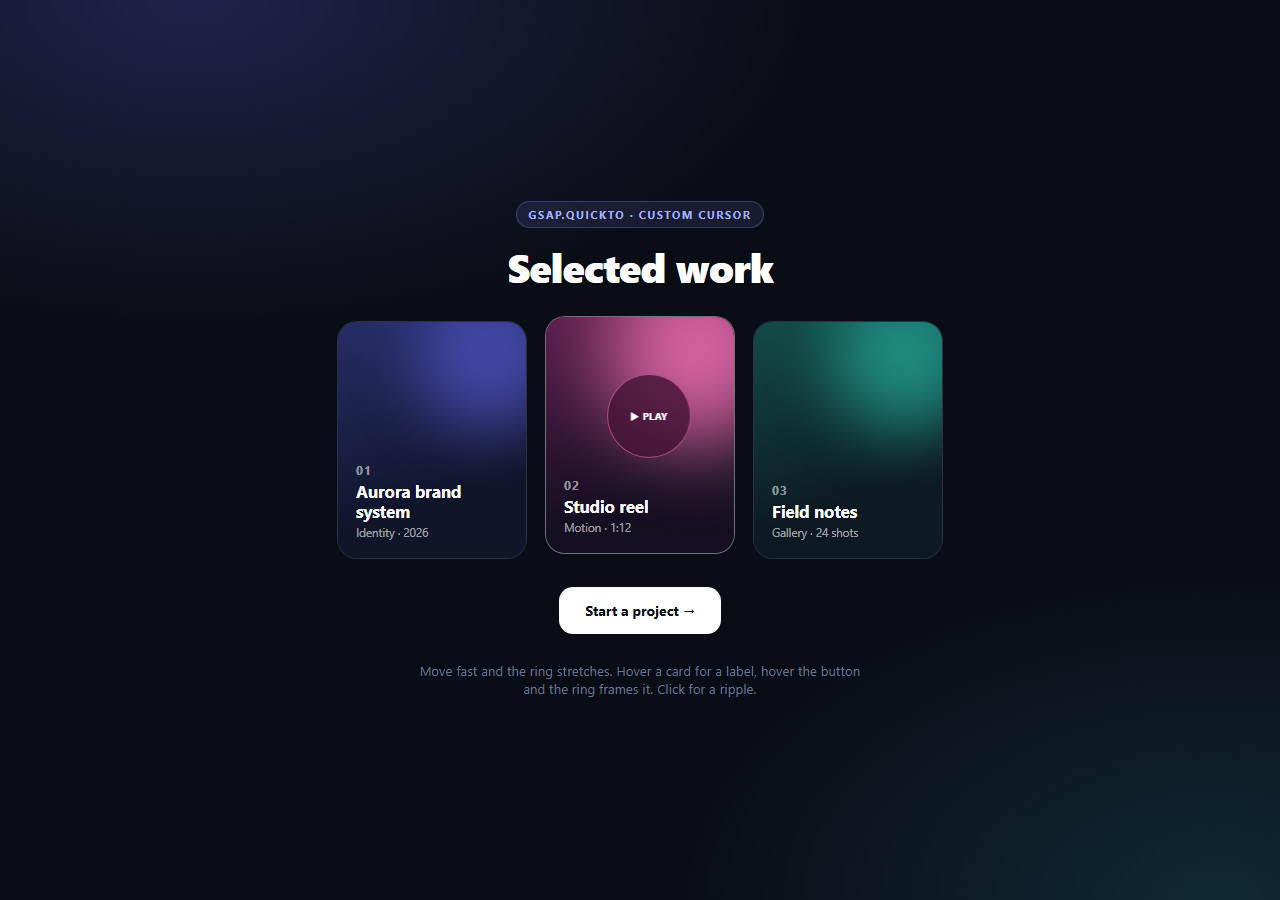
A custom cursor lives or dies on its follow physics and on what happens under the hood at 120 mousemove events a second. Calling gsap.to() on every move creates a tween object, resolves overwrites and throws the tween away milliseconds later. gsap.quickTo() is the purpose-built answer: build one tween per property up front, then keep feeding it new destinations. This snippet pushes that idea further than a dot and a ring: nine properties run on quickTo, the ring stretches along the direction of travel, and four cursor modes switch with a data attribute.
quickTo: one tween, retargeted forever
gsap.quickTo(dot, 'x', { duration: 0.18, ease: 'power3' }) returns a function. Calling dotX(482) creates nothing: it retargets the existing tween, re-easing from the current position and velocity. Per mousemove the cost is a function call and a number. Here nine setters are created once: dot x, y, scaleX and scaleY, ring x, y, rotation, scaleX and scaleY. quickTo works for any numeric property GSAP can tween, not only position, but it needs the real property name: pass scaleX and scaleY rather than the scale shorthand.
The lag gap is the whole feel
The dot uses 0.18s and the ring 0.55s with the same power3 ease. The gap stretches the pair apart in motion and lets the ring glide back in after every stop. Each retarget keeps its momentum, which is why it feels smoother than a pos += (target - pos) * 0.1 loop running in requestAnimationFrame forever.
Speed stretch along the direction of travel
On each move the script reads movementX and movementY, converts them to an angle and sets the ring's rotation. Because GSAP applies rotation before scale, scaleX then stretches the ring along the way you are moving, and scaleY squashes it a little. The angle is unwrapped to the shortest turn, so crossing 180° never spins the ring a full circle. A 90ms timer relaxes it back to a circle when you stop.
Four cursor modes from a data attribute
Add data-cursor="view | play | drag | frame" to any element and one delegated mouseover handler sets a class on the ring: a frosted View lens, a pink Play lens, a pill with "← Drag →", or a frame. The label text comes from data-label, and the dot shrinks away inside a lens so the text stays readable. Discrete state (the lens) is CSS; continuous motion is quickTo, and the two never fight because they animate different properties.
Magnetic frame on buttons
In frame mode the ring takes the hovered element's size from two CSS variables and stops following the pointer. Its quickTo targets become the element's centre plus 18% of the pointer's offset, so the frame hugs the button and leans toward the pointer. It is the same pair of setters as before with different numbers, which is the point of quickTo.
Press, ripple and leaving the window
Holding the mouse button shrinks the dot through its own scale setter, and a click adds a ripple that GSAP animates and then removes from the DOM. When the pointer leaves the window both followers fade out, and they stay invisible until the first move, so nothing sits in the top-left corner on load.
Touch, reduced motion and no CDN
The cursor is a hover construct. The script only runs for (hover: hover) and (pointer: fine), and only then adds the class that hides the native cursor, so phones keep theirs. With prefers-reduced-motion every duration drops to almost nothing (quickTo ignores a duration of exactly 0) and the stretch and ripple are skipped. If GSAP fails to load the page simply keeps the normal cursor.
Related: the vanilla-lerp custom cursor, attraction physics in magnetic button, pointer-reactive cards in 3d card tilt, and image-trailing in hover image trail.
What's included
Features
Step by step
How to Use
- 1Add the GSAP CDNCore gsap only: quickTo is built in, no plugin needed.
- 2Add a dot, a ring and a stageTwo position: fixed, pointer-events: none elements. The script centres them with xPercent and yPercent.
- 3Create the setters onceOne gsap.quickTo per property: x, y, scaleX and scaleY on the dot, x, y, rotation, scaleX and scaleY on the ring.
- 4Feed them on mousemoveCall the setters with clientX / clientY. Do not call gsap.to inside the handler.
- 5Tune the two durationsThe 0.18s dot and 0.55s ring gap defines the personality; widen it for a floatier feel.
- 6Mark elements with data-cursorUse view, play, drag or frame, plus data-label for the text. One delegated mouseover handler does the rest.
- 7Keep touch and reduced motion in mindThe cursor only starts for hover-capable pointers, and prefers-reduced-motion switches the trail off.
Real-world uses
Common Use Cases
Got questions?
Frequently Asked Questions
Mousemove can fire 120 times a second, and a new gsap.to each time creates a tween, resolves overwrites and discards it. quickTo builds one tween per property once and returns a function that only retargets it, so each event costs a function call and a number.
The script converts movementX and movementY to an angle and sets the ring's rotation, then raises scaleX. GSAP applies rotation before scale, so the stretch runs along the travel direction. A 90ms timer sets the scale back to 1 when the pointer stops.
Angles jump from 180° to -180° when you cross the left direction, and tweening that jump would spin the ring a full turn. Adding the shortest signed difference to a running value keeps the rotation continuous, so it always takes the shortest way round.
Add data-cursor="name" and data-label="Text" to an element, then style .qtc-ring.is-name in CSS for size, colour and shape. The delegated mouseover handler applies the class, so no new JavaScript is needed unless the mode changes where the ring points.
On touch the script never starts, so the page keeps its normal cursor. With prefers-reduced-motion every quickTo duration drops to 0.001s, which makes the followers snap to the pointer, and the stretch and ripple are skipped. If GSAP fails to load, nothing changes.
Create the quickTo setters and the listeners in a mount effect against refs, and remove the listeners in the cleanup. Never route coordinates through component state, because that would re-render on every mousemove. Mode changes happen rarely, so they can safely use state.
Copy & paste
Source Code
<div class="qtc-stage" id="qtcStage">
  <div class="qtc-head">
    <span class="qtc-eyebrow">gsap.quickTo · custom cursor</span>
    <h2 class="qtc-title">Selected work</h2>
  </div>

  <div class="qtc-cards">
    <button type="button" class="qtc-card qtc-c1" data-cursor="view" data-label="View">
      <span class="qtc-num">01</span>
      <span class="qtc-name">Aurora brand system</span>
      <span class="qtc-tag">Identity · 2026</span>
    </button>
    <button type="button" class="qtc-card qtc-c2" data-cursor="play" data-label="▶ Play">
      <span class="qtc-num">02</span>
      <span class="qtc-name">Studio reel</span>
      <span class="qtc-tag">Motion · 1:12</span>
    </button>
    <button type="button" class="qtc-card qtc-c3" data-cursor="drag" data-label="← Drag →">
      <span class="qtc-num">03</span>
      <span class="qtc-name">Field notes</span>
      <span class="qtc-tag">Gallery · 24 shots</span>
    </button>
  </div>

  <button type="button" class="qtc-cta" data-cursor="frame">Start a project <span aria-hidden="true">→</span></button>

  <p class="qtc-hint">Move fast and the ring stretches. Hover a card for a label, hover the button and the ring frames it. Click for a ripple.</p>

  <div class="qtc-dot" id="qtcDot"></div>
  <div class="qtc-ring" id="qtcRing"><span id="qtcLabel"></span></div>
</div>*{box-sizing:border-box;margin:0;padding:0}
body{font-family:system-ui,-apple-system,sans-serif;background:#0b0d16;color:#fff}
.qtc-stage{position:relative;min-height:100vh;display:flex;flex-direction:column;align-items:center;justify-content:center;gap:28px;padding:44px 24px;overflow:hidden;background:radial-gradient(80% 60% at 15% 0%,rgba(99,102,241,.24),transparent 60%),radial-gradient(70% 60% at 95% 100%,rgba(34,211,238,.14),transparent 60%),#0b0d16}
.qtc-fine,.qtc-fine *{cursor:none!important}
.qtc-head{text-align:center}
.qtc-eyebrow{display:inline-block;font-size:11px;font-weight:700;letter-spacing:.14em;text-transform:uppercase;color:#a5b4fc;background:rgba(129,140,248,.12);border:1px solid rgba(129,140,248,.3);padding:5px 12px;border-radius:99px;margin-bottom:12px}
.qtc-title{font-size:clamp(26px,4.4vw,40px);font-weight:800;letter-spacing:-.02em}
.qtc-cards{display:flex;gap:18px;flex-wrap:wrap;justify-content:center}
.qtc-card{position:relative;width:190px;aspect-ratio:4/5;border-radius:20px;border:1px solid rgba(255,255,255,.12);padding:18px;display:flex;flex-direction:column;justify-content:flex-end;gap:3px;text-align:left;color:#fff;font:inherit;overflow:hidden;background:#10152a;transition:border-color .3s,translate .3s}
.qtc-card::before{content:'';position:absolute;inset:0;background:var(--g);opacity:.95}
.qtc-card::after{content:'';position:absolute;width:150px;height:150px;border-radius:50%;right:-40px;top:-40px;background:var(--b);filter:blur(34px);opacity:.55;transition:opacity .3s,scale .4s}
.qtc-card>*{position:relative;z-index:1}
.qtc-card:hover,.qtc-card:focus-visible{border-color:rgba(255,255,255,.4);translate:0 -5px}
.qtc-card:hover::after{opacity:.85;scale:1.25}
.qtc-card:focus-visible,.qtc-cta:focus-visible{outline:2px solid #22d3ee;outline-offset:3px}
.qtc-c1{--g:linear-gradient(160deg,#27306b,#10152a 70%);--b:#6366f1}
.qtc-c2{--g:linear-gradient(160deg,#5b1d4d,#150f22 70%);--b:#f472b6}
.qtc-c3{--g:linear-gradient(160deg,#134e4a,#0d1a22 70%);--b:#2dd4bf}
.qtc-num{font-size:12px;font-weight:700;letter-spacing:.1em;color:rgba(255,255,255,.55)}
.qtc-name{font-size:17px;font-weight:700;letter-spacing:-.01em;line-height:1.2}
.qtc-tag{font-size:11.5px;color:rgba(255,255,255,.6)}
.qtc-cta{font:700 14px system-ui;color:#0b0d16;background:#fff;border:0;border-radius:14px;padding:14px 26px;transition:background .2s}
.qtc-cta:hover{background:#e0e7ff}
.qtc-hint{color:#6b7494;font-size:12.5px;letter-spacing:.03em;text-align:center;max-width:460px;line-height:1.5}
.qtc-dot,.qtc-ring,.qtc-ripple{position:fixed;top:0;left:0;pointer-events:none}
.qtc-dot,.qtc-ring{opacity:0;transition:opacity .25s}
.qtc-live .qtc-dot,.qtc-live .qtc-ring{opacity:1}
.qtc-dot{width:8px;height:8px;border-radius:50%;background:#22d3ee;z-index:50}
.qtc-ring{width:44px;height:44px;border-radius:50%;border:1.5px solid rgba(165,180,252,.8);display:flex;align-items:center;justify-content:center;z-index:49;will-change:transform;transition:opacity .25s,width .3s,height .3s,border-radius .3s,background .3s,border-color .3s}
.qtc-ring span{font-size:9.5px;font-weight:700;letter-spacing:.06em;text-transform:uppercase;color:#fff;opacity:0;white-space:nowrap;transition:opacity .25s}
.qtc-ring.is-view,.qtc-ring.is-play,.qtc-ring.is-drag{background:rgba(20,26,46,.82);backdrop-filter:blur(4px);border-color:rgba(165,180,252,.45)}
.qtc-ring.is-view,.qtc-ring.is-play{width:84px;height:84px}
.qtc-ring.is-play{background:rgba(70,20,56,.82);border-color:rgba(244,114,182,.6)}
.qtc-ring.is-drag{width:104px;height:50px;border-radius:99px;border-color:rgba(45,212,191,.55)}
.qtc-ring.is-view span,.qtc-ring.is-play span,.qtc-ring.is-drag span{opacity:1}
.qtc-ring.is-frame{width:var(--w);height:var(--h);border-radius:22px;border-color:#22d3ee;background:rgba(34,211,238,.07)}
.qtc-ripple{width:70px;height:70px;border-radius:50%;border:2px solid #22d3ee;z-index:48}
@media(prefers-reduced-motion:reduce){.qtc-ring,.qtc-card,.qtc-card::after{transition:none}}// gsap.quickTo makes ONE reusable tween per property and only retargets it on every call. It is
// built for pointer-follow: creating a new gsap.to per mousemove (120+ a second) thrashes the
// engine. Here it drives NINE properties: dot x / y / scaleX / scaleY, ring x / y / rotation / scaleX / scaleY.
(function () {
var stage = document.getElementById('qtcStage');
var fine = window.matchMedia('(hover: hover) and (pointer: fine)').matches;
var reduce = window.matchMedia('(prefers-reduced-motion: reduce)').matches;
// Touch screens (no persistent pointer) and a CDN that failed to load keep the normal cursor
if (!window.gsap || !fine) return;
stage.classList.add('qtc-fine');
var dot = document.getElementById('qtcDot');
var ring = document.getElementById('qtcRing');
var label = document.getElementById('qtcLabel');
// Centre both followers on the pointer with xPercent / yPercent, so their size can change freely
gsap.set([dot, ring], { xPercent: -50, yPercent: -50, x: innerWidth / 2, y: innerHeight / 2 });
// Reduced motion: a near-zero duration makes every setter snap to the pointer (no trail, no stretch).
// (Exactly 0 is not allowed: a quickTo with duration 0 never moves.)
var k = reduce ? 0.001 : 1;
var dotX = gsap.quickTo(dot, 'x', { duration: 0.18 * k, ease: 'power3' });
var dotY = gsap.quickTo(dot, 'y', { duration: 0.18 * k, ease: 'power3' });
// quickTo needs the real property names: GSAP expands the 'scale' shorthand into scaleX + scaleY
var dotSX = gsap.quickTo(dot, 'scaleX', { duration: 0.25 * k, ease: 'power3' });
var dotSY = gsap.quickTo(dot, 'scaleY', { duration: 0.25 * k, ease: 'power3' });
function dotS(v) { dotSX(v); dotSY(v); }
var ringX = gsap.quickTo(ring, 'x', { duration: 0.55 * k, ease: 'power3' });
var ringY = gsap.quickTo(ring, 'y', { duration: 0.55 * k, ease: 'power3' });
var ringR = gsap.quickTo(ring, 'rotation', { duration: 0.35 * k, ease: 'power3' });
var ringSX = gsap.quickTo(ring, 'scaleX', { duration: 0.3 * k, ease: 'power3' });
var ringSY = gsap.quickTo(ring, 'scaleY', { duration: 0.3 * k, ease: 'power3' });
var rot = 0, calm = null, mode = null, target = null, dotBase = 1;
window.addEventListener('mousemove', function (e) {
stage.classList.add('qtc-live');
dotX(e.clientX); dotY(e.clientY);
// Frame mode: the ring is pulled to the centre of the hovered element, with a little pointer drift
if (mode === 'frame' && target) {
var r = target.getBoundingClientRect();
var cx = r.left + r.width / 2, cy = r.top + r.height / 2;
ringX(cx + (e.clientX - cx) * 0.18);
ringY(cy + (e.clientY - cy) * 0.18);
return;
}
ringX(e.clientX); ringY(e.clientY);
if (reduce || mode) return;
// Speed stretch: rotate the ring to the travel direction, then scaleX stretches it ALONG that direction
var speed = Math.hypot(e.movementX, e.movementY);
if (speed > 2) {
var a = Math.atan2(e.movementY, e.movementX) * 180 / Math.PI;
rot += ((((a - rot + 540) % 360) + 360) % 360) - 180; // shortest way round, never a 360 degree spin
ringR(rot);
ringSX(1 + Math.min(speed / 70, 0.5));
ringSY(1 - Math.min(speed / 260, 0.18));
}
clearTimeout(calm);
calm = setTimeout(function () { ringSX(1); ringSY(1); }, 90); // pointer stopped: relax to a circle
});
// Cursor modes are CSS classes on the ring; the position keeps coming from quickTo
function setMode(el) {
target = el;
mode = el ? el.getAttribute('data-cursor') : null;
ring.className = 'qtc-ring' + (mode ? ' is-' + mode : '');
label.textContent = el ? (el.getAttribute('data-label') || '') : '';
rot = Math.round(rot / 360) * 360;
ringR(rot); ringSX(1); ringSY(1);
// Inside a label lens the dot would sit on top of the text, so it shrinks away until the lens closes
dotBase = (mode === 'view' || mode === 'play' || mode === 'drag') ? 0 : 1;
dotS(dotBase);
if (mode === 'frame') {
var r = el.getBoundingClientRect();
ring.style.setProperty('--w', (r.width + 18) + 'px');
ring.style.setProperty('--h', (r.height + 18) + 'px');
}
}
stage.addEventListener('mouseover', function (e) {
var el = e.target.closest('[data-cursor]');
if (el !== target) setMode(el);
});
// Press: the dot shrinks while the button is down, and a click sends out a ripple
window.addEventListener('mousedown', function () { dotS(dotBase * 0.5); });
window.addEventListener('mouseup', function () { dotS(dotBase); });
stage.addEventListener('click', function (e) {
if (reduce) return;
var rp = document.createElement('span');
rp.className = 'qtc-ripple';
stage.appendChild(rp);
gsap.set(rp, { x: e.clientX, y: e.clientY, xPercent: -50, yPercent: -50 });
gsap.fromTo(rp, { scale: 0.2, opacity: 0.8 }, { scale: 1.7, opacity: 0, duration: 0.6, ease: 'power2.out', onComplete: function () { rp.remove(); } });
});
// Pointer left the window: fade both followers out until it comes back
document.documentElement.addEventListener('mouseleave', function () { stage.classList.remove('qtc-live'); });
})();Extend with AI
Take This Snippet Further With AI
This snippet is a good prompt for asking an AI to explain how one retargeted tween can drive a whole cursor: paste it into an assistant like Claude and ask why nine gsap.quickTo setters are cheaper than gsap.to on every mousemove, how the rotation is unwrapped so the ring never spins a full turn, and why GSAP applying rotation before scale makes scaleX stretch along the direction of travel. Then ask what changes in frame mode, where the ring's targets become the element's centre. To extend it: ask for a text mode with a thin vertical bar, a magnetic effect that also moves the button itself, a hold-to-fill progress ring on press, or a version that reads data-cursor-color to tint the ring per element.
Prompt to recreate it
Copy this into your AI assistant of choice to build the effect from scratch, or as a jumping-off point for your own variant:
Build a custom cursor in plain HTML, CSS and JavaScript using only core GSAP 3 from a CDN (no plugins) and gsap.quickTo. No requestAnimationFrame loop.

Requirements:
- Two position: fixed, pointer-events: none elements: a small dot and a larger ring, both centred with gsap.set xPercent / yPercent -50 (not negative margins) so the ring can change size. Both start invisible and fade in on the first mousemove; they fade out when the pointer leaves the document.
- Create the quickTo setters once: dot x, y, scaleX and scaleY; ring x, y, rotation, scaleX and scaleY (quickTo does not work with the scale shorthand, so use scaleX and scaleY). Dot duration 0.18s, ring position 0.55s, same power3 ease. Do not call gsap.to inside the mousemove handler.
- Speed stretch: from movementX / movementY compute speed and angle. Set the ring rotation to the angle, unwrapped to the shortest turn (keep a running value and add the signed difference), then scaleX to 1 + min(speed / 70, 0.5) and scaleY slightly below 1. After 90ms without movement set both scales back to 1.
- Cursor modes chosen by data-cursor on the hovered element with one delegated mouseover handler on the stage: view, play and drag (frosted lenses with the text from data-label, different border colours, drag as a wide pill) and frame. In frame mode set --w and --h on the ring from the element's bounding box plus 18px, then retarget the ring's x and y to the element's centre plus 18% of the pointer's offset instead of the pointer. Reset rotation to the nearest multiple of 360 and scales to 1 whenever the mode changes.
- Press and click: mousedown shrinks the dot to scale 0.5 through its scaleX / scaleY setters, mouseup restores it, and a click creates a ripple element that gsap.fromTo scales and fades, then removes itself.
- Only run when (hover: hover) and (pointer: fine) matches and window.gsap exists, and only then add the class that sets cursor: none, so touch screens and a failed CDN keep the normal cursor. With prefers-reduced-motion use a tiny duration such as 0.001 for every setter (quickTo ignores a duration of exactly 0) and skip the stretch and ripple.
- Demo: a dark stage with a heading, three cards (View, Play, Drag modes, real buttons with visible focus outlines) and a white call-to-action button in frame mode.
Want to tighten it up first? Run this prompt through the AI Prompt Studio to score it across 8 quality dimensions, catch anti-patterns, and tune the wording for Claude, ChatGPT, or Gemini before you paste it in.