
Rhythm Tap Game – Free HTML, CSS & JS Snippet with Combos
Rhythm Tap Game · Games · Plain HTML, CSS & JS · Live preview
About this UI Snippet
Rhythm Tap Game — Falling Notes, Combo Multipliers, Synth Sound & Rank Grades
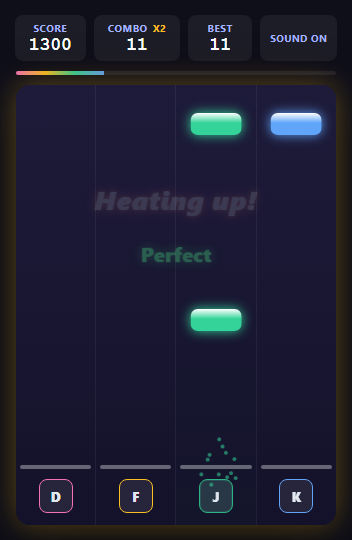
Rhythm games boil down to one core mechanic done well: judging how close a player's input is to a moving target in time, then turning that closeness into a graded, satisfying result. This snippet is a four-lane falling-note rhythm game with no audio files and no libraries: requestAnimationFrame, delta-time movement, a nearest-note matching algorithm, a tiny Web Audio synth and a handful of CSS animations that make every hit feel good.
Falling notes with a rising difficulty curve
Every note is a small div inside its lane's track, advanced each frame by speed * dt, where dt is the real elapsed time since the previous frame. This is the same delta-time approach as the Flap & Dodge Obstacle Game, so fall speed is constant on any refresh rate. Both speed and the gap between spawns are interpolated from the share of notes already spawned, so a 40-note run starts gentle and ends fast. After the first quarter of the run, a spawn can also drop a second note in a different lane (a chord), and pickLane() never allows three notes in a row on the same lane.
Judging a hit: nearest note, graded by distance
When a lane is pressed, laneKeyDown() scans every unhit note in that lane and picks the one whose center is closest to the center of the hit line. Within GOOD_WINDOW it counts as a hit, and within the tighter PERFECT_WINDOW it becomes a Perfect. A note that slides past the window unhit is registered as a Miss on the next frame by the game loop. Pressing a lane with no note nearby is a harmless air tap.
Combo multiplier, heat and milestones
Every consecutive hit raises the combo, and each 10 hits raises the multiplier (up to x4), which scales the 100 or 50 points a Perfect or Good is worth. The multiplier badge bumps when it increases, the stage glow changes colour through a data-heat attribute, and combos of 10, 20, 30 and 40 trigger a callout and a short arpeggio. A Miss resets the combo, drops the multiplier back to x1 and shakes the stage.
Sound and juice, no assets required
Each lane is tuned to a note of a C major chord (C4, E4, G4, C5), and tone() plays it through an OscillatorNode and a GainNode with a quick decay, so every hit adds to a melody. Perfect hits add an octave sparkle, misses play a falling sawtooth, and a mute button turns everything off. Visual feedback comes from lane colours, a glow on the pressed lane, particle sparks created and removed per hit, and a 3-2-1-GO countdown.
Ending the run and ranking the player
The run ends when all 40 notes have been spawned and resolved. gradeFor() turns accuracy and the share of Perfects into an S, A, B, C or D rank, shown with the score, Perfect/Good/Miss breakdown and best combo. The best combo is saved to localStorage (inside a try/catch so it also works in sandboxed iframes), and a "New best combo!" line appears when it was beaten.
What's included
Features
Step by step
How to Use
- 1Start a runClick "Start". A 3-2-1-GO countdown plays, then notes begin falling toward the hit line in four colour-coded lanes.
- 2Play the lanesThe lanes are mapped to D, F, J and K, shown as key caps at the bottom. On a touch screen, tap the lane itself. Each lane plays its own note when you hit it, so you make the music.
- 3Time your hitsPress the lane as a note crosses the hit line. laneKeyDown() finds the closest unhit note in that lane and grades it Perfect or Good, with sparks and a flash on the lane.
- 4Build the multiplierConsecutive hits grow your combo. Every 10 hits raises the multiplier up to x4, the stage glow gets hotter and milestone callouts like "On fire!" appear.
- 5Survive the ramp-upNotes get faster and closer together as the run progresses, and chords (two notes at once) start appearing. A missed note resets your combo and multiplier and shakes the stage.
- 6Check your rankAfter all 40 notes, you get an S to D rank, your Perfect/Good/Miss breakdown, accuracy and best combo, which is saved with localStorage.
Real-world uses
Common Use Cases
Got questions?
Frequently Asked Questions
laneKeyDown() finds the closest unhit note in the pressed lane by comparing the center of each note with the center of the hit line. Within PERFECT_WINDOW (16px) it is a Perfect worth 100 points times the multiplier, within GOOD_WINDOW (34px) it is a Good worth 50 times the multiplier. If no note in that lane is inside GOOD_WINDOW, the press is an air tap with no penalty.
A Miss is only registered when a note slides past the hit line unhit, checked every frame in the game loop. Pressing a lane with no note in range just plays a quiet note, which keeps the lanes feeling like an instrument and avoids punishing exploratory taps.
tone() creates an OscillatorNode and a GainNode with the Web Audio API, sets a frequency, fades the gain to near zero and stops the oscillator. Each lane has its own frequency from LANE_FREQS (C4, E4, G4 and C5). The AudioContext is created inside the Start click so browsers allow sound, and the mute button simply makes tone() return early.
Each frame the loop computes t as the share of notes already spawned, then interpolates speed between BASE_SPEED and MAX_SPEED and the spawn gap between BASE_INTERVAL and MIN_INTERVAL. Change those four constants, or TOTAL_NOTES, to make the run easier, harder or longer. Chords are added in spawnStep() once t passes 0.25.
When a new record is reached, saveBest() writes it to localStorage under rhythm-tap-best-combo. Accessing localStorage throws a SecurityError in sandboxed iframes and some private modes, so both loadBest() and saveBest() are wrapped in try/catch. If storage is blocked, the game still runs and just does not remember the best combo.
Yes. Add a key to LANE_KEYS, a colour to LANE_COLORS and a frequency to LANE_FREQS, then duplicate a .rt-lane block in the HTML with the next track id, a --c colour and a key label, and extend the tracks array. Replace the 4 in pickLane() and spawnStep() with your lane count.
Copy & paste
Source Code
<div class="rt-wrap">
  <div class="rt-hud">
    <div class="rt-hud-item"><span class="rt-hud-label">Score</span><span class="rt-hud-value" id="rt-score">0</span></div>
    <div class="rt-hud-item"><span class="rt-hud-label">Combo <span class="rt-mult" id="rt-mult">x1</span></span><span class="rt-hud-value" id="rt-combo">0</span></div>
    <div class="rt-hud-item"><span class="rt-hud-label">Best</span><span class="rt-hud-value" id="rt-best">0</span></div>
    <button class="rt-mute" id="rt-mute" type="button" aria-pressed="false" aria-label="Toggle sound">Sound on</button>
  </div>
  <div class="rt-progress"><div class="rt-progress-bar" id="rt-progress"></div></div>

  <div class="rt-stage" id="rt-stage" data-heat="0">
    <div class="rt-lane" data-lane="0" style="--c:#f472b6"><div class="rt-lane-track" id="track-0"></div><div class="rt-hitline"></div><div class="rt-key">D</div></div>
    <div class="rt-lane" data-lane="1" style="--c:#fbbf24"><div class="rt-lane-track" id="track-1"></div><div class="rt-hitline"></div><div class="rt-key">F</div></div>
    <div class="rt-lane" data-lane="2" style="--c:#34d399"><div class="rt-lane-track" id="track-2"></div><div class="rt-hitline"></div><div class="rt-key">J</div></div>
    <div class="rt-lane" data-lane="3" style="--c:#60a5fa"><div class="rt-lane-track" id="track-3"></div><div class="rt-hitline"></div><div class="rt-key">K</div></div>
    <div class="rt-fx" id="rt-fx"></div>
    <div class="rt-feedback" id="rt-feedback"></div>
    <div class="rt-callout" id="rt-callout"></div>
    <div class="rt-count" id="rt-count"></div>

    <div class="rt-screen rt-start-screen show" id="rt-start-screen">
      <p class="rt-logo">Rhythm Tap</p>
      <p class="rt-sub">Hit D F J K (or tap a lane) as notes cross the line.<br>Every hit plays a note, so you make the music.</p>
      <button class="rt-btn" id="rt-start-btn">Start</button>
    </div>
    <div class="rt-screen rt-end-screen" id="rt-end-screen">
      <p class="rt-grade" id="rt-grade">A</p>
      <p class="rt-logo">Run Complete</p>
      <p class="rt-summary" id="rt-summary"></p>
      <button class="rt-btn" id="rt-restart-btn">Play Again</button>
    </div>
  </div>
</div>
* { box-sizing: border-box; margin: 0; padding: 0; }
body { font-family: system-ui, sans-serif; background: #0f0f1a; min-height: 100vh; display: flex; align-items: center; justify-content: center; padding: 24px; }
.rt-wrap { display: flex; flex-direction: column; align-items: center; gap: 10px; }
.rt-hud { display: flex; gap: 8px; align-items: stretch; }
.rt-hud-item {
background: rgba(255,255,255,0.06); border-radius: 8px; padding: 6px 14px;
display: flex; flex-direction: column; align-items: center; min-width: 64px;
}
.rt-hud-label { font-size: 10px; font-weight: 700; color: #a5b4fc; text-transform: uppercase; letter-spacing: 0.5px; }
.rt-hud-value { font-size: 18px; font-weight: 800; color: #fff; font-family: 'Courier New', monospace; }
.rt-mult { display: inline-block; color: #fbbf24; margin-left: 2px; }
.rt-mult.bump { animation: rt-bump 0.45s ease; }
@keyframes rt-bump { 0% { transform: scale(2.2); } 100% { transform: scale(1); } }
.rt-mute {
background: rgba(255,255,255,0.06); color: #a5b4fc; border: none; border-radius: 8px;
padding: 0 10px; font-size: 10px; font-weight: 700; text-transform: uppercase; letter-spacing: 0.4px;
cursor: pointer; font-family: inherit;
}
.rt-mute:hover { background: rgba(255,255,255,0.12); }
.rt-progress { width: 320px; max-width: calc(100vw - 48px); height: 4px; background: rgba(255,255,255,0.08); border-radius: 4px; overflow: hidden; }
.rt-progress-bar { height: 100%; width: 0; background: linear-gradient(90deg, #f472b6, #fbbf24, #34d399, #60a5fa); transition: width 0.2s; }
.rt-stage {
position: relative;
width: 320px; max-width: calc(100vw - 48px); height: 440px;
background: linear-gradient(180deg, #1e1b3a 0%, #14122a 100%);
border-radius: 14px; overflow: hidden;
box-shadow: 0 20px 60px rgba(0,0,0,0.5);
display: flex; touch-action: none; user-select: none; -webkit-user-select: none;
transition: box-shadow 0.3s;
}
.rt-stage[data-heat="1"] { box-shadow: 0 0 30px rgba(251,191,36,0.35), 0 20px 60px rgba(0,0,0,0.5); }
.rt-stage[data-heat="2"] { box-shadow: 0 0 40px rgba(244,114,182,0.5), 0 20px 60px rgba(0,0,0,0.5); }
.rt-stage[data-heat="3"] { box-shadow: 0 0 55px rgba(96,165,250,0.7), 0 20px 60px rgba(0,0,0,0.5); }
.rt-stage.shake { animation: rt-shake 0.25s ease; }
@keyframes rt-shake { 0%, 100% { transform: translateX(0); } 25% { transform: translateX(-5px); } 75% { transform: translateX(5px); } }
.rt-lane {
position: relative; flex: 1;
border-right: 1px solid rgba(255,255,255,0.06);
display: flex; flex-direction: column; align-items: center;
}
.rt-lane[data-lane="3"] { border-right: none; }
.rt-lane::before {
content: ''; position: absolute; inset: 0; opacity: 0; transition: opacity 0.12s;
background: linear-gradient(0deg, var(--c), transparent 65%);
}
.rt-lane.lit::before { opacity: 0.28; }
.rt-lane-track { position: absolute; inset: 0; }
.rt-note {
position: absolute; left: 50%; transform: translateX(-50%);
width: 64%; height: 22px; border-radius: 7px;
background: linear-gradient(180deg, #fff 0%, var(--c) 45%);
box-shadow: 0 0 12px var(--c);
}
.rt-hitline {
position: absolute; bottom: 56px; left: 4px; right: 4px; height: 4px;
background: rgba(255,255,255,0.35); border-radius: 4px;
}
.rt-hitline.flash { background: var(--c); box-shadow: 0 0 14px var(--c); }
.rt-key {
position: absolute; bottom: 12px; left: 50%; transform: translateX(-50%);
width: 34px; height: 34px; border-radius: 8px;
background: rgba(255,255,255,0.08); border: 1.5px solid var(--c);
display: flex; align-items: center; justify-content: center;
font-size: 13px; font-weight: 800; color: #e2e8f0;
transition: background 0.08s, transform 0.08s;
}
.rt-key.pressed { background: var(--c); color: #0f0f1a; transform: translateX(-50%) scale(0.9); }
.rt-fx { position: absolute; inset: 0; pointer-events: none; }
.rt-spark {
position: absolute; width: 6px; height: 6px; border-radius: 50%;
animation: rt-spark 0.55s ease-out forwards;
}
@keyframes rt-spark { to { transform: translate(var(--dx), var(--dy)) scale(0.2); opacity: 0; } }
.rt-feedback {
position: absolute; top: 38%; left: 0; right: 0; text-align: center;
font-size: 20px; font-weight: 800; pointer-events: none; opacity: 0;
}
.rt-feedback.show { animation: rt-pop 0.45s ease forwards; }
@keyframes rt-pop { 0% { transform: translateY(0) scale(0.8); opacity: 1; } 100% { transform: translateY(-18px) scale(1.1); opacity: 0; } }
.rt-feedback.perfect { color: #4ade80; text-shadow: 0 0 12px rgba(74,222,128,0.7); }
.rt-feedback.good { color: #60a5fa; }
.rt-feedback.miss { color: #f87171; }
.rt-callout {
position: absolute; top: 22%; left: 0; right: 0; text-align: center;
font-size: 26px; font-weight: 900; font-style: italic; letter-spacing: 1px;
color: #fff; text-shadow: 0 0 18px #f472b6, 0 0 6px #fbbf24;
pointer-events: none; opacity: 0;
}
.rt-callout.show { animation: rt-callout 1s ease forwards; }
@keyframes rt-callout { 0% { transform: scale(0.4); opacity: 0; } 20% { transform: scale(1.15); opacity: 1; } 70% { transform: scale(1); opacity: 1; } 100% { transform: scale(1); opacity: 0; } }
.rt-count {
position: absolute; inset: 0; display: flex; align-items: center; justify-content: center;
font-size: 72px; font-weight: 900; color: #fff; text-shadow: 0 0 30px #6366f1;
pointer-events: none; opacity: 0;
}
.rt-count.show { animation: rt-count 0.7s ease forwards; }
@keyframes rt-count { 0% { transform: scale(1.8); opacity: 0; } 25% { transform: scale(1); opacity: 1; } 100% { transform: scale(0.8); opacity: 0; } }
.rt-screen {
position: absolute; inset: 0; z-index: 2;
background: rgba(15,15,26,0.9);
display: flex; flex-direction: column; align-items: center; justify-content: center; gap: 10px;
opacity: 0; pointer-events: none; transition: opacity 0.2s;
}
.rt-screen.show { opacity: 1; pointer-events: all; }
.rt-logo { font-size: 24px; font-weight: 800; color: #fff; }
.rt-sub { font-size: 12px; color: #a5b4fc; margin-bottom: 4px; text-align: center; line-height: 1.6; padding: 0 16px; }
.rt-summary { font-size: 13px; color: #e0e7ff; text-align: center; line-height: 1.7; }
.rt-grade {
font-size: 80px; font-weight: 900; line-height: 1;
background: linear-gradient(135deg, #f472b6, #fbbf24, #34d399, #60a5fa);
-webkit-background-clip: text; background-clip: text; color: transparent;
}
.rt-btn {
background: #6366f1; color: #fff; border: none; border-radius: 10px;
padding: 10px 24px; font-size: 14px; font-weight: 700; cursor: pointer;
font-family: inherit; transition: background 0.15s, transform 0.1s; margin-top: 4px;
}
.rt-btn:hover { background: #4f46e5; }
.rt-btn:active { transform: scale(0.96); }const LANE_KEYS = ['d', 'f', 'j', 'k'];
const LANE_COLORS = ['#f472b6', '#fbbf24', '#34d399', '#60a5fa'];
const LANE_FREQS = [261.63, 329.63, 392.0, 523.25]; // C4 E4 G4 C5, always sounds good together
const NOTE_HEIGHT = 22;
const STAGE_HEIGHT = 440;
const HIT_LINE_OFFSET = 56; // px from bottom, matches .rt-hitline
const TOTAL_NOTES = 40;
const BASE_SPEED = 250; // px/s at the start of the run
const MAX_SPEED = 350; // px/s at the end of the run
const BASE_INTERVAL = 800; // ms between note spawns at the start
const MIN_INTERVAL = 470; // ms between note spawns at the end
const PERFECT_WINDOW = 16; // px tolerance from hit line center
const GOOD_WINDOW = 34;
const MILESTONES = { 10: 'Heating up!', 20: 'On fire!', 30: 'Unstoppable!', 40: 'Legendary!' };
const BEST_KEY = 'rhythm-tap-best-combo';
// localStorage can throw in sandboxed iframes / private mode, so guard it
function loadBest() {
try { return parseInt(localStorage.getItem(BEST_KEY) || '0', 10) || 0; } catch (e) { return 0; }
}
function saveBest(v) {
try { localStorage.setItem(BEST_KEY, String(v)); } catch (e) { /* ignore */ }
}
const stage = document.getElementById('rt-stage');
const fxEl = document.getElementById('rt-fx');
const scoreEl = document.getElementById('rt-score');
const comboEl = document.getElementById('rt-combo');
const multEl = document.getElementById('rt-mult');
const bestEl = document.getElementById('rt-best');
const progressEl = document.getElementById('rt-progress');
const feedbackEl = document.getElementById('rt-feedback');
const calloutEl = document.getElementById('rt-callout');
const countEl = document.getElementById('rt-count');
const startScreen = document.getElementById('rt-start-screen');
const endScreen = document.getElementById('rt-end-screen');
const summaryEl = document.getElementById('rt-summary');
const gradeEl = document.getElementById('rt-grade');
const muteBtn = document.getElementById('rt-mute');
const tracks = [0, 1, 2, 3].map(i => document.getElementById('track-' + i));
const laneEls = document.querySelectorAll('.rt-lane');
const hitlines = document.querySelectorAll('.rt-hitline');
const keyEls = document.querySelectorAll('.rt-key');
let notes = []; // { lane, el, y, hit }
let score = 0, combo = 0, mult = 1;
let bestCombo = loadBest();
let bestAtStart = bestCombo;
let hits = 0, misses = 0, perfects = 0, goods = 0;
let notesSpawned = 0;
let lastLane = -1, sameLaneRun = 0;
let speed = BASE_SPEED, interval = BASE_INTERVAL;
let running = false;
let lastTime = 0;
let spawnTimer = 0;
let rafId = null;
bestEl.textContent = bestCombo;
// Center of the 4px hit line (px from top); notes are judged by their center
const hitLineY = STAGE_HEIGHT - HIT_LINE_OFFSET - 2;
/* ---------- Sound (tiny Web Audio synth, no files needed) ---------- */
let audioCtx = null;
let muted = false;
function getAudio() {
if (!audioCtx) {
try { audioCtx = new (window.AudioContext || window.webkitAudioContext)(); } catch (e) { audioCtx = null; }
}
if (audioCtx && audioCtx.state === 'suspended') audioCtx.resume();
return audioCtx;
}
function tone(freq, dur, type, vol, slideTo, delay) {
if (muted) return;
const ctx = getAudio();
if (!ctx) return;
try {
const t0 = ctx.currentTime + (delay || 0);
const osc = ctx.createOscillator();
const gain = ctx.createGain();
osc.type = type;
osc.frequency.setValueAtTime(freq, t0);
if (slideTo) osc.frequency.exponentialRampToValueAtTime(slideTo, t0 + dur);
gain.gain.setValueAtTime(vol, t0);
gain.gain.exponentialRampToValueAtTime(0.0001, t0 + dur);
osc.connect(gain);
gain.connect(ctx.destination);
osc.start(t0);
osc.stop(t0 + dur);
} catch (e) { /* audio is optional */ }
}
muteBtn.addEventListener('click', () => {
muted = !muted;
muteBtn.textContent = muted ? 'Sound off' : 'Sound on';
muteBtn.setAttribute('aria-pressed', String(muted));
});
/* ---------- Helpers ---------- */
function restartClass(el, cls) {
el.classList.remove(cls);
void el.offsetWidth; // reflow so the CSS animation restarts every time
el.classList.add(cls);
}
function showFeedback(text, cls) {
feedbackEl.textContent = text;
feedbackEl.className = 'rt-feedback';
void feedbackEl.offsetWidth;
feedbackEl.className = 'rt-feedback show ' + cls;
}
function showCallout(text) {
calloutEl.textContent = text;
calloutEl.classList.remove('show');
void calloutEl.offsetWidth;
calloutEl.classList.add('show');
}
function burst(lane, count) {
const x = laneEls[lane].offsetLeft + laneEls[lane].offsetWidth / 2;
for (let i = 0; i < count; i++) {
const s = document.createElement('div');
s.className = 'rt-spark';
s.style.left = x + 'px';
s.style.top = hitLineY + 'px';
s.style.background = LANE_COLORS[lane];
const angle = Math.random() * Math.PI * 2;
const dist = 24 + Math.random() * 34;
s.style.setProperty('--dx', Math.cos(angle) * dist + 'px');
s.style.setProperty('--dy', Math.sin(angle) * dist - 16 + 'px');
fxEl.appendChild(s);
setTimeout(() => s.remove(), 600);
}
}
function updateHud() {
comboEl.textContent = combo;
const m = 1 + Math.min(3, Math.floor(combo / 10));
if (m > mult) restartClass(multEl, 'bump');
mult = m;
multEl.textContent = 'x' + mult;
stage.dataset.heat = String(mult - 1);
progressEl.style.width = Math.min(100, ((hits + misses) / TOTAL_NOTES) * 100) + '%';
}
/* ---------- Run lifecycle ---------- */
function resetState() {
notes.forEach(n => n.el.remove());
notes = [];
score = 0; combo = 0; mult = 1;
hits = 0; misses = 0; perfects = 0; goods = 0; notesSpawned = 0;
lastLane = -1; sameLaneRun = 0;
speed = BASE_SPEED; interval = BASE_INTERVAL;
bestAtStart = bestCombo;
scoreEl.textContent = '0';
comboEl.textContent = '0';
multEl.textContent = 'x1';
stage.dataset.heat = '0';
progressEl.style.width = '0';
}
function startGame() {
resetState();
startScreen.classList.remove('show');
endScreen.classList.remove('show');
getAudio(); // created inside the click so the browser allows sound
countdown(3);
}
function countdown(n) {
if (n === 0) {
countEl.textContent = 'GO!';
restartClass(countEl, 'show');
tone(880, 0.25, 'square', 0.05);
beginRun();
return;
}
countEl.textContent = String(n);
restartClass(countEl, 'show');
tone(440, 0.12, 'square', 0.05);
setTimeout(() => countdown(n - 1), 700);
}
function beginRun() {
running = true;
spawnTimer = interval - 350; // first note arrives quickly
lastTime = performance.now();
rafId = requestAnimationFrame(loop);
}
function pickLane() {
let lane;
do {
lane = Math.floor(Math.random() * 4);
} while (lane === lastLane && sameLaneRun >= 2); // never three in a row on one lane
sameLaneRun = lane === lastLane ? sameLaneRun + 1 : 1;
lastLane = lane;
return lane;
}
function spawnNote(lane) {
const el = document.createElement('div');
el.className = 'rt-note';
el.style.top = '-24px';
tracks[lane].appendChild(el);
notes.push({ lane, el, y: -24, hit: false });
notesSpawned++;
}
function spawnStep() {
const lane = pickLane();
spawnNote(lane);
// Later in the run, sometimes drop a second note in another lane (a chord)
const t = notesSpawned / TOTAL_NOTES;
if (notesSpawned < TOTAL_NOTES && t > 0.25 && Math.random() < 0.15 + t * 0.15) {
let other;
do { other = Math.floor(Math.random() * 4); } while (other === lane);
spawnNote(other);
}
}
function loop(now) {
const dt = Math.min(0.033, (now - lastTime) / 1000);
lastTime = now;
if (!running) return;
// Difficulty ramps up smoothly: faster notes, shorter gaps
const t = Math.min(1, notesSpawned / TOTAL_NOTES);
speed = BASE_SPEED + (MAX_SPEED - BASE_SPEED) * t;
interval = BASE_INTERVAL - (BASE_INTERVAL - MIN_INTERVAL) * t;
spawnTimer += dt * 1000;
if (spawnTimer >= interval && notesSpawned < TOTAL_NOTES) {
spawnTimer -= interval;
spawnStep();
}
for (const note of notes) {
if (note.hit) continue;
note.y += speed * dt;
note.el.style.top = note.y + 'px';
if (note.y + NOTE_HEIGHT / 2 > hitLineY + GOOD_WINDOW) {
registerMiss(note); // passed the hit window unhit
}
}
notes = notes.filter(n => !n.consumed);
if (notesSpawned >= TOTAL_NOTES && notes.length === 0) {
endRun();
return;
}
rafId = requestAnimationFrame(loop);
}
function registerMiss(note) {
note.hit = true;
note.consumed = true;
note.el.remove();
misses++;
combo = 0;
mult = 1;
updateHud();
showFeedback('Miss', 'miss');
restartClass(stage, 'shake');
tone(160, 0.22, 'sawtooth', 0.06, 70);
}
function laneKeyDown(laneIndex) {
if (!running) return;
const key = keyEls[laneIndex];
key.classList.add('pressed');
laneEls[laneIndex].classList.add('lit');
setTimeout(() => {
key.classList.remove('pressed');
laneEls[laneIndex].classList.remove('lit');
}, 110);
// Find the closest un-hit note in this lane (by center) within the good window
let closest = null;
let closestDist = Infinity;
for (const note of notes) {
if (note.hit || note.lane !== laneIndex) continue;
const dist = Math.abs(note.y + NOTE_HEIGHT / 2 - hitLineY);
if (dist < closestDist) { closestDist = dist; closest = note; }
}
if (!closest || closestDist > GOOD_WINDOW) {
// Air tap: still plays a soft note so the lanes feel like an instrument
tone(LANE_FREQS[laneIndex], 0.08, 'sine', 0.015);
return;
}
closest.hit = true;
closest.consumed = true;
closest.el.remove();
hits++;
combo++;
const wasRecord = combo > bestCombo;
if (wasRecord) {
bestCombo = combo;
saveBest(bestCombo);
bestEl.textContent = bestCombo;
}
updateHud(); // recalculates the multiplier before scoring
hitlines[laneIndex].classList.add('flash');
setTimeout(() => hitlines[laneIndex].classList.remove('flash'), 120);
if (closestDist <= PERFECT_WINDOW) {
perfects++;
score += 100 * mult;
showFeedback('Perfect', 'perfect');
burst(laneIndex, 12);
tone(LANE_FREQS[laneIndex], 0.22, 'triangle', 0.09);
tone(LANE_FREQS[laneIndex] * 2, 0.16, 'sine', 0.04);
} else {
goods++;
score += 50 * mult;
showFeedback('Good', 'good');
burst(laneIndex, 6);
tone(LANE_FREQS[laneIndex], 0.18, 'triangle', 0.07);
}
scoreEl.textContent = score;
if (MILESTONES[combo]) {
showCallout(MILESTONES[combo]);
tone(523.25, 0.12, 'square', 0.04, null, 0);
tone(659.25, 0.12, 'square', 0.04, null, 0.1);
tone(783.99, 0.2, 'square', 0.04, null, 0.2);
}
}
function gradeFor(accuracy, perfectRatio) {
if (misses === 0 && perfectRatio >= 0.8) return 'S';
if (accuracy >= 90) return 'A';
if (accuracy >= 75) return 'B';
if (accuracy >= 50) return 'C';
return 'D';
}
function endRun() {
running = false;
cancelAnimationFrame(rafId);
const total = hits + misses;
const accuracy = total ? Math.round((hits / total) * 100) : 0;
const perfectRatio = total ? perfects / total : 0;
gradeEl.textContent = gradeFor(accuracy, perfectRatio);
summaryEl.innerHTML =
'Score: ' + score + '<br>' +
'Perfect: ' + perfects + ' Good: ' + goods + ' Miss: ' + misses + '<br>' +
'Accuracy: ' + accuracy + '% Best Combo: ' + bestCombo +
(bestCombo > bestAtStart ? '<br><strong>New best combo!</strong>' : '');
tone(392, 0.15, 'triangle', 0.07, null, 0);
tone(523.25, 0.15, 'triangle', 0.07, null, 0.15);
tone(659.25, 0.3, 'triangle', 0.07, null, 0.3);
setTimeout(() => endScreen.classList.add('show'), 450); // let the last hit land first
}
document.addEventListener('keydown', (e) => {
if (e.ctrlKey || e.metaKey || e.altKey) return; // keep browser shortcuts working
const idx = LANE_KEYS.indexOf(e.key.toLowerCase());
if (idx !== -1) {
e.preventDefault();
if (!e.repeat) laneKeyDown(idx);
}
});
laneEls.forEach((laneEl, idx) => {
laneEl.addEventListener('pointerdown', () => laneKeyDown(idx));
});
document.getElementById('rt-start-btn').addEventListener('click', startGame);
document.getElementById('rt-restart-btn').addEventListener('click', startGame);
startScreen.classList.add('show');
/* wdp-share:start */
(function () {
var TITLE = 'Rhythm Tap Game', URL = 'https://webdevpuneet.com/ui-snippets/rhythm-tap-game/';
if (window.__wdpShare) return;
window.__wdpShare = true;
var blob = null, file = null, lastInfo = null;
/* ---- UI ---- */
var st = document.createElement('style');
st.textContent =
'.wdps-in,.wdps-btn,.wdps-box{touch-action:manipulation;-webkit-tap-highlight-color:transparent}.wdps-in{display:block;margin:12px auto 0;border:0;border-radius:12px;padding:11px 22px;font:800 15px/1 system-ui,sans-serif;background:#16a34a;color:#fff;cursor:pointer;box-shadow:0 3px 0 #11793a;pointer-events:auto;position:relative;z-index:5}' +
'.wdps-in:hover{background:#15803d}.wdps-in:active{transform:translateY(2px);box-shadow:0 1px 0 #11793a}' +
'.wdps-btn{position:fixed;right:12px;bottom:12px;z-index:2147483000;border:0;border-radius:99px;padding:9px 16px;font:700 13px/1 system-ui,sans-serif;background:#16a34a;color:#fff;cursor:pointer;box-shadow:0 3px 12px rgba(0,0,0,.3)}' +
'.wdps-btn.wdps-hot{animation:wdps-p 1.4s ease-in-out infinite}' +
'@keyframes wdps-p{0%,100%{box-shadow:0 0 0 0 rgba(22,163,74,.6),0 3px 12px rgba(0,0,0,.3)}50%{box-shadow:0 0 0 9px rgba(22,163,74,0),0 3px 12px rgba(0,0,0,.3)}}' +
'.wdps-btn:active{transform:translateY(1px)}' +
'.wdps-in[hidden],.wdps-btn[hidden],.wdps-box[hidden],.wdps-box [hidden]{display:none}' +
'.wdps-box{position:fixed;left:50%;bottom:12px;transform:translateX(-50%);z-index:2147483001;width:max-content;max-width:calc(100vw - 24px);box-sizing:border-box;background:#fff;color:#64748b;border:1px solid #d5e2ee;border-radius:12px;padding:8px 12px;font:700 12px/1.4 system-ui,sans-serif;box-shadow:0 8px 26px rgba(15,23,42,.25);display:flex;flex-wrap:wrap;gap:8px;align-items:center}' +
'.wdps-box button,.wdps-box a{border:1px solid #d5e2ee;background:#f8fafc;color:#1e293b;border-radius:99px;padding:5px 12px;font:700 12px system-ui,sans-serif;text-decoration:none;cursor:pointer}' +
'.wdps-box .wdps-x{border:0;background:none;font-size:19px;line-height:1;padding:0 4px;margin-left:auto;color:#475569}' +
'@media (max-width:700px){.wdps-box{width:calc(100vw - 24px);justify-content:center;padding:10px 12px}.wdps-box>span{width:100%;text-align:center}.wdps-box button,.wdps-box a{padding:9px 14px;font-size:13px}.wdps-box .wdps-x{position:absolute;top:4px;right:4px}.wdps-in{width:100%;max-width:320px}}';
document.head.appendChild(st);
var pill = document.createElement('button');
pill.type = 'button'; pill.className = 'wdps-btn'; pill.textContent = 'Share result';
var inl = document.createElement('button');
inl.type = 'button'; inl.className = 'wdps-in'; inl.textContent = 'Share result'; inl.hidden = true;
var box = document.createElement('div');
box.className = 'wdps-box'; box.hidden = true;
box.setAttribute('role', 'dialog'); box.setAttribute('aria-label', 'Share your result');
box.innerHTML =
'<span data-a="msg">Share your result:</span>' +
'<button type="button" data-a="copy">Copy image</button>' +
'<a data-a="dl" download="result.png">Download image</a>' +
'<button type="button" data-a="more" hidden>More…</button>' +
'<a data-a="wa" target="_blank" rel="noopener">WhatsApp</a>' +
'<a data-a="x" target="_blank" rel="noopener">X</a>' +
'<a data-a="fb" target="_blank" rel="noopener">Facebook</a>' +
'<button type="button" class="wdps-x" data-a="close" aria-label="Close share options">×</button>';
document.body.appendChild(box);
document.body.appendChild(pill);
function q(a) { return box.querySelector('[data-a="' + a + '"]'); }
function ours(el) { return el === inl || el === pill || !!el.closest('.wdps-box'); }
/* ---- reading the result from the screen ---- */
function shown(el) {
if (!el || !el.getClientRects().length) return false;
for (var n = el; n && n !== document.body; n = n.parentElement) {
var cs = getComputedStyle(n);
if (cs.display === 'none' || cs.visibility === 'hidden' || parseFloat(cs.opacity) < 0.1) return false;
if (n.hidden || n.getAttribute('aria-hidden') === 'true') return false;
}
return true;
}
function txt(el) { return (el.textContent || '').replace(/\s+/g, ' ').trim(); }
function sig(el) { return ((el.id || '') + ' ' + (typeof el.className === 'string' ? el.className : '')).toLowerCase(); }
var OUTCOME = /(you win|you won|win!|wins|victory|game over|time.?s up|cleared|complete|solved|defeat|you lose|you lost|lost|draw|crash|failed|success|congrat|score|result|finished|beat|all matched|well done|perfect|new best)/i;
var HEADSIG = /(title|headline|msg|message|banner|result|verdict|status)/;
var WIN = /(you win|you won|win!|wins|victory|cleared|complete|solved|success|congrat|beat|matched|perfect|new best|record)/i;
var LOSS = /(game over|time.?s up|defeat|you lose|you lost|lost|crash|failed|out of)/i;
var BOX = /(overlay|modal|banner|result|over|end|dialog|screen|popup|panel|card|finish|win)/;
function readResult() {
var head = '', sub = '', root = null, headEl = null;
var all = document.body.querySelectorAll('h1,h2,h3,h4,p,strong,div,span');
for (var i = 0; i < all.length && !head; i++) {
var el = all[i];
if (ours(el) || el.children.length > 2) continue;
if (!HEADSIG.test(sig(el))) continue;
/* a banner that holds its own title: use the title inside it instead */
var inner = false;
for (var c = 0; c < el.children.length; c++) if (HEADSIG.test(sig(el.children[c]))) inner = true;
if (inner) continue;
var t = txt(el);
if (t.length < 3 || t.length > 70 || !OUTCOME.test(t) || !shown(el)) continue;
head = t; headEl = el; root = el.parentElement;
}
if (root) {
var kids = root.querySelectorAll('p,span,div');
for (var j = 0; j < kids.length && !sub; j++) {
var k = kids[j];
if (ours(k) || k.children.length > 2 || !/(sub|text|summary|note|desc|detail)/.test(sig(k))) continue;
var tt = txt(k);
if (tt && tt !== head && tt.length >= 5 && tt.length <= 160 && shown(k)) sub = tt;
}
}
/* the result screen the button goes into: the nearest overlay / banner / result box around the headline */
var host = null;
for (var n = headEl, d = 0; n && n !== document.body && d < 4; n = n.parentElement, d++) {
if (d > 0 && BOX.test(sig(n)) && n.tagName !== 'BUTTON') { host = n; break; }
}
return { head: head, sub: sub, host: host };
}
var STATRE = /(score|moves|time|wpm|best|level|streak|accuracy|combo|coins|distance|height|points|stars|lives|wins|attempt|guess)/;
function readStats() {
var out = [], seen = {};
var all = document.body.querySelectorAll('span,strong,b,div,p,output');
for (var i = 0; i < all.length && out.length < 4; i++) {
var el = all[i];
if (ours(el) || el.children.length > 1) continue;
if (!STATRE.test(sig(el))) continue;
var t = txt(el);
if (!t || t.length > 28 || !/[0-9]/.test(t) || !shown(el)) continue;
if (!/[a-zA-Z]/.test(t) && el.parentElement) {
var parts = [], ch = el.parentElement.childNodes;
for (var p = 0; p < ch.length; p++) { var pv = (ch[p].textContent || '').replace(/\s+/g, ' ').trim(); if (pv) parts.push(pv); }
var pt = parts.join(' ');
if (pt.length <= 30 && /[a-zA-Z]/.test(pt)) t = pt;
}
var key = t.toLowerCase();
if (seen[key]) continue;
seen[key] = 1; out.push(t);
}
return out;
}
function bestCanvas() {
var cs = document.querySelectorAll('canvas'), best = null, area = 0;
for (var i = 0; i < cs.length; i++) {
var r = cs[i].getBoundingClientRect(), a = r.width * r.height;
if (a > area && a > 8000 && shown(cs[i])) { area = a; best = cs[i]; }
}
return best;
}
/* ---- show the button when a result is on screen ---- */
var lastHost = null, timer = 0;
function sync() {
timer = 0;
var r = readResult();
if (r.head && r.host) {
if (inl.parentElement !== r.host) r.host.appendChild(inl);
if (inl.hidden) inl.hidden = false;
if (!pill.hidden) pill.hidden = true;
} else {
if (!inl.hidden) inl.hidden = true;
if (pill.hidden) pill.hidden = false;
pill.classList.toggle('wdps-hot', !!r.head);
}
if (lastHost && !r.head && !box.hidden) box.hidden = true;
lastHost = r.head ? (r.host || document.body) : null;
}
function later() { if (!timer) timer = setTimeout(sync, 200); }
try {
new MutationObserver(function (list) {
for (var i = 0; i < list.length; i++) {
var t = list[i].target;
if (t.nodeType !== 1) t = t.parentElement;
if (t && !ours(t)) { later(); return; }
}
}).observe(document.body, { subtree: true, childList: true, characterData: true, attributes: true, attributeFilter: ['class', 'style', 'hidden'] });
} catch (e) {}
setInterval(later, 1500);
later();
/* ---- the card (1080 x 1080, drawn in memory, light like Pocket Artillery's) ---- */
var outline = 0;
function put(g, t, x, y) { if (outline) { g.lineJoin = 'round'; g.lineWidth = outline; g.strokeStyle = 'rgba(8,12,28,.85)'; g.strokeText(t, x, y); } g.fillText(t, x, y); }
function wrap(g, text, x, y, maxW, lh, maxLines) {
var words = text.split(' '), line = '', n = 0;
for (var i = 0; i < words.length; i++) {
var tst = line ? line + ' ' + words[i] : words[i];
if (g.measureText(tst).width > maxW && line) {
put(g, line, x, y); y += lh; n++; line = words[i];
if (n >= maxLines - 1) { line = words.slice(i).join(' '); break; }
} else line = tst;
}
if (line) {
while (line.length > 3 && g.measureText(line).width > maxW) line = line.slice(0, -2);
put(g, line, x, y); y += lh;
}
return y;
}
/* Biggest-screenshot card: the game frame fills the whole image, the text sits on top of it as an overlay. */
function bgOf(el) {
for (var n = el; n; n = n.parentElement) {
var c = getComputedStyle(n).backgroundColor;
if (c && c !== 'transparent' && c.slice(-4) !== ', 0)') return c;
}
return '#0f172a';
}
function drawBig(info, cv) {
var W = 1080, r = cv.width / cv.height, H = Math.max(810, Math.min(1350, Math.round(W / r)));
var c = document.createElement('canvas'); c.width = W; c.height = H;
var g = c.getContext('2d');
g.fillStyle = bgOf(cv.parentElement || cv); g.fillRect(0, 0, W, H);
var w = W, h = w / r;
if (h > H) { h = H; w = h * r; }
g.imageSmoothingEnabled = true; g.imageSmoothingQuality = 'high';
try { g.drawImage(cv, (W - w) / 2, (H - h) / 2, w, h); } catch (e) { return null; }
/* dark fades under the text so it stays readable on any game colours */
var g1 = g.createLinearGradient(0, 0, 0, H * 0.55); g1.addColorStop(0, 'rgba(8,12,28,.74)'); g1.addColorStop(1, 'rgba(8,12,28,0)');
g.fillStyle = g1; g.fillRect(0, 0, W, H * 0.55);
var g2 = g.createLinearGradient(0, H - 200, 0, H); g2.addColorStop(0, 'rgba(8,12,28,0)'); g2.addColorStop(1, 'rgba(8,12,28,.85)');
g.fillStyle = g2; g.fillRect(0, H - 200, W, 200);
var head = info.head || 'Can you beat me?';
var kind = /draw|tie/i.test(head) ? 'draw' : LOSS.test(head) && !WIN.test(head) ? 'loss' : 'win';
g.textAlign = 'center';
var y = 36;
g.fillStyle = 'rgba(255,255,255,.93)'; g.font = '800 34px system-ui, sans-serif'; outline = 7;
y = wrap(g, TITLE.toUpperCase(), W / 2, y + 34, 1000, 42, 1);
g.fillStyle = kind === 'draw' ? '#e2e8f0' : kind === 'loss' ? '#9db8ff' : '#ffc233';
var big = head.length > 22 ? 84 : 112; g.font = '900 ' + big + 'px system-ui, sans-serif'; outline = 16;
y = wrap(g, head, W / 2, y + big * 0.85, 1000, big * 1.05, 2);
if (info.sub) { g.fillStyle = '#fff'; g.font = '700 40px system-ui, sans-serif'; outline = 9; y = wrap(g, info.sub, W / 2, y + 6, 980, 50, 2); }
outline = 0;
if (info.stats.length) {
g.font = '800 38px system-ui, sans-serif';
var gap = 16, pad = 26, ws = [], tot = -gap;
for (var i = 0; i < info.stats.length; i++) { ws.push(g.measureText(info.stats[i]).width + pad * 2); tot += ws[i] + gap; }
var sc = tot > 960 ? 960 / tot : 1, px = (W - tot * sc) / 2, py = y + 14;
for (var k = 0; k < info.stats.length; k++) {
var w0 = ws[k] * sc;
g.fillStyle = 'rgba(8,12,28,.72)'; g.strokeStyle = 'rgba(255,255,255,.55)'; g.lineWidth = 3;
g.beginPath();
if (g.roundRect) g.roundRect(px, py, w0, 68, 34); else g.rect(px, py, w0, 68);
g.fill(); g.stroke();
g.fillStyle = '#fff'; g.font = '800 ' + Math.round(38 * sc) + 'px system-ui, sans-serif';
g.fillText(info.stats[k], px + w0 / 2, py + 47);
px += w0 + gap * sc;
}
}
outline = 8;
g.fillStyle = '#fff'; g.font = '900 52px system-ui, sans-serif'; put(g, 'Can you beat it?', W / 2, H - 84);
g.fillStyle = 'rgba(255,255,255,.92)'; g.font = '700 34px system-ui, sans-serif'; outline = 6; put(g, 'Play free at webdevpuneet.com', W / 2, H - 34);
outline = 0;
return c;
}
function finish(c, cb) {
var dataUrl = '';
try { dataUrl = c.toDataURL('image/png'); } catch (e) {}
try { c.toBlob(function (b) { cb(b, dataUrl); }, 'image/png'); } catch (e) { cb(null, dataUrl); }
}
function makeCard(info, cb) {
var cv0 = bestCanvas();
if (cv0) { var bc = drawBig(info, cv0); if (bc) { finish(bc, cb); return; } }
var S = 1080, c = document.createElement('canvas');
c.width = S; c.height = S;
var g = c.getContext('2d');
var gr = g.createLinearGradient(0, 0, 0, S);
gr.addColorStop(0, '#eaf4ff'); gr.addColorStop(1, '#fff3ef');
g.fillStyle = gr; g.fillRect(0, 0, S, S);
var cv = bestCanvas();
var head = info.head || 'Can you beat me?';
var kind = /draw|tie/i.test(head) ? 'draw' : LOSS.test(head) && !WIN.test(head) ? 'loss' : 'win';
g.textAlign = 'center';
g.fillStyle = '#1e293b'; g.font = '800 60px system-ui, sans-serif';
var y = wrap(g, TITLE, S / 2, cv ? 120 : 200, 980, 68, 1);
g.fillStyle = kind === 'draw' ? '#475569' : kind === 'loss' ? '#3b63e0' : '#e8553a';
g.font = '800 ' + (head.length > 22 ? 76 : 100) + 'px system-ui, sans-serif';
y = wrap(g, head, S / 2, y + (head.length > 22 ? 70 : 90), 980, head.length > 22 ? 84 : 108, 2);
if (info.sub) { g.fillStyle = '#475569'; g.font = '700 38px system-ui, sans-serif'; y = wrap(g, info.sub, S / 2, y + 4, 940, 48, 2); }
if (info.stats.length) {
g.font = '800 36px system-ui, sans-serif';
var gap = 18, pad = 26, ws = [], tot = -gap;
for (var i = 0; i < info.stats.length; i++) { ws.push(g.measureText(info.stats[i]).width + pad * 2); tot += ws[i] + gap; }
var sc = tot > 1000 ? 1000 / tot : 1, px = (S - tot * sc) / 2, py = y + 14;
for (var k = 0; k < info.stats.length; k++) {
var w0 = ws[k] * sc;
g.fillStyle = '#ffffff'; g.strokeStyle = '#d5e2ee'; g.lineWidth = 3;
g.beginPath();
if (g.roundRect) g.roundRect(px, py, w0, 64, 32); else g.rect(px, py, w0, 64);
g.fill(); g.stroke();
g.fillStyle = '#1e293b'; g.font = '800 ' + Math.round(36 * sc) + 'px system-ui, sans-serif';
g.fillText(info.stats[k], px + w0 / 2, py + 44);
px += w0 + gap * sc;
}
y = py + 64 + 10;
}
if (cv) {
try {
var maxW = 960, maxH = Math.max(180, 930 - y - 30), r = cv.width / cv.height;
var w = maxW, h = w / r;
if (h > maxH) { h = maxH; w = h * r; }
var x = (S - w) / 2, yy = y + 20 + Math.max(0, (maxH - h) / 2);
g.save(); g.shadowColor = 'rgba(60,100,140,0.3)'; g.shadowBlur = 30; g.shadowOffsetY = 10;
g.fillStyle = '#fff'; g.fillRect(x - 8, yy - 8, w + 16, h + 16); g.restore();
g.drawImage(cv, x, yy, w, h);
} catch (e) {}
}
g.fillStyle = '#1e293b'; g.font = '800 46px system-ui, sans-serif';
g.fillText('Can you beat it?', S / 2, 1000);
g.fillStyle = '#64748b'; g.font = '700 34px system-ui, sans-serif';
g.fillText('Play free at webdevpuneet.com', S / 2, 1050);
var dataUrl = '';
try { dataUrl = c.toDataURL('image/png'); } catch (e) {}
try { c.toBlob(function (b) { cb(b, dataUrl); }, 'image/png'); } catch (e) { cb(null, dataUrl); }
}
function shareText(info) {
var bits = [];
if (info.head) bits.push(info.head);
if (info.stats.length) bits.push(info.stats.join(', '));
return TITLE + ': ' + (bits.length ? bits.join(' - ') + '. ' : '') + 'Can you beat it? ' + URL;
}
function msg(t) { q('msg').textContent = t; }
function openFallback() {
var t = encodeURIComponent(shareText(lastInfo));
q('wa').href = 'https://wa.me/?text=' + t;
q('x').href = 'https://twitter.com/intent/tweet?text=' + t;
q('fb').href = 'https://www.facebook.com/sharer/sharer.php?u=' + encodeURIComponent(URL) + '"e=' + t;
box.hidden = false;
}
function nativeShare() {
/* a user cancel does nothing; anything else (blocked in an iframe, no permission) shows Copy / Download / links */
try {
navigator.share({ files: [file], title: TITLE, text: shareText(lastInfo) }).catch(function (e) { if (!e || e.name !== 'AbortError') openFallback(); });
} catch (e) { openFallback(); }
}
function onShare() {
var info = readResult(); info.stats = readStats();
lastInfo = info;
msg('Share your result:');
makeCard(info, function (b, dataUrl) {
blob = b; file = null;
if (b) { try { file = new File([b], 'result.png', { type: 'image/png' }); } catch (e) {} }
if (dataUrl) q('dl').href = dataUrl;
q('dl').hidden = !dataUrl;
var canNative = !!(file && navigator.share && navigator.canShare && navigator.canShare({ files: [file] }));
var touch = !!(window.matchMedia && window.matchMedia('(pointer: coarse)').matches);
q('more').hidden = !canNative;
if (canNative && touch) nativeShare();
else openFallback();
});
}
/* Games often have document/window level touch and pointer handlers (some call preventDefault, which cancels the tap's
click on phones, others restart the game on touchstart). So: keep every pointer event on our controls away from the
game, and fire on touchend as well as click (guarded so one tap shares once). */
var busy = 0;
function trigger() { if (busy) return; busy = 1; setTimeout(function () { busy = 0; }, 700); onShare(); }
function guard(el, act) {
var evs = ['pointerdown', 'pointerup', 'mousedown', 'mouseup', 'touchstart', 'touchend', 'click'];
for (var i = 0; i < evs.length; i++) el.addEventListener(evs[i], function (e) { e.stopPropagation(); });
if (act) {
el.addEventListener('touchend', function (e) { if (e.cancelable) e.preventDefault(); act(); });
el.addEventListener('click', function () { act(); });
}
}
guard(pill, trigger);
guard(inl, trigger);
guard(box);
q('more').addEventListener('click', function () { if (file) nativeShare(); });
q('close').addEventListener('click', function () { box.hidden = true; });
document.addEventListener('keydown', function (e) { if (e.key === 'Escape' && !box.hidden) box.hidden = true; });
q('copy').addEventListener('click', function () {
try {
navigator.clipboard.write([new ClipboardItem({ 'image/png': blob })]).then(
function () { msg('Image copied. Paste it into your chat or post.'); },
function () { msg('Could not copy here. Try Download image.'); }
);
} catch (e) { msg('Copying images is not supported here. Try Download image.'); }
});
})();
/* wdp-share:end */Extend with AI
Take This Snippet Further With AI
Paste this snippet's HTML, CSS and JS into an AI coding assistant like Claude and ask it to explain how laneKeyDown() picks which note to judge, how the combo multiplier feeds into scoring, and how tone() builds a sound from an oscillator and a gain node. It is also a great snippet to extend: ask for a beatmap-driven version that uses the Web Audio clock instead of a fixed spawn interval, a difficulty selector that changes the timing windows, hold notes, or a daily seed so everyone gets the same pattern. Ask the assistant to double-check the miss-detection boundary and the restartable CSS animations too, since small mistakes there are easy to introduce.
Prompt to recreate it
Copy this into your AI assistant of choice to build the effect from scratch, or as a jumping-off point for your own variant:
Build a four-lane falling-note rhythm tap game in plain HTML, CSS and JavaScript, with no frameworks or libraries and no audio files.

Requirements:
- Four colour-coded vertical lanes mapped to the keys D, F, J and K, with key caps shown at a fixed hit line near the bottom of each lane. Lanes also respond to pointerdown for touch.
- Notes spawn in random lanes (never three in a row on one lane) and fall at a speed driven by requestAnimationFrame with delta time. Speed rises and the spawn gap shrinks across the run, and later spawns sometimes add a second note in another lane.
- Pressing a lane finds the closest unhit note in that lane, measured by note center versus hit line center. Within a tight window it is "Perfect", within a looser window it is "Good". Presses with no note nearby are ignored without penalty.
- A note that passes the hit line unhit is a "Miss": reset the combo and multiplier, shake the stage and show red feedback.
- Combo multiplier that goes up every 10 consecutive hits (max x4) and scales the score. Show milestone callouts at 10, 20, 30 and 40 combo and make the stage glow stronger as the multiplier rises.
- Synthesize sound with the Web Audio API (oscillator and gain node): each lane plays a different note of one chord on hit, plus distinct sounds for a miss, the countdown and milestones. Add a mute button, and create the AudioContext inside the Start click.
- Spark particles on each hit, a glow on the pressed lane, a 3-2-1-GO countdown, a progress bar and feedback text whose animation restarts on every hit.
- Track score, combo and best combo in a HUD. Save the best combo to localStorage inside try/catch so it works in sandboxed iframes.
- End the run after 40 notes with a results screen showing an S/A/B/C/D rank, Perfect/Good/Miss counts, accuracy and a "New best combo!" message when applicable, plus a Play Again button.
- Ignore key presses with Ctrl, Cmd or Alt held and ignore key repeat.
Want to tighten it up first? Run this prompt through the AI Prompt Studio to score it across 8 quality dimensions, catch anti-patterns, and tune the wording for Claude, ChatGPT, or Gemini before you paste it in.