
Three.js Scroll Book: 3D Page Flip With Real Pages
Three.js Scroll 3D Book Page Flip · Scroll · Plain HTML, CSS & JS · Live preview
About this UI Snippet
Build a Scroll-Driven 3D Book in Three.js: Cover, Curling Pages and a Printed Story
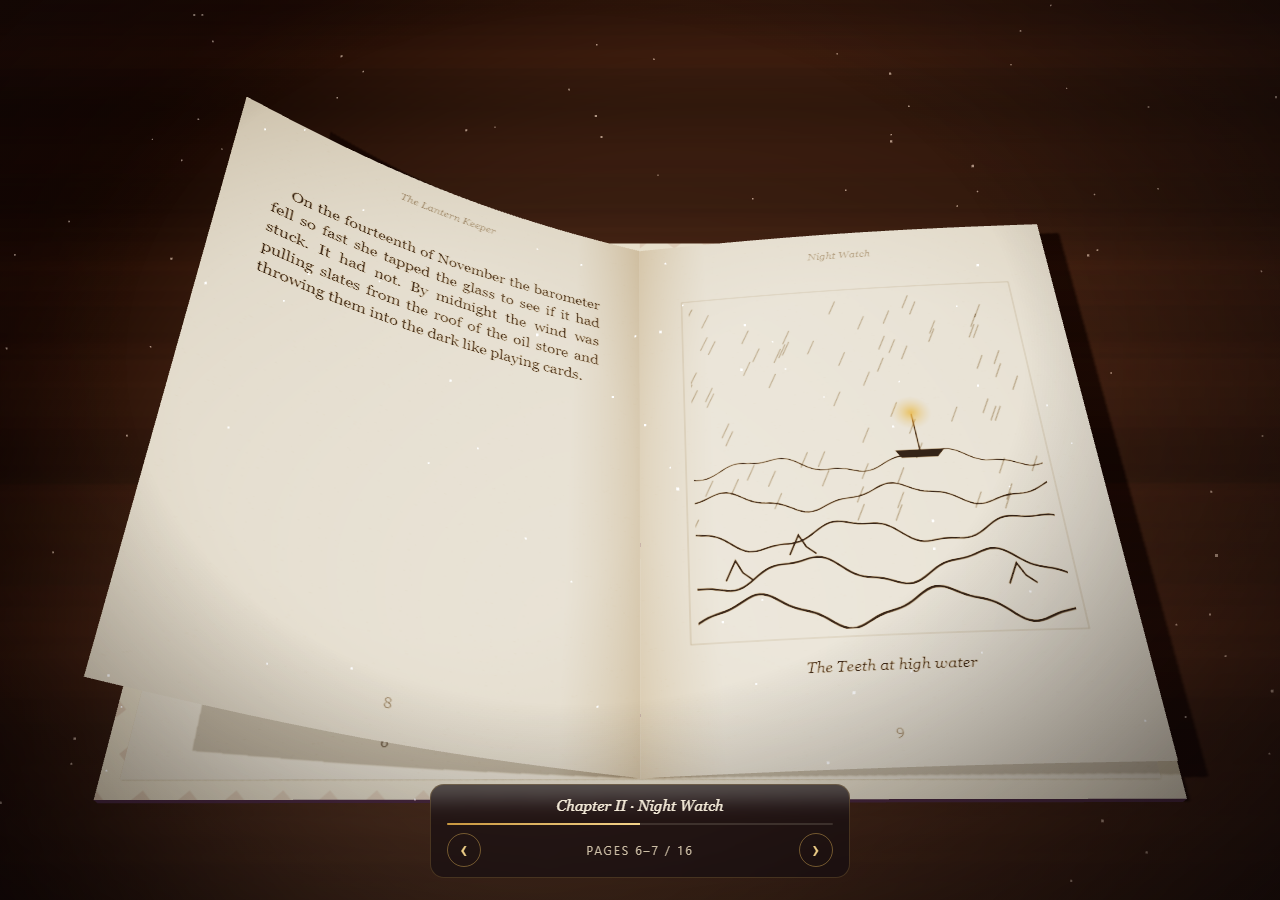
The Three.js Scroll 3D Book snippet puts a purple hardcover on a lamp-lit desk. Scrolling opens the cover, then turns eight leaves of a short illustrated story, *The Lantern Keeper*, one after another. Each page carries printed text on both sides, the paper curls as it turns, and the lamp casts real shadows onto the pages below. GSAP's ScrollTrigger pins the scene and scrubs a single progress value from 0 to 1; every cover angle, page curl, camera move and HUD label is a pure function of that number, so scrolling backwards un-reads the book exactly.
Pages printed with canvas textures
Every side of every leaf is drawn into a 480 × 660 canvas at load: paper colour with fibre specks, a darker gutter on the spine side, a running head, a folio, and the content itself. Body text is justified word by word, chapter openings get a three-line drop cap, and four ink illustrations (a lighthouse, a storm over the reef, a sunrise and a lantern) are drawn with canvas paths, so the whole book ships with no image files. To print your own book, edit the P paragraphs and the SIDES list: each entry is a title page, epigraph, chapter opening, text page, captioned illustration, end page or colophon.
Two meshes, one bending geometry
A plane can only show one texture, but a leaf has two printed sides. Each leaf therefore shares one PlaneGeometry between two meshes: the recto with FrontSide and the verso with BackSide, its texture mirrored with repeat.x = -1 so the text reads correctly once the page lands on the left. The geometry is translated so its left edge sits on the spine, which turns plain rotation.z into a page turn. While a leaf is in the air its vertices are rewritten from a stored flat copy: the middle bows and the free edge trails behind, and the curl falls back to zero when the leaf lies flat, so nothing accumulates.
Cover, stacks and leafing rhythm
The front cover is a leather box with a gold-stamped title on top and patterned endpaper underneath. It turns first, lifting slightly as it swings, and lands under the left stack. Leaves start their turn when the previous one is 60% across, so two pages are often in the air together, the way a reader leafs through. Each leaf's height glides from the right stack order to the mirrored left stack order as it turns, so the right pile thins and the left pile grows.
Lamp light, shadows and a reading camera
A warm SpotLight with soft PCF shadows lights the desk. A turning page throws a moving shadow across the page underneath, which does more for realism than any texture. ACES filmic tone mapping keeps the paper from blowing out under the lamp, and warm dust drifts through the light. The camera starts close on the closed cover, rises to a reading view as it opens and eases back at the end. On tall phone screens it pulls back, and the fog distance scales with it, so the open book always fits.
Navigation and accessibility
The HUD shows the current chapter, a gold progress bar and the page count ("Pages 6–7 / 16"). The ‹ › buttons and the arrow or Page Up/Down keys scroll to the next cover or page stop, so the book can be read without a scroll wheel. The page label is an aria-live region, the canvas is hidden from screen readers, and with prefers-reduced-motion the scrub has no smoothing and the camera and dust stay still. For other scroll-driven Three.js scenes, see the ocean dive and the voxel build; for 2D chapters, try the scroll pin story.
What's included
Features
Step by step
How to Use
- 1Load the three CDN scriptsAdd three.min.js (r128), gsap.min.js and ScrollTrigger.min.js, in that order, before the snippet JS.
- 2Paste the HTML, CSS and JSA closed hardcover lies on a lamp-lit desk with the title overlay above it and the chapter HUD at the bottom.
- 3Scroll to open and readThe cover swings open, then eight leaves turn with curling paper and moving shadows while the HUD follows the chapters.
- 4Use the page buttons or keysPress ‹ › in the HUD or the arrow keys to jump to the next page stop. Scrolling up turns pages back in order.
- 5Write your own bookReplace the P paragraphs and the SIDES list, change TITLE and the cover text in leatherTexture, and adjust LEAF to set the page count.
- 6Tune the feelChange the end value (+=600%) for a longer read, the 0.6 overlap in leafStart for faster leafing, or the lamp colour and angle.
Real-world uses
Common Use Cases
Got questions?
Frequently Asked Questions
Each leaf uses two meshes that share one PlaneGeometry. The recto material renders FrontSide with the right-hand page texture, and the verso renders BackSide with the left-hand texture mirrored by repeat.x = -1. Because the geometry is shared, the curl applied to its vertices moves both sides together.
Every side is drawn into its own canvas at load and used as a CanvasTexture. A small justify function measures each word and spreads the spacing so lines end flush, leaving room for a three-line drop cap on chapter pages. Edit the P paragraphs and the SIDES list to print your own content.
While a leaf is turning, its vertices are rewritten from a flat copy with an offset of sin(turn × π) × (0.55 · sin(uπ) − 1.6 · u²), where u runs from the spine to the free edge. The middle bows and the free edge trails behind. At rest the offset is zero, so the page lies flat again.
Yes. The ‹ › buttons and the arrow or Page Up/Down keys scroll the page to the next stop: closed, cover open, then each leaf landed. The page count is an aria-live region, so screen readers announce it. With reduced motion turned on, the scroll is not smoothed and the camera and dust stay still.
Yes. Export it with the framework buttons and create the renderer, textures and ScrollTrigger in a mount effect against a canvas ref. On cleanup, kill the ScrollTrigger, remove the resize and keydown listeners, dispose the geometries, materials and the 16 canvas textures, and call renderer.dispose().
Copy & paste
Source Code
<section class="bkp-stage" id="bkpStage" aria-label="A 3D book that turns its pages as you scroll">
<canvas id="bkpCanvas" aria-hidden="true"></canvas>
<div class="bkp-intro" id="bkpIntro">
<p class="bkp-kicker">A short story in four chapters</p>
<h2 class="bkp-title">The Lantern Keeper</h2>
<p class="bkp-hint"><span class="bkp-mouse" aria-hidden="true"></span>Scroll to open the book</p>
</div>
<div class="bkp-hud">
<p class="bkp-chapter" id="bkpChapter">The Lantern Keeper</p>
<div class="bkp-bar" aria-hidden="true"><span id="bkpBar"></span></div>
<div class="bkp-nav">
<button type="button" id="bkpPrev" aria-label="Previous page">‹</button>
<span class="bkp-count" id="bkpPage" aria-live="polite">Cover</span>
<button type="button" id="bkpNext" aria-label="Next page">›</button>
</div>
</div>
</section>
<section class="bkp-after">
<p class="bkp-after-kicker">Light kept.</p>
<p>Scroll back up and the pages turn back, one by one.</p>
</section>*{box-sizing:border-box;margin:0;padding:0}
html,body{background:#120d10;color:#f3ead8;font-family:system-ui,-apple-system,sans-serif}
.bkp-stage{height:100vh;position:relative;overflow:hidden;background:#120d10}
#bkpCanvas{display:block;width:100%;height:100%}
.bkp-stage::after{content:'';position:absolute;inset:0;pointer-events:none;background:radial-gradient(ellipse at 45% 40%,transparent 45%,rgba(8,5,7,.7) 100%)}
.bkp-intro{position:absolute;left:0;right:0;top:9vh;z-index:3;text-align:center;padding:0 24px;pointer-events:none;transition:opacity .5s ease}
.bkp-kicker{font-size:12px;letter-spacing:.28em;text-transform:uppercase;color:#d9ac55}
.bkp-title{margin-top:10px;font-family:Georgia,'Times New Roman',serif;font-weight:400;font-style:italic;font-size:clamp(34px,6vw,64px);line-height:1.05;color:#f8efdc;text-shadow:0 2px 30px rgba(0,0,0,.6)}
.bkp-hint{margin-top:16px;display:inline-flex;align-items:center;gap:10px;font-size:13px;color:#cdbfa6;letter-spacing:.06em}
.bkp-mouse{width:16px;height:24px;border:1.5px solid currentColor;border-radius:9px;position:relative}
.bkp-mouse::after{content:'';position:absolute;left:50%;top:5px;width:2px;height:5px;margin-left:-1px;border-radius:1px;background:currentColor;animation:bkpWheel 1.6s ease-in-out infinite}
@keyframes bkpWheel{0%{transform:translateY(0);opacity:1}70%{transform:translateY(7px);opacity:0}100%{opacity:0}}
.bkp-hud{position:absolute;left:50%;bottom:22px;transform:translateX(-50%);z-index:3;width:min(420px,calc(100% - 32px));padding:12px 16px 10px;border-radius:14px;background:rgba(18,12,16,.62);border:1px solid rgba(217,172,85,.22);backdrop-filter:blur(10px);-webkit-backdrop-filter:blur(10px)}
.bkp-chapter{font-family:Georgia,'Times New Roman',serif;font-style:italic;font-size:15px;text-align:center;color:#f3ead8;white-space:nowrap;overflow:hidden;text-overflow:ellipsis}
.bkp-bar{height:2px;margin:9px 0 8px;background:rgba(243,234,216,.14);border-radius:2px;overflow:hidden}
.bkp-bar span{display:block;height:100%;background:linear-gradient(90deg,#c9973f,#f3d38a);transform-origin:left;transform:scaleX(0)}
.bkp-nav{display:flex;align-items:center;justify-content:space-between;gap:10px}
.bkp-nav button{width:34px;height:34px;border-radius:50%;border:1px solid rgba(217,172,85,.45);background:transparent;color:#f3d38a;font-size:22px;line-height:1;cursor:pointer;transition:background .2s,opacity .2s}
.bkp-nav button:hover:not(:disabled){background:rgba(217,172,85,.16)}
.bkp-nav button:focus-visible{outline:2px solid #f3d38a;outline-offset:2px}
.bkp-nav button:disabled{opacity:.3;cursor:default}
.bkp-count{font-size:12px;letter-spacing:.16em;text-transform:uppercase;color:#cdbfa6;font-variant-numeric:tabular-nums}
.bkp-after{min-height:70vh;display:flex;flex-direction:column;justify-content:center;align-items:center;gap:10px;padding:40px 24px;text-align:center;color:#a8987f;font-size:15px}
.bkp-after-kicker{font-family:Georgia,'Times New Roman',serif;font-style:italic;font-size:clamp(28px,4vw,42px);color:#f3d38a}
@media (prefers-reduced-motion:reduce){.bkp-mouse::after{animation:none}.bkp-intro{transition:none}}const canvas = document.getElementById('bkpCanvas');
const stage = document.getElementById('bkpStage');
const introEl = document.getElementById('bkpIntro');
const chapterEl = document.getElementById('bkpChapter');
const pageEl = document.getElementById('bkpPage');
const barEl = document.getElementById('bkpBar');
const prevBtn = document.getElementById('bkpPrev');
const nextBtn = document.getElementById('bkpNext');
const reduceMotion = window.matchMedia('(prefers-reduced-motion: reduce)').matches;
/* ── Renderer, scene, lamp ── */
const renderer = new THREE.WebGLRenderer({ canvas, antialias: true });
renderer.setPixelRatio(Math.min(window.devicePixelRatio, 2));
renderer.outputEncoding = THREE.sRGBEncoding;
renderer.toneMapping = THREE.ACESFilmicToneMapping;
renderer.toneMappingExposure = 1.05;
renderer.shadowMap.enabled = true;
renderer.shadowMap.type = THREE.PCFSoftShadowMap;
const maxAniso = renderer.capabilities.getMaxAnisotropy();
const scene = new THREE.Scene();
scene.background = new THREE.Color(0x120d10);
scene.fog = new THREE.Fog(0x120d10, 26, 48);
const camera = new THREE.PerspectiveCamera(42, 1, 0.1, 100);
scene.add(new THREE.HemisphereLight(0xffe7c4, 0x1a1016, 0.55));
const lamp = new THREE.SpotLight(0xffd9a0, 1.05, 0, 0.7, 0.85);
lamp.position.set(-7, 17, 7);
lamp.target.position.set(0.5, 0, 0);
lamp.castShadow = true;
lamp.shadow.mapSize.set(2048, 2048);
lamp.shadow.camera.near = 8;
lamp.shadow.camera.far = 40;
lamp.shadow.bias = -0.0004;
lamp.shadow.normalBias = 0.03;
scene.add(lamp, lamp.target);
/* ── Canvas textures: paper, print, leather, wood ── */
const TW = 480, TH = 660;
const INK = '#30251f', PAPER = '#f3ead8', SERIF = 'Georgia, "Times New Roman", serif';
const TITLE = 'The Lantern Keeper';
function makeTexture(c, mirror) {
const t = new THREE.CanvasTexture(c);
t.encoding = THREE.sRGBEncoding;
t.anisotropy = maxAniso;
if (mirror) { t.wrapS = THREE.RepeatWrapping; t.repeat.x = -1; }
return t;
}
function newCanvas(w, h) {
const c = document.createElement('canvas');
c.width = w; c.height = h;
return [c, c.getContext('2d')];
}
// Deterministic noise so the paper grain is the same on every load
let seed = 7;
const rnd = () => (seed = (seed * 16807) % 2147483647) / 2147483647;
const P = [
'The island was small enough to walk around before the kettle boiled, and Ada did it every morning anyway. Gulls followed her along the rocks, convinced she carried bread. She never did. She carried a notebook, a pencil worn to a stub, and the habit of counting ships.',
'The lighthouse stood at the north end, white and patient, its lantern room glazed like a jar of captured weather. Her grandfather had kept it for forty years. Now the keys hung on a nail by her door, and the light was hers to keep.',
'At dusk she climbed the hundred and twelve steps, trimmed the wick and wound the clockwork that turned the lens. The beam swept out across the water: one long breath of light, then two short ones. Somewhere out there, someone was reading it.',
'Night watch was mostly listening. The sea had a voice for every mood, and by her second winter Ada could tell a swell from a squall with her eyes closed. She wrote each one down, the way other people write down their dreams.',
'On the fourteenth of November the barometer fell so fast she tapped the glass to see if it had stuck. It had not. By midnight the wind was pulling slates from the roof of the oil store and throwing them into the dark like playing cards.',
'The lamp flickered twice. Ada climbed with a spare wick in her teeth and a lantern in each hand, the tower humming around her like a struck bell. Below, the water had turned the colour of slate and was climbing the rocks to meet her.',
'Then she saw it: a single masthead light, low and wrong, drifting toward the Teeth, the reef her grandfather had named and feared. She turned the lens by hand, faster, flashing the warning until her arms burned and the little light swung away.',
'Morning arrived quietly, as if embarrassed by the night. The fishing boat lay at anchor in the lee of the island, battered but whole. Three figures on deck raised their arms toward the tower. Ada raised hers back, and then she went to sleep.',
'She wrote it all in the notebook later, in smaller handwriting than usual, as if the page might not hold it. Under the date she added one more line, the only one her grandfather had ever underlined in his own logbooks: light kept.',
];
// 8 leaves = 16 printed sides. Even sides are rectos (right), odd sides versos (left).
const SIDES = [
{ type: 'title' },
{ type: 'epigraph' },
{ type: 'chapter', num: 'I', name: 'The Island', text: P[0] },
{ type: 'text', text: P[1] },
{ type: 'art', art: 'lighthouse', caption: 'The north light, from the landing' },
{ type: 'text', text: P[2] },
{ type: 'chapter', num: 'II', name: 'Night Watch', text: P[3] },
{ type: 'text', text: P[4] },
{ type: 'art', art: 'storm', caption: 'The Teeth at high water' },
{ type: 'chapter', num: 'III', name: 'The Storm', text: P[5] },
{ type: 'text', text: P[6] },
{ type: 'art', art: 'sunrise', caption: 'Morning, after' },
{ type: 'chapter', num: 'IV', name: 'Morning', text: P[7] },
{ type: 'text', text: P[8] },
{ type: 'end' },
{ type: 'colophon' },
];
// Chapter shown in the HUD for each side
let ch = TITLE;
const chapterOf = SIDES.map(s => (s.type === 'chapter' ? (ch = 'Chapter ' + s.num + ' · ' + s.name) : ch));
function paperBase(g, w, h, gutterLeft) {
g.fillStyle = PAPER; g.fillRect(0, 0, w, h);
for (let i = 0; i < 2600; i++) { // fibres and specks
g.fillStyle = 'rgba(120,90,50,' + (rnd() * 0.06).toFixed(3) + ')';
g.fillRect(rnd() * w, rnd() * h, 1 + rnd() * 2, 1);
}
const gx = gutterLeft ? 0 : w;
const gr = g.createLinearGradient(gx, 0, gutterLeft ? 80 : w - 80, 0);
gr.addColorStop(0, 'rgba(80,50,20,0.28)'); gr.addColorStop(1, 'rgba(80,50,20,0)');
g.fillStyle = gr; g.fillRect(0, 0, w, h);
const ed = g.createRadialGradient(w / 2, h / 2, h * 0.35, w / 2, h / 2, h * 0.75);
ed.addColorStop(0, 'rgba(0,0,0,0)'); ed.addColorStop(1, 'rgba(110,80,40,0.16)');
g.fillStyle = ed; g.fillRect(0, 0, w, h);
}
// Justified paragraph; firstLines/indent leave room for a drop cap
function justify(g, text, x, y, maxW, lh, dropLines, dropW) {
const words = text.split(' ');
const lines = [];
let cur = [];
const widthAt = n => maxW - (n < dropLines ? dropW : 0);
words.forEach(w => {
const test = cur.concat(w).join(' ');
if (g.measureText(test).width > widthAt(lines.length) && cur.length) { lines.push(cur); cur = [w]; }
else cur.push(w);
});
if (cur.length) lines.push(cur);
lines.forEach((ws, n) => {
const lx = x + (n < dropLines ? dropW : 0);
const avail = widthAt(n);
if (n === lines.length - 1 || ws.length === 1) { g.fillText(ws.join(' '), lx, y + n * lh); return; }
const wordsW = ws.reduce((s, w) => s + g.measureText(w).width, 0);
const gap = (avail - wordsW) / (ws.length - 1);
let cx = lx;
ws.forEach(w => { g.fillText(w, cx, y + n * lh); cx += g.measureText(w).width + gap; });
});
return y + lines.length * lh;
}
function ornament(g, cx, y, w) {
g.strokeStyle = INK; g.lineWidth = 1.2;
g.beginPath(); g.moveTo(cx - w, y); g.lineTo(cx - 8, y); g.moveTo(cx + 8, y); g.lineTo(cx + w, y); g.stroke();
g.beginPath(); g.moveTo(cx, y - 5); g.lineTo(cx + 5, y); g.lineTo(cx, y + 5); g.lineTo(cx - 5, y); g.closePath(); g.fillStyle = INK; g.fill();
}
function drawLantern(g, cx, cy, s, color) {
g.save(); g.translate(cx, cy); g.scale(s, s);
g.strokeStyle = color; g.fillStyle = color; g.lineWidth = 2.2 / s;
g.beginPath(); g.arc(0, -46, 7, Math.PI, 0); g.stroke(); // ring
g.beginPath(); g.moveTo(-18, -30); g.lineTo(0, -40); g.lineTo(18, -30); g.closePath(); g.fill(); // roof
g.strokeRect(-14, -30, 28, 40); // glass
g.beginPath(); g.moveTo(0, -30); g.lineTo(0, 10); g.stroke();
g.fillRect(-18, 10, 36, 6); // base
g.beginPath(); g.ellipse(0, -8, 4, 8, 0, 0, Math.PI * 2); g.globalAlpha = 0.85; g.fill(); // flame
g.restore();
}
function drawArt(g, kind, x, y, w, h) {
g.save();
g.beginPath(); g.rect(x, y, w, h); g.clip();
g.strokeStyle = INK; g.fillStyle = INK; g.lineWidth = 1.6; g.lineCap = 'round';
const sea = (yy, amp, n) => {
for (let k = 0; k < n; k++) {
g.beginPath();
const yl = yy + k * 14;
for (let xx = x; xx <= x + w; xx += 4) {
const v = yl + Math.sin((xx + k * 23) * 0.06) * amp * (1 - k * 0.12);
xx === x ? g.moveTo(xx, v) : g.lineTo(xx, v);
}
g.globalAlpha = 0.85 - k * 0.12; g.stroke();
}
g.globalAlpha = 1;
};
if (kind === 'lighthouse') {
const bx = x + w * 0.42, by = y + h * 0.8;
const beam = g.createLinearGradient(bx, 0, x + w, 0);
beam.addColorStop(0, 'rgba(214,160,60,0.55)'); beam.addColorStop(1, 'rgba(214,160,60,0)');
g.fillStyle = beam;
g.beginPath(); g.moveTo(bx, y + h * 0.18); g.lineTo(x + w, y + h * 0.02); g.lineTo(x + w, y + h * 0.34); g.closePath(); g.fill();
g.fillStyle = INK;
g.beginPath(); g.moveTo(bx - 34, by); g.lineTo(bx - 20, y + h * 0.24); g.lineTo(bx + 20, y + h * 0.24); g.lineTo(bx + 34, by); g.closePath(); g.stroke();
for (let k = 1; k < 4; k++) { // stripes
const t = k / 4, yy = by - (by - (y + h * 0.24)) * t;
const half = 34 - 14 * t;
g.fillRect(bx - half, yy - 8, half * 2, 12);
}
g.strokeRect(bx - 16, y + h * 0.13, 32, h * 0.11);
g.beginPath(); g.moveTo(bx - 22, y + h * 0.13); g.lineTo(bx, y + h * 0.05); g.lineTo(bx + 22, y + h * 0.13); g.closePath(); g.fill();
g.beginPath(); g.ellipse(bx - 10, by + 6, 80, 18, 0, Math.PI, 0); g.stroke(); // rocks
sea(by + 18, 3, 5);
for (let k = 0; k < 3; k++) { // gulls
const gx = x + w * (0.14 + k * 0.1), gy = y + h * (0.2 + (k % 2) * 0.08);
g.beginPath(); g.moveTo(gx - 9, gy); g.quadraticCurveTo(gx - 4, gy - 6, gx, gy); g.quadraticCurveTo(gx + 4, gy - 6, gx + 9, gy); g.stroke();
}
} else if (kind === 'storm') {
g.globalAlpha = 0.5;
for (let k = 0; k < 70; k++) { // rain
const rx = x + rnd() * w, ry = y + rnd() * h * 0.7;
g.beginPath(); g.moveTo(rx, ry); g.lineTo(rx - 8, ry + 18); g.stroke();
}
g.globalAlpha = 1;
const mx = x + w * 0.66, my = y + h * 0.52; // the boat, its masthead light
g.beginPath(); g.moveTo(mx - 26, my); g.lineTo(mx + 26, my); g.lineTo(mx + 18, my + 10); g.lineTo(mx - 20, my + 10); g.closePath(); g.fill();
g.beginPath(); g.moveTo(mx, my); g.lineTo(mx - 3, my - 46); g.stroke();
const glow = g.createRadialGradient(mx - 3, my - 48, 0, mx - 3, my - 48, 22);
glow.addColorStop(0, 'rgba(214,150,50,0.9)'); glow.addColorStop(1, 'rgba(214,150,50,0)');
g.fillStyle = glow; g.beginPath(); g.arc(mx - 3, my - 48, 22, 0, Math.PI * 2); g.fill();
g.fillStyle = INK;
for (let k = 0; k < 5; k++) { // big swells with curling crests
g.beginPath();
const yy = y + h * (0.55 + k * 0.1);
for (let xx = x - 10; xx <= x + w + 10; xx += 4) {
const v = yy + Math.sin(xx * 0.035 + k * 1.7) * (10 + k * 2) + Math.sin(xx * 0.11 + k) * 3;
xx === x - 10 ? g.moveTo(xx, v) : g.lineTo(xx, v);
}
g.lineWidth = 1.4 + k * 0.3; g.stroke();
}
g.lineWidth = 2;
[[0.12, 0.86], [0.3, 0.8], [0.88, 0.9]].forEach(([u, v]) => { // the reef
const rx = x + w * u, ry = y + h * v;
g.beginPath(); g.moveTo(rx - 14, ry); g.lineTo(rx - 4, ry - 22); g.lineTo(rx + 3, ry - 8); g.lineTo(rx + 12, ry); g.stroke();
});
} else {
const sx = x + w * 0.5, sy = y + h * 0.58;
const sun = g.createRadialGradient(sx, sy, 10, sx, sy, 110);
sun.addColorStop(0, 'rgba(222,170,70,0.55)'); sun.addColorStop(1, 'rgba(222,170,70,0)');
g.fillStyle = sun; g.fillRect(x, y, w, h);
g.fillStyle = INK;
g.beginPath(); g.arc(sx, sy, 38, Math.PI, 0); g.stroke();
for (let k = 0; k < 11; k++) { // rays
const a = Math.PI + (k + 0.5) * (Math.PI / 11);
g.beginPath(); g.moveTo(sx + Math.cos(a) * 50, sy + Math.sin(a) * 50); g.lineTo(sx + Math.cos(a) * 72, sy + Math.sin(a) * 72); g.stroke();
}
g.beginPath(); g.moveTo(x, sy); g.lineTo(x + w, sy); g.stroke();
sea(sy + 14, 2, 5);
const bx = x + w * 0.24, by = sy - 2; // the boat at anchor
g.beginPath(); g.moveTo(bx - 22, by - 8); g.lineTo(bx + 22, by - 8); g.lineTo(bx + 15, by); g.lineTo(bx - 16, by); g.closePath(); g.fill();
g.beginPath(); g.moveTo(bx, by - 8); g.lineTo(bx, by - 40); g.stroke();
for (let k = 0; k < 4; k++) {
const gx = x + w * (0.6 + k * 0.08), gy = y + h * (0.16 + (k % 2) * 0.09);
g.beginPath(); g.moveTo(gx - 8, gy); g.quadraticCurveTo(gx - 4, gy - 6, gx, gy); g.quadraticCurveTo(gx + 4, gy - 6, gx + 8, gy); g.stroke();
}
}
g.restore();
}
function pageTexture(n, mirror) {
const [c, g] = newCanvas(TW, TH);
const recto = n % 2 === 0;
paperBase(g, TW, TH, recto);
const s = SIDES[n];
const M = 50, W = TW - M * 2;
g.fillStyle = INK; g.textBaseline = 'alphabetic';
// Running head + folio
if (!['title', 'epigraph', 'colophon'].includes(s.type)) {
g.font = 'italic 13px ' + SERIF; g.globalAlpha = 0.6; g.textAlign = 'center';
g.fillText(recto ? chapterOf[n].replace(/^Chapter [IVX]+ · /, '') : TITLE, TW / 2, 40);
g.font = '14px ' + SERIF; g.fillText(String(n + 1), TW / 2, TH - 30);
g.globalAlpha = 1;
}
g.textAlign = 'left';
if (s.type === 'title') {
g.textAlign = 'center';
drawLantern(g, TW / 2, 200, 1.4, INK);
g.font = '600 38px ' + SERIF; g.fillText('The Lantern', TW / 2, 320);
g.fillText('Keeper', TW / 2, 366);
ornament(g, TW / 2, 400, 70);
g.font = 'italic 17px ' + SERIF; g.fillText('a short story in four chapters', TW / 2, 440);
g.font = '15px ' + SERIF; g.globalAlpha = 0.75; g.fillText('E. MARLOWE', TW / 2, 560);
g.globalAlpha = 1;
} else if (s.type === 'epigraph') {
g.textAlign = 'center'; g.font = 'italic 20px ' + SERIF;
g.fillText('For everyone who', TW / 2, 300); g.fillText('ever kept a light on.', TW / 2, 330);
ornament(g, TW / 2, 370, 40);
} else if (s.type === 'chapter') {
g.textAlign = 'center';
g.font = '14px ' + SERIF; g.globalAlpha = 0.65; g.fillText('CHAPTER ' + s.num, TW / 2, 130); g.globalAlpha = 1;
g.font = 'italic 32px ' + SERIF; g.fillText(s.name, TW / 2, 172);
ornament(g, TW / 2, 200, 50);
g.textAlign = 'left';
g.font = '600 82px ' + SERIF; g.fillStyle = '#7a3b1c';
g.fillText(s.text[0], M - 3, 250 + 2 * 27); // drop cap sits on the third line
g.fillStyle = INK; g.font = '17.5px ' + SERIF;
justify(g, s.text.slice(1), M, 250, W, 27, 3, 64);
} else if (s.type === 'text') {
g.font = '17.5px ' + SERIF;
justify(g, ' ' + s.text, M, 110, W, 27, 0, 0);
} else if (s.type === 'art') {
g.strokeStyle = 'rgba(48,37,31,0.4)'; g.strokeRect(M, 90, W, 440);
drawArt(g, s.art, M + 8, 98, W - 16, 424);
g.textAlign = 'center'; g.font = 'italic 15px ' + SERIF; g.fillText(s.caption, TW / 2, 566);
} else if (s.type === 'end') {
g.textAlign = 'center';
g.font = 'italic 34px ' + SERIF; g.fillText('The End', TW / 2, 300);
ornament(g, TW / 2, 336, 60);
drawLantern(g, TW / 2, 430, 0.9, INK);
} else if (s.type === 'colophon') {
g.textAlign = 'center'; g.font = '13px ' + SERIF; g.globalAlpha = 0.7;
g.fillText('Set in Georgia. Printed with Three.js.', TW / 2, 520);
g.fillText('Turned, one page at a time, by your scroll.', TW / 2, 542);
g.globalAlpha = 1;
}
return makeTexture(c, mirror);
}
function leatherTexture(front) {
const [c, g] = newCanvas(512, 704);
g.fillStyle = '#3a1d3f'; g.fillRect(0, 0, 512, 704);
for (let i = 0; i < 9000; i++) { // grain
g.fillStyle = rnd() > 0.5 ? 'rgba(255,255,255,0.035)' : 'rgba(0,0,0,0.08)';
g.fillRect(rnd() * 512, rnd() * 704, 2, 2);
}
if (front) {
const gold = g.createLinearGradient(0, 0, 512, 704);
gold.addColorStop(0, '#f3d38a'); gold.addColorStop(0.5, '#c9973f'); gold.addColorStop(1, '#f0cf83');
g.strokeStyle = gold; g.fillStyle = gold;
g.lineWidth = 3; g.strokeRect(34, 34, 444, 636);
g.lineWidth = 1.2; g.strokeRect(46, 46, 420, 612);
g.textAlign = 'center';
g.font = '600 50px ' + SERIF; g.fillText('The Lantern', 256, 250); g.fillText('Keeper', 256, 312);
drawLantern(g, 256, 440, 1.5, '#d9ac55');
g.font = '18px ' + SERIF; g.fillText('E. MARLOWE', 256, 590);
}
return makeTexture(c);
}
function endpaperTexture(mirror) {
const [c, g] = newCanvas(512, 704);
g.fillStyle = '#e9dcc0'; g.fillRect(0, 0, 512, 704);
g.fillStyle = 'rgba(90,40,70,0.22)';
for (let yy = 0; yy < 704; yy += 44) for (let xx = (yy / 44) % 2 ? 22 : 0; xx < 512; xx += 44) {
g.beginPath(); g.moveTo(xx, yy - 9); g.lineTo(xx + 9, yy); g.lineTo(xx, yy + 9); g.lineTo(xx - 9, yy); g.closePath(); g.fill();
}
return makeTexture(c, mirror);
}
function woodTexture() {
const [c, g] = newCanvas(1024, 512);
g.fillStyle = '#3b2418'; g.fillRect(0, 0, 1024, 512);
for (let y = 0; y < 512; y += 2) {
const v = Math.sin(y * 0.045) * 0.5 + Math.sin(y * 0.13 + 2) * 0.3 + rnd() * 0.25;
g.fillStyle = 'rgba(' + (v > 0 ? '120,70,40,' : '20,10,6,') + (Math.abs(v) * 0.18).toFixed(3) + ')';
g.fillRect(0, y, 1024, 2);
}
const t = makeTexture(c);
t.wrapS = t.wrapT = THREE.RepeatWrapping; t.repeat.set(2, 2);
return t;
}
/* ── Desk, boards, spine ── */
const desk = new THREE.Mesh(new THREE.BoxGeometry(90, 0.6, 70), new THREE.MeshStandardMaterial({ map: woodTexture(), roughness: 0.75 }));
desk.position.y = -0.8;
desk.receiveShadow = true;
scene.add(desk);
const PW = 8, PH = 11, BW = PW + 0.35, BH = PH + 0.6, BT = 0.16;
const LEAF = 8;
const leatherEdge = new THREE.MeshStandardMaterial({ color: 0x3a1d3f, roughness: 0.6 });
// Box face order: +x, -x, +y, -y, +z, -z
const backBoard = new THREE.Mesh(new THREE.BoxGeometry(BW, BT, BH), [leatherEdge, leatherEdge, new THREE.MeshStandardMaterial({ map: endpaperTexture(), roughness: 0.9 }), leatherEdge, leatherEdge, leatherEdge]);
backBoard.position.set(BW / 2, -0.42, 0);
backBoard.castShadow = backBoard.receiveShadow = true;
scene.add(backBoard);
const spine = new THREE.Mesh(new THREE.CylinderGeometry(0.34, 0.34, BH, 20, 1, false, Math.PI / 2, Math.PI), leatherEdge);
spine.rotation.x = Math.PI / 2;
spine.rotation.y = Math.PI;
spine.position.set(0, -0.42, 0);
scene.add(spine);
// Front cover: hinged at the spine like a page; it opens first and becomes the left board
const coverGeo = new THREE.BoxGeometry(BW, BT, BH);
coverGeo.translate(BW / 2, 0, 0);
const cover = new THREE.Mesh(coverGeo, [leatherEdge, leatherEdge, new THREE.MeshStandardMaterial({ map: leatherTexture(true), roughness: 0.55, metalness: 0.15 }), new THREE.MeshStandardMaterial({ map: endpaperTexture(true), roughness: 0.9 }), leatherEdge, leatherEdge]);
cover.castShadow = cover.receiveShadow = true;
scene.add(cover);
/* ── Leaves: one bending geometry, two meshes (recto on top, verso underneath) ── */
const STEP = 0.014;
const leaves = [];
for (let i = 0; i < LEAF; i++) {
const geo = new THREE.PlaneGeometry(PW, PH, 28, 1);
geo.rotateX(-Math.PI / 2);
geo.translate(PW / 2, 0, 0); // hinge at local x = 0
const front = new THREE.Mesh(geo, new THREE.MeshStandardMaterial({ map: pageTexture(i * 2), roughness: 0.92, side: THREE.FrontSide, shadowSide: THREE.DoubleSide }));
const back = new THREE.Mesh(geo, new THREE.MeshStandardMaterial({ map: pageTexture(i * 2 + 1, true), roughness: 0.92, side: THREE.BackSide }));
front.castShadow = true;
front.receiveShadow = back.receiveShadow = true;
const pivot = new THREE.Group();
pivot.add(front, back);
scene.add(pivot);
leaves.push({ pivot, geo, base: geo.attributes.position.array.slice(), bent: true, i });
}
/* ── Dust in the lamp light ── */
const DUST = 180;
const dustGeo = new THREE.BufferGeometry();
const dustPos = new Float32Array(DUST * 3);
for (let k = 0; k < DUST; k++) {
dustPos[k * 3] = (rnd() - 0.5) * 22;
dustPos[k * 3 + 1] = rnd() * 9;
dustPos[k * 3 + 2] = (rnd() - 0.5) * 16;
}
dustGeo.setAttribute('position', new THREE.BufferAttribute(dustPos, 3));
const dust = new THREE.Points(dustGeo, new THREE.PointsMaterial({ color: 0xffd9a0, size: 0.07, transparent: true, opacity: 0.55, depthWrite: false, blending: THREE.AdditiveBlending }));
scene.add(dust);
/* ── Scroll: one progress value drives everything ── */
gsap.registerPlugin(ScrollTrigger);
const book = { p: 0 };
const tween = gsap.to(book, {
p: 1,
ease: 'none',
scrollTrigger: { trigger: stage, start: 'top top', end: '+=600%', scrub: reduceMotion ? true : 0.6, pin: true },
});
const COVER_END = 0.09, PAGES_END = 0.93;
const win = 1 / (LEAF - 0.4 * (LEAF - 1)); // each leaf lifts when the previous one is 60% across
const leafStart = i => i * win * 0.6;
const clamp01 = v => Math.min(1, Math.max(0, v));
const smooth = v => v * v * (3 - 2 * v);
const easeIO = v => (v < 0.5 ? 2 * v * v : 1 - Math.pow(-2 * v + 2, 2) / 2);
const pagesP = p => clamp01((p - COVER_END) / (PAGES_END - COVER_END));
const leafProgress = (i, p) => clamp01((pagesP(p) - leafStart(i)) / win);
// Stops for the buttons and arrow keys: closed, cover open, then each leaf landed
const stops = [0, COVER_END].concat(leaves.map((_, i) => COVER_END + (leafStart(i) + win) * (PAGES_END - COVER_END)));
function goTo(dir) {
const st = tween.scrollTrigger;
const p = book.p;
const target = dir > 0 ? stops.find(s => s > p + 0.004) : stops.slice().reverse().find(s => s < p - 0.004);
if (target == null) return;
window.scrollTo({ top: st.start + (st.end - st.start) * Math.min(1, target + (dir > 0 ? 0.002 : 0)), behavior: reduceMotion ? 'auto' : 'smooth' });
}
prevBtn.addEventListener('click', () => goTo(-1));
nextBtn.addEventListener('click', () => goTo(1));
window.addEventListener('keydown', e => {
const r = stage.getBoundingClientRect();
if (r.bottom < 0 || r.top > window.innerHeight * 0.5) return;
if (e.key === 'ArrowRight' || e.key === 'PageDown') { e.preventDefault(); goTo(1); }
if (e.key === 'ArrowLeft' || e.key === 'PageUp') { e.preventDefault(); goTo(-1); }
});
function resize() {
const w = canvas.clientWidth, h = canvas.clientHeight;
renderer.setSize(w, h, false);
camera.aspect = w / h;
camera.updateProjectionMatrix();
}
/* ── Frame ── */
const clock = new THREE.Clock();
const lerp = (a, b, t) => a + (b - a) * t;
const look = new THREE.Vector3();
let lastHud = '';
function animate() {
requestAnimationFrame(animate);
const t = clock.getElapsedTime();
const p = book.p;
introEl.style.opacity = p > 0.015 ? '0' : '1';
// Cover: lifts off the stack, swings over, lands under the left pages
const ce = easeIO(clamp01(p / COVER_END));
cover.rotation.z = Math.PI * ce;
cover.position.y = lerp(-0.2 + BT / 2 + 0.01, -0.42, ce) + Math.sin(ce * Math.PI) * 0.4;
let flipped = 0;
leaves.forEach((lf, i) => {
const lp = leafProgress(i, p);
if (lp >= 0.999) flipped++;
const e = easeIO(lp);
lf.pivot.rotation.z = Math.PI * e;
// Right stack: leaf 0 on top. Left stack: the last leaf turned on top.
lf.pivot.position.y = lerp(-(i * STEP), -((LEAF - 1 - i) * STEP), e) - 0.2;
// Curl: the free edge trails the turn, the middle bows; zero when flat
const bend = Math.sin(e * Math.PI);
if (bend > 0.0005 || lf.bent) {
const pos = lf.geo.attributes.position;
for (let v = 0; v < pos.count; v++) {
const bx = lf.base[v * 3], u = bx / PW;
pos.array[v * 3 + 1] = lf.base[v * 3 + 1] + bend * (0.55 * Math.sin(u * Math.PI) - 1.6 * u * u);
}
pos.needsUpdate = true;
lf.geo.computeVertexNormals();
lf.bent = bend > 0.0005;
}
});
// HUD
const open = p >= COVER_END - 0.001;
const left = flipped * 2, right = flipped * 2 + 1;
let label = 'Cover';
if (open) label = flipped === 0 ? 'Page 1 / 16' : flipped >= LEAF ? 'Page 16 / 16' : 'Pages ' + left + '–' + right + ' / 16';
const chapter = !open ? TITLE : flipped >= LEAF ? 'The End' : chapterOf[flipped * 2];
const hud = label + '|' + chapter;
if (hud !== lastHud) { pageEl.textContent = label; chapterEl.textContent = chapter; lastHud = hud; }
barEl.style.transform = 'scaleX(' + p.toFixed(4) + ')';
prevBtn.disabled = p < 0.002;
nextBtn.disabled = p > stops[stops.length - 1] - 0.002;
// Camera: close on the closed book, rising to a reading view, easing back at the end
const a = smooth(clamp01(p / COVER_END));
const z = smooth(clamp01((p - PAGES_END) / (1 - PAGES_END)));
const fit = Math.max(1, 1.3 / camera.aspect); // pull back on tall screens so the open book fits
look.set(lerp(BW / 2, 0, a), 0, lerp(0.2, -0.4, a));
const drift = reduceMotion ? 0 : Math.sin(t * 0.3) * 0.25;
const ox = lerp(3.5, 0, a) + (pagesP(p) - 0.5) * 1.2;
const oy = lerp(12, 17.5, a) + z * 2;
const oz = lerp(11, 11.5, a) + z * 2 + drift;
camera.position.set(look.x + ox * fit, oy * fit, look.z + oz * fit);
scene.fog.near = 26 * fit; scene.fog.far = 48 * fit; // fog keeps its depth when the camera pulls back
camera.lookAt(look);
if (!reduceMotion) {
for (let k = 0; k < DUST; k++) {
dustPos[k * 3 + 1] += 0.004 + Math.sin(t * 0.5 + k) * 0.002;
dustPos[k * 3] += Math.sin(t * 0.2 + k * 1.3) * 0.003;
if (dustPos[k * 3 + 1] > 9) dustPos[k * 3 + 1] = 0;
}
dustGeo.attributes.position.needsUpdate = true;
}
renderer.render(scene, camera);
}
resize();
window.addEventListener('resize', resize);
animate();Extend with AI
Take This Snippet Further With AI
Paste this snippet's HTML, CSS and JS into an AI assistant like Claude and ask it to walk you through the parts you want to reuse: why two meshes share one geometry, how the justify function lays out text on a canvas, or how the curl formula keeps the free edge trailing. It can also take the book further: loading real photos into the illustration slots, a page-turn sound timed to each landing, letting readers drag a page corner to turn it, a table of contents page whose entries jump to chapters, or a second book on the shelf that slides into place for volume two.
Prompt to recreate it
Copy this into your AI assistant of choice to build the effect from scratch, or as a jumping-off point for your own variant:
Build a scroll-driven 3D book in plain HTML, CSS and JavaScript with Three.js r128, GSAP and ScrollTrigger loaded from a CDN (no build step).

Requirements:
- A pinned full-viewport section (ScrollTrigger pin, scrub 0.6, end +=600%) with a canvas, a title overlay ("Scroll to open the book" with a mouse icon) that fades out once scrolling starts, and a glassy bottom HUD showing the chapter name, a gold progress bar, a page count ("Pages 6–7 / 16") in an aria-live region, and ‹ › buttons.
- Renderer: sRGB output, ACES filmic tone mapping, PCF soft shadows. A dark wood desk (canvas texture), fog, a hemisphere fill and a warm SpotLight lamp casting soft shadows.
- A leather hardcover: a back board under the right stack, a half-cylinder spine and a front cover box translated so its left edge sits on the spine. The top face has a gold-stamped title, border and lantern drawn on canvas; the bottom face has patterned endpaper (mirrored). The cover turns first (progress 0 to 0.09), lifting slightly mid-swing and landing under the left stack.
- 8 leaves. Each is one PlaneGeometry (28 width segments) rotated flat and translated so the left edge is the hinge, shared by two meshes: a recto (FrontSide) and a verso (BackSide, texture mirrored with repeat.x = -1).
- 16 page sides drawn into 480×660 canvases: paper with fibre specks, gutter shading on the spine side, a running head and folio. Content types are a title page, epigraph, chapter opening with a three-line drop cap and justified text, text page, captioned ink illustration (lighthouse, storm, sunrise, drawn with canvas paths), end page and colophon. The story is "The Lantern Keeper" in four chapters.
- Leaf i turns across its window of the page phase (0.09 to 0.93), starting when leaf i−1 is 60% across, with easeInOutQuad and rotation.z = π × eased. Its height glides from the right stack order to the mirrored left stack order.
- Curl while turning: rewrite vertices from a stored flat copy with y += sin(eased·π) × (0.55·sin(uπ) − 1.6·u²), then computeVertexNormals(). Skip the work when a leaf is flat.
- Camera: close on the closed cover, rising to a reading view as it opens and easing back at the end. Pull back on tall screens and scale the fog distance with it.
- ‹ › buttons and arrow / Page Up / Page Down keys scroll to the next stop (closed, cover open, each leaf landed). Disable the buttons at either end.
- Warm additive dust points drifting in the lamp light. prefers-reduced-motion: no scrub smoothing, no camera drift, still dust, no wheel animation.
- Scrolling backwards must un-turn everything in exact reverse order.
Want to tighten it up first? Run this prompt through the AI Prompt Studio to score it across 8 quality dimensions, catch anti-patterns, and tune the wording for Claude, ChatGPT, or Gemini before you paste it in.