
Asteroids Blaster Game — HTML Canvas Neon Arcade JS
Asteroids Blaster Game · Games · Plain HTML, CSS & JS · Live preview
About this UI Snippet
Asteroids Blaster — Inertia Physics, Splitting Rocks, UFOs and Combo Scoring on Canvas
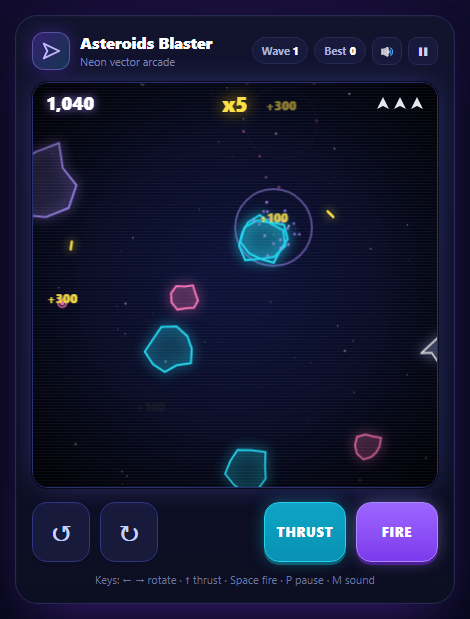
The original Asteroids is the canonical example of *momentum-based* control: you don't steer the ship, you steer its acceleration. That single idea — rotate to aim a thrust vector, then coast on the velocity you've built up — makes it a perfect demonstration of vector movement, and it maps cleanly onto touch as two rotate buttons plus thrust and fire. This snippet builds a complete, polished version on one HTML5 <canvas>: inertia flight, screen wrapping, glowing procedural rocks that split when shot, UFO saucers that shoot back, a kill-chain score multiplier, lives with respawn invulnerability, wave progression, synthesized sound, pause and a saved high score, all wrapped in a neon arcade look.
Rotate the heading, thrust along it, coast on the velocity
The ship stores a heading angle and a velocity vector (vx, vy) that are deliberately independent. Rotating only changes the angle; THRUST adds acceleration *along the current heading*, and every frame the velocity is multiplied by a drag factor slightly below 1, so the ship slows gradually but never stops on its own. That decoupling of facing from motion is the entire feel of the game — you can drift backwards while firing forwards. Speed is capped by normalising the velocity vector when it exceeds MAX_V, and drag is raised to the power of the frame step so the physics behaves the same at 60Hz and 144Hz.
Toroidal screen wrapping
Ship, bullets, rocks and stars pass through one wrap() function that teleports anything crossing an edge to the opposite side, making the field a torus. Bullets have a limited lifetime, so they expire instead of circling back to hit you.
Rocks that split, UFOs that shoot back
Each rock gets a ring of randomised radii, so no two are the same lumpy shape, and a size class (3, 2 or 1) that sets its colour, speed and points. Shooting one removes it and, unless it is the smallest, spawns two faster pieces, which is the escalating swarm the genre is known for. Every so often a UFO saucer sweeps across on a sine path and fires shots aimed at your ship with a little random error; shooting it is worth 200 points, and its shots or the saucer itself cost a life.
Combo scoring and feedback
Kills chained inside a two-second window raise a multiplier from x2 to x5, shown in the HUD with a pop animation, and floating "+points" text rises from every kill. Each explosion adds particles and an expanding shockwave ring, big hits and deaths shake the screen, and thrust throws cyan and amber exhaust. The glow comes from canvas shadowBlur, with a twinkling parallax starfield that drifts against your velocity and a CSS scanline and vignette layer on top.
Sound without any files
All sound effects (shot, explosion, death, wave jingle, UFO) are synthesized with the Web Audio API: short oscillator sweeps with gain envelopes, and filtered noise bursts for explosions. The audio context is created on the first click, which satisfies autoplay rules, and a mute button (or the M key) saves the choice to localStorage.
Lives, waves, pause and crisp rendering
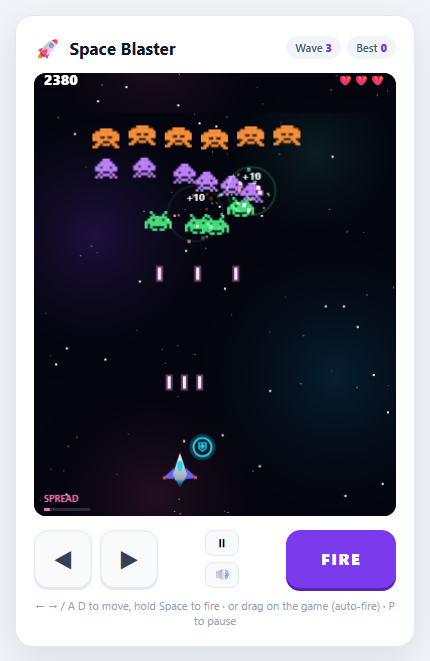
A collision costs a life, respawns the ship at centre and gives a blinking, shielded invulnerability window. Clearing the field starts the next wave with more rocks and a bonus. P or Esc pause the game, which also pauses automatically when the tab loses focus or is hidden. Logic runs in a fixed 400×400 space but the canvas backing store is scaled by devicePixelRatio, so lines stay sharp on retina screens. For a similar canvas shooter see the Space Blaster arcade game.
What's included
Features
Step by step
How to Use
- 1LaunchClick "Launch" or press Enter. The ship appears at centre with a shield, a wave banner flashes and wave 1 of large rocks starts drifting. While you are on the title screen the rocks already move behind it.
- 2Rotate to aimHold ↺ or ↻ (or the arrow keys / A and D) to spin the ship. Rotation only changes the heading, so aim first, then thrust.
- 3Thrust to build momentumHold THRUST (or ↑ / W) to accelerate along the heading. Release and you keep coasting while drag slowly bleeds speed off, so you can drift one way while facing another.
- 4Fire and chain killsTap or hold FIRE (or Space). Shots split rocks into faster pieces. Destroying things within two seconds of each other raises the multiplier up to x5.
- 5Watch for UFOsA green saucer crosses the screen now and then and fires aimed shots. Shoot it for 200 points (multiplied by your combo) before it hits you.
- 6Pause, mute and beat your bestP or Esc pauses, M toggles sound. A collision costs one of three lives. Your best score is saved in localStorage under asteroids-blaster-best.
Real-world uses
Common Use Cases
Got questions?
Frequently Asked Questions
Asteroids is momentum-based: the ship stores a velocity vector that persists between frames. Thrusting only adds acceleration along the heading; when you release, the velocity remains and a drag factor just below 1 slows it gradually. That inertia is the defining feel of the game.
Every moving object passes through a single wrap() function that checks whether it has crossed an edge and, if so, adds or subtracts the canvas width or height. Applying it to the ship, bullets, rocks and stars makes the field a torus. Bullets expire after a limited lifetime so they cannot circle back forever.
Each kill checks a countdown. If it is still running, the combo count goes up (to a maximum of 5) and the countdown restarts at two seconds; otherwise it starts at 1. Points are the base value times the combo count. Losing a life resets it.
The Web Audio API generates it: an oscillator with a frequency sweep and a gain envelope for shots, deaths and jingles, and a buffer of fading random noise through a low-pass filter for explosions. The AudioContext is created on the first click to satisfy browser autoplay rules, and the mute state is saved in localStorage.
The game logic uses a fixed 400 by 400 space, but the canvas backing store is multiplied by the device pixel ratio (capped at 2) and the context is scaled to match. Lines then stay sharp on high-density screens without changing any game coordinates.
Yes. The best score is written to localStorage under asteroids-blaster-best and read on load. Reads and writes are wrapped in try/catch so the game still runs in sandboxed or private contexts where storage access can throw.
Render the canvas and overlays in a component, create the context in a mount effect and run the requestAnimationFrame loop there, storing game state in refs rather than React state. Cancel the loop and remove the keyboard listeners in the cleanup function. Use the export buttons on this page for the markup and styles.
Copy & paste
Source Code
<div class="game-card">
  <div class="game-header">
    <div class="game-title">
      <span class="logo" aria-hidden="true"><svg width="22" height="22" viewBox="0 0 24 24" fill="none" stroke="currentColor" stroke-width="2" stroke-linejoin="round"><path d="M21 12 4 20l4-8-4-8z"/></svg></span>
      <div>
        <h2>Asteroids Blaster</h2>
        <p class="tagline">Neon vector arcade</p>
      </div>
    </div>
    <div class="head-right">
      <span class="badge">Wave <b id="wave">1</b></span>
      <span class="badge">Best <b id="best-score">0</b></span>
      <button class="icon-btn" id="btn-sound" type="button" aria-pressed="true" aria-label="Sound on" title="Sound (M)">🔊</button>
      <button class="icon-btn" id="btn-pause" type="button" aria-label="Pause" title="Pause (P)">❚❚</button>
    </div>
  </div>

  <div class="canvas-wrap">
    <canvas id="game-canvas" width="400" height="400" aria-label="Asteroids game canvas"></canvas>
    <div class="hud" aria-live="off">
      <span class="hud-score" id="hud-score">0</span>
      <span class="hud-combo" id="hud-combo"></span>
      <span class="lives" id="hud-lives"></span>
    </div>
    <div class="wave-banner" id="wave-banner" aria-hidden="true"></div>

    <div class="overlay" id="start-overlay">
      <div class="overlay-card">
        <p class="overlay-kicker">Arcade classic</p>
        <p class="overlay-title">Asteroids <span>Blaster</span></p>
        <p class="overlay-sub">Spin, thrust and shoot. Rocks split into faster pieces, UFOs shoot back, and chaining kills multiplies your score.</p>
        <ul class="keys"><li><kbd>←</kbd><kbd>→</kbd> rotate</li><li><kbd>↑</kbd> thrust</li><li><kbd>Space</kbd> fire</li><li><kbd>P</kbd> pause</li></ul>
        <button class="btn btn-primary" id="btn-start" type="button">Launch</button>
      </div>
    </div>
    <div class="overlay hidden" id="pause-overlay">
      <div class="overlay-card">
        <p class="overlay-title">Paused</p>
        <button class="btn btn-primary" id="btn-resume" type="button">Resume</button>
      </div>
    </div>
    <div class="overlay hidden" id="gameover-overlay">
      <div class="overlay-card">
        <p class="overlay-title over">Wrecked</p>
        <p class="overlay-score" id="final-score">0</p>
        <p class="overlay-sub" id="final-detail">Wave 1</p>
        <p class="overlay-best" id="best-msg"></p>
        <button class="btn btn-primary" id="btn-retry" type="button">Relaunch</button>
      </div>
    </div>
  </div>

  <div class="controls">
    <div class="dpad">
      <button class="ctrl-btn" id="btn-left" type="button" aria-label="Rotate left">↺</button>
      <button class="ctrl-btn" id="btn-right" type="button" aria-label="Rotate right">↻</button>
    </div>
    <div class="actions">
      <button class="act-btn thrust" id="btn-thrust" type="button" aria-label="Thrust">THRUST</button>
      <button class="act-btn fire" id="btn-fire" type="button" aria-label="Fire">FIRE</button>
    </div>
  </div>
  <p class="hint-text">Keys: ← → rotate · ↑ thrust · Space fire · P pause · M sound</p>
</div>*{box-sizing:border-box;margin:0;padding:0}
body{font-family:system-ui,-apple-system,'Segoe UI',sans-serif;background:radial-gradient(700px 420px at 50% 0%,rgba(124,58,237,.28),transparent 70%),#07081a;min-height:100vh;display:flex;align-items:center;justify-content:center;padding:20px;color:#e2e8f0}
.game-card{width:100%;max-width:440px;background:linear-gradient(180deg,#12142e,#0c0e22);border-radius:22px;border:1px solid #262a52;box-shadow:0 24px 60px -20px rgba(124,58,237,.45),0 0 0 1px rgba(255,255,255,.02) inset;padding:16px;user-select:none;-webkit-user-select:none}
.game-header{display:flex;align-items:center;justify-content:space-between;margin-bottom:12px;gap:10px;flex-wrap:wrap}
.game-title{display:flex;align-items:center;gap:10px}
.logo{display:grid;place-items:center;width:38px;height:38px;border-radius:12px;color:#c4b5fd;background:linear-gradient(135deg,rgba(124,58,237,.35),rgba(34,211,238,.18));border:1px solid rgba(167,139,250,.4);box-shadow:0 0 16px rgba(124,58,237,.35)}
.game-title h2{font-size:16px;font-weight:800;letter-spacing:-.01em;color:#fff}
.tagline{font-size:11px;color:#7c85b3;margin-top:1px}
.head-right{display:flex;align-items:center;gap:6px}
.badge{font-size:11px;font-weight:700;color:#aab3dd;background:#171a3a;border:1px solid #262a52;padding:5px 9px;border-radius:999px;white-space:nowrap}
.badge b{color:#fff;font-variant-numeric:tabular-nums}
.icon-btn{width:30px;height:28px;border-radius:9px;border:1px solid #262a52;background:#171a3a;color:#cbd5f5;font-size:12px;cursor:pointer;transition:background .15s,border-color .15s}
.icon-btn:hover{background:#20254d;border-color:#4c51a8}
.icon-btn[aria-pressed="false"]{opacity:.55}
.icon-btn:focus-visible,.btn:focus-visible{outline:2px solid #a78bfa;outline-offset:2px}
.canvas-wrap{position:relative;border-radius:16px;overflow:hidden;line-height:0;touch-action:none;background:#04050c;border:1px solid #2b3070;box-shadow:0 0 0 1px rgba(0,0,0,.6),0 0 30px -8px rgba(99,102,241,.55)}
canvas{display:block;width:100%;height:auto}
.canvas-wrap::after{content:'';position:absolute;inset:0;pointer-events:none;background:repeating-linear-gradient(0deg,rgba(255,255,255,.035) 0 1px,transparent 1px 3px),radial-gradient(ellipse at center,transparent 55%,rgba(0,0,0,.55) 100%)}
.hud{position:absolute;inset:10px 14px auto 14px;display:grid;grid-template-columns:1fr auto 1fr;align-items:center;font-variant-numeric:tabular-nums;pointer-events:none;z-index:2;line-height:1.2}
.hud-score{font-size:18px;font-weight:800;color:#fff;text-shadow:0 0 10px rgba(167,139,250,.9)}
.hud-combo{font-size:13px;font-weight:900;color:#fde047;text-shadow:0 0 10px rgba(250,204,21,.8);min-width:40px;text-align:center}
.hud-combo.pop{animation:comboPop .25s ease-out}
@keyframes comboPop{from{transform:scale(1.6)}to{transform:scale(1)}}
.lives{justify-self:end;display:flex;gap:5px}
.lives i{display:block;width:12px;height:12px;background:#e2e8f0;clip-path:polygon(100% 50%,0 100%,25% 50%,0 0);transform:rotate(-90deg);filter:drop-shadow(0 0 4px #22d3ee)}
.wave-banner{position:absolute;left:0;right:0;top:36%;text-align:center;font-size:26px;font-weight:900;letter-spacing:.28em;text-indent:.28em;color:#fff;text-shadow:0 0 18px #a78bfa;opacity:0;pointer-events:none;z-index:2}
.wave-banner.show{animation:bannerIn 1.5s ease-out both}
@keyframes bannerIn{0%{opacity:0;transform:scale(.7)}18%{opacity:1;transform:scale(1)}70%{opacity:1}100%{opacity:0;transform:scale(1.15)}}
.overlay{position:absolute;inset:0;background:rgba(5,6,20,.72);backdrop-filter:blur(2px);display:flex;align-items:center;justify-content:center;padding:20px;line-height:1.4;z-index:3}
.overlay.hidden{display:none}
.overlay-card{text-align:center;max-width:320px}
.overlay-kicker{font-size:10.5px;font-weight:800;letter-spacing:.2em;text-transform:uppercase;color:#22d3ee;margin-bottom:6px}
.overlay-title{font-size:30px;font-weight:900;letter-spacing:-.02em;color:#fff;margin-bottom:8px}
.overlay-title span{background:linear-gradient(90deg,#a78bfa,#22d3ee);-webkit-background-clip:text;background-clip:text;color:transparent}
.overlay-title.over{color:#fb7185;text-shadow:0 0 22px rgba(251,113,133,.6)}
.overlay-sub{font-size:12.5px;color:#b4bcdf;max-width:300px;margin:0 auto}
.overlay-score{font-size:46px;font-weight:900;color:#fff;font-variant-numeric:tabular-nums;text-shadow:0 0 24px rgba(167,139,250,.8);line-height:1.1}
.overlay-best{font-size:12.5px;color:#fbbf24;font-weight:800;margin-top:6px;min-height:18px}
.keys{list-style:none;display:flex;flex-wrap:wrap;gap:6px 12px;justify-content:center;margin:12px 0 0;font-size:11.5px;color:#9aa3cf}
.keys li{display:flex;align-items:center;gap:4px}
kbd{font:700 11px system-ui;color:#e2e8f0;background:#1b1f45;border:1px solid #3a4090;border-bottom-width:2px;border-radius:5px;padding:1px 6px}
.btn{padding:11px 30px;font-size:14px;font-weight:800;border-radius:12px;cursor:pointer;font-family:inherit;transition:transform .12s,box-shadow .2s;border:none;margin-top:16px}
.btn-primary{background:linear-gradient(135deg,#7c3aed,#4f46e5);color:#fff;box-shadow:0 6px 22px -6px rgba(124,58,237,.9)}
.btn-primary:hover{transform:translateY(-1px);box-shadow:0 10px 26px -6px rgba(124,58,237,1)}
.controls{display:flex;align-items:center;justify-content:space-between;gap:10px;margin-top:14px}
.dpad,.actions{display:flex;gap:10px}
.ctrl-btn,.act-btn{-webkit-tap-highlight-color:transparent;touch-action:none;cursor:pointer;font-family:inherit;border:1px solid #2f3580;transition:transform .06s,background .12s,box-shadow .12s}
.ctrl-btn{width:58px;height:60px;border-radius:15px;background:#171a3a;color:#c7d2fe;font-size:24px;font-weight:700;box-shadow:0 3px 0 #0b0d24}
.ctrl-btn:active{transform:translateY(3px);box-shadow:none;background:#262b66}
.act-btn{width:82px;height:60px;border-radius:15px;color:#fff;font-size:12.5px;font-weight:900;letter-spacing:.08em}
.act-btn.thrust{background:linear-gradient(180deg,#0ea5c6,#0891b2);box-shadow:0 3px 0 #0e5f74,0 0 18px -4px rgba(34,211,238,.6);border-color:#22d3ee}
.act-btn.fire{background:linear-gradient(180deg,#9f67ff,#7c3aed);box-shadow:0 3px 0 #4c1d95,0 0 18px -4px rgba(167,139,250,.7);border-color:#a78bfa}
.act-btn:active{transform:translateY(3px);box-shadow:none}
.hint-text{font-size:11px;color:#6b749f;text-align:center;margin-top:10px}
@media(max-width:400px){.game-card{padding:12px}.overlay-title{font-size:25px}.badge{display:none}}
@media(prefers-reduced-motion:reduce){.wave-banner.show,.hud-combo.pop{animation:none}.wave-banner.show{opacity:1}}const canvas = document.getElementById('game-canvas');
const ctx = canvas.getContext('2d');
const W = 400, H = 400;
const DPR = Math.min(window.devicePixelRatio || 1, 2);
canvas.width = W * DPR; canvas.height = H * DPR; // crisp on retina, game logic stays in 400x400
ctx.setTransform(DPR, 0, 0, DPR, 0, 0);
const BEST_KEY = 'asteroids-blaster-best', MUTE_KEY = 'asteroids-blaster-muted';
const TURN = 4.6, THRUST = 0.14, DRAG = 0.992, MAX_V = 6;
const BULLET_SPEED = 6.5, BULLET_LIFE = 55, FIRE_CD = 210, INVULN = 100, COMBO_WINDOW = 120;
const SIZES = { 3: 34, 2: 22, 1: 13 };
const ROCK_COLOR = { 3: '#a78bfa', 2: '#22d3ee', 1: '#f472b6' };
const reduce = window.matchMedia && matchMedia('(prefers-reduced-motion: reduce)').matches;
let state = 'idle'; // idle | play | paused | over
let ship, bullets, rocks, particles, rings, popups, ufo, ufoShots, stars = [];
let score, lives, wave, kills, invuln, shake = 0, ufoTimer, lastFrame = 0, lastShot = 0;
let combo = { n: 0, t: 0 };
const keys = { left: false, right: false, thrust: false, fire: false };
const $ = id => document.getElementById(id);
const hudScore = $('hud-score'), hudLives = $('hud-lives'), hudCombo = $('hud-combo');
const waveEl = $('wave'), bestEl = $('best-score'), bannerEl = $('wave-banner');
const startOverlay = $('start-overlay'), pauseOverlay = $('pause-overlay'), overOverlay = $('gameover-overlay');
function getBest() { try { return parseInt(localStorage.getItem(BEST_KEY)) || 0; } catch (e) { return 0; } }
function setBest(v) { try { localStorage.setItem(BEST_KEY, String(v)); } catch (e) {} }
// ── Sound: tiny WebAudio synth, created on the first user gesture ──
let actx = null, muted = false;
try { muted = localStorage.getItem(MUTE_KEY) === '1'; } catch (e) {}
function audio() {
if (!actx) { try { actx = new (window.AudioContext || window.webkitAudioContext)(); } catch (e) {} }
if (actx && actx.state === 'suspended') actx.resume();
return actx;
}
function tone(f0, f1, dur, type, vol) {
if (muted) return; const a = audio(); if (!a) return;
const o = a.createOscillator(), g = a.createGain(), t = a.currentTime;
o.type = type; o.frequency.setValueAtTime(f0, t); o.frequency.exponentialRampToValueAtTime(Math.max(30, f1), t + dur);
g.gain.setValueAtTime(vol, t); g.gain.exponentialRampToValueAtTime(0.0001, t + dur);
o.connect(g); g.connect(a.destination); o.start(t); o.stop(t + dur);
}
function noise(dur, vol, cutoff) {
if (muted) return; const a = audio(); if (!a) return;
const len = Math.floor(a.sampleRate * dur), buf = a.createBuffer(1, len, a.sampleRate), d = buf.getChannelData(0);
for (let i = 0; i < len; i++) d[i] = (Math.random() * 2 - 1) * (1 - i / len);
const s = a.createBufferSource(), f = a.createBiquadFilter(), g = a.createGain();
s.buffer = buf; f.type = 'lowpass'; f.frequency.value = cutoff; g.gain.value = vol;
s.connect(f); f.connect(g); g.connect(a.destination); s.start();
}
const sfx = {
shoot: () => tone(880, 180, 0.09, 'square', 0.035),
boom: size => noise(0.18 + (3 - size) * 0.1, 0.09, 900 + size * 500),
death: () => { tone(320, 40, 0.7, 'sawtooth', 0.07); noise(0.6, 0.12, 700); },
wave: () => { tone(440, 660, 0.12, 'triangle', 0.06); setTimeout(() => tone(660, 990, 0.18, 'triangle', 0.06), 110); },
ufo: () => tone(900, 1300, 0.25, 'sine', 0.04),
};
// ── World helpers ──
function wrap(o) { if (o.x < 0) o.x += W; if (o.x > W) o.x -= W; if (o.y < 0) o.y += H; if (o.y > H) o.y -= H; }
function rand(a, b) { return a + Math.random() * (b - a); }
function makeStars() {
stars = [];
for (let i = 0; i < 70; i++) stars.push({ x: rand(0, W), y: rand(0, H), z: i % 3 === 0 ? 2 : 1, a: rand(0.25, 0.8), p: rand(0, 6) });
}
function makeRock(x, y, size) {
const r = SIZES[size], verts = [], n = 10;
for (let i = 0; i < n; i++) verts.push(rand(0.72, 1.2));
const a = rand(0, Math.PI * 2), sp = (4 - size) * rand(0.4, 0.9) * (1 + Math.min(wave || 1, 8) * 0.05);
return { x, y, vx: Math.cos(a) * sp, vy: Math.sin(a) * sp, size, r, verts, rot: rand(0, 6), spin: rand(-0.02, 0.02) };
}
function spawnWave() {
rocks = [];
const count = Math.min(3 + wave, 11);
for (let i = 0; i < count; i++) {
let x, y;
do { x = rand(0, W); y = rand(0, H); } while (Math.hypot(x - W / 2, y - H / 2) < 100); // keep the centre clear for the ship
rocks.push(makeRock(x, y, 3));
}
}
function resetState() {
ship = { x: W / 2, y: H / 2, vx: 0, vy: 0, angle: -Math.PI / 2 };
bullets = []; particles = []; rings = []; popups = []; ufoShots = []; ufo = null;
score = 0; lives = 3; wave = 1; kills = 0; invuln = INVULN; lastShot = 0; combo = { n: 0, t: 0 };
ufoTimer = rand(700, 1000);
spawnWave(); syncHud();
}
function syncHud() {
hudScore.textContent = score.toLocaleString('en-US');
hudLives.innerHTML = '<i></i>'.repeat(Math.max(0, lives));
waveEl.textContent = wave;
hudCombo.textContent = combo.n >= 2 ? 'x' + combo.n : '';
}
function banner(text) {
bannerEl.textContent = text;
bannerEl.classList.remove('show'); void bannerEl.offsetWidth; bannerEl.classList.add('show');
}
function burst(x, y, color, n, speed) {
for (let i = 0; i < n; i++) {
const a = rand(0, Math.PI * 2), s = rand(0.3, 1) * (speed || 3);
particles.push({ x, y, vx: Math.cos(a) * s, vy: Math.sin(a) * s, life: 1, decay: rand(0.015, 0.04), color });
}
}
function ring(x, y, color, max) { rings.push({ x, y, r: 4, sp: max / 18, life: 1, color }); }
function popup(x, y, text) { popups.push({ x, y, text, life: 1 }); }
function fire() {
const now = performance.now();
if (now - lastShot < FIRE_CD) return;
lastShot = now; sfx.shoot();
bullets.push({ x: ship.x + Math.cos(ship.angle) * 13, y: ship.y + Math.sin(ship.angle) * 13, vx: Math.cos(ship.angle) * BULLET_SPEED + ship.vx * 0.3, vy: Math.sin(ship.angle) * BULLET_SPEED + ship.vy * 0.3, life: BULLET_LIFE });
}
// Points, with a x2..x5 multiplier for kills chained inside a short window
function award(base, x, y) {
combo.n = combo.t > 0 ? Math.min(5, combo.n + 1) : 1;
combo.t = COMBO_WINDOW;
const pts = base * combo.n;
score += pts; popup(x, y, '+' + pts);
if (combo.n >= 2) { hudCombo.classList.remove('pop'); void hudCombo.offsetWidth; hudCombo.classList.add('pop'); }
syncHud();
}
function splitRock(i) {
const r = rocks[i];
kills++; award((4 - r.size) * 20, r.x, r.y);
burst(r.x, r.y, ROCK_COLOR[r.size], 8 + r.size * 4, 3); ring(r.x, r.y, ROCK_COLOR[r.size], r.r * 1.8); sfx.boom(r.size);
if (r.size === 3) shake = Math.max(shake, 3);
rocks.splice(i, 1);
if (r.size > 1) { rocks.push(makeRock(r.x, r.y, r.size - 1)); rocks.push(makeRock(r.x, r.y, r.size - 1)); }
}
function killUfo() {
award(200, ufo.x, ufo.y);
burst(ufo.x, ufo.y, '#4ade80', 26, 4); ring(ufo.x, ufo.y, '#4ade80', 50); sfx.boom(3); shake = Math.max(shake, 5);
ufo = null;
}
function loseLife() {
lives--; combo = { n: 0, t: 0 };
burst(ship.x, ship.y, '#f472b6', 26, 4); burst(ship.x, ship.y, '#e2e8f0', 12, 2.5); ring(ship.x, ship.y, '#f472b6', 70);
shake = 12; sfx.death(); syncHud();
if (lives <= 0) { endGame(); return; }
ship.x = W / 2; ship.y = H / 2; ship.vx = 0; ship.vy = 0; ship.angle = -Math.PI / 2; invuln = INVULN; ufoShots = [];
}
// ── Simulation ──
// Everything that just drifts or fades (also runs behind the start / pause / game-over screens)
function moveWorld(step) {
rocks.forEach(r => { r.x += r.vx * step; r.y += r.vy * step; r.rot += r.spin * step; wrap(r); });
particles.forEach(p => { p.x += p.vx * step; p.y += p.vy * step; p.vx *= 0.99; p.vy *= 0.99; p.life -= p.decay * step; });
particles = particles.filter(p => p.life > 0);
rings.forEach(r => { r.r += r.sp * step; r.life -= 0.04 * step; }); rings = rings.filter(r => r.life > 0);
popups.forEach(p => { p.y -= 0.5 * step; p.life -= 0.016 * step; }); popups = popups.filter(p => p.life > 0);
stars.forEach(s => { s.x -= ((state === 'play' ? ship.vx : 0) * 0.12 + 0.06) * s.z * step; s.y -= (state === 'play' ? ship.vy : 0) * 0.12 * s.z * step; wrap(s); });
shake *= Math.pow(0.9, step);
}
function update(step) {
if (keys.left) ship.angle -= (TURN / 60) * step;
if (keys.right) ship.angle += (TURN / 60) * step;
if (keys.thrust) {
ship.vx += Math.cos(ship.angle) * THRUST * step; ship.vy += Math.sin(ship.angle) * THRUST * step;
if (Math.random() < 0.8) particles.push({ x: ship.x - Math.cos(ship.angle) * 9, y: ship.y - Math.sin(ship.angle) * 9, vx: -Math.cos(ship.angle) * 2 + rand(-0.5, 0.5), vy: -Math.sin(ship.angle) * 2 + rand(-0.5, 0.5), life: 0.7, decay: 0.07, color: Math.random() < 0.5 ? '#22d3ee' : '#fbbf24' });
}
const spd = Math.hypot(ship.vx, ship.vy);
if (spd > MAX_V) { ship.vx *= MAX_V / spd; ship.vy *= MAX_V / spd; }
ship.vx *= Math.pow(DRAG, step); ship.vy *= Math.pow(DRAG, step);
ship.x += ship.vx * step; ship.y += ship.vy * step; wrap(ship);
if (keys.fire) fire();
if (invuln > 0) invuln -= step;
if (combo.t > 0) { combo.t -= step; if (combo.t <= 0) { combo.n = 0; syncHud(); } }
bullets.forEach(b => { b.x += b.vx * step; b.y += b.vy * step; b.life -= step; wrap(b); });
bullets = bullets.filter(b => b.life > 0);
moveWorld(step);
// Bullet vs rock
for (let i = rocks.length - 1; i >= 0; i--) {
for (let j = bullets.length - 1; j >= 0; j--) {
if (Math.hypot(rocks[i].x - bullets[j].x, rocks[i].y - bullets[j].y) < rocks[i].r) { bullets.splice(j, 1); splitRock(i); break; }
}
}
// UFO: a saucer sweeps across now and then and fires aimed shots
ufoTimer -= step;
if (!ufo && ufoTimer <= 0 && rocks.length) {
const dir = Math.random() < 0.5 ? 1 : -1;
ufo = { x: dir > 0 ? -24 : W + 24, y0: rand(60, H - 60), y: 0, vx: dir * 1.25, ph: 0, cd: 70 };
ufoTimer = rand(900, 1500); sfx.ufo();
}
if (ufo) {
ufo.x += ufo.vx * step; ufo.ph += 0.035 * step; ufo.y = ufo.y0 + Math.sin(ufo.ph) * 30; ufo.cd -= step;
if (ufo.cd <= 0) {
const a = Math.atan2(ship.y - ufo.y, ship.x - ufo.x) + rand(-0.3, 0.3);
ufoShots.push({ x: ufo.x, y: ufo.y, vx: Math.cos(a) * 2.6, vy: Math.sin(a) * 2.6, life: 130 });
ufo.cd = 90;
}
if (ufo.x < -40 || ufo.x > W + 40) ufo = null;
else for (let j = bullets.length - 1; j >= 0; j--) {
if (Math.hypot(ufo.x - bullets[j].x, ufo.y - bullets[j].y) < 16) { bullets.splice(j, 1); killUfo(); break; }
}
}
ufoShots.forEach(s => { s.x += s.vx * step; s.y += s.vy * step; s.life -= step; });
ufoShots = ufoShots.filter(s => s.life > 0 && s.x > -10 && s.x < W + 10 && s.y > -10 && s.y < H + 10);
// Ship hits (rocks, UFO, UFO shots)
if (invuln <= 0 && state === 'play') {
if (rocks.some(r => Math.hypot(r.x - ship.x, r.y - ship.y) < r.r * 0.9 + 7)) loseLife();
else if (ufo && Math.hypot(ufo.x - ship.x, ufo.y - ship.y) < 20) { killUfo(); loseLife(); }
else if (ufoShots.some(s => Math.hypot(s.x - ship.x, s.y - ship.y) < 8)) loseLife();
}
if (state === 'play' && !rocks.length) {
wave++; score += 50 * wave; invuln = INVULN; ufoShots = []; spawnWave(); syncHud(); banner('WAVE ' + wave); sfx.wave();
}
}
// ── Rendering ──
const bg = ctx.createRadialGradient(W / 2, H / 2, 40, W / 2, H / 2, 300);
bg.addColorStop(0, '#0d1236'); bg.addColorStop(1, '#04050c');
function glow(color, blur) { ctx.shadowColor = color; ctx.shadowBlur = blur; }
function draw(now) {
ctx.fillStyle = bg; ctx.fillRect(0, 0, W, H);
ctx.save();
if (shake > 0.3 && !reduce) ctx.translate(rand(-shake, shake) / 2, rand(-shake, shake) / 2);
ctx.fillStyle = '#fff';
stars.forEach(s => { ctx.globalAlpha = s.a * (0.55 + 0.45 * Math.sin(now / 600 + s.p)); ctx.fillRect(s.x, s.y, s.z, s.z); });
ctx.globalAlpha = 1;
rings.forEach(r => { ctx.globalAlpha = Math.max(0, r.life) * 0.8; ctx.strokeStyle = r.color; ctx.lineWidth = 2; ctx.beginPath(); ctx.arc(r.x, r.y, r.r, 0, Math.PI * 2); ctx.stroke(); });
ctx.globalAlpha = 1;
rocks.forEach(r => {
const c = ROCK_COLOR[r.size];
ctx.save(); ctx.translate(r.x, r.y); ctx.rotate(r.rot); glow(c, 12);
ctx.beginPath();
for (let i = 0; i < r.verts.length; i++) {
const a = (i / r.verts.length) * Math.PI * 2, rad = r.r * r.verts[i];
i === 0 ? ctx.moveTo(Math.cos(a) * rad, Math.sin(a) * rad) : ctx.lineTo(Math.cos(a) * rad, Math.sin(a) * rad);
}
ctx.closePath(); ctx.fillStyle = c + '1f'; ctx.fill(); ctx.strokeStyle = c; ctx.lineWidth = 2; ctx.stroke(); ctx.restore();
});
ctx.shadowBlur = 0;
if (ufo) {
ctx.save(); ctx.translate(ufo.x, ufo.y); glow('#4ade80', 12); ctx.strokeStyle = '#4ade80'; ctx.lineWidth = 2;
ctx.beginPath(); ctx.ellipse(0, 3, 17, 6, 0, 0, Math.PI * 2); ctx.stroke();
ctx.beginPath(); ctx.arc(0, 0, 8, Math.PI, 0); ctx.stroke();
ctx.fillStyle = '#bbf7d0';
for (let i = -1; i <= 1; i++) { ctx.globalAlpha = 0.4 + 0.6 * ((Math.floor(now / 160) + i) % 2 === 0 ? 1 : 0.3); ctx.fillRect(i * 8 - 1, 2, 3, 3); }
ctx.restore();
}
ufoShots.forEach(s => { glow('#f87171', 10); ctx.fillStyle = '#fca5a5'; ctx.beginPath(); ctx.arc(s.x, s.y, 3, 0, Math.PI * 2); ctx.fill(); });
glow('#fde047', 10); ctx.strokeStyle = '#fde047'; ctx.lineWidth = 2.5; ctx.lineCap = 'round';
bullets.forEach(b => { ctx.globalAlpha = 1; ctx.beginPath(); ctx.moveTo(b.x - b.vx * 1.2, b.y - b.vy * 1.2); ctx.lineTo(b.x, b.y); ctx.stroke(); });
ctx.shadowBlur = 0;
particles.forEach(p => { ctx.globalAlpha = Math.max(0, p.life); ctx.fillStyle = p.color; ctx.fillRect(p.x - 1.2, p.y - 1.2, 2.6, 2.6); });
ctx.globalAlpha = 1;
if ((state === 'play' || state === 'paused') && !(invuln > 0 && Math.floor(invuln / 6) % 2)) {
ctx.save(); ctx.translate(ship.x, ship.y); ctx.rotate(ship.angle);
if (keys.thrust && state === 'play') {
const len = 9 + Math.random() * 9; glow('#22d3ee', 14); ctx.strokeStyle = '#67e8f9'; ctx.lineWidth = 2;
ctx.beginPath(); ctx.moveTo(-5, -4); ctx.lineTo(-5 - len, 0); ctx.lineTo(-5, 4); ctx.stroke();
}
glow('#a5b4fc', 12); ctx.strokeStyle = '#f1f5f9'; ctx.lineWidth = 2; ctx.lineJoin = 'round'; ctx.fillStyle = 'rgba(165,180,252,.15)';
ctx.beginPath(); ctx.moveTo(14, 0); ctx.lineTo(-10, -9); ctx.lineTo(-5, 0); ctx.lineTo(-10, 9); ctx.closePath(); ctx.fill(); ctx.stroke();
if (invuln > 0) { ctx.shadowBlur = 0; ctx.globalAlpha = 0.35; ctx.strokeStyle = '#22d3ee'; ctx.beginPath(); ctx.arc(0, 0, 17, 0, Math.PI * 2); ctx.stroke(); }
ctx.restore();
}
ctx.shadowBlur = 0; ctx.globalAlpha = 1;
ctx.font = '800 12px system-ui, sans-serif'; ctx.textAlign = 'center'; ctx.fillStyle = '#fde047';
popups.forEach(p => { ctx.globalAlpha = Math.max(0, p.life); ctx.fillText(p.text, p.x, p.y); });
ctx.globalAlpha = 1;
ctx.restore();
}
// One permanent animation loop: it simulates while playing and only draws the rest of the time
function frame(ts) {
requestAnimationFrame(frame);
if (!lastFrame) lastFrame = ts;
const dt = Math.min((ts - lastFrame) / 1000, 0.05); lastFrame = ts;
const step = dt * 60;
if (state === 'play') update(step);
else if (state !== 'paused') moveWorld(step); // idle / game over: rocks keep drifting behind the overlay
draw(ts);
}
// ── State changes ──
function startGame() {
audio(); resetState(); state = 'play'; lastFrame = 0;
[startOverlay, pauseOverlay, overOverlay].forEach(o => o.classList.add('hidden'));
banner('WAVE 1'); sfx.wave();
}
function pauseGame() {
if (state !== 'play') return;
state = 'paused'; Object.keys(keys).forEach(k => keys[k] = false); pauseOverlay.classList.remove('hidden');
$('btn-pause').setAttribute('aria-label', 'Resume');
}
function resumeGame() {
if (state !== 'paused') return;
state = 'play'; lastFrame = 0; pauseOverlay.classList.add('hidden'); $('btn-pause').setAttribute('aria-label', 'Pause');
}
function endGame() {
state = 'over'; Object.keys(keys).forEach(k => keys[k] = false);
const best = getBest();
$('final-score').textContent = score.toLocaleString('en-US');
$('final-detail').textContent = 'Wave ' + wave + ' · ' + kills + ' rocks destroyed';
if (score > best) { setBest(score); bestEl.textContent = score; $('best-msg').textContent = '🏆 New high score!'; }
else $('best-msg').textContent = 'Best ' + best;
overOverlay.classList.remove('hidden');
}
// ── Input: keyboard ──
const KEYMAP = { ArrowLeft: 'left', KeyA: 'left', ArrowRight: 'right', KeyD: 'right', ArrowUp: 'thrust', KeyW: 'thrust', Space: 'fire' };
const SCROLL_KEYS = ['ArrowUp', 'ArrowDown', 'ArrowLeft', 'ArrowRight', 'Space', 'PageUp', 'PageDown'];
document.addEventListener('keydown', e => {
// Arrow / Space / Page keys must never scroll the page (the browser also scrolls the parent page when this runs in an iframe)
if (SCROLL_KEYS.indexOf(e.code) !== -1) e.preventDefault();
const k = KEYMAP[e.code];
if (k && state === 'play') keys[k] = true;
if (e.code === 'Space' && state === 'paused') resumeGame();
if (e.code === 'KeyP' || e.code === 'Escape') { state === 'play' ? pauseGame() : resumeGame(); }
if (e.code === 'KeyM') toggleSound();
if ((e.code === 'Enter' || e.code === 'Space') && (state === 'idle' || state === 'over')) startGame();
});
document.addEventListener('keyup', e => { const k = KEYMAP[e.code]; if (k) keys[k] = false; });
window.addEventListener('blur', () => { Object.keys(keys).forEach(k => keys[k] = false); pauseGame(); });
document.addEventListener('visibilitychange', () => { if (document.hidden) pauseGame(); });
// ── Input: on-screen buttons (press and hold) ──
function hold(id, k) {
const el = $(id);
const down = e => { e.preventDefault(); if (state === 'play') keys[k] = true; };
const up = e => { e.preventDefault(); keys[k] = false; };
el.addEventListener('pointerdown', down);
el.addEventListener('pointerup', up); el.addEventListener('pointercancel', up); el.addEventListener('pointerleave', up);
el.addEventListener('contextmenu', e => e.preventDefault());
}
hold('btn-left', 'left'); hold('btn-right', 'right'); hold('btn-thrust', 'thrust'); hold('btn-fire', 'fire');
function toggleSound() {
muted = !muted; try { localStorage.setItem(MUTE_KEY, muted ? '1' : '0'); } catch (e) {}
syncSound(); if (!muted) tone(660, 880, 0.08, 'triangle', 0.05);
}
function syncSound() {
const b = $('btn-sound');
b.textContent = muted ? '🔇' : '🔊'; b.setAttribute('aria-pressed', String(!muted)); b.setAttribute('aria-label', muted ? 'Sound off' : 'Sound on');
}
$('btn-sound').addEventListener('click', toggleSound);
$('btn-pause').addEventListener('click', () => { state === 'play' ? pauseGame() : resumeGame(); });
$('btn-start').addEventListener('click', startGame);
$('btn-retry').addEventListener('click', startGame);
$('btn-resume').addEventListener('click', resumeGame);
bestEl.textContent = getBest();
syncSound(); makeStars(); wave = 1; resetState();
requestAnimationFrame(frame);
/* wdp-share:start */
(function () {
var TITLE = 'Asteroids Blaster Game', URL = 'https://webdevpuneet.com/ui-snippets/asteroids-game/';
if (window.__wdpShare) return;
window.__wdpShare = true;
var blob = null, file = null, lastInfo = null;
/* ---- UI ---- */
var st = document.createElement('style');
st.textContent =
'.wdps-in,.wdps-btn,.wdps-box{touch-action:manipulation;-webkit-tap-highlight-color:transparent}.wdps-in{display:block;margin:12px auto 0;border:0;border-radius:12px;padding:11px 22px;font:800 15px/1 system-ui,sans-serif;background:#16a34a;color:#fff;cursor:pointer;box-shadow:0 3px 0 #11793a;pointer-events:auto;position:relative;z-index:5}' +
'.wdps-in:hover{background:#15803d}.wdps-in:active{transform:translateY(2px);box-shadow:0 1px 0 #11793a}' +
'.wdps-btn{position:fixed;right:12px;bottom:12px;z-index:2147483000;border:0;border-radius:99px;padding:9px 16px;font:700 13px/1 system-ui,sans-serif;background:#16a34a;color:#fff;cursor:pointer;box-shadow:0 3px 12px rgba(0,0,0,.3)}' +
'.wdps-btn.wdps-hot{animation:wdps-p 1.4s ease-in-out infinite}' +
'@keyframes wdps-p{0%,100%{box-shadow:0 0 0 0 rgba(22,163,74,.6),0 3px 12px rgba(0,0,0,.3)}50%{box-shadow:0 0 0 9px rgba(22,163,74,0),0 3px 12px rgba(0,0,0,.3)}}' +
'.wdps-btn:active{transform:translateY(1px)}' +
'.wdps-in[hidden],.wdps-btn[hidden],.wdps-box[hidden],.wdps-box [hidden]{display:none}' +
'.wdps-box{position:fixed;left:50%;bottom:12px;transform:translateX(-50%);z-index:2147483001;width:max-content;max-width:calc(100vw - 24px);box-sizing:border-box;background:#fff;color:#64748b;border:1px solid #d5e2ee;border-radius:12px;padding:8px 12px;font:700 12px/1.4 system-ui,sans-serif;box-shadow:0 8px 26px rgba(15,23,42,.25);display:flex;flex-wrap:wrap;gap:8px;align-items:center}' +
'.wdps-box button,.wdps-box a{border:1px solid #d5e2ee;background:#f8fafc;color:#1e293b;border-radius:99px;padding:5px 12px;font:700 12px system-ui,sans-serif;text-decoration:none;cursor:pointer}' +
'.wdps-box .wdps-x{border:0;background:none;font-size:19px;line-height:1;padding:0 4px;margin-left:auto;color:#475569}' +
'@media (max-width:700px){.wdps-box{width:calc(100vw - 24px);justify-content:center;padding:10px 12px}.wdps-box>span{width:100%;text-align:center}.wdps-box button,.wdps-box a{padding:9px 14px;font-size:13px}.wdps-box .wdps-x{position:absolute;top:4px;right:4px}.wdps-in{width:100%;max-width:320px}}';
document.head.appendChild(st);
var pill = document.createElement('button');
pill.type = 'button'; pill.className = 'wdps-btn'; pill.textContent = 'Share result';
var inl = document.createElement('button');
inl.type = 'button'; inl.className = 'wdps-in'; inl.textContent = 'Share result'; inl.hidden = true;
var box = document.createElement('div');
box.className = 'wdps-box'; box.hidden = true;
box.setAttribute('role', 'dialog'); box.setAttribute('aria-label', 'Share your result');
box.innerHTML =
'<span data-a="msg">Share your result:</span>' +
'<button type="button" data-a="copy">Copy image</button>' +
'<a data-a="dl" download="result.png">Download image</a>' +
'<button type="button" data-a="more" hidden>More…</button>' +
'<a data-a="wa" target="_blank" rel="noopener">WhatsApp</a>' +
'<a data-a="x" target="_blank" rel="noopener">X</a>' +
'<a data-a="fb" target="_blank" rel="noopener">Facebook</a>' +
'<button type="button" class="wdps-x" data-a="close" aria-label="Close share options">×</button>';
document.body.appendChild(box);
document.body.appendChild(pill);
function q(a) { return box.querySelector('[data-a="' + a + '"]'); }
function ours(el) { return el === inl || el === pill || !!el.closest('.wdps-box'); }
/* ---- reading the result from the screen ---- */
function shown(el) {
if (!el || !el.getClientRects().length) return false;
for (var n = el; n && n !== document.body; n = n.parentElement) {
var cs = getComputedStyle(n);
if (cs.display === 'none' || cs.visibility === 'hidden' || parseFloat(cs.opacity) < 0.1) return false;
if (n.hidden || n.getAttribute('aria-hidden') === 'true') return false;
}
return true;
}
function txt(el) { return (el.textContent || '').replace(/\s+/g, ' ').trim(); }
function sig(el) { return ((el.id || '') + ' ' + (typeof el.className === 'string' ? el.className : '')).toLowerCase(); }
var OUTCOME = /(you win|you won|win!|wins|victory|game over|time.?s up|cleared|complete|solved|defeat|you lose|you lost|lost|draw|crash|failed|success|congrat|score|result|finished|beat|all matched|well done|perfect|new best)/i;
var HEADSIG = /(title|headline|msg|message|banner|result|verdict|status)/;
var WIN = /(you win|you won|win!|wins|victory|cleared|complete|solved|success|congrat|beat|matched|perfect|new best|record)/i;
var LOSS = /(game over|time.?s up|defeat|you lose|you lost|lost|crash|failed|out of)/i;
var BOX = /(overlay|modal|banner|result|over|end|dialog|screen|popup|panel|card|finish|win)/;
function readResult() {
var head = '', sub = '', root = null, headEl = null;
var all = document.body.querySelectorAll('h1,h2,h3,h4,p,strong,div,span');
for (var i = 0; i < all.length && !head; i++) {
var el = all[i];
if (ours(el) || el.children.length > 2) continue;
if (!HEADSIG.test(sig(el))) continue;
/* a banner that holds its own title: use the title inside it instead */
var inner = false;
for (var c = 0; c < el.children.length; c++) if (HEADSIG.test(sig(el.children[c]))) inner = true;
if (inner) continue;
var t = txt(el);
if (t.length < 3 || t.length > 70 || !OUTCOME.test(t) || !shown(el)) continue;
head = t; headEl = el; root = el.parentElement;
}
if (root) {
var kids = root.querySelectorAll('p,span,div');
for (var j = 0; j < kids.length && !sub; j++) {
var k = kids[j];
if (ours(k) || k.children.length > 2 || !/(sub|text|summary|note|desc|detail)/.test(sig(k))) continue;
var tt = txt(k);
if (tt && tt !== head && tt.length >= 5 && tt.length <= 160 && shown(k)) sub = tt;
}
}
/* the result screen the button goes into: the nearest overlay / banner / result box around the headline */
var host = null;
for (var n = headEl, d = 0; n && n !== document.body && d < 4; n = n.parentElement, d++) {
if (d > 0 && BOX.test(sig(n)) && n.tagName !== 'BUTTON') { host = n; break; }
}
return { head: head, sub: sub, host: host };
}
var STATRE = /(score|moves|time|wpm|best|level|streak|accuracy|combo|coins|distance|height|points|stars|lives|wins|attempt|guess)/;
function readStats() {
var out = [], seen = {};
var all = document.body.querySelectorAll('span,strong,b,div,p,output');
for (var i = 0; i < all.length && out.length < 4; i++) {
var el = all[i];
if (ours(el) || el.children.length > 1) continue;
if (!STATRE.test(sig(el))) continue;
var t = txt(el);
if (!t || t.length > 28 || !/[0-9]/.test(t) || !shown(el)) continue;
if (!/[a-zA-Z]/.test(t) && el.parentElement) {
var parts = [], ch = el.parentElement.childNodes;
for (var p = 0; p < ch.length; p++) { var pv = (ch[p].textContent || '').replace(/\s+/g, ' ').trim(); if (pv) parts.push(pv); }
var pt = parts.join(' ');
if (pt.length <= 30 && /[a-zA-Z]/.test(pt)) t = pt;
}
var key = t.toLowerCase();
if (seen[key]) continue;
seen[key] = 1; out.push(t);
}
return out;
}
function bestCanvas() {
var cs = document.querySelectorAll('canvas'), best = null, area = 0;
for (var i = 0; i < cs.length; i++) {
var r = cs[i].getBoundingClientRect(), a = r.width * r.height;
if (a > area && a > 8000 && shown(cs[i])) { area = a; best = cs[i]; }
}
return best;
}
/* ---- show the button when a result is on screen ---- */
var lastHost = null, timer = 0;
function sync() {
timer = 0;
var r = readResult();
if (r.head && r.host) {
if (inl.parentElement !== r.host) r.host.appendChild(inl);
if (inl.hidden) inl.hidden = false;
if (!pill.hidden) pill.hidden = true;
} else {
if (!inl.hidden) inl.hidden = true;
if (pill.hidden) pill.hidden = false;
pill.classList.toggle('wdps-hot', !!r.head);
}
if (lastHost && !r.head && !box.hidden) box.hidden = true;
lastHost = r.head ? (r.host || document.body) : null;
}
function later() { if (!timer) timer = setTimeout(sync, 200); }
try {
new MutationObserver(function (list) {
for (var i = 0; i < list.length; i++) {
var t = list[i].target;
if (t.nodeType !== 1) t = t.parentElement;
if (t && !ours(t)) { later(); return; }
}
}).observe(document.body, { subtree: true, childList: true, characterData: true, attributes: true, attributeFilter: ['class', 'style', 'hidden'] });
} catch (e) {}
setInterval(later, 1500);
later();
/* ---- the card (1080 x 1080, drawn in memory, light like Pocket Artillery's) ---- */
var outline = 0;
function put(g, t, x, y) { if (outline) { g.lineJoin = 'round'; g.lineWidth = outline; g.strokeStyle = 'rgba(8,12,28,.85)'; g.strokeText(t, x, y); } g.fillText(t, x, y); }
function wrap(g, text, x, y, maxW, lh, maxLines) {
var words = text.split(' '), line = '', n = 0;
for (var i = 0; i < words.length; i++) {
var tst = line ? line + ' ' + words[i] : words[i];
if (g.measureText(tst).width > maxW && line) {
put(g, line, x, y); y += lh; n++; line = words[i];
if (n >= maxLines - 1) { line = words.slice(i).join(' '); break; }
} else line = tst;
}
if (line) {
while (line.length > 3 && g.measureText(line).width > maxW) line = line.slice(0, -2);
put(g, line, x, y); y += lh;
}
return y;
}
/* Biggest-screenshot card: the game frame fills the whole image, the text sits on top of it as an overlay. */
function bgOf(el) {
for (var n = el; n; n = n.parentElement) {
var c = getComputedStyle(n).backgroundColor;
if (c && c !== 'transparent' && c.slice(-4) !== ', 0)') return c;
}
return '#0f172a';
}
function drawBig(info, cv) {
var W = 1080, r = cv.width / cv.height, H = Math.max(810, Math.min(1350, Math.round(W / r)));
var c = document.createElement('canvas'); c.width = W; c.height = H;
var g = c.getContext('2d');
g.fillStyle = bgOf(cv.parentElement || cv); g.fillRect(0, 0, W, H);
var w = W, h = w / r;
if (h > H) { h = H; w = h * r; }
g.imageSmoothingEnabled = true; g.imageSmoothingQuality = 'high';
try { g.drawImage(cv, (W - w) / 2, (H - h) / 2, w, h); } catch (e) { return null; }
/* dark fades under the text so it stays readable on any game colours */
var g1 = g.createLinearGradient(0, 0, 0, H * 0.55); g1.addColorStop(0, 'rgba(8,12,28,.74)'); g1.addColorStop(1, 'rgba(8,12,28,0)');
g.fillStyle = g1; g.fillRect(0, 0, W, H * 0.55);
var g2 = g.createLinearGradient(0, H - 200, 0, H); g2.addColorStop(0, 'rgba(8,12,28,0)'); g2.addColorStop(1, 'rgba(8,12,28,.85)');
g.fillStyle = g2; g.fillRect(0, H - 200, W, 200);
var head = info.head || 'Can you beat me?';
var kind = /draw|tie/i.test(head) ? 'draw' : LOSS.test(head) && !WIN.test(head) ? 'loss' : 'win';
g.textAlign = 'center';
var y = 36;
g.fillStyle = 'rgba(255,255,255,.93)'; g.font = '800 34px system-ui, sans-serif'; outline = 7;
y = wrap(g, TITLE.toUpperCase(), W / 2, y + 34, 1000, 42, 1);
g.fillStyle = kind === 'draw' ? '#e2e8f0' : kind === 'loss' ? '#9db8ff' : '#ffc233';
var big = head.length > 22 ? 84 : 112; g.font = '900 ' + big + 'px system-ui, sans-serif'; outline = 16;
y = wrap(g, head, W / 2, y + big * 0.85, 1000, big * 1.05, 2);
if (info.sub) { g.fillStyle = '#fff'; g.font = '700 40px system-ui, sans-serif'; outline = 9; y = wrap(g, info.sub, W / 2, y + 6, 980, 50, 2); }
outline = 0;
if (info.stats.length) {
g.font = '800 38px system-ui, sans-serif';
var gap = 16, pad = 26, ws = [], tot = -gap;
for (var i = 0; i < info.stats.length; i++) { ws.push(g.measureText(info.stats[i]).width + pad * 2); tot += ws[i] + gap; }
var sc = tot > 960 ? 960 / tot : 1, px = (W - tot * sc) / 2, py = y + 14;
for (var k = 0; k < info.stats.length; k++) {
var w0 = ws[k] * sc;
g.fillStyle = 'rgba(8,12,28,.72)'; g.strokeStyle = 'rgba(255,255,255,.55)'; g.lineWidth = 3;
g.beginPath();
if (g.roundRect) g.roundRect(px, py, w0, 68, 34); else g.rect(px, py, w0, 68);
g.fill(); g.stroke();
g.fillStyle = '#fff'; g.font = '800 ' + Math.round(38 * sc) + 'px system-ui, sans-serif';
g.fillText(info.stats[k], px + w0 / 2, py + 47);
px += w0 + gap * sc;
}
}
outline = 8;
g.fillStyle = '#fff'; g.font = '900 52px system-ui, sans-serif'; put(g, 'Can you beat it?', W / 2, H - 84);
g.fillStyle = 'rgba(255,255,255,.92)'; g.font = '700 34px system-ui, sans-serif'; outline = 6; put(g, 'Play free at webdevpuneet.com', W / 2, H - 34);
outline = 0;
return c;
}
function finish(c, cb) {
var dataUrl = '';
try { dataUrl = c.toDataURL('image/png'); } catch (e) {}
try { c.toBlob(function (b) { cb(b, dataUrl); }, 'image/png'); } catch (e) { cb(null, dataUrl); }
}
function makeCard(info, cb) {
var cv0 = bestCanvas();
if (cv0) { var bc = drawBig(info, cv0); if (bc) { finish(bc, cb); return; } }
var S = 1080, c = document.createElement('canvas');
c.width = S; c.height = S;
var g = c.getContext('2d');
var gr = g.createLinearGradient(0, 0, 0, S);
gr.addColorStop(0, '#eaf4ff'); gr.addColorStop(1, '#fff3ef');
g.fillStyle = gr; g.fillRect(0, 0, S, S);
var cv = bestCanvas();
var head = info.head || 'Can you beat me?';
var kind = /draw|tie/i.test(head) ? 'draw' : LOSS.test(head) && !WIN.test(head) ? 'loss' : 'win';
g.textAlign = 'center';
g.fillStyle = '#1e293b'; g.font = '800 60px system-ui, sans-serif';
var y = wrap(g, TITLE, S / 2, cv ? 120 : 200, 980, 68, 1);
g.fillStyle = kind === 'draw' ? '#475569' : kind === 'loss' ? '#3b63e0' : '#e8553a';
g.font = '800 ' + (head.length > 22 ? 76 : 100) + 'px system-ui, sans-serif';
y = wrap(g, head, S / 2, y + (head.length > 22 ? 70 : 90), 980, head.length > 22 ? 84 : 108, 2);
if (info.sub) { g.fillStyle = '#475569'; g.font = '700 38px system-ui, sans-serif'; y = wrap(g, info.sub, S / 2, y + 4, 940, 48, 2); }
if (info.stats.length) {
g.font = '800 36px system-ui, sans-serif';
var gap = 18, pad = 26, ws = [], tot = -gap;
for (var i = 0; i < info.stats.length; i++) { ws.push(g.measureText(info.stats[i]).width + pad * 2); tot += ws[i] + gap; }
var sc = tot > 1000 ? 1000 / tot : 1, px = (S - tot * sc) / 2, py = y + 14;
for (var k = 0; k < info.stats.length; k++) {
var w0 = ws[k] * sc;
g.fillStyle = '#ffffff'; g.strokeStyle = '#d5e2ee'; g.lineWidth = 3;
g.beginPath();
if (g.roundRect) g.roundRect(px, py, w0, 64, 32); else g.rect(px, py, w0, 64);
g.fill(); g.stroke();
g.fillStyle = '#1e293b'; g.font = '800 ' + Math.round(36 * sc) + 'px system-ui, sans-serif';
g.fillText(info.stats[k], px + w0 / 2, py + 44);
px += w0 + gap * sc;
}
y = py + 64 + 10;
}
if (cv) {
try {
var maxW = 960, maxH = Math.max(180, 930 - y - 30), r = cv.width / cv.height;
var w = maxW, h = w / r;
if (h > maxH) { h = maxH; w = h * r; }
var x = (S - w) / 2, yy = y + 20 + Math.max(0, (maxH - h) / 2);
g.save(); g.shadowColor = 'rgba(60,100,140,0.3)'; g.shadowBlur = 30; g.shadowOffsetY = 10;
g.fillStyle = '#fff'; g.fillRect(x - 8, yy - 8, w + 16, h + 16); g.restore();
g.drawImage(cv, x, yy, w, h);
} catch (e) {}
}
g.fillStyle = '#1e293b'; g.font = '800 46px system-ui, sans-serif';
g.fillText('Can you beat it?', S / 2, 1000);
g.fillStyle = '#64748b'; g.font = '700 34px system-ui, sans-serif';
g.fillText('Play free at webdevpuneet.com', S / 2, 1050);
var dataUrl = '';
try { dataUrl = c.toDataURL('image/png'); } catch (e) {}
try { c.toBlob(function (b) { cb(b, dataUrl); }, 'image/png'); } catch (e) { cb(null, dataUrl); }
}
function shareText(info) {
var bits = [];
if (info.head) bits.push(info.head);
if (info.stats.length) bits.push(info.stats.join(', '));
return TITLE + ': ' + (bits.length ? bits.join(' - ') + '. ' : '') + 'Can you beat it? ' + URL;
}
function msg(t) { q('msg').textContent = t; }
function openFallback() {
var t = encodeURIComponent(shareText(lastInfo));
q('wa').href = 'https://wa.me/?text=' + t;
q('x').href = 'https://twitter.com/intent/tweet?text=' + t;
q('fb').href = 'https://www.facebook.com/sharer/sharer.php?u=' + encodeURIComponent(URL) + '"e=' + t;
box.hidden = false;
}
function nativeShare() {
/* a user cancel does nothing; anything else (blocked in an iframe, no permission) shows Copy / Download / links */
try {
navigator.share({ files: [file], title: TITLE, text: shareText(lastInfo) }).catch(function (e) { if (!e || e.name !== 'AbortError') openFallback(); });
} catch (e) { openFallback(); }
}
function onShare() {
var info = readResult(); info.stats = readStats();
lastInfo = info;
msg('Share your result:');
makeCard(info, function (b, dataUrl) {
blob = b; file = null;
if (b) { try { file = new File([b], 'result.png', { type: 'image/png' }); } catch (e) {} }
if (dataUrl) q('dl').href = dataUrl;
q('dl').hidden = !dataUrl;
var canNative = !!(file && navigator.share && navigator.canShare && navigator.canShare({ files: [file] }));
var touch = !!(window.matchMedia && window.matchMedia('(pointer: coarse)').matches);
q('more').hidden = !canNative;
if (canNative && touch) nativeShare();
else openFallback();
});
}
/* Games often have document/window level touch and pointer handlers (some call preventDefault, which cancels the tap's
click on phones, others restart the game on touchstart). So: keep every pointer event on our controls away from the
game, and fire on touchend as well as click (guarded so one tap shares once). */
var busy = 0;
function trigger() { if (busy) return; busy = 1; setTimeout(function () { busy = 0; }, 700); onShare(); }
function guard(el, act) {
var evs = ['pointerdown', 'pointerup', 'mousedown', 'mouseup', 'touchstart', 'touchend', 'click'];
for (var i = 0; i < evs.length; i++) el.addEventListener(evs[i], function (e) { e.stopPropagation(); });
if (act) {
el.addEventListener('touchend', function (e) { if (e.cancelable) e.preventDefault(); act(); });
el.addEventListener('click', function () { act(); });
}
}
guard(pill, trigger);
guard(inl, trigger);
guard(box);
q('more').addEventListener('click', function () { if (file) nativeShare(); });
q('close').addEventListener('click', function () { box.hidden = true; });
document.addEventListener('keydown', function (e) { if (e.key === 'Escape' && !box.hidden) box.hidden = true; });
q('copy').addEventListener('click', function () {
try {
navigator.clipboard.write([new ClipboardItem({ 'image/png': blob })]).then(
function () { msg('Image copied. Paste it into your chat or post.'); },
function () { msg('Could not copy here. Try Download image.'); }
);
} catch (e) { msg('Copying images is not supported here. Try Download image.'); }
});
})();
/* wdp-share:end */Extend with AI
Take This Snippet Further With AI
Paste this snippet's HTML, CSS and JS into an AI assistant like Claude and ask it to explain how the independent heading and velocity vectors, drag raised to the frame step, and the shared wrap() function combine into Asteroids-style momentum flight, or how the combo window and the UFO's aimed shots are timed. It is a strong base to extend: ask for a hyperspace teleport button, a shield or extra-life pickup, shot power-ups (spread, rapid fire), a boss UFO every fifth wave, or an online leaderboard. You could also ask it to add gamepad support, tune the difficulty curve per wave, or port the loop into a React component using useRef and useEffect. Treat it as a working prototype to question and rebuild rather than a finished game.
Prompt to recreate it
Copy this into your AI assistant of choice to build the effect from scratch, or as a jumping-off point for your own variant:
Build a polished, mobile-friendly Asteroids-style vector shooter on an HTML5 canvas, as ONE self-contained HTML file (inline CSS and JS, no frameworks, no asset files). Dark neon arcade look.

GAME CORE
- A ship with momentum: an independent heading angle and velocity vector. Rotate changes only the angle, thrust accelerates along the heading, drag (raised to the frame step) bleeds speed, and speed is capped. Scale everything by delta time. Wrap the ship, bullets, rocks and stars around the edges with one shared wrap function; bullets expire after about 55 frames.
- Procedural lumpy asteroids with three size classes (different colours, speeds and points). A hit splits a rock into two faster smaller ones; rocks get slightly faster each wave.
- A UFO saucer that appears every 15 to 25 seconds, sweeps across on a sine path and fires shots aimed at the ship with random error. Shooting it gives 200 points; its shots or contact cost a life.
- 3 lives, a blinking shielded invulnerability period after respawn, wave progression with more rocks (capped) and a wave-clear bonus, and a combo multiplier (x2 to x5) for kills chained within 2 seconds that resets on death.
- High score saved in localStorage with try/catch.

VISUALS
- Logic in a 400x400 space; scale the canvas backing store by devicePixelRatio (max 2) for sharp lines. Glow with shadowBlur, translucent rock fills, twinkling parallax starfield that drifts against the ship's velocity, bullet trails, thrust flame plus exhaust particles, particle bursts, expanding shockwave rings, floating "+points" popups, and screen shake on deaths and big rocks (disabled for prefers-reduced-motion). A CSS scanline and vignette overlay on the canvas.
- A card UI: header with logo, title, Wave and Best badges, sound and pause buttons; an in-canvas HUD (score, combo, lives as small ship icons); a "WAVE N" banner animation; start, pause and game-over overlays (game over shows score, wave, rocks destroyed and a new-high-score message). While idle or game over, rocks keep drifting behind the overlay.

CONTROLS AND AUDIO
- On-screen rotate-left, rotate-right, THRUST and FIRE buttons using Pointer Events with press-and-hold (release on pointerup/cancel/leave), plus keyboard (arrows or WASD, Space), Enter to start, P or Esc to pause, M to mute. One shared input-state object read once per frame. Auto-pause on window blur and when the tab is hidden.
- Sound synthesized with the Web Audio API (no files): square sweep for shots, filtered noise for explosions, sawtooth drop for death, triangle jingle for waves, a short tone for the UFO. Create the AudioContext on the first user click; saved mute toggle.

Use a single permanent requestAnimationFrame loop that simulates only while playing. Return only the finished single HTML file.
Want to tighten it up first? Run this prompt through the AI Prompt Studio to score it across 8 quality dimensions, catch anti-patterns, and tune the wording for Claude, ChatGPT, or Gemini before you paste it in.