
Space Blaster Game: Diving Aliens, Bosses and Power-Ups
Space Blaster Arcade Game · Games · Plain HTML, CSS & JS · Live preview
About this UI Snippet
Space Blaster: Swooping Alien Formations, a Mothership Boss and Arcade Game Feel
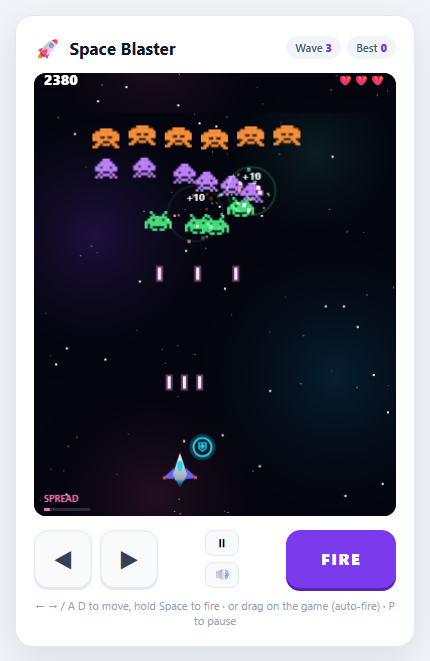
Space Blaster is a vertical arcade shooter in the style of Galaga: alien formations fly onto the screen along curved paths, sway in place, and break off one by one to dive-bomb your ship. This snippet builds the complete game on one HTML5 <canvas> with no libraries and no image files. It plays with the arrow keys or A and D and Space, with on-screen buttons, or by dragging a finger on the game, which moves the ship under your finger and fires automatically.
Formations that fly in, sway and dive
Every alien has a slot in a formation whose centre slowly drifts from side to side. A new wave starts with each alien following a quadratic Bézier curve from off-screen to its slot, staggered by a few hundredths of a second, so the formation streams in. Once in place, aliens fire now and then (shooters aim at you, tanks fire a three-way spread) and, a few at a time, break into a dive: a curve that starts at the alien, swings sideways and ends just past your ship's position below the screen. A diving alien that misses you reappears at the top and drops back into its slot. Hitting a diver is worth double, and the number of simultaneous divers, the dive rate and the fire rate all grow with the wave.
Three alien types and a mothership
Green grunts take one hit, purple shooters two and orange tanks four; each is pixel art with two animation frames, pre-rendered into small off-screen canvases (plus a white copy for the hit flash) so drawing dozens of them costs only a drawImage each. Every fifth wave is a mothership boss with a health bar: it sweeps across the top and cycles through a rotating ring of bullets, aimed three-shot bursts, and launching kamikaze grunts. Destroying it scores 1000 plus 100 per wave and drops two power-ups.
Power-ups, combos and game feel
Destroyed aliens sometimes drop a capsule: double shot, a three-way spread, rapid fire, a shield that absorbs one hit, or a rare extra life. Weapons last ten seconds, shown as timer bars along the bottom. Kills in quick succession build a combo, and every five raise the score multiplier, up to x4. Explosions combine additive particles, an expanding shockwave ring, screen shake and a filtered-noise boom from the Web Audio API; the background is a three-layer parallax starfield over a slowly scrolling nebula, and clearing a wave triggers a hyperspace streak. The ship banks as it moves, has a flickering engine flame, and blinks while it is invulnerable after a hit.
Fair and readable
The ship's hitbox is a 9-pixel circle, smaller than the drawing, and enemy bullets are bright glowing orbs so they read clearly against the stars. Losing a life clears the enemy bullets and gives two seconds of invulnerability. The game pauses on P, Escape, the pause button or a tab switch, sound can be muted, and the best score is saved in localStorage.
What's included
Features
Step by step
How to Use
- 1LaunchPress Launch. Move with the arrow keys or A and D (or the on-screen arrows) and hold Space or FIRE to shoot. On a phone, drag on the game: the ship follows your finger and fires automatically.
- 2Break the formationAliens stream in and take their places. Grunts take one hit, shooters two and tanks four. Shooters aim at you, tanks fire spreads.
- 3Watch for diversAliens break away and swoop at your ship. Dodge them or shoot them mid-dive for double points; a diver that touches you costs a life.
- 4Grab power-upsCatch falling capsules: D for double shot, S for a spread, R for rapid fire, a shield, or a heart for an extra life. Weapons last ten seconds.
- 5Build a comboKill aliens in quick succession: every five quick kills raise the multiplier, up to x4.
- 6Beat the mothershipEvery fifth wave a mothership with a health bar fires rings, aimed bursts and kamikaze grunts. Take it down for a big bonus and two power-ups.
Real-world uses
Common Use Cases
Got questions?
Frequently Asked Questions
Each alien follows a quadratic Bézier curve. When a wave starts the curve goes from a point off-screen, through a control point on the other side, to the alien's slot in the formation. A dive goes from the alien's current position, through a random point beside it, to just below your ship. After a dive the alien reappears above the screen and slides back into its slot.
Every fifth wave (5, 10, 15...). Its health is 50 plus 12 per wave, and it cycles through a ring of bullets, three aimed spread bursts, and launching two kamikaze grunts. It gets faster at switching patterns on later waves.
D gives a double shot and S a three-way spread, each for ten seconds (the newest replaces the other). R doubles the fire rate for ten seconds and can stack with either. The shield absorbs one hit, and the heart adds a life (up to five). Aliens drop a capsule 7% of the time and the mothership always drops two.
Grunts are 10, shooters 20 and tanks 40 points, doubled if the alien was diving, then multiplied by your combo (1 plus one for every five quick kills, up to x4). Each hit on the mothership is 5 points and destroying it is 1000 plus 100 per wave.
Yes. Drag anywhere on the game and the ship follows your finger and fires automatically, or use the arrow and FIRE buttons. The game pauses by itself when you switch tabs.
Each alien frame is drawn once into a tiny off-screen canvas (plus a white copy for the hit flash). Drawing the formation is then one drawImage per alien instead of dozens of fillRect calls, which keeps the frame rate steady with many enemies, particles and bullets on screen.
Copy & paste
Source Code
<div class="game-card">
  <div class="game-header">
    <div class="game-title">
      <span class="game-icon">🚀</span>
      <h2>Space Blaster</h2>
    </div>
    <div class="stat-badges">
      <span class="badge">Wave <b id="wave">1</b></span>
      <span class="badge">Best <b id="best-score">0</b></span>
    </div>
  </div>

  <div class="canvas-wrap">
    <canvas id="game-canvas" width="360" height="440"></canvas>
    <div class="hud">
      <span id="hud-score">0</span>
      <span class="lives" id="hud-lives">❤️❤️❤️</span>
    </div>
    <div class="overlay" id="start-overlay">
      <div class="overlay-card">
        <p class="overlay-title">Space Blaster</p>
        <p class="overlay-sub">Aliens fly in, then dive at you. Blast them, grab power-ups for double, spread and rapid fire, and survive the mothership every 5th wave.</p>
        <button class="btn btn-primary" id="btn-start">Launch</button>
      </div>
    </div>
    <div class="overlay hidden" id="pause-overlay">
      <div class="overlay-card">
        <p class="overlay-title">Paused</p>
        <button class="btn btn-primary" id="btn-resume">Resume</button>
      </div>
    </div>
    <div class="overlay hidden" id="gameover-overlay">
      <div class="overlay-card">
        <p class="overlay-title" id="over-title">Game Over</p>
        <p class="overlay-sub" id="final-score">Score 0</p>
        <p class="overlay-best" id="best-msg"></p>
        <button class="btn btn-primary" id="btn-retry">Play again</button>
      </div>
    </div>
  </div>

  <div class="controls">
    <div class="dpad">
      <button class="ctrl-btn" id="btn-left" aria-label="Move left">◀</button>
      <button class="ctrl-btn" id="btn-right" aria-label="Move right">▶</button>
    </div>
    <div class="mid-btns">
      <button class="mini-btn" id="btn-pause" type="button" aria-label="Pause">⏸</button>
      <button class="mini-btn" id="btn-mute" type="button" aria-label="Sound on" aria-pressed="false">🔊</button>
    </div>
    <button class="fire-btn" id="btn-fire" aria-label="Fire">FIRE</button>
  </div>

  <p class="hint-text">← → / A D to move, hold Space to fire · or drag on the game (auto-fire) · P to pause</p>
</div>
* { box-sizing: border-box; margin: 0; padding: 0; }
body { font-family: system-ui, -apple-system, sans-serif; background: #f1f5f9; min-height: 100vh; display: flex; align-items: center; justify-content: center; padding: 20px; }
.game-card { width: 100%; max-width: 400px; background: #fff; border-radius: 18px; border: 1px solid #e2e8f0; box-shadow: 0 12px 40px rgba(15,23,42,0.1); padding: 18px; user-select: none; -webkit-user-select: none; }
.game-header { display: flex; align-items: center; justify-content: space-between; margin-bottom: 12px; gap: 8px; }
.game-title { display: flex; align-items: center; gap: 8px; }
.game-icon { font-size: 20px; }
.game-title h2 { font-size: 17px; font-weight: 700; color: #0f172a; }
.stat-badges { display: flex; gap: 6px; }
.badge { font-size: 11px; font-weight: 600; color: #475569; background: #f1f5f9; padding: 4px 9px; border-radius: 20px; white-space: nowrap; }
.badge b { color: #7c3aed; }
.canvas-wrap { position: relative; border-radius: 12px; overflow: hidden; line-height: 0; touch-action: none; background: #05060f; }
canvas { display: block; width: 100%; height: auto; }
.hud { position: absolute; inset: 7px 10px auto 10px; display: flex; align-items: center; justify-content: space-between; font-size: 14px; font-weight: 800; color: #fff; font-variant-numeric: tabular-nums; text-shadow: 0 1px 4px rgba(0,0,0,0.8); pointer-events: none; }
.lives { font-size: 11px; letter-spacing: 1px; }
.overlay { position: absolute; inset: 0; background: rgba(5,6,15,0.86); display: flex; align-items: center; justify-content: center; padding: 20px; line-height: 1.4; }
.overlay.hidden { display: none; }
.overlay-card { text-align: center; }
.overlay-title { font-size: 21px; font-weight: 800; color: #fff; margin-bottom: 8px; }
.overlay-sub { font-size: 13px; color: #c7d2fe; margin-bottom: 4px; max-width: 290px; }
.overlay-best { font-size: 12px; color: #fbbf24; font-weight: 700; margin: 6px 0 0; min-height: 16px; }
.btn { padding: 11px 26px; font-size: 14px; font-weight: 700; border-radius: 10px; cursor: pointer; font-family: inherit; transition: background 0.15s; border: none; margin-top: 14px; }
.btn-primary { background: #7c3aed; color: #fff; }
.btn-primary:hover { background: #6d28d9; }
.controls { display: flex; align-items: center; justify-content: space-between; gap: 10px; margin-top: 14px; }
.dpad { display: flex; gap: 8px; }
.ctrl-btn, .fire-btn { -webkit-tap-highlight-color: transparent; touch-action: none; cursor: pointer; font-family: inherit; border: 1px solid #e2e8f0; transition: transform 0.06s, background 0.12s; }
.ctrl-btn { width: 58px; height: 58px; border-radius: 14px; background: #f8fafc; color: #334155; font-size: 22px; font-weight: 700; box-shadow: 0 2px 0 #e2e8f0; }
.ctrl-btn:active { transform: translateY(2px); box-shadow: none; background: #ede9fe; }
.mid-btns { display: flex; flex-direction: column; gap: 6px; }
.mini-btn { width: 34px; height: 26px; border: 1px solid #e2e8f0; background: #f8fafc; border-radius: 8px; font-size: 13px; line-height: 1; cursor: pointer; }
.mini-btn[aria-pressed="true"] { opacity: 0.55; }
.fire-btn { width: 110px; height: 58px; border-radius: 14px; background: #7c3aed; color: #fff; font-size: 16px; font-weight: 800; letter-spacing: 1.5px; box-shadow: 0 3px 0 #5b21b6; border-color: #7c3aed; }
.fire-btn:active { transform: translateY(3px); box-shadow: none; background: #6d28d9; }
.hint-text { font-size: 11px; color: #94a3b8; text-align: center; margin-top: 10px; }const $ = id => document.getElementById(id);
const canvas = $('game-canvas');
const ctx = canvas.getContext('2d');
const W = canvas.width, H = canvas.height;
const BEST_KEY = 'space-blaster-best';
const SHIP_Y = H - 46, SHIP_SPEED = 4.4, SHIP_R = 9, POWER_TIME = 10;
const TYPES = {
grunt: { hp: 1, pts: 10, color: '#4ade80' },
shooter: { hp: 2, pts: 20, color: '#c084fc' },
tank: { hp: 4, pts: 40, color: '#fb923c' },
};
// Pixel-art aliens, two animation frames each (X = a pixel)
const ART = {
grunt: [['..X.....X..', '...X...X...', '..XXXXXXX..', '.XX.XXX.XX.', 'XXXXXXXXXXX', 'X.XXXXXXX.X', 'X.X.....X.X', '...XX.XX...'],
['..X.....X..', 'X..X...X..X', 'X.XXXXXXX.X', 'XXX.XXX.XXX', 'XXXXXXXXXXX', '.XXXXXXXXX.', '..X.....X..', '.X.......X.']],
shooter: [['....XXX....', '...XXXXX...', '..XXXXXXX..', '.XX.XXX.XX.', '.XXXXXXXXX.', '...X...X...', '..X.XXX.X..', '.X.X...X.X.'],
['....XXX....', '...XXXXX...', '..XXXXXXX..', '.XX.XXX.XX.', '.XXXXXXXXX.', '..X.X.X.X..', '.X.......X.', '..X.....X..']],
tank: [['...XXXXX...', '.XXXXXXXXX.', 'XXXXXXXXXXX', 'XXX..X..XXX', 'XXXXXXXXXXX', '..XX...XX..', '.XX.XXX.XX.', 'XX.......XX'],
['...XXXXX...', '.XXXXXXXXX.', 'XXXXXXXXXXX', 'XXX..X..XXX', 'XXXXXXXXXXX', '...XX.XX...', '..XX.X.XX..', '...X...X...']],
};
const POWERS = [['double', 0.3, '#38bdf8', 'D'], ['spread', 0.25, '#f472b6', 'S'], ['rapid', 0.25, '#facc15', 'R'], ['shield', 0.15, '#22d3ee', '⛨'], ['life', 0.05, '#ef4444', '♥']];
let ship, bullets, eBullets, enemies, boss, drops, parts, rings, pops, stars, nebula, sprites;
let score, lives, wave, running = false, paused = false, rafId, lastFrame, phase = 'play', phaseT = 0, banner;
let fireCd = 0, weapon = 'single', weaponT = 0, rapidT = 0, shield = false, invuln = 0, combo = 0, comboT = 0, shake = 0, warp = 0, time = 0;
let keys = { left: false, right: false, fire: false }, drag = null, muted = false, ac = null, noiseBuf = null;
const startOverlay = $('start-overlay'), pauseOverlay = $('pause-overlay'), gameoverOverlay = $('gameover-overlay');
const hudScore = $('hud-score'), hudLives = $('hud-lives'), waveEl = $('wave'), bestEl = $('best-score');
const finalEl = $('final-score'), bestMsgEl = $('best-msg'), overTitle = $('over-title'), muteBtn = $('btn-mute');
const clamp = (v, a, b) => Math.max(a, Math.min(b, v));
const ease = t => t * t * (3 - 2 * t);
const qb = (a, b, c, t) => ({ x: (1 - t) * (1 - t) * a.x + 2 * (1 - t) * t * b.x + t * t * c.x, y: (1 - t) * (1 - t) * a.y + 2 * (1 - t) * t * b.y + t * t * c.y });
function getBest() { try { return parseInt(localStorage.getItem(BEST_KEY), 10) || 0; } catch (e) { return 0; } }
function setBest(v) { try { localStorage.setItem(BEST_KEY, String(v)); } catch (e) {} }
// ── Sound: Web Audio tones plus a filtered noise burst for explosions ──
function audio() { if (!ac) ac = new (window.AudioContext || window.webkitAudioContext)(); if (ac.state === 'suspended') ac.resume(); return ac; }
function tone(f, dur, type, to, vol, delay) {
if (muted) return;
try {
const a = audio(), t0 = a.currentTime + (delay || 0), o = a.createOscillator(), g = a.createGain();
o.type = type || 'square'; o.frequency.setValueAtTime(f, t0);
if (to) o.frequency.exponentialRampToValueAtTime(to, t0 + dur);
g.gain.setValueAtTime(vol || 0.04, t0); g.gain.exponentialRampToValueAtTime(0.0001, t0 + dur);
o.connect(g); g.connect(a.destination); o.start(t0); o.stop(t0 + dur + 0.02);
} catch (e) {}
}
function noise(dur, vol, freq) {
if (muted) return;
try {
const a = audio();
if (!noiseBuf) { noiseBuf = a.createBuffer(1, a.sampleRate, a.sampleRate); const d = noiseBuf.getChannelData(0); for (let i = 0; i < d.length; i++) d[i] = Math.random() * 2 - 1; }
const s = a.createBufferSource(), f = a.createBiquadFilter(), g = a.createGain();
s.buffer = noiseBuf; f.type = 'lowpass'; f.frequency.value = freq || 1200;
g.gain.setValueAtTime(vol, a.currentTime); g.gain.exponentialRampToValueAtTime(0.0001, a.currentTime + dur);
s.connect(f); f.connect(g); g.connect(a.destination); s.start(); s.stop(a.currentTime + dur);
} catch (e) {}
}
const sfx = {
laser: () => tone(1250, 0.07, 'square', 380, 0.018),
hit: () => tone(300, 0.05, 'square', 200, 0.025),
boom: big => { noise(big ? 0.9 : 0.35, big ? 0.22 : 0.12, big ? 700 : 1500); if (big) tone(120, 0.8, 'sawtooth', 30, 0.06); },
power: () => [660, 880, 1320].forEach((f, i) => tone(f, 0.09, 'triangle', 0, 0.05, i * 0.06)),
hurt: () => { noise(0.7, 0.2, 900); tone(220, 0.6, 'sawtooth', 40, 0.06); },
warn: () => [0, 0.35, 0.7].forEach(d => tone(440, 0.25, 'sawtooth', 330, 0.04, d)),
wave: () => [523, 659, 784].forEach((f, i) => tone(f, 0.12, 'square', 0, 0.035, i * 0.09)),
};
// ── Pre-rendered art: alien sprites (normal and white hit flash) and a nebula backdrop ──
function makeSprite(rows, color, s) {
const cv = document.createElement('canvas'); cv.width = Math.ceil(11 * s); cv.height = Math.ceil(8 * s);
const g = cv.getContext('2d'); g.fillStyle = color;
rows.forEach((row, y) => { for (let x = 0; x < row.length; x++) if (row[x] === 'X') g.fillRect(x * s, y * s, s + 0.4, s + 0.4); });
return cv;
}
function buildArt() {
sprites = {};
Object.keys(ART).forEach(t => { sprites[t] = ART[t].map(f => makeSprite(f, TYPES[t].color, 2.4)); sprites[t + '_w'] = ART[t].map(f => makeSprite(f, '#ffffff', 2.4)); });
nebula = document.createElement('canvas'); nebula.width = W; nebula.height = H;
const g = nebula.getContext('2d');
[[60, 120, 150, 'rgba(124,58,237,0.22)'], [300, 260, 170, 'rgba(14,165,233,0.16)'], [120, 380, 130, 'rgba(236,72,153,0.14)'], [280, 40, 110, 'rgba(45,212,191,0.12)']].forEach(b => {
const r = g.createRadialGradient(b[0], b[1], 0, b[0], b[1], b[2]); r.addColorStop(0, b[3]); r.addColorStop(1, 'rgba(0,0,0,0)');
g.fillStyle = r; g.fillRect(0, 0, W, H);
});
stars = [];
for (let i = 0; i < 90; i++) stars.push({ x: Math.random() * W, y: Math.random() * H, z: 1 + (i % 3) });
}
// ── Waves ──
function buildWave(n) {
enemies = []; boss = null; eBullets = []; drops = drops || [];
if (n % 5 === 0) {
boss = { x: W / 2, y: -70, w: 120, h: 54, hp: 50 + n * 12, max: 50 + n * 12, t: 0, mode: 0, modeT: 2.2, flash: 0, burst: 0, burstT: 0 };
banner = { text: 'WARNING: MOTHERSHIP', t: 2 }; sfx.warn();
return;
}
const rows = Math.min(5, 2 + Math.floor(n / 2)), cols = Math.min(8, 5 + Math.floor(n / 3));
let i = 0;
for (let r = 0; r < rows; r++) for (let c = 0; c < cols; c++) {
const type = r === 0 && n >= 3 ? 'tank' : r <= 1 && n >= 2 ? 'shooter' : r === 0 ? 'shooter' : 'grunt';
const side = c < cols / 2 ? -1 : 1;
enemies.push({
type, hp: TYPES[type].hp, sx: (c - (cols - 1) / 2) * 36, sy: r * 30, x: 0, y: -40, state: 'enter', t: 0, delay: i * 0.05,
path: [{ x: W / 2 + side * (W / 2 + 30), y: -30 }, { x: W / 2 - side * 90, y: 220 }], flash: 0, ph: Math.random() * 6,
});
i++;
}
banner = { text: 'WAVE ' + n, t: 1.6 }; sfx.wave();
}
const formX = () => W / 2 + Math.sin(time * 0.6) * 24;
const slotPos = e => ({ x: formX() + e.sx, y: 64 + e.sy + Math.sin(time * 2 + e.sx * 0.05) * 2 });
function resetState() {
ship = { x: W / 2, tilt: 0 };
bullets = []; eBullets = []; parts = []; rings = []; pops = []; drops = [];
score = 0; lives = 3; wave = 1; phase = 'play'; fireCd = 0; weapon = 'single'; weaponT = 0; rapidT = 0; shield = false; invuln = 0; combo = 0; comboT = 0; shake = 0; warp = 0;
buildWave(1); syncHud();
}
function syncHud() {
hudScore.textContent = score;
hudLives.textContent = '❤️'.repeat(Math.max(0, lives));
waveEl.textContent = wave;
}
// ── Effects ──
function burst(x, y, n, colors, spd) {
for (let i = 0; i < n && parts.length < 500; i++) {
const a = Math.random() * 6.283, v = (0.3 + Math.random()) * (spd || 3);
parts.push({ x, y, vx: Math.cos(a) * v, vy: Math.sin(a) * v, life: 20 + Math.random() * 25, max: 45, c: colors[(Math.random() * colors.length) | 0], s: 1.5 + Math.random() * 2.5 });
}
}
function explode(x, y, color, big) {
burst(x, y, big ? 70 : 18, [color, '#fde68a', '#ffffff', '#fb923c'], big ? 5 : 3);
rings.push({ x, y, r: 4, max: big ? 90 : 30, c: color });
shake = Math.max(shake, big ? 12 : 3);
sfx.boom(big);
}
function popup(x, y, text, color) { pops.push({ x, y, text, color: color || '#fde68a', t: 0.9 }); }
// ── Player ──
function fire() {
if (fireCd > 0) return;
fireCd = rapidT > 0 ? 0.1 : 0.2;
const x = ship.x, y = SHIP_Y - 14;
if (weapon === 'spread') [-1.9, 0, 1.9].forEach(vx => bullets.push({ x, y, vx, vy: -9 }));
else if (weapon === 'double') { bullets.push({ x: x - 7, y, vx: 0, vy: -9.5 }); bullets.push({ x: x + 7, y, vx: 0, vy: -9.5 }); }
else bullets.push({ x, y, vx: 0, vy: -9.5 });
sfx.laser();
}
function hurt() {
if (invuln > 0 || phase !== 'play') return;
if (shield) { shield = false; invuln = 1.2; sfx.hit(); rings.push({ x: ship.x, y: SHIP_Y, r: 10, max: 40, c: '#22d3ee' }); return; }
lives--; syncHud(); sfx.hurt();
explode(ship.x, SHIP_Y, '#38bdf8', true);
phase = 'dying'; phaseT = 1.4; weapon = 'single'; weaponT = 0; rapidT = 0; combo = 0;
}
function kill(e, wasDiving) {
const mult = 1 + Math.min(3, Math.floor(combo / 5));
const pts = TYPES[e.type].pts * (wasDiving ? 2 : 1) * mult;
score += pts; combo++; comboT = 1.5;
explode(e.x, e.y, TYPES[e.type].color, false);
popup(e.x, e.y - 10, '+' + pts, mult > 1 ? '#fbbf24' : '#e2e8f0');
if (Math.random() < 0.07) dropPower(e.x, e.y);
syncHud();
}
function dropPower(x, y) {
let r = Math.random(), p = POWERS[0];
for (const q of POWERS) { if (r < q[1]) { p = q; break; } r -= q[1]; }
drops.push({ x, y, type: p[0], color: p[2], label: p[3], t: 0 });
}
// ── Enemy behaviour ──
function startDive(e) {
e.state = 'dive'; e.t = 0; e.dur = Math.max(1.3, 2 - wave * 0.05); e.fired = false;
e.path = [{ x: e.x, y: e.y }, { x: e.x + (Math.random() - 0.5) * 240, y: e.y + 150 }, { x: ship.x + (Math.random() - 0.5) * 60, y: H + 40 }];
}
function enemyShot(x, y, aim, spread) {
const sp = Math.min(4.2, 2.4 + wave * 0.15);
let a = Math.PI / 2;
if (aim) a = Math.atan2(SHIP_Y - y, ship.x - x);
(spread ? [-0.22, 0, 0.22] : [0]).forEach(d => eBullets.push({ x, y, vx: Math.cos(a + d) * sp, vy: Math.sin(a + d) * sp, r: 3.5 }));
}
function updateEnemies(dt, step) {
const divers = enemies.filter(e => e.state === 'dive').length;
const maxDivers = Math.min(5, 1 + Math.floor(wave / 2));
const diveRate = 0.05 + wave * 0.015, fireRate = 0.08 + wave * 0.02;
for (const e of enemies) {
if (e.flash > 0) e.flash -= dt;
const sp = slotPos(e);
if (e.state === 'enter') {
if (e.delay > 0) { e.delay -= dt; e.x = e.path[0].x; e.y = e.path[0].y; continue; }
e.t += dt / 1.1;
const p = qb(e.path[0], e.path[1], sp, ease(Math.min(1, e.t)));
e.x = p.x; e.y = p.y;
if (e.t >= 1) e.state = 'form';
} else if (e.state === 'form') {
e.x = sp.x; e.y = sp.y;
if (phase === 'play' && divers < maxDivers && Math.random() < diveRate * dt) startDive(e);
const fr = e.type === 'grunt' ? fireRate * 0.3 : e.type === 'tank' ? fireRate * 0.6 : fireRate;
if (phase === 'play' && Math.random() < fr * dt) enemyShot(e.x, e.y + 8, e.type === 'shooter', e.type === 'tank');
} else if (e.state === 'dive') {
e.t += dt / e.dur;
const p = qb(e.path[0], e.path[1], e.path[2], Math.min(1, e.t));
e.x = p.x; e.y = p.y;
if (!e.fired && e.t > 0.3 && e.type !== 'grunt' && phase === 'play') { e.fired = true; enemyShot(e.x, e.y + 8, true, false); }
if (e.t >= 1) { if (e.kamikaze) { e.dead = true; continue; } e.state = 'return'; e.t = 0; }
} else if (e.state === 'return') {
e.t += dt / 0.9;
e.x = sp.x; e.y = -30 + (sp.y + 30) * ease(Math.min(1, e.t));
if (e.t >= 1) e.state = 'form';
}
}
}
function updateBoss(dt) {
const b = boss;
b.t += dt; if (b.flash > 0) b.flash -= dt;
b.y += (70 - b.y) * Math.min(1, dt * 1.5);
b.x = W / 2 + Math.sin(b.t * 0.7) * (W / 2 - 70);
if (phase !== 'play' || b.y < 50) return;
b.modeT -= dt;
if (b.burst > 0) { b.burstT -= dt; if (b.burstT <= 0) { b.burst--; b.burstT = 0.22; enemyShot(b.x, b.y + 20, true, true); } }
if (b.modeT <= 0) {
b.mode = (b.mode + 1) % 3; b.modeT = Math.max(1.4, 2.6 - wave * 0.05);
if (b.mode === 0) { for (let i = 0; i < 14; i++) { const a = (i / 14) * Math.PI * 2 + b.t; eBullets.push({ x: b.x, y: b.y, vx: Math.cos(a) * 2.6, vy: Math.sin(a) * 2.6 + 0.6, r: 4 }); } sfx.hit(); }
else if (b.mode === 1) { b.burst = 3; b.burstT = 0; }
else [-1, 1].forEach(s => { const m = { type: 'grunt', hp: 1, sx: 0, sy: 0, x: b.x + s * 40, y: b.y + 20, state: 'dive', flash: 0, ph: 0, kamikaze: true }; enemies.push(m); startDive(m); });
}
}
// ── Frame update ──
function update(dt) {
const step = dt * 60;
time += dt;
if (fireCd > 0) fireCd -= dt;
if (weaponT > 0) { weaponT -= dt; if (weaponT <= 0) weapon = 'single'; }
if (rapidT > 0) rapidT -= dt;
if (invuln > 0) invuln -= dt;
if (comboT > 0) { comboT -= dt; if (comboT <= 0) combo = 0; }
if (banner) { banner.t -= dt; if (banner.t <= 0) banner = null; }
warp = Math.max(0, warp - dt * 0.6);
stars.forEach(s => { s.y += s.z * (0.4 + warp * 9) * step; if (s.y > H) { s.y -= H; s.x = Math.random() * W; } });
parts.forEach(p => { p.x += p.vx * step; p.y += p.vy * step; p.vx *= 0.96; p.vy *= 0.96; p.life -= step; });
parts = parts.filter(p => p.life > 0);
rings.forEach(r => { r.r += (r.max - r.r) * 0.15 * step + 0.5; }); rings = rings.filter(r => r.r < r.max - 1);
pops.forEach(p => { p.t -= dt; p.y -= 0.5 * step; }); pops = pops.filter(p => p.t > 0);
if (shake > 0.2) shake *= Math.pow(0.86, step); else shake = 0;
if (phase === 'dying') {
phaseT -= dt;
eBullets.forEach(b => { b.x += b.vx * step; b.y += b.vy * step; });
updateEnemies(dt, step); if (boss) updateBoss(dt);
if (phaseT <= 0) { if (lives <= 0) { endGame(); return; } phase = 'play'; invuln = 2.2; ship.x = W / 2; eBullets = []; }
return;
}
if (phase === 'clear') {
phaseT -= dt;
if (phaseT <= 0) { wave++; phase = 'play'; buildWave(wave); syncHud(); }
return;
}
// Ship: keys, buttons, or drag (touch / mouse) on the canvas
let dx = (keys.right ? 1 : 0) - (keys.left ? 1 : 0);
if (drag) dx = clamp((drag.x - ship.x) / SHIP_SPEED, -1, 1);
ship.x = clamp(ship.x + dx * SHIP_SPEED * step, 16, W - 16);
ship.tilt += (dx * 0.35 - ship.tilt) * 0.2;
if (keys.fire || drag) fire();
bullets.forEach(b => { b.x += b.vx * step; b.y += b.vy * step; });
bullets = bullets.filter(b => b.y > -20 && b.x > -10 && b.x < W + 10);
eBullets.forEach(b => { b.x += b.vx * step; b.y += b.vy * step; });
eBullets = eBullets.filter(b => b.y < H + 10 && b.y > -20 && b.x > -10 && b.x < W + 10);
updateEnemies(dt, step);
if (boss) updateBoss(dt);
// Player bullets vs aliens and the mothership
for (const b of bullets) {
if (b.dead) continue;
for (const e of enemies) {
if (e.dead || e.y < -10) continue;
if (Math.abs(b.x - e.x) < 14 && Math.abs(b.y - e.y) < 11) {
b.dead = true; e.hp--; e.flash = 0.07;
if (e.hp <= 0) { e.dead = true; kill(e, e.state === 'dive'); } else sfx.hit();
break;
}
}
if (!b.dead && boss && Math.abs(b.x - boss.x) < boss.w / 2 && Math.abs(b.y - boss.y) < boss.h / 2) {
b.dead = true; boss.hp--; boss.flash = 0.06; score += 5; burst(b.x, b.y, 4, ['#fde68a', '#fff'], 2);
if (boss.hp <= 0) {
explode(boss.x, boss.y, '#a855f7', true); explode(boss.x - 30, boss.y + 10, '#f472b6', true);
const pts = 1000 + wave * 100; score += pts; popup(boss.x, boss.y, 'MOTHERSHIP +' + pts, '#fbbf24');
dropPower(boss.x - 20, boss.y); dropPower(boss.x + 20, boss.y); boss = null;
}
syncHud();
}
}
bullets = bullets.filter(b => !b.dead);
enemies = enemies.filter(e => !e.dead);
// Hits on the ship: bullets, diving aliens, the mothership
for (const b of eBullets) if (!b.dead && Math.hypot(b.x - ship.x, b.y - SHIP_Y) < SHIP_R + b.r) { b.dead = true; hurt(); }
eBullets = eBullets.filter(b => !b.dead);
for (const e of enemies) if ((e.state === 'dive') && Math.hypot(e.x - ship.x, e.y - SHIP_Y) < 18) { e.dead = true; explode(e.x, e.y, TYPES[e.type].color, false); hurt(); }
enemies = enemies.filter(e => !e.dead);
// Power-ups
for (const d of drops) {
d.y += 1.5 * step; d.t += dt;
if (Math.hypot(d.x - ship.x, d.y - SHIP_Y) < 18) {
d.dead = true; sfx.power();
if (d.type === 'double' || d.type === 'spread') { weapon = d.type; weaponT = POWER_TIME; }
else if (d.type === 'rapid') rapidT = POWER_TIME;
else if (d.type === 'shield') shield = true;
else { lives = Math.min(5, lives + 1); syncHud(); }
popup(d.x, d.y - 12, d.type === 'life' ? '+1 LIFE' : d.type.toUpperCase() + '!', d.color);
}
}
drops = drops.filter(d => !d.dead && d.y < H + 20);
// Wave cleared
if (!enemies.length && !boss && phase === 'play') { phase = 'clear'; phaseT = 1.8; warp = 1; banner = { text: 'WAVE CLEAR!', t: 1.2 }; eBullets = []; }
}
// ── Drawing ──
function drawShip() {
if (phase === 'dying' || (invuln > 0 && Math.floor(invuln * 12) % 2)) return;
const x = ship.x, y = SHIP_Y;
ctx.save(); ctx.translate(x, y); ctx.rotate(ship.tilt * 0.4);
const fl = 8 + Math.random() * 6; // engine flame
ctx.globalCompositeOperation = 'lighter';
const fg = ctx.createLinearGradient(0, 8, 0, 8 + fl); fg.addColorStop(0, 'rgba(56,189,248,0.95)'); fg.addColorStop(1, 'rgba(56,189,248,0)');
ctx.fillStyle = fg; ctx.beginPath(); ctx.moveTo(-5, 8); ctx.lineTo(5, 8); ctx.lineTo(0, 8 + fl); ctx.fill();
ctx.globalCompositeOperation = 'source-over';
ctx.fillStyle = '#6366f1'; ctx.beginPath(); ctx.moveTo(-17, 8); ctx.lineTo(-6, -2); ctx.lineTo(-6, 9); ctx.fill(); ctx.beginPath(); ctx.moveTo(17, 8); ctx.lineTo(6, -2); ctx.lineTo(6, 9); ctx.fill();
const g = ctx.createLinearGradient(0, -16, 0, 10); g.addColorStop(0, '#f8fafc'); g.addColorStop(1, '#94a3b8');
ctx.fillStyle = g; ctx.beginPath(); ctx.moveTo(0, -17); ctx.lineTo(7, 4); ctx.lineTo(5, 10); ctx.lineTo(-5, 10); ctx.lineTo(-7, 4); ctx.closePath(); ctx.fill();
ctx.fillStyle = '#22d3ee'; ctx.beginPath(); ctx.ellipse(0, -4, 2.6, 5, 0, 0, 6.3); ctx.fill();
ctx.fillStyle = '#f43f5e'; ctx.fillRect(-17, 6, 3, 3); ctx.fillRect(14, 6, 3, 3);
ctx.restore();
if (shield) { ctx.strokeStyle = 'rgba(34,211,238,' + (0.55 + Math.sin(time * 6) * 0.2).toFixed(2) + ')'; ctx.lineWidth = 2; ctx.beginPath(); ctx.arc(x, y - 2, 20, 0, 6.3); ctx.stroke(); }
}
function drawBoss() {
const b = boss, x = b.x, y = b.y;
ctx.save(); ctx.translate(x, y);
const halo = ctx.createRadialGradient(0, 0, 10, 0, 0, 90); halo.addColorStop(0, 'rgba(168,85,247,0.35)'); halo.addColorStop(1, 'rgba(168,85,247,0)');
ctx.fillStyle = halo; ctx.fillRect(-90, -90, 180, 180);
const g = ctx.createLinearGradient(0, -24, 0, 24); g.addColorStop(0, b.flash > 0 ? '#ffffff' : '#a855f7'); g.addColorStop(1, b.flash > 0 ? '#e9d5ff' : '#4c1d95');
ctx.fillStyle = g; ctx.beginPath(); ctx.ellipse(0, 4, 60, 18, 0, 0, 6.3); ctx.fill();
ctx.fillStyle = b.flash > 0 ? '#fff' : '#22d3ee'; ctx.beginPath(); ctx.ellipse(0, -6, 24, 16, 0, Math.PI, 0); ctx.fill();
ctx.fillStyle = '#1e1b4b'; ctx.fillRect(-48, 14, 10, 10); ctx.fillRect(38, 14, 10, 10); ctx.fillRect(-5, 18, 10, 10);
for (let i = 0; i < 7; i++) { ctx.fillStyle = (Math.floor(time * 6) + i) % 2 ? '#fde047' : '#f472b6'; ctx.beginPath(); ctx.arc(-45 + i * 15, 8, 2.5, 0, 6.3); ctx.fill(); }
ctx.restore();
ctx.fillStyle = 'rgba(255,255,255,0.15)'; ctx.fillRect(40, 30, W - 80, 6);
ctx.fillStyle = '#f43f5e'; ctx.fillRect(40, 30, (W - 80) * clamp(b.hp / b.max, 0, 1), 6);
}
function draw() {
ctx.fillStyle = '#05060f'; ctx.fillRect(0, 0, W, H);
const ny = (time * 6) % H;
ctx.drawImage(nebula, 0, ny); ctx.drawImage(nebula, 0, ny - H);
stars.forEach(s => {
ctx.fillStyle = s.z === 3 ? '#ffffff' : s.z === 2 ? '#c7d2fe' : '#64748b';
if (warp > 0.05) ctx.fillRect(s.x, s.y - warp * s.z * 14, 1, warp * s.z * 14 + 1); else ctx.fillRect(s.x, s.y, s.z === 3 ? 2 : 1, s.z === 3 ? 2 : 1);
});
ctx.save();
if (shake) ctx.translate((Math.random() - 0.5) * shake, (Math.random() - 0.5) * shake);
const frame = Math.floor(time * 3) % 2;
enemies.forEach(e => {
if (e.y < -30) return;
const img = (e.flash > 0 ? sprites[e.type + '_w'] : sprites[e.type])[frame];
ctx.drawImage(img, Math.round(e.x - img.width / 2), Math.round(e.y - img.height / 2));
});
if (boss) drawBoss();
ctx.globalCompositeOperation = 'lighter';
bullets.forEach(b => { ctx.fillStyle = weapon === 'spread' ? '#f9a8d4' : rapidT > 0 ? '#fde047' : '#67e8f9'; ctx.fillRect(b.x - 1.5, b.y - 7, 3, 12); ctx.globalAlpha = 0.35; ctx.fillRect(b.x - 3.5, b.y - 9, 7, 16); ctx.globalAlpha = 1; });
eBullets.forEach(b => {
const g = ctx.createRadialGradient(b.x, b.y, 0, b.x, b.y, b.r * 2.4); g.addColorStop(0, '#fff'); g.addColorStop(0.35, '#fb7185'); g.addColorStop(1, 'rgba(244,63,94,0)');
ctx.fillStyle = g; ctx.fillRect(b.x - b.r * 2.4, b.y - b.r * 2.4, b.r * 4.8, b.r * 4.8);
});
parts.forEach(p => { ctx.globalAlpha = clamp(p.life / p.max, 0, 1); ctx.fillStyle = p.c; ctx.fillRect(p.x - p.s / 2, p.y - p.s / 2, p.s, p.s); });
ctx.globalAlpha = 1;
rings.forEach(r => { ctx.strokeStyle = r.c; ctx.globalAlpha = clamp(1 - r.r / r.max, 0, 1); ctx.lineWidth = 2; ctx.beginPath(); ctx.arc(r.x, r.y, r.r, 0, 6.3); ctx.stroke(); });
ctx.globalAlpha = 1; ctx.globalCompositeOperation = 'source-over';
drops.forEach(d => {
const bob = Math.sin(d.t * 6) * 2;
ctx.fillStyle = d.color; ctx.globalAlpha = 0.25; ctx.beginPath(); ctx.arc(d.x, d.y + bob, 13, 0, 6.3); ctx.fill(); ctx.globalAlpha = 1;
ctx.fillStyle = '#0f172a'; ctx.strokeStyle = d.color; ctx.lineWidth = 2; ctx.beginPath(); ctx.arc(d.x, d.y + bob, 9, 0, 6.3); ctx.fill(); ctx.stroke();
ctx.fillStyle = d.color; ctx.font = 'bold 10px system-ui, sans-serif'; ctx.textAlign = 'center'; ctx.textBaseline = 'middle'; ctx.fillText(d.label, d.x, d.y + bob + 0.5);
});
drawShip();
ctx.font = 'bold 10px system-ui, sans-serif'; ctx.textAlign = 'center'; ctx.textBaseline = 'middle';
pops.forEach(p => { ctx.globalAlpha = clamp(p.t * 2, 0, 1); ctx.fillStyle = p.color; ctx.fillText(p.text, p.x, p.y); });
ctx.globalAlpha = 1;
ctx.restore();
// Power-up timers and combo along the bottom
let bx = 10;
const bar = (label, frac, color) => { ctx.fillStyle = color; ctx.font = 'bold 9px system-ui, sans-serif'; ctx.textAlign = 'left'; ctx.fillText(label, bx, H - 14); ctx.fillStyle = 'rgba(255,255,255,0.15)'; ctx.fillRect(bx, H - 8, 46, 3); ctx.fillStyle = color; ctx.fillRect(bx, H - 8, 46 * frac, 3); bx += 56; };
if (weaponT > 0) bar(weapon.toUpperCase(), weaponT / POWER_TIME, weapon === 'spread' ? '#f472b6' : '#38bdf8');
if (rapidT > 0) bar('RAPID', rapidT / POWER_TIME, '#facc15');
if (shield) bar('SHIELD', 1, '#22d3ee');
const mult = 1 + Math.min(3, Math.floor(combo / 5));
if (mult > 1) { ctx.font = '800 14px system-ui, sans-serif'; ctx.textAlign = 'right'; ctx.fillStyle = '#fbbf24'; ctx.fillText('x' + mult, W - 10, H - 12); }
if (banner) {
ctx.globalAlpha = clamp(banner.t * 2, 0, 1); ctx.textAlign = 'center';
ctx.font = '800 22px system-ui, sans-serif'; ctx.fillStyle = banner.text.indexOf('WARNING') === 0 ? '#f43f5e' : '#ffffff';
ctx.fillText(banner.text, W / 2, H / 2); ctx.globalAlpha = 1;
}
}
// ── Game flow ──
function loop(ts) {
if (!running) return;
if (!lastFrame) lastFrame = ts;
const dt = Math.min((ts - lastFrame) / 1000, 1 / 30);
lastFrame = ts;
update(dt);
if (running) { draw(); rafId = requestAnimationFrame(loop); }
}
function startGame() {
resetState(); running = true; paused = false; lastFrame = 0;
startOverlay.classList.add('hidden'); pauseOverlay.classList.add('hidden'); gameoverOverlay.classList.add('hidden');
rafId = requestAnimationFrame(loop);
}
function setPaused(p) {
if (!running && !paused) return;
if (p === paused) return;
paused = p;
if (p) { running = false; cancelAnimationFrame(rafId); keys = { left: false, right: false, fire: false }; drag = null; draw(); pauseOverlay.classList.remove('hidden'); }
else { pauseOverlay.classList.add('hidden'); running = true; lastFrame = 0; rafId = requestAnimationFrame(loop); }
}
function endGame() {
running = false; cancelAnimationFrame(rafId); draw();
const best = getBest();
overTitle.textContent = 'Game Over';
finalEl.textContent = 'Score ' + score + ' · reached wave ' + wave;
if (score > best) { setBest(score); bestEl.textContent = score; bestMsgEl.textContent = '🏆 New high score!'; }
else bestMsgEl.textContent = '';
gameoverOverlay.classList.remove('hidden');
}
// ── Input ──
const isFire = k => k === ' ' || k === 'ArrowUp' || k === 'w' || k === 'W' || k === 'k';
document.addEventListener('keydown', e => {
if (e.key === 'p' || e.key === 'P' || e.key === 'Escape') { if (running || paused) setPaused(!paused); return; }
if (!running) {
if (e.key === 'Enter' || e.key === ' ') {
e.preventDefault();
if (paused) setPaused(false); else if (!startOverlay.classList.contains('hidden') || !gameoverOverlay.classList.contains('hidden')) startGame();
}
return;
}
if (e.key === 'ArrowLeft' || e.key === 'a' || e.key === 'A') { keys.left = true; e.preventDefault(); }
if (e.key === 'ArrowRight' || e.key === 'd' || e.key === 'D') { keys.right = true; e.preventDefault(); }
if (isFire(e.key)) { keys.fire = true; e.preventDefault(); }
});
document.addEventListener('keyup', e => {
if (e.key === 'ArrowLeft' || e.key === 'a' || e.key === 'A') keys.left = false;
if (e.key === 'ArrowRight' || e.key === 'd' || e.key === 'D') keys.right = false;
if (isFire(e.key)) keys.fire = false;
});
document.addEventListener('visibilitychange', () => { if (document.hidden && running) setPaused(true); });
function hold(id, on, off) {
const el = $(id);
const down = e => { e.preventDefault(); on(); };
const up = e => { e.preventDefault(); off(); };
el.addEventListener('pointerdown', down);
el.addEventListener('pointerup', up);
el.addEventListener('pointercancel', up);
el.addEventListener('pointerleave', up);
el.addEventListener('contextmenu', e => e.preventDefault());
}
hold('btn-left', () => { keys.left = true; }, () => { keys.left = false; });
hold('btn-right', () => { keys.right = true; }, () => { keys.right = false; });
hold('btn-fire', () => { keys.fire = true; }, () => { keys.fire = false; });
// Drag on the game: the ship follows your finger and fires automatically
const toCanvasX = e => { const r = canvas.getBoundingClientRect(); return (e.clientX - r.left) * (W / r.width); };
canvas.addEventListener('pointerdown', e => { e.preventDefault(); if (running) drag = { x: toCanvasX(e) }; });
canvas.addEventListener('pointermove', e => { if (drag) drag.x = toCanvasX(e); });
['pointerup', 'pointercancel', 'pointerleave'].forEach(ev => canvas.addEventListener(ev, () => { drag = null; }));
$('btn-start').addEventListener('click', startGame);
$('btn-retry').addEventListener('click', startGame);
$('btn-resume').addEventListener('click', () => setPaused(false));
$('btn-pause').addEventListener('click', () => { if (running || paused) setPaused(!paused); });
muteBtn.addEventListener('click', () => {
muted = !muted; muteBtn.textContent = muted ? '🔇' : '🔊';
muteBtn.setAttribute('aria-pressed', String(muted)); muteBtn.setAttribute('aria-label', muted ? 'Sound off' : 'Sound on');
});
buildArt();
bestEl.textContent = getBest();
resetState();
draw();
/* wdp-share:start */
(function () {
var TITLE = 'Space Blaster Arcade Game', URL = 'https://webdevpuneet.com/ui-snippets/space-blaster-game/';
if (window.__wdpShare) return;
window.__wdpShare = true;
var blob = null, file = null, lastInfo = null;
/* ---- UI ---- */
var st = document.createElement('style');
st.textContent =
'.wdps-in,.wdps-btn,.wdps-box{touch-action:manipulation;-webkit-tap-highlight-color:transparent}.wdps-in{display:block;margin:12px auto 0;border:0;border-radius:12px;padding:11px 22px;font:800 15px/1 system-ui,sans-serif;background:#16a34a;color:#fff;cursor:pointer;box-shadow:0 3px 0 #11793a;pointer-events:auto;position:relative;z-index:5}' +
'.wdps-in:hover{background:#15803d}.wdps-in:active{transform:translateY(2px);box-shadow:0 1px 0 #11793a}' +
'.wdps-btn{position:fixed;right:12px;bottom:12px;z-index:2147483000;border:0;border-radius:99px;padding:9px 16px;font:700 13px/1 system-ui,sans-serif;background:#16a34a;color:#fff;cursor:pointer;box-shadow:0 3px 12px rgba(0,0,0,.3)}' +
'.wdps-btn.wdps-hot{animation:wdps-p 1.4s ease-in-out infinite}' +
'@keyframes wdps-p{0%,100%{box-shadow:0 0 0 0 rgba(22,163,74,.6),0 3px 12px rgba(0,0,0,.3)}50%{box-shadow:0 0 0 9px rgba(22,163,74,0),0 3px 12px rgba(0,0,0,.3)}}' +
'.wdps-btn:active{transform:translateY(1px)}' +
'.wdps-in[hidden],.wdps-btn[hidden],.wdps-box[hidden],.wdps-box [hidden]{display:none}' +
'.wdps-box{position:fixed;left:50%;bottom:12px;transform:translateX(-50%);z-index:2147483001;width:max-content;max-width:calc(100vw - 24px);box-sizing:border-box;background:#fff;color:#64748b;border:1px solid #d5e2ee;border-radius:12px;padding:8px 12px;font:700 12px/1.4 system-ui,sans-serif;box-shadow:0 8px 26px rgba(15,23,42,.25);display:flex;flex-wrap:wrap;gap:8px;align-items:center}' +
'.wdps-box button,.wdps-box a{border:1px solid #d5e2ee;background:#f8fafc;color:#1e293b;border-radius:99px;padding:5px 12px;font:700 12px system-ui,sans-serif;text-decoration:none;cursor:pointer}' +
'.wdps-box .wdps-x{border:0;background:none;font-size:19px;line-height:1;padding:0 4px;margin-left:auto;color:#475569}' +
'@media (max-width:700px){.wdps-box{width:calc(100vw - 24px);justify-content:center;padding:10px 12px}.wdps-box>span{width:100%;text-align:center}.wdps-box button,.wdps-box a{padding:9px 14px;font-size:13px}.wdps-box .wdps-x{position:absolute;top:4px;right:4px}.wdps-in{width:100%;max-width:320px}}';
document.head.appendChild(st);
var pill = document.createElement('button');
pill.type = 'button'; pill.className = 'wdps-btn'; pill.textContent = 'Share result';
var inl = document.createElement('button');
inl.type = 'button'; inl.className = 'wdps-in'; inl.textContent = 'Share result'; inl.hidden = true;
var box = document.createElement('div');
box.className = 'wdps-box'; box.hidden = true;
box.setAttribute('role', 'dialog'); box.setAttribute('aria-label', 'Share your result');
box.innerHTML =
'<span data-a="msg">Share your result:</span>' +
'<button type="button" data-a="copy">Copy image</button>' +
'<a data-a="dl" download="result.png">Download image</a>' +
'<button type="button" data-a="more" hidden>More…</button>' +
'<a data-a="wa" target="_blank" rel="noopener">WhatsApp</a>' +
'<a data-a="x" target="_blank" rel="noopener">X</a>' +
'<a data-a="fb" target="_blank" rel="noopener">Facebook</a>' +
'<button type="button" class="wdps-x" data-a="close" aria-label="Close share options">×</button>';
document.body.appendChild(box);
document.body.appendChild(pill);
function q(a) { return box.querySelector('[data-a="' + a + '"]'); }
function ours(el) { return el === inl || el === pill || !!el.closest('.wdps-box'); }
/* ---- reading the result from the screen ---- */
function shown(el) {
if (!el || !el.getClientRects().length) return false;
for (var n = el; n && n !== document.body; n = n.parentElement) {
var cs = getComputedStyle(n);
if (cs.display === 'none' || cs.visibility === 'hidden' || parseFloat(cs.opacity) < 0.1) return false;
if (n.hidden || n.getAttribute('aria-hidden') === 'true') return false;
}
return true;
}
function txt(el) { return (el.textContent || '').replace(/\s+/g, ' ').trim(); }
function sig(el) { return ((el.id || '') + ' ' + (typeof el.className === 'string' ? el.className : '')).toLowerCase(); }
var OUTCOME = /(you win|you won|win!|wins|victory|game over|time.?s up|cleared|complete|solved|defeat|you lose|you lost|lost|draw|crash|failed|success|congrat|score|result|finished|beat|all matched|well done|perfect|new best)/i;
var HEADSIG = /(title|headline|msg|message|banner|result|verdict|status)/;
var WIN = /(you win|you won|win!|wins|victory|cleared|complete|solved|success|congrat|beat|matched|perfect|new best|record)/i;
var LOSS = /(game over|time.?s up|defeat|you lose|you lost|lost|crash|failed|out of)/i;
var BOX = /(overlay|modal|banner|result|over|end|dialog|screen|popup|panel|card|finish|win)/;
function readResult() {
var head = '', sub = '', root = null, headEl = null;
var all = document.body.querySelectorAll('h1,h2,h3,h4,p,strong,div,span');
for (var i = 0; i < all.length && !head; i++) {
var el = all[i];
if (ours(el) || el.children.length > 2) continue;
if (!HEADSIG.test(sig(el))) continue;
/* a banner that holds its own title: use the title inside it instead */
var inner = false;
for (var c = 0; c < el.children.length; c++) if (HEADSIG.test(sig(el.children[c]))) inner = true;
if (inner) continue;
var t = txt(el);
if (t.length < 3 || t.length > 70 || !OUTCOME.test(t) || !shown(el)) continue;
head = t; headEl = el; root = el.parentElement;
}
if (root) {
var kids = root.querySelectorAll('p,span,div');
for (var j = 0; j < kids.length && !sub; j++) {
var k = kids[j];
if (ours(k) || k.children.length > 2 || !/(sub|text|summary|note|desc|detail)/.test(sig(k))) continue;
var tt = txt(k);
if (tt && tt !== head && tt.length >= 5 && tt.length <= 160 && shown(k)) sub = tt;
}
}
/* the result screen the button goes into: the nearest overlay / banner / result box around the headline */
var host = null;
for (var n = headEl, d = 0; n && n !== document.body && d < 4; n = n.parentElement, d++) {
if (d > 0 && BOX.test(sig(n)) && n.tagName !== 'BUTTON') { host = n; break; }
}
return { head: head, sub: sub, host: host };
}
var STATRE = /(score|moves|time|wpm|best|level|streak|accuracy|combo|coins|distance|height|points|stars|lives|wins|attempt|guess)/;
function readStats() {
var out = [], seen = {};
var all = document.body.querySelectorAll('span,strong,b,div,p,output');
for (var i = 0; i < all.length && out.length < 4; i++) {
var el = all[i];
if (ours(el) || el.children.length > 1) continue;
if (!STATRE.test(sig(el))) continue;
var t = txt(el);
if (!t || t.length > 28 || !/[0-9]/.test(t) || !shown(el)) continue;
if (!/[a-zA-Z]/.test(t) && el.parentElement) {
var parts = [], ch = el.parentElement.childNodes;
for (var p = 0; p < ch.length; p++) { var pv = (ch[p].textContent || '').replace(/\s+/g, ' ').trim(); if (pv) parts.push(pv); }
var pt = parts.join(' ');
if (pt.length <= 30 && /[a-zA-Z]/.test(pt)) t = pt;
}
var key = t.toLowerCase();
if (seen[key]) continue;
seen[key] = 1; out.push(t);
}
return out;
}
function bestCanvas() {
var cs = document.querySelectorAll('canvas'), best = null, area = 0;
for (var i = 0; i < cs.length; i++) {
var r = cs[i].getBoundingClientRect(), a = r.width * r.height;
if (a > area && a > 8000 && shown(cs[i])) { area = a; best = cs[i]; }
}
return best;
}
/* ---- show the button when a result is on screen ---- */
var lastHost = null, timer = 0;
function sync() {
timer = 0;
var r = readResult();
if (r.head && r.host) {
if (inl.parentElement !== r.host) r.host.appendChild(inl);
if (inl.hidden) inl.hidden = false;
if (!pill.hidden) pill.hidden = true;
} else {
if (!inl.hidden) inl.hidden = true;
if (pill.hidden) pill.hidden = false;
pill.classList.toggle('wdps-hot', !!r.head);
}
if (lastHost && !r.head && !box.hidden) box.hidden = true;
lastHost = r.head ? (r.host || document.body) : null;
}
function later() { if (!timer) timer = setTimeout(sync, 200); }
try {
new MutationObserver(function (list) {
for (var i = 0; i < list.length; i++) {
var t = list[i].target;
if (t.nodeType !== 1) t = t.parentElement;
if (t && !ours(t)) { later(); return; }
}
}).observe(document.body, { subtree: true, childList: true, characterData: true, attributes: true, attributeFilter: ['class', 'style', 'hidden'] });
} catch (e) {}
setInterval(later, 1500);
later();
/* ---- the card (1080 x 1080, drawn in memory, light like Pocket Artillery's) ---- */
var outline = 0;
function put(g, t, x, y) { if (outline) { g.lineJoin = 'round'; g.lineWidth = outline; g.strokeStyle = 'rgba(8,12,28,.85)'; g.strokeText(t, x, y); } g.fillText(t, x, y); }
function wrap(g, text, x, y, maxW, lh, maxLines) {
var words = text.split(' '), line = '', n = 0;
for (var i = 0; i < words.length; i++) {
var tst = line ? line + ' ' + words[i] : words[i];
if (g.measureText(tst).width > maxW && line) {
put(g, line, x, y); y += lh; n++; line = words[i];
if (n >= maxLines - 1) { line = words.slice(i).join(' '); break; }
} else line = tst;
}
if (line) {
while (line.length > 3 && g.measureText(line).width > maxW) line = line.slice(0, -2);
put(g, line, x, y); y += lh;
}
return y;
}
/* Biggest-screenshot card: the game frame fills the whole image, the text sits on top of it as an overlay. */
function bgOf(el) {
for (var n = el; n; n = n.parentElement) {
var c = getComputedStyle(n).backgroundColor;
if (c && c !== 'transparent' && c.slice(-4) !== ', 0)') return c;
}
return '#0f172a';
}
function drawBig(info, cv) {
var W = 1080, r = cv.width / cv.height, H = Math.max(810, Math.min(1350, Math.round(W / r)));
var c = document.createElement('canvas'); c.width = W; c.height = H;
var g = c.getContext('2d');
g.fillStyle = bgOf(cv.parentElement || cv); g.fillRect(0, 0, W, H);
var w = W, h = w / r;
if (h > H) { h = H; w = h * r; }
g.imageSmoothingEnabled = true; g.imageSmoothingQuality = 'high';
try { g.drawImage(cv, (W - w) / 2, (H - h) / 2, w, h); } catch (e) { return null; }
/* dark fades under the text so it stays readable on any game colours */
var g1 = g.createLinearGradient(0, 0, 0, H * 0.55); g1.addColorStop(0, 'rgba(8,12,28,.74)'); g1.addColorStop(1, 'rgba(8,12,28,0)');
g.fillStyle = g1; g.fillRect(0, 0, W, H * 0.55);
var g2 = g.createLinearGradient(0, H - 200, 0, H); g2.addColorStop(0, 'rgba(8,12,28,0)'); g2.addColorStop(1, 'rgba(8,12,28,.85)');
g.fillStyle = g2; g.fillRect(0, H - 200, W, 200);
var head = info.head || 'Can you beat me?';
var kind = /draw|tie/i.test(head) ? 'draw' : LOSS.test(head) && !WIN.test(head) ? 'loss' : 'win';
g.textAlign = 'center';
var y = 36;
g.fillStyle = 'rgba(255,255,255,.93)'; g.font = '800 34px system-ui, sans-serif'; outline = 7;
y = wrap(g, TITLE.toUpperCase(), W / 2, y + 34, 1000, 42, 1);
g.fillStyle = kind === 'draw' ? '#e2e8f0' : kind === 'loss' ? '#9db8ff' : '#ffc233';
var big = head.length > 22 ? 84 : 112; g.font = '900 ' + big + 'px system-ui, sans-serif'; outline = 16;
y = wrap(g, head, W / 2, y + big * 0.85, 1000, big * 1.05, 2);
if (info.sub) { g.fillStyle = '#fff'; g.font = '700 40px system-ui, sans-serif'; outline = 9; y = wrap(g, info.sub, W / 2, y + 6, 980, 50, 2); }
outline = 0;
if (info.stats.length) {
g.font = '800 38px system-ui, sans-serif';
var gap = 16, pad = 26, ws = [], tot = -gap;
for (var i = 0; i < info.stats.length; i++) { ws.push(g.measureText(info.stats[i]).width + pad * 2); tot += ws[i] + gap; }
var sc = tot > 960 ? 960 / tot : 1, px = (W - tot * sc) / 2, py = y + 14;
for (var k = 0; k < info.stats.length; k++) {
var w0 = ws[k] * sc;
g.fillStyle = 'rgba(8,12,28,.72)'; g.strokeStyle = 'rgba(255,255,255,.55)'; g.lineWidth = 3;
g.beginPath();
if (g.roundRect) g.roundRect(px, py, w0, 68, 34); else g.rect(px, py, w0, 68);
g.fill(); g.stroke();
g.fillStyle = '#fff'; g.font = '800 ' + Math.round(38 * sc) + 'px system-ui, sans-serif';
g.fillText(info.stats[k], px + w0 / 2, py + 47);
px += w0 + gap * sc;
}
}
outline = 8;
g.fillStyle = '#fff'; g.font = '900 52px system-ui, sans-serif'; put(g, 'Can you beat it?', W / 2, H - 84);
g.fillStyle = 'rgba(255,255,255,.92)'; g.font = '700 34px system-ui, sans-serif'; outline = 6; put(g, 'Play free at webdevpuneet.com', W / 2, H - 34);
outline = 0;
return c;
}
function finish(c, cb) {
var dataUrl = '';
try { dataUrl = c.toDataURL('image/png'); } catch (e) {}
try { c.toBlob(function (b) { cb(b, dataUrl); }, 'image/png'); } catch (e) { cb(null, dataUrl); }
}
function makeCard(info, cb) {
var cv0 = bestCanvas();
if (cv0) { var bc = drawBig(info, cv0); if (bc) { finish(bc, cb); return; } }
var S = 1080, c = document.createElement('canvas');
c.width = S; c.height = S;
var g = c.getContext('2d');
var gr = g.createLinearGradient(0, 0, 0, S);
gr.addColorStop(0, '#eaf4ff'); gr.addColorStop(1, '#fff3ef');
g.fillStyle = gr; g.fillRect(0, 0, S, S);
var cv = bestCanvas();
var head = info.head || 'Can you beat me?';
var kind = /draw|tie/i.test(head) ? 'draw' : LOSS.test(head) && !WIN.test(head) ? 'loss' : 'win';
g.textAlign = 'center';
g.fillStyle = '#1e293b'; g.font = '800 60px system-ui, sans-serif';
var y = wrap(g, TITLE, S / 2, cv ? 120 : 200, 980, 68, 1);
g.fillStyle = kind === 'draw' ? '#475569' : kind === 'loss' ? '#3b63e0' : '#e8553a';
g.font = '800 ' + (head.length > 22 ? 76 : 100) + 'px system-ui, sans-serif';
y = wrap(g, head, S / 2, y + (head.length > 22 ? 70 : 90), 980, head.length > 22 ? 84 : 108, 2);
if (info.sub) { g.fillStyle = '#475569'; g.font = '700 38px system-ui, sans-serif'; y = wrap(g, info.sub, S / 2, y + 4, 940, 48, 2); }
if (info.stats.length) {
g.font = '800 36px system-ui, sans-serif';
var gap = 18, pad = 26, ws = [], tot = -gap;
for (var i = 0; i < info.stats.length; i++) { ws.push(g.measureText(info.stats[i]).width + pad * 2); tot += ws[i] + gap; }
var sc = tot > 1000 ? 1000 / tot : 1, px = (S - tot * sc) / 2, py = y + 14;
for (var k = 0; k < info.stats.length; k++) {
var w0 = ws[k] * sc;
g.fillStyle = '#ffffff'; g.strokeStyle = '#d5e2ee'; g.lineWidth = 3;
g.beginPath();
if (g.roundRect) g.roundRect(px, py, w0, 64, 32); else g.rect(px, py, w0, 64);
g.fill(); g.stroke();
g.fillStyle = '#1e293b'; g.font = '800 ' + Math.round(36 * sc) + 'px system-ui, sans-serif';
g.fillText(info.stats[k], px + w0 / 2, py + 44);
px += w0 + gap * sc;
}
y = py + 64 + 10;
}
if (cv) {
try {
var maxW = 960, maxH = Math.max(180, 930 - y - 30), r = cv.width / cv.height;
var w = maxW, h = w / r;
if (h > maxH) { h = maxH; w = h * r; }
var x = (S - w) / 2, yy = y + 20 + Math.max(0, (maxH - h) / 2);
g.save(); g.shadowColor = 'rgba(60,100,140,0.3)'; g.shadowBlur = 30; g.shadowOffsetY = 10;
g.fillStyle = '#fff'; g.fillRect(x - 8, yy - 8, w + 16, h + 16); g.restore();
g.drawImage(cv, x, yy, w, h);
} catch (e) {}
}
g.fillStyle = '#1e293b'; g.font = '800 46px system-ui, sans-serif';
g.fillText('Can you beat it?', S / 2, 1000);
g.fillStyle = '#64748b'; g.font = '700 34px system-ui, sans-serif';
g.fillText('Play free at webdevpuneet.com', S / 2, 1050);
var dataUrl = '';
try { dataUrl = c.toDataURL('image/png'); } catch (e) {}
try { c.toBlob(function (b) { cb(b, dataUrl); }, 'image/png'); } catch (e) { cb(null, dataUrl); }
}
function shareText(info) {
var bits = [];
if (info.head) bits.push(info.head);
if (info.stats.length) bits.push(info.stats.join(', '));
return TITLE + ': ' + (bits.length ? bits.join(' - ') + '. ' : '') + 'Can you beat it? ' + URL;
}
function msg(t) { q('msg').textContent = t; }
function openFallback() {
var t = encodeURIComponent(shareText(lastInfo));
q('wa').href = 'https://wa.me/?text=' + t;
q('x').href = 'https://twitter.com/intent/tweet?text=' + t;
q('fb').href = 'https://www.facebook.com/sharer/sharer.php?u=' + encodeURIComponent(URL) + '"e=' + t;
box.hidden = false;
}
function nativeShare() {
/* a user cancel does nothing; anything else (blocked in an iframe, no permission) shows Copy / Download / links */
try {
navigator.share({ files: [file], title: TITLE, text: shareText(lastInfo) }).catch(function (e) { if (!e || e.name !== 'AbortError') openFallback(); });
} catch (e) { openFallback(); }
}
function onShare() {
var info = readResult(); info.stats = readStats();
lastInfo = info;
msg('Share your result:');
makeCard(info, function (b, dataUrl) {
blob = b; file = null;
if (b) { try { file = new File([b], 'result.png', { type: 'image/png' }); } catch (e) {} }
if (dataUrl) q('dl').href = dataUrl;
q('dl').hidden = !dataUrl;
var canNative = !!(file && navigator.share && navigator.canShare && navigator.canShare({ files: [file] }));
var touch = !!(window.matchMedia && window.matchMedia('(pointer: coarse)').matches);
q('more').hidden = !canNative;
if (canNative && touch) nativeShare();
else openFallback();
});
}
/* Games often have document/window level touch and pointer handlers (some call preventDefault, which cancels the tap's
click on phones, others restart the game on touchstart). So: keep every pointer event on our controls away from the
game, and fire on touchend as well as click (guarded so one tap shares once). */
var busy = 0;
function trigger() { if (busy) return; busy = 1; setTimeout(function () { busy = 0; }, 700); onShare(); }
function guard(el, act) {
var evs = ['pointerdown', 'pointerup', 'mousedown', 'mouseup', 'touchstart', 'touchend', 'click'];
for (var i = 0; i < evs.length; i++) el.addEventListener(evs[i], function (e) { e.stopPropagation(); });
if (act) {
el.addEventListener('touchend', function (e) { if (e.cancelable) e.preventDefault(); act(); });
el.addEventListener('click', function () { act(); });
}
}
guard(pill, trigger);
guard(inl, trigger);
guard(box);
q('more').addEventListener('click', function () { if (file) nativeShare(); });
q('close').addEventListener('click', function () { box.hidden = true; });
document.addEventListener('keydown', function (e) { if (e.key === 'Escape' && !box.hidden) box.hidden = true; });
q('copy').addEventListener('click', function () {
try {
navigator.clipboard.write([new ClipboardItem({ 'image/png': blob })]).then(
function () { msg('Image copied. Paste it into your chat or post.'); },
function () { msg('Could not copy here. Try Download image.'); }
);
} catch (e) { msg('Copying images is not supported here. Try Download image.'); }
});
})();
/* wdp-share:end */Extend with AI
Take This Snippet Further With AI
Paste this snippet's HTML, CSS and JS into an AI assistant like Claude and ask it to explain the Bézier entry and dive paths, the formation slots, the boss attack cycle and the power-up system. It is a good base to extend: ask for a tractor-beam alien that captures your ship (as in Galaga), a bomb that clears the screen, ship upgrades bought between waves, a two-player mode, gamepad support, or a port to a React component with the game state in a ref. Treat it as a working prototype to question and rebuild.
Prompt to recreate it
Copy this into your AI assistant of choice to build the effect from scratch, or as a jumping-off point for your own variant:
Build a complete Galaga-style vertical shooter on an HTML5 canvas in plain HTML, CSS and JavaScript, with no libraries and no image files.

Requirements:
- A ship at the bottom that moves left and right (arrow keys, A and D, on-screen buttons, or dragging on the canvas, which also auto-fires) and shoots with Space or a FIRE button, with a banking tilt and an engine flame.
- Waves of aliens in a formation whose centre drifts side to side. Each alien enters along a quadratic Bézier curve with a staggered delay, then fires now and then and breaks off into curved dives toward the ship, returning to its slot from the top if it misses. Dive count, dive rate and fire rate grow with the wave.
- Three alien types (1, 2 and 4 hit points) drawn as two-frame pixel art from strings, pre-rendered to off-screen canvases with a white hit-flash copy. Shooters aim at the player, tanks fire spreads.
- A mothership boss every fifth wave with a health bar and three rotating attacks: a ring of bullets, aimed spread bursts, and kamikaze grunts.
- Power-up capsules (double shot, spread, rapid fire, shield, extra life) with timer bars, a combo multiplier up to x4, double points for diving aliens, and a boss bonus.
- Additive particle explosions, shockwave rings, screen shake, a parallax starfield over a scrolling nebula and a hyperspace streak between waves. Invulnerability blink after a hit, a small circular ship hitbox, wave and warning banners.
- Web Audio sound (lasers, noise-burst explosions, alarms) with a mute button, pause on P, a button and tab switch, and the best score in localStorage (with try/catch).
Want to tighten it up first? Run this prompt through the AI Prompt Studio to score it across 8 quality dimensions, catch anti-patterns, and tune the wording for Claude, ChatGPT, or Gemini before you paste it in.