
About this UI Snippet
Battleship vs Computer — Fleet Placement, Probability AI, 12 Levels, Sonar and a Daily Fleet
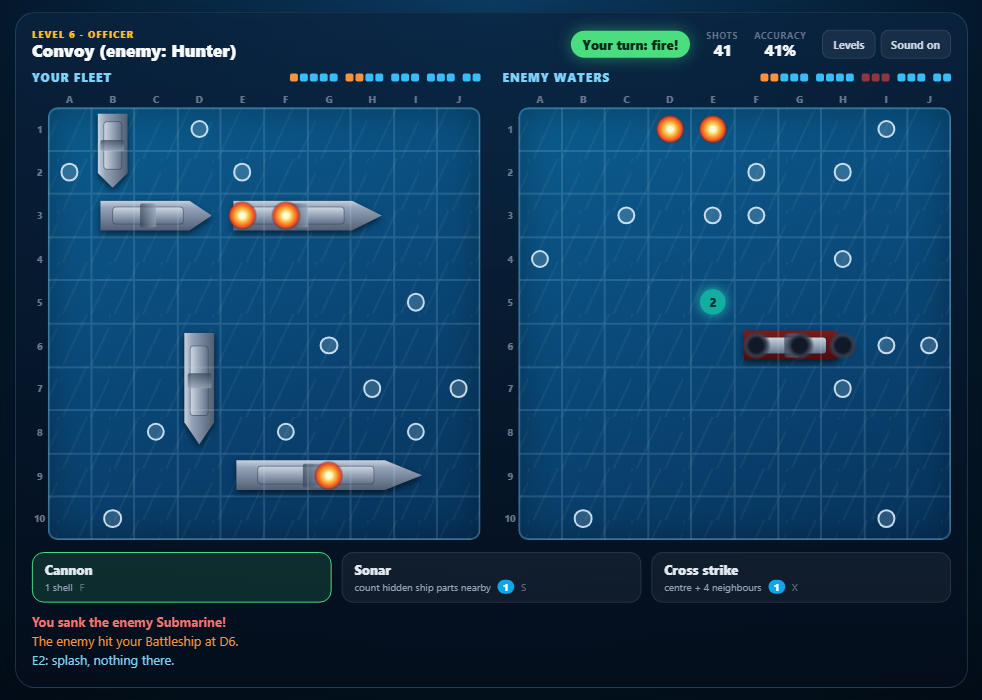
Battleship is a game of hidden information: two fleets on two grids, and each player only sees the shots they have fired. This version is a full game against a computer captain, not just a ship-finding puzzle. You place your own fleet, take turns firing with an opponent that really hunts you, and can use special weapons. It has 12 levels, a Daily Fleet with a streak, stars, saved progress and synthesized sound, in plain HTML, CSS and JavaScript with no libraries, images or audio files.
Two fleets, one model
Each side is a small object made by makeSide(): a grid of ship indexes (occ), a grid of shots fired at it (fired: 0 untouched, 1 miss, 2 hit) and a list of ships with their cells, hits and sunk flag. Your side and the enemy side use exactly the same functions, so resolve() can fire at either one, and the win test is the same allSunk() call. The boards themselves are plain CSS grids with an animated water background, and every ship is one absolutely positioned hull element sized in percentages of the board, so the same code draws an 8x8 and a 10x10 grid.
Placing your fleet
Your fleet starts randomly placed, and you can rearrange it: choose a ship in the dock, hover the grid to see a ghost hull that turns red if it would overlap another ship, and click to place it. R or a right click rotates, clicking a placed ship picks it up again, and Randomize and Clear are one click away. Ships are clamped so they always stay on the board. The enemy fleet is placed with the same randomFleet(), and for the Daily Fleet it uses a seeded random generator (mulberry32), so every player gets the same enemy layout on the same day.
An enemy captain with four levels of skill
aiPick(skill) is the opponent. Skill 0 fires at random and follows up a hit. Skill 1 hunts on a checkerboard pattern (every ship is at least two cells long, so half the cells are enough to find it) and extends lines of hits. Skills 2 and 3 use a probability map: for every ship still afloat, the AI counts every position and direction where it could still fit given the misses and the sunk ships, adds that weight to each open cell, and gives a big bonus to placements that cover a known hit. Skill 2 picks randomly among the three best cells, skill 3 always takes the best one. The AI only uses information a real player would have: hits, misses and which ships have been sunk.
Special weapons that cost a turn
Sonar pings a cell and shows how many hidden ship parts are within one square, without firing. The cross strike fires at a cell and its four neighbours in one turn. Both are limited per level, and the later levels give you fewer of them, down to none on the final level. Hovering previews exactly which cells a weapon will touch.
Levels, stars and the daily fleet
The LEVELS array holds 12 levels in four tiers (Recruit, Officer, Captain, Admiral) with the grid size, the enemy skill, the number of sonar pings and strikes, and two par values. Three stars for sinking the enemy fleet within the first par, two within the second, one for any win. Winning a level unlocks the next. Stars, best shot counts and the Daily Fleet streak are saved to localStorage inside try/catch, so the game also runs in a sandboxed iframe.
Feel
Shells splash with a ripple, hits explode into flames and turn into smoke when the ship sinks, your panel shakes when the enemy hits you, and a battle log tells you what just happened. Explosions and splashes are generated as filtered noise with the Web Audio API. The whole game scales to the space it is given, and on phones the boards stack and the page scrolls.
What's included
Features
Step by step
How to Use
- 1Pick a level or the Daily FleetThe menu shows 12 levels in four tiers with your stars. Level 1 is open at first and each win unlocks the next level. The gold Daily Fleet card starts the enemy layout of the day, which is the same for every player.
- 2Place your fleetYour ships start randomly placed. Click a ship in the dock and then your grid to move it, press R or right-click to rotate, or click a placed ship to pick it up. Randomize and Clear are in the toolbar. Press Start battle (or Enter) when you are happy.
- 3Fire at the enemy watersClick a cell on the right grid (or move with the arrow keys and press Enter). A red flame is a hit, a ring is a miss. When all the cells of a ship are hit it sinks and its hull appears on the map.
- 4Use sonar and cross strikesPress S to ping with sonar: it shows how many hidden ship parts are within one square of a cell and costs your turn. Press X for a cross strike that fires at a cell and its four neighbours. Press F to go back to the cannon. Each level gives you a limited number.
- 5Beat the enemy captainAfter each of your turns the enemy fires at your fleet. Higher levels use smarter captains that hunt on a pattern and calculate where your ships can still be. Sink all their ships before they sink yours.
- 6Earn stars and keep your streakSink the enemy fleet in few shots for 3 stars, the par is shown on the result screen. Clearing the Daily Fleet on consecutive days builds a streak, and Copy result puts a share line on your clipboard.
Real-world uses
Common Use Cases
Got questions?
Frequently Asked Questions
It depends on the level. The easiest captain fires at random and follows up a hit. The next one hunts on a checkerboard pattern and extends lines of hits. The two strongest use a probability map: aiPick() counts every position where each surviving ship could still fit, given the misses and the sunk ships, adds a big bonus for placements that cover a known hit, and fires at the cell with the highest total. It never looks at your real ship positions.
No. It reads only your fired grid (hits and misses) and which of your ships have been sunk, exactly the information a human opponent gets. The strongest captain is simply good at statistics.
Winning gives one star. Sinking the enemy fleet within the second par value gives two, and within the first par value gives three. The par values are in the LEVELS array and are shown on the result screen. Losing gives no stars, and a win unlocks the next level.
Add an object to the LEVELS array with a name, grid (small for 8x8, classic for 10x10), ai (0 to 3), the number of sonar pings and strikes, and the two par values. The menu draws three levels per tier, so add levels in groups of three or extend the TIERS array. A new grid size is one more entry in GRIDS with a size and a fleet list.
todayNumber() counts days since a fixed start date, and the enemy fleet is placed with randomFleet() using a mulberry32 generator seeded from that number. The same seed gives the same layout, so every player faces the same enemy fleet that day. Clearing it on the next day adds one to your streak, and a missed day resets it.
Yes. All localStorage reads and writes are in try/catch, so a blocked storage only means progress is not saved. The AudioContext is created when you start a level and every sound call is wrapped. On wide areas the game scales down to fit, and on narrow ones the boards stack and the page scrolls. Cells respond to pointer events, so it is playable by touch.
Copy & paste
Source Code
<div class="bs-fit" id="bs-fit"><div class="bs-wrap" id="bs-wrap">
<div class="bs-panel" id="bs-panel">
<div class="bs-hud">
<div class="bs-hud-left">
<span class="bs-kicker" id="bs-kicker">Battleship</span>
<span class="bs-name" id="bs-name">Pick a level</span>
</div>
<div class="bs-turn" id="bs-turn"></div>
<div class="bs-stat"><span class="bs-label">Shots</span><b id="bs-shots">0</b></div>
<div class="bs-stat"><span class="bs-label">Accuracy</span><b id="bs-acc">0%</b></div>
<div class="bs-hud-btns">
<button class="bs-btn-sm" id="bs-levels-btn" type="button" title="Levels (Esc)">Levels</button>
<button class="bs-btn-sm" id="bs-mute" type="button" aria-pressed="false">Sound on</button>
</div>
</div>
<div class="bs-boards">
<section class="bs-side" id="bs-side-me">
<header class="bs-side-head"><h3>Your fleet</h3><div class="bs-fleet" id="bs-fleet-me"></div></header>
<div class="bs-gridwrap" id="bs-wrap-me"></div>
</section>
<section class="bs-side" id="bs-side-en">
<header class="bs-side-head"><h3>Enemy waters</h3><div class="bs-fleet" id="bs-fleet-en"></div></header>
<div class="bs-gridwrap" id="bs-wrap-en"></div>
</section>
</div>
<div class="bs-controls" id="bs-place">
<div class="bs-dock" id="bs-dock"></div>
<div class="bs-ctl-btns">
<button class="bs-btn-sm" id="bs-rotate" type="button">Rotate <em>R</em></button>
<button class="bs-btn-sm" id="bs-random" type="button">Randomize</button>
<button class="bs-btn-sm" id="bs-clear" type="button">Clear</button>
<button class="bs-btn" id="bs-start" type="button">Start battle <em>Enter</em></button>
</div>
</div>
<div class="bs-controls" id="bs-weapons">
<button class="bs-weapon" id="bs-w-shot" type="button"><b>Cannon</b><span>1 shell <em>F</em></span></button>
<button class="bs-weapon" id="bs-w-sonar" type="button"><b>Sonar</b><span>count hidden ship parts nearby <i id="bs-sonar-count">0</i> <em>S</em></span></button>
<button class="bs-weapon" id="bs-w-strike" type="button"><b>Cross strike</b><span>centre + 4 neighbours <i id="bs-strike-count">0</i> <em>X</em></span></button>
</div>
<div class="bs-log" id="bs-log"></div>
<div class="bs-overlay show" id="bs-menu">
<p class="bs-logo">Battleship</p>
<p class="bs-tagline">Place your fleet, hunt the enemy fleet and sink every ship before they sink yours.</p>
<div class="bs-menu-row">
<button class="bs-daily" id="bs-daily" type="button">
<span class="bs-daily-title" id="bs-daily-title">Daily Fleet</span>
<span class="bs-daily-sub" id="bs-daily-sub">The same enemy fleet for everyone</span>
</button>
<div class="bs-totals"><span><b id="bs-star-total">0</b> / 36 stars</span><span>Daily streak <b id="bs-streak">0</b></span></div>
</div>
<div class="bs-tiers" id="bs-tiers"></div>
</div>
<div class="bs-overlay" id="bs-result">
<p class="bs-result-title" id="bs-result-title">Victory!</p>
<div class="bs-result-stars" id="bs-result-stars"><span>★</span><span>★</span><span>★</span></div>
<p class="bs-result-sub" id="bs-result-sub"></p>
<div class="bs-result-btns">
<button class="bs-btn" id="bs-next" type="button">Next level</button>
<button class="bs-btn bs-btn-ghost" id="bs-retry" type="button">Rematch</button>
<button class="bs-btn bs-btn-ghost" id="bs-share" type="button">Copy result</button>
<button class="bs-btn bs-btn-ghost" id="bs-menu-back" type="button">Levels</button>
</div>
</div>
</div>
</div></div>* { box-sizing: border-box; margin: 0; padding: 0; }
body {
font-family: system-ui, -apple-system, 'Segoe UI', sans-serif; color: #e2e8f0;
background: radial-gradient(ellipse at top, #0d3b63 0%, #061a30 55%, #030a14 100%);
min-height: 100vh; display: flex; align-items: center; justify-content: center; padding: 12px 14px; overflow: hidden;
}
/* The game scales itself to the space it is given (fitToView in the script): .bs-fit takes the scaled size,
.bs-wrap is laid out at its natural size and then shrunk with transform. */
.bs-fit { flex: none; }
.bs-wrap { width: 960px; transform-origin: top left; }
.bs-panel {
position: relative; display: flex; flex-direction: column; gap: 10px; padding: 16px; border-radius: 20px; overflow: hidden;
background: linear-gradient(180deg, rgba(10,36,64,0.78), rgba(4,14,28,0.94));
border: 1px solid rgba(125,211,252,0.18);
box-shadow: 0 30px 80px rgba(0,0,0,0.55), 0 0 90px rgba(14,165,233,0.12);
}
.bs-panel.shake { animation: bs-shake 0.35s ease; }
@keyframes bs-shake { 20%, 60% { transform: translate(-4px, 2px); } 40%, 80% { transform: translate(4px, -2px); } }
.bs-hud { display: flex; align-items: center; gap: 16px; flex-wrap: wrap; }
.bs-hud-left { display: flex; flex-direction: column; line-height: 1.15; margin-right: auto; min-width: 0; }
.bs-kicker { font-size: 10px; font-weight: 800; letter-spacing: 0.09em; text-transform: uppercase; color: #fbbf24; }
.bs-name { font-size: 17px; font-weight: 800; color: #f8fafc; white-space: nowrap; }
.bs-turn { font-size: 13px; font-weight: 800; padding: 5px 12px; border-radius: 999px; background: rgba(255,255,255,0.06); color: #94a3b8; }
.bs-turn.me { color: #052e16; background: #4ade80; box-shadow: 0 0 16px rgba(74,222,128,0.45); }
.bs-turn.ai { color: #422006; background: #fbbf24; animation: bs-pulse 0.9s ease-in-out infinite alternate; }
@keyframes bs-pulse { to { opacity: 0.6; } }
.bs-stat { display: flex; flex-direction: column; align-items: center; line-height: 1.15; }
.bs-label { font-size: 9px; font-weight: 700; letter-spacing: 0.08em; text-transform: uppercase; color: #64748b; }
.bs-stat b { font-size: 16px; font-weight: 800; color: #f1f5f9; font-variant-numeric: tabular-nums; }
.bs-hud-btns { display: flex; gap: 5px; }
.bs-btn-sm {
background: rgba(255,255,255,0.06); color: #cbd5e1; border: 1px solid rgba(255,255,255,0.1); border-radius: 8px;
padding: 6px 10px; font: inherit; font-size: 11px; font-weight: 700; cursor: pointer; transition: background 0.12s;
}
.bs-btn-sm:hover:not(:disabled) { background: rgba(255,255,255,0.14); }
.bs-btn-sm:disabled { opacity: 0.35; cursor: not-allowed; }
.bs-btn-sm em, .bs-btn em { font-style: normal; font-size: 9px; opacity: 0.6; margin-left: 4px; }
.bs-boards { display: flex; gap: 22px; }
.bs-side { flex: 1; min-width: 0; display: flex; flex-direction: column; gap: 6px; }
.bs-side-head { display: flex; align-items: center; justify-content: space-between; gap: 8px; }
.bs-side-head h3 { font-size: 12px; font-weight: 800; letter-spacing: 0.08em; text-transform: uppercase; color: #7dd3fc; }
.bs-fleet { display: flex; gap: 8px; align-items: center; }
.bs-pips { display: inline-flex; gap: 2px; }
.bs-pips i { width: 8px; height: 8px; border-radius: 2px; background: #38bdf8; }
.bs-pips.hurt i.on { background: #fb923c; }
.bs-pips.sunk i { background: #ef4444; opacity: 0.6; }
.bs-pips.sunk { text-decoration: line-through; }
.bs-gridwrap { position: relative; padding: 16px 0 0 16px; }
.bs-axis-x, .bs-axis-y { position: absolute; display: grid; font-size: 10px; font-weight: 800; color: #64748b; text-align: center; pointer-events: none; }
.bs-axis-x { top: 0; left: 16px; right: 0; height: 16px; line-height: 16px; }
.bs-axis-y { left: 0; top: 16px; bottom: 0; width: 16px; align-items: center; }
.bs-grid {
position: relative; aspect-ratio: 1 / 1; border-radius: 10px; overflow: hidden;
background:
repeating-linear-gradient(115deg, rgba(255,255,255,0.05) 0 2px, transparent 2px 26px),
linear-gradient(160deg, #0b5d8f 0%, #0a4a7a 45%, #07335c 100%);
background-size: 52px 52px, auto; animation: bs-waves 7s linear infinite;
box-shadow: inset 0 0 0 2px rgba(125,211,252,0.3), inset 0 0 40px rgba(0,0,0,0.35);
}
@keyframes bs-waves { to { background-position: 52px 0, 0 0; } }
.bs-ships { position: absolute; inset: 0; pointer-events: none; }
.bs-cells { position: relative; display: grid; width: 100%; height: 100%; }
.bs-cell {
position: relative; border: 1px solid rgba(186,230,253,0.16); cursor: default;
display: flex; align-items: center; justify-content: center; transition: background 0.1s;
}
.bs-side.live .bs-cell:not(.hit):not(.miss) { cursor: crosshair; }
.bs-side.live .bs-cell:not(.hit):not(.miss):hover { background: rgba(125,211,252,0.28); }
.bs-cell.pv { background: rgba(125,211,252,0.34); box-shadow: inset 0 0 0 1px rgba(224,242,254,0.8); }
.bs-cell.pv.bad { background: rgba(248,113,113,0.45); box-shadow: inset 0 0 0 1px #fca5a5; }
.bs-cell.cur { box-shadow: inset 0 0 0 2px #fde68a; }
.bs-cell .mk { position: absolute; left: 50%; top: 50%; width: 70%; height: 70%; transform: translate(-50%, -50%); border-radius: 50%; display: none; pointer-events: none; }
.bs-cell.miss .mk { display: block; width: 44%; height: 44%; border: 2px solid rgba(224,242,254,0.85); background: rgba(224,242,254,0.18); }
.bs-cell.hit .mk {
display: block; z-index: 3;
background: radial-gradient(circle, #fffbd0 0 14%, #fdba3c 32%, #ef4a1d 58%, rgba(127,29,29,0.5) 66%, transparent 72%);
animation: bs-flicker 0.5s ease-in-out infinite alternate;
}
.bs-cell.hit.sunk .mk { background: radial-gradient(circle, #111827 0 34%, rgba(55,65,81,0.9) 52%, transparent 72%); animation: none; }
@keyframes bs-flicker { from { transform: translate(-50%, -50%) scale(0.9); } to { transform: translate(-50%, -50%) scale(1.08); } }
.bs-cell.new.miss .mk { animation: bs-ripple 0.7s ease-out; }
.bs-cell.new.hit .mk { animation: bs-boom 0.7s ease-out, bs-flicker 0.5s ease-in-out 0.7s infinite alternate; }
@keyframes bs-ripple { 0% { transform: translate(-50%, -50%) scale(2.6); opacity: 0; } 100% { transform: translate(-50%, -50%) scale(1); opacity: 1; } }
@keyframes bs-boom { 0% { transform: translate(-50%, -50%) scale(0.2); opacity: 0; } 35% { transform: translate(-50%, -50%) scale(1.9); opacity: 1; filter: brightness(1.8); } 100% { transform: translate(-50%, -50%) scale(1); } }
.bs-cell .sn {
display: none; position: absolute; z-index: 2; width: 62%; height: 62%; border-radius: 50%; align-items: center; justify-content: center;
background: rgba(20,184,166,0.9); color: #042f2e; font-size: 12px; font-weight: 900; box-shadow: 0 0 12px rgba(45,212,191,0.8);
}
.bs-cell.ping .sn { display: flex; animation: bs-pop 0.4s cubic-bezier(0.2, 1.6, 0.4, 1); }
.bs-cell.hit .sn, .bs-cell.miss .sn { display: none; }
@keyframes bs-pop { from { transform: scale(0.2); } to { transform: scale(1); } }
.bs-hull { position: absolute; filter: drop-shadow(0 3px 3px rgba(0,0,0,0.55)); transition: opacity 0.3s; }
.bs-hull-body {
position: absolute; inset: 7%;
background: linear-gradient(180deg, #e2e8f0 0%, #94a3b8 30%, #475569 100%);
clip-path: polygon(0 10%, 80% 10%, 100% 50%, 80% 90%, 0 90%);
}
.bs-hull-body::before { content: ''; position: absolute; left: 12%; right: 26%; top: 28%; height: 44%; border-radius: 3px; background: linear-gradient(180deg, #cbd5e1, #64748b); box-shadow: 0 0 0 1px rgba(15,23,42,0.35); }
.bs-hull-body::after { content: ''; position: absolute; left: 36%; width: 14%; top: 18%; height: 64%; border-radius: 2px; background: linear-gradient(90deg, #334155, #94a3b8); opacity: 0.7; }
.bs-hull.v .bs-hull-body { background: linear-gradient(90deg, #e2e8f0 0%, #94a3b8 30%, #475569 100%); clip-path: polygon(10% 0, 90% 0, 90% 80%, 50% 100%, 10% 80%); }
.bs-hull.v .bs-hull-body::before { left: 28%; right: 28%; top: 12%; bottom: 26%; height: auto; background: linear-gradient(90deg, #cbd5e1, #64748b); }
.bs-hull.v .bs-hull-body::after { left: 18%; width: 64%; top: 36%; height: 14%; background: linear-gradient(180deg, #334155, #94a3b8); }
.bs-hull.sunk .bs-hull-body { background: linear-gradient(180deg, #7f1d1d, #450a0a); }
.bs-hull.v.sunk .bs-hull-body { background: linear-gradient(90deg, #7f1d1d, #450a0a); }
.bs-hull.reveal { opacity: 0.55; }
.bs-hull.reveal .bs-hull-body { background: linear-gradient(180deg, #64748b, #334155); }
.bs-hull.ghost { opacity: 0.7; }
.bs-hull.ghost.bad .bs-hull-body { background: #ef4444; }
.bs-controls { display: flex; align-items: center; gap: 10px; flex-wrap: wrap; min-height: 54px; }
.bs-dock { display: flex; gap: 6px; flex-wrap: wrap; margin-right: auto; }
.bs-dock-ship {
display: flex; flex-direction: column; align-items: flex-start; gap: 3px; padding: 6px 10px; border-radius: 9px; cursor: pointer; font: inherit;
font-size: 11px; font-weight: 700; color: #cbd5e1; background: rgba(255,255,255,0.05); border: 1px solid rgba(255,255,255,0.1);
}
.bs-dock-ship.sel { border-color: #fbbf24; background: rgba(251,191,36,0.14); color: #fef3c7; }
.bs-dock-ship.placed { opacity: 0.55; }
.bs-dock-ship .bs-pips i { background: #94a3b8; }
.bs-ctl-btns { display: flex; gap: 6px; align-items: center; }
.bs-btn {
padding: 9px 16px; border: none; border-radius: 10px; cursor: pointer; font: inherit; font-size: 13px; font-weight: 800; color: #fff;
background: linear-gradient(135deg, #0ea5e9, #2563eb); box-shadow: 0 6px 18px rgba(14,165,233,0.35); transition: transform 0.12s;
}
.bs-btn:hover:not(:disabled) { transform: translateY(-1px); }
.bs-btn:disabled { opacity: 0.4; cursor: not-allowed; box-shadow: none; }
.bs-btn-ghost { background: rgba(255,255,255,0.06); box-shadow: none; border: 1px solid rgba(255,255,255,0.12); color: #cbd5e1; }
.bs-btn[hidden] { display: none; }
.bs-weapon {
flex: 1; min-width: 150px; display: flex; flex-direction: column; align-items: flex-start; gap: 2px; padding: 8px 12px; border-radius: 12px; cursor: pointer; font: inherit; text-align: left;
color: #e2e8f0; background: rgba(255,255,255,0.05); border: 1px solid rgba(255,255,255,0.1); transition: background 0.12s, border-color 0.12s;
}
.bs-weapon b { font-size: 13px; font-weight: 800; }
.bs-weapon span { font-size: 10px; color: #94a3b8; }
.bs-weapon i { font-style: normal; font-size: 10px; font-weight: 800; background: #0ea5e9; color: #fff; border-radius: 8px; padding: 0 6px; margin-left: 4px; }
.bs-weapon em { font-style: normal; opacity: 0.6; margin-left: 4px; }
.bs-weapon:hover:not(:disabled) { background: rgba(255,255,255,0.1); }
.bs-weapon.on { border-color: #4ade80; background: rgba(74,222,128,0.14); }
.bs-weapon:disabled { opacity: 0.35; cursor: not-allowed; }
.bs-controls[hidden] { display: none; }
.bs-log { min-height: 58px; display: flex; flex-direction: column; gap: 2px; font-size: 13px; color: #94a3b8; }
.bs-log div:first-child { color: #f1f5f9; font-weight: 700; }
.bs-log .hit { color: #fb923c; } .bs-log .sunk { color: #f87171; } .bs-log .miss { color: #7dd3fc; } .bs-log .me { color: #4ade80; }
.bs-overlay {
position: absolute; inset: 0; z-index: 8; display: flex; flex-direction: column; align-items: center; justify-content: center;
gap: 12px; padding: 20px; text-align: center; overflow-y: auto;
background: radial-gradient(ellipse at center, rgba(4,16,32,0.965), rgba(2,8,18,0.985));
opacity: 0; pointer-events: none; transition: opacity 0.25s;
}
.bs-overlay.show { opacity: 1; pointer-events: auto; }
.bs-logo { font-size: 48px; font-weight: 900; letter-spacing: -0.02em; line-height: 1.05; background: linear-gradient(90deg, #38bdf8, #818cf8, #f472b6); -webkit-background-clip: text; background-clip: text; color: transparent; }
.bs-tagline { font-size: 14px; color: #94a3b8; max-width: 460px; line-height: 1.5; }
.bs-menu-row { display: flex; align-items: center; justify-content: center; gap: 16px; flex-wrap: wrap; }
.bs-daily {
display: flex; flex-direction: column; align-items: flex-start; gap: 2px; padding: 10px 18px; border-radius: 12px; cursor: pointer; font: inherit; text-align: left;
color: #fef3c7; border: 1px solid rgba(250,204,21,0.45); background: linear-gradient(135deg, rgba(250,204,21,0.18), rgba(251,146,60,0.1)); transition: transform 0.15s, box-shadow 0.15s;
}
.bs-daily:hover { transform: translateY(-2px); box-shadow: 0 8px 24px rgba(250,204,21,0.2); }
.bs-daily-title { font-size: 14px; font-weight: 800; }
.bs-daily-sub { font-size: 11px; color: #fcd34d; }
.bs-totals { display: flex; flex-direction: column; gap: 3px; font-size: 12px; color: #94a3b8; text-align: left; }
.bs-totals b { color: #f8fafc; }
.bs-tiers { display: flex; flex-direction: column; gap: 8px; width: 100%; max-width: 680px; }
.bs-tier { display: grid; grid-template-columns: 130px 1fr; align-items: center; gap: 12px; }
.bs-tier-name { font-size: 12px; font-weight: 800; letter-spacing: 0.04em; text-transform: uppercase; color: var(--g); text-align: left; line-height: 1.2; }
.bs-tier-name small { display: block; font-size: 10px; font-weight: 600; color: #64748b; text-transform: none; letter-spacing: 0; }
.bs-tier-tiles { display: grid; grid-template-columns: repeat(3, 1fr); gap: 8px; }
.bs-tile {
position: relative; padding: 7px 10px; border-radius: 10px; cursor: pointer; font: inherit; color: #e2e8f0; text-align: left;
border: 1px solid rgba(148,163,184,0.22); background: rgba(255,255,255,0.04); display: flex; flex-direction: column; gap: 1px; transition: transform 0.12s, border-color 0.12s;
}
.bs-tile:hover:not(:disabled) { transform: translateY(-2px); border-color: var(--g); }
.bs-tile::after { content: ''; position: absolute; left: 10px; right: 10px; bottom: 4px; height: 2px; border-radius: 2px; background: var(--g); opacity: 0.7; }
.bs-tile-num { font-size: 12px; font-weight: 800; }
.bs-tile-num small { font-weight: 600; color: #94a3b8; margin-left: 4px; }
.bs-tile-stars { font-size: 10px; letter-spacing: 1px; color: #334155; margin-bottom: 4px; }
.bs-tile-stars .on { color: #facc15; }
.bs-tile:disabled { opacity: 0.32; cursor: not-allowed; }
.bs-tile.perfect { border-color: rgba(250,204,21,0.55); box-shadow: inset 0 0 12px rgba(250,204,21,0.15); }
.bs-result-title { font-size: 38px; font-weight: 900; color: #f8fafc; }
.bs-result-stars { display: flex; gap: 10px; font-size: 54px; line-height: 1; }
.bs-result-stars span { color: #1e293b; transform: scale(0.4); opacity: 0; }
.bs-result-stars span.on { color: #facc15; text-shadow: 0 0 22px rgba(250,204,21,0.75); }
.bs-overlay.show .bs-result-stars span { animation: bs-star 0.45s cubic-bezier(0.2, 1.6, 0.4, 1) forwards; }
.bs-overlay.show .bs-result-stars span:nth-child(2) { animation-delay: 0.18s; }
.bs-overlay.show .bs-result-stars span:nth-child(3) { animation-delay: 0.36s; }
@keyframes bs-star { to { transform: scale(1); opacity: 1; } }
.bs-result-sub { font-size: 14px; color: #94a3b8; line-height: 1.7; }
.bs-result-btns { display: flex; gap: 8px; flex-wrap: wrap; justify-content: center; }
.bs-confetti { position: absolute; top: -12px; width: 8px; height: 14px; border-radius: 2px; z-index: 9; pointer-events: none; animation: bs-fall linear forwards; }
@keyframes bs-fall { to { transform: translate(var(--dx), 760px) rotate(var(--rot)); opacity: 0.9; } }
/* Narrow areas (phones): the boards stack and the page scrolls instead of shrinking the game */
.bs-narrow .bs-boards { flex-direction: column; gap: 12px; }
.bs-narrow .bs-tier { grid-template-columns: 1fr; gap: 4px; }
.bs-narrow .bs-logo { font-size: 36px; }const SAVE_KEY = 'battleship-save-v1';
const DAY0 = Date.UTC(2026, 10, 11); // Daily Fleet #1
const GRIDS = {
small: { size: 8, fleet: [['Battleship', 4], ['Cruiser', 3], ['Submarine', 3], ['Destroyer', 2]] },
classic: { size: 10, fleet: [['Carrier', 5], ['Battleship', 4], ['Cruiser', 3], ['Submarine', 3], ['Destroyer', 2]] },
};
const TIERS = [
{ name: 'Recruit', note: '8x8 grid, easy enemy', color: '#4ade80' },
{ name: 'Officer', note: '10x10, enemy hunts smart', color: '#60a5fa' },
{ name: 'Captain', note: 'enemy uses probability', color: '#c084fc' },
{ name: 'Admiral', note: 'no mercy', color: '#fb923c' },
];
// ai: 0 random + follows hits, 1 checkerboard hunt + line extension, 2 probability map (picks among the best 3),
// 3 probability map (always the best cell). sonar / strike: how many of each special weapon you get.
// par: shots for 3 stars and for 2 stars (more than that is 1 star).
const LEVELS = [
{ name: 'First Watch', grid: 'small', ai: 0, sonar: 3, strike: 1, par: [26, 36] },
{ name: 'Calm Waters', grid: 'small', ai: 0, sonar: 3, strike: 1, par: [26, 36] },
{ name: 'Patrol', grid: 'small', ai: 1, sonar: 2, strike: 1, par: [27, 37] },
{ name: 'Open Sea', grid: 'classic', ai: 1, sonar: 3, strike: 1, par: [52, 68] },
{ name: 'Fog Bank', grid: 'classic', ai: 1, sonar: 2, strike: 1, par: [52, 68] },
{ name: 'Convoy', grid: 'classic', ai: 2, sonar: 2, strike: 1, par: [50, 66] },
{ name: 'Wolf Pack', grid: 'classic', ai: 2, sonar: 2, strike: 1, par: [50, 66] },
{ name: 'Iron Tide', grid: 'classic', ai: 2, sonar: 1, strike: 1, par: [50, 66] },
{ name: 'Dead Reckoning', grid: 'classic', ai: 3, sonar: 1, strike: 1, par: [48, 64] },
{ name: 'Storm Front', grid: 'classic', ai: 3, sonar: 1, strike: 0, par: [48, 64] },
{ name: 'Silent Running', grid: 'classic', ai: 3, sonar: 0, strike: 1, par: [48, 64] },
{ name: 'Admiral\'s Gambit', grid: 'classic', ai: 3, sonar: 0, strike: 0, par: [48, 64] },
];
const LEVEL_COUNT = LEVELS.length;
const AI_NAMES = ['Rookie', 'Scout', 'Hunter', 'Admiral'];
const AI_DELAY = 850;
const $ = id => document.getElementById(id);
const panelEl = $('bs-panel'), turnEl = $('bs-turn'), logEl = $('bs-log'), menuEl = $('bs-menu'), resultEl = $('bs-result');
const placeEl = $('bs-place'), weaponsEl = $('bs-weapons'), dockEl = $('bs-dock');
const startBtn = $('bs-start'), nextBtn = $('bs-next'), shareBtn = $('bs-share'), muteBtn = $('bs-mute');
/* ---------- Saved progress (localStorage can throw in sandboxed iframes, so every access is guarded) ---------- */
function freshSave() {
return { stars: Array(LEVEL_COUNT).fill(0), best: Array(LEVEL_COUNT).fill(0), daily: { day: 0, stars: 0, shots: 0, streak: 0, lastDay: 0 } };
}
function loadSave() {
const f = freshSave();
try {
const s = JSON.parse(localStorage.getItem(SAVE_KEY) || 'null');
if (s && Array.isArray(s.stars)) {
f.stars = f.stars.map((_, i) => s.stars[i] || 0);
f.best = f.best.map((_, i) => (s.best && s.best[i]) || 0);
Object.assign(f.daily, s.daily || {});
}
} catch (e) { /* storage blocked */ }
return f;
}
function persist() { try { localStorage.setItem(SAVE_KEY, JSON.stringify(save)); } catch (e) { /* storage blocked */ } }
let save = loadSave();
/* ---------- Seeded random (the daily fleet) ---------- */
function mulberry32(a) {
return function () {
a |= 0; a = a + 0x6D2B79F5 | 0;
let t = Math.imul(a ^ a >>> 15, 1 | a);
t = t + Math.imul(t ^ t >>> 7, 61 | t) ^ t;
return ((t ^ t >>> 14) >>> 0) / 4294967296;
};
}
function todayNumber() {
const d = new Date();
return Math.max(1, Math.floor((Date.UTC(d.getFullYear(), d.getMonth(), d.getDate()) - DAY0) / 86400000) + 1);
}
/* ---------- Sound: a tiny Web Audio synth, no files ---------- */
let audioCtx = null, muted = false;
function getAudio() {
if (!audioCtx) { try { audioCtx = new (window.AudioContext || window.webkitAudioContext)(); } catch (e) { audioCtx = null; } }
if (audioCtx && audioCtx.state === 'suspended') audioCtx.resume();
return audioCtx;
}
function tone(freq, dur, type, vol, slideTo, delay) {
if (muted || !audioCtx) return;
try {
const t0 = audioCtx.currentTime + (delay || 0);
const osc = audioCtx.createOscillator(), gain = audioCtx.createGain();
osc.type = type;
osc.frequency.setValueAtTime(freq, t0);
if (slideTo) osc.frequency.exponentialRampToValueAtTime(slideTo, t0 + dur);
gain.gain.setValueAtTime(vol, t0);
gain.gain.exponentialRampToValueAtTime(0.0001, t0 + dur);
osc.connect(gain); gain.connect(audioCtx.destination);
osc.start(t0); osc.stop(t0 + dur);
} catch (e) { /* audio is optional */ }
}
function noise(dur, vol, lowpass, delay) { // explosions and splashes: filtered noise with a fast decay
if (muted || !audioCtx) return;
try {
const t0 = audioCtx.currentTime + (delay || 0);
const len = Math.floor(audioCtx.sampleRate * dur);
const buf = audioCtx.createBuffer(1, len, audioCtx.sampleRate), data = buf.getChannelData(0);
for (let i = 0; i < len; i++) data[i] = (Math.random() * 2 - 1) * (1 - i / len);
const src = audioCtx.createBufferSource(), filter = audioCtx.createBiquadFilter(), gain = audioCtx.createGain();
src.buffer = buf; filter.type = 'lowpass'; filter.frequency.value = lowpass;
gain.gain.setValueAtTime(vol, t0); gain.gain.exponentialRampToValueAtTime(0.0001, t0 + dur);
src.connect(filter); filter.connect(gain); gain.connect(audioCtx.destination);
src.start(t0);
} catch (e) { /* audio is optional */ }
}
const sfx = {
fire() { noise(0.22, 0.12, 1400); tone(110, 0.2, 'sine', 0.1, 45); },
splash() { noise(0.35, 0.07, 3200, 0.12); },
hit() { noise(0.45, 0.16, 800, 0.12); tone(90, 0.35, 'sine', 0.12, 35, 0.12); },
sunk() { noise(0.8, 0.2, 600, 0.12); tone(70, 0.7, 'sine', 0.16, 28, 0.12); tone(220, 0.5, 'sawtooth', 0.04, 90, 0.2); },
sonar() { tone(1100, 0.25, 'sine', 0.07, 700); tone(1100, 0.25, 'sine', 0.035, 700, 0.3); tone(1100, 0.25, 'sine', 0.018, 700, 0.6); },
place() { tone(300, 0.07, 'square', 0.04); },
win() { [523, 659, 784, 1046].forEach((f, i) => tone(f, 0.22, 'triangle', 0.07, null, i * 0.12)); },
lose() { tone(330, 0.3, 'sawtooth', 0.05, 160); tone(220, 0.45, 'sawtooth', 0.05, 110, 0.25); },
};
muteBtn.addEventListener('click', () => {
muted = !muted;
muteBtn.textContent = muted ? 'Sound off' : 'Sound on';
muteBtn.setAttribute('aria-pressed', String(muted));
});
/* ---------- Boards: each side is a fleet, an occupancy grid and a grid of shots fired AT it ---------- */
function makeSide(gridKey) {
const g = GRIDS[gridKey], n = g.size;
return {
size: n,
occ: Array.from({ length: n }, () => Array(n).fill(-1)),
fired: Array.from({ length: n }, () => Array(n).fill(0)), // 0 untouched, 1 miss, 2 hit
ships: g.fleet.map(([name, len], i) => ({ i, name, len, cells: [], horiz: true, placed: false, hits: 0, sunk: false })),
};
}
const coord = (r, c) => String.fromCharCode(65 + c) + (r + 1);
function cellsFor(len, r, c, horiz) { const out = []; for (let k = 0; k < len; k++) out.push(horiz ? [r, c + k] : [r + k, c]); return out; }
function canPlace(side, cells, ignore) {
return cells.every(([r, c]) => r >= 0 && c >= 0 && r < side.size && c < side.size && (side.occ[r][c] === -1 || side.occ[r][c] === ignore));
}
function setShip(side, ship, cells, horiz) {
ship.cells = cells; ship.horiz = horiz; ship.placed = true;
cells.forEach(([r, c]) => { side.occ[r][c] = ship.i; });
}
function removeShip(side, ship) {
ship.cells.forEach(([r, c]) => { side.occ[r][c] = -1; });
ship.cells = []; ship.placed = false;
}
function randomFleet(side, R) {
for (let attempt = 0; attempt < 200; attempt++) {
side.ships.forEach(s => { if (s.placed) removeShip(side, s); });
let ok = true;
for (const ship of side.ships) {
let done = false;
for (let t = 0; t < 300 && !done; t++) {
const horiz = R() < 0.5;
const r = Math.floor(R() * (horiz ? side.size : side.size - ship.len + 1));
const c = Math.floor(R() * (horiz ? side.size - ship.len + 1 : side.size));
const cells = cellsFor(ship.len, r, c, horiz);
if (canPlace(side, cells)) { setShip(side, ship, cells, horiz); done = true; }
}
if (!done) { ok = false; break; }
}
if (ok) return;
}
}
const allSunk = side => side.ships.every(s => s.sunk);
/* ---------- Game state ---------- */
let spec = null, isDaily = false, dailyNum = 0, levelIndex = 0;
let me = null, en = null; // your fleet and the enemy fleet
let phase = 'menu'; // menu | place | battle | over
let turn = 'me'; // who fires next
let runId = 0; // bumped on every new game so old timers do nothing
let weapon = 'shot', sonarLeft = 0, strikeLeft = 0;
let myShots = 0, myHits = 0;
let selShip = 0, orient = true, hoverCell = null, cursor = null;
let sonarMap = {}; // "r,c" -> number shown on the enemy board
let logLines = [];
const els = { me: null, en: null }; // { grid, cells, ships }
function buildBoard(key, host) {
const side = key === 'me' ? me : en, n = side.size;
host.innerHTML = '';
const ax = document.createElement('div'); ax.className = 'bs-axis-x'; ax.style.gridTemplateColumns = 'repeat(' + n + ', 1fr)';
const ay = document.createElement('div'); ay.className = 'bs-axis-y'; ay.style.gridTemplateRows = 'repeat(' + n + ', 1fr)';
for (let i = 0; i < n; i++) {
const a = document.createElement('span'); a.textContent = String.fromCharCode(65 + i); ax.appendChild(a);
const b = document.createElement('span'); b.textContent = String(i + 1); ay.appendChild(b);
}
const grid = document.createElement('div'); grid.className = 'bs-grid';
const ships = document.createElement('div'); ships.className = 'bs-ships';
const cellsEl = document.createElement('div'); cellsEl.className = 'bs-cells';
cellsEl.style.gridTemplateColumns = 'repeat(' + n + ', 1fr)'; cellsEl.style.gridTemplateRows = 'repeat(' + n + ', 1fr)';
const cells = [];
for (let r = 0; r < n; r++) {
for (let c = 0; c < n; c++) {
const el = document.createElement('div');
el.className = 'bs-cell';
el.innerHTML = '<i class="mk"></i><b class="sn"></b>';
el.addEventListener('pointerdown', e => { if (e.button === 0) onCell(key, r, c); });
el.addEventListener('pointerenter', () => onHover(key, r, c));
el.addEventListener('pointerleave', () => onHover(key, -1, -1));
cellsEl.appendChild(el);
cells.push(el);
}
}
if (key === 'me') cellsEl.addEventListener('contextmenu', e => { e.preventDefault(); if (phase === 'place') { toggleOrient(); } });
grid.appendChild(ships); grid.appendChild(cellsEl);
host.appendChild(ax); host.appendChild(ay); host.appendChild(grid);
els[key] = { grid, cells, ships, n };
}
/* ---------- Rendering ---------- */
function hullHtml(ship, n, cls) {
const [r, c] = ship.cells[0];
const w = (ship.horiz ? ship.len : 1) * 100 / n, h = (ship.horiz ? 1 : ship.len) * 100 / n;
return '<div class="bs-hull ' + (ship.horiz ? 'h' : 'v') + ' ' + cls + '" title="' + ship.name + '" style="left:' + (c * 100 / n) + '%;top:' + (r * 100 / n) + '%;width:' + w + '%;height:' + h + '%"><div class="bs-hull-body"></div></div>';
}
function render() {
['me', 'en'].forEach(key => {
const side = key === 'me' ? me : en, e = els[key], n = side.size;
// ships layer: yours always, the enemy's once sunk (and all of them when the game is over)
let html = '';
side.ships.forEach(ship => {
if (!ship.placed) return;
if (key === 'me') html += hullHtml(ship, n, ship.sunk ? 'sunk' : '');
else if (ship.sunk) html += hullHtml(ship, n, 'sunk');
else if (phase === 'over') html += hullHtml(ship, n, 'reveal');
});
if (key === 'me' && phase === 'place' && hoverCell) html += previewHull(n);
e.ships.innerHTML = html;
for (let r = 0; r < n; r++) {
for (let c = 0; c < n; c++) {
const el = e.cells[r * n + c], f = side.fired[r][c];
el.classList.toggle('miss', f === 1);
el.classList.toggle('hit', f === 2);
el.classList.toggle('sunk', f === 2 && side.ships[side.occ[r][c]].sunk);
const sn = sonarMap[r + ',' + c];
el.classList.toggle('ping', key === 'en' && sn !== undefined && f === 0);
if (key === 'en' && sn !== undefined) el.lastChild.textContent = sn;
el.classList.toggle('cur', key === 'en' && !!cursor && cursor.r === r && cursor.c === c);
}
}
$('bs-fleet-' + key).innerHTML = side.ships.map(s => {
const pips = Array.from({ length: s.len }, (_, k) => '<i class="' + (k < s.hits ? 'on' : '') + '"></i>').join('');
return '<span class="bs-pips ' + (s.sunk ? 'sunk' : s.hits ? 'hurt' : '') + '" title="' + s.name + '">' + pips + '</span>';
}).join('');
});
$('bs-side-en').classList.toggle('live', phase === 'battle' && turn === 'me');
$('bs-side-me').classList.toggle('live', phase === 'place');
$('bs-shots').textContent = myShots;
$('bs-acc').textContent = (myShots ? Math.round(myHits / myShots * 100) : 0) + '%';
turnEl.className = 'bs-turn' + (phase === 'battle' ? (turn === 'me' ? ' me' : ' ai') : '');
turnEl.textContent = phase === 'place' ? 'Place your fleet' : phase === 'battle' ? (turn === 'me' ? 'Your turn: fire!' : 'Enemy is firing...') : phase === 'over' ? 'Battle over' : '';
placeEl.hidden = phase !== 'place';
weaponsEl.hidden = phase === 'place' || phase === 'menu';
$('bs-w-shot').classList.toggle('on', weapon === 'shot');
$('bs-w-sonar').classList.toggle('on', weapon === 'sonar');
$('bs-w-strike').classList.toggle('on', weapon === 'strike');
$('bs-sonar-count').textContent = sonarLeft;
$('bs-strike-count').textContent = strikeLeft;
const live = phase === 'battle' && turn === 'me';
$('bs-w-shot').disabled = !live;
$('bs-w-sonar').disabled = !live || sonarLeft <= 0;
$('bs-w-strike').disabled = !live || strikeLeft <= 0;
if (phase === 'place') renderDock();
logEl.innerHTML = logLines.map(l => '<div>' + l + '</div>').join('');
}
function previewHull(n) {
const ship = me.ships[selShip];
if (!ship || ship.placed || !hoverCell) return '';
const p = placementFor(ship, hoverCell.r, hoverCell.c);
const tmp = { cells: p.cells, horiz: orient, len: ship.len, name: ship.name };
return hullHtml(tmp, n, 'ghost' + (p.ok ? '' : ' bad'));
}
function placementFor(ship, r, c) { // keep the whole ship on the board, then check for overlaps
const rr = orient ? r : Math.min(r, me.size - ship.len), cc = orient ? Math.min(c, me.size - ship.len) : c;
const cells = cellsFor(ship.len, Math.max(0, rr), Math.max(0, cc), orient);
return { cells, ok: canPlace(me, cells) };
}
function renderDock() {
dockEl.innerHTML = '';
me.ships.forEach(ship => {
const b = document.createElement('button');
b.type = 'button';
b.className = 'bs-dock-ship' + (ship.i === selShip ? ' sel' : '') + (ship.placed ? ' placed' : '');
b.innerHTML = ship.name + '<span class="bs-pips">' + Array.from({ length: ship.len }, () => '<i></i>').join('') + '</span>';
b.addEventListener('click', () => { if (ship.placed) { removeShip(me, ship); sfx.place(); } selShip = ship.i; render(); });
dockEl.appendChild(b);
});
startBtn.disabled = !me.ships.every(s => s.placed);
}
function logMsg(html) { logLines.unshift(html); logLines = logLines.slice(0, 3); }
function pop(key, r, c) { // restart the impact animation on a cell
const side = key === 'me' ? me : en, el = els[key].cells[r * side.size + c];
el.classList.remove('new'); void el.offsetWidth; el.classList.add('new');
setTimeout(() => el.classList.remove('new'), 900);
}
/* ---------- Flow ---------- */
function levelSpec(i) { return Object.assign({ daily: false }, LEVELS[i]); }
function dailySpec(n) { return { name: 'Daily Fleet #' + n, grid: 'classic', ai: 2, sonar: 2, strike: 1, par: [50, 66], daily: true }; }
function setupBattle(s, R) {
spec = s;
me = makeSide(s.grid); en = makeSide(s.grid);
randomFleet(me, Math.random); // your fleet starts randomly placed, rearrange it if you like
randomFleet(en, R || Math.random);
runId++;
myShots = 0; myHits = 0; sonarMap = {}; logLines = []; cursor = null; hoverCell = null;
weapon = 'shot'; sonarLeft = s.sonar; strikeLeft = s.strike;
selShip = 0; orient = true;
buildBoard('me', $('bs-wrap-me')); buildBoard('en', $('bs-wrap-en'));
phase = 'place';
logMsg('Drag nothing: click a ship below, then click your grid to place it. R rotates, or press Start battle.');
fitToView();
}
function startLevel(i) {
getAudio();
isDaily = false; levelIndex = i;
setupBattle(levelSpec(i));
$('bs-kicker').textContent = 'Level ' + (i + 1) + ' - ' + TIERS[Math.floor(i / 3)].name;
$('bs-name').textContent = spec.name + ' (enemy: ' + AI_NAMES[spec.ai] + ')';
openBattleScreen();
}
function startDaily() {
getAudio();
isDaily = true; dailyNum = todayNumber();
setupBattle(dailySpec(dailyNum), mulberry32(dailyNum * 104729 + 5));
$('bs-kicker').textContent = 'Daily';
$('bs-name').textContent = spec.name + ' (enemy: ' + AI_NAMES[spec.ai] + ')';
openBattleScreen();
}
function openBattleScreen() {
if (document.activeElement && document.activeElement.blur) document.activeElement.blur();
menuEl.classList.remove('show'); resultEl.classList.remove('show');
render();
}
function restart() { if (isDaily) startDaily(); else startLevel(levelIndex); }
function showMenu() {
runId++;
phase = 'menu';
resultEl.classList.remove('show'); menuEl.classList.add('show');
renderMenu();
$('bs-kicker').textContent = 'Battleship'; $('bs-name').textContent = 'Pick a level';
render();
}
function renderMenu() {
const today = todayNumber(), d = save.daily;
if (d.lastDay && d.lastDay < today - 1) d.streak = 0; // a missed day resets the streak
const wrap = $('bs-tiers');
wrap.innerHTML = '';
TIERS.forEach((t, ti) => {
const row = document.createElement('div');
row.className = 'bs-tier'; row.style.setProperty('--g', t.color);
row.innerHTML = '<div class="bs-tier-name">' + t.name + '<small>' + t.note + '</small></div>';
const tiles = document.createElement('div');
tiles.className = 'bs-tier-tiles';
for (let k = 0; k < 3; k++) {
const i = ti * 3 + k;
const unlocked = i === 0 || save.stars[i - 1] > 0; // winning a level unlocks the next one
const b = document.createElement('button');
b.type = 'button';
b.className = 'bs-tile' + (save.stars[i] === 3 ? ' perfect' : '');
b.disabled = !unlocked;
b.title = unlocked ? LEVELS[i].name : 'Win level ' + i + ' to unlock';
b.innerHTML = '<span class="bs-tile-num">' + (i + 1) + '<small>' + LEVELS[i].name + '</small></span><span class="bs-tile-stars">' +
[0, 1, 2].map(n => '<span class="' + (n < save.stars[i] ? 'on' : '') + '">\u2605</span>').join('') + '</span>';
b.addEventListener('click', () => startLevel(i));
tiles.appendChild(b);
}
row.appendChild(tiles);
wrap.appendChild(row);
});
$('bs-star-total').textContent = save.stars.reduce((s, v) => s + v, 0);
$('bs-streak').textContent = d.streak;
$('bs-daily-title').textContent = 'Daily Fleet #' + today;
$('bs-daily-sub').textContent = d.day === today && d.stars > 0
? 'Done today: ' + '\u2605'.repeat(d.stars) + '\u2606'.repeat(3 - d.stars) + ' in ' + d.shots + ' shots (play again to improve)'
: 'The same enemy fleet for everyone. Keep your streak!';
}
function startBattle() {
if (phase !== 'place' || !me.ships.every(s => s.placed)) return;
phase = 'battle'; turn = 'me'; hoverCell = null;
logLines = [];
logMsg('<span class="me">Battle stations! You fire first.</span>');
render();
}
/* ---------- Placement ---------- */
function toggleOrient() { orient = !orient; render(); }
function onHover(key, r, c) {
if (phase === 'place' && key === 'me') { hoverCell = r < 0 ? null : { r, c }; render(); return; }
if (key !== 'en') return;
els.en.cells.forEach(el => el.classList.remove('pv', 'bad'));
if (r < 0 || phase !== 'battle' || turn !== 'me') return;
weaponCells(r, c).forEach(([a, b]) => els.en.cells[a * en.size + b].classList.add('pv'));
}
function onCell(key, r, c) {
if (phase === 'place' && key === 'me') {
const ship = me.ships[selShip];
const hit = me.occ[r][c];
if (hit >= 0 && (!ship || ship.placed)) { // click a placed ship to pick it up again
selShip = hit; removeShip(me, me.ships[hit]); sfx.place(); render(); return;
}
if (!ship || ship.placed) return;
const p = placementFor(ship, r, c);
if (!p.ok) { logMsg('<span class="sunk">Ships cannot overlap.</span>'); render(); return; }
setShip(me, ship, p.cells, orient);
sfx.place();
const next = me.ships.find(s => !s.placed);
if (next) selShip = next.i;
render();
return;
}
if (key === 'en' && phase === 'battle' && turn === 'me') playerAction(r, c);
}
/* ---------- Battle ---------- */
function weaponCells(r, c) { // the cells the current weapon would touch (used for the hover preview)
const n = en.size, out = [];
const add = (a, b) => { if (a >= 0 && b >= 0 && a < n && b < n) out.push([a, b]); };
if (weapon === 'sonar') { for (let i = -1; i <= 1; i++) for (let j = -1; j <= 1; j++) add(r + i, c + j); }
else if (weapon === 'strike') { [[0, 0], [-1, 0], [1, 0], [0, -1], [0, 1]].forEach(([i, j]) => add(r + i, c + j)); }
else add(r, c);
return out;
}
function resolve(key, r, c) { // fire one shell at a fleet
const side = key === 'me' ? me : en;
const res = { r, c, hit: false, ship: null, sunk: false };
if (side.occ[r][c] >= 0) {
side.fired[r][c] = 2;
const ship = side.ships[side.occ[r][c]];
ship.hits++; res.hit = true; res.ship = ship;
if (ship.hits === ship.len) { ship.sunk = true; res.sunk = true; }
} else {
side.fired[r][c] = 1;
}
pop(key, r, c);
return res;
}
function playerAction(r, c) {
const id = runId;
if (weapon === 'sonar') {
if (sonarLeft <= 0) return;
let count = 0;
weaponCells(r, c).forEach(([a, b]) => { if (en.occ[a][b] >= 0 && en.fired[a][b] === 0) count++; });
sonarMap[r + ',' + c] = count;
sonarLeft--; weapon = 'shot';
sfx.sonar();
logMsg('Sonar at ' + coord(r, c) + ': <b>' + count + '</b> hidden ship part' + (count === 1 ? '' : 's') + ' within one square.');
endPlayerTurn(id);
return;
}
let cells = weaponCells(r, c).filter(([a, b]) => en.fired[a][b] === 0);
if (!cells.length) return;
const strike = weapon === 'strike';
if (strike) { strikeLeft--; weapon = 'shot'; }
sfx.fire();
const results = cells.map(([a, b]) => resolve('en', a, b));
myShots += results.length;
const hits = results.filter(x => x.hit), sunk = results.filter(x => x.sunk);
myHits += hits.length;
setTimeout(() => {
if (id !== runId) return;
if (sunk.length) sfx.sunk(); else if (hits.length) sfx.hit(); else sfx.splash();
}, 10);
if (sunk.length) logMsg('<span class="sunk">You sank the enemy ' + sunk.map(x => x.ship.name).join(' and ') + '!</span>');
else if (strike) logMsg('<span class="hit">Cross strike at ' + coord(r, c) + ': ' + hits.length + ' hit' + (hits.length === 1 ? '' : 's') + ' in ' + results.length + ' shells.</span>');
else if (hits.length) logMsg('<span class="hit">' + coord(r, c) + ': direct hit!</span>');
else logMsg('<span class="miss">' + coord(r, c) + ': splash, nothing there.</span>');
endPlayerTurn(id);
}
function endPlayerTurn(id) {
cursor = cursor && cursor;
els.en.cells.forEach(el => el.classList.remove('pv', 'bad'));
if (allSunk(en)) { finish(true); return; }
turn = 'ai';
render();
setTimeout(() => { if (id === runId) aiTurn(); }, AI_DELAY);
}
function aiTurn() {
if (phase !== 'battle') return;
const [r, c] = aiPick(spec.ai);
const res = resolve('me', r, c);
sfx.fire();
setTimeout(() => { if (res.sunk) sfx.sunk(); else if (res.hit) sfx.hit(); else sfx.splash(); }, 10);
if (res.hit) { panelEl.classList.remove('shake'); void panelEl.offsetWidth; panelEl.classList.add('shake'); }
if (res.sunk) logMsg('<span class="sunk">The enemy sank your ' + res.ship.name + '!</span>');
else if (res.hit) logMsg('<span class="hit">The enemy hit your ' + res.ship.name + ' at ' + coord(r, c) + '.</span>');
else logMsg('<span class="miss">The enemy missed at ' + coord(r, c) + '.</span>');
if (allSunk(me)) { finish(false); return; }
turn = 'me';
render();
}
/* ---------- The enemy captain ---------- */
function aiPick(skill) {
const n = me.size, rnd = a => a[Math.floor(Math.random() * a.length)];
const open = [], openHits = [];
for (let r = 0; r < n; r++) for (let c = 0; c < n; c++) {
const f = me.fired[r][c];
if (f === 0) open.push([r, c]);
else if (f === 2 && !me.ships[me.occ[r][c]].sunk) openHits.push([r, c]);
}
const free = (r, c) => r >= 0 && c >= 0 && r < n && c < n && me.fired[r][c] === 0;
const nbrs = ([r, c]) => [[r - 1, c], [r + 1, c], [r, c - 1], [r, c + 1]].filter(([a, b]) => free(a, b));
if (skill === 0) { // random shots, but it follows up a hit
if (openHits.length) { const cand = nbrs(rnd(openHits)); if (cand.length) return rnd(cand); }
return rnd(open);
}
if (skill === 1) { // checkerboard hunting, then extend lines of hits
if (openHits.length) {
const isHit = (r, c) => openHits.some(h => h[0] === r && h[1] === c);
const ext = [];
openHits.forEach(([r, c]) => [[0, 1], [1, 0]].forEach(([dr, dc]) => {
if (isHit(r + dr, c + dc)) { if (free(r - dr, c - dc)) ext.push([r - dr, c - dc]); if (free(r + 2 * dr, c + 2 * dc)) ext.push([r + 2 * dr, c + 2 * dc]); }
}));
if (ext.length) return rnd(ext);
const cand = nbrs(rnd(openHits)); if (cand.length) return rnd(cand);
}
const parity = open.filter(([r, c]) => (r + c) % 2 === 0);
return rnd(parity.length ? parity : open);
}
// skill 2 and 3: count every way the remaining ships could still fit, weighting placements that cover known hits
const remaining = me.ships.filter(s => !s.sunk).map(s => s.len);
const w = Array.from({ length: n }, () => Array(n).fill(0));
remaining.forEach(len => {
for (let r = 0; r < n; r++) for (let c = 0; c < n; c++) [true, false].forEach(horiz => {
const cells = cellsFor(len, r, c, horiz);
if (!cells.every(([a, b]) => a < n && b < n && me.fired[a][b] !== 1 && !(me.fired[a][b] === 2 && me.ships[me.occ[a][b]].sunk))) return;
const covered = cells.filter(([a, b]) => me.fired[a][b] === 2).length;
const weight = 1 + covered * 40;
cells.forEach(([a, b]) => { if (me.fired[a][b] === 0) w[a][b] += weight; });
});
});
const ranked = open.map(([r, c]) => ({ r, c, v: w[r][c] })).sort((a, b) => b.v - a.v);
if (skill === 3) { const top = ranked.filter(x => x.v === ranked[0].v); const p = rnd(top); return [p.r, p.c]; }
const p = rnd(ranked.slice(0, 3));
return [p.r, p.c];
}
/* ---------- Results ---------- */
function finish(win) {
if (phase === 'over') return;
phase = 'over';
const par = spec.par;
const stars = win ? 1 + (myShots <= par[1] ? 1 : 0) + (myShots <= par[0] ? 1 : 0) : 0;
const lost = me.ships.filter(s => s.sunk).length;
let best = 0;
if (win) {
if (isDaily) {
const d = save.daily;
if (d.day !== dailyNum) { d.day = dailyNum; d.stars = 0; d.shots = 0; }
if (stars > d.stars || (stars === d.stars && (!d.shots || myShots < d.shots))) { d.stars = stars; d.shots = myShots; }
if (d.lastDay !== dailyNum) { d.streak = d.lastDay === dailyNum - 1 ? d.streak + 1 : 1; d.lastDay = dailyNum; }
} else {
save.stars[levelIndex] = Math.max(save.stars[levelIndex], stars);
save.best[levelIndex] = save.best[levelIndex] ? Math.min(save.best[levelIndex], myShots) : myShots;
best = save.best[levelIndex];
}
persist();
}
render();
if (win) { sfx.win(); confetti(); } else sfx.lose();
$('bs-result-title').textContent = win ? (lost === 0 ? 'Flawless victory!' : 'Victory!') : 'Fleet sunk';
[...$('bs-result-stars').children].forEach((s, i) => s.classList.toggle('on', i < stars));
const enemyLeft = en.ships.filter(s => !s.sunk).length;
$('bs-result-sub').innerHTML = win
? myShots + ' shots, ' + Math.round(myHits / myShots * 100) + '% accuracy<br>Ships lost: ' + lost + ' of ' + me.ships.length +
'<br>3 stars at ' + par[0] + ' shots or fewer, 2 stars at ' + par[1] + (isDaily ? '. Streak ' + save.daily.streak : (best ? '. Best: ' + best + ' shots' : ''))
: 'The enemy ' + AI_NAMES[spec.ai] + ' still has ' + enemyLeft + ' of ' + en.ships.length + ' ships afloat.<br>Their remaining ships are shown on the map.';
nextBtn.hidden = isDaily || !win || levelIndex >= LEVEL_COUNT - 1;
shareBtn.hidden = !isDaily || !win;
shareBtn.textContent = 'Copy result';
const id = runId;
setTimeout(() => { if (id === runId && phase === 'over') resultEl.classList.add('show'); }, win ? 1000 : 1400);
}
function confetti() {
const colors = ['#38bdf8', '#fbbf24', '#4ade80', '#f472b6', '#c084fc', '#fb923c'];
for (let i = 0; i < 46; i++) {
const p = document.createElement('div');
p.className = 'bs-confetti';
p.style.left = Math.random() * 100 + '%';
p.style.background = colors[i % colors.length];
p.style.setProperty('--dx', (Math.random() * 160 - 80) + 'px');
p.style.setProperty('--rot', (Math.random() * 720 - 360) + 'deg');
p.style.animationDuration = (1.8 + Math.random() * 1.4) + 's';
p.style.animationDelay = (Math.random() * 0.5) + 's';
panelEl.appendChild(p);
setTimeout(() => p.remove(), 4200);
}
}
/* ---------- Input ---------- */
function setWeapon(w) {
if (phase !== 'battle' || turn !== 'me') return;
if (w === 'sonar' && sonarLeft <= 0) return;
if (w === 'strike' && strikeLeft <= 0) return;
weapon = w;
render();
}
$('bs-w-shot').addEventListener('click', () => setWeapon('shot'));
$('bs-w-sonar').addEventListener('click', () => setWeapon(weapon === 'sonar' ? 'shot' : 'sonar'));
$('bs-w-strike').addEventListener('click', () => setWeapon(weapon === 'strike' ? 'shot' : 'strike'));
$('bs-rotate').addEventListener('click', toggleOrient);
$('bs-random').addEventListener('click', () => { if (phase !== 'place') return; randomFleet(me, Math.random); selShip = 0; sfx.place(); render(); });
$('bs-clear').addEventListener('click', () => { if (phase !== 'place') return; me.ships.forEach(s => { if (s.placed) removeShip(me, s); }); selShip = 0; render(); });
startBtn.addEventListener('click', startBattle);
$('bs-levels-btn').addEventListener('click', showMenu);
$('bs-daily').addEventListener('click', startDaily);
$('bs-retry').addEventListener('click', restart);
$('bs-menu-back').addEventListener('click', showMenu);
nextBtn.addEventListener('click', () => startLevel(levelIndex + 1));
shareBtn.addEventListener('click', () => {
const d = save.daily;
const text = 'Battleship Daily #' + dailyNum + ' ' + '\u2605'.repeat(d.stars) + '\u2606'.repeat(3 - d.stars) + ' ' + d.shots + ' shots, streak ' + d.streak;
const done = () => { shareBtn.textContent = 'Copied!'; };
try { navigator.clipboard.writeText(text).then(done, () => { shareBtn.textContent = text; }); } catch (e) { shareBtn.textContent = text; }
});
document.addEventListener('keydown', e => {
if (e.ctrlKey || e.metaKey || e.altKey) return;
const k = e.key;
if (phase === 'place') {
if (k === 'r' || k === 'R') { toggleOrient(); return; }
if (k === 'Enter') { e.preventDefault(); startBattle(); return; }
}
if (phase === 'battle' && turn === 'me') {
if (/^Arrow/.test(k)) {
e.preventDefault();
const cur = cursor || { r: Math.floor(en.size / 2), c: Math.floor(en.size / 2) };
const dr = k === 'ArrowUp' ? -1 : k === 'ArrowDown' ? 1 : 0, dc = k === 'ArrowLeft' ? -1 : k === 'ArrowRight' ? 1 : 0;
cursor = cursor ? { r: Math.max(0, Math.min(en.size - 1, cur.r + dr)), c: Math.max(0, Math.min(en.size - 1, cur.c + dc)) } : cur;
render();
onHover('en', cursor.r, cursor.c);
return;
}
if ((k === 'Enter' || k === ' ') && cursor) { e.preventDefault(); playerAction(cursor.r, cursor.c); return; }
if (k === 'f' || k === 'F') setWeapon('shot');
else if (k === 's' || k === 'S') setWeapon(weapon === 'sonar' ? 'shot' : 'sonar');
else if (k === 'x' || k === 'X') setWeapon(weapon === 'strike' ? 'shot' : 'strike');
}
if (k === 'Escape' && phase !== 'menu') showMenu();
});
/* ---------- Fit the game into the space available ---------- */
const fitEl = $('bs-fit'), wrapEl = $('bs-wrap');
function fitToView() {
const availW = Math.max(240, window.innerWidth - 28), availH = Math.max(240, window.innerHeight - 24);
const narrow = availW < 760;
wrapEl.classList.toggle('bs-narrow', narrow);
document.body.style.overflow = narrow ? 'auto' : 'hidden';
document.body.style.alignItems = narrow ? 'flex-start' : 'center';
if (narrow) { // phones: keep full size, boards stacked, the page scrolls
wrapEl.style.transform = 'none'; wrapEl.style.width = Math.min(520, availW) + 'px';
fitEl.style.width = wrapEl.style.width; fitEl.style.height = wrapEl.offsetHeight + 'px';
return;
}
wrapEl.style.transform = 'none'; wrapEl.style.width = '960px';
const natH = wrapEl.offsetHeight || 1;
const k = Math.max(0.4, Math.min(1, availW / 960, availH / natH));
wrapEl.style.transform = k < 1 ? 'scale(' + k + ')' : 'none';
fitEl.style.width = Math.round(960 * k) + 'px';
fitEl.style.height = Math.round(natH * k) + 'px';
}
window.addEventListener('resize', fitToView);
if (typeof ResizeObserver !== 'undefined') new ResizeObserver(fitToView).observe(wrapEl);
setupBattle(levelSpec(0));
showMenu();
fitToView();
/* wdp-share:start */
(function () {
var TITLE = 'Battleship Game vs Computer', URL = 'https://webdevpuneet.com/ui-snippets/battleship-game/';
if (window.__wdpShare) return;
window.__wdpShare = true;
var blob = null, file = null, lastInfo = null;
/* ---- UI ---- */
var st = document.createElement('style');
st.textContent =
'.wdps-in,.wdps-btn,.wdps-box{touch-action:manipulation;-webkit-tap-highlight-color:transparent}.wdps-in{display:block;margin:12px auto 0;border:0;border-radius:12px;padding:11px 22px;font:800 15px/1 system-ui,sans-serif;background:#16a34a;color:#fff;cursor:pointer;box-shadow:0 3px 0 #11793a;pointer-events:auto;position:relative;z-index:5}' +
'.wdps-in:hover{background:#15803d}.wdps-in:active{transform:translateY(2px);box-shadow:0 1px 0 #11793a}' +
'.wdps-btn{position:fixed;right:12px;bottom:12px;z-index:2147483000;border:0;border-radius:99px;padding:9px 16px;font:700 13px/1 system-ui,sans-serif;background:#16a34a;color:#fff;cursor:pointer;box-shadow:0 3px 12px rgba(0,0,0,.3)}' +
'.wdps-btn.wdps-hot{animation:wdps-p 1.4s ease-in-out infinite}' +
'@keyframes wdps-p{0%,100%{box-shadow:0 0 0 0 rgba(22,163,74,.6),0 3px 12px rgba(0,0,0,.3)}50%{box-shadow:0 0 0 9px rgba(22,163,74,0),0 3px 12px rgba(0,0,0,.3)}}' +
'.wdps-btn:active{transform:translateY(1px)}' +
'.wdps-in[hidden],.wdps-btn[hidden],.wdps-box[hidden],.wdps-box [hidden]{display:none}' +
'.wdps-box{position:fixed;left:50%;bottom:12px;transform:translateX(-50%);z-index:2147483001;width:max-content;max-width:calc(100vw - 24px);box-sizing:border-box;background:#fff;color:#64748b;border:1px solid #d5e2ee;border-radius:12px;padding:8px 12px;font:700 12px/1.4 system-ui,sans-serif;box-shadow:0 8px 26px rgba(15,23,42,.25);display:flex;flex-wrap:wrap;gap:8px;align-items:center}' +
'.wdps-box button,.wdps-box a{border:1px solid #d5e2ee;background:#f8fafc;color:#1e293b;border-radius:99px;padding:5px 12px;font:700 12px system-ui,sans-serif;text-decoration:none;cursor:pointer}' +
'.wdps-box .wdps-x{border:0;background:none;font-size:19px;line-height:1;padding:0 4px;margin-left:auto;color:#475569}' +
'@media (max-width:700px){.wdps-box{width:calc(100vw - 24px);justify-content:center;padding:10px 12px}.wdps-box>span{width:100%;text-align:center}.wdps-box button,.wdps-box a{padding:9px 14px;font-size:13px}.wdps-box .wdps-x{position:absolute;top:4px;right:4px}.wdps-in{width:100%;max-width:320px}}';
document.head.appendChild(st);
var pill = document.createElement('button');
pill.type = 'button'; pill.className = 'wdps-btn'; pill.textContent = 'Share result';
var inl = document.createElement('button');
inl.type = 'button'; inl.className = 'wdps-in'; inl.textContent = 'Share result'; inl.hidden = true;
var box = document.createElement('div');
box.className = 'wdps-box'; box.hidden = true;
box.setAttribute('role', 'dialog'); box.setAttribute('aria-label', 'Share your result');
box.innerHTML =
'<span data-a="msg">Share your result:</span>' +
'<button type="button" data-a="copy">Copy image</button>' +
'<a data-a="dl" download="result.png">Download image</a>' +
'<button type="button" data-a="more" hidden>More…</button>' +
'<a data-a="wa" target="_blank" rel="noopener">WhatsApp</a>' +
'<a data-a="x" target="_blank" rel="noopener">X</a>' +
'<a data-a="fb" target="_blank" rel="noopener">Facebook</a>' +
'<button type="button" class="wdps-x" data-a="close" aria-label="Close share options">×</button>';
document.body.appendChild(box);
document.body.appendChild(pill);
function q(a) { return box.querySelector('[data-a="' + a + '"]'); }
function ours(el) { return el === inl || el === pill || !!el.closest('.wdps-box'); }
/* ---- reading the result from the screen ---- */
function shown(el) {
if (!el || !el.getClientRects().length) return false;
for (var n = el; n && n !== document.body; n = n.parentElement) {
var cs = getComputedStyle(n);
if (cs.display === 'none' || cs.visibility === 'hidden' || parseFloat(cs.opacity) < 0.1) return false;
if (n.hidden || n.getAttribute('aria-hidden') === 'true') return false;
}
return true;
}
function txt(el) { return (el.textContent || '').replace(/\s+/g, ' ').trim(); }
function sig(el) { return ((el.id || '') + ' ' + (typeof el.className === 'string' ? el.className : '')).toLowerCase(); }
var OUTCOME = /(you win|you won|win!|wins|victory|game over|time.?s up|cleared|complete|solved|defeat|you lose|you lost|lost|draw|crash|failed|success|congrat|score|result|finished|beat|all matched|well done|perfect|new best)/i;
var HEADSIG = /(title|headline|msg|message|banner|result|verdict|status)/;
var WIN = /(you win|you won|win!|wins|victory|cleared|complete|solved|success|congrat|beat|matched|perfect|new best|record)/i;
var LOSS = /(game over|time.?s up|defeat|you lose|you lost|lost|crash|failed|out of)/i;
var BOX = /(overlay|modal|banner|result|over|end|dialog|screen|popup|panel|card|finish|win)/;
function readResult() {
var head = '', sub = '', root = null, headEl = null;
var all = document.body.querySelectorAll('h1,h2,h3,h4,p,strong,div,span');
for (var i = 0; i < all.length && !head; i++) {
var el = all[i];
if (ours(el) || el.children.length > 2) continue;
if (!HEADSIG.test(sig(el))) continue;
/* a banner that holds its own title: use the title inside it instead */
var inner = false;
for (var c = 0; c < el.children.length; c++) if (HEADSIG.test(sig(el.children[c]))) inner = true;
if (inner) continue;
var t = txt(el);
if (t.length < 3 || t.length > 70 || !OUTCOME.test(t) || !shown(el)) continue;
head = t; headEl = el; root = el.parentElement;
}
if (root) {
var kids = root.querySelectorAll('p,span,div');
for (var j = 0; j < kids.length && !sub; j++) {
var k = kids[j];
if (ours(k) || k.children.length > 2 || !/(sub|text|summary|note|desc|detail)/.test(sig(k))) continue;
var tt = txt(k);
if (tt && tt !== head && tt.length >= 5 && tt.length <= 160 && shown(k)) sub = tt;
}
}
/* the result screen the button goes into: the nearest overlay / banner / result box around the headline */
var host = null;
for (var n = headEl, d = 0; n && n !== document.body && d < 4; n = n.parentElement, d++) {
if (d > 0 && BOX.test(sig(n)) && n.tagName !== 'BUTTON') { host = n; break; }
}
return { head: head, sub: sub, host: host };
}
var STATRE = /(score|moves|time|wpm|best|level|streak|accuracy|combo|coins|distance|height|points|stars|lives|wins|attempt|guess)/;
function readStats() {
var out = [], seen = {};
var all = document.body.querySelectorAll('span,strong,b,div,p,output');
for (var i = 0; i < all.length && out.length < 4; i++) {
var el = all[i];
if (ours(el) || el.children.length > 1) continue;
if (!STATRE.test(sig(el))) continue;
var t = txt(el);
if (!t || t.length > 28 || !/[0-9]/.test(t) || !shown(el)) continue;
if (!/[a-zA-Z]/.test(t) && el.parentElement) {
var parts = [], ch = el.parentElement.childNodes;
for (var p = 0; p < ch.length; p++) { var pv = (ch[p].textContent || '').replace(/\s+/g, ' ').trim(); if (pv) parts.push(pv); }
var pt = parts.join(' ');
if (pt.length <= 30 && /[a-zA-Z]/.test(pt)) t = pt;
}
var key = t.toLowerCase();
if (seen[key]) continue;
seen[key] = 1; out.push(t);
}
return out;
}
function bestCanvas() {
var cs = document.querySelectorAll('canvas'), best = null, area = 0;
for (var i = 0; i < cs.length; i++) {
var r = cs[i].getBoundingClientRect(), a = r.width * r.height;
if (a > area && a > 8000 && shown(cs[i])) { area = a; best = cs[i]; }
}
return best;
}
/* ---- show the button when a result is on screen ---- */
var lastHost = null, timer = 0;
function sync() {
timer = 0;
var r = readResult();
if (r.head && r.host) {
if (inl.parentElement !== r.host) r.host.appendChild(inl);
if (inl.hidden) inl.hidden = false;
if (!pill.hidden) pill.hidden = true;
} else {
if (!inl.hidden) inl.hidden = true;
if (pill.hidden) pill.hidden = false;
pill.classList.toggle('wdps-hot', !!r.head);
}
if (lastHost && !r.head && !box.hidden) box.hidden = true;
lastHost = r.head ? (r.host || document.body) : null;
}
function later() { if (!timer) timer = setTimeout(sync, 200); }
try {
new MutationObserver(function (list) {
for (var i = 0; i < list.length; i++) {
var t = list[i].target;
if (t.nodeType !== 1) t = t.parentElement;
if (t && !ours(t)) { later(); return; }
}
}).observe(document.body, { subtree: true, childList: true, characterData: true, attributes: true, attributeFilter: ['class', 'style', 'hidden'] });
} catch (e) {}
setInterval(later, 1500);
later();
/* ---- the card (1080 x 1080, drawn in memory, light like Pocket Artillery's) ---- */
var outline = 0;
function put(g, t, x, y) { if (outline) { g.lineJoin = 'round'; g.lineWidth = outline; g.strokeStyle = 'rgba(8,12,28,.85)'; g.strokeText(t, x, y); } g.fillText(t, x, y); }
function wrap(g, text, x, y, maxW, lh, maxLines) {
var words = text.split(' '), line = '', n = 0;
for (var i = 0; i < words.length; i++) {
var tst = line ? line + ' ' + words[i] : words[i];
if (g.measureText(tst).width > maxW && line) {
put(g, line, x, y); y += lh; n++; line = words[i];
if (n >= maxLines - 1) { line = words.slice(i).join(' '); break; }
} else line = tst;
}
if (line) {
while (line.length > 3 && g.measureText(line).width > maxW) line = line.slice(0, -2);
put(g, line, x, y); y += lh;
}
return y;
}
/* Biggest-screenshot card: the game frame fills the whole image, the text sits on top of it as an overlay. */
function bgOf(el) {
for (var n = el; n; n = n.parentElement) {
var c = getComputedStyle(n).backgroundColor;
if (c && c !== 'transparent' && c.slice(-4) !== ', 0)') return c;
}
return '#0f172a';
}
function drawBig(info, cv) {
var W = 1080, r = cv.width / cv.height, H = Math.max(810, Math.min(1350, Math.round(W / r)));
var c = document.createElement('canvas'); c.width = W; c.height = H;
var g = c.getContext('2d');
g.fillStyle = bgOf(cv.parentElement || cv); g.fillRect(0, 0, W, H);
var w = W, h = w / r;
if (h > H) { h = H; w = h * r; }
g.imageSmoothingEnabled = true; g.imageSmoothingQuality = 'high';
try { g.drawImage(cv, (W - w) / 2, (H - h) / 2, w, h); } catch (e) { return null; }
/* dark fades under the text so it stays readable on any game colours */
var g1 = g.createLinearGradient(0, 0, 0, H * 0.55); g1.addColorStop(0, 'rgba(8,12,28,.74)'); g1.addColorStop(1, 'rgba(8,12,28,0)');
g.fillStyle = g1; g.fillRect(0, 0, W, H * 0.55);
var g2 = g.createLinearGradient(0, H - 200, 0, H); g2.addColorStop(0, 'rgba(8,12,28,0)'); g2.addColorStop(1, 'rgba(8,12,28,.85)');
g.fillStyle = g2; g.fillRect(0, H - 200, W, 200);
var head = info.head || 'Can you beat me?';
var kind = /draw|tie/i.test(head) ? 'draw' : LOSS.test(head) && !WIN.test(head) ? 'loss' : 'win';
g.textAlign = 'center';
var y = 36;
g.fillStyle = 'rgba(255,255,255,.93)'; g.font = '800 34px system-ui, sans-serif'; outline = 7;
y = wrap(g, TITLE.toUpperCase(), W / 2, y + 34, 1000, 42, 1);
g.fillStyle = kind === 'draw' ? '#e2e8f0' : kind === 'loss' ? '#9db8ff' : '#ffc233';
var big = head.length > 22 ? 84 : 112; g.font = '900 ' + big + 'px system-ui, sans-serif'; outline = 16;
y = wrap(g, head, W / 2, y + big * 0.85, 1000, big * 1.05, 2);
if (info.sub) { g.fillStyle = '#fff'; g.font = '700 40px system-ui, sans-serif'; outline = 9; y = wrap(g, info.sub, W / 2, y + 6, 980, 50, 2); }
outline = 0;
if (info.stats.length) {
g.font = '800 38px system-ui, sans-serif';
var gap = 16, pad = 26, ws = [], tot = -gap;
for (var i = 0; i < info.stats.length; i++) { ws.push(g.measureText(info.stats[i]).width + pad * 2); tot += ws[i] + gap; }
var sc = tot > 960 ? 960 / tot : 1, px = (W - tot * sc) / 2, py = y + 14;
for (var k = 0; k < info.stats.length; k++) {
var w0 = ws[k] * sc;
g.fillStyle = 'rgba(8,12,28,.72)'; g.strokeStyle = 'rgba(255,255,255,.55)'; g.lineWidth = 3;
g.beginPath();
if (g.roundRect) g.roundRect(px, py, w0, 68, 34); else g.rect(px, py, w0, 68);
g.fill(); g.stroke();
g.fillStyle = '#fff'; g.font = '800 ' + Math.round(38 * sc) + 'px system-ui, sans-serif';
g.fillText(info.stats[k], px + w0 / 2, py + 47);
px += w0 + gap * sc;
}
}
outline = 8;
g.fillStyle = '#fff'; g.font = '900 52px system-ui, sans-serif'; put(g, 'Can you beat it?', W / 2, H - 84);
g.fillStyle = 'rgba(255,255,255,.92)'; g.font = '700 34px system-ui, sans-serif'; outline = 6; put(g, 'Play free at webdevpuneet.com', W / 2, H - 34);
outline = 0;
return c;
}
function finish(c, cb) {
var dataUrl = '';
try { dataUrl = c.toDataURL('image/png'); } catch (e) {}
try { c.toBlob(function (b) { cb(b, dataUrl); }, 'image/png'); } catch (e) { cb(null, dataUrl); }
}
function makeCard(info, cb) {
var cv0 = bestCanvas();
if (cv0) { var bc = drawBig(info, cv0); if (bc) { finish(bc, cb); return; } }
var S = 1080, c = document.createElement('canvas');
c.width = S; c.height = S;
var g = c.getContext('2d');
var gr = g.createLinearGradient(0, 0, 0, S);
gr.addColorStop(0, '#eaf4ff'); gr.addColorStop(1, '#fff3ef');
g.fillStyle = gr; g.fillRect(0, 0, S, S);
var cv = bestCanvas();
var head = info.head || 'Can you beat me?';
var kind = /draw|tie/i.test(head) ? 'draw' : LOSS.test(head) && !WIN.test(head) ? 'loss' : 'win';
g.textAlign = 'center';
g.fillStyle = '#1e293b'; g.font = '800 60px system-ui, sans-serif';
var y = wrap(g, TITLE, S / 2, cv ? 120 : 200, 980, 68, 1);
g.fillStyle = kind === 'draw' ? '#475569' : kind === 'loss' ? '#3b63e0' : '#e8553a';
g.font = '800 ' + (head.length > 22 ? 76 : 100) + 'px system-ui, sans-serif';
y = wrap(g, head, S / 2, y + (head.length > 22 ? 70 : 90), 980, head.length > 22 ? 84 : 108, 2);
if (info.sub) { g.fillStyle = '#475569'; g.font = '700 38px system-ui, sans-serif'; y = wrap(g, info.sub, S / 2, y + 4, 940, 48, 2); }
if (info.stats.length) {
g.font = '800 36px system-ui, sans-serif';
var gap = 18, pad = 26, ws = [], tot = -gap;
for (var i = 0; i < info.stats.length; i++) { ws.push(g.measureText(info.stats[i]).width + pad * 2); tot += ws[i] + gap; }
var sc = tot > 1000 ? 1000 / tot : 1, px = (S - tot * sc) / 2, py = y + 14;
for (var k = 0; k < info.stats.length; k++) {
var w0 = ws[k] * sc;
g.fillStyle = '#ffffff'; g.strokeStyle = '#d5e2ee'; g.lineWidth = 3;
g.beginPath();
if (g.roundRect) g.roundRect(px, py, w0, 64, 32); else g.rect(px, py, w0, 64);
g.fill(); g.stroke();
g.fillStyle = '#1e293b'; g.font = '800 ' + Math.round(36 * sc) + 'px system-ui, sans-serif';
g.fillText(info.stats[k], px + w0 / 2, py + 44);
px += w0 + gap * sc;
}
y = py + 64 + 10;
}
if (cv) {
try {
var maxW = 960, maxH = Math.max(180, 930 - y - 30), r = cv.width / cv.height;
var w = maxW, h = w / r;
if (h > maxH) { h = maxH; w = h * r; }
var x = (S - w) / 2, yy = y + 20 + Math.max(0, (maxH - h) / 2);
g.save(); g.shadowColor = 'rgba(60,100,140,0.3)'; g.shadowBlur = 30; g.shadowOffsetY = 10;
g.fillStyle = '#fff'; g.fillRect(x - 8, yy - 8, w + 16, h + 16); g.restore();
g.drawImage(cv, x, yy, w, h);
} catch (e) {}
}
g.fillStyle = '#1e293b'; g.font = '800 46px system-ui, sans-serif';
g.fillText('Can you beat it?', S / 2, 1000);
g.fillStyle = '#64748b'; g.font = '700 34px system-ui, sans-serif';
g.fillText('Play free at webdevpuneet.com', S / 2, 1050);
var dataUrl = '';
try { dataUrl = c.toDataURL('image/png'); } catch (e) {}
try { c.toBlob(function (b) { cb(b, dataUrl); }, 'image/png'); } catch (e) { cb(null, dataUrl); }
}
function shareText(info) {
var bits = [];
if (info.head) bits.push(info.head);
if (info.stats.length) bits.push(info.stats.join(', '));
return TITLE + ': ' + (bits.length ? bits.join(' - ') + '. ' : '') + 'Can you beat it? ' + URL;
}
function msg(t) { q('msg').textContent = t; }
function openFallback() {
var t = encodeURIComponent(shareText(lastInfo));
q('wa').href = 'https://wa.me/?text=' + t;
q('x').href = 'https://twitter.com/intent/tweet?text=' + t;
q('fb').href = 'https://www.facebook.com/sharer/sharer.php?u=' + encodeURIComponent(URL) + '"e=' + t;
box.hidden = false;
}
function nativeShare() {
/* a user cancel does nothing; anything else (blocked in an iframe, no permission) shows Copy / Download / links */
try {
navigator.share({ files: [file], title: TITLE, text: shareText(lastInfo) }).catch(function (e) { if (!e || e.name !== 'AbortError') openFallback(); });
} catch (e) { openFallback(); }
}
function onShare() {
var info = readResult(); info.stats = readStats();
lastInfo = info;
msg('Share your result:');
makeCard(info, function (b, dataUrl) {
blob = b; file = null;
if (b) { try { file = new File([b], 'result.png', { type: 'image/png' }); } catch (e) {} }
if (dataUrl) q('dl').href = dataUrl;
q('dl').hidden = !dataUrl;
var canNative = !!(file && navigator.share && navigator.canShare && navigator.canShare({ files: [file] }));
var touch = !!(window.matchMedia && window.matchMedia('(pointer: coarse)').matches);
q('more').hidden = !canNative;
if (canNative && touch) nativeShare();
else openFallback();
});
}
/* Games often have document/window level touch and pointer handlers (some call preventDefault, which cancels the tap's
click on phones, others restart the game on touchstart). So: keep every pointer event on our controls away from the
game, and fire on touchend as well as click (guarded so one tap shares once). */
var busy = 0;
function trigger() { if (busy) return; busy = 1; setTimeout(function () { busy = 0; }, 700); onShare(); }
function guard(el, act) {
var evs = ['pointerdown', 'pointerup', 'mousedown', 'mouseup', 'touchstart', 'touchend', 'click'];
for (var i = 0; i < evs.length; i++) el.addEventListener(evs[i], function (e) { e.stopPropagation(); });
if (act) {
el.addEventListener('touchend', function (e) { if (e.cancelable) e.preventDefault(); act(); });
el.addEventListener('click', function () { act(); });
}
}
guard(pill, trigger);
guard(inl, trigger);
guard(box);
q('more').addEventListener('click', function () { if (file) nativeShare(); });
q('close').addEventListener('click', function () { box.hidden = true; });
document.addEventListener('keydown', function (e) { if (e.key === 'Escape' && !box.hidden) box.hidden = true; });
q('copy').addEventListener('click', function () {
try {
navigator.clipboard.write([new ClipboardItem({ 'image/png': blob })]).then(
function () { msg('Image copied. Paste it into your chat or post.'); },
function () { msg('Could not copy here. Try Download image.'); }
);
} catch (e) { msg('Copying images is not supported here. Try Download image.'); }
});
})();
/* wdp-share:end */Extend with AI
Take This Snippet Further With AI
Paste this snippet's HTML, CSS and JS into an AI coding assistant like Claude and ask it to explain how aiPick() builds its probability map, why a checkerboard pattern is enough to find every ship, and how the hover preview and the sonar count share the same weaponCells() helper. It is also a good base to extend: ask for a second player on the same screen, ships that can move one square, a "mine" cell the AI must avoid, a salvo mode where you fire one shell per surviving ship, or an online daily leaderboard. You can also ask it to review the turn handling and the runId timer guard for edge cases when you open the menu mid-battle.
Prompt to recreate it
Copy this into your AI assistant of choice to build the effect from scratch, or as a jumping-off point for your own variant:
Build a Battleship game against the computer in plain HTML, CSS and JavaScript, with no libraries, images or audio files.

Requirements:
- Two boards side by side ("Your fleet" and "Enemy waters"), drawn as CSS grids with an animated water background and row and column labels. Ships are single absolutely positioned hull elements sized in percentages of the board and drawn with CSS clip-path and gradients. Both fleets use the same data model: an occupancy grid, a grid of shots fired at that side (untouched, miss, hit) and a list of ships with cells, hits and a sunk flag.
- Fleet placement: your fleet starts random, and you can select a ship in a dock, see a ghost hull that turns red when it would overlap, click to place, rotate with R or right-click, click a placed ship to pick it up, and use Randomize, Clear and Start battle.
- Turn-based battle: you fire first by clicking a cell (or arrow keys and Enter). A hit shows flames, a miss a ripple, and a sunk ship reveals its hull on the enemy board. The enemy fires after a short delay. Show a turn indicator, shots and accuracy, per-ship health pips for both fleets and a log of the last three events. Shake the panel when you are hit.
- An enemy captain with four skill levels: random with follow-up shots, checkerboard hunting with line extension, and two probability-map AIs that count every placement where each surviving ship could still fit (given misses and sunk ships) and weight placements covering known hits. The AI must only use information a real player has.
- Two limited special weapons that each cost a turn: sonar (shows how many hidden ship parts are within one square of a cell, without firing) and cross strike (fires at a cell and its four neighbours). Hovering shows which cells the weapon touches.
- 12 levels in four tiers (8x8 grid with 4 ships for the first three levels, then 10x10 with 5 ships) defined as data: enemy skill, sonar and strike counts and two par shot counts. Stars: 3 within the first par, 2 within the second, 1 for any win. A win unlocks the next level.
- A Daily Fleet: the enemy layout comes from a seeded random generator (mulberry32) based on the date, with a day streak and a copy result button. Save stars, best shot counts, the daily result and the streak to localStorage inside try/catch.
- Web Audio synth sounds (filtered noise for cannons, splashes and explosions, tones for sonar and results) with a mute button created on the first level start. Confetti on a win, a result screen with stars, and bump a run id on every new game or menu visit so old timers do nothing.
- Scale the whole game to fit the available area (shrink with transform down to 40 percent), and on narrow screens stack the boards and let the page scroll.
Want to tighten it up first? Run this prompt through the AI Prompt Studio to score it across 8 quality dimensions, catch anti-patterns, and tune the wording for Claude, ChatGPT, or Gemini before you paste it in.