
About this UI Snippet
Checkers vs Computer — Forced Jumps, Multi-Jumps, a Minimax AI with 12 Levels and a Daily Match
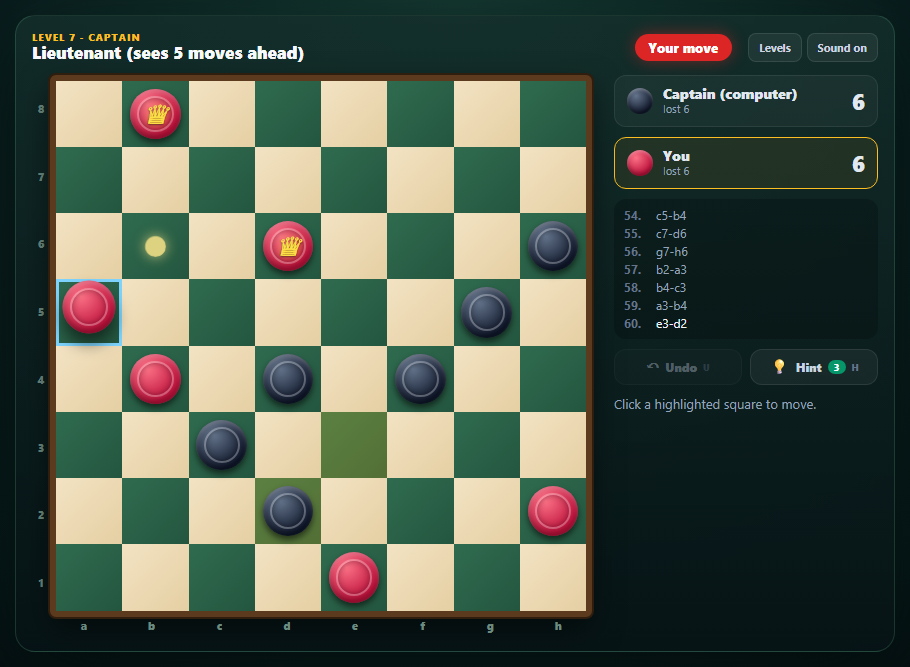
Checkers (draughts) is a game of forced captures, and that rule is what makes it a good programming exercise. This version is a full game: you play red against a computer with twelve difficulty levels, or play a friend on the same screen. It enforces the real rules (forced jumps, multi-jumps that must be completed, kings, a draw rule), animates every move, gives hints, and has stars, a daily match and saved progress. It is plain HTML, CSS and JavaScript with no libraries, images or audio files.
The board as 64 numbers
The position is a flat array of 64 numbers: 0 for empty, 1 and 2 for a red man and king, and -1 and -2 for black. genMoves() returns every legal move as a complete sequence, such as { path: [41, 32, 23], caps: [36, 27] }. Because a whole multi-jump is one move, the interface, the AI and the move log all use the same objects. If any jump exists, only jumps are returned, which is the forced-capture rule. While generating a chain, a jumped piece is marked as a ghost so it cannot be jumped twice, and a man that reaches the far row becomes a king and its move ends there.
Multi-jumps that cannot be abandoned
Many simple checkers programs let you switch pieces halfway through a multi-jump. Here, nextSquares() looks at the squares chosen so far and shows only the squares that continue a legal sequence. Once you have started a chain, clicking another piece is refused with a message, and the move is applied only when a complete sequence has been chosen. Each jump is drawn as soon as you click it, and the captured piece shrinks away.
A minimax opponent with a dial for strength
The computer uses iterative deepening negamax with alpha-beta pruning. evaluate() scores material (a king is worth 1.7 men), how far each man has advanced, a guarded home row and control of the centre. At the edge of the search it keeps going while captures are pending, so it never stops in the middle of an exchange. Each level in the LEVELS array sets the search depth (1 to 9 moves), a time limit and a noise value. Noise adds a random amount to each candidate move's score, which makes the lower levels play like a distracted human instead of a perfect player with a shallow horizon. Level 12 searches nine plies, within a time cap that keeps the page responsive.
Hints, undo, stars and the daily match
The Hint button runs the same search for you at depth 6 and highlights the start and end squares. Undo takes back your last move together with the computer's reply. Winning gives one star, a second star if you used no hints or undos, and a third if you lost no more than the level's par number of pieces. A win unlocks the next level. The Daily Match plays four seeded random moves from the start position, so everyone faces the same opening each day, and winning on consecutive days builds a streak. There is also a pass-and-play mode.
Draws, feel and saving
A game with 40 moves each without a capture or a man move is a draw, which stops endless king shuffling. Moves slide across the board, captured pieces shrink away, kinging crowns a piece with a glow, and a short wooden click and chimes come from a Web Audio synth. Your last move is highlighted, pieces that must jump pulse, and a move list shows the game in notation such as d6xb4. Stars, your record and the streak are saved to localStorage inside try/catch, and the whole game scales to short preview areas.
What's included
Features
Step by step
How to Use
- 1Pick a level, the Daily Match or two playersThe menu shows 12 levels in four tiers, from the Cadet who plays almost randomly to the Grandmaster who searches nine moves ahead. Level 1 is open at first and each win unlocks the next. The gold card starts the daily match and the green card is a two-player game on one screen.
- 2Move your piecesYou play red, at the bottom, and move first. Click a piece and then a highlighted square. Men move diagonally forward, and a man that reaches the far row becomes a king (shown with a crown) that can move in all four diagonal directions.
- 3Jump when you canCaptures are forced: if a jump is available, you must take one, and the pieces that can jump pulse. Red-marked squares are jumps. After a jump, if the same piece can jump again, you have to keep going with that piece.
- 4Beat the computerCapture all its pieces or leave it with no legal move. The right panel shows how many pieces each side has left and the last moves in notation. If neither side captures or advances a man for 40 moves each, the game is a draw.
- 5Use hints and undo carefullyHint (H) highlights a strong move and you get three per game. Undo (U) takes back your last move and the computer reply. Both are useful for learning but they cost you the second star.
- 6Earn stars and keep the streakOne star for a win, one more for no hints or undos, one more for losing no more than the par number of pieces. Winning the Daily Match on consecutive days builds a streak, and Copy result gives a share line.
Real-world uses
Common Use Cases
Got questions?
Frequently Asked Questions
chooseMove() runs an iterative deepening negamax search with alpha-beta pruning. It searches one ply, then two, and so on up to the level depth, and keeps the result of the last depth it finished before the time cap. Positions are scored by evaluate(): material (a king is worth 170 and a man 100), how far men have advanced, a guarded home row and the centre. On the weaker levels a random amount (the noise) is added to each move score, so it sometimes picks a worse move.
American checkers: 8x8 board, men move and capture diagonally forward, kings move in all four diagonal directions one square at a time, captures are mandatory, a multi-jump must be finished with the same piece, a man that reaches the far row becomes a king and its move ends there. If no capture or man move happens for 40 moves each, the game is a draw. There are no flying kings.
Because the rules do not allow it. A move is a whole sequence of jumps, and after you have started one, nextSquares() only shows squares that continue a legal sequence. A click elsewhere shows a reminder. The board is only changed when a complete sequence has been chosen.
Beating a level gives one star. You get a second star if you used no hints and no undos, and a third if you lost no more than the level par number of pieces (6 on the first levels, down to 2 on the last ones). A draw or a defeat gives no stars. A level unlocks when the previous one has at least one star.
Edit the LEVELS array: depth is how many plies the computer searches, noise is the random score added to its candidate moves, ms is its thinking time cap and par is the number of pieces you may lose for the third star. Tiers hold three levels each, so add levels in threes or edit TIERS. To change how it plays, tune the numbers in evaluate().
Yes. All localStorage access is in try/catch, so a blocked storage only means progress is not saved, and every sound call is wrapped. Squares respond to pointer events, so touch works, and on narrow screens the side panel moves under the board and the page scrolls. The computer thinks within a time cap, so the page stays responsive.
Copy & paste
Source Code
<div class="ck-fit" id="ck-fit"><div class="ck-wrap" id="ck-wrap">
<div class="ck-panel" id="ck-panel">
<div class="ck-hud">
<div class="ck-hud-left">
<span class="ck-kicker" id="ck-kicker">Checkers</span>
<span class="ck-name" id="ck-name">Pick a level</span>
</div>
<div class="ck-turn" id="ck-turn"></div>
<div class="ck-hud-btns">
<button class="ck-btn-sm" id="ck-levels-btn" type="button" title="Levels (Esc)">Levels</button>
<button class="ck-btn-sm" id="ck-mute" type="button" aria-pressed="false">Sound on</button>
</div>
</div>
<div class="ck-main">
<div class="ck-board-col">
<div class="ck-frame">
<div class="ck-axis-y" id="ck-axis-y"></div>
<div class="ck-board" id="ck-board" role="grid" aria-label="Checkers board"></div>
<div class="ck-axis-x" id="ck-axis-x"></div>
</div>
</div>
<aside class="ck-side">
<div class="ck-player" id="ck-p-black"><i class="ck-chip black"></i><div><b id="ck-black-name">Computer</b><span id="ck-black-sub"></span></div><em id="ck-black-count">12</em></div>
<div class="ck-player" id="ck-p-red"><i class="ck-chip red"></i><div><b id="ck-red-name">You</b><span id="ck-red-sub"></span></div><em id="ck-red-count">12</em></div>
<div class="ck-moves" id="ck-moves"></div>
<div class="ck-tools">
<button class="ck-tool" id="ck-undo" type="button"><span class="ck-tool-ico">↶</span>Undo <em>U</em></button>
<button class="ck-tool" id="ck-hint" type="button"><span class="ck-tool-ico">💡</span>Hint <i id="ck-hint-count">3</i><em>H</em></button>
</div>
<p class="ck-msg" id="ck-msg"></p>
</aside>
</div>
<div class="ck-overlay show" id="ck-menu">
<p class="ck-logo">Checkers</p>
<p class="ck-tagline">Capture every piece or block the computer. Jumps are forced, multi-jumps must be finished and a piece that reaches the far row becomes a king.</p>
<div class="ck-menu-row">
<button class="ck-daily" id="ck-daily" type="button">
<span class="ck-daily-title" id="ck-daily-title">Daily Match</span>
<span class="ck-daily-sub" id="ck-daily-sub">The same opening for everyone</span>
</button>
<button class="ck-daily ck-pvp" id="ck-pvp" type="button">
<span class="ck-daily-title">Two players</span>
<span class="ck-daily-sub">Pass and play on one screen</span>
</button>
<div class="ck-totals"><span><b id="ck-star-total">0</b> / 36 stars</span><span>Daily streak <b id="ck-streak">0</b></span><span id="ck-record"></span></div>
</div>
<div class="ck-tiers" id="ck-tiers"></div>
</div>
<div class="ck-overlay" id="ck-result">
<p class="ck-result-title" id="ck-result-title">Victory!</p>
<div class="ck-result-stars" id="ck-result-stars"><span>★</span><span>★</span><span>★</span></div>
<p class="ck-result-sub" id="ck-result-sub"></p>
<div class="ck-result-btns">
<button class="ck-btn" id="ck-next" type="button">Next level</button>
<button class="ck-btn ck-btn-ghost" id="ck-retry" type="button">Rematch</button>
<button class="ck-btn ck-btn-ghost" id="ck-share" type="button">Copy result</button>
<button class="ck-btn ck-btn-ghost" id="ck-menu-back" type="button">Levels</button>
</div>
</div>
</div>
</div></div>* { box-sizing: border-box; margin: 0; padding: 0; }
body {
font-family: system-ui, -apple-system, 'Segoe UI', sans-serif; color: #e2e8f0;
background: radial-gradient(ellipse at top, #16342f 0%, #0a1a1c 58%, #050d10 100%);
min-height: 100vh; display: flex; align-items: center; justify-content: center; padding: 12px 14px; overflow: hidden;
}
/* The game scales itself to the space it is given (fitToView): .ck-fit takes the scaled size, .ck-wrap is laid out at its
natural size and then shrunk with transform. */
.ck-fit { flex: none; }
.ck-wrap { width: 880px; transform-origin: top left; }
.ck-panel {
position: relative; display: flex; flex-direction: column; gap: 12px; padding: 16px; border-radius: 20px; overflow: hidden;
background: linear-gradient(180deg, rgba(20,48,44,0.8), rgba(7,20,22,0.95));
border: 1px solid rgba(134,239,172,0.16); box-shadow: 0 30px 80px rgba(0,0,0,0.55), 0 0 90px rgba(16,185,129,0.1);
}
.ck-hud { display: flex; align-items: center; gap: 16px; flex-wrap: wrap; }
.ck-hud-left { display: flex; flex-direction: column; line-height: 1.15; margin-right: auto; min-width: 0; }
.ck-kicker { font-size: 10px; font-weight: 800; letter-spacing: 0.09em; text-transform: uppercase; color: #fbbf24; }
.ck-name { font-size: 17px; font-weight: 800; color: #f8fafc; white-space: nowrap; }
.ck-turn { font-size: 13px; font-weight: 800; padding: 5px 14px; border-radius: 999px; background: rgba(255,255,255,0.06); color: #94a3b8; }
.ck-turn.red { color: #fff; background: #dc2626; box-shadow: 0 0 16px rgba(220,38,38,0.45); }
.ck-turn.black { color: #fff; background: #334155; box-shadow: 0 0 16px rgba(71,85,105,0.5); }
.ck-turn.think { color: #422006; background: #fbbf24; animation: ck-pulse 0.8s ease-in-out infinite alternate; }
@keyframes ck-pulse { to { opacity: 0.6; } }
.ck-hud-btns { display: flex; gap: 5px; }
.ck-btn-sm { background: rgba(255,255,255,0.06); color: #cbd5e1; border: 1px solid rgba(255,255,255,0.1); border-radius: 8px; padding: 6px 10px; font: inherit; font-size: 11px; font-weight: 700; cursor: pointer; }
.ck-btn-sm:hover { background: rgba(255,255,255,0.14); }
.ck-main { display: flex; gap: 22px; align-items: flex-start; }
.ck-board-col { flex: none; width: 560px; }
.ck-frame { position: relative; padding: 0 0 18px 18px; }
.ck-axis-y, .ck-axis-x { position: absolute; display: grid; font-size: 11px; font-weight: 800; color: #6b8a80; text-align: center; pointer-events: none; }
.ck-axis-y { left: 0; top: 0; bottom: 18px; width: 18px; grid-template-rows: repeat(8, 1fr); align-items: center; }
.ck-axis-x { left: 18px; right: 0; bottom: 0; height: 18px; grid-template-columns: repeat(8, 1fr); line-height: 18px; }
.ck-board {
position: relative; width: 100%; aspect-ratio: 1 / 1; border-radius: 6px; overflow: hidden;
border: 6px solid #5b3a1e; box-shadow: 0 0 0 2px #2f1d0e, 0 12px 30px rgba(0,0,0,0.5), inset 0 0 18px rgba(0,0,0,0.4);
display: grid; grid-template-columns: repeat(8, 1fr); grid-template-rows: repeat(8, 1fr);
background: #5b3a1e;
}
.ck-sq { position: relative; display: flex; align-items: center; justify-content: center; }
.ck-sq.light { background: linear-gradient(135deg, #f3e3c3, #e5cfa3); }
.ck-sq.dark { background: linear-gradient(135deg, #2f6b4f, #24563f); cursor: default; }
.ck-sq.mine { cursor: pointer; }
.ck-sq.last::before { content: ''; position: absolute; inset: 0; background: rgba(250,204,21,0.22); }
.ck-sq.sel { box-shadow: inset 0 0 0 3px #fde68a; }
.ck-sq.cur { box-shadow: inset 0 0 0 3px #7dd3fc; }
.ck-sq.dot::after { content: ''; position: absolute; width: 26%; height: 26%; border-radius: 50%; background: rgba(253,230,138,0.85); box-shadow: 0 0 10px rgba(253,230,138,0.7); z-index: 4; animation: ck-dot 0.9s ease-in-out infinite alternate; }
.ck-sq.dot.cap::after { background: rgba(248,113,113,0.95); box-shadow: 0 0 12px rgba(248,113,113,0.8); width: 32%; height: 32%; }
@keyframes ck-dot { to { transform: scale(1.25); } }
.ck-sq.hintFrom { box-shadow: inset 0 0 0 3px #fbbf24, inset 0 0 16px rgba(251,191,36,0.6); }
.ck-sq.hintTo { box-shadow: inset 0 0 0 3px #4ade80, inset 0 0 16px rgba(74,222,128,0.6); }
.ck-pieces { position: absolute; inset: 0; pointer-events: none; }
.ck-piece {
position: absolute; width: 12.5%; height: 12.5%; display: flex; align-items: center; justify-content: center;
transition: left 0.26s ease-in-out, top 0.26s ease-in-out, opacity 0.25s, transform 0.25s; z-index: 2;
}
.ck-piece i {
width: 76%; height: 76%; border-radius: 50%; position: relative; display: flex; align-items: center; justify-content: center;
box-shadow: 0 4px 6px rgba(0,0,0,0.55), inset 0 -4px 6px rgba(0,0,0,0.3), inset 0 3px 4px rgba(255,255,255,0.25);
transition: transform 0.15s, box-shadow 0.15s;
}
.ck-piece i::before { content: ''; position: absolute; inset: 14%; border-radius: 50%; border: 2px solid rgba(255,255,255,0.28); box-shadow: inset 0 0 6px rgba(0,0,0,0.3); }
.ck-piece.red i { background: radial-gradient(circle at 35% 30%, #fb7185, #be123c 70%); }
.ck-piece.black i { background: radial-gradient(circle at 35% 30%, #64748b, #0f172a 72%); }
.ck-piece.king i::after { content: '\265B'; position: relative; z-index: 1; font-size: clamp(14px, 3.4vw, 26px); color: #fde047; text-shadow: 0 1px 2px rgba(0,0,0,0.6), 0 0 8px rgba(253,224,71,0.7); line-height: 1; }
.ck-piece.lift i { transform: translateY(-5px) scale(1.06); box-shadow: 0 10px 14px rgba(0,0,0,0.5), inset 0 -4px 6px rgba(0,0,0,0.3), inset 0 3px 4px rgba(255,255,255,0.25); }
.ck-piece.must i { animation: ck-must 0.9s ease-in-out infinite alternate; }
@keyframes ck-must { to { box-shadow: 0 0 0 3px rgba(253,224,71,0.8), 0 4px 6px rgba(0,0,0,0.55); } }
.ck-piece.gone { opacity: 0; transform: scale(0.3) rotate(120deg); }
.ck-piece.crowned i { animation: ck-crown 0.7s ease-out; }
@keyframes ck-crown { 0% { transform: scale(1); } 40% { transform: scale(1.35); box-shadow: 0 0 28px #fde047; } 100% { transform: scale(1); } }
.ck-side { flex: 1; min-width: 0; display: flex; flex-direction: column; gap: 10px; }
.ck-player { display: flex; align-items: center; gap: 10px; padding: 10px 12px; border-radius: 12px; background: rgba(255,255,255,0.04); border: 1px solid rgba(255,255,255,0.08); transition: border-color 0.2s, background 0.2s; }
.ck-player.active { border-color: #fbbf24; background: rgba(251,191,36,0.08); }
.ck-player div { flex: 1; display: flex; flex-direction: column; line-height: 1.2; min-width: 0; }
.ck-player b { font-size: 14px; font-weight: 800; }
.ck-player span { font-size: 11px; color: #94a3b8; }
.ck-player em { font-style: normal; font-size: 22px; font-weight: 900; font-variant-numeric: tabular-nums; }
.ck-chip { width: 26px; height: 26px; border-radius: 50%; box-shadow: inset 0 -3px 4px rgba(0,0,0,0.3), inset 0 2px 3px rgba(255,255,255,0.3); flex: none; }
.ck-chip.red { background: radial-gradient(circle at 35% 30%, #fb7185, #be123c 70%); }
.ck-chip.black { background: radial-gradient(circle at 35% 30%, #64748b, #0f172a 72%); }
.ck-moves { min-height: 120px; max-height: 150px; overflow: hidden; display: flex; flex-direction: column; justify-content: flex-end; gap: 2px; font-size: 12px; color: #94a3b8; font-variant-numeric: tabular-nums; padding: 8px 10px; border-radius: 12px; background: rgba(0,0,0,0.22); }
.ck-moves div { display: flex; gap: 10px; }
.ck-moves div b { color: #64748b; width: 22px; font-weight: 700; }
.ck-moves div span.cap { color: #f87171; font-weight: 700; }
.ck-moves div:last-child { color: #f1f5f9; }
.ck-tools { display: grid; grid-template-columns: 1fr 1fr; gap: 8px; }
.ck-tool { display: flex; align-items: center; justify-content: center; gap: 6px; padding: 9px 0; border-radius: 12px; cursor: pointer; font: inherit; font-size: 12px; font-weight: 800; color: #cbd5e1; background: rgba(255,255,255,0.05); border: 1px solid rgba(255,255,255,0.09); transition: background 0.12s, border-color 0.12s; }
.ck-tool:hover:not(:disabled) { background: rgba(255,255,255,0.1); border-color: rgba(134,239,172,0.5); }
.ck-tool:disabled { opacity: 0.35; cursor: not-allowed; }
.ck-tool-ico { font-size: 15px; line-height: 1; }
.ck-tool em { font-style: normal; font-size: 9px; color: #64748b; }
.ck-tool i { font-style: normal; font-size: 10px; background: #059669; color: #fff; border-radius: 8px; padding: 0 6px; }
.ck-msg { min-height: 54px; font-size: 13px; line-height: 1.45; color: #94a3b8; }
.ck-msg b { color: #5eead4; }
.ck-msg.warn { color: #fca5a5; }
.ck-overlay { position: absolute; inset: 0; z-index: 30; display: flex; flex-direction: column; align-items: center; justify-content: center; gap: 12px; padding: 18px; text-align: center; overflow-y: auto; background: radial-gradient(ellipse at center, rgba(7,20,22,0.965), rgba(3,9,11,0.985)); opacity: 0; pointer-events: none; transition: opacity 0.25s; }
.ck-overlay.show { opacity: 1; pointer-events: auto; }
.ck-logo { font-size: 46px; font-weight: 900; letter-spacing: -0.02em; line-height: 1.05; background: linear-gradient(90deg, #fb7185, #fbbf24, #4ade80); -webkit-background-clip: text; background-clip: text; color: transparent; }
.ck-tagline { font-size: 13px; color: #94a3b8; max-width: 500px; line-height: 1.5; }
.ck-menu-row { display: flex; align-items: center; justify-content: center; gap: 14px; flex-wrap: wrap; }
.ck-daily { display: flex; flex-direction: column; align-items: flex-start; gap: 2px; padding: 10px 18px; border-radius: 12px; cursor: pointer; font: inherit; text-align: left; color: #fef3c7; border: 1px solid rgba(250,204,21,0.45); background: linear-gradient(135deg, rgba(250,204,21,0.18), rgba(251,146,60,0.1)); transition: transform 0.15s, box-shadow 0.15s; }
.ck-daily:hover { transform: translateY(-2px); box-shadow: 0 8px 24px rgba(250,204,21,0.2); }
.ck-pvp { color: #d1fae5; border-color: rgba(52,211,153,0.45); background: linear-gradient(135deg, rgba(52,211,153,0.16), rgba(20,184,166,0.08)); }
.ck-pvp .ck-daily-sub { color: #6ee7b7; }
.ck-daily-title { font-size: 14px; font-weight: 800; }
.ck-daily-sub { font-size: 11px; color: #fcd34d; }
.ck-totals { display: flex; flex-direction: column; gap: 3px; font-size: 12px; color: #94a3b8; text-align: left; }
.ck-totals b { color: #f8fafc; }
.ck-tiers { display: flex; flex-direction: column; gap: 8px; width: 100%; max-width: 720px; }
.ck-tier { display: grid; grid-template-columns: 150px 1fr; align-items: center; gap: 12px; }
.ck-tier-name { font-size: 12px; font-weight: 800; letter-spacing: 0.04em; text-transform: uppercase; color: var(--g); text-align: left; line-height: 1.2; }
.ck-tier-name small { display: block; font-size: 10px; font-weight: 600; color: #6b8a80; text-transform: none; letter-spacing: 0; }
.ck-tier-tiles { display: grid; grid-template-columns: repeat(3, 1fr); gap: 8px; }
.ck-tile { position: relative; padding: 7px 10px; border-radius: 10px; cursor: pointer; font: inherit; color: #e2e8f0; text-align: left; border: 1px solid rgba(148,163,184,0.22); background: rgba(255,255,255,0.04); display: flex; flex-direction: column; gap: 1px; transition: transform 0.12s, border-color 0.12s; }
.ck-tile:hover:not(:disabled) { transform: translateY(-2px); border-color: var(--g); }
.ck-tile::after { content: ''; position: absolute; left: 10px; right: 10px; bottom: 4px; height: 2px; border-radius: 2px; background: var(--g); opacity: 0.7; }
.ck-tile-num { font-size: 12px; font-weight: 800; }
.ck-tile-num small { font-weight: 600; color: #94a3b8; margin-left: 4px; }
.ck-tile-stars { font-size: 10px; letter-spacing: 1px; color: #334155; margin-bottom: 4px; }
.ck-tile-stars .on { color: #facc15; }
.ck-tile:disabled { opacity: 0.32; cursor: not-allowed; }
.ck-tile.perfect { border-color: rgba(250,204,21,0.55); box-shadow: inset 0 0 12px rgba(250,204,21,0.15); }
.ck-result-title { font-size: 38px; font-weight: 900; color: #f8fafc; }
.ck-result-stars { display: flex; gap: 10px; font-size: 54px; line-height: 1; }
.ck-result-stars span { color: #1e293b; transform: scale(0.4); opacity: 0; }
.ck-result-stars span.on { color: #facc15; text-shadow: 0 0 22px rgba(250,204,21,0.75); }
.ck-overlay.show .ck-result-stars span { animation: ck-star 0.45s cubic-bezier(0.2, 1.6, 0.4, 1) forwards; }
.ck-overlay.show .ck-result-stars span:nth-child(2) { animation-delay: 0.18s; }
.ck-overlay.show .ck-result-stars span:nth-child(3) { animation-delay: 0.36s; }
@keyframes ck-star { to { transform: scale(1); opacity: 1; } }
.ck-result-sub { font-size: 14px; color: #94a3b8; line-height: 1.7; }
.ck-result-btns { display: flex; gap: 8px; flex-wrap: wrap; justify-content: center; }
.ck-btn { padding: 10px 18px; border: none; border-radius: 10px; cursor: pointer; font: inherit; font-size: 14px; font-weight: 800; color: #fff; background: linear-gradient(135deg, #059669, #0d9488); box-shadow: 0 6px 18px rgba(16,185,129,0.35); transition: transform 0.12s; }
.ck-btn:hover { transform: translateY(-1px); }
.ck-btn-ghost { background: rgba(255,255,255,0.06); box-shadow: none; border: 1px solid rgba(255,255,255,0.12); color: #cbd5e1; }
.ck-btn[hidden] { display: none; }
.ck-confetti { position: absolute; top: -12px; width: 8px; height: 14px; border-radius: 2px; z-index: 40; pointer-events: none; animation: ck-fall linear forwards; }
@keyframes ck-fall { to { transform: translate(var(--dx), 760px) rotate(var(--rot)); opacity: 0.9; } }
/* Narrow areas (phones): the side panel drops under the board and the page scrolls */
.ck-narrow .ck-main { flex-direction: column; }
.ck-narrow .ck-board-col { width: 100%; }
.ck-narrow .ck-side { width: 100%; }
.ck-narrow .ck-tier { grid-template-columns: 1fr; gap: 4px; }
.ck-narrow .ck-logo { font-size: 34px; }const SAVE_KEY = 'checkers-save-v1';
const DAY0 = Date.UTC(2026, 10, 11); // Daily Match #1
const RED = 1, BLACK = -1; // red (you, bottom of the board) moves up, black (the computer) moves down
const GHOST = 100; // marks a piece that has been jumped during a multi-jump (it cannot be jumped twice)
const DRAW_PLIES = 80; // 40 moves each without a capture or a man move is a draw
const MAX_HINTS = 3;
const TIERS = [
{ name: 'Cadet', note: 'sees 1-2 moves, blunders often', color: '#4ade80' },
{ name: 'Soldier', note: 'sees 3-4 moves ahead', color: '#60a5fa' },
{ name: 'Captain', note: 'sees 5-6 moves ahead', color: '#c084fc' },
{ name: 'Grandmaster', note: 'thinks 7-9 moves ahead', color: '#fb923c' },
];
// depth: how many plies the computer searches. noise: random centipawns added to each root move (a weaker, human-like
// player). ms: thinking time cap. par: pieces you may lose and still earn the third star.
const LEVELS = [
{ name: 'Recruit', depth: 1, noise: 350, ms: 200, par: 6 },
{ name: 'Rookie', depth: 1, noise: 140, ms: 200, par: 6 },
{ name: 'Scout', depth: 2, noise: 90, ms: 300, par: 5 },
{ name: 'Private', depth: 3, noise: 60, ms: 400, par: 5 },
{ name: 'Corporal', depth: 3, noise: 20, ms: 400, par: 4 },
{ name: 'Sergeant', depth: 4, noise: 20, ms: 500, par: 4 },
{ name: 'Lieutenant', depth: 5, noise: 10, ms: 700, par: 3 },
{ name: 'Captain', depth: 5, noise: 0, ms: 700, par: 3 },
{ name: 'Major', depth: 6, noise: 0, ms: 900, par: 3 },
{ name: 'Colonel', depth: 7, noise: 0, ms: 1000, par: 2 },
{ name: 'General', depth: 8, noise: 0, ms: 1300, par: 2 },
{ name: 'Grandmaster', depth: 9, noise: 0, ms: 1600, par: 2 },
];
const LEVEL_COUNT = LEVELS.length;
const AI_NAMES = ['Cadet', 'Soldier', 'Captain', 'Grandmaster'];
const $ = id => document.getElementById(id);
const boardEl = $('ck-board'), panelEl = $('ck-panel'), turnEl = $('ck-turn'), msgEl = $('ck-msg'), movesEl = $('ck-moves');
const menuEl = $('ck-menu'), resultEl = $('ck-result'), undoBtn = $('ck-undo'), hintBtn = $('ck-hint');
const nextBtn = $('ck-next'), shareBtn = $('ck-share'), muteBtn = $('ck-mute');
/* ---------- Saved progress (localStorage can throw in sandboxed iframes, so every access is guarded) ---------- */
function freshSave() {
return { stars: Array(LEVEL_COUNT).fill(0), wins: 0, losses: 0, draws: 0, daily: { day: 0, stars: 0, streak: 0, lastDay: 0 } };
}
function loadSave() {
const f = freshSave();
try {
const s = JSON.parse(localStorage.getItem(SAVE_KEY) || 'null');
if (s && Array.isArray(s.stars)) {
f.stars = f.stars.map((_, i) => s.stars[i] || 0);
f.wins = s.wins || 0; f.losses = s.losses || 0; f.draws = s.draws || 0;
Object.assign(f.daily, s.daily || {});
}
} catch (e) { /* storage blocked */ }
return f;
}
function persist() { try { localStorage.setItem(SAVE_KEY, JSON.stringify(save)); } catch (e) { /* storage blocked */ } }
let save = loadSave();
function mulberry32(a) {
return function () {
a |= 0; a = a + 0x6D2B79F5 | 0;
let t = Math.imul(a ^ a >>> 15, 1 | a);
t = t + Math.imul(t ^ t >>> 7, 61 | t) ^ t;
return ((t ^ t >>> 14) >>> 0) / 4294967296;
};
}
function todayNumber() {
const d = new Date();
return Math.max(1, Math.floor((Date.UTC(d.getFullYear(), d.getMonth(), d.getDate()) - DAY0) / 86400000) + 1);
}
/* ---------- Sound: a tiny Web Audio synth, no files ---------- */
let audioCtx = null, muted = false;
function getAudio() {
if (!audioCtx) { try { audioCtx = new (window.AudioContext || window.webkitAudioContext)(); } catch (e) { audioCtx = null; } }
if (audioCtx && audioCtx.state === 'suspended') audioCtx.resume();
return audioCtx;
}
function tone(freq, dur, type, vol, slideTo, delay) {
if (muted || !audioCtx) return;
try {
const t0 = audioCtx.currentTime + (delay || 0);
const osc = audioCtx.createOscillator(), gain = audioCtx.createGain();
osc.type = type;
osc.frequency.setValueAtTime(freq, t0);
if (slideTo) osc.frequency.exponentialRampToValueAtTime(slideTo, t0 + dur);
gain.gain.setValueAtTime(vol, t0);
gain.gain.exponentialRampToValueAtTime(0.0001, t0 + dur);
osc.connect(gain); gain.connect(audioCtx.destination);
osc.start(t0); osc.stop(t0 + dur);
} catch (e) { /* audio is optional */ }
}
const sfx = {
tock(d) { tone(260, 0.07, 'triangle', 0.09, 120, d || 0); tone(1400, 0.02, 'square', 0.025, null, d || 0); },
capture() { sfx.tock(0); sfx.tock(0.09); tone(90, 0.2, 'sine', 0.09, 50, 0.05); },
king() { [523, 659, 784, 1046].forEach((f, i) => tone(f, 0.12, 'triangle', 0.06, null, 0.1 + i * 0.07)); },
pick() { tone(600, 0.04, 'sine', 0.04); },
bad() { tone(160, 0.16, 'sawtooth', 0.04, 100); },
win() { [523, 659, 784, 1046].forEach((f, i) => tone(f, 0.22, 'triangle', 0.07, null, i * 0.12)); },
lose() { tone(330, 0.3, 'sawtooth', 0.05, 160); tone(220, 0.45, 'sawtooth', 0.05, 110, 0.25); },
};
muteBtn.addEventListener('click', () => {
muted = !muted;
muteBtn.textContent = muted ? 'Sound off' : 'Sound on';
muteBtn.setAttribute('aria-pressed', String(muted));
});
/* ---------- Rules: board is 64 numbers, 0 empty, +1/+2 red man/king, -1/-2 black man/king ---------- */
const sideOf = p => (p === 0 || p === GHOST ? 0 : p > 0 ? 1 : -1);
const isKing = p => p === 2 || p === -2;
function startBoard() {
const b = new Array(64).fill(0);
for (let r = 0; r < 8; r++) for (let c = 0; c < 8; c++) {
if ((r + c) % 2 === 1) { if (r < 3) b[r * 8 + c] = BLACK; else if (r > 4) b[r * 8 + c] = RED; }
}
return b;
}
function dirsOf(p) { return isKing(p) ? [[-1, -1], [-1, 1], [1, -1], [1, 1]] : (p > 0 ? [[-1, -1], [-1, 1]] : [[1, -1], [1, 1]]); }
const kingRow = side => (side === RED ? 0 : 7);
// Every legal move as a full sequence: { path: [squares], caps: [jumped squares], promote }. Jumps are forced, a multi-jump
// must be finished with the same piece, a man that reaches the far row becomes a king and its move ends there.
function genMoves(b, side) {
const jumps = [], steps = [];
for (let from = 0; from < 64; from++) {
const p = b[from];
if (sideOf(p) !== side) continue;
b[from] = 0; // the moving piece leaves its square, so it can land back on it in a loop
chain(b, from, p, side, [from], [], jumps);
b[from] = p;
if (jumps.length) continue;
const r = from >> 3, c = from & 7;
for (const [dr, dc] of dirsOf(p)) {
const nr = r + dr, nc = c + dc;
if (nr < 0 || nr > 7 || nc < 0 || nc > 7 || b[nr * 8 + nc] !== 0) continue;
steps.push({ path: [from, nr * 8 + nc], caps: [], promote: !isKing(p) && nr === kingRow(side) });
}
}
return jumps.length ? jumps : steps;
}
function chain(b, at, p, side, path, caps, out) {
const r = at >> 3, c = at & 7;
let found = false;
for (const [dr, dc] of dirsOf(p)) {
const mr = r + dr, mc = c + dc, lr = r + 2 * dr, lc = c + 2 * dc;
if (lr < 0 || lr > 7 || lc < 0 || lc > 7) continue;
const mid = b[mr * 8 + mc];
if (sideOf(mid) !== -side || b[lr * 8 + lc] !== 0) continue;
found = true;
b[mr * 8 + mc] = GHOST;
const np = path.concat(lr * 8 + lc), nc2 = caps.concat(mr * 8 + mc);
if (!isKing(p) && lr === kingRow(side)) out.push({ path: np, caps: nc2, promote: true }); // kinging ends the move
else chain(b, lr * 8 + lc, p, side, np, nc2, out);
b[mr * 8 + mc] = mid;
}
if (!found && path.length > 1) out.push({ path, caps, promote: false });
}
function applyMove(b, m) {
const from = m.path[0], to = m.path[m.path.length - 1], p = b[from];
b[from] = 0;
m.caps.forEach(i => { b[i] = 0; });
b[to] = m.promote ? sideOf(p) * 2 : p;
}
/* ---------- The computer: iterative deepening negamax with alpha-beta pruning ---------- */
function evaluate(b) { // positive is good for red
let s = 0;
for (let i = 0; i < 64; i++) {
const p = b[i];
if (!p) continue;
const side = sideOf(p), r = i >> 3, c = i & 7, king = isKing(p);
let v = king ? 170 : 100;
if (!king) { const adv = side === RED ? 7 - r : r; v += adv * 4; if (adv === 0) v += 8; } // advance, and keep the home row guarded
v += ((3.5 - Math.abs(c - 3.5)) + (3.5 - Math.abs(r - 3.5))) * 2.5; // the centre is worth more
s += side * v;
}
return s;
}
let nodes = 0, deadline = 0;
function search(b, side, depth, alpha, beta, ply) {
if ((++nodes & 2047) === 0 && Date.now() > deadline) throw 'timeout';
const moves = genMoves(b, side);
if (!moves.length) return -100000 + ply; // the side to move is blocked or has no pieces: it has lost
if (depth <= 0) {
if (moves[0].caps.length && ply < 24) depth = 1; // never stop in the middle of a capture exchange
else return side * evaluate(b);
}
let best = -Infinity;
for (const m of moves) {
const nb = b.slice(); applyMove(nb, m);
const v = -search(nb, -side, depth - 1, -beta, -alpha, ply + 1);
if (v > best) best = v;
if (v > alpha) alpha = v;
if (alpha >= beta) break;
}
return best;
}
function chooseMove(b, side, level, R) { // returns a move from genMoves
const moves = genMoves(b, side);
if (moves.length <= 1) return moves[0] || null;
let result = null;
deadline = Date.now() + level.ms;
for (let d = 1; d <= level.depth; d++) {
nodes = 0;
const scored = [];
try {
let alpha = -Infinity;
for (const m of moves) {
const nb = b.slice(); applyMove(nb, m);
const v = -search(nb, -side, d - 1, -Infinity, level.noise > 0 ? Infinity : -alpha, 1);
scored.push({ m, v });
if (level.noise === 0 && v > alpha) alpha = v;
}
} catch (e) { break; } // out of time: keep the result of the last finished depth
result = scored;
}
if (!result) result = moves.map(m => ({ m, v: 0 }));
let best = null, bestV = -Infinity;
result.forEach(x => { const v = x.v + (level.noise ? (R() * 2 - 1) * level.noise : R() * 0.01); if (v > bestV) { bestV = v; best = x.m; } });
return best;
}
/* ---------- Game state ---------- */
let spec = null, mode = 'ai', levelIndex = 0, dailyNum = 0;
let board = startBoard(), turn = RED, quiet = 0, plies = 0, lastMove = null;
let log = [], history = [], hintsLeft = MAX_HINTS, hintsUsed = 0, undosUsed = 0, startPieces = 12;
let phase = 'menu'; // menu | play | over
let busy = false, runId = 0;
let moveList = [], pathSoFar = [], cursor = -1, rng = Math.random;
const squares = [], pieceEls = {}; // square elements, and the piece element standing on each square index
let piecesLayer = null;
const coord = i => 'abcdefgh'[i & 7] + (8 - (i >> 3));
function counts(b) { let red = 0, black = 0; b.forEach(p => { if (p > 0 && p < 3) red++; else if (p < 0) black++; }); return { red, black }; }
function buildBoard() {
boardEl.innerHTML = '';
squares.length = 0;
for (let i = 0; i < 64; i++) {
const r = i >> 3, c = i & 7, el = document.createElement('div');
el.className = 'ck-sq ' + ((r + c) % 2 === 1 ? 'dark' : 'light');
el.addEventListener('pointerdown', e => { if (e.button === 0) onSquare(i); });
boardEl.appendChild(el); squares.push(el);
}
piecesLayer = document.createElement('div');
piecesLayer.className = 'ck-pieces';
boardEl.appendChild(piecesLayer);
const ax = $('ck-axis-x'), ay = $('ck-axis-y');
ax.innerHTML = 'abcdefgh'.split('').map(l => '<span>' + l + '</span>').join('');
ay.innerHTML = [8, 7, 6, 5, 4, 3, 2, 1].map(n => '<span>' + n + '</span>').join('');
}
function placePieces() { // draw the pieces of the current board (used at the start and after undo)
piecesLayer.innerHTML = '';
Object.keys(pieceEls).forEach(k => delete pieceEls[k]);
board.forEach((p, i) => { if (p && p !== GHOST) addPiece(i, p); });
}
function addPiece(i, p) {
const el = document.createElement('div');
el.className = 'ck-piece ' + (p > 0 ? 'red' : 'black') + (isKing(p) ? ' king' : '');
el.innerHTML = '<i></i>';
el.style.left = (i & 7) * 12.5 + '%'; el.style.top = (i >> 3) * 12.5 + '%';
piecesLayer.appendChild(el);
pieceEls[i] = el;
}
function movePieceEl(from, to) {
const el = pieceEls[from];
if (!el) return;
delete pieceEls[from]; pieceEls[to] = el;
el.style.left = (to & 7) * 12.5 + '%'; el.style.top = (to >> 3) * 12.5 + '%';
}
function removePieceEl(i) {
const el = pieceEls[i];
if (!el) return;
delete pieceEls[i];
el.classList.add('gone');
setTimeout(() => el.remove(), 300);
}
/* ---------- Flow ---------- */
function setupGame(s) {
spec = s; mode = s.mode;
runId++; busy = false;
board = startBoard(); turn = RED; quiet = 0; plies = 0; lastMove = null;
log = []; history = []; moveList = []; pathSoFar = []; cursor = -1;
hintsLeft = MAX_HINTS; hintsUsed = 0; undosUsed = 0;
rng = s.mode === 'daily' ? mulberry32(s.seed) : Math.random;
if (s.mode === 'daily') { // a seeded opening: four random quiet plies, the same for everyone that day, with no capture on offer
for (let attempt = 0; attempt < 40; attempt++) {
const b2 = startBoard(); let side = RED, last = null, ok = true;
for (let k = 0; k < 4 && ok; k++) {
const quiet = genMoves(b2, side).filter(m => m.caps.length === 0);
if (!quiet.length) { ok = false; break; }
last = quiet[Math.floor(rng() * quiet.length)]; applyMove(b2, last); side = -side;
}
if (ok && genMoves(b2, RED)[0].caps.length === 0 && genMoves(b2, BLACK)[0].caps.length === 0) { board = b2; lastMove = last; break; }
}
}
startPieces = 12;
if (!piecesLayer || !piecesLayer.parentNode) buildBoard();
placePieces();
phase = 'play';
menuEl.classList.remove('show'); resultEl.classList.remove('show');
if (document.activeElement && document.activeElement.blur) document.activeElement.blur();
setMsg(s.mode === 'pvp' ? 'Red moves first. Click a piece, then a highlighted square.' : 'You are red and move first. Click a piece, then a highlighted square. Jumps are forced.');
const names = s.mode === 'pvp' ? ['Black', 'Red'] : [AI_NAMES[Math.floor((s.level || 0) / 3)] + ' (computer)', 'You'];
$('ck-black-name').textContent = names[0]; $('ck-red-name').textContent = names[1];
fitToView();
render();
}
function startLevel(i) {
getAudio(); levelIndex = i;
const L = LEVELS[i];
setupGame({ mode: 'ai', level: i, depth: L.depth, noise: L.noise, ms: L.ms, par: L.par });
$('ck-kicker').textContent = 'Level ' + (i + 1) + ' - ' + TIERS[Math.floor(i / 3)].name;
$('ck-name').textContent = L.name + ' (sees ' + L.depth + ' move' + (L.depth > 1 ? 's' : '') + ' ahead)';
}
function startDaily() {
getAudio(); dailyNum = todayNumber();
setupGame({ mode: 'daily', level: 6, depth: 4, noise: 10, ms: 500, par: 3, seed: dailyNum * 104729 + 7 });
$('ck-kicker').textContent = 'Daily'; $('ck-name').textContent = 'Daily Match #' + dailyNum;
}
function startPvp() {
getAudio();
setupGame({ mode: 'pvp', level: 0, par: 0 });
$('ck-kicker').textContent = 'Two players'; $('ck-name').textContent = 'Pass and play';
}
function restart() { if (mode === 'pvp') startPvp(); else if (mode === 'daily') startDaily(); else startLevel(levelIndex); }
function showMenu() {
runId++; busy = false; phase = 'menu';
resultEl.classList.remove('show'); menuEl.classList.add('show');
renderMenu();
$('ck-kicker').textContent = 'Checkers'; $('ck-name').textContent = 'Pick a level';
render();
}
/* ---------- Rendering ---------- */
function setMsg(html, warn) { msgEl.innerHTML = html; msgEl.classList.toggle('warn', !!warn); }
function render() {
const legal = phase === 'play' && !busy ? genMoves(board, turn) : [];
const forced = legal.length > 0 && legal[0].caps.length > 0;
const movable = new Set(legal.map(m => m.path[0]));
const nexts = nextSquares(legal);
squares.forEach((el, i) => {
el.classList.toggle('mine', movable.has(i) && !pathSoFar.length);
el.classList.toggle('sel', pathSoFar.length > 0 && pathSoFar[pathSoFar.length - 1] === i);
el.classList.toggle('last', !!lastMove && (lastMove.path[0] === i || lastMove.path[lastMove.path.length - 1] === i));
const nx = nexts.get(i);
el.classList.toggle('dot', nx !== undefined);
el.classList.toggle('cap', nx === true);
el.classList.toggle('cur', cursor === i);
});
Object.keys(pieceEls).forEach(k => {
const el = pieceEls[k], i = Number(k);
el.classList.toggle('lift', pathSoFar.length > 0 && pathSoFar[pathSoFar.length - 1] === i);
el.classList.toggle('must', forced && movable.has(i) && !pathSoFar.length && (mode === 'pvp' || turn === RED));
});
const c = counts(board);
$('ck-red-count').textContent = c.red; $('ck-black-count').textContent = c.black;
$('ck-red-sub').textContent = 'lost ' + (startPieces - c.red); $('ck-black-sub').textContent = 'lost ' + (startPieces - c.black);
$('ck-p-red').classList.toggle('active', phase === 'play' && turn === RED);
$('ck-p-black').classList.toggle('active', phase === 'play' && turn === BLACK);
const thinking = phase === 'play' && busy && mode !== 'pvp' && turn === BLACK;
turnEl.className = 'ck-turn' + (phase !== 'play' ? '' : thinking ? ' think' : turn === RED ? ' red' : ' black');
turnEl.textContent = phase !== 'play' ? '' : thinking ? 'Computer thinking...' : mode === 'pvp' ? (turn === RED ? 'Red to move' : 'Black to move') : 'Your move';
hintBtn.disabled = phase !== 'play' || busy || mode === 'pvp' || turn !== RED || hintsLeft <= 0;
undoBtn.disabled = phase !== 'play' || busy || history.length === 0;
$('ck-hint-count').textContent = hintsLeft;
hintBtn.style.display = mode === 'pvp' ? 'none' : '';
movesEl.innerHTML = moveList.slice(-7).map(x => '<div><b>' + x.n + '.</b><span class="' + (x.cap ? 'cap' : '') + '">' + x.t + '</span></div>').join('');
}
function nextSquares(legal) { // squares the selected piece can go to next: Map(square -> isJump)
const out = new Map();
if (!pathSoFar.length) return out;
const k = pathSoFar.length;
legal.forEach(m => {
if (m.path.length <= k) return;
for (let i = 0; i < k; i++) if (m.path[i] !== pathSoFar[i]) return;
out.set(m.path[k], m.caps.length > 0);
});
return out;
}
function renderMenu() {
const today = todayNumber(), d = save.daily;
if (d.lastDay && d.lastDay < today - 1) d.streak = 0; // a missed day resets the streak
const wrap = $('ck-tiers');
wrap.innerHTML = '';
TIERS.forEach((t, ti) => {
const row = document.createElement('div');
row.className = 'ck-tier'; row.style.setProperty('--g', t.color);
row.innerHTML = '<div class="ck-tier-name">' + t.name + '<small>' + t.note + '</small></div>';
const tiles = document.createElement('div');
tiles.className = 'ck-tile-wrap ck-tier-tiles';
for (let k = 0; k < 3; k++) {
const i = ti * 3 + k, unlocked = i === 0 || save.stars[i - 1] > 0; // beating a level unlocks the next one
const b = document.createElement('button');
b.type = 'button'; b.className = 'ck-tile' + (save.stars[i] === 3 ? ' perfect' : '');
b.disabled = !unlocked; b.title = unlocked ? LEVELS[i].name : 'Beat level ' + i + ' to unlock';
b.innerHTML = '<span class="ck-tile-num">' + (i + 1) + '<small>' + LEVELS[i].name + '</small></span><span class="ck-tile-stars">' + [0, 1, 2].map(n => '<span class="' + (n < save.stars[i] ? 'on' : '') + '">\u2605</span>').join('') + '</span>';
b.addEventListener('click', () => startLevel(i));
tiles.appendChild(b);
}
row.appendChild(tiles); wrap.appendChild(row);
});
$('ck-star-total').textContent = save.stars.reduce((s, v) => s + v, 0);
$('ck-streak').textContent = d.streak;
$('ck-record').textContent = 'Record ' + save.wins + 'W ' + save.losses + 'L ' + save.draws + 'D';
$('ck-daily-title').textContent = 'Daily Match #' + today;
$('ck-daily-sub').textContent = d.day === today && d.stars > 0 ? 'Won today: ' + '\u2605'.repeat(d.stars) + '\u2606'.repeat(3 - d.stars) + ' (play again to improve)' : 'The same opening for everyone. Keep your streak!';
}
/* ---------- Playing ---------- */
function isHuman(side) { return mode === 'pvp' || side === RED; }
function onSquare(i) {
if (phase !== 'play' || busy || !isHuman(turn)) return;
const legal = genMoves(board, turn);
const nexts = nextSquares(legal);
if (pathSoFar.length && nexts.has(i)) { stepTo(i, legal); return; }
if (pathSoFar.length > 1) { setMsg('Finish the jump: a multi-jump has to be completed with the same piece.', true); sfx.bad(); return; }
const mine = legal.some(m => m.path[0] === i);
if (mine) { pathSoFar = [i]; cursor = i; sfx.pick(); setMsg(legal[0].caps.length ? 'Jump! Click a red-marked square.' : 'Click a highlighted square to move.'); render(); return; }
if (sideOf(board[i]) === turn) { setMsg(legal.length && legal[0].caps.length ? 'You must jump with one of the pulsing pieces.' : 'That piece has no moves.', true); sfx.bad(); }
pathSoFar = []; render();
}
function stepTo(i, legal) { // one step of the chosen move (a single square, or one jump of a multi-jump)
const from = pathSoFar[pathSoFar.length - 1];
const candidates = legal.filter(m => pathSoFar.every((s, k) => m.path[k] === s) && m.path[pathSoFar.length] === i);
pathSoFar = pathSoFar.concat(i);
const done = candidates.find(m => m.path.length === pathSoFar.length);
if (!done) { // more jumps to come: show this jump now, the move is applied when the chain is complete
const jumped = candidates[0].caps[pathSoFar.length - 2];
visualStep(from, i, jumped);
cursor = i; setMsg('Multi-jump! Keep jumping with the same piece.'); render();
return;
}
const alreadyDone = pathSoFar.length - 2; // earlier jumps were already drawn
if (alreadyDone > 0) visualStep(from, i, done.caps[done.caps.length - 1]);
commitMove(done, alreadyDone > 0 ? 'drawn' : 'animate');
}
function visualStep(from, to, jumped) {
movePieceEl(from, to);
if (jumped !== undefined) { removePieceEl(jumped); sfx.capture(); } else sfx.tock();
}
function commitMove(m, how) {
const mover = turn;
busy = true;
const id = runId;
if (mover === RED || mode === 'pvp') history.push({ board: board.slice(), turn, quiet, plies, lastMove, logLen: moveList.length, logs: log.length });
const wasMan = !isKing(board[m.path[0]]);
const finish = () => {
if (id !== runId) return;
const el = pieceEls[m.path[m.path.length - 1]];
applyMove(board, m);
if (m.promote && el) { el.classList.add('king', 'crowned'); sfx.king(); setTimeout(() => el.classList.remove('crowned'), 800); }
quiet = (m.caps.length || wasMan) ? 0 : quiet + 1;
plies++; lastMove = m; log.push(m);
moveList.push({ n: Math.ceil(plies / 1) , t: m.path.map(coord).join(m.caps.length ? 'x' : '-'), cap: m.caps.length > 0 });
moveList.forEach((x, k) => { x.n = k + 1; });
pathSoFar = []; cursor = -1; turn = -turn; busy = false;
const next = genMoves(board, turn);
if (!next.length) { endGame(-turn, 'blocked'); return; }
if (quiet >= DRAW_PLIES) { endGame(0, 'draw'); return; }
setMsg('');
render();
if (!isHuman(turn)) aiTurn();
};
if (how === 'drawn') { setTimeout(finish, 280); render(); return; }
// animate the whole move, one jump at a time
let k = 0;
const stepper = () => {
if (id !== runId) return;
const from = m.path[k], to = m.path[k + 1], jumped = m.caps[k];
visualStep(from, to, jumped);
k++;
if (k < m.path.length - 1) setTimeout(stepper, 330); else setTimeout(finish, 300);
};
render();
stepper();
}
function aiTurn() {
busy = true; render();
const id = runId;
setTimeout(() => {
if (id !== runId || phase !== 'play') return;
const m = chooseMove(board, BLACK, spec, rng);
if (!m) { busy = false; endGame(RED, 'blocked'); return; }
commitMove(m, 'animate');
}, 450);
}
function undo() {
if (phase !== 'play' || busy || !history.length) return;
const h = history.pop();
board = h.board; turn = h.turn; quiet = h.quiet; plies = h.plies; lastMove = h.lastMove;
moveList.length = h.logLen; log.length = h.logs; pathSoFar = []; cursor = -1; undosUsed++;
placePieces();
setMsg('Undone. Using undo costs you the unassisted star.');
render();
}
function hint() {
if (phase !== 'play' || busy || mode === 'pvp' || turn !== RED || hintsLeft <= 0) return;
setMsg('Looking for a good move...');
const id = runId;
setTimeout(() => {
if (id !== runId) return;
const m = chooseMove(board, RED, { depth: 6, noise: 0, ms: 600 }, Math.random);
if (!m) return;
hintsLeft--; hintsUsed++;
squares[m.path[0]].classList.add('hintFrom'); squares[m.path[1]].classList.add('hintTo');
setTimeout(() => { squares.forEach(s => s.classList.remove('hintFrom', 'hintTo')); }, 2600);
setMsg('<b>Hint:</b> try ' + m.path.map(coord).join(m.caps.length ? 'x' : '-') + '.');
sfx.pick(); render();
}, 30);
}
function endGame(winner, why) { // winner: RED, BLACK or 0 (draw)
if (phase !== 'play') return;
phase = 'over'; busy = false; render();
const c = counts(board), lost = startPieces - c.red;
let stars = 0, title, sub;
if (mode === 'pvp') {
title = winner === 0 ? 'Draw' : (winner === RED ? 'Red' : 'Black') + ' wins!';
sub = winner === 0 ? 'No capture or man move for 40 moves each.' : (winner === RED ? 'Black' : 'Red') + (why === 'blocked' && (winner === RED ? c.black : c.red) > 0 ? ' has no legal moves.' : ' has no pieces left.');
} else if (winner === RED) {
stars = 1 + (hintsUsed + undosUsed === 0 ? 1 : 0) + (lost <= spec.par ? 1 : 0);
title = stars === 3 ? 'Flawless victory!' : 'Victory!';
sub = 'You won with ' + c.red + ' piece' + (c.red === 1 ? '' : 's') + ' left (lost ' + lost + ', par ' + spec.par + ').<br>' + (hintsUsed + undosUsed ? 'Hints and undos used: ' + (hintsUsed + undosUsed) + ' (they cost the unassisted star).' : 'No hints or undos used.') + '<br>Moves played: ' + Math.ceil(plies / 2);
save.wins++;
if (mode === 'daily') {
const d = save.daily;
if (d.day !== dailyNum) { d.day = dailyNum; d.stars = 0; }
d.stars = Math.max(d.stars, stars);
if (d.lastDay !== dailyNum) { d.streak = d.lastDay === dailyNum - 1 ? d.streak + 1 : 1; d.lastDay = dailyNum; }
} else save.stars[levelIndex] = Math.max(save.stars[levelIndex], stars);
} else if (winner === BLACK) {
title = 'Defeat'; sub = 'The computer ' + (why === 'blocked' && c.red > 0 ? 'blocked all your pieces.' : 'captured all your pieces.') + ' Try the hint button or take back moves to learn from it.';
save.losses++;
} else { title = 'Draw'; sub = 'No capture or man move for 40 moves each. A draw earns no stars.'; save.draws++; }
persist();
if (winner === RED || (mode === 'pvp' && winner !== 0)) { sfx.win(); confetti(); } else if (winner === BLACK) sfx.lose();
$('ck-result-title').textContent = title; $('ck-result-sub').innerHTML = sub;
[...$('ck-result-stars').children].forEach((el, i) => el.classList.toggle('on', i < stars));
$('ck-result-stars').style.visibility = mode === 'pvp' ? 'hidden' : 'visible';
nextBtn.hidden = mode !== 'ai' || winner !== RED || levelIndex >= LEVEL_COUNT - 1;
shareBtn.hidden = mode !== 'daily' || winner !== RED;
shareBtn.textContent = 'Copy result';
const id = runId;
setTimeout(() => { if (id === runId && phase === 'over') resultEl.classList.add('show'); }, 1000);
}
function confetti() {
const colors = ['#fb7185', '#fbbf24', '#4ade80', '#60a5fa', '#c084fc', '#f472b6'];
for (let i = 0; i < 46; i++) {
const p = document.createElement('div');
p.className = 'ck-confetti'; p.style.left = Math.random() * 100 + '%'; p.style.background = colors[i % colors.length];
p.style.setProperty('--dx', (Math.random() * 160 - 80) + 'px'); p.style.setProperty('--rot', (Math.random() * 720 - 360) + 'deg');
p.style.animationDuration = (1.8 + Math.random() * 1.4) + 's'; p.style.animationDelay = (Math.random() * 0.5) + 's';
panelEl.appendChild(p); setTimeout(() => p.remove(), 4200);
}
}
/* ---------- Controls ---------- */
undoBtn.addEventListener('click', () => { undo(); undoBtn.blur(); });
hintBtn.addEventListener('click', () => { hint(); hintBtn.blur(); });
$('ck-levels-btn').addEventListener('click', showMenu);
$('ck-daily').addEventListener('click', startDaily);
$('ck-pvp').addEventListener('click', startPvp);
$('ck-retry').addEventListener('click', restart);
$('ck-menu-back').addEventListener('click', showMenu);
nextBtn.addEventListener('click', () => startLevel(levelIndex + 1));
shareBtn.addEventListener('click', () => {
const d = save.daily;
const text = 'Checkers Daily #' + dailyNum + ' ' + '\u2605'.repeat(d.stars) + '\u2606'.repeat(3 - d.stars) + ', streak ' + d.streak;
const done = () => { shareBtn.textContent = 'Copied!'; };
try { navigator.clipboard.writeText(text).then(done, () => { shareBtn.textContent = text; }); } catch (e) { shareBtn.textContent = text; }
});
document.addEventListener('keydown', e => {
if (e.ctrlKey || e.metaKey || e.altKey) return;
const k = e.key;
if (phase === 'play') {
if ((k === 'u' || k === 'U') && !e.repeat) undo();
else if ((k === 'h' || k === 'H') && !e.repeat) hint();
else if (/^Arrow/.test(k)) { // keyboard play: arrows move a cursor, Enter picks or moves
e.preventDefault();
const cur = cursor < 0 ? 40 : cursor, r = cur >> 3, c = cur & 7;
const nr = Math.max(0, Math.min(7, r + (k === 'ArrowUp' ? -1 : k === 'ArrowDown' ? 1 : 0))), nc = Math.max(0, Math.min(7, c + (k === 'ArrowLeft' ? -1 : k === 'ArrowRight' ? 1 : 0)));
cursor = cursor < 0 ? 40 : nr * 8 + nc; render();
} else if ((k === 'Enter' || k === ' ') && cursor >= 0) { e.preventDefault(); onSquare(cursor); }
}
if (k === 'Escape' && phase !== 'menu') showMenu();
});
/* ---------- Fit the game into the space available ---------- */
const fitEl = $('ck-fit'), wrapEl = $('ck-wrap');
function fitToView() {
const availW = Math.max(240, window.innerWidth - 28), availH = Math.max(240, window.innerHeight - 24);
const narrow = availW < 780;
wrapEl.classList.toggle('ck-narrow', narrow);
document.body.style.overflow = narrow ? 'auto' : 'hidden';
document.body.style.alignItems = narrow ? 'flex-start' : 'center';
if (narrow) { wrapEl.style.transform = 'none'; wrapEl.style.width = Math.min(560, availW) + 'px'; fitEl.style.width = wrapEl.style.width; fitEl.style.height = wrapEl.offsetHeight + 'px'; return; }
wrapEl.style.transform = 'none'; wrapEl.style.width = '880px';
const natH = wrapEl.offsetHeight || 1, k = Math.max(0.4, Math.min(1, availW / 880, availH / natH));
wrapEl.style.transform = k < 1 ? 'scale(' + k + ')' : 'none';
fitEl.style.width = Math.round(880 * k) + 'px'; fitEl.style.height = Math.round(natH * k) + 'px';
}
window.addEventListener('resize', fitToView);
if (typeof ResizeObserver !== 'undefined') new ResizeObserver(fitToView).observe(wrapEl);
buildBoard();
setupGame({ mode: 'ai', level: 0, depth: 1, noise: 350, ms: 200, par: 6 });
showMenu();
fitToView();
/* wdp-share:start */
(function () {
var TITLE = 'Checkers Game', URL = 'https://webdevpuneet.com/ui-snippets/checkers-game/';
if (window.__wdpShare) return;
window.__wdpShare = true;
var blob = null, file = null, lastInfo = null;
/* ---- UI ---- */
var st = document.createElement('style');
st.textContent =
'.wdps-in,.wdps-btn,.wdps-box{touch-action:manipulation;-webkit-tap-highlight-color:transparent}.wdps-in{display:block;margin:12px auto 0;border:0;border-radius:12px;padding:11px 22px;font:800 15px/1 system-ui,sans-serif;background:#16a34a;color:#fff;cursor:pointer;box-shadow:0 3px 0 #11793a;pointer-events:auto;position:relative;z-index:5}' +
'.wdps-in:hover{background:#15803d}.wdps-in:active{transform:translateY(2px);box-shadow:0 1px 0 #11793a}' +
'.wdps-btn{position:fixed;right:12px;bottom:12px;z-index:2147483000;border:0;border-radius:99px;padding:9px 16px;font:700 13px/1 system-ui,sans-serif;background:#16a34a;color:#fff;cursor:pointer;box-shadow:0 3px 12px rgba(0,0,0,.3)}' +
'.wdps-btn.wdps-hot{animation:wdps-p 1.4s ease-in-out infinite}' +
'@keyframes wdps-p{0%,100%{box-shadow:0 0 0 0 rgba(22,163,74,.6),0 3px 12px rgba(0,0,0,.3)}50%{box-shadow:0 0 0 9px rgba(22,163,74,0),0 3px 12px rgba(0,0,0,.3)}}' +
'.wdps-btn:active{transform:translateY(1px)}' +
'.wdps-in[hidden],.wdps-btn[hidden],.wdps-box[hidden],.wdps-box [hidden]{display:none}' +
'.wdps-box{position:fixed;left:50%;bottom:12px;transform:translateX(-50%);z-index:2147483001;width:max-content;max-width:calc(100vw - 24px);box-sizing:border-box;background:#fff;color:#64748b;border:1px solid #d5e2ee;border-radius:12px;padding:8px 12px;font:700 12px/1.4 system-ui,sans-serif;box-shadow:0 8px 26px rgba(15,23,42,.25);display:flex;flex-wrap:wrap;gap:8px;align-items:center}' +
'.wdps-box button,.wdps-box a{border:1px solid #d5e2ee;background:#f8fafc;color:#1e293b;border-radius:99px;padding:5px 12px;font:700 12px system-ui,sans-serif;text-decoration:none;cursor:pointer}' +
'.wdps-box .wdps-x{border:0;background:none;font-size:19px;line-height:1;padding:0 4px;margin-left:auto;color:#475569}' +
'@media (max-width:700px){.wdps-box{width:calc(100vw - 24px);justify-content:center;padding:10px 12px}.wdps-box>span{width:100%;text-align:center}.wdps-box button,.wdps-box a{padding:9px 14px;font-size:13px}.wdps-box .wdps-x{position:absolute;top:4px;right:4px}.wdps-in{width:100%;max-width:320px}}';
document.head.appendChild(st);
var pill = document.createElement('button');
pill.type = 'button'; pill.className = 'wdps-btn'; pill.textContent = 'Share result';
var inl = document.createElement('button');
inl.type = 'button'; inl.className = 'wdps-in'; inl.textContent = 'Share result'; inl.hidden = true;
var box = document.createElement('div');
box.className = 'wdps-box'; box.hidden = true;
box.setAttribute('role', 'dialog'); box.setAttribute('aria-label', 'Share your result');
box.innerHTML =
'<span data-a="msg">Share your result:</span>' +
'<button type="button" data-a="copy">Copy image</button>' +
'<a data-a="dl" download="result.png">Download image</a>' +
'<button type="button" data-a="more" hidden>More…</button>' +
'<a data-a="wa" target="_blank" rel="noopener">WhatsApp</a>' +
'<a data-a="x" target="_blank" rel="noopener">X</a>' +
'<a data-a="fb" target="_blank" rel="noopener">Facebook</a>' +
'<button type="button" class="wdps-x" data-a="close" aria-label="Close share options">×</button>';
document.body.appendChild(box);
document.body.appendChild(pill);
function q(a) { return box.querySelector('[data-a="' + a + '"]'); }
function ours(el) { return el === inl || el === pill || !!el.closest('.wdps-box'); }
/* ---- reading the result from the screen ---- */
function shown(el) {
if (!el || !el.getClientRects().length) return false;
for (var n = el; n && n !== document.body; n = n.parentElement) {
var cs = getComputedStyle(n);
if (cs.display === 'none' || cs.visibility === 'hidden' || parseFloat(cs.opacity) < 0.1) return false;
if (n.hidden || n.getAttribute('aria-hidden') === 'true') return false;
}
return true;
}
function txt(el) { return (el.textContent || '').replace(/\s+/g, ' ').trim(); }
function sig(el) { return ((el.id || '') + ' ' + (typeof el.className === 'string' ? el.className : '')).toLowerCase(); }
var OUTCOME = /(you win|you won|win!|wins|victory|game over|time.?s up|cleared|complete|solved|defeat|you lose|you lost|lost|draw|crash|failed|success|congrat|score|result|finished|beat|all matched|well done|perfect|new best)/i;
var HEADSIG = /(title|headline|msg|message|banner|result|verdict|status)/;
var WIN = /(you win|you won|win!|wins|victory|cleared|complete|solved|success|congrat|beat|matched|perfect|new best|record)/i;
var LOSS = /(game over|time.?s up|defeat|you lose|you lost|lost|crash|failed|out of)/i;
var BOX = /(overlay|modal|banner|result|over|end|dialog|screen|popup|panel|card|finish|win)/;
function readResult() {
var head = '', sub = '', root = null, headEl = null;
var all = document.body.querySelectorAll('h1,h2,h3,h4,p,strong,div,span');
for (var i = 0; i < all.length && !head; i++) {
var el = all[i];
if (ours(el) || el.children.length > 2) continue;
if (!HEADSIG.test(sig(el))) continue;
/* a banner that holds its own title: use the title inside it instead */
var inner = false;
for (var c = 0; c < el.children.length; c++) if (HEADSIG.test(sig(el.children[c]))) inner = true;
if (inner) continue;
var t = txt(el);
if (t.length < 3 || t.length > 70 || !OUTCOME.test(t) || !shown(el)) continue;
head = t; headEl = el; root = el.parentElement;
}
if (root) {
var kids = root.querySelectorAll('p,span,div');
for (var j = 0; j < kids.length && !sub; j++) {
var k = kids[j];
if (ours(k) || k.children.length > 2 || !/(sub|text|summary|note|desc|detail)/.test(sig(k))) continue;
var tt = txt(k);
if (tt && tt !== head && tt.length >= 5 && tt.length <= 160 && shown(k)) sub = tt;
}
}
/* the result screen the button goes into: the nearest overlay / banner / result box around the headline */
var host = null;
for (var n = headEl, d = 0; n && n !== document.body && d < 4; n = n.parentElement, d++) {
if (d > 0 && BOX.test(sig(n)) && n.tagName !== 'BUTTON') { host = n; break; }
}
return { head: head, sub: sub, host: host };
}
var STATRE = /(score|moves|time|wpm|best|level|streak|accuracy|combo|coins|distance|height|points|stars|lives|wins|attempt|guess)/;
function readStats() {
var out = [], seen = {};
var all = document.body.querySelectorAll('span,strong,b,div,p,output');
for (var i = 0; i < all.length && out.length < 4; i++) {
var el = all[i];
if (ours(el) || el.children.length > 1) continue;
if (!STATRE.test(sig(el))) continue;
var t = txt(el);
if (!t || t.length > 28 || !/[0-9]/.test(t) || !shown(el)) continue;
if (!/[a-zA-Z]/.test(t) && el.parentElement) {
var parts = [], ch = el.parentElement.childNodes;
for (var p = 0; p < ch.length; p++) { var pv = (ch[p].textContent || '').replace(/\s+/g, ' ').trim(); if (pv) parts.push(pv); }
var pt = parts.join(' ');
if (pt.length <= 30 && /[a-zA-Z]/.test(pt)) t = pt;
}
var key = t.toLowerCase();
if (seen[key]) continue;
seen[key] = 1; out.push(t);
}
return out;
}
function bestCanvas() {
var cs = document.querySelectorAll('canvas'), best = null, area = 0;
for (var i = 0; i < cs.length; i++) {
var r = cs[i].getBoundingClientRect(), a = r.width * r.height;
if (a > area && a > 8000 && shown(cs[i])) { area = a; best = cs[i]; }
}
return best;
}
/* ---- show the button when a result is on screen ---- */
var lastHost = null, timer = 0;
function sync() {
timer = 0;
var r = readResult();
if (r.head && r.host) {
if (inl.parentElement !== r.host) r.host.appendChild(inl);
if (inl.hidden) inl.hidden = false;
if (!pill.hidden) pill.hidden = true;
} else {
if (!inl.hidden) inl.hidden = true;
if (pill.hidden) pill.hidden = false;
pill.classList.toggle('wdps-hot', !!r.head);
}
if (lastHost && !r.head && !box.hidden) box.hidden = true;
lastHost = r.head ? (r.host || document.body) : null;
}
function later() { if (!timer) timer = setTimeout(sync, 200); }
try {
new MutationObserver(function (list) {
for (var i = 0; i < list.length; i++) {
var t = list[i].target;
if (t.nodeType !== 1) t = t.parentElement;
if (t && !ours(t)) { later(); return; }
}
}).observe(document.body, { subtree: true, childList: true, characterData: true, attributes: true, attributeFilter: ['class', 'style', 'hidden'] });
} catch (e) {}
setInterval(later, 1500);
later();
/* ---- the card (1080 x 1080, drawn in memory, light like Pocket Artillery's) ---- */
var outline = 0;
function put(g, t, x, y) { if (outline) { g.lineJoin = 'round'; g.lineWidth = outline; g.strokeStyle = 'rgba(8,12,28,.85)'; g.strokeText(t, x, y); } g.fillText(t, x, y); }
function wrap(g, text, x, y, maxW, lh, maxLines) {
var words = text.split(' '), line = '', n = 0;
for (var i = 0; i < words.length; i++) {
var tst = line ? line + ' ' + words[i] : words[i];
if (g.measureText(tst).width > maxW && line) {
put(g, line, x, y); y += lh; n++; line = words[i];
if (n >= maxLines - 1) { line = words.slice(i).join(' '); break; }
} else line = tst;
}
if (line) {
while (line.length > 3 && g.measureText(line).width > maxW) line = line.slice(0, -2);
put(g, line, x, y); y += lh;
}
return y;
}
/* Biggest-screenshot card: the game frame fills the whole image, the text sits on top of it as an overlay. */
function bgOf(el) {
for (var n = el; n; n = n.parentElement) {
var c = getComputedStyle(n).backgroundColor;
if (c && c !== 'transparent' && c.slice(-4) !== ', 0)') return c;
}
return '#0f172a';
}
function drawBig(info, cv) {
var W = 1080, r = cv.width / cv.height, H = Math.max(810, Math.min(1350, Math.round(W / r)));
var c = document.createElement('canvas'); c.width = W; c.height = H;
var g = c.getContext('2d');
g.fillStyle = bgOf(cv.parentElement || cv); g.fillRect(0, 0, W, H);
var w = W, h = w / r;
if (h > H) { h = H; w = h * r; }
g.imageSmoothingEnabled = true; g.imageSmoothingQuality = 'high';
try { g.drawImage(cv, (W - w) / 2, (H - h) / 2, w, h); } catch (e) { return null; }
/* dark fades under the text so it stays readable on any game colours */
var g1 = g.createLinearGradient(0, 0, 0, H * 0.55); g1.addColorStop(0, 'rgba(8,12,28,.74)'); g1.addColorStop(1, 'rgba(8,12,28,0)');
g.fillStyle = g1; g.fillRect(0, 0, W, H * 0.55);
var g2 = g.createLinearGradient(0, H - 200, 0, H); g2.addColorStop(0, 'rgba(8,12,28,0)'); g2.addColorStop(1, 'rgba(8,12,28,.85)');
g.fillStyle = g2; g.fillRect(0, H - 200, W, 200);
var head = info.head || 'Can you beat me?';
var kind = /draw|tie/i.test(head) ? 'draw' : LOSS.test(head) && !WIN.test(head) ? 'loss' : 'win';
g.textAlign = 'center';
var y = 36;
g.fillStyle = 'rgba(255,255,255,.93)'; g.font = '800 34px system-ui, sans-serif'; outline = 7;
y = wrap(g, TITLE.toUpperCase(), W / 2, y + 34, 1000, 42, 1);
g.fillStyle = kind === 'draw' ? '#e2e8f0' : kind === 'loss' ? '#9db8ff' : '#ffc233';
var big = head.length > 22 ? 84 : 112; g.font = '900 ' + big + 'px system-ui, sans-serif'; outline = 16;
y = wrap(g, head, W / 2, y + big * 0.85, 1000, big * 1.05, 2);
if (info.sub) { g.fillStyle = '#fff'; g.font = '700 40px system-ui, sans-serif'; outline = 9; y = wrap(g, info.sub, W / 2, y + 6, 980, 50, 2); }
outline = 0;
if (info.stats.length) {
g.font = '800 38px system-ui, sans-serif';
var gap = 16, pad = 26, ws = [], tot = -gap;
for (var i = 0; i < info.stats.length; i++) { ws.push(g.measureText(info.stats[i]).width + pad * 2); tot += ws[i] + gap; }
var sc = tot > 960 ? 960 / tot : 1, px = (W - tot * sc) / 2, py = y + 14;
for (var k = 0; k < info.stats.length; k++) {
var w0 = ws[k] * sc;
g.fillStyle = 'rgba(8,12,28,.72)'; g.strokeStyle = 'rgba(255,255,255,.55)'; g.lineWidth = 3;
g.beginPath();
if (g.roundRect) g.roundRect(px, py, w0, 68, 34); else g.rect(px, py, w0, 68);
g.fill(); g.stroke();
g.fillStyle = '#fff'; g.font = '800 ' + Math.round(38 * sc) + 'px system-ui, sans-serif';
g.fillText(info.stats[k], px + w0 / 2, py + 47);
px += w0 + gap * sc;
}
}
outline = 8;
g.fillStyle = '#fff'; g.font = '900 52px system-ui, sans-serif'; put(g, 'Can you beat it?', W / 2, H - 84);
g.fillStyle = 'rgba(255,255,255,.92)'; g.font = '700 34px system-ui, sans-serif'; outline = 6; put(g, 'Play free at webdevpuneet.com', W / 2, H - 34);
outline = 0;
return c;
}
function finish(c, cb) {
var dataUrl = '';
try { dataUrl = c.toDataURL('image/png'); } catch (e) {}
try { c.toBlob(function (b) { cb(b, dataUrl); }, 'image/png'); } catch (e) { cb(null, dataUrl); }
}
function makeCard(info, cb) {
var cv0 = bestCanvas();
if (cv0) { var bc = drawBig(info, cv0); if (bc) { finish(bc, cb); return; } }
var S = 1080, c = document.createElement('canvas');
c.width = S; c.height = S;
var g = c.getContext('2d');
var gr = g.createLinearGradient(0, 0, 0, S);
gr.addColorStop(0, '#eaf4ff'); gr.addColorStop(1, '#fff3ef');
g.fillStyle = gr; g.fillRect(0, 0, S, S);
var cv = bestCanvas();
var head = info.head || 'Can you beat me?';
var kind = /draw|tie/i.test(head) ? 'draw' : LOSS.test(head) && !WIN.test(head) ? 'loss' : 'win';
g.textAlign = 'center';
g.fillStyle = '#1e293b'; g.font = '800 60px system-ui, sans-serif';
var y = wrap(g, TITLE, S / 2, cv ? 120 : 200, 980, 68, 1);
g.fillStyle = kind === 'draw' ? '#475569' : kind === 'loss' ? '#3b63e0' : '#e8553a';
g.font = '800 ' + (head.length > 22 ? 76 : 100) + 'px system-ui, sans-serif';
y = wrap(g, head, S / 2, y + (head.length > 22 ? 70 : 90), 980, head.length > 22 ? 84 : 108, 2);
if (info.sub) { g.fillStyle = '#475569'; g.font = '700 38px system-ui, sans-serif'; y = wrap(g, info.sub, S / 2, y + 4, 940, 48, 2); }
if (info.stats.length) {
g.font = '800 36px system-ui, sans-serif';
var gap = 18, pad = 26, ws = [], tot = -gap;
for (var i = 0; i < info.stats.length; i++) { ws.push(g.measureText(info.stats[i]).width + pad * 2); tot += ws[i] + gap; }
var sc = tot > 1000 ? 1000 / tot : 1, px = (S - tot * sc) / 2, py = y + 14;
for (var k = 0; k < info.stats.length; k++) {
var w0 = ws[k] * sc;
g.fillStyle = '#ffffff'; g.strokeStyle = '#d5e2ee'; g.lineWidth = 3;
g.beginPath();
if (g.roundRect) g.roundRect(px, py, w0, 64, 32); else g.rect(px, py, w0, 64);
g.fill(); g.stroke();
g.fillStyle = '#1e293b'; g.font = '800 ' + Math.round(36 * sc) + 'px system-ui, sans-serif';
g.fillText(info.stats[k], px + w0 / 2, py + 44);
px += w0 + gap * sc;
}
y = py + 64 + 10;
}
if (cv) {
try {
var maxW = 960, maxH = Math.max(180, 930 - y - 30), r = cv.width / cv.height;
var w = maxW, h = w / r;
if (h > maxH) { h = maxH; w = h * r; }
var x = (S - w) / 2, yy = y + 20 + Math.max(0, (maxH - h) / 2);
g.save(); g.shadowColor = 'rgba(60,100,140,0.3)'; g.shadowBlur = 30; g.shadowOffsetY = 10;
g.fillStyle = '#fff'; g.fillRect(x - 8, yy - 8, w + 16, h + 16); g.restore();
g.drawImage(cv, x, yy, w, h);
} catch (e) {}
}
g.fillStyle = '#1e293b'; g.font = '800 46px system-ui, sans-serif';
g.fillText('Can you beat it?', S / 2, 1000);
g.fillStyle = '#64748b'; g.font = '700 34px system-ui, sans-serif';
g.fillText('Play free at webdevpuneet.com', S / 2, 1050);
var dataUrl = '';
try { dataUrl = c.toDataURL('image/png'); } catch (e) {}
try { c.toBlob(function (b) { cb(b, dataUrl); }, 'image/png'); } catch (e) { cb(null, dataUrl); }
}
function shareText(info) {
var bits = [];
if (info.head) bits.push(info.head);
if (info.stats.length) bits.push(info.stats.join(', '));
return TITLE + ': ' + (bits.length ? bits.join(' - ') + '. ' : '') + 'Can you beat it? ' + URL;
}
function msg(t) { q('msg').textContent = t; }
function openFallback() {
var t = encodeURIComponent(shareText(lastInfo));
q('wa').href = 'https://wa.me/?text=' + t;
q('x').href = 'https://twitter.com/intent/tweet?text=' + t;
q('fb').href = 'https://www.facebook.com/sharer/sharer.php?u=' + encodeURIComponent(URL) + '"e=' + t;
box.hidden = false;
}
function nativeShare() {
/* a user cancel does nothing; anything else (blocked in an iframe, no permission) shows Copy / Download / links */
try {
navigator.share({ files: [file], title: TITLE, text: shareText(lastInfo) }).catch(function (e) { if (!e || e.name !== 'AbortError') openFallback(); });
} catch (e) { openFallback(); }
}
function onShare() {
var info = readResult(); info.stats = readStats();
lastInfo = info;
msg('Share your result:');
makeCard(info, function (b, dataUrl) {
blob = b; file = null;
if (b) { try { file = new File([b], 'result.png', { type: 'image/png' }); } catch (e) {} }
if (dataUrl) q('dl').href = dataUrl;
q('dl').hidden = !dataUrl;
var canNative = !!(file && navigator.share && navigator.canShare && navigator.canShare({ files: [file] }));
var touch = !!(window.matchMedia && window.matchMedia('(pointer: coarse)').matches);
q('more').hidden = !canNative;
if (canNative && touch) nativeShare();
else openFallback();
});
}
/* Games often have document/window level touch and pointer handlers (some call preventDefault, which cancels the tap's
click on phones, others restart the game on touchstart). So: keep every pointer event on our controls away from the
game, and fire on touchend as well as click (guarded so one tap shares once). */
var busy = 0;
function trigger() { if (busy) return; busy = 1; setTimeout(function () { busy = 0; }, 700); onShare(); }
function guard(el, act) {
var evs = ['pointerdown', 'pointerup', 'mousedown', 'mouseup', 'touchstart', 'touchend', 'click'];
for (var i = 0; i < evs.length; i++) el.addEventListener(evs[i], function (e) { e.stopPropagation(); });
if (act) {
el.addEventListener('touchend', function (e) { if (e.cancelable) e.preventDefault(); act(); });
el.addEventListener('click', function () { act(); });
}
}
guard(pill, trigger);
guard(inl, trigger);
guard(box);
q('more').addEventListener('click', function () { if (file) nativeShare(); });
q('close').addEventListener('click', function () { box.hidden = true; });
document.addEventListener('keydown', function (e) { if (e.key === 'Escape' && !box.hidden) box.hidden = true; });
q('copy').addEventListener('click', function () {
try {
navigator.clipboard.write([new ClipboardItem({ 'image/png': blob })]).then(
function () { msg('Image copied. Paste it into your chat or post.'); },
function () { msg('Could not copy here. Try Download image.'); }
);
} catch (e) { msg('Copying images is not supported here. Try Download image.'); }
});
})();
/* wdp-share:end */Extend with AI
Take This Snippet Further With AI
Paste this snippet's HTML, CSS and JS into an AI coding assistant like Claude and ask it to explain how genMoves() builds complete multi-jump sequences with ghost pieces, how negamax and alpha-beta pruning work together in search(), and why chooseMove() adds noise to the weaker levels. It is also a good base to extend: ask for a transposition table, an opening book, a "flying kings" international draughts variant, a 10x10 board, a stronger evaluation (mobility, tempo, trapped pieces), a move replay slider, or playing as black. You can also ask it to review how the busy flag and the run id protect against clicks and timers during the computer's move.
Prompt to recreate it
Copy this into your AI assistant of choice to build the effect from scratch, or as a jumping-off point for your own variant:
Build a checkers (draughts) game against the computer in plain HTML, CSS and JavaScript, with no libraries, images or audio files.

Requirements:
- An 8x8 board drawn with CSS (green and cream squares, wooden frame, file and rank labels). Pieces are persistent elements positioned in percentages and moved with CSS transitions. The position is stored as a flat array of 64 numbers (0 empty, +1 and +2 red man and king, -1 and -2 black man and king). You play red at the bottom and move first.
- Rules: men move and capture diagonally forward, kings move and capture in all four diagonals, captures are mandatory, a multi-jump must be completed with the same piece (a jumped piece cannot be jumped twice), a man reaching the far row becomes a king and the move ends there. The game is lost when the side to move has no legal move or no pieces, and a draw after 40 moves each without a capture or man move.
- A move generator that returns every legal move as a complete sequence ({ path, caps, promote }), returning only jumps when a jump exists. In the interface, click a piece, show only the squares that continue a legal sequence, draw each jump as soon as it is clicked, refuse clicking other pieces mid-chain and apply the move when the sequence is complete. Highlight the last move and make pieces that must jump pulse.
- The computer: iterative deepening negamax with alpha-beta pruning, a time cap, an evaluation that scores material, advancement, home-row guard and the centre, and a capture extension at the search edge. 12 levels defined as data (depth 1 to 9, noise added to root move scores for weaker levels, a time cap, par pieces lost), in 4 tiers. Winning unlocks the next level.
- Stars: 1 for a win, +1 for no hints or undos, +1 for losing no more than the par number of pieces. Hints (3 per game) use the same search at depth 6 and highlight the start and end squares. Undo takes back your move and the reply.
- A Daily Match that plays four seeded random moves (mulberry32) from the start position, a day streak and a copy result button, plus a two-player pass-and-play mode. Save stars, the win/loss/draw record and the daily result to localStorage inside try/catch.
- Side panel with piece counts for both players, a move list in notation (for example d6xb4) and a turn indicator showing "Computer thinking...". Web Audio synth sounds (wood tocks, capture, king chime, win and lose) with a mute button, confetti on a win, and a result screen with stars.
- Lock input and guard timers with a busy flag and a run id while the computer thinks or a move animates. Keyboard play with arrow keys and Enter. Scale the whole game to fit the available area (down to 40 percent) and stack the layout on narrow screens.
Want to tighten it up first? Run this prompt through the AI Prompt Studio to score it across 8 quality dimensions, catch anti-patterns, and tune the wording for Claude, ChatGPT, or Gemini before you paste it in.