
Bootstrap Notification Center Dropdown — Free Snippet
Bootstrap Notification Center Dropdown · Navigation · Plain HTML, CSS & JS · Live preview
About this UI Snippet
Bootstrap Notification Center Dropdown — HTML, CSS & JavaScript
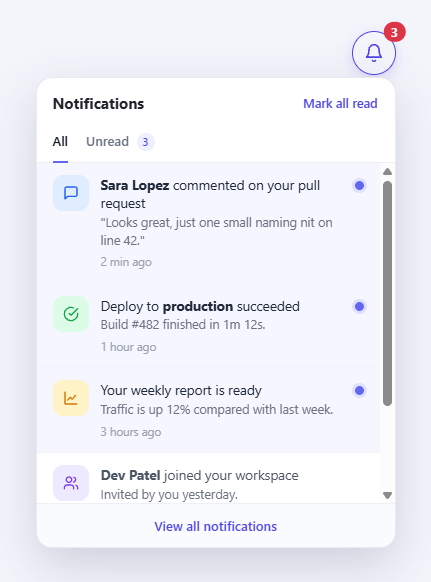
This is a complete notification center built on real Bootstrap 5.3's Dropdown component: a bell button with a red badge, and a 360px panel with coloured icon tiles, a headline, a short preview line and a timestamp for every notification, All / Unread tabs, a "Mark all read" link and a "View all notifications" footer.
Everything is derived from the DOM
The badge, the counter on the Unread tab and the empty state are never tracked in a separate variable. render() re-counts the .bsnotif-unread items after every click, so the numbers cannot drift out of sync. When the Unread tab is selected and nothing is left, a friendly "You're all caught up" state replaces the list instead of leaving a blank box.
Keeping the menu open past the first click
Bootstrap's Dropdown closes on any click by default, including a click on an item inside it. The bell's data-bs-auto-close="outside" attribute switches to Bootstrap's other documented mode, so the menu closes only on a genuine outside click and a visitor can read several notifications in one go. The bell also rings once on load, respecting prefers-reduced-motion.
What's included
Features
Step by step
How to Use
- 1Load the snippetClick the snippet in the sidebar Library tab. The bell rings once and the panel opens with a red "3" badge.
- 2Click a notificationIt loses its tint and dot, the badge and the Unread tab count drop to "2", and the dropdown stays open.
- 3Switch to the Unread tabAlready-read items are hidden so only what still needs attention is listed.
- 4Click "Mark all read"Every notification clears, the badge disappears, and the Unread tab shows the "You're all caught up" state.
Real-world uses
Common Use Cases
Got questions?
Frequently Asked Questions
Yes — it uses Bootstrap 5.3's actual Dropdown component via data-bs-toggle="dropdown", loaded from the genuine CDN, for the open/close and outside-click behavior.
render() re-counts the elements carrying the .bsnotif-unread class after every click, tab switch or "mark all", and updates the badge, the Unread tab counter and the empty state from that one number.
The bell carries data-bs-auto-close="outside". With Bootstrap's default (autoClose: true) the menu would close on any click inside it, dismissing the panel after the very first notification you read.
The tabs only toggle a bsnotif-only-unread class on the panel. CSS then hides every item that lacks .bsnotif-unread, so no items are removed or re-rendered.
Yes — insert a new .dropdown-item.bsnotif-item.bsnotif-unread element into #bsnotifList and call render(); the click handler is delegated on the list, so new items work automatically.
Only in this demo, so the design is visible straight away. Delete the window load listener at the bottom of the JS to keep it closed until clicked.
Yes. While the Bootstrap Notification Center Dropdown snippet gives you one pattern to copy, the free Responsive Navbar Builder at webdevpuneet.com/navbar-builder/ designs a whole navigation bar: logo, links and dropdown menus, a mobile hamburger menu (dropdown panel, slide-in drawer or full screen) and a scroll effect (sticky, shrink, hide on scroll or transparent). It has six presets, a live preview that runs the real code, and exports HTML + CSS + vanilla JS, React, Tailwind, Vue 3 or Angular — or you can click Fork & Edit to keep editing it in My Code.
Copy & paste
Source Code
<div class="container-fluid py-5 d-flex justify-content-center bsnotif-stage">
  <div class="dropdown">
    <button class="btn bsnotif-bell position-relative" id="bsnotifBell" data-bs-toggle="dropdown" data-bs-auto-close="outside" aria-expanded="false" aria-label="Notifications">
      <svg width="20" height="20" viewBox="0 0 24 24" fill="none" stroke="currentColor" stroke-width="2" stroke-linecap="round" stroke-linejoin="round"><path d="M18 8A6 6 0 0 0 6 8c0 7-3 9-3 9h18s-3-2-3-9"/><path d="M13.73 21a2 2 0 0 1-3.46 0"/></svg>
      <span class="badge rounded-pill bg-danger position-absolute top-0 start-100 translate-middle" id="bsnotifBadge">3</span>
    </button>
    <div class="dropdown-menu dropdown-menu-end bsnotif-panel p-0" id="bsnotifPanel">
      <div class="bsnotif-head">
        <div class="d-flex justify-content-between align-items-center">
          <strong>Notifications</strong>
          <button class="btn btn-link btn-sm p-0 text-decoration-none" id="bsnotifReadAll">Mark all read</button>
        </div>
        <div class="bsnotif-tabs" role="tablist">
          <button class="bsnotif-tab active" data-filter="all" role="tab" aria-selected="true">All</button>
          <button class="bsnotif-tab" data-filter="unread" role="tab" aria-selected="false">Unread <span id="bsnotifTabCount">3</span></button>
        </div>
      </div>
      <div id="bsnotifList">
        <a href="javascript:void(0)" class="dropdown-item bsnotif-item bsnotif-unread">
          <span class="bsnotif-ico bsnotif-blue"><svg width="16" height="16" viewBox="0 0 24 24" fill="none" stroke="currentColor" stroke-width="2" stroke-linecap="round" stroke-linejoin="round"><path d="M21 15a2 2 0 0 1-2 2H7l-4 4V5a2 2 0 0 1 2-2h14a2 2 0 0 1 2 2z"/></svg></span>
          <span class="bsnotif-body"><span class="bsnotif-title"><b>Sara Lopez</b> commented on your pull request</span><span class="bsnotif-sub">"Looks great, just one small naming nit on line 42."</span><span class="bsnotif-time">2 min ago</span></span>
          <span class="bsnotif-dot" aria-hidden="true"></span>
        </a>
        <a href="javascript:void(0)" class="dropdown-item bsnotif-item bsnotif-unread">
          <span class="bsnotif-ico bsnotif-green"><svg width="16" height="16" viewBox="0 0 24 24" fill="none" stroke="currentColor" stroke-width="2" stroke-linecap="round" stroke-linejoin="round"><path d="M22 11.08V12a10 10 0 1 1-5.93-9.14"/><path d="M22 4 12 14.01l-3-3"/></svg></span>
          <span class="bsnotif-body"><span class="bsnotif-title">Deploy to <b>production</b> succeeded</span><span class="bsnotif-sub">Build #482 finished in 1m 12s.</span><span class="bsnotif-time">1 hour ago</span></span>
          <span class="bsnotif-dot" aria-hidden="true"></span>
        </a>
        <a href="javascript:void(0)" class="dropdown-item bsnotif-item bsnotif-unread">
          <span class="bsnotif-ico bsnotif-amber"><svg width="16" height="16" viewBox="0 0 24 24" fill="none" stroke="currentColor" stroke-width="2" stroke-linecap="round" stroke-linejoin="round"><path d="M3 3v18h18"/><path d="M7 15l4-4 3 3 5-6"/></svg></span>
          <span class="bsnotif-body"><span class="bsnotif-title">Your weekly report is ready</span><span class="bsnotif-sub">Traffic is up 12% compared with last week.</span><span class="bsnotif-time">3 hours ago</span></span>
          <span class="bsnotif-dot" aria-hidden="true"></span>
        </a>
        <a href="javascript:void(0)" class="dropdown-item bsnotif-item">
          <span class="bsnotif-ico bsnotif-violet"><svg width="16" height="16" viewBox="0 0 24 24" fill="none" stroke="currentColor" stroke-width="2" stroke-linecap="round" stroke-linejoin="round"><path d="M16 21v-2a4 4 0 0 0-4-4H6a4 4 0 0 0-4 4v2"/><circle cx="9" cy="7" r="4"/><path d="M22 21v-2a4 4 0 0 0-3-3.87"/><path d="M16 3.13a4 4 0 0 1 0 7.75"/></svg></span>
          <span class="bsnotif-body"><span class="bsnotif-title"><b>Dev Patel</b> joined your workspace</span><span class="bsnotif-sub">Invited by you yesterday.</span><span class="bsnotif-time">Yesterday</span></span>
          <span class="bsnotif-dot" aria-hidden="true"></span>
        </a>
        <a href="javascript:void(0)" class="dropdown-item bsnotif-item">
          <span class="bsnotif-ico bsnotif-rose"><svg width="16" height="16" viewBox="0 0 24 24" fill="none" stroke="currentColor" stroke-width="2" stroke-linecap="round" stroke-linejoin="round"><path d="M10.29 3.86 1.82 18a2 2 0 0 0 1.71 3h16.94a2 2 0 0 0 1.71-3L13.71 3.86a2 2 0 0 0-3.42 0z"/><path d="M12 9v4"/><path d="M12 17h.01"/></svg></span>
          <span class="bsnotif-body"><span class="bsnotif-title">Payment method expires soon</span><span class="bsnotif-sub">Update your card ending 4242 before 30 Nov.</span><span class="bsnotif-time">2 days ago</span></span>
          <span class="bsnotif-dot" aria-hidden="true"></span>
        </a>
      </div>
      <div class="bsnotif-empty" id="bsnotifEmpty" hidden>
        <div class="bsnotif-empty-ico"><svg width="26" height="26" viewBox="0 0 24 24" fill="none" stroke="currentColor" stroke-width="2" stroke-linecap="round" stroke-linejoin="round"><path d="M22 11.08V12a10 10 0 1 1-5.93-9.14"/><path d="M22 4 12 14.01l-3-3"/></svg></div>
        <strong>You're all caught up</strong>
        <span>No unread notifications right now.</span>
      </div>
      <a href="javascript:void(0)" class="bsnotif-foot">View all notifications</a>
    </div>
  </div>
</div>html, body { min-height: 100%; background: #f4f5fb; }
.bsnotif-stage { min-height: 100vh; align-items: flex-start; background: #f4f5fb; }
.bsnotif-bell { width: 44px; height: 44px; padding: 0; display: inline-flex; align-items: center; justify-content: center; border-radius: 50%; background: #fff; border: 1px solid #e3e5f0; color: #374151; box-shadow: 0 1px 2px rgba(16,24,40,.06); transition: box-shadow .2s, color .2s; }
.bsnotif-bell:hover, .bsnotif-bell.show { box-shadow: 0 4px 14px rgba(99,102,241,.25); color: #4f46e5; }
.bsnotif-bell.bsnotif-ring svg { animation: bsnotifRing .8s ease; transform-origin: 50% 0; }
@keyframes bsnotifRing { 0%,100% { transform: rotate(0); } 15% { transform: rotate(14deg); } 30% { transform: rotate(-12deg); } 45% { transform: rotate(8deg); } 60% { transform: rotate(-6deg); } 75% { transform: rotate(3deg); } }
.bsnotif-panel { width: 360px; max-width: calc(100vw - 24px); border: 1px solid #e8eaf3; border-radius: 16px; overflow: hidden; box-shadow: 0 18px 48px rgba(30,34,80,.18); }
.bsnotif-head { padding: 14px 16px 0; border-bottom: 1px solid #eef0f6; }
.bsnotif-head strong { font-size: 15px; }
.bsnotif-head .btn-link { font-size: 12.5px; font-weight: 600; color: #4f46e5; }
.bsnotif-tabs { display: flex; gap: 18px; margin-top: 10px; }
.bsnotif-tab { background: none; border: 0; padding: 6px 0 10px; font-size: 13px; font-weight: 600; color: #6b7280; border-bottom: 2px solid transparent; margin-bottom: -1px; }
.bsnotif-tab span { display: inline-block; min-width: 18px; padding: 0 5px; margin-left: 4px; border-radius: 9px; background: #eef0ff; color: #4f46e5; font-size: 11px; line-height: 18px; text-align: center; }
.bsnotif-tab.active { color: #111827; border-bottom-color: #6366f1; }
#bsnotifList { max-height: 340px; overflow-y: auto; }
.bsnotif-item { display: flex; align-items: flex-start; gap: 12px; padding: 12px 16px; white-space: normal; border-bottom: 1px solid #f3f4f8; transition: background .15s; }
.bsnotif-item:hover { background: #f7f8fc; }
.bsnotif-item.bsnotif-unread { background: #f5f6ff; }
.bsnotif-item.bsnotif-unread:hover { background: #eef0ff; }
.bsnotif-ico { width: 36px; height: 36px; border-radius: 10px; display: inline-flex; align-items: center; justify-content: center; flex-shrink: 0; }
.bsnotif-blue { background: #e0ecff; color: #2563eb; }
.bsnotif-green { background: #dcfce7; color: #16a34a; }
.bsnotif-amber { background: #fef3c7; color: #d97706; }
.bsnotif-violet { background: #ede9fe; color: #7c3aed; }
.bsnotif-rose { background: #ffe4e6; color: #e11d48; }
.bsnotif-body { display: flex; flex-direction: column; min-width: 0; flex: 1; }
.bsnotif-title { font-size: 13.5px; line-height: 1.4; color: #1f2937; }
.bsnotif-sub { font-size: 12.5px; color: #6b7280; margin-top: 2px; line-height: 1.4; }
.bsnotif-time { font-size: 11.5px; color: #9ca3af; margin-top: 4px; }
.bsnotif-dot { width: 9px; height: 9px; border-radius: 50%; background: #6366f1; margin-top: 6px; flex-shrink: 0; box-shadow: 0 0 0 3px rgba(99,102,241,.15); }
.bsnotif-item:not(.bsnotif-unread) .bsnotif-dot { display: none; }
.bsnotif-item:not(.bsnotif-unread) .bsnotif-title { color: #4b5563; }
.bsnotif-panel.bsnotif-only-unread .bsnotif-item:not(.bsnotif-unread) { display: none; }
.bsnotif-empty { display: flex; flex-direction: column; align-items: center; text-align: center; gap: 4px; padding: 34px 20px; color: #6b7280; font-size: 13px; }
.bsnotif-empty[hidden] { display: none; }
.bsnotif-empty-ico { width: 52px; height: 52px; border-radius: 50%; background: #dcfce7; color: #16a34a; display: flex; align-items: center; justify-content: center; margin-bottom: 6px; }
.bsnotif-empty strong { color: #111827; font-size: 14px; }
.bsnotif-foot { display: block; text-align: center; padding: 12px; font-size: 13px; font-weight: 600; color: #4f46e5; text-decoration: none; background: #fafbff; border-top: 1px solid #eef0f6; }
.bsnotif-foot:hover { background: #f0f2ff; }
@media (prefers-reduced-motion: reduce) { .bsnotif-bell.bsnotif-ring svg { animation: none; } }const bell = document.getElementById('bsnotifBell');
const badge = document.getElementById('bsnotifBadge');
const panel = document.getElementById('bsnotifPanel');
const list = document.getElementById('bsnotifList');
const empty = document.getElementById('bsnotifEmpty');
const tabCount = document.getElementById('bsnotifTabCount');
const readAllBtn = document.getElementById('bsnotifReadAll');
let filter = 'all';
// The badge, tab counter and empty state are all derived from the DOM:
// they re-count .bsnotif-unread items after every change.
function render() {
const unread = list.querySelectorAll('.bsnotif-unread').length;
badge.textContent = unread;
badge.style.display = unread > 0 ? '' : 'none';
tabCount.textContent = unread;
panel.classList.toggle('bsnotif-only-unread', filter === 'unread');
empty.hidden = !(filter === 'unread' && unread === 0);
document.querySelectorAll('.bsnotif-tab').forEach(t => {
const on = t.dataset.filter === filter;
t.classList.toggle('active', on);
t.setAttribute('aria-selected', on);
});
}
// data-bs-auto-close="outside" on the bell keeps the menu open while
// notifications are clicked. Bootstrap's default would close it on the first click.
list.addEventListener('click', e => {
const item = e.target.closest('.bsnotif-item');
if (!item) return;
item.classList.remove('bsnotif-unread');
render();
});
readAllBtn.addEventListener('click', () => {
list.querySelectorAll('.bsnotif-unread').forEach(i => i.classList.remove('bsnotif-unread'));
render();
});
document.querySelectorAll('.bsnotif-tab').forEach(t => {
t.addEventListener('click', () => { filter = t.dataset.filter; render(); });
});
// Ring the bell on load, then open the panel so the design is visible straight away.
bell.classList.add('bsnotif-ring');
render();
window.addEventListener('load', () => {
if (window.bootstrap) bootstrap.Dropdown.getOrCreateInstance(bell).show();
});Extend with AI
Take This Snippet Further With AI
Hand this snippet's HTML, CSS, and JS to an AI coding assistant like Claude and ask it to add real-time notifications via a WebSocket or polling connection that prepend new unread items, to add a per-item dismiss button, or to group notifications under Today / Earlier headings. It's also a good exercise to ask the assistant to persist read state to localStorage so it survives a page reload.
Prompt to recreate it
Copy this into your AI assistant of choice to build the effect from scratch, or as a jumping-off point for your own variant:
Build a Bootstrap 5.3 notification center dropdown, using the real Bootstrap CDN framework (bootstrap.min.css and bootstrap.bundle.min.js), not custom CSS made to resemble Bootstrap.

Requirements:
- A round bell button with a red unread-count badge, using Bootstrap's real Dropdown component (data-bs-toggle="dropdown" with data-bs-auto-close="outside") to reveal a rounded, shadowed panel about 360px wide.
- Panel header with the title "Notifications", a "Mark all read" link, and All / Unread tabs where the Unread tab shows a live count.
- At least five notifications, each with a coloured icon tile, a headline with bold names, a one-line preview and a relative timestamp. Unread ones have a tinted background and a dot; read ones are muted.
- Clicking a notification marks only that one as read without closing the dropdown. The Unread tab hides read items.
- Badge, tab counter and empty state must be recalculated from the DOM on every change (no separate counter); the badge hides at zero, and the Unread tab shows a "You're all caught up" empty state when nothing is left.
- A "View all notifications" footer link, a scrollable list, and a one-time bell ring animation on load that respects prefers-reduced-motion.
Want to tighten it up first? Run this prompt through the AI Prompt Studio to score it across 8 quality dimensions, catch anti-patterns, and tune the wording for Claude, ChatGPT, or Gemini before you paste it in.