
Clipboard Paste Button — Smart Paste Field in HTML & JS
Clipboard Paste Button · Buttons · Plain HTML, CSS & JS · Live preview
About this UI Snippet
Clipboard Paste Button — One-Click Paste That Still Works When the Browser Says No
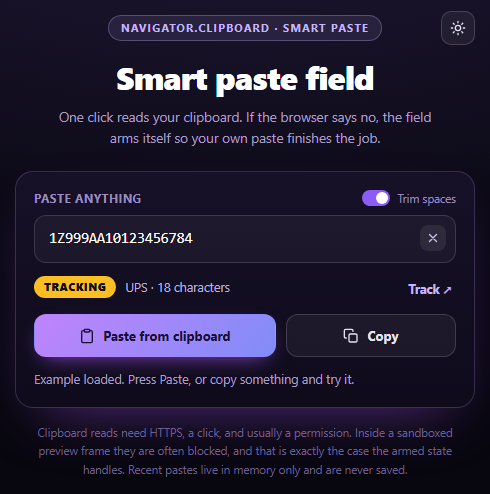
This snippet is a paste field built around one awkward fact: navigator.clipboard.readText() is permission-gated, needs HTTPS and a click, and is frequently blocked outright inside sandboxed iframes. Most paste buttons simply break when that happens. This one treats a refusal as a normal state. The button tries a one-click read, and if the browser declines, the field *arms* itself and shows the keys to press, so a native paste finishes the job and the user never hits a dead end.
The paste button and its four states
The button moves through idle, reading, done and armed, driven by a single data-state attribute so CSS draws each one: a clipboard icon, a spinner while the browser decides, an animated check, and a pulsing amber state that says "Now press Ctrl V" (or the command key on Apple devices). If a permission prompt is left open and the user pastes by hand instead, a read token makes the late result get ignored rather than overwriting what they just pasted.
Armed fallback instead of an error
When readText() rejects with NotAllowedError, is missing, or returns an empty string, arm() focuses the field, pulses its border and shows a pair of keycaps that physically press down as you hold the real keys. The reason is stated in plain words, and a native paste event on the field is never gated by the Clipboard API, so it always works. That event reads clipboardData, so the same path also catches pasted images.
Detecting what was pasted
Every value is classified as you type or paste: a link, email address, phone number, hex colour, number, valid JSON, or a parcel tracking number matched to UPS, FedEx, USPS, Amazon or international postal (S10) formats. Each type gets a colour chip, a short description, and one useful action: Open, Write, Call, Track (a carrier tracking link), or Prettify and Minify for JSON. Links are built with DOM methods and rel="noopener noreferrer", and pasted text is only ever assigned with textContent, never as HTML.
Trim, undo and recent pastes
A switch trims stray spaces and line breaks that clipboards love to add, and the status line reports how many characters were removed. Every paste, clear or restore offers a seven-second Undo. Escape clears the field, also undoable. The last five distinct pastes appear as chips you can click to reuse. They live in memory only and are never written to storage, which matters when people paste tokens and addresses.
Copying back out
Copy calls navigator.clipboard.writeText(), falls back to a hidden textarea and document.execCommand('copy'), and as a last resort selects the text so the manual shortcut is one keystroke. An empty field shakes instead of copying nothing. Pair it with a plain copy button, an API key copy field for secrets, or a paste-to-upload area for files.
Accessibility and motion
The status line is a polite live region, every control is a real button with a visible focus ring, the trim switch is a native checkbox, and prefers-reduced-motion stops the pulses and shake. The layout stacks on narrow screens.
What's included
Features
Step by step
How to Use
- 1Press "Paste from clipboard"The button calls navigator.clipboard.readText() from your click. The browser may ask once for permission; while it decides, the button shows a spinner.
- 2See what you pastedThe chip names the type: link, email, phone, hex colour, number, JSON or a UPS, FedEx, USPS, Amazon or international postal tracking number. The action beside it opens, calls, tracks or prettifies it.
- 3Follow the armed hint if access is blockedWhen the browser refuses, the button turns amber, the field glows and the keycaps show what to press. A normal paste then fills the field, and it also accepts pasted images.
- 4Undo, clear and reuseUndo appears for seven seconds after any paste or clear. Press Escape to clear, and click a Recent chip to bring an earlier value back, or Clear all to empty the list. Turn off Trim spaces to keep padding.
- 5Copy it back outCopy writes the field to the clipboard and confirms with a check. An empty field shakes, and if every method is blocked the text is selected for a manual copy.
- 6Wire it into your formReplace the detect() rules with your own validator, swap the textarea for an input, or call apply(text) from your own button to reuse the trim, undo and history behaviour.
Real-world uses
Common Use Cases
Got questions?
Frequently Asked Questions
readText() needs HTTPS, a click and usually a permission, and sandboxed frames often block it with no prompt at all. The amber state means the browser refused, and the field is armed so your own paste, which is never blocked, still fills it.
No. Browsers only allow readText() in direct response to a user gesture and normally ask permission first. This snippet calls it solely when you press the Paste button, and keeps recent pastes in memory, never in storage.
A text field cannot hold an image, so the native paste event is caught and the picture appears as a thumbnail with its type, size and pixel dimensions. Remove clears it, and the one-click button reads text only.
It matches common formats only: UPS 1Z numbers, 12 or 15 digit FedEx numbers and 20 to 22 digit USPS numbers starting with 9, Amazon TBA numbers and 13 character international postal numbers such as RM123456789GB. Other carriers fall back to Number or Text, and you can add patterns to the CARRIERS table.
Yes. Pasted text is only assigned with textContent and value, never as HTML. Links are limited to valid http and https URLs and open with rel noopener noreferrer, and mailto and tel links are built from the validated value.
Copy & paste
Source Code
<section class="cpb-wrap">
  <button class="cpb-theme" id="cpbTheme" type="button" aria-pressed="false" aria-label="Switch to light theme" title="Light or dark theme">
    <svg class="ic-sun" viewBox="0 0 24 24" width="16" height="16" fill="none" stroke="currentColor" stroke-width="2" stroke-linecap="round" stroke-linejoin="round"><circle cx="12" cy="12" r="4"/><path d="M12 2v2M12 20v2M4.9 4.9l1.4 1.4M17.7 17.7l1.4 1.4M2 12h2M20 12h2M4.9 19.1l1.4-1.4M17.7 6.3l1.4-1.4"/></svg>
    <svg class="ic-moon" viewBox="0 0 24 24" width="16" height="16" fill="none" stroke="currentColor" stroke-width="2" stroke-linecap="round" stroke-linejoin="round"><path d="M21 12.8A9 9 0 1111.2 3a7 7 0 009.8 9.8z"/></svg>
  </button>
  <span class="cpb-tag">navigator.clipboard · smart paste</span>
  <h1>Smart paste field</h1>
  <p class="cpb-lead">One click reads your clipboard. If the browser says no, the field arms itself so your own paste finishes the job.</p>

  <div class="cpb-card">
    <div class="cpb-row">
      <label class="cpb-label" for="cpbInput">Paste anything</label>
      <label class="cpb-switch"><input type="checkbox" id="cpbTrim" checked><span class="cpb-track"></span><span>Trim spaces</span></label>
    </div>

    <div class="cpb-field" id="cpbField">
      <textarea class="cpb-input" id="cpbInput" rows="1" placeholder="Tracking number, link, email, JSON, colour…" spellcheck="false" autocomplete="off"></textarea>
      <button class="cpb-x" id="cpbClear" type="button" aria-label="Clear field" hidden><svg viewBox="0 0 24 24" width="14" height="14" fill="none" stroke="currentColor" stroke-width="2.4" stroke-linecap="round"><path d="M6 6l12 12M18 6L6 18"/></svg></button>
    </div>

    <div class="cpb-detect" id="cpbDetect">
      <span class="cpb-chip" id="cpbChip" data-type="none">Empty</span>
      <span class="cpb-meta" id="cpbMeta">Detects what you paste</span>
      <span class="cpb-action" id="cpbAction"></span>
    </div>

    <div class="cpb-image" id="cpbImage" hidden>
      <img id="cpbThumb" alt="Pasted image preview" width="44" height="44">
      <div><b>Image pasted</b><span id="cpbImgInfo"></span></div>
      <button type="button" class="cpb-link" id="cpbImgRemove">Remove</button>
    </div>

    <div class="cpb-actions">
      <button class="cpb-btn primary" id="cpbPasteBtn" type="button" data-state="idle">
        <svg class="ic-paste" viewBox="0 0 24 24" width="16" height="16" fill="none" stroke="currentColor" stroke-width="2" stroke-linecap="round" stroke-linejoin="round"><rect x="8" y="2" width="8" height="4" rx="1"/><path d="M16 4h2a2 2 0 012 2v14a2 2 0 01-2 2H6a2 2 0 01-2-2V6a2 2 0 012-2h2"/></svg>
        <svg class="ic-check" viewBox="0 0 24 24" width="16" height="16" fill="none" stroke="currentColor" stroke-width="2.6" stroke-linecap="round" stroke-linejoin="round"><path d="M20 6L9 17l-5-5"/></svg>
        <i class="ic-spin"></i>
        <span id="cpbPasteLabel">Paste from clipboard</span>
      </button>
      <button class="cpb-btn" id="cpbCopyBtn" type="button" data-state="idle">
        <svg class="ic-copy" viewBox="0 0 24 24" width="16" height="16" fill="none" stroke="currentColor" stroke-width="2" stroke-linecap="round" stroke-linejoin="round"><rect x="9" y="9" width="12" height="12" rx="2"/><path d="M5 15H4a2 2 0 01-2-2V4a2 2 0 012-2h9a2 2 0 012 2v1"/></svg>
        <svg class="ic-check" viewBox="0 0 24 24" width="16" height="16" fill="none" stroke="currentColor" stroke-width="2.6" stroke-linecap="round" stroke-linejoin="round"><path d="M20 6L9 17l-5-5"/></svg>
        <span id="cpbCopyLabel">Copy</span>
      </button>
    </div>

    <div class="cpb-armed" id="cpbArmed" hidden>
      <div class="cpb-keys"><kbd id="cpbKeyMod">Ctrl</kbd><b>+</b><kbd id="cpbKeyV">V</kbd></div>
      <p id="cpbArmedMsg"></p>
    </div>

    <p class="cpb-status" role="status" aria-live="polite"><span id="cpbStatusText">Example loaded. Press Paste, or copy something and try it.</span><button type="button" class="cpb-link" id="cpbUndo" hidden>Undo</button></p>

    <div class="cpb-recent" id="cpbRecent" hidden><span>Recent</span><div id="cpbChips"></div><button type="button" class="cpb-link cpb-clearall" id="cpbClearRecent">Clear all</button></div>
  </div>

  <p class="cpb-note">Clipboard reads need HTTPS, a click, and usually a permission. Inside a sandboxed preview frame they are often blocked, and that is exactly the case the armed state handles. Recent pastes live in memory only and are never saved.</p>
</section>*{box-sizing:border-box;margin:0;padding:0}
[hidden]{display:none!important}
body{font-family:system-ui,-apple-system,'Segoe UI',sans-serif;background:radial-gradient(120% 90% at 50% 0%,#241b3d,#08070f 62%);color:#fff;min-height:100vh;display:flex;align-items:center;justify-content:center;padding:26px}
.cpb-wrap{position:relative;width:100%;max-width:460px;text-align:center}
.cpb-theme{position:absolute;top:-4px;right:0;width:34px;height:34px;border-radius:10px;border:1px solid rgba(255,255,255,.16);background:rgba(255,255,255,.06);color:#e8e2f5;cursor:pointer;display:grid;place-items:center;transition:background .15s}
.cpb-theme:hover{background:rgba(255,255,255,.13)}
.cpb-theme:focus-visible{outline:2px solid #c4b5fd;outline-offset:2px}
.cpb-theme .ic-moon{display:none}
.cpb-tag{display:inline-block;font-size:10.5px;font-weight:700;letter-spacing:.14em;text-transform:uppercase;color:#c4b5fd;background:rgba(196,181,253,.1);border:1px solid rgba(196,181,253,.3);padding:5px 12px;border-radius:99px;margin-bottom:14px}
.cpb-wrap h1{font-size:clamp(24px,6vw,32px);font-weight:800;letter-spacing:-.02em}
.cpb-lead{font-size:13.5px;color:#a89dc2;margin:8px auto 0;line-height:1.6;max-width:380px}
.cpb-card{margin-top:22px;border-radius:18px;border:1px solid rgba(196,181,253,.2);background:linear-gradient(180deg,#161127,#0f0b1b);padding:18px;text-align:left;box-shadow:0 24px 60px -28px rgba(168,85,247,.55)}
.cpb-row{display:flex;align-items:center;justify-content:space-between;gap:10px;margin-bottom:9px}
.cpb-label{font-size:11.5px;font-weight:700;letter-spacing:.06em;text-transform:uppercase;color:#9a8cc0}
.cpb-switch{display:flex;align-items:center;gap:7px;font-size:11.5px;color:#9a8cc0;cursor:pointer}
.cpb-switch input{position:absolute;opacity:0;width:0;height:0}
.cpb-track{position:relative;width:28px;height:16px;border-radius:99px;background:#2a2342;transition:background .2s}
.cpb-track::after{content:'';position:absolute;top:2px;left:2px;width:12px;height:12px;border-radius:50%;background:#cbbff0;transition:transform .2s}
.cpb-switch input:checked+.cpb-track{background:#8b5cf6}
.cpb-switch input:checked+.cpb-track::after{transform:translateX(12px);background:#fff}
.cpb-switch input:focus-visible+.cpb-track{outline:2px solid #c4b5fd;outline-offset:2px}
.cpb-field{position:relative;border-radius:12px}
.cpb-input{display:block;width:100%;min-height:46px;max-height:120px;resize:none;padding:13px 40px 13px 14px;border-radius:12px;border:1px solid rgba(255,255,255,.14);background:rgba(255,255,255,.04);color:#fff;font:14.5px ui-monospace,SFMono-Regular,Menlo,Consolas,monospace;line-height:1.4;outline:none;transition:border-color .15s,box-shadow .15s}
.cpb-input{scrollbar-width:thin;scrollbar-color:rgba(196,181,253,.4) transparent}
.cpb-input::-webkit-scrollbar{width:5px}
.cpb-input::-webkit-scrollbar-track{background:transparent;margin:8px 0}
.cpb-input::-webkit-scrollbar-thumb{background:rgba(196,181,253,.35);border-radius:99px}
.cpb-input::-webkit-scrollbar-thumb:hover{background:rgba(196,181,253,.6)}
.cpb-input::placeholder{color:#6c5f8d;font-family:system-ui,sans-serif}
.cpb-input:focus{border-color:#c4b5fd;box-shadow:0 0 0 3px rgba(196,181,253,.18)}
.cpb-field.armed .cpb-input{border-color:#fbbf24;animation:cpbArm 1.4s ease-in-out infinite}
.cpb-field.shake{animation:cpbShake .4s}
@keyframes cpbArm{0%,100%{box-shadow:0 0 0 0 rgba(251,191,36,.45)}50%{box-shadow:0 0 0 6px rgba(251,191,36,0)}}
@keyframes cpbShake{20%{transform:translateX(-5px)}40%{transform:translateX(5px)}60%{transform:translateX(-3px)}80%{transform:translateX(3px)}}
.cpb-x{position:absolute;top:10px;right:10px;width:26px;height:26px;border-radius:8px;border:0;background:rgba(255,255,255,.08);color:#cbbff0;cursor:pointer;display:grid;place-items:center;transition:background .15s}
.cpb-x:hover{background:rgba(255,255,255,.16)}
.cpb-x:focus-visible,.cpb-btn:focus-visible,.cpb-link:focus-visible,.cpb-chipbtn:focus-visible{outline:2px solid #c4b5fd;outline-offset:2px}
.cpb-detect{display:flex;align-items:center;gap:9px;flex-wrap:wrap;margin-top:11px;min-height:26px}
.cpb-chip{font-size:10.5px;font-weight:800;letter-spacing:.08em;text-transform:uppercase;padding:4px 10px;border-radius:99px;color:#0f0b1b;background:#94a3b8;transition:background .2s}
.cpb-chip[data-type=none]{background:rgba(255,255,255,.1);color:#9a8cc0}
.cpb-chip[data-type=link]{background:#38bdf8}.cpb-chip[data-type=email]{background:#f472b6}.cpb-chip[data-type=phone]{background:#34d399}
.cpb-chip[data-type=tracking]{background:#fbbf24}.cpb-chip[data-type=json]{background:#a78bfa}.cpb-chip[data-type=color]{background:#fff}.cpb-chip[data-type=number]{background:#fb923c}
.cpb-meta{font-size:12.5px;color:#b9aedb;display:flex;align-items:center;gap:7px;min-width:0;overflow:hidden;text-overflow:ellipsis;white-space:nowrap}
.cpb-swatch{width:14px;height:14px;border-radius:4px;border:1px solid rgba(255,255,255,.4);flex:none}
.cpb-action{margin-left:auto}
.cpb-link{background:none;border:0;color:#c4b5fd;font:700 12.5px system-ui;cursor:pointer;text-decoration:none;padding:2px 4px;border-radius:5px}
.cpb-link:hover{color:#fff;text-decoration:underline}
.cpb-image{display:flex;align-items:center;gap:12px;margin-top:12px;padding:10px;border-radius:12px;background:rgba(255,255,255,.04);border:1px dashed rgba(196,181,253,.35)}
.cpb-image img{width:44px;height:44px;border-radius:8px;object-fit:cover;background:#2a2342}
.cpb-image div{display:flex;flex-direction:column;font-size:12px;color:#9a8cc0;flex:1;min-width:0}
.cpb-image b{color:#fff;font-size:13px}
.cpb-actions{display:flex;gap:10px;margin-top:14px}
.cpb-btn{flex:1;display:flex;align-items:center;justify-content:center;gap:8px;padding:12px;border-radius:12px;border:1px solid rgba(255,255,255,.16);background:rgba(255,255,255,.05);color:#e8e2f5;font:700 13px system-ui;cursor:pointer;transition:background .15s,border-color .15s,transform .1s,color .15s}
.cpb-btn:hover{background:rgba(255,255,255,.1)}
.cpb-btn:active{transform:scale(.97)}
.cpb-btn.primary{background:linear-gradient(135deg,#c084fc,#818cf8);border-color:transparent;color:#1a0f2e;flex:1.5;box-shadow:0 8px 22px -10px rgba(168,85,247,.9)}
.cpb-btn.primary:hover{filter:brightness(1.08)}
.cpb-btn .ic-check,.cpb-btn .ic-spin{display:none}
.cpb-btn[data-state=done]{background:rgba(74,222,128,.16);border-color:rgba(74,222,128,.45);color:#86efac;box-shadow:none}
.cpb-btn[data-state=done] .ic-paste,.cpb-btn[data-state=done] .ic-copy,.cpb-btn[data-state=reading] .ic-paste{display:none}
.cpb-btn[data-state=done] .ic-check{display:block;animation:cpbPop .35s ease-out}
.cpb-btn[data-state=reading] .ic-spin{display:block;width:16px;height:16px;border-radius:50%;border:2.4px solid rgba(26,15,46,.25);border-top-color:#1a0f2e;animation:cpbSpin .7s linear infinite}
.cpb-btn[data-state=armed]{background:linear-gradient(135deg,#fbbf24,#f59e0b);color:#2b1a00;animation:cpbArm 1.4s ease-in-out infinite}
@keyframes cpbPop{0%{transform:scale(.3);opacity:0}70%{transform:scale(1.25)}100%{transform:scale(1);opacity:1}}
@keyframes cpbSpin{to{transform:rotate(360deg)}}
.cpb-armed{display:flex;align-items:center;gap:14px;margin-top:12px;padding:12px 14px;border-radius:12px;background:rgba(251,191,36,.08);border:1px solid rgba(251,191,36,.35)}
.cpb-armed p{font-size:12px;line-height:1.55;color:#f5deb0}
.cpb-keys{display:flex;align-items:center;gap:5px;flex:none}
.cpb-keys b{color:#d6b366;font-size:12px}
.cpb-keys kbd{font:800 12px system-ui;color:#f5deb0;background:#2b2210;border:1px solid #6b5522;border-bottom-width:3px;border-radius:7px;padding:5px 9px;min-width:30px;text-align:center;transition:transform .08s,background .1s}
.cpb-keys kbd.down{transform:translateY(2px);border-bottom-width:1px;background:#fbbf24;color:#2b1a00}
.cpb-status{display:flex;align-items:center;gap:8px;min-height:20px;margin-top:12px;font-size:12.5px;color:#a89dc2}
.cpb-recent{display:flex;align-items:center;gap:10px;margin-top:12px;padding-top:12px;border-top:1px solid rgba(255,255,255,.07)}
.cpb-recent>span{font-size:10.5px;font-weight:800;letter-spacing:.12em;text-transform:uppercase;color:#6c5f8d;flex:none}
.cpb-recent div{display:flex;gap:6px;flex-wrap:wrap;min-width:0}
.cpb-clearall{flex:none;margin-left:auto}
.cpb-chipbtn{display:flex;align-items:center;gap:6px;max-width:150px;padding:4px 10px;border-radius:99px;border:1px solid rgba(255,255,255,.14);background:rgba(255,255,255,.04);color:#d7cdf0;font:12px ui-monospace,Menlo,Consolas,monospace;cursor:pointer;transition:background .15s,border-color .15s}
.cpb-chipbtn:hover{background:rgba(255,255,255,.1);border-color:rgba(196,181,253,.5)}
.cpb-chipbtn i{width:7px;height:7px;border-radius:50%;flex:none;background:#94a3b8}
.cpb-chipbtn span{overflow:hidden;text-overflow:ellipsis;white-space:nowrap}
.cpb-note{font-size:11.5px;color:#6c5f8d;max-width:420px;margin:16px auto 0;line-height:1.6}
/* Light theme: the switch in the corner toggles .cpb-light on the wrapper */
body:has(.cpb-light){background:radial-gradient(120% 90% at 50% 0%,#ffffff,#e9e4f7 70%);color:#1b1530}
.cpb-light .cpb-theme{border-color:rgba(27,21,48,.16);background:#fff;color:#2a1f4d}
.cpb-light .cpb-theme:hover{background:#f1edfb}
.cpb-light .cpb-theme .ic-sun{display:none}
.cpb-light .cpb-theme .ic-moon{display:block}
.cpb-light .cpb-tag{color:#6d28d9;background:rgba(109,40,217,.08);border-color:rgba(109,40,217,.28)}
.cpb-light .cpb-lead{color:#5b4f7d}
.cpb-light .cpb-card{border-color:rgba(109,40,217,.18);background:#fff;box-shadow:0 24px 60px -30px rgba(109,40,217,.35)}
.cpb-light .cpb-label,.cpb-light .cpb-switch{color:#6b5f8c}
.cpb-light .cpb-track{background:#d9d2ee}
.cpb-light .cpb-track::after{background:#fff;box-shadow:0 1px 2px rgba(27,21,48,.3)}
.cpb-light .cpb-input{border-color:rgba(27,21,48,.16);background:#f6f3fd;color:#1b1530}
.cpb-light .cpb-input::placeholder{color:#8b80ab}
.cpb-light .cpb-input:focus{border-color:#7c3aed;box-shadow:0 0 0 3px rgba(124,58,237,.18)}
.cpb-light .cpb-x{background:rgba(27,21,48,.07);color:#4b3f72}
.cpb-light .cpb-x:hover{background:rgba(27,21,48,.14)}
.cpb-light .cpb-x:focus-visible,.cpb-light .cpb-btn:focus-visible,.cpb-light .cpb-link:focus-visible,.cpb-light .cpb-chipbtn:focus-visible,.cpb-light .cpb-theme:focus-visible{outline-color:#7c3aed}
.cpb-light .cpb-chip[data-type=none]{background:rgba(27,21,48,.08);color:#6b5f8c}
.cpb-light .cpb-chip[data-type=color]{background:#fff;box-shadow:inset 0 0 0 1px rgba(27,21,48,.25)}
.cpb-light .cpb-meta{color:#4b3f72}
.cpb-light .cpb-swatch{border-color:rgba(27,21,48,.3)}
.cpb-light .cpb-link{color:#6d28d9}
.cpb-light .cpb-link:hover{color:#1b1530}
.cpb-light .cpb-image{background:#f6f3fd;border-color:rgba(109,40,217,.35)}
.cpb-light .cpb-image img{background:#e6e0f6}
.cpb-light .cpb-image div{color:#6b5f8c}
.cpb-light .cpb-image b{color:#1b1530}
.cpb-light .cpb-btn{border-color:rgba(27,21,48,.16);background:#f1edfb;color:#2a1f4d}
.cpb-light .cpb-btn:hover{background:#e7e0f8}
.cpb-light .cpb-btn.primary{background:linear-gradient(135deg,#c084fc,#818cf8);border-color:transparent;color:#1a0f2e}
.cpb-light .cpb-btn[data-state=done]{background:rgba(34,197,94,.14);border-color:rgba(22,163,74,.5);color:#15803d}
.cpb-light .cpb-btn[data-state=armed]{background:linear-gradient(135deg,#fbbf24,#f59e0b);color:#2b1a00}
.cpb-light .cpb-armed{background:rgba(245,158,11,.1);border-color:rgba(217,119,6,.45)}
.cpb-light .cpb-armed p{color:#7a4b00}
.cpb-light .cpb-keys b{color:#a16207}
.cpb-light .cpb-keys kbd{color:#7a4b00;background:#fff4d6;border-color:#e0b45a}
.cpb-light .cpb-keys kbd.down{background:#fbbf24;color:#2b1a00}
.cpb-light .cpb-status{color:#5b4f7d}
.cpb-light .cpb-recent{border-top-color:rgba(27,21,48,.1)}
.cpb-light .cpb-recent>span{color:#8b80ab}
.cpb-light .cpb-chipbtn{border-color:rgba(27,21,48,.16);background:#f6f3fd;color:#2a1f4d}
.cpb-light .cpb-chipbtn:hover{background:#ece6fa;border-color:rgba(124,58,237,.5)}
.cpb-light .cpb-note{color:#7a6f9a}
@media(max-width:420px){.cpb-actions{flex-direction:column}.cpb-armed{flex-direction:column;align-items:flex-start}}
@media(prefers-reduced-motion:reduce){.cpb-field.armed .cpb-input,.cpb-btn[data-state=armed],.cpb-field.shake,.cpb-btn[data-state=done] .ic-check{animation:none}.cpb-btn[data-state=reading] .ic-spin{animation-duration:1.6s}}var $ = function (id) { return document.getElementById(id); };
var input = $('cpbInput'), field = $('cpbField'), clearBtn = $('cpbClear'), trimBox = $('cpbTrim');
var chip = $('cpbChip'), meta = $('cpbMeta'), actionEl = $('cpbAction');
var pasteBtn = $('cpbPasteBtn'), pasteLabel = $('cpbPasteLabel'), copyBtn = $('cpbCopyBtn'), copyLabel = $('cpbCopyLabel');
var armedBox = $('cpbArmed'), armedMsg = $('cpbArmedMsg'), keyMod = $('cpbKeyMod'), keyV = $('cpbKeyV');
var statusText = $('cpbStatusText'), undoBtn = $('cpbUndo');
var recentBox = $('cpbRecent'), chipsEl = $('cpbChips'), clearRecentBtn = $('cpbClearRecent');
var imageBox = $('cpbImage'), thumb = $('cpbThumb'), imgInfo = $('cpbImgInfo');
var isMac = /Mac|iPhone|iPad/.test(navigator.platform || navigator.userAgent || '');
keyMod.textContent = isMac ? '\u2318' : 'Ctrl';
var PASTE_LABELS = { idle: 'Paste from clipboard', reading: 'Waiting for the browser\u2026', done: 'Pasted', armed: 'Now press ' + (isMac ? '\u2318 V' : 'Ctrl V') };
var recent = [], undoValue = null, undoTimer = 0, readToken = 0, imgUrl = '';
var pretty = false;
// ── Light / dark theme switch (dark by default) ──
var wrapEl = document.querySelector('.cpb-wrap'), themeBtn = $('cpbTheme');
function setTheme(light) {
wrapEl.classList.toggle('cpb-light', light);
themeBtn.setAttribute('aria-pressed', String(light));
themeBtn.setAttribute('aria-label', light ? 'Switch to dark theme' : 'Switch to light theme');
}
themeBtn.addEventListener('click', function () { setTheme(!wrapEl.classList.contains('cpb-light')); });
// ── Detect what was pasted ──
var CARRIERS = {
UPS: function (n) { return 'https://www.ups.com/track?tracknum=' + n; },
FedEx: function (n) { return 'https://www.fedex.com/fedextrack/?trknbr=' + n; },
USPS: function (n) { return 'https://tools.usps.com/go/TrackConfirmAction?tLabels=' + n; },
Amazon: function (n) { return 'https://track.amazon.com/tracking/' + n; },
'Intl post': function (n) { return 'https://parcelsapp.com/en/tracking/' + n; }
};
function detect(raw) {
var v = raw.trim();
if (!v) return null;
if (/^[\[{]/.test(v)) {
try { var o = JSON.parse(v); return { type: 'json', label: 'JSON', meta: 'Valid \u00b7 ' + (Array.isArray(o) ? o.length + ' items' : Object.keys(o).length + ' keys'), json: true }; } catch (e) {}
}
if (/^https?:\/\/\S+$/i.test(v)) {
try { var u = new URL(v); return { type: 'link', label: 'Link', meta: u.hostname.replace(/^www\./, '') + (u.pathname.length > 1 ? u.pathname.slice(0, 22) : ''), href: u.href, linkText: 'Open \u2197' }; } catch (e) {}
}
if (/^[^\s@]+@[^\s@]+\.[^\s@]{2,}$/.test(v)) return { type: 'email', label: 'Email', meta: v.split('@')[1], href: 'mailto:' + v, linkText: 'Write \u2197' };
if (/^#([0-9a-f]{3}|[0-9a-f]{6})$/i.test(v)) return { type: 'color', label: 'Colour', meta: v.toUpperCase(), swatch: v };
var c = v.replace(/[\s-]/g, '');
var carrier = /^1Z[0-9A-Z]{16}$/i.test(c) ? 'UPS' : /^9\d{19,21}$/.test(c) ? 'USPS' : /^(\d{12}|\d{15})$/.test(c) ? 'FedEx' : /^TBA\d{10,14}$/i.test(c) ? 'Amazon' : /^[A-Z]{2}\d{9}[A-Z]{2}$/i.test(c) ? 'Intl post' : '';
if (carrier) return { type: 'tracking', label: 'Tracking', meta: carrier + ' \u00b7 ' + c.length + ' characters', href: CARRIERS[carrier](c.toUpperCase()), linkText: 'Track \u2197' };
var digits = v.replace(/\D/g, '').length;
if (/^\+?[\d\s().-]{7,20}$/.test(v) && digits >= 7 && digits <= 15 && (/[+\s().-]/.test(v) || digits >= 10)) return { type: 'phone', label: 'Phone', meta: digits + ' digits', href: 'tel:' + v.replace(/[^\d+]/g, ''), linkText: 'Call \u2197' };
if (/^-?\d[\d,]*(\.\d+)?$/.test(v)) return { type: 'number', label: 'Number', meta: Number(v.replace(/,/g, '')).toLocaleString() };
var lines = v.split(/\n/).length;
return { type: 'text', label: 'Text', meta: lines > 1 ? lines + ' lines \u00b7 ' + v.length + ' characters' : v.length + ' characters' };
}
function renderDetect() {
var d = detect(input.value);
actionEl.textContent = '';
meta.textContent = '';
if (!d) { chip.textContent = 'Empty'; chip.setAttribute('data-type', 'none'); meta.textContent = 'Detects what you paste'; return; }
chip.textContent = d.label; chip.setAttribute('data-type', d.type);
if (d.swatch) { var sw = document.createElement('i'); sw.className = 'cpb-swatch'; sw.style.background = d.swatch; meta.appendChild(sw); }
meta.appendChild(document.createTextNode(d.meta));
if (d.href) {
var a = document.createElement('a'); a.className = 'cpb-link'; a.href = d.href; a.textContent = d.linkText;
if (d.href.indexOf('http') === 0) { a.target = '_blank'; a.rel = 'noopener noreferrer'; }
actionEl.appendChild(a);
} else if (d.json) {
var b = document.createElement('button'); b.type = 'button'; b.className = 'cpb-link'; b.textContent = pretty ? 'Minify' : 'Prettify';
b.addEventListener('click', function () {
try { var o = JSON.parse(input.value); pretty = !pretty; input.value = pretty ? JSON.stringify(o, null, 2) : JSON.stringify(o); sync(); } catch (e) {}
});
actionEl.appendChild(b);
}
}
function autosize() { input.style.height = 'auto'; input.style.height = Math.min(input.scrollHeight + 2, 120) + 'px'; }
function sync() { clearBtn.hidden = !input.value; autosize(); renderDetect(); }
function setValue(v) { input.value = v; pretty = /\n\s+"/.test(v); sync(); }
// ── Status, undo, recent ──
function setStatus(text, canUndo) {
statusText.textContent = text; undoBtn.hidden = !canUndo;
clearTimeout(undoTimer);
if (canUndo) undoTimer = setTimeout(function () { undoValue = null; undoBtn.hidden = true; }, 7000);
}
function offerUndo(prev, text) { if (prev !== input.value) { undoValue = prev; setStatus(text, true); } else setStatus(text, false); }
undoBtn.addEventListener('click', function () { if (undoValue === null) return; setValue(undoValue); undoValue = null; setStatus('Restored the previous value.', false); input.focus(); });
function remember(v) {
if (!v || v.length > 200) return;
recent = recent.filter(function (x) { return x !== v; });
recent.unshift(v); recent = recent.slice(0, 5);
chipsEl.textContent = '';
recent.forEach(function (val) {
var d = detect(val), b = document.createElement('button'), dot = document.createElement('i'), sp = document.createElement('span');
b.type = 'button'; b.className = 'cpb-chipbtn'; b.title = val;
dot.style.background = ({ link: '#38bdf8', email: '#f472b6', phone: '#34d399', tracking: '#fbbf24', json: '#a78bfa', color: val, number: '#fb923c' })[d && d.type] || '#94a3b8';
sp.textContent = val.replace(/\s+/g, ' ');
b.appendChild(dot); b.appendChild(sp);
b.addEventListener('click', function () { apply(val, 'history'); });
chipsEl.appendChild(b);
});
recentBox.hidden = recent.length < 2;
}
clearRecentBtn.addEventListener('click', function () {
recent = []; chipsEl.textContent = ''; recentBox.hidden = true;
setStatus('Recent list cleared.', false);
});
// ── Paste button states ──
function setPasteState(s) { pasteBtn.setAttribute('data-state', s); pasteLabel.textContent = PASTE_LABELS[s]; }
function arm(reason) {
armedMsg.textContent = reason + ' Your own paste still works, and the field is ready for it.';
armedBox.hidden = false; field.classList.add('armed'); setPasteState('armed'); setStatus('Waiting for your paste\u2026', false); input.focus();
}
function disarm() { armedBox.hidden = true; field.classList.remove('armed'); if (pasteBtn.getAttribute('data-state') !== 'done') setPasteState('idle'); }
var doneTimer = 0;
function flashPasted() { setPasteState('done'); clearTimeout(doneTimer); doneTimer = setTimeout(function () { if (pasteBtn.getAttribute('data-state') === 'done') setPasteState('idle'); }, 1500); }
function hideImage() { if (imgUrl) { URL.revokeObjectURL(imgUrl); imgUrl = ''; } imageBox.hidden = true; }
function showImage(file) {
hideImage(); imgUrl = URL.createObjectURL(file); thumb.src = imgUrl;
var kb = file.size / 1024, base = (file.type.split('/')[1] || 'image').toUpperCase() + ' \u00b7 ' + (kb < 10 ? kb.toFixed(1) : Math.round(kb)) + ' KB';
imgInfo.textContent = base; imageBox.hidden = false;
thumb.onload = function () { imgInfo.textContent = base + ' \u00b7 ' + thumb.naturalWidth + ' \u00d7 ' + thumb.naturalHeight; };
}
$('cpbImgRemove').addEventListener('click', function () { hideImage(); setStatus('Image removed.', false); input.focus(); });
function apply(text, source) {
var prev = input.value, clean = trimBox.checked ? text.trim() : text, trimmed = text.length - clean.length;
hideImage(); setValue(clean); remember(clean); disarm(); flashPasted();
offerUndo(prev, (source === 'history' ? 'Restored ' : 'Pasted ') + clean.length + ' characters' + (trimmed ? ' (trimmed ' + trimmed + ' of spacing)' : '') + '.');
}
async function pasteClick() {
var token = ++readToken;
setPasteState('reading');
if (!navigator.clipboard || !navigator.clipboard.readText) { arm('This browser or context does not offer one-click clipboard reads.'); return; }
try {
var text = await navigator.clipboard.readText();
if (token !== readToken) return; // the user pasted by hand while a prompt was open
if (!text) { arm('The clipboard is empty, or holds something that is not text.'); return; }
apply(text, 'button');
} catch (err) {
if (token !== readToken) return;
arm(err && err.name === 'NotAllowedError' ? 'The browser blocked clipboard access (permission denied, or this frame is sandboxed).' : 'Clipboard access failed (' + (err && err.name ? err.name : 'unknown') + ').');
}
}
pasteBtn.addEventListener('click', pasteClick);
// A native paste always works, so the field finishes the job when the API refuses
input.addEventListener('paste', function (e) {
var cd = e.clipboardData; if (!cd) return;
readToken++;
var file = null;
for (var i = 0; i < cd.items.length; i++) if (cd.items[i].kind === 'file' && cd.items[i].type.indexOf('image/') === 0) file = cd.items[i].getAsFile();
if (file && !cd.getData('text')) { e.preventDefault(); showImage(file); disarm(); setStatus('Pasted an image. Text fields only take text, so it is shown here.', false); return; }
var prev = input.value;
setTimeout(function () {
if (trimBox.checked) input.value = input.value.trim();
hideImage(); sync(); remember(input.value); disarm(); flashPasted();
offerUndo(prev, 'Pasted ' + input.value.length + ' characters.');
}, 0);
});
input.addEventListener('input', function () { pretty = /\n\s+"/.test(input.value); sync(); if (!armedBox.hidden) disarm(); });
input.addEventListener('keydown', function (e) { if (e.key === 'Escape' && input.value) { e.preventDefault(); clearField(); } });
function clearField() { var prev = input.value; setValue(''); offerUndo(prev, 'Field cleared.'); input.focus(); }
clearBtn.addEventListener('click', clearField);
// ── Copy ──
function legacyCopy(text) {
var t = document.createElement('textarea'); t.value = text; t.style.cssText = 'position:fixed;opacity:0;top:0;left:0';
document.body.appendChild(t); t.focus(); t.select();
var ok = false; try { ok = document.execCommand('copy'); } catch (e) {}
document.body.removeChild(t); return ok;
}
async function copyClick() {
var text = input.value;
if (!text) { field.classList.remove('shake'); void field.offsetWidth; field.classList.add('shake'); input.focus(); setStatus('Nothing to copy yet. Paste or type something first.', false); return; }
var ok = false;
if (navigator.clipboard && navigator.clipboard.writeText) { try { await navigator.clipboard.writeText(text); ok = true; } catch (e) {} }
if (!ok) ok = legacyCopy(text);
if (ok) {
copyBtn.setAttribute('data-state', 'done'); copyLabel.textContent = 'Copied'; setStatus('Copied ' + text.length + ' characters.', false);
setTimeout(function () { copyBtn.setAttribute('data-state', 'idle'); copyLabel.textContent = 'Copy'; }, 1600);
} else { input.focus(); input.select(); setStatus('Copy was blocked, so the text is selected. Press ' + (isMac ? '\u2318 C' : 'Ctrl C') + '.', false); }
}
copyBtn.addEventListener('click', copyClick);
// Keycaps press down while you hold the real keys
function keycap(e, down) {
if (armedBox.hidden) return;
if (e.key === 'Control' || e.key === 'Meta') keyMod.classList.toggle('down', down);
if (e.key.toLowerCase() === 'v') keyV.classList.toggle('down', down);
}
document.addEventListener('keydown', function (e) { keycap(e, true); });
document.addEventListener('keyup', function (e) { keycap(e, false); });
// First-time visitors start with a value so the detection is visible
setValue('1Z999AA10123456784');
remember('1Z999AA10123456784');Extend with AI
Take This Snippet Further With AI
Paste this snippet's HTML, CSS and JS into an AI assistant like Claude and ask it to explain the read-token trick that ignores a late readText() result, why a native paste event still works when the Clipboard API is blocked, and how detect() decides between a tracking number, phone number and plain number. Then extend it: use navigator.clipboard.read() to pull images on a button click, add more carriers such as DHL or Royal Mail, an IBAN and credit-card-last-four mask, validate against a pattern you pass in, offer a "paste and submit" mode, remember the visitor's light or dark choice, or turn the Recent list into a small saved history (opt-in, since it is memory only now). You could also ask for a React hook, usePasteField, that returns the value, detected type, and armed state.
Prompt to recreate it
Copy this into your AI assistant of choice to build the effect from scratch, or as a jumping-off point for your own variant:
Build a "smart paste field" in plain HTML, CSS and JavaScript, no libraries, with a dark purple theme by default and a light theme the visitor can switch to with a small sun/moon button in the top corner (toggle a class on the wrapper, set aria-pressed and update the aria-label).

Core behaviour:
- An auto-growing textarea (1 to about 5 rows), a clear (x) button that appears when it has text, a "Paste from clipboard" button and a "Copy" button. A switch labelled "Trim spaces" is on by default.
- The Paste button calls navigator.clipboard.readText() from the click, with a data-state attribute driving four looks: idle, reading (spinner), done (animated check for about 1.5 s) and armed (pulsing amber). Use a read token so a result that arrives after the user pasted by hand is ignored.
- If readText is missing, rejects (explain NotAllowedError in plain words) or returns an empty string, enter an "armed" state: focus the field, pulse its border, change the button to "Now press Ctrl V" (use the command key on Apple devices), and show two keycaps that animate down while the real keys are held. A native paste event must always work, and must also catch pasted images (show a thumbnail with type, KB and pixel size, plus a Remove button).
- Detect the value after every change and show a coloured chip, a short description and one action: link (open in a new tab with rel noopener noreferrer), email (mailto), phone (tel), hex colour (swatch), number (locale formatted), valid JSON (key count, Prettify/Minify toggle), and tracking numbers (UPS 1Z..., FedEx 12 or 15 digits, USPS 9... 20 to 22 digits, Amazon TBA..., international postal S10 numbers like RM123456789GB, with a carrier tracking link).
- Offer a 7-second Undo after any paste, clear or restore; Escape clears the field; keep the last five distinct pastes as clickable chips in memory only (never in storage), with a Clear all button that empties the list. The Prettify/Minify label must follow the text if the user edits the JSON by hand.
- Copy uses writeText(), falls back to a hidden textarea with execCommand('copy'), and finally selects the text. An empty field shakes and shows a message instead.
- Use textContent and DOM methods for all user text, never innerHTML. Add a polite live status region, visible focus rings, a native checkbox switch, prefers-reduced-motion support and a stacked layout below 420px. Start with the example tracking number 1Z999AA10123456784 loaded.
Want to tighten it up first? Run this prompt through the AI Prompt Studio to score it across 8 quality dimensions, catch anti-patterns, and tune the wording for Claude, ChatGPT, or Gemini before you paste it in.