
Frog Crossing Game: Traffic, Logs and Diving Turtles
Frog Crossing Game · Games · Plain HTML, CSS & JS · Live preview
About this UI Snippet
Frog Crossing: Tile Hops, Riding Platforms, Diving Turtles and Hand-Drawn Canvas Art
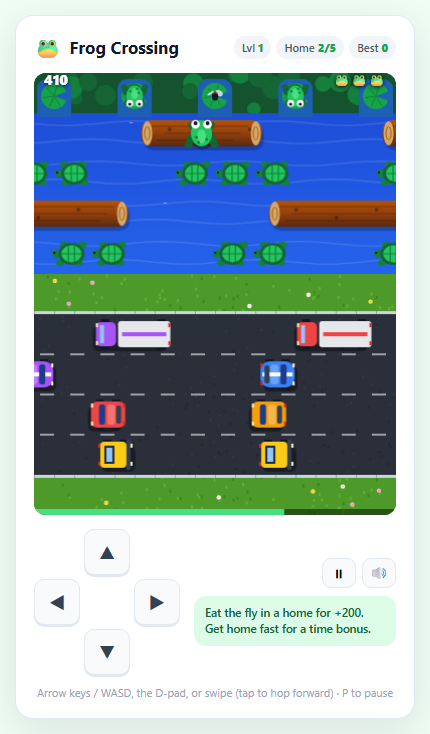
Frog Crossing is the classic road-and-river arcade game: hop up through four lanes of traffic, cross a river by riding logs and turtles, and land the frog in each of the five lily-pad homes at the top. This snippet builds a complete version on one HTML5 <canvas> with no libraries and no image files. Every car, truck, bulldozer, log, turtle, fly and the frog itself is drawn with canvas paths, and the scenery (hedge, grass with flowers, asphalt with lane lines and curbs) is painted once into an off-screen canvas. It plays with the arrow keys or WASD, an on-screen D-pad, or swipes and taps on the game.
Hops are tweens between tiles
The frog lives on a 9 by 11 grid of 40-pixel tiles. A hop is a 0.11-second tween from one tile to the next: frogX() and frogY() interpolate the position, the sprite lifts and stretches its legs at the top of the arc, and it rotates to face the way it jumped. A key pressed during a hop is queued and fires the moment the frog lands, so quick double-taps feel responsive. On land the frog snaps back to the nearest column; on water it keeps its exact position so it can ride.
Lanes that wrap forever
Each lane is a row of evenly spaced items (cars, trucks, logs or turtle groups) moving at its own speed. When an item leaves one side it jumps back by the lane's full repeat length, so traffic never runs out and the spacing never changes. Cars are tested every frame, even in mid-hop, against a slightly smaller hitbox. In the river the rule is reversed: the frog must be standing on a log or a turtle, and it drifts with it. Drifting off the edge of the screen is a splash.
Diving turtles, flies and the timer
Some turtle groups dive on a 7-second cycle: they float, blink while sinking (still safe), vanish under ripples (not safe) and rise again, so you have to time your crossing. Every life has 30 seconds, shown as a bar that turns yellow and red and ticks in the last five seconds, and the time you have left becomes a bonus when you reach a home. Now and then a fly lands in an empty home, worth 200 more points if you get there in time. Hitting the hedge between homes, or a home that is already full, costs a life.
Levels and scoring
Every new row you reach is worth 10 points, a home 50 plus the time bonus, and filling all five homes 1000 and the next level. Each level makes the traffic faster and denser, spaces the logs further apart and makes more turtles dive. An extra life comes at 5000 points. Deaths have their own animation (a squashed frog on the road, splash rings in the river), and sound effects for hops, homes, flies, splats, splashes and the level fanfare are made with the Web Audio API, with a mute button. The game pauses on P, a button or a tab switch, and the best score is kept in localStorage.
What's included
Features
Step by step
How to Use
- 1HopPress Hop in, then hop with the arrow keys or WASD, the D-pad, or by swiping on the game (a quick tap hops forward). A press during a hop is queued.
- 2Cross the roadFour lanes of trucks, sports cars, cars and bulldozers move at different speeds and directions. Wait for a gap, hop, and use the grass strip in the middle as a safe stop.
- 3Ride across the riverYou cannot swim: land on a log or a turtle and ride it. Turtles that blink are about to dive, so hop off before they go under, and do not drift off the edge.
- 4Fill the five homesLand exactly in a lily-pad notch. Hitting the hedge or a full home costs a life. A fly in a home is worth 200 more.
- 5Beat the clockEach life has 30 seconds. The bar at the bottom shows the time, and whatever is left becomes a bonus when you reach a home.
- 6Clear levelsFill all five homes for +1000 and the next level, where the traffic is faster and more turtles dive. Press P to pause; your best score is saved.
Real-world uses
Common Use Cases
Got questions?
Frequently Asked Questions
When the frog is on a water row and not in mid-hop, the game looks for an item in that lane under the frog (and, for turtles, one that is not under water). If there is none the frog drowns; if there is one, the frog moves by the lane speed every frame, which carries it along. Moving past either edge of the screen also ends in a splash.
Some turtle groups have a timer that runs on a 7-second cycle: about 4 seconds floating, a blinking sinking phase (still safe), a phase under water (not safe) and a rising phase. On level 3 and above every second group dives instead of every third.
Collisions with traffic are checked every frame using the frog's interpolated position, not only when it lands, so hopping into the side of a passing car still counts. The car hitbox is a few pixels smaller than the drawing so near misses feel fair.
Each new row you reach in a life gives 10 points, a home gives 50 plus 10 for every second left on the timer, a fly in that home gives 200 more, and filling all five homes gives 1000. An extra life is awarded at 5000 points.
The LANES object maps each row to what moves in it (log, turtle, truck, sport, car or dozer), its speed in pixels per second (positive moves right), the item length in tiles and the gap in tiles. buildLanes() applies the level scaling, so a change there carries through every level.
Yes. Swipe in any direction to hop that way, tap to hop forward, or use the D-pad. The game pauses on its own when you switch tabs.
Copy & paste
Source Code
<div class="game-card">
  <div class="game-header">
    <div class="game-title">
      <span class="game-icon">🐸</span>
      <h2>Frog Crossing</h2>
    </div>
    <div class="stat-badges">
      <span class="badge">Lvl <b id="level">1</b></span>
      <span class="badge">Home <b id="homes">0/5</b></span>
      <span class="badge">Best <b id="best-score">0</b></span>
    </div>
  </div>

  <div class="canvas-wrap">
    <canvas id="game-canvas" width="360" height="440"></canvas>
    <div class="hud">
      <span id="hud-score">0</span>
      <span class="lives" id="hud-lives">🐸🐸🐸</span>
    </div>
    <div class="overlay" id="start-overlay">
      <div class="overlay-card">
        <p class="overlay-title">Frog Crossing</p>
        <p class="overlay-sub">Hop across the road, ride the logs and turtles over the river, and fill all five lily-pad homes before the timer runs out. Watch out: some turtles dive!</p>
        <button class="btn btn-primary" id="btn-start">Hop in</button>
      </div>
    </div>
    <div class="overlay hidden" id="pause-overlay">
      <div class="overlay-card">
        <p class="overlay-title">Paused</p>
        <button class="btn btn-primary" id="btn-resume">Resume</button>
      </div>
    </div>
    <div class="overlay hidden" id="gameover-overlay">
      <div class="overlay-card">
        <p class="overlay-title" id="over-title">Game Over</p>
        <p class="overlay-sub" id="final-score">Score 0</p>
        <p class="overlay-best" id="best-msg"></p>
        <button class="btn btn-primary" id="btn-retry">Play again</button>
      </div>
    </div>
  </div>

  <div class="controls">
    <div class="dpad-cross">
      <button class="ctrl-btn up" id="btn-up" aria-label="Up">▲</button>
      <button class="ctrl-btn left" id="btn-left" aria-label="Left">◀</button>
      <button class="ctrl-btn right" id="btn-right" aria-label="Right">▶</button>
      <button class="ctrl-btn down" id="btn-down" aria-label="Down">▼</button>
    </div>
    <div class="side-box">
      <div class="side-btns">
        <button class="mini-btn" id="btn-pause" type="button" aria-label="Pause">⏸</button>
        <button class="mini-btn" id="btn-mute" type="button" aria-label="Sound on" aria-pressed="false">🔊</button>
      </div>
      <div class="tip-box">Eat the fly in a home for +200. Get home fast for a time bonus.</div>
    </div>
  </div>

  <p class="hint-text">Arrow keys / WASD, the D-pad, or swipe (tap to hop forward) · P to pause</p>
</div>
* { box-sizing: border-box; margin: 0; padding: 0; }
body { font-family: system-ui, -apple-system, sans-serif; background: #f0fdf4; min-height: 100vh; display: flex; align-items: center; justify-content: center; padding: 20px; }
.game-card { width: 100%; max-width: 400px; background: #fff; border-radius: 18px; border: 1px solid #e2e8f0; box-shadow: 0 12px 40px rgba(15,23,42,0.1); padding: 18px; user-select: none; -webkit-user-select: none; }
.game-header { display: flex; align-items: center; justify-content: space-between; margin-bottom: 12px; gap: 8px; }
.game-title { display: flex; align-items: center; gap: 8px; }
.game-icon { font-size: 20px; }
.game-title h2 { font-size: 17px; font-weight: 700; color: #0f172a; }
.stat-badges { display: flex; gap: 5px; }
.badge { font-size: 11px; font-weight: 600; color: #475569; background: #f1f5f9; padding: 4px 8px; border-radius: 20px; white-space: nowrap; }
.badge b { color: #16a34a; }
.canvas-wrap { position: relative; border-radius: 12px; overflow: hidden; line-height: 0; touch-action: none; background: #14532d; }
canvas { display: block; width: 100%; height: auto; }
.hud { position: absolute; inset: 7px 10px auto 10px; display: flex; align-items: center; justify-content: space-between; font-size: 14px; font-weight: 800; color: #fff; font-variant-numeric: tabular-nums; text-shadow: 0 1px 4px rgba(0,0,0,0.8); pointer-events: none; }
.lives { font-size: 12px; letter-spacing: 1px; }
.overlay { position: absolute; inset: 0; background: rgba(5,46,22,0.86); display: flex; align-items: center; justify-content: center; padding: 20px; line-height: 1.4; }
.overlay.hidden { display: none; }
.overlay-card { text-align: center; }
.overlay-title { font-size: 21px; font-weight: 800; color: #fff; margin-bottom: 8px; }
.overlay-sub { font-size: 13px; color: #d1fae5; margin-bottom: 4px; max-width: 290px; }
.overlay-best { font-size: 12px; color: #fbbf24; font-weight: 700; margin: 6px 0 0; min-height: 16px; }
.btn { padding: 11px 26px; font-size: 14px; font-weight: 700; border-radius: 10px; cursor: pointer; font-family: inherit; transition: background 0.15s; border: none; margin-top: 14px; }
.btn-primary { background: #16a34a; color: #fff; }
.btn-primary:hover { background: #15803d; }
.controls { display: flex; align-items: center; justify-content: space-between; gap: 14px; margin-top: 14px; }
.dpad-cross { display: grid; grid-template-columns: repeat(3, 46px); grid-template-rows: repeat(3, 46px); gap: 4px; flex-shrink: 0; }
.ctrl-btn { -webkit-tap-highlight-color: transparent; touch-action: none; cursor: pointer; font-family: inherit; border: 1px solid #e2e8f0; border-radius: 10px; background: #f8fafc; color: #334155; font-size: 18px; font-weight: 700; box-shadow: 0 2px 0 #e2e8f0; transition: transform 0.06s, background 0.12s; }
.ctrl-btn:active { transform: translateY(2px); box-shadow: none; background: #dcfce7; }
.ctrl-btn.up { grid-column: 2; grid-row: 1; }
.ctrl-btn.left { grid-column: 1; grid-row: 2; }
.ctrl-btn.right { grid-column: 3; grid-row: 2; }
.ctrl-btn.down { grid-column: 2; grid-row: 3; }
.side-box { display: flex; flex-direction: column; gap: 8px; }
.side-btns { display: flex; gap: 6px; justify-content: flex-end; }
.mini-btn { width: 34px; height: 30px; border: 1px solid #e2e8f0; background: #f8fafc; border-radius: 9px; font-size: 14px; line-height: 1; cursor: pointer; }
.mini-btn[aria-pressed="true"] { opacity: 0.55; }
.tip-box { font-size: 11.5px; font-weight: 600; color: #166534; background: #dcfce7; border-radius: 12px; padding: 9px 11px; line-height: 1.4; }
.hint-text { font-size: 11px; color: #94a3b8; text-align: center; margin-top: 10px; }const $ = id => document.getElementById(id);
const canvas = $('game-canvas');
const ctx = canvas.getContext('2d');
const W = canvas.width, H = canvas.height;
const BEST_KEY = 'frog-crossing-best';
const TS = 40, COLS = W / TS, ROWS = H / TS; // 9 x 11 tiles
const HOP_T = 0.11, TIME_PER_LIFE = 30, START_LIVES = 3, EXTRA_LIFE_AT = 5000;
const HOME_COLS = [0, 2, 4, 6, 8];
const ROW_TYPE = ['goal', 'water', 'water', 'water', 'water', 'safe', 'road', 'road', 'road', 'road', 'start'];
// Each lane: what moves in it, speed in px/s (+ = right), item length in tiles, gap between items in tiles
const LANES = {
1: { kind: 'log', speed: 42, len: 3, gap: 3 },
2: { kind: 'turtle', speed: -55, len: 3, gap: 2 },
3: { kind: 'log', speed: 68, len: 4, gap: 3.5 },
4: { kind: 'turtle', speed: -46, len: 2, gap: 2 },
6: { kind: 'truck', speed: -45, len: 2, gap: 3 },
7: { kind: 'sport', speed: 125, len: 1, gap: 5 },
8: { kind: 'car', speed: -75, len: 1, gap: 3 },
9: { kind: 'dozer', speed: 50, len: 1, gap: 3 },
};
const CAR_COLORS = ['#ef4444', '#3b82f6', '#f59e0b', '#a855f7', '#ec4899', '#14b8a6'];
let lanes, frog, homes, fly, flyT, score, lives, level, running = false, paused = false, rafId, lastFrame;
let phase = 'play', phaseT = 0, death = null, timeLeft, bestRow, queued, extraGiven, banner, tick = 0, lastWarn;
let parts = [], pops = [], muted = false, ac = null, bg;
const startOverlay = $('start-overlay'), pauseOverlay = $('pause-overlay'), gameoverOverlay = $('gameover-overlay');
const hudScore = $('hud-score'), hudLives = $('hud-lives'), homesEl = $('homes'), levelEl = $('level'), bestEl = $('best-score');
const finalEl = $('final-score'), bestMsgEl = $('best-msg'), overTitle = $('over-title'), muteBtn = $('btn-mute');
const clamp = (v, a, b) => Math.max(a, Math.min(b, v));
const hash = n => { const s = Math.sin(n * 91.3) * 47453.13; return s - Math.floor(s); };
function getBest() { try { return parseInt(localStorage.getItem(BEST_KEY), 10) || 0; } catch (e) { return 0; } }
function setBest(v) { try { localStorage.setItem(BEST_KEY, String(v)); } catch (e) {} }
function rr(x, y, w, h, r) { ctx.beginPath(); if (ctx.roundRect) ctx.roundRect(x, y, w, h, r); else ctx.rect(x, y, w, h); }
// ── Sound: a tiny Web Audio synth, no files ──
function tone(f, dur, type, to, vol, delay) {
if (muted) return;
try {
if (!ac) ac = new (window.AudioContext || window.webkitAudioContext)();
if (ac.state === 'suspended') ac.resume();
const t0 = ac.currentTime + (delay || 0), o = ac.createOscillator(), g = ac.createGain();
o.type = type || 'square'; o.frequency.setValueAtTime(f, t0);
if (to) o.frequency.exponentialRampToValueAtTime(to, t0 + dur);
g.gain.setValueAtTime(vol || 0.04, t0); g.gain.exponentialRampToValueAtTime(0.0001, t0 + dur);
o.connect(g); g.connect(ac.destination); o.start(t0); o.stop(t0 + dur + 0.02);
} catch (e) {}
}
const sfx = {
hop: () => tone(420, 0.06, 'square', 640, 0.025),
home: () => [659, 880, 1175].forEach((f, i) => tone(f, 0.12, 'triangle', 0, 0.05, i * 0.08)),
fly: () => [1320, 1760].forEach((f, i) => tone(f, 0.08, 'square', 0, 0.035, i * 0.06)),
splat: () => { tone(180, 0.25, 'sawtooth', 50, 0.07); tone(90, 0.3, 'square', 40, 0.05); },
splash: () => tone(900, 0.4, 'sine', 120, 0.07),
warn: () => tone(880, 0.05, 'square', 0, 0.03),
level: () => [523, 659, 784, 1046, 1318].forEach((f, i) => tone(f, 0.15, 'square', 0, 0.04, i * 0.09)),
life: () => [784, 988, 1175].forEach((f, i) => tone(f, 0.12, 'triangle', 0, 0.05, i * 0.09)),
over: () => [392, 330, 262, 196].forEach((f, i) => tone(f, 0.22, 'triangle', 0, 0.06, i * 0.16)),
};
// ── Static scenery (bank, grass, road) is painted once into an off-screen canvas ──
function buildBackground() {
const cv = document.createElement('canvas'); cv.width = W; cv.height = H;
const g = cv.getContext('2d');
const grass = (y, h, seed) => {
g.fillStyle = '#4d9a2a'; g.fillRect(0, y, W, h);
for (let i = 0; i < 70; i++) {
const x = hash(i + seed) * W, yy = y + hash(i * 3 + seed) * h;
g.fillStyle = i % 3 ? '#5fb236' : '#3f8423'; g.fillRect(x, yy, 2, 3);
}
for (let i = 0; i < 6; i++) { // little flowers
const x = hash(i * 7 + seed + 1) * W, yy = y + 6 + hash(i * 11 + seed) * (h - 12);
g.fillStyle = ['#fde047', '#f9a8d4', '#ffffff'][i % 3];
g.beginPath(); g.arc(x, yy, 2.2, 0, 6.3); g.fill(); g.fillStyle = '#f59e0b'; g.fillRect(x - 0.5, yy - 0.5, 1, 1);
}
};
// Top bank: hedge with five water notches for the lily-pad homes
g.fillStyle = '#14532d'; g.fillRect(0, 0, W, TS);
for (let i = 0; i < 26; i++) { g.fillStyle = i % 2 ? '#166534' : '#15803d'; g.beginPath(); g.arc(hash(i + 300) * W, hash(i + 400) * TS, 6 + hash(i + 500) * 6, 0, 6.3); g.fill(); }
HOME_COLS.forEach(c => { g.fillStyle = '#1e5fb4'; g.beginPath(); if (g.roundRect) g.roundRect(c * TS + 3, 6, TS - 6, TS - 2, [10, 10, 0, 0]); else g.rect(c * TS + 3, 6, TS - 6, TS - 2); g.fill(); });
grass(5 * TS, TS, 11);
grass(10 * TS, TS, 23);
// Road: asphalt with specks, dashed lane lines and curbs
g.fillStyle = '#2b2f3a'; g.fillRect(0, 6 * TS, W, 4 * TS);
for (let i = 0; i < 160; i++) { g.fillStyle = i % 2 ? '#353a47' : '#24272f'; g.fillRect(hash(i + 50) * W, 6 * TS + hash(i + 80) * 4 * TS, 2, 2); }
g.fillStyle = 'rgba(255,255,255,0.55)';
for (let r = 7; r <= 9; r++) for (let x = 6; x < W; x += 30) g.fillRect(x, r * TS - 1, 14, 2);
g.fillStyle = '#cbd5e1'; g.fillRect(0, 6 * TS - 3, W, 3); g.fillRect(0, 10 * TS, W, 3);
g.fillStyle = '#94a3b8'; for (let x = 0; x < W; x += 20) { g.fillRect(x, 6 * TS - 3, 1, 3); g.fillRect(x, 10 * TS, 1, 3); }
return cv;
}
// ── Lanes: a repeating row of items that wraps around, so traffic never runs out ──
function buildLanes() {
lanes = {};
const mul = Math.min(1.9, 1 + 0.13 * (level - 1));
Object.keys(LANES).forEach(k => {
const row = +k, cfg = LANES[row], road = ROW_TYPE[row] === 'road';
const gap = road ? Math.max(1.6, cfg.gap - (level - 1) * 0.4) : cfg.gap + Math.min(1.5, (level - 1) * 0.3);
const span = cfg.len + gap, count = Math.ceil(COLS / span) + 1, total = count * span * TS, off = Math.random() * span * TS;
const items = [];
for (let i = 0; i < count; i++) items.push({ x: i * span * TS - off, w: cfg.len * TS, seed: Math.random(), dive: cfg.kind === 'turtle' && i % (level >= 3 ? 2 : 3) === 0, t: Math.random() * 7 });
lanes[row] = { kind: cfg.kind, speed: cfg.speed * mul, items, total };
});
}
// Diving turtles: up, sinking (still safe), under (not safe), rising
function turtleState(it) {
if (!it.dive) return 'up';
const p = it.t % 7;
return p < 4.2 ? 'up' : p < 5 ? 'sink' : p < 6.2 ? 'under' : 'rise';
}
function respawn() {
frog = { x: Math.floor(COLS / 2) * TS + TS / 2, row: ROWS - 1, dir: 0, hop: null };
timeLeft = TIME_PER_LIFE; bestRow = ROWS - 1; queued = null; lastWarn = 99;
}
function resetState() {
score = 0; lives = START_LIVES; level = 1; extraGiven = false; homes = [false, false, false, false, false];
fly = null; flyT = 6; parts = []; pops = []; phase = 'play'; banner = { text: 'LEVEL 1', t: 1.6 };
buildLanes(); respawn(); syncHud();
}
function syncHud() {
hudScore.textContent = score;
hudLives.textContent = '🐸'.repeat(Math.max(0, lives));
homesEl.textContent = homes.filter(Boolean).length + '/5';
levelEl.textContent = level;
}
function addScore(n) {
score += n;
if (!extraGiven && score >= EXTRA_LIFE_AT) { extraGiven = true; lives++; sfx.life(); popup(W / 2, 5 * TS + 20, 'EXTRA LIFE!', '#86efac'); }
}
function popup(x, y, text, color) { pops.push({ x, y, text, color: color || '#fde68a', t: 1.1 }); }
function burst(x, y, n, colors, spd, grav) {
for (let i = 0; i < n; i++) {
const a = Math.random() * 6.283, v = (0.4 + Math.random()) * (spd || 3);
parts.push({ x, y, vx: Math.cos(a) * v, vy: Math.sin(a) * v - 1, g: grav === undefined ? 0.15 : grav, life: 22 + Math.random() * 18, max: 40, c: colors[(Math.random() * colors.length) | 0], s: 2 + Math.random() * 2 });
}
}
// ── Hopping: a short tween from tile to tile; one extra press is queued during a hop ──
function frogY() {
if (!frog.hop) return frog.row * TS + TS / 2;
const h = frog.hop, e = Math.min(1, h.t);
return h.fy + (h.trow * TS + TS / 2 - h.fy) * e;
}
function frogX() {
if (!frog.hop) return frog.x;
const h = frog.hop, e = Math.min(1, h.t);
return h.fx + (h.tx - h.fx) * e;
}
function tryHop(dc, dr) {
if (!running || phase !== 'play') return;
if (frog.hop) { queued = [dc, dr]; return; }
const nr = clamp(frog.row + dr, 0, ROWS - 1);
if (dr && nr === frog.row) return;
const nx = frog.x + dc * TS;
if (dc && (nx < TS / 2 - 2 || nx > W - TS / 2 + 2)) return; // no hopping off the sides
frog.dir = dr < 0 ? 0 : dr > 0 ? Math.PI : dc > 0 ? Math.PI / 2 : -Math.PI / 2;
frog.hop = { t: 0, fx: frog.x, fy: frog.row * TS + TS / 2, tx: nx, trow: nr, from: frog.row };
sfx.hop();
}
function land() {
const t = ROW_TYPE[frog.row];
if (t !== 'water' && t !== 'goal') frog.x = clamp(Math.round((frog.x - TS / 2) / TS) * TS + TS / 2, TS / 2, W - TS / 2); // snap to a column on land
if (frog.row < bestRow) { addScore(10 * (bestRow - frog.row)); bestRow = frog.row; }
if (frog.row === 0) { homeCheck(); return; }
if (queued) { const q = queued; queued = null; tryHop(q[0], q[1]); }
}
function homeCheck() {
const i = HOME_COLS.findIndex(c => Math.abs(c * TS + TS / 2 - frog.x) < 17);
if (i < 0 || homes[i]) { die('hedge'); return; }
homes[i] = true;
const cx = HOME_COLS[i] * TS + TS / 2, timeBonus = Math.ceil(timeLeft) * 10;
let pts = 50 + timeBonus;
if (fly && fly.home === i) { pts += 200; sfx.fly(); popup(cx, 52, 'FLY +200', '#fde047'); fly = null; }
addScore(pts); sfx.home(); burst(cx, TS / 2, 18, ['#86efac', '#fde047', '#fff'], 2.6, 0.05);
popup(cx, 30, '+' + pts, '#ffffff');
if (homes.every(Boolean)) { phase = 'clear'; phaseT = 2.2; addScore(1000); sfx.level(); banner = { text: 'ALL HOME! +1000', t: 2.2 }; }
else respawn();
syncHud();
}
function die(kind) {
if (phase !== 'play') return;
const x = frogX(), y = frogY();
phase = 'dying'; phaseT = 1.0; death = { kind, x, y, dir: frog.dir };
lives--; frog.hop = null; queued = null;
if (kind === 'splat') { sfx.splat(); burst(x, y, 16, ['#22c55e', '#15803d', '#86efac'], 2.4); }
else if (kind === 'time') { sfx.splat(); }
else { sfx.splash(); burst(x, y, 20, ['#bfdbfe', '#ffffff', '#60a5fa'], 2.8, 0.18); }
syncHud();
}
// ── Frame update ──
function standableAt(row, x) {
const ln = lanes[row];
if (!ln) return null;
return ln.items.find(it => x > it.x + 4 && x < it.x + it.w - 4 && (ln.kind !== 'turtle' || turtleState(it) !== 'under')) ? ln : null;
}
function update(dt) {
tick += dt;
// Traffic and river
for (const k in lanes) {
const ln = lanes[k];
ln.items.forEach(it => {
it.x += ln.speed * dt; it.t += dt;
if (ln.speed > 0 && it.x > W) it.x -= ln.total;
if (ln.speed < 0 && it.x + it.w < 0) it.x += ln.total;
});
}
parts.forEach(p => { p.x += p.vx; p.y += p.vy; p.vy += p.g; p.life--; });
parts = parts.filter(p => p.life > 0);
pops.forEach(p => { p.t -= dt; p.y -= dt * 18; });
pops = pops.filter(p => p.t > 0);
if (banner) { banner.t -= dt; if (banner.t <= 0) banner = null; }
// A fly visits an empty home now and then
flyT -= dt;
if (fly && flyT <= 0) { fly = null; flyT = 4 + Math.random() * 5; }
else if (!fly && flyT <= 0) {
const empty = homes.map((h, i) => (h ? -1 : i)).filter(i => i >= 0);
if (empty.length) { fly = { home: empty[(Math.random() * empty.length) | 0] }; flyT = 5; } else flyT = 3;
}
if (phase === 'dying') {
phaseT -= dt;
if (phaseT <= 0) { if (lives <= 0) endGame(); else { phase = 'play'; respawn(); } }
return;
}
if (phase === 'clear') {
phaseT -= dt;
if (phaseT <= 0) { level++; homes = homes.map(() => false); buildLanes(); respawn(); phase = 'play'; banner = { text: 'LEVEL ' + level, t: 1.6 }; syncHud(); }
return;
}
// Timer
timeLeft -= dt;
if (timeLeft < 5 && Math.ceil(timeLeft) < lastWarn) { lastWarn = Math.ceil(timeLeft); sfx.warn(); }
if (timeLeft <= 0) { die('time'); return; }
// Hop in progress (riding the row you jumped from, if it was water)
if (frog.hop) {
const h = frog.hop, from = lanes[h.from];
if (ROW_TYPE[h.from] === 'water' && from) { h.fx += from.speed * dt; h.tx += from.speed * dt; }
h.t += dt / HOP_T;
if (h.t >= 1) { frog.x = h.tx; frog.row = h.trow; frog.hop = null; land(); if (phase !== 'play') return; }
}
const x = frogX(), y = frogY(), row = clamp(Math.floor(y / TS), 0, ROWS - 1);
// Cars: checked even mid-hop
if (ROW_TYPE[row] === 'road' && lanes[row]) {
const fx = x - 12, fy = y - 12;
if (lanes[row].items.some(it => fx < it.x + it.w - 3 && fx + 24 > it.x + 3 && fy < row * TS + TS - 8 && fy + 24 > row * TS + 8)) { die('splat'); return; }
}
// River: you must stand on a log or a surfaced turtle, and you drift with it
if (!frog.hop && ROW_TYPE[frog.row] === 'water') {
const ln = standableAt(frog.row, frog.x);
if (!ln) { die('splash'); return; }
frog.x += ln.speed * dt;
if (frog.x < 4 || frog.x > W - 4) { die('splash'); return; }
}
syncHud();
}
// ── Drawing ──
function drawWater() {
const g = ctx.createLinearGradient(0, TS, 0, 5 * TS);
g.addColorStop(0, '#1d4ed8'); g.addColorStop(1, '#2563eb');
ctx.fillStyle = g; ctx.fillRect(0, TS, W, 4 * TS);
ctx.strokeStyle = 'rgba(255,255,255,0.13)'; ctx.lineWidth = 1.5;
for (let r = 1; r <= 4; r++) for (let k = 0; k < 2; k++) {
const y0 = r * TS + 10 + k * 18;
ctx.beginPath();
for (let x = 0; x <= W; x += 8) { const y = y0 + Math.sin(x * 0.045 + tick * 2.2 + r * 1.7 + k * 2) * 2.2; x ? ctx.lineTo(x, y) : ctx.moveTo(x, y); }
ctx.stroke();
}
ctx.fillStyle = 'rgba(255,255,255,0.5)';
for (let i = 0; i < 10; i++) { if ((Math.floor(tick * 3) + i) % 4) continue; ctx.fillRect((hash(i + Math.floor(tick)) * W) | 0, TS + ((hash(i * 5 + 2) * 4 * TS) | 0), 3, 1); }
}
function drawLilyPad(cx, cy) {
ctx.fillStyle = '#16a34a'; ctx.beginPath(); ctx.moveTo(cx, cy); ctx.arc(cx, cy, 13, 0.35, 6.28 - 0.35); ctx.closePath(); ctx.fill();
ctx.strokeStyle = '#15803d'; ctx.lineWidth = 1;
for (let a = 1; a < 6; a++) { ctx.beginPath(); ctx.moveTo(cx, cy); ctx.lineTo(cx + Math.cos(a) * 11, cy + Math.sin(a) * 11); ctx.stroke(); }
}
function drawFly(cx, cy) {
const f = Math.sin(tick * 40) * 3;
ctx.fillStyle = 'rgba(219,234,254,0.85)';
ctx.beginPath(); ctx.ellipse(cx - 4, cy - 3, 4, 2 + f * 0.3, -0.5, 0, 6.3); ctx.ellipse(cx + 4, cy - 3, 4, 2 - f * 0.3, 0.5, 0, 6.3); ctx.fill();
ctx.fillStyle = '#111827'; ctx.beginPath(); ctx.ellipse(cx, cy, 3, 4.5, 0, 0, 6.3); ctx.fill();
ctx.fillStyle = '#ef4444'; ctx.fillRect(cx - 2, cy - 4, 1.5, 1.5); ctx.fillRect(cx + 0.5, cy - 4, 1.5, 1.5);
}
function drawLog(it, y) {
const x = it.x, w = it.w, top = y + 7, h = TS - 14;
ctx.fillStyle = 'rgba(0,0,0,0.22)'; rr(x + 2, top + 4, w, h, 10); ctx.fill();
const g = ctx.createLinearGradient(0, top, 0, top + h); g.addColorStop(0, '#b45309'); g.addColorStop(0.5, '#92400e'); g.addColorStop(1, '#5c2a0b');
ctx.fillStyle = g; rr(x, top, w, h, 10); ctx.fill();
ctx.strokeStyle = 'rgba(0,0,0,0.25)'; ctx.lineWidth = 1;
for (let k = 0; k < 3; k++) { const yy = top + 6 + k * 7; ctx.beginPath(); ctx.moveTo(x + 10 + (k * 13) % 20, yy); ctx.lineTo(x + w - 14 - (k * 7) % 16, yy); ctx.stroke(); }
ctx.fillStyle = 'rgba(0,0,0,0.3)';
for (let k = 0; k < it.w / TS; k++) { ctx.beginPath(); ctx.arc(x + 22 + k * TS + it.seed * 10, top + 9 + (k % 2) * 8, 2, 0, 6.3); ctx.fill(); }
[x + 6, x + w - 6].forEach(ex => {
ctx.fillStyle = '#d6a76c'; ctx.beginPath(); ctx.ellipse(ex, top + h / 2, 5, h / 2 - 1, 0, 0, 6.3); ctx.fill();
ctx.strokeStyle = '#a16207'; ctx.beginPath(); ctx.ellipse(ex, top + h / 2, 2.5, h / 4, 0, 0, 6.3); ctx.stroke();
});
}
function drawTurtles(it, y, speed) {
const st = turtleState(it), n = Math.round(it.w / TS), dirL = speed < 0;
for (let k = 0; k < n; k++) {
const cx = it.x + TS * (k + 0.5), cy = y + TS / 2;
if (st === 'under') {
ctx.strokeStyle = 'rgba(255,255,255,0.35)'; ctx.lineWidth = 1.2;
const r = 6 + ((tick * 10 + k * 3) % 8);
ctx.beginPath(); ctx.ellipse(cx, cy, r, r * 0.6, 0, 0, 6.3); ctx.stroke();
continue;
}
ctx.globalAlpha = st === 'sink' ? (Math.floor(tick * 8) % 2 ? 0.45 : 0.8) : st === 'rise' ? 0.7 : 1;
const paddle = Math.sin(tick * 8 + k) * 2, hx = dirL ? -1 : 1;
ctx.fillStyle = '#15803d';
[[-9, -9], [9, -9], [-9, 9], [9, 9]].forEach(p => { ctx.beginPath(); ctx.ellipse(cx + p[0] + (p[1] < 0 ? paddle : -paddle) * hx, cy + p[1], 4.5, 3, 0, 0, 6.3); ctx.fill(); });
ctx.beginPath(); ctx.ellipse(cx + hx * 15, cy, 4.5, 4, 0, 0, 6.3); ctx.fill();
ctx.fillStyle = '#111827'; ctx.fillRect(cx + hx * 17 - 1, cy - 2, 2, 2);
ctx.fillStyle = '#166534'; ctx.beginPath(); ctx.ellipse(cx, cy, 13, 11, 0, 0, 6.3); ctx.fill();
ctx.fillStyle = '#22c55e'; ctx.beginPath(); ctx.ellipse(cx, cy, 10, 8.5, 0, 0, 6.3); ctx.fill();
ctx.strokeStyle = '#15803d'; ctx.lineWidth = 1.2;
ctx.beginPath(); ctx.moveTo(cx - 3, cy - 8); ctx.lineTo(cx - 3, cy + 8); ctx.moveTo(cx + 3, cy - 8); ctx.lineTo(cx + 3, cy + 8); ctx.moveTo(cx - 10, cy); ctx.lineTo(cx + 10, cy); ctx.stroke();
ctx.globalAlpha = 1;
}
}
function drawVehicle(it, row, kind, right) {
const y = row * TS, L = it.w - 6, Wd = TS - 14, col = CAR_COLORS[Math.floor(it.seed * CAR_COLORS.length)];
ctx.save(); ctx.translate(it.x + it.w / 2, y + TS / 2);
if (!right) ctx.scale(-1, 1); // every vehicle is drawn facing right
ctx.fillStyle = 'rgba(0,0,0,0.35)'; rr(-L / 2 + 3, -Wd / 2 + 4, L, Wd, 6); ctx.fill();
ctx.fillStyle = '#0f172a';
[[-L / 2 + 5, -Wd / 2 - 2], [L / 2 - 13, -Wd / 2 - 2], [-L / 2 + 5, Wd / 2 - 2], [L / 2 - 13, Wd / 2 - 2]].forEach(p => ctx.fillRect(p[0], p[1], 8, 4));
if (kind === 'truck') {
ctx.fillStyle = '#e5e7eb'; rr(-L / 2, -Wd / 2, L - 22, Wd, 3); ctx.fill();
ctx.fillStyle = col; ctx.fillRect(-L / 2 + 4, -2, L - 30, 4);
ctx.fillStyle = col; rr(L / 2 - 20, -Wd / 2 + 1, 20, Wd - 2, 5); ctx.fill();
ctx.fillStyle = '#93c5fd'; ctx.fillRect(L / 2 - 8, -Wd / 2 + 4, 4, Wd - 8);
} else if (kind === 'dozer') {
ctx.fillStyle = '#facc15'; rr(-L / 2 + 2, -Wd / 2, L - 8, Wd, 4); ctx.fill();
ctx.fillStyle = '#334155'; ctx.fillRect(L / 2 - 6, -Wd / 2 - 2, 4, Wd + 4);
ctx.fillStyle = '#1e293b'; ctx.fillRect(-L / 2 + 6, -Wd / 2 + 4, 10, Wd - 8);
ctx.fillStyle = '#93c5fd'; ctx.fillRect(-L / 2 + 8, -Wd / 2 + 6, 6, Wd - 12);
} else {
ctx.fillStyle = col; rr(-L / 2, -Wd / 2, L, Wd, kind === 'sport' ? 9 : 6); ctx.fill();
if (kind === 'sport') { ctx.fillStyle = '#f8fafc'; ctx.fillRect(-L / 2 + 2, -2, L - 4, 4); }
ctx.fillStyle = '#1e3a8a'; rr(L / 2 - 14, -Wd / 2 + 3, 6, Wd - 6, 2); ctx.fill(); // windshield
ctx.fillStyle = '#334155'; rr(-L / 2 + 4, -Wd / 2 + 4, 5, Wd - 8, 2); ctx.fill(); // rear window
ctx.fillStyle = 'rgba(255,255,255,0.25)'; rr(-L / 2 + 10, -Wd / 2 + 3, L - 26, Wd - 6, 3); ctx.fill(); // roof shine
}
ctx.fillStyle = '#fef9c3'; ctx.fillRect(L / 2 - 2, -Wd / 2 + 2, 2, 4); ctx.fillRect(L / 2 - 2, Wd / 2 - 6, 2, 4);
ctx.fillStyle = '#dc2626'; ctx.fillRect(-L / 2, -Wd / 2 + 2, 2, 4); ctx.fillRect(-L / 2, Wd / 2 - 6, 2, 4);
ctx.restore();
}
// The frog is drawn facing up and rotated to the direction of its last hop
function drawFrog(x, y, dir, stretch, scale) {
ctx.save(); ctx.translate(x, y); ctx.rotate(dir); ctx.scale(scale || 1, scale || 1);
const s = stretch || 0, lift = 1 + s * 0.18;
ctx.fillStyle = 'rgba(0,0,0,0.25)'; ctx.beginPath(); ctx.ellipse(1, 4, 11, 12, 0, 0, 6.3); ctx.fill();
ctx.scale(lift, lift);
ctx.fillStyle = '#166534';
if (s > 0.15) { [-1, 1].forEach(m => { ctx.beginPath(); ctx.ellipse(m * 7, 12 + s * 6, 3, 7, m * 0.3, 0, 6.3); ctx.fill(); ctx.beginPath(); ctx.ellipse(m * 9, 19 + s * 6, 4, 2.5, 0, 0, 6.3); ctx.fill(); }); }
else { [-1, 1].forEach(m => { ctx.beginPath(); ctx.ellipse(m * 11, 6, 4, 7, m * -0.4, 0, 6.3); ctx.fill(); ctx.beginPath(); ctx.ellipse(m * 13, 12, 4, 2.5, 0, 0, 6.3); ctx.fill(); }); }
[-1, 1].forEach(m => { ctx.beginPath(); ctx.ellipse(m * 10, -7 - s * 2, 2.5, 4.5, m * 0.5, 0, 6.3); ctx.fill(); });
ctx.fillStyle = '#22c55e'; ctx.beginPath(); ctx.ellipse(0, 0, 10.5, 13, 0, 0, 6.3); ctx.fill();
ctx.fillStyle = '#4ade80'; ctx.beginPath(); ctx.ellipse(0, 3, 4.5, 7, 0, 0, 6.3); ctx.fill();
ctx.fillStyle = '#15803d'; [[-5, 4], [5, 6], [-3, 9]].forEach(p => { ctx.beginPath(); ctx.arc(p[0], p[1], 1.5, 0, 6.3); ctx.fill(); });
ctx.fillStyle = '#ffffff'; [-1, 1].forEach(m => { ctx.beginPath(); ctx.arc(m * 6, -9, 4.3, 0, 6.3); ctx.fill(); });
ctx.fillStyle = '#0f172a'; [-1, 1].forEach(m => { ctx.beginPath(); ctx.arc(m * 6, -10, 2, 0, 6.3); ctx.fill(); });
ctx.restore();
}
function draw() {
ctx.drawImage(bg, 0, 0);
drawWater();
// the home notches show the river, then the lily pads and their contents
HOME_COLS.forEach((c, i) => {
const cx = c * TS + TS / 2, cy = TS / 2 + 3;
ctx.fillStyle = '#1e5fb4'; rr(c * TS + 3, 6, TS - 6, TS - 2, [10, 10, 0, 0]); ctx.fill();
drawLilyPad(cx, cy);
if (homes[i]) drawFrog(cx, cy, Math.PI, 0, 0.8);
else if (fly && fly.home === i) drawFly(cx, cy - 1 + Math.sin(tick * 4) * 1.5);
});
for (const k in lanes) {
const ln = lanes[k], row = +k;
ln.items.forEach(it => {
if (it.x > W + 4 || it.x + it.w < -4) return;
if (ln.kind === 'log') drawLog(it, row * TS);
else if (ln.kind === 'turtle') drawTurtles(it, row * TS, ln.speed);
else drawVehicle(it, row, ln.kind, ln.speed > 0);
});
}
// Frog, or its unlucky end
if (phase === 'dying' && death) {
const a = clamp(phaseT, 0, 1);
if (death.kind === 'splat' || death.kind === 'time') {
ctx.globalAlpha = a; ctx.save(); ctx.translate(death.x, death.y); ctx.scale(1.5, 0.55);
ctx.fillStyle = '#16a34a'; ctx.beginPath(); ctx.ellipse(0, 0, 12, 12, 0, 0, 6.3); ctx.fill(); ctx.restore();
ctx.strokeStyle = '#0f172a'; ctx.lineWidth = 1.5;
[-6, 6].forEach(m => { ctx.beginPath(); ctx.moveTo(death.x + m - 2, death.y - 4); ctx.lineTo(death.x + m + 2, death.y); ctx.moveTo(death.x + m + 2, death.y - 4); ctx.lineTo(death.x + m - 2, death.y); ctx.stroke(); });
ctx.globalAlpha = 1;
} else {
ctx.strokeStyle = 'rgba(255,255,255,' + a.toFixed(2) + ')'; ctx.lineWidth = 2;
for (let k = 0; k < 3; k++) { const r = (1 - a) * 22 + k * 6; ctx.beginPath(); ctx.ellipse(death.x, death.y, r, r * 0.6, 0, 0, 6.3); ctx.stroke(); }
}
} else if (phase !== 'clear' || frog.row !== 0) {
const h = frog.hop, st = h ? Math.sin(Math.min(1, h.t) * Math.PI) : 0;
drawFrog(frogX(), frogY() - st * 5, frog.dir, st, 1);
}
parts.forEach(p => { ctx.globalAlpha = clamp(p.life / p.max, 0, 1); ctx.fillStyle = p.c; ctx.fillRect(p.x - p.s / 2, p.y - p.s / 2, p.s, p.s); });
ctx.globalAlpha = 1;
ctx.font = '800 12px system-ui, sans-serif'; ctx.textAlign = 'center'; ctx.textBaseline = 'middle';
pops.forEach(p => { ctx.globalAlpha = clamp(p.t * 2, 0, 1); ctx.fillStyle = 'rgba(0,0,0,0.5)'; ctx.fillText(p.text, p.x + 1, p.y + 1); ctx.fillStyle = p.color; ctx.fillText(p.text, p.x, p.y); });
ctx.globalAlpha = 1;
// Timer bar along the bottom
const frac = clamp(timeLeft / TIME_PER_LIFE, 0, 1);
ctx.fillStyle = 'rgba(0,0,0,0.45)'; ctx.fillRect(0, H - 6, W, 6);
ctx.fillStyle = frac > 0.3 ? '#4ade80' : frac > 0.15 ? '#facc15' : '#ef4444'; ctx.fillRect(0, H - 6, W * frac, 6);
if (banner) {
ctx.globalAlpha = clamp(banner.t * 2, 0, 1);
ctx.font = '800 24px system-ui, sans-serif'; ctx.lineWidth = 5; ctx.strokeStyle = 'rgba(5,46,22,0.75)'; ctx.fillStyle = '#fff';
ctx.strokeText(banner.text, W / 2, 5 * TS + TS / 2); ctx.fillText(banner.text, W / 2, 5 * TS + TS / 2);
ctx.globalAlpha = 1;
}
}
// ── Game flow ──
function loop(ts) {
if (!running) return;
if (!lastFrame) lastFrame = ts;
const dt = Math.min((ts - lastFrame) / 1000, 1 / 30);
lastFrame = ts;
update(dt);
if (running) { draw(); rafId = requestAnimationFrame(loop); }
}
function startGame() {
resetState(); running = true; paused = false; lastFrame = 0;
startOverlay.classList.add('hidden'); pauseOverlay.classList.add('hidden'); gameoverOverlay.classList.add('hidden');
rafId = requestAnimationFrame(loop);
}
function setPaused(p) {
if (!running && !paused) return;
if (p === paused) return;
paused = p;
if (p) { running = false; cancelAnimationFrame(rafId); draw(); pauseOverlay.classList.remove('hidden'); }
else { pauseOverlay.classList.add('hidden'); running = true; lastFrame = 0; rafId = requestAnimationFrame(loop); }
}
function endGame() {
running = false; cancelAnimationFrame(rafId); draw(); sfx.over();
const best = getBest();
overTitle.textContent = level > 1 ? 'Game Over · Level ' + level : 'Game Over';
finalEl.textContent = 'Score ' + score + ' · ' + homes.filter(Boolean).length + '/5 homes on level ' + level;
if (score > best) { setBest(score); bestEl.textContent = score; bestMsgEl.textContent = '🏆 New high score!'; }
else bestMsgEl.textContent = '';
gameoverOverlay.classList.remove('hidden');
}
// ── Input: keyboard, D-pad and swipe all call tryHop ──
const KEY = { ArrowUp: [0, -1], ArrowDown: [0, 1], ArrowLeft: [-1, 0], ArrowRight: [1, 0], w: [0, -1], s: [0, 1], a: [-1, 0], d: [1, 0], W: [0, -1], S: [0, 1], A: [-1, 0], D: [1, 0] };
document.addEventListener('keydown', e => {
if (e.key === 'p' || e.key === 'P' || e.key === 'Escape') { if (running || paused) setPaused(!paused); return; }
if (KEY[e.key]) { e.preventDefault(); if (!e.repeat) tryHop(KEY[e.key][0], KEY[e.key][1]); return; }
if ((e.key === 'Enter' || e.key === ' ') && !running) {
e.preventDefault();
if (paused) setPaused(false);
else if (!startOverlay.classList.contains('hidden') || !gameoverOverlay.classList.contains('hidden')) startGame();
}
});
document.addEventListener('visibilitychange', () => { if (document.hidden && running) setPaused(true); });
function tap(id, dc, dr) {
const el = $(id);
el.addEventListener('pointerdown', e => { e.preventDefault(); tryHop(dc, dr); });
el.addEventListener('contextmenu', e => e.preventDefault());
}
tap('btn-up', 0, -1); tap('btn-down', 0, 1); tap('btn-left', -1, 0); tap('btn-right', 1, 0);
// Swipe on the game; a short tap hops forward
let touch = null;
canvas.addEventListener('pointerdown', e => { touch = { x: e.clientX, y: e.clientY }; });
canvas.addEventListener('pointerup', e => {
if (!touch) return;
const dx = e.clientX - touch.x, dy = e.clientY - touch.y; touch = null;
if (Math.abs(dx) < 14 && Math.abs(dy) < 14) { tryHop(0, -1); return; }
if (Math.abs(dx) > Math.abs(dy)) tryHop(dx > 0 ? 1 : -1, 0); else tryHop(0, dy > 0 ? 1 : -1);
});
canvas.addEventListener('pointercancel', () => { touch = null; });
$('btn-start').addEventListener('click', startGame);
$('btn-retry').addEventListener('click', startGame);
$('btn-resume').addEventListener('click', () => setPaused(false));
$('btn-pause').addEventListener('click', () => { if (running || paused) setPaused(!paused); });
muteBtn.addEventListener('click', () => {
muted = !muted; muteBtn.textContent = muted ? '🔇' : '🔊';
muteBtn.setAttribute('aria-pressed', String(muted)); muteBtn.setAttribute('aria-label', muted ? 'Sound off' : 'Sound on');
});
bg = buildBackground();
bestEl.textContent = getBest();
resetState();
draw();
/* wdp-share:start */
(function () {
var TITLE = 'Frog Crossing Game', URL = 'https://webdevpuneet.com/ui-snippets/frog-crossing-game/';
if (window.__wdpShare) return;
window.__wdpShare = true;
var blob = null, file = null, lastInfo = null;
/* ---- UI ---- */
var st = document.createElement('style');
st.textContent =
'.wdps-in,.wdps-btn,.wdps-box{touch-action:manipulation;-webkit-tap-highlight-color:transparent}.wdps-in{display:block;margin:12px auto 0;border:0;border-radius:12px;padding:11px 22px;font:800 15px/1 system-ui,sans-serif;background:#16a34a;color:#fff;cursor:pointer;box-shadow:0 3px 0 #11793a;pointer-events:auto;position:relative;z-index:5}' +
'.wdps-in:hover{background:#15803d}.wdps-in:active{transform:translateY(2px);box-shadow:0 1px 0 #11793a}' +
'.wdps-btn{position:fixed;right:12px;bottom:12px;z-index:2147483000;border:0;border-radius:99px;padding:9px 16px;font:700 13px/1 system-ui,sans-serif;background:#16a34a;color:#fff;cursor:pointer;box-shadow:0 3px 12px rgba(0,0,0,.3)}' +
'.wdps-btn.wdps-hot{animation:wdps-p 1.4s ease-in-out infinite}' +
'@keyframes wdps-p{0%,100%{box-shadow:0 0 0 0 rgba(22,163,74,.6),0 3px 12px rgba(0,0,0,.3)}50%{box-shadow:0 0 0 9px rgba(22,163,74,0),0 3px 12px rgba(0,0,0,.3)}}' +
'.wdps-btn:active{transform:translateY(1px)}' +
'.wdps-in[hidden],.wdps-btn[hidden],.wdps-box[hidden],.wdps-box [hidden]{display:none}' +
'.wdps-box{position:fixed;left:50%;bottom:12px;transform:translateX(-50%);z-index:2147483001;width:max-content;max-width:calc(100vw - 24px);box-sizing:border-box;background:#fff;color:#64748b;border:1px solid #d5e2ee;border-radius:12px;padding:8px 12px;font:700 12px/1.4 system-ui,sans-serif;box-shadow:0 8px 26px rgba(15,23,42,.25);display:flex;flex-wrap:wrap;gap:8px;align-items:center}' +
'.wdps-box button,.wdps-box a{border:1px solid #d5e2ee;background:#f8fafc;color:#1e293b;border-radius:99px;padding:5px 12px;font:700 12px system-ui,sans-serif;text-decoration:none;cursor:pointer}' +
'.wdps-box .wdps-x{border:0;background:none;font-size:19px;line-height:1;padding:0 4px;margin-left:auto;color:#475569}' +
'@media (max-width:700px){.wdps-box{width:calc(100vw - 24px);justify-content:center;padding:10px 12px}.wdps-box>span{width:100%;text-align:center}.wdps-box button,.wdps-box a{padding:9px 14px;font-size:13px}.wdps-box .wdps-x{position:absolute;top:4px;right:4px}.wdps-in{width:100%;max-width:320px}}';
document.head.appendChild(st);
var pill = document.createElement('button');
pill.type = 'button'; pill.className = 'wdps-btn'; pill.textContent = 'Share result';
var inl = document.createElement('button');
inl.type = 'button'; inl.className = 'wdps-in'; inl.textContent = 'Share result'; inl.hidden = true;
var box = document.createElement('div');
box.className = 'wdps-box'; box.hidden = true;
box.setAttribute('role', 'dialog'); box.setAttribute('aria-label', 'Share your result');
box.innerHTML =
'<span data-a="msg">Share your result:</span>' +
'<button type="button" data-a="copy">Copy image</button>' +
'<a data-a="dl" download="result.png">Download image</a>' +
'<button type="button" data-a="more" hidden>More…</button>' +
'<a data-a="wa" target="_blank" rel="noopener">WhatsApp</a>' +
'<a data-a="x" target="_blank" rel="noopener">X</a>' +
'<a data-a="fb" target="_blank" rel="noopener">Facebook</a>' +
'<button type="button" class="wdps-x" data-a="close" aria-label="Close share options">×</button>';
document.body.appendChild(box);
document.body.appendChild(pill);
function q(a) { return box.querySelector('[data-a="' + a + '"]'); }
function ours(el) { return el === inl || el === pill || !!el.closest('.wdps-box'); }
/* ---- reading the result from the screen ---- */
function shown(el) {
if (!el || !el.getClientRects().length) return false;
for (var n = el; n && n !== document.body; n = n.parentElement) {
var cs = getComputedStyle(n);
if (cs.display === 'none' || cs.visibility === 'hidden' || parseFloat(cs.opacity) < 0.1) return false;
if (n.hidden || n.getAttribute('aria-hidden') === 'true') return false;
}
return true;
}
function txt(el) { return (el.textContent || '').replace(/\s+/g, ' ').trim(); }
function sig(el) { return ((el.id || '') + ' ' + (typeof el.className === 'string' ? el.className : '')).toLowerCase(); }
var OUTCOME = /(you win|you won|win!|wins|victory|game over|time.?s up|cleared|complete|solved|defeat|you lose|you lost|lost|draw|crash|failed|success|congrat|score|result|finished|beat|all matched|well done|perfect|new best)/i;
var HEADSIG = /(title|headline|msg|message|banner|result|verdict|status)/;
var WIN = /(you win|you won|win!|wins|victory|cleared|complete|solved|success|congrat|beat|matched|perfect|new best|record)/i;
var LOSS = /(game over|time.?s up|defeat|you lose|you lost|lost|crash|failed|out of)/i;
var BOX = /(overlay|modal|banner|result|over|end|dialog|screen|popup|panel|card|finish|win)/;
function readResult() {
var head = '', sub = '', root = null, headEl = null;
var all = document.body.querySelectorAll('h1,h2,h3,h4,p,strong,div,span');
for (var i = 0; i < all.length && !head; i++) {
var el = all[i];
if (ours(el) || el.children.length > 2) continue;
if (!HEADSIG.test(sig(el))) continue;
/* a banner that holds its own title: use the title inside it instead */
var inner = false;
for (var c = 0; c < el.children.length; c++) if (HEADSIG.test(sig(el.children[c]))) inner = true;
if (inner) continue;
var t = txt(el);
if (t.length < 3 || t.length > 70 || !OUTCOME.test(t) || !shown(el)) continue;
head = t; headEl = el; root = el.parentElement;
}
if (root) {
var kids = root.querySelectorAll('p,span,div');
for (var j = 0; j < kids.length && !sub; j++) {
var k = kids[j];
if (ours(k) || k.children.length > 2 || !/(sub|text|summary|note|desc|detail)/.test(sig(k))) continue;
var tt = txt(k);
if (tt && tt !== head && tt.length >= 5 && tt.length <= 160 && shown(k)) sub = tt;
}
}
/* the result screen the button goes into: the nearest overlay / banner / result box around the headline */
var host = null;
for (var n = headEl, d = 0; n && n !== document.body && d < 4; n = n.parentElement, d++) {
if (d > 0 && BOX.test(sig(n)) && n.tagName !== 'BUTTON') { host = n; break; }
}
return { head: head, sub: sub, host: host };
}
var STATRE = /(score|moves|time|wpm|best|level|streak|accuracy|combo|coins|distance|height|points|stars|lives|wins|attempt|guess)/;
function readStats() {
var out = [], seen = {};
var all = document.body.querySelectorAll('span,strong,b,div,p,output');
for (var i = 0; i < all.length && out.length < 4; i++) {
var el = all[i];
if (ours(el) || el.children.length > 1) continue;
if (!STATRE.test(sig(el))) continue;
var t = txt(el);
if (!t || t.length > 28 || !/[0-9]/.test(t) || !shown(el)) continue;
if (!/[a-zA-Z]/.test(t) && el.parentElement) {
var parts = [], ch = el.parentElement.childNodes;
for (var p = 0; p < ch.length; p++) { var pv = (ch[p].textContent || '').replace(/\s+/g, ' ').trim(); if (pv) parts.push(pv); }
var pt = parts.join(' ');
if (pt.length <= 30 && /[a-zA-Z]/.test(pt)) t = pt;
}
var key = t.toLowerCase();
if (seen[key]) continue;
seen[key] = 1; out.push(t);
}
return out;
}
function bestCanvas() {
var cs = document.querySelectorAll('canvas'), best = null, area = 0;
for (var i = 0; i < cs.length; i++) {
var r = cs[i].getBoundingClientRect(), a = r.width * r.height;
if (a > area && a > 8000 && shown(cs[i])) { area = a; best = cs[i]; }
}
return best;
}
/* ---- show the button when a result is on screen ---- */
var lastHost = null, timer = 0;
function sync() {
timer = 0;
var r = readResult();
if (r.head && r.host) {
if (inl.parentElement !== r.host) r.host.appendChild(inl);
if (inl.hidden) inl.hidden = false;
if (!pill.hidden) pill.hidden = true;
} else {
if (!inl.hidden) inl.hidden = true;
if (pill.hidden) pill.hidden = false;
pill.classList.toggle('wdps-hot', !!r.head);
}
if (lastHost && !r.head && !box.hidden) box.hidden = true;
lastHost = r.head ? (r.host || document.body) : null;
}
function later() { if (!timer) timer = setTimeout(sync, 200); }
try {
new MutationObserver(function (list) {
for (var i = 0; i < list.length; i++) {
var t = list[i].target;
if (t.nodeType !== 1) t = t.parentElement;
if (t && !ours(t)) { later(); return; }
}
}).observe(document.body, { subtree: true, childList: true, characterData: true, attributes: true, attributeFilter: ['class', 'style', 'hidden'] });
} catch (e) {}
setInterval(later, 1500);
later();
/* ---- the card (1080 x 1080, drawn in memory, light like Pocket Artillery's) ---- */
var outline = 0;
function put(g, t, x, y) { if (outline) { g.lineJoin = 'round'; g.lineWidth = outline; g.strokeStyle = 'rgba(8,12,28,.85)'; g.strokeText(t, x, y); } g.fillText(t, x, y); }
function wrap(g, text, x, y, maxW, lh, maxLines) {
var words = text.split(' '), line = '', n = 0;
for (var i = 0; i < words.length; i++) {
var tst = line ? line + ' ' + words[i] : words[i];
if (g.measureText(tst).width > maxW && line) {
put(g, line, x, y); y += lh; n++; line = words[i];
if (n >= maxLines - 1) { line = words.slice(i).join(' '); break; }
} else line = tst;
}
if (line) {
while (line.length > 3 && g.measureText(line).width > maxW) line = line.slice(0, -2);
put(g, line, x, y); y += lh;
}
return y;
}
/* Biggest-screenshot card: the game frame fills the whole image, the text sits on top of it as an overlay. */
function bgOf(el) {
for (var n = el; n; n = n.parentElement) {
var c = getComputedStyle(n).backgroundColor;
if (c && c !== 'transparent' && c.slice(-4) !== ', 0)') return c;
}
return '#0f172a';
}
function drawBig(info, cv) {
var W = 1080, r = cv.width / cv.height, H = Math.max(810, Math.min(1350, Math.round(W / r)));
var c = document.createElement('canvas'); c.width = W; c.height = H;
var g = c.getContext('2d');
g.fillStyle = bgOf(cv.parentElement || cv); g.fillRect(0, 0, W, H);
var w = W, h = w / r;
if (h > H) { h = H; w = h * r; }
g.imageSmoothingEnabled = true; g.imageSmoothingQuality = 'high';
try { g.drawImage(cv, (W - w) / 2, (H - h) / 2, w, h); } catch (e) { return null; }
/* dark fades under the text so it stays readable on any game colours */
var g1 = g.createLinearGradient(0, 0, 0, H * 0.55); g1.addColorStop(0, 'rgba(8,12,28,.74)'); g1.addColorStop(1, 'rgba(8,12,28,0)');
g.fillStyle = g1; g.fillRect(0, 0, W, H * 0.55);
var g2 = g.createLinearGradient(0, H - 200, 0, H); g2.addColorStop(0, 'rgba(8,12,28,0)'); g2.addColorStop(1, 'rgba(8,12,28,.85)');
g.fillStyle = g2; g.fillRect(0, H - 200, W, 200);
var head = info.head || 'Can you beat me?';
var kind = /draw|tie/i.test(head) ? 'draw' : LOSS.test(head) && !WIN.test(head) ? 'loss' : 'win';
g.textAlign = 'center';
var y = 36;
g.fillStyle = 'rgba(255,255,255,.93)'; g.font = '800 34px system-ui, sans-serif'; outline = 7;
y = wrap(g, TITLE.toUpperCase(), W / 2, y + 34, 1000, 42, 1);
g.fillStyle = kind === 'draw' ? '#e2e8f0' : kind === 'loss' ? '#9db8ff' : '#ffc233';
var big = head.length > 22 ? 84 : 112; g.font = '900 ' + big + 'px system-ui, sans-serif'; outline = 16;
y = wrap(g, head, W / 2, y + big * 0.85, 1000, big * 1.05, 2);
if (info.sub) { g.fillStyle = '#fff'; g.font = '700 40px system-ui, sans-serif'; outline = 9; y = wrap(g, info.sub, W / 2, y + 6, 980, 50, 2); }
outline = 0;
if (info.stats.length) {
g.font = '800 38px system-ui, sans-serif';
var gap = 16, pad = 26, ws = [], tot = -gap;
for (var i = 0; i < info.stats.length; i++) { ws.push(g.measureText(info.stats[i]).width + pad * 2); tot += ws[i] + gap; }
var sc = tot > 960 ? 960 / tot : 1, px = (W - tot * sc) / 2, py = y + 14;
for (var k = 0; k < info.stats.length; k++) {
var w0 = ws[k] * sc;
g.fillStyle = 'rgba(8,12,28,.72)'; g.strokeStyle = 'rgba(255,255,255,.55)'; g.lineWidth = 3;
g.beginPath();
if (g.roundRect) g.roundRect(px, py, w0, 68, 34); else g.rect(px, py, w0, 68);
g.fill(); g.stroke();
g.fillStyle = '#fff'; g.font = '800 ' + Math.round(38 * sc) + 'px system-ui, sans-serif';
g.fillText(info.stats[k], px + w0 / 2, py + 47);
px += w0 + gap * sc;
}
}
outline = 8;
g.fillStyle = '#fff'; g.font = '900 52px system-ui, sans-serif'; put(g, 'Can you beat it?', W / 2, H - 84);
g.fillStyle = 'rgba(255,255,255,.92)'; g.font = '700 34px system-ui, sans-serif'; outline = 6; put(g, 'Play free at webdevpuneet.com', W / 2, H - 34);
outline = 0;
return c;
}
function finish(c, cb) {
var dataUrl = '';
try { dataUrl = c.toDataURL('image/png'); } catch (e) {}
try { c.toBlob(function (b) { cb(b, dataUrl); }, 'image/png'); } catch (e) { cb(null, dataUrl); }
}
function makeCard(info, cb) {
var cv0 = bestCanvas();
if (cv0) { var bc = drawBig(info, cv0); if (bc) { finish(bc, cb); return; } }
var S = 1080, c = document.createElement('canvas');
c.width = S; c.height = S;
var g = c.getContext('2d');
var gr = g.createLinearGradient(0, 0, 0, S);
gr.addColorStop(0, '#eaf4ff'); gr.addColorStop(1, '#fff3ef');
g.fillStyle = gr; g.fillRect(0, 0, S, S);
var cv = bestCanvas();
var head = info.head || 'Can you beat me?';
var kind = /draw|tie/i.test(head) ? 'draw' : LOSS.test(head) && !WIN.test(head) ? 'loss' : 'win';
g.textAlign = 'center';
g.fillStyle = '#1e293b'; g.font = '800 60px system-ui, sans-serif';
var y = wrap(g, TITLE, S / 2, cv ? 120 : 200, 980, 68, 1);
g.fillStyle = kind === 'draw' ? '#475569' : kind === 'loss' ? '#3b63e0' : '#e8553a';
g.font = '800 ' + (head.length > 22 ? 76 : 100) + 'px system-ui, sans-serif';
y = wrap(g, head, S / 2, y + (head.length > 22 ? 70 : 90), 980, head.length > 22 ? 84 : 108, 2);
if (info.sub) { g.fillStyle = '#475569'; g.font = '700 38px system-ui, sans-serif'; y = wrap(g, info.sub, S / 2, y + 4, 940, 48, 2); }
if (info.stats.length) {
g.font = '800 36px system-ui, sans-serif';
var gap = 18, pad = 26, ws = [], tot = -gap;
for (var i = 0; i < info.stats.length; i++) { ws.push(g.measureText(info.stats[i]).width + pad * 2); tot += ws[i] + gap; }
var sc = tot > 1000 ? 1000 / tot : 1, px = (S - tot * sc) / 2, py = y + 14;
for (var k = 0; k < info.stats.length; k++) {
var w0 = ws[k] * sc;
g.fillStyle = '#ffffff'; g.strokeStyle = '#d5e2ee'; g.lineWidth = 3;
g.beginPath();
if (g.roundRect) g.roundRect(px, py, w0, 64, 32); else g.rect(px, py, w0, 64);
g.fill(); g.stroke();
g.fillStyle = '#1e293b'; g.font = '800 ' + Math.round(36 * sc) + 'px system-ui, sans-serif';
g.fillText(info.stats[k], px + w0 / 2, py + 44);
px += w0 + gap * sc;
}
y = py + 64 + 10;
}
if (cv) {
try {
var maxW = 960, maxH = Math.max(180, 930 - y - 30), r = cv.width / cv.height;
var w = maxW, h = w / r;
if (h > maxH) { h = maxH; w = h * r; }
var x = (S - w) / 2, yy = y + 20 + Math.max(0, (maxH - h) / 2);
g.save(); g.shadowColor = 'rgba(60,100,140,0.3)'; g.shadowBlur = 30; g.shadowOffsetY = 10;
g.fillStyle = '#fff'; g.fillRect(x - 8, yy - 8, w + 16, h + 16); g.restore();
g.drawImage(cv, x, yy, w, h);
} catch (e) {}
}
g.fillStyle = '#1e293b'; g.font = '800 46px system-ui, sans-serif';
g.fillText('Can you beat it?', S / 2, 1000);
g.fillStyle = '#64748b'; g.font = '700 34px system-ui, sans-serif';
g.fillText('Play free at webdevpuneet.com', S / 2, 1050);
var dataUrl = '';
try { dataUrl = c.toDataURL('image/png'); } catch (e) {}
try { c.toBlob(function (b) { cb(b, dataUrl); }, 'image/png'); } catch (e) { cb(null, dataUrl); }
}
function shareText(info) {
var bits = [];
if (info.head) bits.push(info.head);
if (info.stats.length) bits.push(info.stats.join(', '));
return TITLE + ': ' + (bits.length ? bits.join(' - ') + '. ' : '') + 'Can you beat it? ' + URL;
}
function msg(t) { q('msg').textContent = t; }
function openFallback() {
var t = encodeURIComponent(shareText(lastInfo));
q('wa').href = 'https://wa.me/?text=' + t;
q('x').href = 'https://twitter.com/intent/tweet?text=' + t;
q('fb').href = 'https://www.facebook.com/sharer/sharer.php?u=' + encodeURIComponent(URL) + '"e=' + t;
box.hidden = false;
}
function nativeShare() {
/* a user cancel does nothing; anything else (blocked in an iframe, no permission) shows Copy / Download / links */
try {
navigator.share({ files: [file], title: TITLE, text: shareText(lastInfo) }).catch(function (e) { if (!e || e.name !== 'AbortError') openFallback(); });
} catch (e) { openFallback(); }
}
function onShare() {
var info = readResult(); info.stats = readStats();
lastInfo = info;
msg('Share your result:');
makeCard(info, function (b, dataUrl) {
blob = b; file = null;
if (b) { try { file = new File([b], 'result.png', { type: 'image/png' }); } catch (e) {} }
if (dataUrl) q('dl').href = dataUrl;
q('dl').hidden = !dataUrl;
var canNative = !!(file && navigator.share && navigator.canShare && navigator.canShare({ files: [file] }));
var touch = !!(window.matchMedia && window.matchMedia('(pointer: coarse)').matches);
q('more').hidden = !canNative;
if (canNative && touch) nativeShare();
else openFallback();
});
}
/* Games often have document/window level touch and pointer handlers (some call preventDefault, which cancels the tap's
click on phones, others restart the game on touchstart). So: keep every pointer event on our controls away from the
game, and fire on touchend as well as click (guarded so one tap shares once). */
var busy = 0;
function trigger() { if (busy) return; busy = 1; setTimeout(function () { busy = 0; }, 700); onShare(); }
function guard(el, act) {
var evs = ['pointerdown', 'pointerup', 'mousedown', 'mouseup', 'touchstart', 'touchend', 'click'];
for (var i = 0; i < evs.length; i++) el.addEventListener(evs[i], function (e) { e.stopPropagation(); });
if (act) {
el.addEventListener('touchend', function (e) { if (e.cancelable) e.preventDefault(); act(); });
el.addEventListener('click', function () { act(); });
}
}
guard(pill, trigger);
guard(inl, trigger);
guard(box);
q('more').addEventListener('click', function () { if (file) nativeShare(); });
q('close').addEventListener('click', function () { box.hidden = true; });
document.addEventListener('keydown', function (e) { if (e.key === 'Escape' && !box.hidden) box.hidden = true; });
q('copy').addEventListener('click', function () {
try {
navigator.clipboard.write([new ClipboardItem({ 'image/png': blob })]).then(
function () { msg('Image copied. Paste it into your chat or post.'); },
function () { msg('Could not copy here. Try Download image.'); }
);
} catch (e) { msg('Copying images is not supported here. Try Download image.'); }
});
})();
/* wdp-share:end */Extend with AI
Take This Snippet Further With AI
Paste this snippet's HTML, CSS and JS into an AI assistant like Claude and ask it to explain the hop tween and queued input, the wrapping lane system, the riding logic and the diving-turtle cycle. It is a good base to extend: ask for crocodiles in the river whose mouths are deadly, a snake on the median, a lady frog to escort home for bonus points, a two-player alternating mode, day and night themes, or a port to a React component with the game state in a ref. Treat it as a working prototype to question and rebuild.
Prompt to recreate it
Copy this into your AI assistant of choice to build the effect from scratch, or as a jumping-off point for your own variant:
Build a complete Frogger-style game on an HTML5 canvas in plain HTML, CSS and JavaScript, with no libraries and no image files.

Requirements:
- A 9 by 11 grid of 40px tiles: a top bank with five lily-pad homes, four river rows, a grass median, four road rows and a grass start row. Paint the static scenery once into an off-screen canvas and draw an animated river on top.
- Hand-drawn canvas art: top-down cars, trucks, sports cars and bulldozers with shadows, windows and lights; bark-textured logs; paddling turtles; lily pads; a fly; and a frog that faces its hop direction and stretches its legs mid-hop.
- Hops are 0.11 s tweens between tiles with one queued input. Snap to columns on land, keep exact x on water.
- Lanes are rows of evenly spaced items that wrap around by the lane's repeat length. Check car collisions every frame with the interpolated frog position. On water the frog must stand on a log or a surfaced turtle and drifts with it; leaving the screen is a splash.
- Some turtle groups dive on a timed cycle (float, blink while sinking, under water, rise).
- A 30 s timer per life with a bar and warning ticks, time bonus on reaching a home, flies worth 200 in empty homes, 10 points per new row, 1000 for filling all homes, an extra life at 5000, and levels that make traffic faster and denser and more turtles dive.
- Death animations (squash on the road, splash rings in the river), particles, floating score text and level banners. Keyboard, D-pad and swipe or tap controls; pause on P, a button and tab switch; Web Audio sound with mute; best score in localStorage (with try/catch).
Want to tighten it up first? Run this prompt through the AI Prompt Studio to score it across 8 quality dimensions, catch anti-patterns, and tune the wording for Claude, ChatGPT, or Gemini before you paste it in.