
Fuse.js Typo-Tolerant Product Search — HTML CSS JS Demo
Fuse.js Typo-Tolerant Product Search with Threshold Tuning · Forms · Plain HTML, CSS & JS · Live preview
About this UI Snippet
Fuse.js Typo-Tolerant Product Search — HTML, CSS & JavaScript
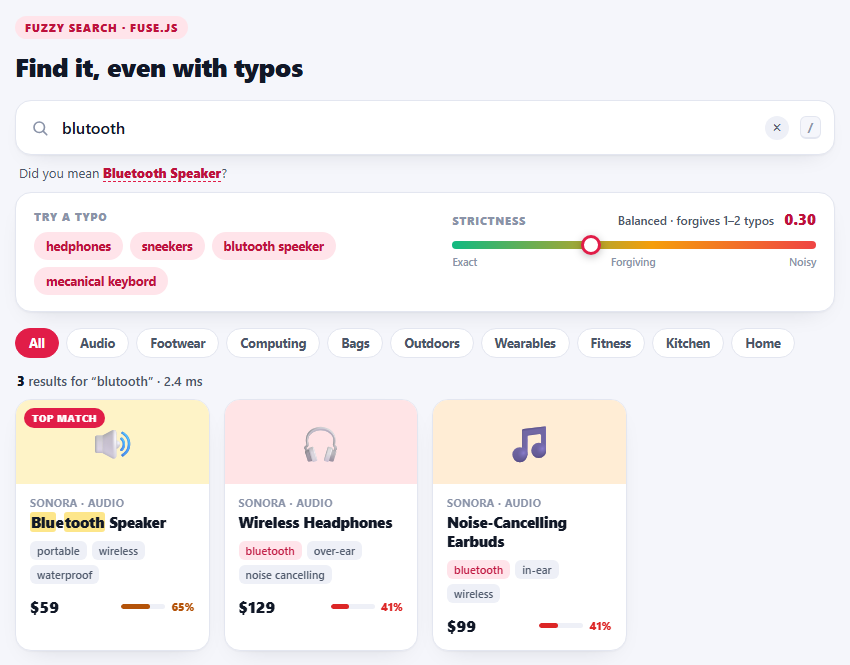
Shoppers misspell things constantly, and an exact-match search punishes them for it: "sneekers" returns nothing, so the customer concludes you do not sell sneakers. A fuzzy search closes that gap. Fuse.js scores every item by how closely it approximates the query, so "hedphones", "blutooth speeker" and "mecanical keybord" all find the right products without any dictionary or server round trip. This version wraps Fuse in a complete store-style search page: a big search field with a clear button and "/" shortcut, a "Did you mean" suggestion, category filter chips, product cards with highlighted matches and relevance meters, and dark mode.
Make the threshold visible
The most useful thing this snippet adds is a strictness slider bound to Fuse's threshold option, because that number is the one everyone has to tune and almost nobody understands until they see it. The track is a green-to-red gradient, a live hint translates the value into plain language ("Strict · tiny slips only", "Balanced · forgives 1–2 typos", "Very loose · mostly noise"), and a readout shows the exact figure. At 0 the search demands exact matches. Around 0.3 it forgives a couple of wrong or missing letters. Push it towards 0.8 and unrelated products start matching. Dragging rebuilds the index and re-renders instantly, so the trade-off is visible in seconds instead of by guesswork.
Weighted fields and the multiplication caveat
The fields are weighted to reflect how shoppers search: name carries half the score, tags a quarter, then brand and category. A search for "bluetooth" finds products through their tags even when the word is not in the title. One caveat worth knowing: Fuse combines per-key scores multiplicatively, so a perfect hit in a lightly weighted key (a tag) can still outrank a near-perfect hit in a heavily weighted one (the name) — try "wireless" to see it. Weights nudge ranking rather than dictating it, so always test them against real queries. ignoreLocation is enabled so a hit deep inside a long product name counts the same as one at the start.
Show why a result matched
includeMatches returns character ranges per key. The renderer sorts the ranges, skips overlaps and escapes every piece of text before it touches innerHTML, so a product name with angle brackets cannot break the page. Matches in the name are highlighted with <mark>, and matching tags are tinted, so a product found through "waterproof" visibly shows which tag matched. includeScore returns Fuse's error value, where 0 is a perfect match; each card converts it to a relevance percentage with a small meter coloured green, amber or red, and the first result gets a "Top match" badge.
Did you mean, categories and shortcuts
When the top result's name does not literally contain what was typed, a "Did you mean Wireless Headphones?" link appears, and one click replaces the query with the corrected term. Category chips filter the ranked results without re-running the search logic, so typos and categories combine. The empty state offers a "Loosen strictness" button that sets the slider to 0.5, which is the right remedy. Press / to focus the field and Escape to clear it.
Performance and accessibility
The search runs entirely in memory, so it is instant for catalogues up to a few thousand items (the result count even shows the search time in milliseconds). Beyond that, move the index to a server or a dedicated search service. Result counts are announced through aria-live, the category chips use aria-pressed, controls have focus rings, and prefers-reduced-motion switches the card animation off. For a command-palette style search with the same library, see the Fuse fuzzy command search.
What's included
Features
Step by step
How to Use
- 1Start with a typoThe field opens on "blutooth". Bluetooth Speaker ranks first with a "Top match" badge and a "Did you mean" suggestion, and products tagged bluetooth follow with lower relevance meters.
- 2Try the other typosClick "sneekers", "blutooth speeker" or "mecanical keybord" and watch the correct product surface with its name highlighted.
- 3Tighten the strictnessDrag the slider to 0. Typo queries return nothing, the hint reads "Exact matches only", and the empty state offers a Loosen strictness button.
- 4Loosen it too farDrag to the right end. Unrelated products creep in with low, red relevance meters, and the hint warns "mostly noise".
- 5Combine with a categoryClick a category chip such as Audio. The same fuzzy results are filtered, and the count updates.
- 6Search by tagType "waterproof" or "gps". Products match through their tags, and the matching tag chip is tinted. Press / to jump to the field and Esc to clear.
Real-world uses
Common Use Cases
includeScore option.threshold option changes which results appear.Got questions?
Frequently Asked Questions
Start around 0.3. Lower is stricter and returns fewer results; higher forgives more typos but adds unrelated matches. The hint under the slider labels each range, and you should tune it against real queries.
includeScore returns an error value where 0 is a perfect match and 1 is a complete mismatch. This snippet converts it to a relevance percentage and a coloured meter.
Each key can have a weight; matches in higher-weighted fields contribute more to the final score. Because Fuse multiplies per-key scores, weights nudge ranking rather than dictate it, so test with real queries.
After searching, the top result is compared with the typed text. If it matched on its name and the name does not contain the query, a button offers that name as a correction. Results found only through a tag do not trigger it. Clicking it sets the query to the full product name.
Without it Fuse prefers matches near the start of a field, which unfairly penalises words later in long product names.
It is fast for a few thousand items in memory, and the snippet shows the search time so you can measure it. For tens of thousands, index server-side with a search engine.
Escape every string before inserting it as HTML, as the esc and mark functions do, or build DOM nodes with textContent.
Yes. Use the JSX, Vue, Angular or Tailwind export buttons on this page to convert the markup and styles. In a framework project install Fuse with npm install fuse.js instead of the CDN tag, build the index with useMemo / computed / a service keyed on the data, and keep the query, strictness and category in state. The index holds no DOM listeners, so nothing needs cleanup on unmount.
Copy & paste
Source Code
<div class="fp-wrap">
  <header class="fp-hero">
    <span class="fp-eyebrow">Fuzzy search · Fuse.js</span>
    <h2 class="fp-title">Find it, even with typos</h2>
  </header>

  <div class="fp-search">
    <svg class="fp-ico" width="18" height="18" viewBox="0 0 24 24" fill="none" stroke="currentColor" stroke-width="2.2" stroke-linecap="round" aria-hidden="true"><circle cx="11" cy="11" r="7"/><line x1="21" y1="21" x2="16.5" y2="16.5"/></svg>
    <input id="fpQ" type="search" placeholder="Search products, brands, tags…" autocomplete="off" spellcheck="false" aria-label="Search products">
    <button id="fpClear" class="fp-clear" type="button" aria-label="Clear search" hidden>×</button>
    <kbd class="fp-kbd" aria-hidden="true">/</kbd>
  </div>
  <p class="fp-dym" id="fpDym" aria-live="polite"></p>

  <div class="fp-panel">
    <div class="fp-try"><span class="fp-lbl">Try a typo</span>
      <button type="button">hedphones</button>
      <button type="button">sneekers</button>
      <button type="button">blutooth speeker</button>
      <button type="button">mecanical keybord</button>
    </div>
    <div class="fp-tune">
      <div class="fp-tune-top">
        <label class="fp-lbl" for="fpThr">Strictness</label>
        <span class="fp-hint" id="fpThrHint"></span>
        <b id="fpThrVal">0.30</b>
      </div>
      <input id="fpThr" type="range" min="0" max="0.8" step="0.05" value="0.3" aria-describedby="fpThrHint">
      <div class="fp-scale" aria-hidden="true"><span>Exact</span><span>Forgiving</span><span>Noisy</span></div>
    </div>
  </div>

  <div class="fp-cats" id="fpCats" role="group" aria-label="Filter by category"></div>
  <p class="fp-count" id="fpCount" aria-live="polite"></p>
  <ul class="fp-grid" id="fpGrid"></ul>
</div>*{box-sizing:border-box}
:root{--bg:#f5f6fb;--card:#fff;--line:#e3e6f0;--ink:#111827;--ink2:#4b5568;--ink3:#8a93a8;--acc:#e11d48;--acc-d:#be123c;--acc-t:#ffe4ea;--chip:#eef0f7;--mark:#fde68a;--shadow:0 1px 2px rgba(17,24,39,.04),0 10px 26px -16px rgba(17,24,39,.18)}
@media(prefers-color-scheme:dark){:root{--bg:#0d1020;--card:#161a2f;--line:#252b49;--ink:#f1f3fb;--ink2:#aab1cc;--ink3:#707898;--acc:#fb7185;--acc-d:#fda4af;--acc-t:rgba(251,113,133,.16);--chip:#1e2342;--mark:rgba(250,204,21,.32);--shadow:0 1px 2px rgba(0,0,0,.3),0 14px 30px -18px rgba(0,0,0,.7)}}
body{margin:0;background:var(--bg);color:var(--ink);padding:26px 20px;font-family:system-ui,-apple-system,'Segoe UI',sans-serif;min-height:100vh}
.fp-wrap{max-width:820px;margin:0 auto}
.fp-hero{margin-bottom:16px}
.fp-eyebrow{display:inline-block;font-size:11px;font-weight:800;letter-spacing:.08em;text-transform:uppercase;color:var(--acc-d);background:var(--acc-t);padding:4px 10px;border-radius:999px}
.fp-title{margin:10px 0 0;font-size:26px;font-weight:800;letter-spacing:-.02em}
.fp-search{position:relative;display:flex;align-items:center}
.fp-ico{position:absolute;left:16px;color:var(--ink3);pointer-events:none}
#fpQ{width:100%;padding:16px 78px 16px 46px;font-size:16px;font-weight:500;font-family:inherit;color:var(--ink);background:var(--card);border:1.5px solid var(--line);border-radius:16px;box-shadow:var(--shadow);transition:border-color .2s,box-shadow .2s;-webkit-appearance:none;appearance:none}
#fpQ::-webkit-search-cancel-button{display:none}
#fpQ::placeholder{color:var(--ink3)}
#fpQ:focus{outline:0;border-color:var(--acc);box-shadow:0 0 0 4px var(--acc-t),var(--shadow)}
.fp-clear{position:absolute;right:46px;width:24px;height:24px;border:0;border-radius:50%;background:var(--chip);color:var(--ink2);font-size:16px;line-height:1;cursor:pointer}
.fp-clear:hover{background:var(--acc-t);color:var(--acc-d)}
.fp-kbd{position:absolute;right:14px;font:700 12px system-ui;color:var(--ink3);border:1px solid var(--line);border-bottom-width:2px;border-radius:6px;padding:2px 7px;background:var(--bg)}
#fpQ:focus ~ .fp-kbd{opacity:0}
.fp-dym{min-height:22px;margin:9px 4px 0;font-size:13px;color:var(--ink2)}
.fp-dym button{font:inherit;font-weight:800;color:var(--acc-d);background:none;border:0;border-bottom:1.5px dashed var(--acc);padding:0;cursor:pointer}
.fp-panel{display:grid;grid-template-columns:1.1fr 1fr;gap:18px;margin-top:6px;background:var(--card);border:1px solid var(--line);border-radius:16px;padding:16px 18px;box-shadow:var(--shadow)}
.fp-lbl{font-size:11px;font-weight:800;letter-spacing:.07em;text-transform:uppercase;color:var(--ink3)}
.fp-try{display:flex;flex-wrap:wrap;gap:7px;align-items:center;align-content:flex-start}
.fp-try .fp-lbl{width:100%;margin-bottom:1px}
.fp-try button{font:inherit;font-size:12.5px;font-weight:700;color:var(--acc-d);background:var(--acc-t);border:0;border-radius:999px;padding:6px 12px;cursor:pointer;transition:transform .15s,background .15s}
.fp-try button:hover{transform:translateY(-1px)}
.fp-tune-top{display:flex;align-items:baseline;gap:8px}
.fp-hint{flex:1;font-size:12px;font-weight:600;color:var(--ink2);text-align:right}
#fpThrVal{font-size:15px;font-weight:800;color:var(--acc-d);font-variant-numeric:tabular-nums;min-width:34px;text-align:right}
#fpThr{-webkit-appearance:none;appearance:none;width:100%;height:8px;margin:12px 0 6px;border-radius:99px;background:linear-gradient(90deg,#10b981,#f59e0b 55%,#ef4444);outline:0}
#fpThr::-webkit-slider-thumb{-webkit-appearance:none;width:20px;height:20px;border-radius:50%;background:var(--card);border:3px solid var(--acc);box-shadow:0 2px 8px rgba(0,0,0,.25);cursor:grab}
#fpThr::-moz-range-thumb{width:16px;height:16px;border-radius:50%;background:var(--card);border:3px solid var(--acc);cursor:grab}
#fpThr:focus-visible{box-shadow:0 0 0 4px var(--acc-t)}
.fp-scale{display:flex;justify-content:space-between;font-size:10.5px;font-weight:600;color:var(--ink3)}
.fp-cats{display:flex;gap:7px;flex-wrap:wrap;margin:16px 0 4px}
.fp-cat{font:inherit;font-size:12.5px;font-weight:700;color:var(--ink2);background:var(--card);border:1px solid var(--line);border-radius:999px;padding:6px 13px;cursor:pointer;transition:all .15s}
.fp-cat:hover{border-color:var(--acc);color:var(--acc-d)}
.fp-cat[aria-pressed="true"]{background:var(--acc);border-color:var(--acc);color:#fff}
.fp-cat:focus-visible,.fp-try button:focus-visible,.fp-clear:focus-visible,.fp-dym button:focus-visible{outline:2px solid var(--acc);outline-offset:2px}
.fp-count{margin:14px 2px 10px;font-size:13px;font-weight:600;color:var(--ink2)}
.fp-count b{color:var(--ink)}
.fp-grid{list-style:none;margin:0;padding:0;display:grid;grid-template-columns:repeat(auto-fill,minmax(190px,1fr));gap:14px}
.fp-card{position:relative;background:var(--card);border:1px solid var(--line);border-radius:16px;overflow:hidden;box-shadow:var(--shadow);animation:fpIn .4s cubic-bezier(.2,.8,.2,1) both;animation-delay:calc(var(--i,0)*35ms);transition:transform .2s,border-color .2s}
.fp-card:hover{transform:translateY(-3px);border-color:var(--acc)}
@keyframes fpIn{from{opacity:0;transform:translateY(10px)}to{opacity:1;transform:none}}
.fp-img{position:relative;height:84px;display:grid;place-items:center;font-size:36px;background:var(--bg-c)}
.fp-top{position:absolute;top:8px;left:8px;font-size:10px;font-weight:800;letter-spacing:.04em;text-transform:uppercase;color:#fff;background:var(--acc);padding:3px 8px;border-radius:999px}
.fp-body{padding:12px 14px 14px}
.fp-meta{font-size:10.5px;font-weight:700;letter-spacing:.05em;text-transform:uppercase;color:var(--ink3)}
.fp-name{font-size:14.5px;font-weight:800;line-height:1.3;margin-top:3px}
mark{background:var(--mark);color:inherit;border-radius:3px;padding:0 1px}
.fp-tags{display:flex;flex-wrap:wrap;gap:5px;margin-top:9px}
.fp-tags span{font-size:11px;font-weight:600;color:var(--ink2);background:var(--chip);border-radius:6px;padding:2px 7px}
.fp-tags span.hit{background:var(--acc-t);color:var(--acc-d)}
.fp-row{display:flex;justify-content:space-between;align-items:center;gap:10px;margin-top:12px}
.fp-price{font-size:16px;font-weight:800}
.fp-rel{display:flex;align-items:center;gap:6px;font-size:11px;font-weight:800;font-variant-numeric:tabular-nums;color:#15803d}
.fp-rel i{display:block;width:44px;height:5px;border-radius:9px;background:var(--chip);overflow:hidden;position:relative}
.fp-rel i::after{content:'';position:absolute;inset:0;width:var(--w);background:currentColor;border-radius:9px}
.fp-rel.mid{color:#b45309}
.fp-rel.low{color:#dc2626}
.fp-none{grid-column:1/-1;padding:34px 16px;text-align:center;color:var(--ink2);font-size:14px;background:var(--card);border:1.5px dashed var(--line);border-radius:16px}
.fp-none b{display:block;font-size:16px;color:var(--ink);margin-bottom:4px}
.fp-none button{margin-top:12px;font:inherit;font-size:13px;font-weight:700;color:#fff;background:var(--acc);border:0;border-radius:10px;padding:8px 14px;cursor:pointer}
@media(max-width:640px){.fp-panel{grid-template-columns:1fr}.fp-title{font-size:22px}.fp-grid{grid-template-columns:repeat(2,1fr)}}
@media(max-width:380px){.fp-grid{grid-template-columns:1fr}}
@media(prefers-reduced-motion:reduce){*,*::before,*::after{animation:none!important;transition-duration:.01ms!important}}const PRODUCTS = [
{ name: 'Wireless Headphones', brand: 'Sonora', category: 'Audio', tags: ['bluetooth', 'over-ear', 'noise cancelling'], price: 129, icon: '🎧', bg: '#ffe4e6' },
{ name: 'Running Sneakers', brand: 'Stride', category: 'Footwear', tags: ['shoes', 'trainers', 'sport'], price: 89, icon: '👟', bg: '#dbeafe' },
{ name: 'Bluetooth Speaker', brand: 'Sonora', category: 'Audio', tags: ['portable', 'wireless', 'waterproof'], price: 59, icon: '🔊', bg: '#fef3c7' },
{ name: 'Mechanical Keyboard', brand: 'Keycraft', category: 'Computing', tags: ['typing', 'rgb', 'switches'], price: 149, icon: '⌨️', bg: '#e0e7ff' },
{ name: 'Ergonomic Mouse', brand: 'Keycraft', category: 'Computing', tags: ['wireless', 'vertical', 'office'], price: 49, icon: '🖱️', bg: '#dcfce7' },
{ name: 'Leather Backpack', brand: 'Northway', category: 'Bags', tags: ['travel', 'laptop', 'commuter'], price: 139, icon: '🎒', bg: '#fde2c8' },
{ name: 'Stainless Water Bottle', brand: 'Northway', category: 'Outdoors', tags: ['insulated', 'hydration', 'hiking'], price: 32, icon: '🥤', bg: '#cffafe' },
{ name: 'Smart Watch', brand: 'Pulse', category: 'Wearables', tags: ['fitness', 'heart rate', 'gps'], price: 199, icon: '⌚', bg: '#ede9fe' },
{ name: 'Yoga Mat', brand: 'Stride', category: 'Fitness', tags: ['exercise', 'non-slip', 'studio'], price: 35, icon: '🧘', bg: '#fce7f3' },
{ name: 'Espresso Machine', brand: 'Brewline', category: 'Kitchen', tags: ['coffee', 'barista', 'steam'], price: 249, icon: '☕', bg: '#f5e9dc' },
{ name: 'Desk Lamp', brand: 'Lumen', category: 'Home', tags: ['led', 'dimmable', 'office'], price: 45, icon: '💡', bg: '#fef9c3' },
{ name: 'Noise-Cancelling Earbuds', brand: 'Sonora', category: 'Audio', tags: ['bluetooth', 'in-ear', 'wireless'], price: 99, icon: '🎵', bg: '#ffedd5' },
];
const q = document.getElementById('fpQ');
const thr = document.getElementById('fpThr');
const grid = document.getElementById('fpGrid');
const count = document.getElementById('fpCount');
const dym = document.getElementById('fpDym');
const clearBtn = document.getElementById('fpClear');
const catsEl = document.getElementById('fpCats');
let category = 'All';
let fuse;
function build() {
if (typeof Fuse === 'undefined') return;
fuse = new Fuse(PRODUCTS, {
keys: [
{ name: 'name', weight: 0.5 },
{ name: 'tags', weight: 0.25 },
{ name: 'brand', weight: 0.15 },
{ name: 'category', weight: 0.1 },
],
threshold: Number(thr.value), // lower = stricter; raise it to forgive more typos (and allow more noise)
ignoreLocation: true,
includeScore: true, // 0 = perfect match, 1 = worst
includeMatches: true,
ignoreFieldNorm: true, // rank by field weights, not by how short the matching field is
minMatchCharLength: 3, // drop 1-2 character highlight fragments
});
}
function esc(s) { return String(s).replace(/[&<>"]/g, function (c) { return { '&': '&', '<': '<', '>': '>', '"': '"' }[c]; }); }
function mark(text, indices) {
if (!indices || !indices.length) return esc(text);
let out = '', pos = 0;
indices.slice().sort(function (a, b) { return a[0] - b[0]; }).forEach(function (r) {
if (r[0] < pos) return; // skip ranges already covered by a previous one
out += esc(text.slice(pos, r[0])) + '<mark>' + esc(text.slice(r[0], r[1] + 1)) + '</mark>';
pos = r[1] + 1;
});
return out + esc(text.slice(pos));
}
function hintFor(v) {
if (v === 0) return 'Exact matches only';
if (v <= 0.2) return 'Strict · tiny slips only';
if (v <= 0.45) return 'Balanced · forgives 1–2 typos';
if (v <= 0.65) return 'Loose · expect some noise';
return 'Very loose · mostly noise';
}
function drawCats() {
const names = ['All'].concat(PRODUCTS.map(function (p) { return p.category; }).filter(function (c, i, a) { return a.indexOf(c) === i; }));
catsEl.innerHTML = names.map(function (n) {
return '<button type="button" class="fp-cat" data-cat="' + esc(n) + '" aria-pressed="' + (n === category) + '">' + esc(n) + '</button>';
}).join('');
}
function render() {
const term = q.value.trim();
const v = Number(thr.value);
document.getElementById('fpThrVal').textContent = v.toFixed(2);
document.getElementById('fpThrHint').textContent = hintFor(v);
clearBtn.hidden = !q.value;
const t0 = performance.now();
let rows = term && fuse
? fuse.search(term)
: PRODUCTS.map(function (p) { return { item: p, score: 0, matches: [] }; });
const ms = performance.now() - t0;
if (category !== 'All') rows = rows.filter(function (r) { return r.item.category === category; });
// "Did you mean": only when the best hit matched on its name and does not literally contain what was typed
const bestRow = term && rows.length ? rows[0] : null;
const best = bestRow && (bestRow.matches || []).some(function (x) { return x.key === 'name'; }) ? bestRow.item : null; // only for name matches, not tag hits
dym.innerHTML = best && best.name.toLowerCase().indexOf(term.toLowerCase()) === -1
? 'Did you mean <button type="button" data-fix="' + esc(best.name) + '">' + esc(best.name) + '</button>?'
: '';
count.innerHTML = term
? '<b>' + rows.length + '</b> result' + (rows.length === 1 ? '' : 's') + ' for “' + esc(term) + '” · ' + ms.toFixed(1) + ' ms'
: '<b>' + rows.length + '</b> products' + (category === 'All' ? '' : ' in ' + esc(category));
if (!rows.length) {
grid.innerHTML = '<li class="fp-none"><b>Nothing found</b>A higher strictness value forgives more typos.' +
'<br><button type="button" data-loosen>Loosen strictness</button></li>';
return;
}
grid.innerHTML = rows.map(function (r, i) {
const p = r.item;
const ms2 = r.matches || [];
const nameM = ms2.filter(function (x) { return x.key === 'name'; })[0];
const hits = {};
ms2.forEach(function (x) { if (x.key === 'tags') hits[x.refIndex] = true; });
const rel = Math.round((1 - (r.score || 0)) * 100); // turn Fuse's error score into "relevance"
const cls = rel >= 80 ? '' : rel >= 55 ? ' mid' : ' low';
const tags = p.tags.map(function (tg, ti) { return '<span' + (hits[ti] ? ' class="hit"' : '') + '>' + esc(tg) + '</span>'; }).join('');
return '<li class="fp-card" style="--i:' + Math.min(i, 12) + '">' +
'<div class="fp-img" style="--bg-c:' + p.bg + '">' + p.icon + (term && i === 0 ? '<span class="fp-top">Top match</span>' : '') + '</div>' +
'<div class="fp-body"><div class="fp-meta">' + esc(p.brand) + ' · ' + esc(p.category) + '</div>' +
'<div class="fp-name">' + mark(p.name, nameM && nameM.indices) + '</div>' +
'<div class="fp-tags">' + tags + '</div>' +
'<div class="fp-row"><span class="fp-price">$' + p.price + '</span>' +
(term ? '<span class="fp-rel' + cls + '" title="Match relevance"><i style="--w:' + rel + '%"></i>' + rel + '%</span>' : '') +
'</div></div></li>';
}).join('');
}
q.addEventListener('input', render);
thr.addEventListener('input', function () { build(); render(); });
clearBtn.addEventListener('click', function () { q.value = ''; render(); q.focus(); });
document.querySelectorAll('.fp-try button').forEach(function (b) {
b.addEventListener('click', function () { q.value = b.textContent; render(); q.focus(); });
});
catsEl.addEventListener('click', function (e) {
const b = e.target.closest('.fp-cat');
if (!b) return;
category = b.dataset.cat;
drawCats(); render();
});
dym.addEventListener('click', function (e) {
const b = e.target.closest('button[data-fix]');
if (b) { q.value = b.dataset.fix; render(); q.focus(); }
});
grid.addEventListener('click', function (e) {
if (e.target.closest('[data-loosen]')) { thr.value = 0.5; build(); render(); }
});
// "/" focuses the search box, Escape clears it
document.addEventListener('keydown', function (e) {
if (e.key === '/' && document.activeElement !== q) { e.preventDefault(); q.focus(); }
if (e.key === 'Escape' && document.activeElement === q && q.value) { q.value = ''; render(); }
});
build();
drawCats();
q.value = 'blutooth';
render();Extend with AI
Take This Snippet Further With AI
Paste this snippet's HTML, CSS and JS into an AI coding assistant like Claude and ask it to explain why Fuse multiplies per-key scores, so a perfect tag hit can outrank a near-perfect name hit, or why the "Did you mean" link only appears when the top result matched on its name and does not contain the typed text. It can also help you harden it: debounce the input for catalogues of a few thousand items, move the index into a Web Worker, or log zero-result queries so you know which products or synonyms are missing. And it's a fast way to extend it: add price-range filtering beside the category chips, highlight the matched brand as well as the name and tags, or fall back to a server search when the catalogue grows. Treat the code as the start of a conversation, not a finished artifact.
Prompt to recreate it
Copy this into your AI assistant of choice to build the effect from scratch, or as a jumping-off point for your own variant:
Build a polished, typo-tolerant product search page with Fuse.js 7 loaded from the jsDelivr CDN, as ONE self-contained HTML file (inline CSS and JS). Light and dark themes via CSS variables and prefers-color-scheme; accent colour rose (#e11d48).

DATA
- 12 products {name, brand, category, tags[], price, icon (emoji), bg (pastel)} across categories like Audio, Footwear, Computing, Bags, Outdoors, Wearables, Fitness, Kitchen, Home.

FUSE SETUP
- Weighted keys: name 0.5, tags 0.25, brand 0.15, category 0.1; ignoreLocation: true, includeScore: true, includeMatches: true, ignoreFieldNorm: true, minMatchCharLength: 3. The threshold comes from a slider, and every change rebuilds the Fuse instance and re-renders.

LAYOUT AND UI
- Header: a small "Fuzzy search · Fuse.js" pill and the title "Find it, even with typos".
- A large search field (16px radius) with a search icon, a clear (×) button shown only when there is text, and a "/" key hint that hides on focus. A line under it for the "Did you mean" suggestion.
- A panel with two columns (stacked on mobile): "Try a typo" pill buttons (hedphones, sneekers, blutooth speeker, mecanical keybord) that fill the field, and a Strictness control: range 0 to 0.8 step 0.05 whose track is a green-to-amber-to-red gradient, an exact value readout, a plain-language hint that changes with the value (Exact matches only, Strict · tiny slips only, Balanced · forgives 1–2 typos, Loose · expect some noise, Very loose · mostly noise) and Exact / Forgiving / Noisy labels beneath.
- Category filter chips built from the data ("All" plus each category) using aria-pressed; selecting one filters the already-ranked results.
- A result count line announced through aria-live, such as "3 results for “hedphones” · 0.2 ms" (measure with performance.now), or "12 products" with no query.
- A responsive grid of product cards (2 columns on small screens, 1 under 380px): pastel emoji banner, a "Top match" badge on the first result when searching, brand · category in small caps, the name with matched characters wrapped in <mark>, tag chips where tags that matched are tinted, the price, and a relevance meter (a small bar plus percentage from 1 - score, coloured green at 80+, amber at 55+, red below). Cards fade up with a staggered delay and lift on hover.

BEHAVIOUR
- Start with the query "blutooth" so several cards show. "Did you mean <best result name>?" appears only when the top result matched on its name and that name does not contain the typed text; clicking it sets the query to that name.
- Empty state: "Nothing found" with a "Loosen strictness" button that sets the slider to 0.5 and re-searches.
- "/" focuses the field, Escape clears it.
- Escape every string before inserting HTML; handle highlight ranges that overlap by sorting and skipping them; guard against Fuse failing to load.

QUALITY
- Focus rings on all controls, prefers-reduced-motion disables animation, no console errors.

Return only the finished single HTML file.
Want to tighten it up first? Run this prompt through the AI Prompt Studio to score it across 8 quality dimensions, catch anti-patterns, and tune the wording for Claude, ChatGPT, or Gemini before you paste it in.