
Matter.js Stacking Tower Game — Perfect Drops and Wind
Matter.js Stacking Tower Game · Games · Plain HTML, CSS & JS · Live preview
About this UI Snippet
A Physics Stacking Game in Matter.js — Pendulum Drops, Perfect Combos, Wind and a Rising Camera
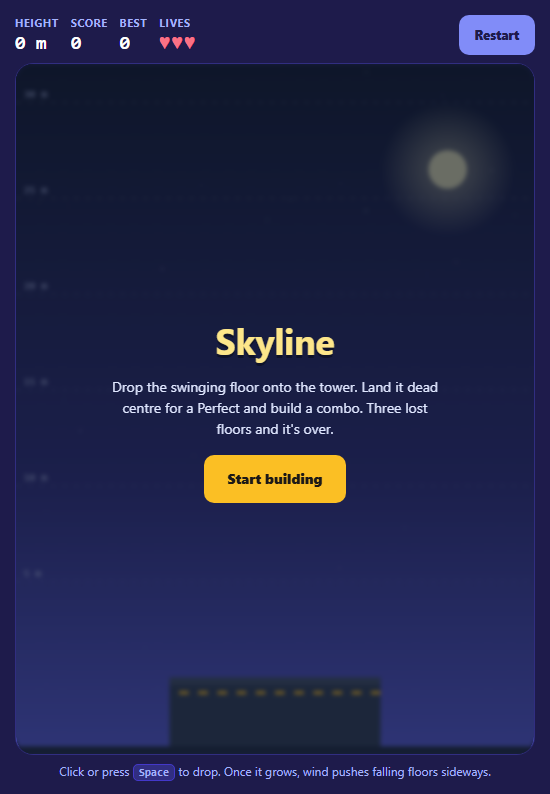
Stacking games look simple: drop a block and don't let the tower fall. Underneath they depend on real physics, because floors that land off-centre tip and a tall stack sways. Matter.js handles that, and this snippet adds the game around it: a pendulum that swings each new floor, a Perfect-landing combo, wind that pushes falling floors sideways, lives, a score and best saved in localStorage, particles, and a camera that climbs from dusk into a starry sky. It is all plain JavaScript on one canvas.
A pendulum that is not a physics body
While it hangs, the next floor is only a position: an angle that follows a sine of phase, converted to x = centre + sin(theta) * length and y = pivot + cos(theta) * length, with the floor tilted against the swing. Keeping it out of the physics world means nothing can knock it. The phase is accumulated each step, so speeding the swing up as the tower grows never makes the floor jump, and the swing gets wider as well as faster.
Dropping honestly
On click, tap or Space the floor becomes a real rectangle at the same position and tilt and falls straight down. Carrying over the swing's sideways speed looks realistic but drifts the block far from the faint drop guide over a long fall, so timing is the skill. The fall speed is also capped (MAX_FALL, 6px per step): a long drop at full speed hits the stack hard enough to shake a tall tower apart. Floors also get narrower as the tower grows, down to 70px.
Perfect landings and combos
Once a floor is asleep, or slow after the first 30 steps, it counts as landed and judge() compares it with the floor beneath (or the base). Within 8px of centre and nearly level it is Perfect: the combo rises, the floor glows, gold sparks fire and the bonus is 25 times the combo on top of 10 points. Any other landing resets the combo and kicks up dust.
Wind
From the fifth floor, a gust target is picked every few seconds and the wind eases toward it. It is applied as a small Body.applyForce to floors that have not landed, so it only matters while a floor is falling; the drop guide leans with the gust and a meter in the corner shows the strength. Wind never touches landed floors, which keeps tall towers stable.
Stable stacking
Tall stacks are a stress test for a 2D engine, so the snippet raises positionIterations and velocityIterations, uses high static friction and zero restitution, and turns on enableSleeping so settled floors stop jittering. A floor that falls below the base platform or off its sides costs a life.
Built for phones
The board keeps its 3:4 shape and scales with CSS, so the canvas stays sharp (it renders at the device pixel ratio) while the whole game is sized to the screen height with 100dvh: HUD, board and hint fit without scrolling. The canvas uses touch-action: none and any touch drops the floor at once, with no double-tap zoom delay or page scroll. On a sideways phone the HUD moves to a column beside a full-height board, buttons grow to 44 px tall on coarse pointers, safe-area insets keep it clear of notches, and Perfect landings and lost floors give a short vibration where the device supports it.
A camera that climbs
With hasBounds, the renderer draws only what is inside render.bounds, whose vertical position eases toward the tower top. Everything else is painted by hand in afterRender: floors with lit windows, the podium, height lines every 5 m, and the background last with destination-over, where the sky fades from dusk to deep space and the stars twinkle more with altitude.
What's included
Features
Step by step
How to Use
- 1Press Start buildingThe card explains the goal. Press the button or Space to begin, and the first floor swings on its rope above the tower.
- 2Time the dropClick, tap anywhere on the tower, or press Space. The floor falls straight down; the faint column below it shows where it will land.
- 3Land it centredWithin 8px of the floor below and level counts as Perfect: a glow, gold sparks and a combo bonus that grows with each one.
- 4Watch the windFrom the fifth floor the wind meter appears. A strong gust pushes the falling floor sideways, so aim against it.
- 5Keep your livesA floor that falls off the base costs one of three hearts and resets your combo. Climb as the camera rises into the stars.
- 6Beat your bestYour best score is saved on this device, so there is always a record to beat.
Real-world uses
Common Use Cases
Got questions?
Frequently Asked Questions
Yes. The board scales to the screen height so nothing scrolls, any tap on it drops the floor immediately, the HUD moves beside the board in landscape, and Perfect landings and lost floors vibrate on devices that allow it. Space and click still work on a desktop.
Raise engine.positionIterations and velocityIterations, use high friction and frictionStatic, zero restitution, and enable sleeping so settled bodies stop jittering. Keep wind or other forces off bodies that have already landed.
So nothing can collide with it while it hangs. On drop you create the body at the same position and angle and let it fall, which keeps the drop guide honest. Accumulating the pendulum phase also lets you change the speed smoothly.
When a floor lands, judge() finds the landed floor directly below it, or the base, and compares x positions. A difference under 8px with an angle under 0.08 radians is Perfect, which raises the combo and adds 25 points per combo level. Other landings reset the combo.
Every step, falling floors get Body.applyForce with a horizontal force of wind times mass times a small constant. The wind value eases toward a new random target every few seconds. Landed floors are skipped, so towers do not slide apart.
Create the renderer with hasBounds: true and move render.bounds.min.y and max.y every frame, easing toward a target based on the tower's highest point. Draw custom graphics with the same vertical offset through setTransform.
Copy & paste
Source Code
<div class="st">
<div class="st-hud">
<div><span>Height</span><b id="stHeight">0 m</b></div>
<div><span>Score</span><b id="stScore">0</b></div>
<div><span>Best</span><b id="stBest">0</b></div>
<div><span>Lives</span><b id="stLives">♥♥♥</b></div>
<button type="button" id="stRestart">Restart</button>
</div>
<div class="st-stage" id="stStage">
<div class="st-over" id="stOver">
<strong id="stOverTitle">Skyline</strong>
<div class="st-stats" id="stStats" hidden></div>
<span id="stOverText">Drop the swinging floor onto the tower. Land it dead centre for a Perfect and build a combo. Three lost floors and it's over.</span>
<button type="button" id="stAgain">Start building</button>
</div>
</div>
<p class="st-hint"><span class="st-keys">Click or press <kbd>Space</kbd> to drop.</span><span class="st-tap">Tap the tower to drop.</span> Once it grows, wind pushes falling floors sideways.</p>
</div>*{box-sizing:border-box;margin:0;padding:0}
body{font-family:system-ui,-apple-system,sans-serif;background:#1e1b4b;color:#e0e7ff;min-height:100vh;min-height:100dvh;display:flex;align-items:center;justify-content:center;padding:max(12px,env(safe-area-inset-top)) max(12px,env(safe-area-inset-right)) max(12px,env(safe-area-inset-bottom)) max(12px,env(safe-area-inset-left));overscroll-behavior:none}
/* the whole game (HUD + 3:4 board + hint) is sized to fit the screen height, so a phone never needs to scroll */
.st{width:100%;max-width:520px;max-width:min(520px,calc((100dvh - 150px) * .75));min-width:280px;-webkit-user-select:none;user-select:none;-webkit-touch-callout:none}
.st-tap{display:none}
.st-hud{display:flex;align-items:center;justify-content:space-between;gap:12px;margin-bottom:8px}
.st-hud>div{display:flex;flex-direction:column;gap:2px}
.st-hud span{font-size:10.5px;text-transform:uppercase;letter-spacing:.08em;color:#a5b4fc;font-weight:700}
.st-hud b{font:800 19px ui-monospace,monospace;color:#fff;font-variant-numeric:tabular-nums}
#stLives{color:#fb7185;letter-spacing:2px}
.st button{border:0;border-radius:10px;background:#818cf8;color:#1e1b4b;font:800 12.5px system-ui;padding:9px 16px;cursor:pointer}
.st button:hover{background:#a5b4fc}
.st-hud button{margin-left:auto;min-height:40px}
.st :focus-visible{outline:2px solid #c7d2fe;outline-offset:2px}
.st-stage{position:relative;border-radius:18px;overflow:hidden;border:1px solid #312e81;background:#0f172a}
/* Matter writes a fixed pixel width and height onto the canvas; !important lets the board scale with the screen at its 3:4 shape */
.st-stage canvas{display:block;width:100%!important;height:auto!important;aspect-ratio:3/4;cursor:pointer;touch-action:none;-webkit-tap-highlight-color:transparent}
.st-over{position:absolute;inset:0;z-index:2;display:flex;flex-direction:column;align-items:center;justify-content:center;gap:12px;background:rgba(15,23,42,.62);backdrop-filter:blur(2px);text-align:center;padding:24px}
.st-over[hidden]{display:none}
.st-over strong{font-size:36px;color:#fde68a;letter-spacing:-.01em;text-shadow:0 3px 0 rgba(0,0,0,.35)}
.st-over>span{font-size:14px;color:#e0e7ff;max-width:340px;line-height:1.5}
.st-stats{display:flex;gap:10px}
.st-stats[hidden]{display:none}
.st-stats div{background:rgba(30,27,75,.8);border-radius:12px;padding:8px 14px}
.st-stats small{display:block;font-size:10px;text-transform:uppercase;letter-spacing:.08em;color:#a5b4fc;font-weight:700}
.st-stats b{font:800 18px ui-monospace,monospace;color:#fde68a}
.st-over button{margin-top:4px;padding:11px 24px;font-size:14px;background:#fbbf24;color:#1c1917}
.st-over button:hover{background:#fde68a}
.st-hint{font-size:12px;color:#a5b4fc;margin-top:8px;text-align:center}
.st kbd{font:700 11px ui-monospace,monospace;background:#312e81;border:1px solid #4338ca;border-radius:5px;padding:1px 5px}
.st-over button{min-height:48px}
/* touch screens: tap wording, bigger buttons */
@media (pointer:coarse){.st-keys{display:none}.st-tap{display:inline}.st button{min-height:44px}.st-hud button{padding:9px 18px}}
/* small phones */
@media (max-width:420px){
.st-hud{gap:6px}.st-hud b{font-size:16px}.st-hud span{font-size:9.5px}
.st-over{padding:16px;gap:9px}.st-over strong{font-size:28px}.st-over>span{font-size:13px}
.st-stats{gap:6px}.st-stats div{padding:6px 10px}.st-stats b{font-size:16px}
.st-hint{font-size:11.5px}
}
/* phone held sideways: board on the left at full height, HUD in a column on the right */
@media (orientation:landscape) and (max-height:520px){
body{padding:8px max(12px,env(safe-area-inset-right)) 8px max(12px,env(safe-area-inset-left))}
.st{max-width:none;min-width:0;display:flex;flex-direction:row-reverse;align-items:center;justify-content:center;gap:14px}
.st-hud{flex-direction:column;align-items:flex-start;justify-content:center;gap:10px;margin:0;width:118px}
.st-hud button{margin:0;width:100%}
.st-stage{flex:none;width:calc((100dvh - 16px) * .75);max-width:calc(100vw - 190px)}
.st-hint{display:none}
}var M = Matter, Engine = M.Engine, Render = M.Render, Runner = M.Runner, Bodies = M.Bodies, Body = M.Body,
Composite = M.Composite, Events = M.Events;
var $ = function (id) { return document.getElementById(id); };
var W = 540, H = 720, BLOCK_H = 34, PX_PER_M = 20;
var BASE_TOP = H - 80; // y of the top of the base platform
var PIVOT_LEN = 210; // rope length of the swinging pendulum
var MAX_FALL = 6; // terminal speed of a dropped floor (px per step)
var engine = Engine.create({ enableSleeping: true });
engine.positionIterations = 12;
engine.velocityIterations = 10;
var render = Render.create({
element: $('stStage'), engine: engine,
options: { width: W, height: H, wireframes: false, background: 'transparent', pixelRatio: window.devicePixelRatio || 1, hasBounds: true },
});
$('stStage').prepend(render.canvas);
var HUES = [340, 20, 45, 150, 190, 220, 265, 300];
var base, hanging, blocks, lives, best = 0, over, ready, camY, phase, towerTop, score, combo, wind, windTarget, windTimer;
var particles = [], texts = [], shake = 0;
var bestH = 0; // tallest tower so far (metres), shown as a gold line
try { best = +localStorage.getItem('st-best') || 0; bestH = +localStorage.getItem('st-best-h') || 0; } catch (e) {}
// Stars for the background, with a fixed random layout
var STARS = [];
for (var s = 0; s < 80; s++) STARS.push({ x: Math.random() * W, y: Math.random() * H * 2, r: 0.5 + Math.random() * 1.4, f: 0.05 + Math.random() * 0.2, p: Math.random() * 6 });
function reset(intro) {
Composite.clear(engine.world, false);
base = Bodies.rectangle(W / 2, H - 40, 220, 80, { isStatic: true, friction: 1, label: 'base', render: { visible: false } });
Composite.add(engine.world, base);
blocks = []; lives = 3; over = !!intro; ready = !intro; camY = 0; phase = 0; combo = 0; score = 0;
wind = 0; windTarget = 0; windTimer = 0; particles = []; texts = []; shake = 0;
towerTop = BASE_TOP;
newHanging();
hud();
$('stOver').hidden = !intro;
if (intro) {
$('stOverTitle').textContent = 'Skyline';
$('stOverText').textContent = "Drop the swinging floor onto the tower. Land it dead centre for a Perfect and build a combo. Three lost floors and it's over.";
$('stStats').hidden = true;
$('stAgain').textContent = 'Start building';
}
}
// The next floor hangs from a pendulum above the view. It is not a physics body yet, only a position we
// animate, so nothing can knock it. Floors get narrower as the tower grows.
function newHanging() {
var n = blocks.length;
var w = Math.max(70, 100 + Math.random() * 50 - Math.min(30, n * 1.2));
hanging = { w: w, hue: HUES[n % HUES.length], x: W / 2, y: 0, angle: 0, lit: [Math.random() < 0.7, Math.random() < 0.7, Math.random() < 0.7, Math.random() < 0.7, Math.random() < 0.7] };
}
function drop() {
if (over || !ready || !hanging) return;
var h = hanging;
// Hand over to the physics engine at the pendulum's position and tilt. It falls straight down (plus wind),
// so the drop guide is honest. Carrying the swing's speed made long falls drift unfairly.
var b = Bodies.rectangle(h.x, h.y, h.w, BLOCK_H, {
friction: 0.9, frictionStatic: 1.2, restitution: 0, density: 0.002, chamfer: { radius: 4 },
label: 'block', render: { visible: false },
});
Body.setAngle(b, h.angle);
b.landed = false; b.age = 0; b.hue = h.hue; b.w = h.w; b.lit = h.lit; b.perfectUntil = 0;
Composite.add(engine.world, b);
blocks.push(b);
hanging = null;
setTimeout(function () { if (!over) newHanging(); }, 600);
}
// ---------- Effects ----------
function burst(x, y, colors, n, speed, life, grav) {
for (var i = 0; i < n && particles.length < 220; i++) {
var a = Math.random() * Math.PI * 2, v = 0.5 + Math.random() * speed;
particles.push({ x: x, y: y, vx: Math.cos(a) * v, vy: Math.sin(a) * v - 1, g: grav, life: life * (0.6 + Math.random() * 0.4), max: life, r: 1.5 + Math.random() * 2.5, c: colors[i % colors.length] });
}
}
function buzz(p) { try { if (navigator.vibrate) navigator.vibrate(p); } catch (e) {} }
function floatText(x, y, text, color) { texts.push({ x: x, y: y, text: text, color: color, life: 70 }); }
function heightM() { return Math.max(0, Math.round((BASE_TOP - towerTop) / PX_PER_M * 10) / 10); }
function hud() {
if (heightM() > bestH) bestH = heightM();
$('stHeight').textContent = heightM() + ' m';
$('stScore').textContent = score;
$('stBest').textContent = Math.max(best, score);
$('stLives').textContent = '\u2665\u2665\u2665'.slice(0, Math.max(0, lives)) + '\u2661\u2661\u2661'.slice(0, 3 - Math.max(0, lives));
}
function loseLife(b) {
burst(b.position.x, Math.min(b.position.y, H + camY - 10), ['#fb7185', '#fda4af', '#fff'], 16, 4, 30, 0.15);
shake = 10; buzz([30, 40, 30]);
Composite.remove(engine.world, b);
blocks.splice(blocks.indexOf(b), 1);
lives--; combo = 0;
hud();
if (lives <= 0) endGame();
}
function endGame() {
over = true;
var floors = blocks.filter(function (b) { return b.landed; }).length;
var isBest = score > best;
if (isBest) { best = score; }
try { localStorage.setItem('st-best', String(best)); localStorage.setItem('st-best-h', String(bestH)); } catch (e) {}
$('stOverTitle').textContent = 'Tower down!';
$('stOverText').textContent = (isBest ? 'New best score!' : 'Best score ' + best + '.');
$('stStats').innerHTML = '<div><small>Height</small><b>' + heightM() + ' m</b></div><div><small>Floors</small><b>' + floors + '</b></div><div><small>Score</small><b>' + score + '</b></div>';
$('stStats').hidden = false;
$('stAgain').textContent = 'Build again';
setTimeout(function () { $('stOver').hidden = false; }, 700);
}
// A landed block is "Perfect" when its centre is within 8 px of the block (or base) it sits on and it is level.
function judge(b) {
var ref = null;
blocks.forEach(function (o) { if (o !== b && o.landed && o.position.y > b.position.y + 10 && (!ref || o.position.y < ref.position.y)) ref = o; });
var refX = ref ? ref.position.x : W / 2;
var perfect = Math.abs(b.position.x - refX) < 8 && Math.abs(b.angle) < 0.08;
var pts = 10;
if (perfect) {
buzz(14); combo++; pts += 25 * combo; b.perfectUntil = performance.now() + 900;
floatText(b.position.x, b.position.y - 30, 'Perfect!' + (combo > 1 ? ' x' + combo : ''), '#fde047');
burst(b.position.x, b.position.y, ['#fde047', '#fbbf24', '#fff'], 18, 4, 36, 0.08);
} else {
combo = 0;
burst(b.position.x - b.w / 2, b.position.y + BLOCK_H / 2, ['#cbd5e1', '#94a3b8'], 4, 1.6, 22, -0.01);
burst(b.position.x + b.w / 2, b.position.y + BLOCK_H / 2, ['#cbd5e1', '#94a3b8'], 4, 1.6, 22, -0.01);
}
score += pts;
floatText(b.position.x, b.position.y - (perfect ? 52 : 30), '+' + pts, '#fff');
}
Events.on(engine, 'beforeUpdate', function () {
for (var i = particles.length - 1; i >= 0; i--) { var p = particles[i]; p.x += p.vx; p.y += p.vy; p.vy += p.g; if (--p.life <= 0) particles.splice(i, 1); }
for (i = texts.length - 1; i >= 0; i--) { texts[i].y -= 0.6; if (--texts[i].life <= 0) texts.splice(i, 1); }
// Wind: from the 5th floor a gust target changes every few seconds and blows on falling floors
if (!over && ready && blocks.length >= 5) {
if (--windTimer <= 0) { windTarget = Math.random() < 0.25 ? 0 : (Math.random() * 2 - 1); windTimer = 300 + Math.random() * 240; }
wind += (windTarget - wind) * 0.02;
} else wind += (0 - wind) * 0.05;
blocks.forEach(function (b) {
if (b.landed) return;
Body.applyForce(b, b.position, { x: wind * b.mass * 0.00007, y: 0 });
// Cap the fall speed: a long drop at full speed hits the stack hard enough to shake a tall tower apart
if (b.velocity.y > MAX_FALL) Body.setVelocity(b, { x: b.velocity.x, y: MAX_FALL });
});
// Pendulum: the swing widens and speeds up as the tower grows. The phase is accumulated, so changing the
// speed never makes the block jump.
var n = blocks.length;
phase += 0.022 + Math.min(0.026, n * 0.0011);
if (hanging) {
var theta = (0.5 + Math.min(0.25, n * 0.01)) * Math.sin(phase);
hanging.x = W / 2 + Math.sin(theta) * PIVOT_LEN;
hanging.y = camY - 30 + Math.cos(theta) * PIVOT_LEN;
hanging.angle = -theta * 0.9;
}
});
Events.on(engine, 'afterUpdate', function () {
var top = BASE_TOP;
blocks.slice().forEach(function (b) {
// Fell past the base: a lost life
if (b.position.y > H + 60 + camY * 0 || (b.position.y > BASE_TOP && Math.abs(b.position.x - W / 2) > 120)) { loseLife(b); return; }
// Landed = asleep, or slow once it has had time to fall (it is also slow right after release)
b.age++;
if (!b.landed && (b.isSleeping || (b.age > 30 && b.speed < 0.25))) { b.landed = true; judge(b); hud(); }
if (b.landed) top = Math.min(top, b.bounds.min.y);
});
towerTop = top;
var target = Math.min(0, towerTop - H * 0.62);
camY += (target - camY) * 0.05;
render.bounds.min.y = camY; render.bounds.max.y = camY + H;
render.bounds.min.x = 0; render.bounds.max.x = W;
hud();
});
// ---------- Drawing ----------
function roundRect(ctx, x, y, w, h, r) { ctx.beginPath(); ctx.roundRect(x, y, w, h, r); }
function drawFloor(ctx, x, y, w, angle, hue, lit, glow) {
ctx.save(); ctx.translate(x, y); ctx.rotate(angle);
if (glow) { ctx.shadowColor = '#fde047'; ctx.shadowBlur = 18 * glow; }
var g = ctx.createLinearGradient(0, -BLOCK_H / 2, 0, BLOCK_H / 2);
g.addColorStop(0, 'hsl(' + hue + ',82%,68%)'); g.addColorStop(1, 'hsl(' + hue + ',72%,50%)');
ctx.fillStyle = g; roundRect(ctx, -w / 2, -BLOCK_H / 2, w, BLOCK_H, 4); ctx.fill();
ctx.shadowBlur = 0;
ctx.strokeStyle = 'hsl(' + hue + ',70%,36%)'; ctx.lineWidth = 2; ctx.stroke();
ctx.fillStyle = 'rgba(255,255,255,.35)'; ctx.fillRect(-w / 2 + 4, -BLOCK_H / 2 + 3, w - 8, 3);
var n = Math.max(1, Math.floor((w - 20) / 26)), startX = -((n - 1) * 26) / 2;
for (var i = 0; i < n; i++) {
ctx.fillStyle = lit[i % lit.length] ? 'rgba(254,243,199,.95)' : 'rgba(15,23,42,.38)';
roundRect(ctx, startX + i * 26 - 8, -2, 16, 14, 3); ctx.fill();
}
ctx.restore();
}
function background(ctx, t) {
var alt = Math.min(1, -camY / 2600); // 0 near the ground, 1 high up
// nearest first, because destination-over paints each new layer behind the previous
ctx.fillStyle = '#fef9c3';
var mx = W - 90, my = 110 + camY * -0.03;
var glow = ctx.createRadialGradient(mx, my, 4, mx, my, 70); glow.addColorStop(0, 'rgba(254,249,195,.55)'); glow.addColorStop(1, 'rgba(254,249,195,0)');
ctx.fillStyle = '#fef9c3'; ctx.beginPath(); ctx.arc(mx, my, 20, 0, Math.PI * 2); ctx.fill();
ctx.fillStyle = glow; ctx.fillRect(mx - 80, my - 80, 160, 160);
STARS.forEach(function (s) {
var sy = ((s.y - camY * s.f) % (H * 2) + H * 2) % (H * 2) - H * 0.4;
ctx.globalAlpha = (0.2 + 0.8 * alt) * (0.55 + 0.45 * Math.sin(t / 600 + s.p));
ctx.fillStyle = '#e0e7ff'; ctx.beginPath(); ctx.arc(s.x, sy, s.r, 0, Math.PI * 2); ctx.fill();
});
ctx.globalAlpha = 1;
var sky = ctx.createLinearGradient(0, 0, 0, H);
function mix(a, b) { return 'rgb(' + a.map(function (v, i) { return Math.round(v + (b[i] - v) * alt); }).join(',') + ')'; }
sky.addColorStop(0, mix([15, 23, 42], [2, 6, 23])); sky.addColorStop(0.6, mix([49, 46, 129], [11, 16, 51])); sky.addColorStop(1, mix([99, 102, 241], [30, 27, 75]));
ctx.fillStyle = sky; ctx.fillRect(0, 0, W, H);
}
Events.on(render, 'afterRender', function () {
var ctx = render.context, pr = render.options.pixelRatio, now = performance.now();
shake *= 0.9;
var sx = shake > 0.3 ? (Math.random() - 0.5) * shake : 0, sy = shake > 0.3 ? (Math.random() - 0.5) * shake : 0;
ctx.save();
ctx.setTransform(pr, 0, 0, pr, sx * pr, (-camY + sy) * pr);
// Height guide lines every 5 m, and the best marker
ctx.font = '700 11px ui-monospace,monospace'; ctx.textAlign = 'left';
for (var m = 5; m < 400; m += 5) {
var y = BASE_TOP - m * PX_PER_M;
if (y < camY - 20) break;
if (y > camY + H) continue;
ctx.strokeStyle = 'rgba(199,210,254,.2)'; ctx.lineWidth = 1; ctx.setLineDash([6, 6]);
ctx.beginPath(); ctx.moveTo(0, y); ctx.lineTo(W, y); ctx.stroke(); ctx.setLineDash([]);
ctx.fillStyle = 'rgba(199,210,254,.65)'; ctx.fillText(m + ' m', 8, y - 5);
}
// Best-height marker
if (bestH > 0) {
var by = BASE_TOP - bestH * PX_PER_M;
ctx.strokeStyle = '#fde68a'; ctx.lineWidth = 2; ctx.beginPath(); ctx.moveTo(W - 90, by); ctx.lineTo(W, by); ctx.stroke();
ctx.fillStyle = '#fde68a'; ctx.textAlign = 'right'; ctx.fillText('best', W - 8, by - 5); ctx.textAlign = 'left';
}
// Base: a podium with a striped edge
ctx.fillStyle = '#334155'; ctx.fillRect(W / 2 - 110, BASE_TOP, 220, 80);
ctx.fillStyle = '#475569'; ctx.fillRect(W / 2 - 110, BASE_TOP, 220, 8);
ctx.fillStyle = '#fbbf24'; for (var k = 0; k < 11; k++) ctx.fillRect(W / 2 - 110 + k * 20 + 10, BASE_TOP + 14, 10, 4);
ctx.fillStyle = '#1e293b'; ctx.fillRect(0, H - 8, W, 8 + 400);
// Landed and falling floors
blocks.forEach(function (b) { drawFloor(ctx, b.position.x, b.position.y, b.w, b.angle, b.hue, b.lit, Math.max(0, (b.perfectUntil - now) / 900)); });
// Hanging floor: rope, drop guide with wind drift, and the floor itself
if (hanging && !over) {
var h = hanging;
ctx.strokeStyle = 'rgba(255,255,255,.65)'; ctx.lineWidth = 2;
ctx.beginPath(); ctx.moveTo(W / 2, camY - 30); ctx.lineTo(h.x, h.y - BLOCK_H / 2); ctx.stroke();
ctx.fillStyle = 'rgba(255,255,255,.08)';
var drift = wind * 20;
ctx.beginPath(); ctx.moveTo(h.x - h.w / 2, h.y + BLOCK_H / 2); ctx.lineTo(h.x + h.w / 2, h.y + BLOCK_H / 2);
ctx.lineTo(h.x + h.w / 2 + drift, towerTop); ctx.lineTo(h.x - h.w / 2 + drift, towerTop); ctx.closePath(); ctx.fill();
drawFloor(ctx, h.x, h.y, h.w, h.angle, h.hue, h.lit, 0);
}
particles.forEach(function (p) { ctx.globalAlpha = Math.max(0, p.life / p.max); ctx.fillStyle = p.c; ctx.beginPath(); ctx.arc(p.x, p.y, p.r, 0, Math.PI * 2); ctx.fill(); });
ctx.globalAlpha = 1;
ctx.font = '800 15px system-ui'; ctx.textAlign = 'center';
texts.forEach(function (t) { ctx.globalAlpha = Math.min(1, t.life / 25); ctx.fillStyle = 'rgba(0,0,0,.45)'; ctx.fillText(t.text, t.x + 1, t.y + 2); ctx.fillStyle = t.color; ctx.fillText(t.text, t.x, t.y); });
ctx.globalAlpha = 1;
ctx.restore();
// Screen-space overlays: wind indicator, then the background behind everything
ctx.save();
ctx.setTransform(pr, 0, 0, pr, 0, 0);
if (blocks.length >= 5 && !over) {
ctx.fillStyle = 'rgba(199,210,254,.8)'; ctx.font = '700 11px ui-monospace,monospace'; ctx.textAlign = 'left'; ctx.fillText('WIND', 14, 24);
ctx.strokeStyle = 'rgba(15,23,42,.5)'; ctx.lineWidth = 6; ctx.lineCap = 'round'; ctx.beginPath(); ctx.moveTo(54, 20); ctx.lineTo(114, 20); ctx.stroke();
ctx.strokeStyle = Math.abs(wind) > 0.6 ? '#fb7185' : '#a5b4fc'; ctx.lineWidth = 4; ctx.beginPath(); ctx.moveTo(84, 20); ctx.lineTo(84 + wind * 28, 20); ctx.stroke();
}
ctx.globalCompositeOperation = 'destination-over';
background(ctx, now);
ctx.restore();
});
function onDrop(e) { if (e) e.preventDefault(); drop(); }
render.canvas.addEventListener('pointerdown', onDrop);
document.addEventListener('keydown', function (e) {
if (e.code !== 'Space' || e.target.tagName === 'BUTTON') return;
if (!ready && !over) return;
e.preventDefault();
if (over && !$('stOver').hidden) reset(false); else onDrop(e);
});
$('stRestart').addEventListener('click', function () { reset(false); });
$('stAgain').addEventListener('click', function () { reset(false); });
reset(true);
Render.run(render);
Runner.run(Runner.create(), engine);
/* wdp-share:start */
(function () {
var TITLE = 'Matter.js Stacking Tower Game', URL = 'https://webdevpuneet.com/ui-snippets/matter-js-stacking-tower-game/';
if (window.__wdpShare) return;
window.__wdpShare = true;
var blob = null, file = null, lastInfo = null;
/* ---- UI ---- */
var st = document.createElement('style');
st.textContent =
'.wdps-in,.wdps-btn,.wdps-box{touch-action:manipulation;-webkit-tap-highlight-color:transparent}.wdps-in{display:block;margin:12px auto 0;border:0;border-radius:12px;padding:11px 22px;font:800 15px/1 system-ui,sans-serif;background:#16a34a;color:#fff;cursor:pointer;box-shadow:0 3px 0 #11793a;pointer-events:auto;position:relative;z-index:5}' +
'.wdps-in:hover{background:#15803d}.wdps-in:active{transform:translateY(2px);box-shadow:0 1px 0 #11793a}' +
'.wdps-btn{position:fixed;right:12px;bottom:12px;z-index:2147483000;border:0;border-radius:99px;padding:9px 16px;font:700 13px/1 system-ui,sans-serif;background:#16a34a;color:#fff;cursor:pointer;box-shadow:0 3px 12px rgba(0,0,0,.3)}' +
'.wdps-btn.wdps-hot{animation:wdps-p 1.4s ease-in-out infinite}' +
'@keyframes wdps-p{0%,100%{box-shadow:0 0 0 0 rgba(22,163,74,.6),0 3px 12px rgba(0,0,0,.3)}50%{box-shadow:0 0 0 9px rgba(22,163,74,0),0 3px 12px rgba(0,0,0,.3)}}' +
'.wdps-btn:active{transform:translateY(1px)}' +
'.wdps-in[hidden],.wdps-btn[hidden],.wdps-box[hidden],.wdps-box [hidden]{display:none}' +
'.wdps-box{position:fixed;left:50%;bottom:12px;transform:translateX(-50%);z-index:2147483001;width:max-content;max-width:calc(100vw - 24px);box-sizing:border-box;background:#fff;color:#64748b;border:1px solid #d5e2ee;border-radius:12px;padding:8px 12px;font:700 12px/1.4 system-ui,sans-serif;box-shadow:0 8px 26px rgba(15,23,42,.25);display:flex;flex-wrap:wrap;gap:8px;align-items:center}' +
'.wdps-box button,.wdps-box a{border:1px solid #d5e2ee;background:#f8fafc;color:#1e293b;border-radius:99px;padding:5px 12px;font:700 12px system-ui,sans-serif;text-decoration:none;cursor:pointer}' +
'.wdps-box .wdps-x{border:0;background:none;font-size:19px;line-height:1;padding:0 4px;margin-left:auto;color:#475569}' +
'@media (max-width:700px){.wdps-box{width:calc(100vw - 24px);justify-content:center;padding:10px 12px}.wdps-box>span{width:100%;text-align:center}.wdps-box button,.wdps-box a{padding:9px 14px;font-size:13px}.wdps-box .wdps-x{position:absolute;top:4px;right:4px}.wdps-in{width:100%;max-width:320px}}';
document.head.appendChild(st);
var pill = document.createElement('button');
pill.type = 'button'; pill.className = 'wdps-btn'; pill.textContent = 'Share result';
var inl = document.createElement('button');
inl.type = 'button'; inl.className = 'wdps-in'; inl.textContent = 'Share result'; inl.hidden = true;
var box = document.createElement('div');
box.className = 'wdps-box'; box.hidden = true;
box.setAttribute('role', 'dialog'); box.setAttribute('aria-label', 'Share your result');
box.innerHTML =
'<span data-a="msg">Share your result:</span>' +
'<button type="button" data-a="copy">Copy image</button>' +
'<a data-a="dl" download="result.png">Download image</a>' +
'<button type="button" data-a="more" hidden>More…</button>' +
'<a data-a="wa" target="_blank" rel="noopener">WhatsApp</a>' +
'<a data-a="x" target="_blank" rel="noopener">X</a>' +
'<a data-a="fb" target="_blank" rel="noopener">Facebook</a>' +
'<button type="button" class="wdps-x" data-a="close" aria-label="Close share options">×</button>';
document.body.appendChild(box);
document.body.appendChild(pill);
function q(a) { return box.querySelector('[data-a="' + a + '"]'); }
function ours(el) { return el === inl || el === pill || !!el.closest('.wdps-box'); }
/* ---- reading the result from the screen ---- */
function shown(el) {
if (!el || !el.getClientRects().length) return false;
for (var n = el; n && n !== document.body; n = n.parentElement) {
var cs = getComputedStyle(n);
if (cs.display === 'none' || cs.visibility === 'hidden' || parseFloat(cs.opacity) < 0.1) return false;
if (n.hidden || n.getAttribute('aria-hidden') === 'true') return false;
}
return true;
}
function txt(el) { return (el.textContent || '').replace(/\s+/g, ' ').trim(); }
function sig(el) { return ((el.id || '') + ' ' + (typeof el.className === 'string' ? el.className : '')).toLowerCase(); }
var OUTCOME = /(you win|you won|win!|wins|victory|game over|time.?s up|cleared|complete|solved|defeat|you lose|you lost|lost|draw|crash|failed|success|congrat|score|result|finished|beat|all matched|well done|perfect|new best)/i;
var HEADSIG = /(title|headline|msg|message|banner|result|verdict|status)/;
var WIN = /(you win|you won|win!|wins|victory|cleared|complete|solved|success|congrat|beat|matched|perfect|new best|record)/i;
var LOSS = /(game over|time.?s up|defeat|you lose|you lost|lost|crash|failed|out of)/i;
var BOX = /(overlay|modal|banner|result|over|end|dialog|screen|popup|panel|card|finish|win)/;
function readResult() {
var head = '', sub = '', root = null, headEl = null;
var all = document.body.querySelectorAll('h1,h2,h3,h4,p,strong,div,span');
for (var i = 0; i < all.length && !head; i++) {
var el = all[i];
if (ours(el) || el.children.length > 2) continue;
if (!HEADSIG.test(sig(el))) continue;
/* a banner that holds its own title: use the title inside it instead */
var inner = false;
for (var c = 0; c < el.children.length; c++) if (HEADSIG.test(sig(el.children[c]))) inner = true;
if (inner) continue;
var t = txt(el);
if (t.length < 3 || t.length > 70 || !OUTCOME.test(t) || !shown(el)) continue;
head = t; headEl = el; root = el.parentElement;
}
if (root) {
var kids = root.querySelectorAll('p,span,div');
for (var j = 0; j < kids.length && !sub; j++) {
var k = kids[j];
if (ours(k) || k.children.length > 2 || !/(sub|text|summary|note|desc|detail)/.test(sig(k))) continue;
var tt = txt(k);
if (tt && tt !== head && tt.length >= 5 && tt.length <= 160 && shown(k)) sub = tt;
}
}
/* the result screen the button goes into: the nearest overlay / banner / result box around the headline */
var host = null;
for (var n = headEl, d = 0; n && n !== document.body && d < 4; n = n.parentElement, d++) {
if (d > 0 && BOX.test(sig(n)) && n.tagName !== 'BUTTON') { host = n; break; }
}
return { head: head, sub: sub, host: host };
}
var STATRE = /(score|moves|time|wpm|best|level|streak|accuracy|combo|coins|distance|height|points|stars|lives|wins|attempt|guess)/;
function readStats() {
var out = [], seen = {};
var all = document.body.querySelectorAll('span,strong,b,div,p,output');
for (var i = 0; i < all.length && out.length < 4; i++) {
var el = all[i];
if (ours(el) || el.children.length > 1) continue;
if (!STATRE.test(sig(el))) continue;
var t = txt(el);
if (!t || t.length > 28 || !/[0-9]/.test(t) || !shown(el)) continue;
if (!/[a-zA-Z]/.test(t) && el.parentElement) {
var parts = [], ch = el.parentElement.childNodes;
for (var p = 0; p < ch.length; p++) { var pv = (ch[p].textContent || '').replace(/\s+/g, ' ').trim(); if (pv) parts.push(pv); }
var pt = parts.join(' ');
if (pt.length <= 30 && /[a-zA-Z]/.test(pt)) t = pt;
}
var key = t.toLowerCase();
if (seen[key]) continue;
seen[key] = 1; out.push(t);
}
return out;
}
function bestCanvas() {
var cs = document.querySelectorAll('canvas'), best = null, area = 0;
for (var i = 0; i < cs.length; i++) {
var r = cs[i].getBoundingClientRect(), a = r.width * r.height;
if (a > area && a > 8000 && shown(cs[i])) { area = a; best = cs[i]; }
}
return best;
}
/* ---- show the button when a result is on screen ---- */
var lastHost = null, timer = 0;
function sync() {
timer = 0;
var r = readResult();
if (r.head && r.host) {
if (inl.parentElement !== r.host) r.host.appendChild(inl);
if (inl.hidden) inl.hidden = false;
if (!pill.hidden) pill.hidden = true;
} else {
if (!inl.hidden) inl.hidden = true;
if (pill.hidden) pill.hidden = false;
pill.classList.toggle('wdps-hot', !!r.head);
}
if (lastHost && !r.head && !box.hidden) box.hidden = true;
lastHost = r.head ? (r.host || document.body) : null;
}
function later() { if (!timer) timer = setTimeout(sync, 200); }
try {
new MutationObserver(function (list) {
for (var i = 0; i < list.length; i++) {
var t = list[i].target;
if (t.nodeType !== 1) t = t.parentElement;
if (t && !ours(t)) { later(); return; }
}
}).observe(document.body, { subtree: true, childList: true, characterData: true, attributes: true, attributeFilter: ['class', 'style', 'hidden'] });
} catch (e) {}
setInterval(later, 1500);
later();
/* ---- the card (1080 x 1080, drawn in memory, light like Pocket Artillery's) ---- */
var outline = 0;
function put(g, t, x, y) { if (outline) { g.lineJoin = 'round'; g.lineWidth = outline; g.strokeStyle = 'rgba(8,12,28,.85)'; g.strokeText(t, x, y); } g.fillText(t, x, y); }
function wrap(g, text, x, y, maxW, lh, maxLines) {
var words = text.split(' '), line = '', n = 0;
for (var i = 0; i < words.length; i++) {
var tst = line ? line + ' ' + words[i] : words[i];
if (g.measureText(tst).width > maxW && line) {
put(g, line, x, y); y += lh; n++; line = words[i];
if (n >= maxLines - 1) { line = words.slice(i).join(' '); break; }
} else line = tst;
}
if (line) {
while (line.length > 3 && g.measureText(line).width > maxW) line = line.slice(0, -2);
put(g, line, x, y); y += lh;
}
return y;
}
/* Biggest-screenshot card: the game frame fills the whole image, the text sits on top of it as an overlay. */
function bgOf(el) {
for (var n = el; n; n = n.parentElement) {
var c = getComputedStyle(n).backgroundColor;
if (c && c !== 'transparent' && c.slice(-4) !== ', 0)') return c;
}
return '#0f172a';
}
function drawBig(info, cv) {
var W = 1080, r = cv.width / cv.height, H = Math.max(810, Math.min(1350, Math.round(W / r)));
var c = document.createElement('canvas'); c.width = W; c.height = H;
var g = c.getContext('2d');
g.fillStyle = bgOf(cv.parentElement || cv); g.fillRect(0, 0, W, H);
var w = W, h = w / r;
if (h > H) { h = H; w = h * r; }
g.imageSmoothingEnabled = true; g.imageSmoothingQuality = 'high';
try { g.drawImage(cv, (W - w) / 2, (H - h) / 2, w, h); } catch (e) { return null; }
/* dark fades under the text so it stays readable on any game colours */
var g1 = g.createLinearGradient(0, 0, 0, H * 0.55); g1.addColorStop(0, 'rgba(8,12,28,.74)'); g1.addColorStop(1, 'rgba(8,12,28,0)');
g.fillStyle = g1; g.fillRect(0, 0, W, H * 0.55);
var g2 = g.createLinearGradient(0, H - 200, 0, H); g2.addColorStop(0, 'rgba(8,12,28,0)'); g2.addColorStop(1, 'rgba(8,12,28,.85)');
g.fillStyle = g2; g.fillRect(0, H - 200, W, 200);
var head = info.head || 'Can you beat me?';
var kind = /draw|tie/i.test(head) ? 'draw' : LOSS.test(head) && !WIN.test(head) ? 'loss' : 'win';
g.textAlign = 'center';
var y = 36;
g.fillStyle = 'rgba(255,255,255,.93)'; g.font = '800 34px system-ui, sans-serif'; outline = 7;
y = wrap(g, TITLE.toUpperCase(), W / 2, y + 34, 1000, 42, 1);
g.fillStyle = kind === 'draw' ? '#e2e8f0' : kind === 'loss' ? '#9db8ff' : '#ffc233';
var big = head.length > 22 ? 84 : 112; g.font = '900 ' + big + 'px system-ui, sans-serif'; outline = 16;
y = wrap(g, head, W / 2, y + big * 0.85, 1000, big * 1.05, 2);
if (info.sub) { g.fillStyle = '#fff'; g.font = '700 40px system-ui, sans-serif'; outline = 9; y = wrap(g, info.sub, W / 2, y + 6, 980, 50, 2); }
outline = 0;
if (info.stats.length) {
g.font = '800 38px system-ui, sans-serif';
var gap = 16, pad = 26, ws = [], tot = -gap;
for (var i = 0; i < info.stats.length; i++) { ws.push(g.measureText(info.stats[i]).width + pad * 2); tot += ws[i] + gap; }
var sc = tot > 960 ? 960 / tot : 1, px = (W - tot * sc) / 2, py = y + 14;
for (var k = 0; k < info.stats.length; k++) {
var w0 = ws[k] * sc;
g.fillStyle = 'rgba(8,12,28,.72)'; g.strokeStyle = 'rgba(255,255,255,.55)'; g.lineWidth = 3;
g.beginPath();
if (g.roundRect) g.roundRect(px, py, w0, 68, 34); else g.rect(px, py, w0, 68);
g.fill(); g.stroke();
g.fillStyle = '#fff'; g.font = '800 ' + Math.round(38 * sc) + 'px system-ui, sans-serif';
g.fillText(info.stats[k], px + w0 / 2, py + 47);
px += w0 + gap * sc;
}
}
outline = 8;
g.fillStyle = '#fff'; g.font = '900 52px system-ui, sans-serif'; put(g, 'Can you beat it?', W / 2, H - 84);
g.fillStyle = 'rgba(255,255,255,.92)'; g.font = '700 34px system-ui, sans-serif'; outline = 6; put(g, 'Play free at webdevpuneet.com', W / 2, H - 34);
outline = 0;
return c;
}
function finish(c, cb) {
var dataUrl = '';
try { dataUrl = c.toDataURL('image/png'); } catch (e) {}
try { c.toBlob(function (b) { cb(b, dataUrl); }, 'image/png'); } catch (e) { cb(null, dataUrl); }
}
function makeCard(info, cb) {
var cv0 = bestCanvas();
if (cv0) { var bc = drawBig(info, cv0); if (bc) { finish(bc, cb); return; } }
var S = 1080, c = document.createElement('canvas');
c.width = S; c.height = S;
var g = c.getContext('2d');
var gr = g.createLinearGradient(0, 0, 0, S);
gr.addColorStop(0, '#eaf4ff'); gr.addColorStop(1, '#fff3ef');
g.fillStyle = gr; g.fillRect(0, 0, S, S);
var cv = bestCanvas();
var head = info.head || 'Can you beat me?';
var kind = /draw|tie/i.test(head) ? 'draw' : LOSS.test(head) && !WIN.test(head) ? 'loss' : 'win';
g.textAlign = 'center';
g.fillStyle = '#1e293b'; g.font = '800 60px system-ui, sans-serif';
var y = wrap(g, TITLE, S / 2, cv ? 120 : 200, 980, 68, 1);
g.fillStyle = kind === 'draw' ? '#475569' : kind === 'loss' ? '#3b63e0' : '#e8553a';
g.font = '800 ' + (head.length > 22 ? 76 : 100) + 'px system-ui, sans-serif';
y = wrap(g, head, S / 2, y + (head.length > 22 ? 70 : 90), 980, head.length > 22 ? 84 : 108, 2);
if (info.sub) { g.fillStyle = '#475569'; g.font = '700 38px system-ui, sans-serif'; y = wrap(g, info.sub, S / 2, y + 4, 940, 48, 2); }
if (info.stats.length) {
g.font = '800 36px system-ui, sans-serif';
var gap = 18, pad = 26, ws = [], tot = -gap;
for (var i = 0; i < info.stats.length; i++) { ws.push(g.measureText(info.stats[i]).width + pad * 2); tot += ws[i] + gap; }
var sc = tot > 1000 ? 1000 / tot : 1, px = (S - tot * sc) / 2, py = y + 14;
for (var k = 0; k < info.stats.length; k++) {
var w0 = ws[k] * sc;
g.fillStyle = '#ffffff'; g.strokeStyle = '#d5e2ee'; g.lineWidth = 3;
g.beginPath();
if (g.roundRect) g.roundRect(px, py, w0, 64, 32); else g.rect(px, py, w0, 64);
g.fill(); g.stroke();
g.fillStyle = '#1e293b'; g.font = '800 ' + Math.round(36 * sc) + 'px system-ui, sans-serif';
g.fillText(info.stats[k], px + w0 / 2, py + 44);
px += w0 + gap * sc;
}
y = py + 64 + 10;
}
if (cv) {
try {
var maxW = 960, maxH = Math.max(180, 930 - y - 30), r = cv.width / cv.height;
var w = maxW, h = w / r;
if (h > maxH) { h = maxH; w = h * r; }
var x = (S - w) / 2, yy = y + 20 + Math.max(0, (maxH - h) / 2);
g.save(); g.shadowColor = 'rgba(60,100,140,0.3)'; g.shadowBlur = 30; g.shadowOffsetY = 10;
g.fillStyle = '#fff'; g.fillRect(x - 8, yy - 8, w + 16, h + 16); g.restore();
g.drawImage(cv, x, yy, w, h);
} catch (e) {}
}
g.fillStyle = '#1e293b'; g.font = '800 46px system-ui, sans-serif';
g.fillText('Can you beat it?', S / 2, 1000);
g.fillStyle = '#64748b'; g.font = '700 34px system-ui, sans-serif';
g.fillText('Play free at webdevpuneet.com', S / 2, 1050);
var dataUrl = '';
try { dataUrl = c.toDataURL('image/png'); } catch (e) {}
try { c.toBlob(function (b) { cb(b, dataUrl); }, 'image/png'); } catch (e) { cb(null, dataUrl); }
}
function shareText(info) {
var bits = [];
if (info.head) bits.push(info.head);
if (info.stats.length) bits.push(info.stats.join(', '));
return TITLE + ': ' + (bits.length ? bits.join(' - ') + '. ' : '') + 'Can you beat it? ' + URL;
}
function msg(t) { q('msg').textContent = t; }
function openFallback() {
var t = encodeURIComponent(shareText(lastInfo));
q('wa').href = 'https://wa.me/?text=' + t;
q('x').href = 'https://twitter.com/intent/tweet?text=' + t;
q('fb').href = 'https://www.facebook.com/sharer/sharer.php?u=' + encodeURIComponent(URL) + '"e=' + t;
box.hidden = false;
}
function nativeShare() {
/* a user cancel does nothing; anything else (blocked in an iframe, no permission) shows Copy / Download / links */
try {
navigator.share({ files: [file], title: TITLE, text: shareText(lastInfo) }).catch(function (e) { if (!e || e.name !== 'AbortError') openFallback(); });
} catch (e) { openFallback(); }
}
function onShare() {
var info = readResult(); info.stats = readStats();
lastInfo = info;
msg('Share your result:');
makeCard(info, function (b, dataUrl) {
blob = b; file = null;
if (b) { try { file = new File([b], 'result.png', { type: 'image/png' }); } catch (e) {} }
if (dataUrl) q('dl').href = dataUrl;
q('dl').hidden = !dataUrl;
var canNative = !!(file && navigator.share && navigator.canShare && navigator.canShare({ files: [file] }));
var touch = !!(window.matchMedia && window.matchMedia('(pointer: coarse)').matches);
q('more').hidden = !canNative;
if (canNative && touch) nativeShare();
else openFallback();
});
}
/* Games often have document/window level touch and pointer handlers (some call preventDefault, which cancels the tap's
click on phones, others restart the game on touchstart). So: keep every pointer event on our controls away from the
game, and fire on touchend as well as click (guarded so one tap shares once). */
var busy = 0;
function trigger() { if (busy) return; busy = 1; setTimeout(function () { busy = 0; }, 700); onShare(); }
function guard(el, act) {
var evs = ['pointerdown', 'pointerup', 'mousedown', 'mouseup', 'touchstart', 'touchend', 'click'];
for (var i = 0; i < evs.length; i++) el.addEventListener(evs[i], function (e) { e.stopPropagation(); });
if (act) {
el.addEventListener('touchend', function (e) { if (e.cancelable) e.preventDefault(); act(); });
el.addEventListener('click', function () { act(); });
}
}
guard(pill, trigger);
guard(inl, trigger);
guard(box);
q('more').addEventListener('click', function () { if (file) nativeShare(); });
q('close').addEventListener('click', function () { box.hidden = true; });
document.addEventListener('keydown', function (e) { if (e.key === 'Escape' && !box.hidden) box.hidden = true; });
q('copy').addEventListener('click', function () {
try {
navigator.clipboard.write([new ClipboardItem({ 'image/png': blob })]).then(
function () { msg('Image copied. Paste it into your chat or post.'); },
function () { msg('Could not copy here. Try Download image.'); }
);
} catch (e) { msg('Copying images is not supported here. Try Download image.'); }
});
})();
/* wdp-share:end */Extend with AI
Take This Snippet Further With AI
Paste this snippet into an AI assistant like Claude and ask it to explain the hand-off from the animated pendulum floor to a physics body, or how judge() decides whether a landing is Perfect. Since Perfect combos, wind, lives, a saved best and the changing sky already exist, ask for what is missing: power-ups such as a slow-motion swing or a glue block, different floor shapes, a daily seed so everyone gets the same sequence, sound effects on landings, a ghost marker of your best tower, or a leaderboard. It can also check whether the stability settings hold up for towers above fifty floors.
Prompt to recreate it
Copy this into your AI assistant of choice to build the effect from scratch, or as a jumping-off point for your own variant:
Build a physics stacking tower game with Matter.js 0.20 (from a CDN) in plain HTML, CSS and JavaScript.

Requirements:
- A tall canvas with a static base platform; enable sleeping and raise position/velocity iterations. Draw every floor by hand in afterRender (render.visible = false): gradient floors with lit windows, a podium, dashed height lines every 5 m.
- The next floor (random width that shrinks as the tower grows, rotating hue) hangs on a rope from a pendulum above the view: x = centre + sin(theta) * length, y = pivot + cos(theta) * length, theta = amplitude * sin(phase), with phase accumulated each step so speed changes never jump. It is not a physics body until dropped.
- Click, tap or Space drops it: create a rectangle body at the same position and angle with no sideways velocity, high friction and zero restitution. A faint drop guide shows where it will land.
- Cap the fall speed of a dropped floor at 6 px per step (Body.setVelocity) so long drops do not shake the stack. A floor is landed when asleep or slow after 30 steps. Compare it with the floor beneath (or the base): within 8 px of centre and level (angle under 0.08) is Perfect, which raises a combo, adds 10 + 25 * combo points, glows and sprays gold sparks. Other landings reset the combo and kick up dust.
- From the fifth floor, apply wind: a target changes every few seconds, the wind eases toward it, and Body.applyForce pushes only floors that have not landed. Show a wind meter and lean the drop guide.
- A floor that falls off the base costs one of three lives with debris and shake. Game over shows height, floors and score; the best score is saved in localStorage with try/catch.
- A camera using hasBounds that eases upward to keep the tower top in view, and a destination-over background with a sky that fades from dusk to space and twinkling stars that strengthen with altitude.
- HUD with height, score, best and hearts, a start card and a Restart button.
- Make it mobile friendly: size the whole game to 100dvh so it never scrolls, canvas touch-action none with pointerdown to drop, a 44px minimum tap size on coarse pointers, a sideways layout with the HUD in a column, safe-area padding, user-select off, and navigator.vibrate on Perfect and on a lost floor.
Want to tighten it up first? Run this prompt through the AI Prompt Studio to score it across 8 quality dimensions, catch anti-patterns, and tune the wording for Claude, ChatGPT, or Gemini before you paste it in.