
Matter.js Slingshot Game — Levels, Critters and Aim Preview
Matter.js Slingshot Tower Knockdown Game · Games · Plain HTML, CSS & JS · Live preview
About this UI Snippet
A Slingshot Game in Matter.js — Exact Aim Preview, Fragile Glass and Critters to Pop
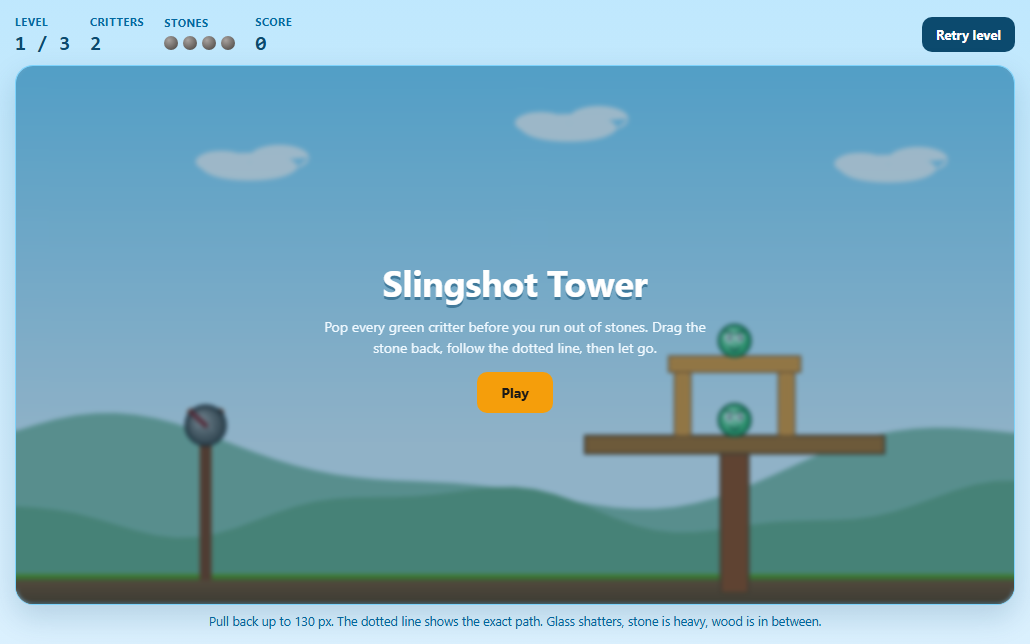
Pull back, let go, watch a tower collapse: slingshot games are the classic physics-engine showcase. This version turns the mechanics into a small game with three levels, a limited number of stones, green critters to pop, blocks of wood, stone and glass, a dotted aim preview that matches the shot exactly, star ratings and particle effects, all on one canvas with plain JavaScript and Matter.js.
An aim preview that is actually accurate
Instead of letting a spring fling the stone and guessing where it goes, the launch is computed. While you drag, the stone is held at your pointer up to 130px from the anchor. On release, Body.setVelocity gives it a speed of pull distance times a constant (POWER). Because that speed is known, the preview can replay the engine's own per-step maths: multiply by the air friction (1 minus 0.004), add gravity (0.2778 per step), move, and draw a dot every fourth step until the path meets the ground. The dots land where the stone will.
Release detection with enddrag
MouseConstraint fires an enddrag event when you let go. If the dragged body is the stone, the state is "play" and the pull is at least 28px, the spring is detached, the velocity is set and one stone is spent. A smaller pull just lets the spring return it. A new stone is loaded 900ms later with a short grow-in, and startdrag rejects every body that is not the loaded stone.
Three materials
Wood, stone and glass differ in density and fragility. Stone is four times heavier than glass, so it barely moves when hit. Glass shatters when it collides above a speed threshold (lower for another body, higher for the ground), spraying blue shards and giving 50 points, which makes glass floors a way to bring a structure down.
Critters that pop on impact
Each green critter is a circle that pops when something hits it hard enough: the relative speed from collisionStart must exceed 3.6 for a moving body or 7.5 for the ground, so a gentle landing is safe but a falling block is not. A pop gives 500 points, a burst of confetti and a short screen shake. The faces blink, and are drawn along with every other body by hand in afterRender.
Levels, stones and stars
Each level is a function that returns bodies placed relative to the platform: a pillar frame, a two-tower fort with glass and stone floors, and a stepped pyramid built with Composites.pyramid. A level is won when no critters remain and lost when the stones run out and the scene settles. Finishing with two or more stones left earns three stars, and every unused stone is worth 300 bonus points.
Housekeeping
Spent stones are removed once they leave the scene or have lain around for nine seconds, particles and floating text are capped, and the background, clouds and hills are painted last with destination-over.
What's included
Features
Step by step
How to Use
- 1Press PlayA card explains the goal: pop every green critter before the stones run out. The stones left are shown as dots in the HUD.
- 2Drag the stone backPull it back from the sling, up to 130px. A dotted line shows the exact path the stone will take.
- 3ReleaseThe stone launches at a speed proportional to the pull. Pull further for more power and change the angle for a different arc.
- 4Use the materialsGlass shatters at a touch, wood holds, and stone is heavy. Knock out supports so the structure drops onto the critters.
- 5Clear the levelPop all critters to win, earning 500 each, 300 per unused stone, and up to three stars. Next level changes the structure.
- 6RetryRetry level resets the structure and restores the score from the start of that level.
Real-world uses
Common Use Cases
Got questions?
Frequently Asked Questions
The launch velocity is set directly from the pull (distance times POWER), so the preview repeats Matter's own per-step update: multiply the velocity by one minus the air friction, add 0.2778 of gravity, then move. Plotting every fourth position until it reaches the ground gives a path that matches the real flight.
A spring's launch speed depends on stiffness, damping, mass and frame timing, which makes a trajectory impossible to predict exactly. Computing velocity from the pull gives predictable shots and an accurate preview, while the spring only holds the stone at rest.
Add an object to LEVELS with a stones count and a build function that returns bodies, using block(kind, dx, bottom, w, h) and critter(dx, bottom) to place things relative to the platform. The HUD, win check and star rating pick it up automatically.
In collisionStart the relative speed between the two bodies is measured. A critter pops above 3.6 against a moving body or 7.5 against the ground, and glass shatters above 4.2 or 6.5. Raise the numbers for sturdier objects.
Setting render.visible to false on each body and painting them in afterRender gives full control: faces on critters, grain on wood, cracks on stone and shine on glass. The polygon vertices from Matter are used for the shapes, so collisions and visuals stay in sync.
Copy & paste
Source Code
<div class="sl">
  <div class="sl-hud">
    <div><span>Level</span><b id="slLevel">1 / 3</b></div>
    <div><span>Critters</span><b id="slTargets">0</b></div>
    <div><span>Stones</span><i class="sl-stones" id="slStones"></i></div>
    <div><span>Score</span><b id="slScore">0</b></div>
    <div class="sl-btns"><button type="button" id="slRetry">Retry level</button></div>
  </div>
  <div class="sl-stage" id="slStage">
    <div class="sl-over" id="slOver">
      <strong id="slOverTitle">Slingshot Tower</strong>
      <div class="sl-stars" id="slStars" hidden></div>
      <span id="slOverText">Pop every green critter before you run out of stones. Drag the stone back, follow the dotted line, then let go.</span>
      <button type="button" id="slGo">Play</button>
    </div>
  </div>
  <p class="sl-hint">Pull back up to 130 px. The dotted line shows the exact path. Glass shatters, stone is heavy, wood is in between.</p>
</div>*{box-sizing:border-box;margin:0;padding:0}
body{font-family:system-ui,-apple-system,sans-serif;background:linear-gradient(#bae6fd,#e0f2fe);color:#0c4a6e;min-height:100vh;display:flex;align-items:center;justify-content:center;padding:18px}
.sl{width:100%;max-width:1000px}
.sl-hud{display:flex;align-items:center;gap:20px;margin-bottom:10px;flex-wrap:wrap}
.sl-hud>div{display:flex;flex-direction:column;gap:3px}
.sl-hud span{font-size:10.5px;text-transform:uppercase;letter-spacing:.08em;font-weight:700;color:#0369a1}
.sl-hud b{font:800 20px ui-monospace,monospace;font-variant-numeric:tabular-nums;color:#0c4a6e}
.sl-stones{display:flex;gap:5px;height:20px;align-items:center}
.sl-stones u{width:14px;height:14px;border-radius:50%;background:radial-gradient(circle at 35% 30%,#a8a29e,#44403c);transition:opacity .25s,transform .25s}
.sl-stones u.used{opacity:.18;transform:scale(.7)}
.sl-btns{margin-left:auto;display:flex!important;flex-direction:row!important}
.sl button{border:0;border-radius:10px;background:#0c4a6e;color:#fff;font:700 13px system-ui;padding:9px 14px;cursor:pointer}
.sl button:hover{background:#075985}
.sl button:focus-visible{outline:2px solid #f59e0b;outline-offset:2px}
.sl-stage{position:relative;border-radius:18px;overflow:hidden;background:#7dd3fc;border:1px solid #7dd3fc;box-shadow:0 12px 30px rgba(12,74,110,.18)}
.sl-stage canvas{display:block;width:100%;height:auto;cursor:grab;touch-action:none}
.sl-stage canvas:active{cursor:grabbing}
.sl-over{position:absolute;inset:0;z-index:2;display:flex;flex-direction:column;align-items:center;justify-content:center;gap:10px;padding:24px;text-align:center;background:rgba(12,74,110,.38);backdrop-filter:blur(2px)}
.sl-over[hidden]{display:none}
.sl-over strong{font-size:36px;color:#fff;letter-spacing:-.01em;text-shadow:0 3px 0 rgba(12,74,110,.5)}
.sl-over>span{font-size:14px;color:#f0f9ff;max-width:400px;line-height:1.5}
.sl-stars{font-size:38px;letter-spacing:6px;color:#fbbf24;text-shadow:0 2px 0 rgba(120,53,15,.5)}
.sl-stars[hidden]{display:none}
.sl-stars s{text-decoration:none;color:rgba(255,255,255,.35)}
.sl-over button{margin-top:4px;padding:11px 24px;font-size:14px;background:#f59e0b;color:#1c1917}
.sl-over button:hover{background:#fbbf24}
.sl-hint{font-size:12.5px;margin-top:8px;text-align:center;color:#0369a1}var M = Matter, Engine = M.Engine, Render = M.Render, Runner = M.Runner, Bodies = M.Bodies, Body = M.Body,
Composite = M.Composite, Composites = M.Composites, Constraint = M.Constraint, Mouse = M.Mouse, MouseConstraint = M.MouseConstraint, Events = M.Events;
var $ = function (id) { return document.getElementById(id); };
var W = 1000, H = 540, GROUND = H - 30;
var ANCHOR = { x: 190, y: 360 };
var PLAT = { x: 720, w: 300 }, PT = 371; // platform centre x / width, and the y of its top surface
var MAX_PULL = 130, POWER = 0.12; // launch speed = pull distance * POWER (pixels per physics step)
var GRAV = 0.2778, AIR = 0.004; // what Matter applies per step: used for the dotted preview
var engine = Engine.create();
var render = Render.create({
element: $('slStage'), engine: engine,
options: { width: W, height: H, wireframes: false, background: 'transparent', pixelRatio: window.devicePixelRatio || 1 },
});
$('slStage').prepend(render.canvas);
// Every body is drawn by hand (afterRender), so Matter's own drawing is switched off via render.visible = false.
var hide = { visible: false };
Composite.add(engine.world, [
Bodies.rectangle(W / 2, GROUND + 60, W * 3, 120, { isStatic: true, render: hide, plugin: { kind: 'ground' } }),
Bodies.rectangle(PLAT.x, PT + 9, PLAT.w, 18, { isStatic: true, render: hide, plugin: { kind: 'platform' } }),
Bodies.rectangle(PLAT.x, PT + 9 + 79, 28, 140, { isStatic: true, render: hide, plugin: { kind: 'post' } }),
]);
// ---------- Materials: wood, stone and glass differ in weight and fragility ----------
var MAT = { wood: { density: 0.0016, friction: 0.6 }, stone: { density: 0.004, friction: 0.7 }, glass: { density: 0.0009, friction: 0.4 } };
function block(kind, dx, bottom, w, h) {
return Bodies.rectangle(PLAT.x + dx, PT - bottom - h / 2, w, h, { density: MAT[kind].density, friction: MAT[kind].friction, restitution: 0.05, render: hide, plugin: { kind: kind, w: w, h: h } });
}
function critter(dx, bottom) {
return Bodies.circle(PLAT.x + dx, PT - bottom - 16, 16, { density: 0.001, friction: 0.5, restitution: 0.2, render: hide, plugin: { kind: 'target', blink: Math.random() * 200 } });
}
// ---------- Levels ----------
var LEVELS = [
{ stones: 4, build: function () { return [
block('wood', -52, 0, 16, 64), block('wood', 52, 0, 16, 64), block('wood', 0, 64, 132, 16),
critter(0, 0), critter(0, 80),
]; } },
{ stones: 5, build: function () { return [
block('wood', -110, 0, 16, 60), block('wood', -50, 0, 16, 60), block('stone', -80, 60, 84, 14),
block('glass', -95, 74, 12, 42), block('glass', -65, 74, 12, 42), block('wood', -80, 116, 70, 12),
critter(-80, 0), critter(-80, 128),
block('wood', 50, 0, 16, 84), block('wood', 110, 0, 16, 84), block('wood', 80, 84, 90, 14),
critter(80, 0), critter(80, 98),
]; } },
{ stones: 5, build: function () {
var pyr = Composites.pyramid(PLAT.x - 112, PT - 128, 7, 4, 0, 0, function (x, y, col, row) {
var kind = row === 3 ? 'stone' : row === 2 ? 'wood' : 'glass';
return Bodies.rectangle(x, y, 32, 32, { density: MAT[kind].density, friction: MAT[kind].friction, restitution: 0.05, render: hide, plugin: { kind: kind, w: 32, h: 32 } });
});
return Composite.allBodies(pyr).concat([critter(0, 128), critter(-134, 0), critter(134, 0)]);
} },
];
// ---------- State ----------
var stone = null, elastic, level = 0, score = 0, levelStartScore = 0, stonesLeft = 0, targetsLeft = 0;
var state = 'intro', lastShotAt = 0, particles = [], texts = [], shake = 0;
// The sling band is drawn by hand; the spring only holds the stone at rest between shots.
elastic = Constraint.create({ pointA: ANCHOR, pointB: { x: 0, y: 0 }, length: 0.01, damping: 0.01, stiffness: 0.05, render: hide });
Composite.add(engine.world, elastic);
var mouse = Mouse.create(render.canvas);
var mc = MouseConstraint.create(engine, { mouse: mouse, constraint: { stiffness: 0.9, damping: 0.1, render: hide } });
['mousewheel', 'DOMMouseScroll', 'wheel'].forEach(function (t) { mouse.element.removeEventListener(t, mouse.mousewheel); });
Composite.add(engine.world, mc);
render.mouse = mouse;
function hud() {
$('slLevel').textContent = (level + 1) + ' / ' + LEVELS.length;
$('slTargets').textContent = targetsLeft;
$('slScore').textContent = score;
var total = LEVELS[level].stones, html = '';
for (var i = 0; i < total; i++) html += '<u class="' + (i < total - stonesLeft ? 'used' : '') + '"></u>';
$('slStones').innerHTML = html;
}
function loadStone() {
if (stonesLeft <= 0) { stone = null; return; }
stone = Bodies.circle(ANCHOR.x, ANCHOR.y, 20, { density: 0.004, restitution: 0.2, frictionAir: AIR, render: hide, plugin: { kind: 'ammo', born: performance.now() } });
Composite.add(engine.world, stone);
elastic.bodyB = stone; elastic.pointB = { x: 0, y: 0 }; elastic.angleB = stone.angle; // a spring created without a body needs its angle set when one is attached
}
function loadLevel(n) {
level = n; levelStartScore = score;
Composite.allBodies(engine.world).forEach(function (b) { if (!b.isStatic) Composite.remove(engine.world, b); });
elastic.bodyB = null; stone = null; particles = []; texts = [];
var bodies = LEVELS[n].build();
Composite.add(engine.world, bodies);
targetsLeft = bodies.filter(function (b) { return b.plugin.kind === 'target'; }).length;
stonesLeft = LEVELS[n].stones;
lastShotAt = 0;
loadStone(); hud();
}
// ---------- Effects ----------
function burst(x, y, colors, n, speed, life, grav, size) {
for (var i = 0; i < n && particles.length < 260; i++) {
var a = Math.random() * Math.PI * 2, v = 1 + Math.random() * speed;
particles.push({ x: x, y: y, vx: Math.cos(a) * v, vy: Math.sin(a) * v - 1, g: grav, life: life * (0.6 + Math.random() * 0.4), max: life, r: (size || 3) * (0.6 + Math.random() * 0.7), c: colors[i % colors.length], rot: Math.random() * 6 });
}
}
function floatText(x, y, text) { texts.push({ x: x, y: y, text: text, life: 60 }); }
function pop(t) {
if (t.dead) return; t.dead = true;
Composite.remove(engine.world, t);
targetsLeft--; score += 500;
burst(t.position.x, t.position.y, ['#86efac', '#22c55e', '#ffffff', '#bbf7d0'], 22, 5, 36, 0.12, 4);
floatText(t.position.x, t.position.y - 24, '+500');
shake = Math.max(shake, 7);
hud();
}
function shatter(g) {
if (g.dead) return; g.dead = true;
Composite.remove(engine.world, g);
score += 50;
burst(g.position.x, g.position.y, ['#bfdbfe', '#e0f2fe', '#ffffff', '#93c5fd'], 16, 6, 34, 0.2, 3);
hud();
}
Events.on(engine, 'collisionStart', function (ev) {
ev.pairs.forEach(function (p) {
var a = p.bodyA, b = p.bodyB;
var sp = Math.hypot(a.velocity.x - b.velocity.x, a.velocity.y - b.velocity.y);
[[a, b], [b, a]].forEach(function (pr) {
var me = pr[0], other = pr[1];
if (me.plugin.kind === 'target' && sp > (other.isStatic ? 7.5 : 3.6)) pop(me);
else if (me.plugin.kind === 'glass' && sp > (other.isStatic ? 6.5 : 4.2)) shatter(me);
});
if (sp > 6) { shake = Math.max(shake, Math.min(10, sp * 0.45)); if (a.isStatic || b.isStatic) burst((a.position.x + b.position.x) / 2, Math.min(a.position.y, b.position.y), ['#d6c4a1', '#a8946a'], 4, 2, 22, 0.02, 3); }
});
});
// ---------- Aiming and launching ----------
// Dragging the stone back stretches the band. On release the velocity is set straight from the pull
// (launch speed = distance * POWER), which is what makes the dotted preview exactly right.
Events.on(mc, 'startdrag', function (e) {
if (e.body !== stone) { mc.body = null; mc.constraint.bodyB = null; }
});
Events.on(mc, 'enddrag', function (e) {
if (e.body !== stone || !stone || state !== 'play') return;
var dx = ANCHOR.x - stone.position.x, dy = ANCHOR.y - stone.position.y, d = Math.hypot(dx, dy);
if (d < 28) return; // barely pulled: let the spring take it back
elastic.bodyB = null;
Body.setVelocity(stone, { x: dx * POWER, y: dy * POWER });
stone = null; stonesLeft--; lastShotAt = performance.now();
burst(ANCHOR.x, ANCHOR.y, ['#fde68a', '#ffffff'], 6, 2, 14, 0, 2);
hud();
setTimeout(loadStone, 900);
});
Events.on(engine, 'beforeUpdate', function () {
// keep the pull inside MAX_PULL
if (stone && mc.body === stone) {
var dx = stone.position.x - ANCHOR.x, dy = stone.position.y - ANCHOR.y, d = Math.hypot(dx, dy);
if (d > MAX_PULL) Body.setPosition(stone, { x: ANCHOR.x + dx / d * MAX_PULL, y: ANCHOR.y + dy / d * MAX_PULL });
}
for (var i = particles.length - 1; i >= 0; i--) {
var p = particles[i]; p.x += p.vx; p.y += p.vy; p.vy += p.g; p.rot += 0.2; if (--p.life <= 0) particles.splice(i, 1);
}
for (i = texts.length - 1; i >= 0; i--) { texts[i].y -= 0.8; if (--texts[i].life <= 0) texts.splice(i, 1); }
});
// ---------- Win / lose ----------
function finish(won) {
state = won ? 'won' : 'lost';
if (won) {
var bonus = stonesLeft * 300; score += bonus;
var stars = stonesLeft >= 2 ? 3 : stonesLeft === 1 ? 2 : 1;
$('slStars').innerHTML = [1, 2, 3].map(function (n) { return n <= stars ? '★' : '<s>★</s>'; }).join('');
$('slStars').hidden = false;
$('slOverTitle').textContent = level === LEVELS.length - 1 ? 'Tower conquered!' : 'Level cleared!';
$('slOverText').textContent = stonesLeft ? 'Bonus +' + bonus + ' for ' + stonesLeft + ' unused stone' + (stonesLeft > 1 ? 's' : '') + '. Score ' + score + '.' : 'Score ' + score + '.';
$('slGo').textContent = level === LEVELS.length - 1 ? 'Play again' : 'Next level';
for (var i = 0; i < 5; i++) burst(300 + i * 130, 120, ['#fde047', '#f97316', '#38bdf8', '#4ade80'], 24, 6, 60, 0.12, 4);
hud();
} else {
$('slStars').hidden = true;
$('slOverTitle').textContent = 'Out of stones';
$('slOverText').textContent = targetsLeft + ' critter' + (targetsLeft > 1 ? 's' : '') + ' left. Try a different angle.';
$('slGo').textContent = 'Try again';
}
setTimeout(function () { $('slOver').hidden = false; }, won ? 900 : 500);
}
function settled() {
return Composite.allBodies(engine.world).every(function (b) { return b.isStatic || Math.hypot(b.velocity.x, b.velocity.y) < 0.25; });
}
Events.on(engine, 'afterUpdate', function () {
var now = performance.now();
if (state === 'play') {
if (targetsLeft <= 0) finish(true);
else if (stonesLeft <= 0 && !stone && lastShotAt && now - lastShotAt > 2200 && (settled() || now - lastShotAt > 7000)) finish(false);
}
// remove stones that left the scene or have been lying around for a while
Composite.allBodies(engine.world).forEach(function (b) {
if (b.plugin.kind === 'ammo' && b !== stone && (b.position.x > W + 200 || b.position.y > H + 200 || now - b.plugin.born > 9000)) Composite.remove(engine.world, b);
});
});
function go() {
$('slOver').hidden = true;
if (state === 'intro') { state = 'play'; return; }
if (state === 'won') {
if (level === LEVELS.length - 1) { score = 0; loadLevel(0); } else loadLevel(level + 1);
} else { score = levelStartScore; loadLevel(level); }
state = 'play';
}
$('slGo').addEventListener('click', go);
$('slRetry').addEventListener('click', function () { score = levelStartScore; loadLevel(level); state = 'play'; $('slOver').hidden = true; });
// ---------- Drawing ----------
function poly(ctx, b) {
ctx.beginPath();
b.vertices.forEach(function (v, i) { ctx[i ? 'lineTo' : 'moveTo'](v.x, v.y); });
ctx.closePath();
}
function drawBody(ctx, b) {
var k = b.plugin.kind;
if (k === 'wood') {
poly(ctx, b); ctx.fillStyle = '#e8962f'; ctx.fill(); ctx.strokeStyle = '#8a4b0f'; ctx.lineWidth = 1.5; ctx.stroke();
ctx.save(); ctx.translate(b.position.x, b.position.y); ctx.rotate(b.angle);
ctx.strokeStyle = 'rgba(138,75,15,.35)'; ctx.lineWidth = 1; ctx.beginPath();
if (b.plugin.w >= b.plugin.h) { ctx.moveTo(-b.plugin.w / 2 + 4, 0); ctx.lineTo(b.plugin.w / 2 - 4, 0); } else { ctx.moveTo(0, -b.plugin.h / 2 + 4); ctx.lineTo(0, b.plugin.h / 2 - 4); }
ctx.stroke(); ctx.restore();
} else if (k === 'stone') {
poly(ctx, b); ctx.fillStyle = '#94a3b8'; ctx.fill(); ctx.strokeStyle = '#475569'; ctx.lineWidth = 2; ctx.stroke();
ctx.save(); ctx.translate(b.position.x, b.position.y); ctx.rotate(b.angle);
ctx.strokeStyle = 'rgba(71,85,105,.45)'; ctx.lineWidth = 1.2; ctx.beginPath();
ctx.moveTo(-b.plugin.w * 0.25, -b.plugin.h * 0.2); ctx.lineTo(-b.plugin.w * 0.05, b.plugin.h * 0.1); ctx.lineTo(b.plugin.w * 0.2, -b.plugin.h * 0.05); ctx.stroke(); ctx.restore();
} else if (k === 'glass') {
poly(ctx, b); ctx.fillStyle = 'rgba(186,230,253,.7)'; ctx.fill(); ctx.strokeStyle = '#f0f9ff'; ctx.lineWidth = 2; ctx.stroke();
ctx.strokeStyle = 'rgba(255,255,255,.8)'; ctx.lineWidth = 1.5; ctx.beginPath();
ctx.moveTo(b.vertices[0].x + 3, b.vertices[0].y + 6); ctx.lineTo(b.vertices[0].x + 8, b.vertices[0].y + 2); ctx.stroke();
} else if (k === 'platform' || k === 'post') {
poly(ctx, b); ctx.fillStyle = k === 'post' ? '#92400e' : '#a8641a'; ctx.fill(); ctx.strokeStyle = '#5b3410'; ctx.lineWidth = 2; ctx.stroke();
} else if (k === 'target') {
var p = b.position, blink = ((performance.now() / 16 + b.plugin.blink) % 220) < 6;
ctx.save(); ctx.translate(p.x, p.y); ctx.rotate(b.angle);
var g = ctx.createRadialGradient(-5, -6, 2, 0, 0, 17); g.addColorStop(0, '#bbf7d0'); g.addColorStop(1, '#16a34a');
ctx.fillStyle = g; ctx.beginPath(); ctx.arc(0, 0, 16, 0, Math.PI * 2); ctx.fill(); ctx.strokeStyle = '#14532d'; ctx.lineWidth = 2; ctx.stroke();
ctx.fillStyle = '#fff';
ctx.beginPath(); ctx.ellipse(-5.5, -3, 4, blink ? 0.8 : 4.4, 0, 0, Math.PI * 2); ctx.ellipse(5.5, -3, 4, blink ? 0.8 : 4.4, 0, 0, Math.PI * 2); ctx.fill();
ctx.fillStyle = '#052e16'; if (!blink) { ctx.beginPath(); ctx.arc(-5, -2.5, 1.8, 0, Math.PI * 2); ctx.arc(6, -2.5, 1.8, 0, Math.PI * 2); ctx.fill(); }
ctx.strokeStyle = '#14532d'; ctx.lineWidth = 2; ctx.beginPath(); ctx.moveTo(-9, -9); ctx.lineTo(-2, -7); ctx.moveTo(9, -9); ctx.lineTo(2, -7); ctx.stroke();
ctx.beginPath(); ctx.arc(0, 6, 4, 0.1 * Math.PI, 0.9 * Math.PI); ctx.stroke();
ctx.restore();
}
}
function drawStone(ctx, s) {
var r = 20 * Math.min(1, (performance.now() - s.plugin.born) / 220 + 0.2);
ctx.save(); ctx.translate(s.position.x, s.position.y); ctx.rotate(s.angle);
var g = ctx.createRadialGradient(-6, -7, 2, 0, 0, r); g.addColorStop(0, '#a8a29e'); g.addColorStop(1, '#44403c');
ctx.fillStyle = g; ctx.beginPath(); ctx.arc(0, 0, r, 0, Math.PI * 2); ctx.fill(); ctx.strokeStyle = '#1c1917'; ctx.lineWidth = 2; ctx.stroke();
ctx.strokeStyle = 'rgba(255,255,255,.2)'; ctx.lineWidth = 1.5; ctx.beginPath(); ctx.moveTo(-r * 0.5, r * 0.1); ctx.lineTo(0, -r * 0.2); ctx.lineTo(r * 0.4, r * 0.3); ctx.stroke();
ctx.restore();
}
function band(ctx, from, to) {
ctx.strokeStyle = '#7f1d1d'; ctx.lineWidth = 5; ctx.lineCap = 'round';
ctx.beginPath(); ctx.moveTo(from.x, from.y); ctx.lineTo(to.x, to.y); ctx.stroke();
}
// Painted with destination-over, so each layer goes BEHIND the previous one: nearest first, sky last
function background(ctx, t) {
var gr = ctx.createLinearGradient(0, GROUND, 0, H); gr.addColorStop(0, '#65a30d'); gr.addColorStop(0.18, '#4d7c0f'); gr.addColorStop(0.2, '#7c4a1f'); gr.addColorStop(1, '#5b3410');
ctx.fillStyle = gr; ctx.fillRect(0, GROUND, W, H - GROUND);
ctx.fillStyle = '#6aa57c'; ctx.beginPath(); ctx.moveTo(0, GROUND);
for (var x = 0; x <= W; x += 20) ctx.lineTo(x, 445 - Math.sin(x / 90 + 3) * 22 - Math.sin(x / 37) * 7);
ctx.lineTo(W, GROUND); ctx.fill();
ctx.fillStyle = '#86b9a1'; ctx.beginPath(); ctx.moveTo(0, GROUND);
for (x = 0; x <= W; x += 20) ctx.lineTo(x, 400 - Math.sin(x / 150 + 1) * 40 - Math.sin(x / 61) * 12);
ctx.lineTo(W, GROUND); ctx.fill();
ctx.fillStyle = 'rgba(255,255,255,.9)';
for (var k = 0; k < 4; k++) {
var cx = ((k * 320 + t * 0.012) % (W + 240)) - 120, cy = 60 + (k * 41) % 80;
ctx.beginPath(); ctx.ellipse(cx, cy, 48, 14, 0, 0, Math.PI * 2); ctx.ellipse(cx + 30, cy - 9, 30, 13, 0, 0, Math.PI * 2); ctx.ellipse(cx - 28, cy - 5, 26, 11, 0, 0, Math.PI * 2); ctx.fill();
}
var sky = ctx.createLinearGradient(0, 0, 0, H); sky.addColorStop(0, '#7dd3fc'); sky.addColorStop(0.7, '#e0f2fe');
ctx.fillStyle = sky; ctx.fillRect(0, 0, W, H);
}
Events.on(render, 'afterRender', function () {
var ctx = render.context, pr = render.options.pixelRatio, now = performance.now();
ctx.save(); ctx.scale(pr, pr);
shake *= 0.9;
if (shake > 0.3) ctx.translate((Math.random() - 0.5) * shake, (Math.random() - 0.5) * shake);
// The canvas is cleared by Matter first, so the background is drawn with destination-over below
ctx.globalCompositeOperation = 'source-over';
// fork trunk
ctx.fillStyle = '#78350f'; ctx.fillRect(ANCHOR.x - 6, ANCHOR.y + 12, 12, GROUND - ANCHOR.y - 12 + 6);
ctx.strokeStyle = '#78350f'; ctx.lineWidth = 9; ctx.lineCap = 'round';
ctx.beginPath(); ctx.moveTo(ANCHOR.x, ANCHOR.y + 16); ctx.lineTo(ANCHOR.x - 14, ANCHOR.y - 12); ctx.moveTo(ANCHOR.x, ANCHOR.y + 16); ctx.lineTo(ANCHOR.x + 14, ANCHOR.y - 12); ctx.stroke();
var tipF = { x: ANCHOR.x - 14, y: ANCHOR.y - 12 }, tipB = { x: ANCHOR.x + 14, y: ANCHOR.y - 12 };
var pouch = stone ? stone.position : { x: ANCHOR.x, y: ANCHOR.y + 2 };
band(ctx, tipB, pouch);
Composite.allBodies(engine.world).forEach(function (b) { if (b.plugin.kind !== 'ammo' && b.plugin.kind !== 'ground') drawBody(ctx, b); });
Composite.allBodies(engine.world).forEach(function (b) { if (b.plugin.kind === 'ammo') drawStone(ctx, b); });
band(ctx, tipF, pouch);
// dotted preview of the exact path while aiming
if (stone && mc.body === stone && state === 'play') {
var dx = ANCHOR.x - stone.position.x, dy = ANCHOR.y - stone.position.y;
if (Math.hypot(dx, dy) >= 28) {
var x = stone.position.x, y = stone.position.y, vx = dx * POWER, vy = dy * POWER;
for (var i = 0; i < 90; i++) {
vx *= 1 - AIR; vy = vy * (1 - AIR) + GRAV; x += vx; y += vy;
if (y > GROUND - 4) break;
if (i % 4 === 3) { ctx.globalAlpha = 1 - i / 120; ctx.fillStyle = '#fff'; ctx.strokeStyle = 'rgba(12,74,110,.55)'; ctx.lineWidth = 1.5; ctx.beginPath(); ctx.arc(x, y, 3.6, 0, Math.PI * 2); ctx.fill(); ctx.stroke(); ctx.globalAlpha = 1; }
}
}
}
particles.forEach(function (p) {
ctx.globalAlpha = Math.max(0, p.life / p.max); ctx.fillStyle = p.c;
ctx.save(); ctx.translate(p.x, p.y); ctx.rotate(p.rot); ctx.fillRect(-p.r, -p.r * 0.6, p.r * 2, p.r * 1.2); ctx.restore();
});
ctx.globalAlpha = 1;
ctx.font = '800 17px system-ui'; ctx.textAlign = 'center';
texts.forEach(function (t) { ctx.globalAlpha = Math.min(1, t.life / 20); ctx.fillStyle = 'rgba(12,74,110,.45)'; ctx.fillText(t.text, t.x + 1, t.y + 2); ctx.fillStyle = '#fff'; ctx.fillText(t.text, t.x, t.y); });
ctx.globalAlpha = 1;
// everything above is on a cleared canvas, so the scenery goes behind it
ctx.globalCompositeOperation = 'destination-over';
background(ctx, now);
ctx.restore();
});
loadLevel(0);
Render.run(render);
Runner.run(Runner.create(), engine);
/* wdp-share:start */
(function () {
var TITLE = 'Matter.js Slingshot Tower Knockdown Game', URL = 'https://webdevpuneet.com/ui-snippets/matter-js-slingshot-tower-knockdown/';
if (window.__wdpShare) return;
window.__wdpShare = true;
var blob = null, file = null, lastInfo = null;
/* ---- UI ---- */
var st = document.createElement('style');
st.textContent =
'.wdps-in,.wdps-btn,.wdps-box{touch-action:manipulation;-webkit-tap-highlight-color:transparent}.wdps-in{display:block;margin:12px auto 0;border:0;border-radius:12px;padding:11px 22px;font:800 15px/1 system-ui,sans-serif;background:#16a34a;color:#fff;cursor:pointer;box-shadow:0 3px 0 #11793a;pointer-events:auto;position:relative;z-index:5}' +
'.wdps-in:hover{background:#15803d}.wdps-in:active{transform:translateY(2px);box-shadow:0 1px 0 #11793a}' +
'.wdps-btn{position:fixed;right:12px;bottom:12px;z-index:2147483000;border:0;border-radius:99px;padding:9px 16px;font:700 13px/1 system-ui,sans-serif;background:#16a34a;color:#fff;cursor:pointer;box-shadow:0 3px 12px rgba(0,0,0,.3)}' +
'.wdps-btn.wdps-hot{animation:wdps-p 1.4s ease-in-out infinite}' +
'@keyframes wdps-p{0%,100%{box-shadow:0 0 0 0 rgba(22,163,74,.6),0 3px 12px rgba(0,0,0,.3)}50%{box-shadow:0 0 0 9px rgba(22,163,74,0),0 3px 12px rgba(0,0,0,.3)}}' +
'.wdps-btn:active{transform:translateY(1px)}' +
'.wdps-in[hidden],.wdps-btn[hidden],.wdps-box[hidden],.wdps-box [hidden]{display:none}' +
'.wdps-box{position:fixed;left:50%;bottom:12px;transform:translateX(-50%);z-index:2147483001;width:max-content;max-width:calc(100vw - 24px);box-sizing:border-box;background:#fff;color:#64748b;border:1px solid #d5e2ee;border-radius:12px;padding:8px 12px;font:700 12px/1.4 system-ui,sans-serif;box-shadow:0 8px 26px rgba(15,23,42,.25);display:flex;flex-wrap:wrap;gap:8px;align-items:center}' +
'.wdps-box button,.wdps-box a{border:1px solid #d5e2ee;background:#f8fafc;color:#1e293b;border-radius:99px;padding:5px 12px;font:700 12px system-ui,sans-serif;text-decoration:none;cursor:pointer}' +
'.wdps-box .wdps-x{border:0;background:none;font-size:19px;line-height:1;padding:0 4px;margin-left:auto;color:#475569}' +
'@media (max-width:700px){.wdps-box{width:calc(100vw - 24px);justify-content:center;padding:10px 12px}.wdps-box>span{width:100%;text-align:center}.wdps-box button,.wdps-box a{padding:9px 14px;font-size:13px}.wdps-box .wdps-x{position:absolute;top:4px;right:4px}.wdps-in{width:100%;max-width:320px}}';
document.head.appendChild(st);
var pill = document.createElement('button');
pill.type = 'button'; pill.className = 'wdps-btn'; pill.textContent = 'Share result';
var inl = document.createElement('button');
inl.type = 'button'; inl.className = 'wdps-in'; inl.textContent = 'Share result'; inl.hidden = true;
var box = document.createElement('div');
box.className = 'wdps-box'; box.hidden = true;
box.setAttribute('role', 'dialog'); box.setAttribute('aria-label', 'Share your result');
box.innerHTML =
'<span data-a="msg">Share your result:</span>' +
'<button type="button" data-a="copy">Copy image</button>' +
'<a data-a="dl" download="result.png">Download image</a>' +
'<button type="button" data-a="more" hidden>More…</button>' +
'<a data-a="wa" target="_blank" rel="noopener">WhatsApp</a>' +
'<a data-a="x" target="_blank" rel="noopener">X</a>' +
'<a data-a="fb" target="_blank" rel="noopener">Facebook</a>' +
'<button type="button" class="wdps-x" data-a="close" aria-label="Close share options">×</button>';
document.body.appendChild(box);
document.body.appendChild(pill);
function q(a) { return box.querySelector('[data-a="' + a + '"]'); }
function ours(el) { return el === inl || el === pill || !!el.closest('.wdps-box'); }
/* ---- reading the result from the screen ---- */
function shown(el) {
if (!el || !el.getClientRects().length) return false;
for (var n = el; n && n !== document.body; n = n.parentElement) {
var cs = getComputedStyle(n);
if (cs.display === 'none' || cs.visibility === 'hidden' || parseFloat(cs.opacity) < 0.1) return false;
if (n.hidden || n.getAttribute('aria-hidden') === 'true') return false;
}
return true;
}
function txt(el) { return (el.textContent || '').replace(/\s+/g, ' ').trim(); }
function sig(el) { return ((el.id || '') + ' ' + (typeof el.className === 'string' ? el.className : '')).toLowerCase(); }
var OUTCOME = /(you win|you won|win!|wins|victory|game over|time.?s up|cleared|complete|solved|defeat|you lose|you lost|lost|draw|crash|failed|success|congrat|score|result|finished|beat|all matched|well done|perfect|new best)/i;
var HEADSIG = /(title|headline|msg|message|banner|result|verdict|status)/;
var WIN = /(you win|you won|win!|wins|victory|cleared|complete|solved|success|congrat|beat|matched|perfect|new best|record)/i;
var LOSS = /(game over|time.?s up|defeat|you lose|you lost|lost|crash|failed|out of)/i;
var BOX = /(overlay|modal|banner|result|over|end|dialog|screen|popup|panel|card|finish|win)/;
function readResult() {
var head = '', sub = '', root = null, headEl = null;
var all = document.body.querySelectorAll('h1,h2,h3,h4,p,strong,div,span');
for (var i = 0; i < all.length && !head; i++) {
var el = all[i];
if (ours(el) || el.children.length > 2) continue;
if (!HEADSIG.test(sig(el))) continue;
/* a banner that holds its own title: use the title inside it instead */
var inner = false;
for (var c = 0; c < el.children.length; c++) if (HEADSIG.test(sig(el.children[c]))) inner = true;
if (inner) continue;
var t = txt(el);
if (t.length < 3 || t.length > 70 || !OUTCOME.test(t) || !shown(el)) continue;
head = t; headEl = el; root = el.parentElement;
}
if (root) {
var kids = root.querySelectorAll('p,span,div');
for (var j = 0; j < kids.length && !sub; j++) {
var k = kids[j];
if (ours(k) || k.children.length > 2 || !/(sub|text|summary|note|desc|detail)/.test(sig(k))) continue;
var tt = txt(k);
if (tt && tt !== head && tt.length >= 5 && tt.length <= 160 && shown(k)) sub = tt;
}
}
/* the result screen the button goes into: the nearest overlay / banner / result box around the headline */
var host = null;
for (var n = headEl, d = 0; n && n !== document.body && d < 4; n = n.parentElement, d++) {
if (d > 0 && BOX.test(sig(n)) && n.tagName !== 'BUTTON') { host = n; break; }
}
return { head: head, sub: sub, host: host };
}
var STATRE = /(score|moves|time|wpm|best|level|streak|accuracy|combo|coins|distance|height|points|stars|lives|wins|attempt|guess)/;
function readStats() {
var out = [], seen = {};
var all = document.body.querySelectorAll('span,strong,b,div,p,output');
for (var i = 0; i < all.length && out.length < 4; i++) {
var el = all[i];
if (ours(el) || el.children.length > 1) continue;
if (!STATRE.test(sig(el))) continue;
var t = txt(el);
if (!t || t.length > 28 || !/[0-9]/.test(t) || !shown(el)) continue;
if (!/[a-zA-Z]/.test(t) && el.parentElement) {
var parts = [], ch = el.parentElement.childNodes;
for (var p = 0; p < ch.length; p++) { var pv = (ch[p].textContent || '').replace(/\s+/g, ' ').trim(); if (pv) parts.push(pv); }
var pt = parts.join(' ');
if (pt.length <= 30 && /[a-zA-Z]/.test(pt)) t = pt;
}
var key = t.toLowerCase();
if (seen[key]) continue;
seen[key] = 1; out.push(t);
}
return out;
}
function bestCanvas() {
var cs = document.querySelectorAll('canvas'), best = null, area = 0;
for (var i = 0; i < cs.length; i++) {
var r = cs[i].getBoundingClientRect(), a = r.width * r.height;
if (a > area && a > 8000 && shown(cs[i])) { area = a; best = cs[i]; }
}
return best;
}
/* ---- show the button when a result is on screen ---- */
var lastHost = null, timer = 0;
function sync() {
timer = 0;
var r = readResult();
if (r.head && r.host) {
if (inl.parentElement !== r.host) r.host.appendChild(inl);
if (inl.hidden) inl.hidden = false;
if (!pill.hidden) pill.hidden = true;
} else {
if (!inl.hidden) inl.hidden = true;
if (pill.hidden) pill.hidden = false;
pill.classList.toggle('wdps-hot', !!r.head);
}
if (lastHost && !r.head && !box.hidden) box.hidden = true;
lastHost = r.head ? (r.host || document.body) : null;
}
function later() { if (!timer) timer = setTimeout(sync, 200); }
try {
new MutationObserver(function (list) {
for (var i = 0; i < list.length; i++) {
var t = list[i].target;
if (t.nodeType !== 1) t = t.parentElement;
if (t && !ours(t)) { later(); return; }
}
}).observe(document.body, { subtree: true, childList: true, characterData: true, attributes: true, attributeFilter: ['class', 'style', 'hidden'] });
} catch (e) {}
setInterval(later, 1500);
later();
/* ---- the card (1080 x 1080, drawn in memory, light like Pocket Artillery's) ---- */
var outline = 0;
function put(g, t, x, y) { if (outline) { g.lineJoin = 'round'; g.lineWidth = outline; g.strokeStyle = 'rgba(8,12,28,.85)'; g.strokeText(t, x, y); } g.fillText(t, x, y); }
function wrap(g, text, x, y, maxW, lh, maxLines) {
var words = text.split(' '), line = '', n = 0;
for (var i = 0; i < words.length; i++) {
var tst = line ? line + ' ' + words[i] : words[i];
if (g.measureText(tst).width > maxW && line) {
put(g, line, x, y); y += lh; n++; line = words[i];
if (n >= maxLines - 1) { line = words.slice(i).join(' '); break; }
} else line = tst;
}
if (line) {
while (line.length > 3 && g.measureText(line).width > maxW) line = line.slice(0, -2);
put(g, line, x, y); y += lh;
}
return y;
}
/* Biggest-screenshot card: the game frame fills the whole image, the text sits on top of it as an overlay. */
function bgOf(el) {
for (var n = el; n; n = n.parentElement) {
var c = getComputedStyle(n).backgroundColor;
if (c && c !== 'transparent' && c.slice(-4) !== ', 0)') return c;
}
return '#0f172a';
}
function drawBig(info, cv) {
var W = 1080, r = cv.width / cv.height, H = Math.max(810, Math.min(1350, Math.round(W / r)));
var c = document.createElement('canvas'); c.width = W; c.height = H;
var g = c.getContext('2d');
g.fillStyle = bgOf(cv.parentElement || cv); g.fillRect(0, 0, W, H);
var w = W, h = w / r;
if (h > H) { h = H; w = h * r; }
g.imageSmoothingEnabled = true; g.imageSmoothingQuality = 'high';
try { g.drawImage(cv, (W - w) / 2, (H - h) / 2, w, h); } catch (e) { return null; }
/* dark fades under the text so it stays readable on any game colours */
var g1 = g.createLinearGradient(0, 0, 0, H * 0.55); g1.addColorStop(0, 'rgba(8,12,28,.74)'); g1.addColorStop(1, 'rgba(8,12,28,0)');
g.fillStyle = g1; g.fillRect(0, 0, W, H * 0.55);
var g2 = g.createLinearGradient(0, H - 200, 0, H); g2.addColorStop(0, 'rgba(8,12,28,0)'); g2.addColorStop(1, 'rgba(8,12,28,.85)');
g.fillStyle = g2; g.fillRect(0, H - 200, W, 200);
var head = info.head || 'Can you beat me?';
var kind = /draw|tie/i.test(head) ? 'draw' : LOSS.test(head) && !WIN.test(head) ? 'loss' : 'win';
g.textAlign = 'center';
var y = 36;
g.fillStyle = 'rgba(255,255,255,.93)'; g.font = '800 34px system-ui, sans-serif'; outline = 7;
y = wrap(g, TITLE.toUpperCase(), W / 2, y + 34, 1000, 42, 1);
g.fillStyle = kind === 'draw' ? '#e2e8f0' : kind === 'loss' ? '#9db8ff' : '#ffc233';
var big = head.length > 22 ? 84 : 112; g.font = '900 ' + big + 'px system-ui, sans-serif'; outline = 16;
y = wrap(g, head, W / 2, y + big * 0.85, 1000, big * 1.05, 2);
if (info.sub) { g.fillStyle = '#fff'; g.font = '700 40px system-ui, sans-serif'; outline = 9; y = wrap(g, info.sub, W / 2, y + 6, 980, 50, 2); }
outline = 0;
if (info.stats.length) {
g.font = '800 38px system-ui, sans-serif';
var gap = 16, pad = 26, ws = [], tot = -gap;
for (var i = 0; i < info.stats.length; i++) { ws.push(g.measureText(info.stats[i]).width + pad * 2); tot += ws[i] + gap; }
var sc = tot > 960 ? 960 / tot : 1, px = (W - tot * sc) / 2, py = y + 14;
for (var k = 0; k < info.stats.length; k++) {
var w0 = ws[k] * sc;
g.fillStyle = 'rgba(8,12,28,.72)'; g.strokeStyle = 'rgba(255,255,255,.55)'; g.lineWidth = 3;
g.beginPath();
if (g.roundRect) g.roundRect(px, py, w0, 68, 34); else g.rect(px, py, w0, 68);
g.fill(); g.stroke();
g.fillStyle = '#fff'; g.font = '800 ' + Math.round(38 * sc) + 'px system-ui, sans-serif';
g.fillText(info.stats[k], px + w0 / 2, py + 47);
px += w0 + gap * sc;
}
}
outline = 8;
g.fillStyle = '#fff'; g.font = '900 52px system-ui, sans-serif'; put(g, 'Can you beat it?', W / 2, H - 84);
g.fillStyle = 'rgba(255,255,255,.92)'; g.font = '700 34px system-ui, sans-serif'; outline = 6; put(g, 'Play free at webdevpuneet.com', W / 2, H - 34);
outline = 0;
return c;
}
function finish(c, cb) {
var dataUrl = '';
try { dataUrl = c.toDataURL('image/png'); } catch (e) {}
try { c.toBlob(function (b) { cb(b, dataUrl); }, 'image/png'); } catch (e) { cb(null, dataUrl); }
}
function makeCard(info, cb) {
var cv0 = bestCanvas();
if (cv0) { var bc = drawBig(info, cv0); if (bc) { finish(bc, cb); return; } }
var S = 1080, c = document.createElement('canvas');
c.width = S; c.height = S;
var g = c.getContext('2d');
var gr = g.createLinearGradient(0, 0, 0, S);
gr.addColorStop(0, '#eaf4ff'); gr.addColorStop(1, '#fff3ef');
g.fillStyle = gr; g.fillRect(0, 0, S, S);
var cv = bestCanvas();
var head = info.head || 'Can you beat me?';
var kind = /draw|tie/i.test(head) ? 'draw' : LOSS.test(head) && !WIN.test(head) ? 'loss' : 'win';
g.textAlign = 'center';
g.fillStyle = '#1e293b'; g.font = '800 60px system-ui, sans-serif';
var y = wrap(g, TITLE, S / 2, cv ? 120 : 200, 980, 68, 1);
g.fillStyle = kind === 'draw' ? '#475569' : kind === 'loss' ? '#3b63e0' : '#e8553a';
g.font = '800 ' + (head.length > 22 ? 76 : 100) + 'px system-ui, sans-serif';
y = wrap(g, head, S / 2, y + (head.length > 22 ? 70 : 90), 980, head.length > 22 ? 84 : 108, 2);
if (info.sub) { g.fillStyle = '#475569'; g.font = '700 38px system-ui, sans-serif'; y = wrap(g, info.sub, S / 2, y + 4, 940, 48, 2); }
if (info.stats.length) {
g.font = '800 36px system-ui, sans-serif';
var gap = 18, pad = 26, ws = [], tot = -gap;
for (var i = 0; i < info.stats.length; i++) { ws.push(g.measureText(info.stats[i]).width + pad * 2); tot += ws[i] + gap; }
var sc = tot > 1000 ? 1000 / tot : 1, px = (S - tot * sc) / 2, py = y + 14;
for (var k = 0; k < info.stats.length; k++) {
var w0 = ws[k] * sc;
g.fillStyle = '#ffffff'; g.strokeStyle = '#d5e2ee'; g.lineWidth = 3;
g.beginPath();
if (g.roundRect) g.roundRect(px, py, w0, 64, 32); else g.rect(px, py, w0, 64);
g.fill(); g.stroke();
g.fillStyle = '#1e293b'; g.font = '800 ' + Math.round(36 * sc) + 'px system-ui, sans-serif';
g.fillText(info.stats[k], px + w0 / 2, py + 44);
px += w0 + gap * sc;
}
y = py + 64 + 10;
}
if (cv) {
try {
var maxW = 960, maxH = Math.max(180, 930 - y - 30), r = cv.width / cv.height;
var w = maxW, h = w / r;
if (h > maxH) { h = maxH; w = h * r; }
var x = (S - w) / 2, yy = y + 20 + Math.max(0, (maxH - h) / 2);
g.save(); g.shadowColor = 'rgba(60,100,140,0.3)'; g.shadowBlur = 30; g.shadowOffsetY = 10;
g.fillStyle = '#fff'; g.fillRect(x - 8, yy - 8, w + 16, h + 16); g.restore();
g.drawImage(cv, x, yy, w, h);
} catch (e) {}
}
g.fillStyle = '#1e293b'; g.font = '800 46px system-ui, sans-serif';
g.fillText('Can you beat it?', S / 2, 1000);
g.fillStyle = '#64748b'; g.font = '700 34px system-ui, sans-serif';
g.fillText('Play free at webdevpuneet.com', S / 2, 1050);
var dataUrl = '';
try { dataUrl = c.toDataURL('image/png'); } catch (e) {}
try { c.toBlob(function (b) { cb(b, dataUrl); }, 'image/png'); } catch (e) { cb(null, dataUrl); }
}
function shareText(info) {
var bits = [];
if (info.head) bits.push(info.head);
if (info.stats.length) bits.push(info.stats.join(', '));
return TITLE + ': ' + (bits.length ? bits.join(' - ') + '. ' : '') + 'Can you beat it? ' + URL;
}
function msg(t) { q('msg').textContent = t; }
function openFallback() {
var t = encodeURIComponent(shareText(lastInfo));
q('wa').href = 'https://wa.me/?text=' + t;
q('x').href = 'https://twitter.com/intent/tweet?text=' + t;
q('fb').href = 'https://www.facebook.com/sharer/sharer.php?u=' + encodeURIComponent(URL) + '"e=' + t;
box.hidden = false;
}
function nativeShare() {
/* a user cancel does nothing; anything else (blocked in an iframe, no permission) shows Copy / Download / links */
try {
navigator.share({ files: [file], title: TITLE, text: shareText(lastInfo) }).catch(function (e) { if (!e || e.name !== 'AbortError') openFallback(); });
} catch (e) { openFallback(); }
}
function onShare() {
var info = readResult(); info.stats = readStats();
lastInfo = info;
msg('Share your result:');
makeCard(info, function (b, dataUrl) {
blob = b; file = null;
if (b) { try { file = new File([b], 'result.png', { type: 'image/png' }); } catch (e) {} }
if (dataUrl) q('dl').href = dataUrl;
q('dl').hidden = !dataUrl;
var canNative = !!(file && navigator.share && navigator.canShare && navigator.canShare({ files: [file] }));
var touch = !!(window.matchMedia && window.matchMedia('(pointer: coarse)').matches);
q('more').hidden = !canNative;
if (canNative && touch) nativeShare();
else openFallback();
});
}
/* Games often have document/window level touch and pointer handlers (some call preventDefault, which cancels the tap's
click on phones, others restart the game on touchstart). So: keep every pointer event on our controls away from the
game, and fire on touchend as well as click (guarded so one tap shares once). */
var busy = 0;
function trigger() { if (busy) return; busy = 1; setTimeout(function () { busy = 0; }, 700); onShare(); }
function guard(el, act) {
var evs = ['pointerdown', 'pointerup', 'mousedown', 'mouseup', 'touchstart', 'touchend', 'click'];
for (var i = 0; i < evs.length; i++) el.addEventListener(evs[i], function (e) { e.stopPropagation(); });
if (act) {
el.addEventListener('touchend', function (e) { if (e.cancelable) e.preventDefault(); act(); });
el.addEventListener('click', function () { act(); });
}
}
guard(pill, trigger);
guard(inl, trigger);
guard(box);
q('more').addEventListener('click', function () { if (file) nativeShare(); });
q('close').addEventListener('click', function () { box.hidden = true; });
document.addEventListener('keydown', function (e) { if (e.key === 'Escape' && !box.hidden) box.hidden = true; });
q('copy').addEventListener('click', function () {
try {
navigator.clipboard.write([new ClipboardItem({ 'image/png': blob })]).then(
function () { msg('Image copied. Paste it into your chat or post.'); },
function () { msg('Could not copy here. Try Download image.'); }
);
} catch (e) { msg('Copying images is not supported here. Try Download image.'); }
});
})();
/* wdp-share:end */Extend with AI
Take This Snippet Further With AI
Paste this game into an AI assistant like Claude and ask it to explain how POWER, GRAV and AIR make the dotted preview match the real flight, or how enddrag decides between launching and returning the stone. Since levels, materials, critters, stars and particles already exist, ask for what is missing: different ammo such as a splitting stone or a bomb, a level editor that saves layouts as JSON, a wind setting that the preview also respects, sound effects for launches and pops, a combo multiplier for chain reactions, or a mobile layout with a larger grab area around the stone.
Prompt to recreate it
Copy this into your AI assistant of choice to build the effect from scratch, or as a jumping-off point for your own variant:
Build a slingshot tower-knockdown game with Matter.js 0.20 (from a CDN) in plain HTML, CSS and JavaScript.

Requirements:
- A ground, a static wooden platform on a post and a stone held at a fixed anchor by a weak spring constraint. Draw every body, the sling fork and the band by hand in afterRender (set render.visible = false on all bodies), with clouds, two hill layers and grass painted last using destination-over.
- Drag only the loaded stone (reject other bodies in startdrag), clamp the pull to 130 px from the anchor, and on enddrag with a pull of at least 28 px detach the spring and call Body.setVelocity with (anchor minus stone position) times 0.12. Spend one stone and load the next after 900 ms.
- While dragging, draw a dotted preview by replaying the engine's step: v = v * (1 - frictionAir) + gravity * 0.2778, position += v, dotted every fourth step until the ground.
- Materials: wood, stone (about 2.5x denser) and glass (lighter and fragile). Glass shatters into shards and gives 50 points when the relative impact speed in collisionStart is over 4.2 (6.5 against static bodies).
- Green critter targets (circles with blinking faces) pop when hit at relative speed over 3.6 (7.5 against the ground): 500 points, confetti and a short screen shake.
- Three levels defined as functions returning bodies placed relative to the platform: a pillar frame, a two-tower fort with glass and stone floors and a pyramid from Composites.pyramid with critters on the platform.
- HUD with level, critters left, stones as dots and score. A start card, a level-cleared card with 1 to 3 stars (3 stars with two or more stones left) and +300 per unused stone, and an out-of-stones card with Try again. Retry button restores the score from the start of the level.
- Remove stones that leave the scene or are older than nine seconds, and cap the particle count.
Want to tighten it up first? Run this prompt through the AI Prompt Studio to score it across 8 quality dimensions, catch anti-patterns, and tune the wording for Claude, ChatGPT, or Gemini before you paste it in.