
Pong vs Computer – Free HTML, CSS & JS Neon Canvas Game
Pong vs Computer · Games · Plain HTML, CSS & JS · Live preview
About this UI Snippet
Pong vs Computer — Five CPU Levels, Power-Up Orbs, Swept Collision & Rate-Limited AI
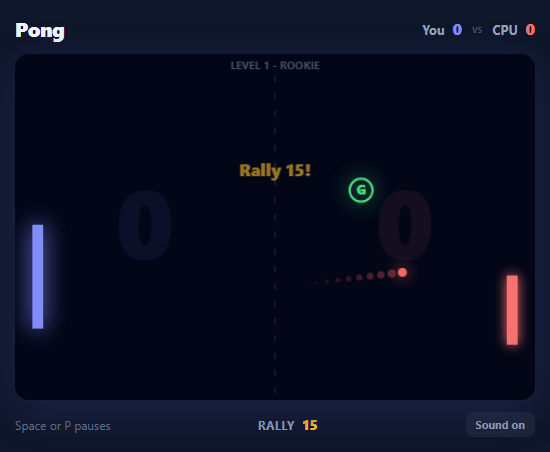
Pong is the original video game archetype, and what separates a forgettable clone from a fun one is feel: a ball that bounces by where it hits, an opponent that is beatable but never boring, and enough juice and variety to make you want one more match. This snippet is a neon canvas Pong with five unlockable CPU levels, power-up orbs, a Web Audio synth, particle effects and a collision system that cannot be tunnelled through at high speed. It uses no libraries and no audio files.
An AI that is beatable on purpose, tuned by level
A paddle that copies ball.y every frame never misses, so it is unbeatable and no fun. Here the CPU computes how far its paddle centre is from a target and moves a fraction of that distance each frame, capped by a top speed: cpuStep = clamp(diff * lv.k, -lv.speed, lv.speed). The target is the ball's y plus an aimErr offset that is re-rolled every time the player returns the ball, so the CPU sometimes aims slightly off. While the ball travels away from it, the CPU drifts back to the middle. The five entries in the LEVELS array (Rookie, Club Player, Pro, Expert, Legend) raise the top speed, the tracking factor and the aim accuracy, and shorten the gap between power-up orbs.
Levels that unlock as you win
Only level 1 is open at the start. Winning a match (first to 7) unlocks the next level and moves the selection to it, the button changes to "Next Level", and losing offers "Retry Level". The highest unlocked level is saved to localStorage inside a try/catch, so the game also runs in sandboxed iframes where storage is blocked, it just does not remember your progress.
Angle-reflection bounce physics and a speed that heats up
bounceOffPaddle() turns the contact position into a rebound angle: rel = (ball.y - paddleY) / paddleH gives a value from 0 at the top edge to 1 at the bottom, and angle = (rel - 0.5) * (Math.PI / 3) maps it to plus or minus 60 degrees. Every hit multiplies the speed by 1.06 up to MAX_SPEED, and the ball's colour moves from cool blue to red as it gets faster, with a fading trail behind it.
Swept collision instead of a simple range check
Each frame the game keeps the ball's previous position and checks whether the ball crossed a paddle's face between the previous and the new position. It then interpolates the y value at the crossing point and tests that against the paddle. This means a fast ball can never skip over a paddle between two frames, which is the classic tunnelling bug of naive Pong code. Movement is scaled by a delta-time factor, so the game runs at the same speed on 60Hz and 120Hz screens.
Power-up orbs
During a long rally an orb appears in the middle of the court. Whoever hit the ball last collects it when the ball touches it. A green orb grows your paddle for 8 seconds, a pink one shrinks the opponent's paddle, and a blue one slows the ball down. Paddles grow and shrink smoothly around their centre, and a glow shows who has an active power-up.
Juice: sound, particles, shake and rally tracking
Paddle hits, wall hits, goals, power-ups and rally milestones every five hits play short sounds made with an OscillatorNode and a GainNode, and the pitch of the hit sound climbs with the rally. Sparks burst from every impact, the screen shakes on hard hits and goals, a rally counter tracks your streak, and the longest rally is saved as your best. Mouse, touch (through pointermove), Arrow keys and W/S all move the paddle, Space or P pauses, and the game pauses itself when the tab is hidden.
What's included
Features
Step by step
How to Use
- 1Pick a level and startChoose an unlocked level from the numbered buttons (only level 1 is open at first), then click "Start Game". A 3-2-1 countdown runs before the first serve.
- 2Move your paddleMove the mouse over the court, drag a finger on a touch screen, or use Arrow Up/Down or W/S. The paddle is always clamped inside the court, and Space or P pauses the game.
- 3Aim with the paddle edgesWhere the ball touches your paddle sets the return angle: the centre sends it straight back, the edges send it off at up to 60 degrees, which is how you beat the CPU. Every hit also makes the ball faster and hotter in colour.
- 4Grab the power-up orbsIn a long rally an orb appears. Hit the ball last and let it touch the orb: G grows your paddle, S shrinks the opponent's, T slows the ball down.
- 5Play to 7 and unlock the next levelThe first side to 7 points wins the match. Beating a level unlocks the next, up to level 5 (Legend), and your longest rally is recorded as your best.
- 6Retry or move onAfter a match the overlay offers "Next Level" after a win, or "Retry Level" after a loss, and you can also pick any unlocked level yourself.
Real-world uses
Common Use Cases
Got questions?
Frequently Asked Questions
The CPU moves toward the ball using a proportional step (the level's k factor times the distance) capped at the level's top speed, and it aims at the ball's y plus a small random error that changes after each of your returns. A fast or sharply angled shot can outrun it, especially on the lower levels. A paddle that snaps to the ball every frame would be unbeatable and not fun, so the game avoids it on purpose.
The LEVELS array holds five entries, each with a name, top speed, tracking factor k, aim error in pixels and the time between power-up orbs. Winning a match unlocks the next level and saves the highest unlocked level to localStorage under pong-unlocked-level. Edit the numbers to retune the difficulty, or add an entry (and a numbered button in the HTML) for a sixth level.
bounceOffPaddle() computes rel as the contact position along the paddle (0 at the top edge, 1 at the bottom) and maps it to an angle between -60 and +60 degrees with (rel - 0.5) * (Math.PI / 3). A centre hit goes nearly straight back, an edge hit goes off steeply. Each hit also multiplies the speed by 1.06, capped at MAX_SPEED.
A simple check tests whether the ball is inside a paddle's x range at the end of a frame. At high speeds the ball can move past the paddle in one frame and never be detected, which is called tunnelling. Here the game remembers the previous position, detects that the ball crossed the paddle face during the frame and interpolates the y position at the crossing, so even the fastest ball is caught.
After a rally has started, a timer (the level's orbEvery value) spawns an orb at a random spot in the middle of the court. If the ball touches it, whoever hit the ball last gets the effect: grow makes their paddle 96px tall for 8 seconds, shrink makes the opponent's 40px tall for 8 seconds, and slow cuts the ball speed to about 70 percent. Uncollected orbs blink and disappear after 7 seconds.
Yes. Reads and writes to localStorage are wrapped in try/catch, so a blocked storage only means that your best rally and unlocked levels are not remembered. The AudioContext is created inside the Start click and every sound call is wrapped in try/catch, so a blocked audio device never stops the game. There is also a mute button.
Copy & paste
Source Code
<div class="pg-wrap">
  <div class="pg-header">
    <h2>Pong</h2>
    <div class="pg-scores">
      <span class="pg-score-you">You <strong id="pg-score-player">0</strong></span>
      <span class="pg-vs">vs</span>
      <span class="pg-score-cpu">CPU <strong id="pg-score-cpu">0</strong></span>
    </div>
  </div>

  <div class="pg-canvas-wrap">
    <canvas id="pg-canvas" width="480" height="320"></canvas>
    <div class="pg-overlay" id="pg-overlay">
      <p class="pg-overlay-title" id="pg-overlay-title">Neon Pong</p>
      <p class="pg-overlay-sub" id="pg-overlay-sub">Move the mouse, drag a finger, or use Arrow Up/Down (or W/S). Grab the glowing orbs for power-ups. First to 7 wins. Beat a level to unlock the next one.</p>
      <div class="pg-levels" id="pg-levels" role="group" aria-label="Level">
        <button class="pg-level active" data-level="1" type="button" aria-pressed="true" aria-label="Level 1">1</button>
        <button class="pg-level" data-level="2" type="button" aria-pressed="false" aria-label="Level 2">2</button>
        <button class="pg-level" data-level="3" type="button" aria-pressed="false" aria-label="Level 3">3</button>
        <button class="pg-level" data-level="4" type="button" aria-pressed="false" aria-label="Level 4">4</button>
        <button class="pg-level" data-level="5" type="button" aria-pressed="false" aria-label="Level 5">5</button>
      </div>
      <p class="pg-level-name" id="pg-level-name">Level 1: Rookie</p>
      <button class="pg-start-btn" id="pg-start-btn" type="button">Start Game</button>
    </div>
  </div>

  <div class="pg-footer">
    <span class="pg-hint">Space or P pauses</span>
    <span class="pg-rally">Rally <strong id="pg-rally">0</strong></span>
    <button class="pg-mute" id="pg-mute" type="button" aria-pressed="false">Sound on</button>
  </div>
</div>
* { box-sizing: border-box; margin: 0; padding: 0; }
body { font-family: system-ui, sans-serif; background: #0f172a; min-height: 100vh; display: flex; align-items: center; justify-content: center; padding: 24px; }
.pg-wrap { display: flex; flex-direction: column; align-items: center; gap: 12px; width: 100%; max-width: 520px; }
.pg-header { width: 100%; display: flex; align-items: center; justify-content: space-between; }
.pg-header h2 { color: #f1f5f9; font-size: 20px; font-weight: 800; letter-spacing: -0.02em; }
.pg-scores { display: flex; align-items: center; gap: 10px; font-size: 13px; font-weight: 700; color: #94a3b8; }
.pg-scores strong { font-size: 16px; margin-left: 4px; }
.pg-score-you strong { color: #818cf8; }
.pg-score-cpu strong { color: #f87171; }
.pg-vs { color: #475569; font-weight: 600; font-size: 11px; }
.pg-canvas-wrap { position: relative; width: 100%; aspect-ratio: 3 / 2; border-radius: 14px; overflow: hidden; box-shadow: 0 10px 40px rgba(99,102,241,0.25), 0 10px 30px rgba(0,0,0,0.4); }
#pg-canvas { width: 100%; height: 100%; display: block; background: #020617; cursor: none; touch-action: none; }
.pg-overlay {
position: absolute; inset: 0;
background: rgba(2, 6, 23, 0.9);
display: flex; flex-direction: column; align-items: center; justify-content: center; gap: 10px;
text-align: center; padding: 20px;
}
.pg-overlay.hidden { display: none; }
.pg-overlay-title { color: #f1f5f9; font-size: 24px; font-weight: 800; text-shadow: 0 0 18px #6366f1; }
.pg-overlay-sub { color: #94a3b8; font-size: 13px; max-width: 340px; line-height: 1.5; }
.pg-levels { display: flex; gap: 6px; }
.pg-level {
width: 34px; height: 34px; font-size: 13px; font-weight: 800; border-radius: 8px;
border: 1.5px solid #334155; background: transparent; color: #94a3b8; cursor: pointer; font-family: inherit;
transition: background 0.15s, color 0.15s, border-color 0.15s;
}
.pg-level:hover:not(:disabled) { border-color: #6366f1; color: #e2e8f0; }
.pg-level.active { background: #6366f1; border-color: #6366f1; color: #fff; }
.pg-level:disabled { opacity: 0.35; cursor: not-allowed; }
.pg-level-name { color: #fbbf24; font-size: 12px; font-weight: 700; letter-spacing: 0.4px; text-transform: uppercase; }
.pg-start-btn {
padding: 10px 22px; font-size: 13px; font-weight: 700; border-radius: 9px;
border: none; background: #6366f1; color: #fff; cursor: pointer;
font-family: inherit; transition: background 0.15s, transform 0.1s;
}
.pg-start-btn:hover { background: #4f46e5; }
.pg-start-btn:active { transform: scale(0.96); }
.pg-footer { width: 100%; display: flex; align-items: center; justify-content: space-between; gap: 10px; }
.pg-hint { color: #64748b; font-size: 12px; }
.pg-rally { color: #94a3b8; font-size: 12px; font-weight: 700; text-transform: uppercase; letter-spacing: 0.4px; }
.pg-rally strong { color: #fbbf24; font-size: 14px; margin-left: 4px; }
.pg-mute {
background: rgba(255,255,255,0.06); color: #94a3b8; border: none; border-radius: 8px;
padding: 5px 10px; font-size: 11px; font-weight: 700; cursor: pointer; font-family: inherit;
}
.pg-mute:hover { background: rgba(255,255,255,0.12); }const canvas = document.getElementById('pg-canvas');
const ctx = canvas.getContext('2d');
const W = 480, H = 320;
// Sharp on retina screens: the buffer is bigger, the drawing coordinates stay 480 x 320
const dpr = Math.min(2, window.devicePixelRatio || 1);
canvas.width = W * dpr;
canvas.height = H * dpr;
ctx.scale(dpr, dpr);
const PADDLE_W = 10, BASE_H = 64;
const BALL_SIZE = 8, HALF = BALL_SIZE / 2;
const PLAYER_X = 16;
const CPU_X = W - 16 - PADDLE_W;
const WIN_SCORE = 7;
const START_SPEED = 4.2, MAX_SPEED = 10;
const ORB_R = 11, ORB_LIFE = 7000, BUFF_MS = 8000;
// Five levels: the CPU gets faster, tracks the ball more tightly, aims more accurately, and orbs appear more often
const LEVELS = [
{ name: 'Rookie', speed: 2.8, k: 0.05, err: 45, orbEvery: 7500 }, // top paddle speed, tracking factor, aim error (px), ms between orbs
{ name: 'Club Player', speed: 3.6, k: 0.07, err: 30, orbEvery: 7000 },
{ name: 'Pro', speed: 4.4, k: 0.09, err: 20, orbEvery: 6500 },
{ name: 'Expert', speed: 5.2, k: 0.12, err: 10, orbEvery: 6000 },
{ name: 'Legend', speed: 6.2, k: 0.15, err: 4, orbEvery: 5500 },
];
const ORB_TYPES = {
grow: { label: 'Big paddle!', letter: 'G', color: '#4ade80' },
shrink: { label: 'Shrink ray!', letter: 'S', color: '#f472b6' },
slow: { label: 'Slow-mo!', letter: 'T', color: '#38bdf8' },
};
const BEST_KEY = 'pong-best-rally';
const LEVEL_KEY = 'pong-unlocked-level';
const playerScoreEl = document.getElementById('pg-score-player');
const cpuScoreEl = document.getElementById('pg-score-cpu');
const rallyEl = document.getElementById('pg-rally');
const overlayEl = document.getElementById('pg-overlay');
const overlayTitleEl = document.getElementById('pg-overlay-title');
const overlaySubEl = document.getElementById('pg-overlay-sub');
const levelNameEl = document.getElementById('pg-level-name');
const startBtn = document.getElementById('pg-start-btn');
const muteBtn = document.getElementById('pg-mute');
const levelBtns = document.querySelectorAll('.pg-level');
let playerY, cpuY, playerH = BASE_H, cpuH = BASE_H;
let ball, trail = [], particles = [], texts = [];
let playerScore = 0, cpuScore = 0;
let running = false, paused = false, rafHandle = null, lastTime = 0, tick = 0;
let level = 1, unlocked = loadNumber(LEVEL_KEY, 1);
let rally = 0, longestRally = 0, bestRally = loadNumber(BEST_KEY, 0);
let lastHitter = null, aimErr = 0;
let serveLeft = 0, serveTotal = 0;
let orb = null, orbTimer = 0;
let shake = 0;
const mods = { player: null, cpu: null }; // active paddle power-ups: { type, left }
function clamp(v, min, max) { return Math.max(min, Math.min(max, v)); }
function currentLevel() { return LEVELS[level - 1]; }
// localStorage can throw in sandboxed iframes / private mode, so guard it
function loadNumber(key, fallback) {
try { return parseInt(localStorage.getItem(key) || String(fallback), 10) || fallback; } catch (e) { return fallback; }
}
function saveNumber(key, v) {
try { localStorage.setItem(key, String(v)); } catch (e) { /* ignore */ }
}
unlocked = clamp(unlocked, 1, LEVELS.length);
/* ---------- Sound (tiny Web Audio synth, no files) ---------- */
let audioCtx = null, muted = false;
function getAudio() {
if (!audioCtx) {
try { audioCtx = new (window.AudioContext || window.webkitAudioContext)(); } catch (e) { audioCtx = null; }
}
if (audioCtx && audioCtx.state === 'suspended') audioCtx.resume();
return audioCtx;
}
function tone(freq, dur, type, vol, slideTo, delay) {
if (muted) return;
const ac = getAudio();
if (!ac) return;
try {
const t0 = ac.currentTime + (delay || 0);
const osc = ac.createOscillator();
const gain = ac.createGain();
osc.type = type;
osc.frequency.setValueAtTime(freq, t0);
if (slideTo) osc.frequency.exponentialRampToValueAtTime(slideTo, t0 + dur);
gain.gain.setValueAtTime(vol, t0);
gain.gain.exponentialRampToValueAtTime(0.0001, t0 + dur);
osc.connect(gain);
gain.connect(ac.destination);
osc.start(t0);
osc.stop(t0 + dur);
} catch (e) { /* audio is optional */ }
}
muteBtn.addEventListener('click', () => {
muted = !muted;
muteBtn.textContent = muted ? 'Sound off' : 'Sound on';
muteBtn.setAttribute('aria-pressed', String(muted));
});
/* ---------- Effects ---------- */
function burst(x, y, color, count) {
for (let i = 0; i < count; i++) {
const a = Math.random() * Math.PI * 2;
const sp = 1 + Math.random() * 3.5;
particles.push({ x, y, vx: Math.cos(a) * sp, vy: Math.sin(a) * sp, life: 1, color });
}
}
function addText(text, x, y, color) {
texts.push({ text, x, y, life: 1, color });
}
/* ---------- Levels ---------- */
function syncLevelUi() {
levelBtns.forEach(btn => {
const n = parseInt(btn.dataset.level, 10);
btn.classList.toggle('active', n === level);
btn.setAttribute('aria-pressed', String(n === level));
btn.disabled = n > unlocked; // levels unlock one by one as you beat them
btn.title = n > unlocked ? 'Beat level ' + (n - 1) + ' to unlock' : LEVELS[n - 1].name;
});
levelNameEl.textContent = 'Level ' + level + ': ' + currentLevel().name;
}
levelBtns.forEach(btn => btn.addEventListener('click', () => {
level = parseInt(btn.dataset.level, 10);
syncLevelUi();
}));
/* ---------- Setup ---------- */
function serveBall(delay) {
const dir = Math.random() < 0.5 ? -1 : 1;
const angle = Math.random() * 0.5 - 0.25;
ball = { x: W / 2, y: H / 2, vx: dir * START_SPEED, vy: angle * START_SPEED };
trail = [];
serveLeft = serveTotal = delay;
rally = 0;
rallyEl.textContent = '0';
lastHitter = null;
orb = null; orbTimer = 0;
mods.player = null; mods.cpu = null;
aimErr = 0;
}
function resetPositions(delay) {
playerH = BASE_H; cpuH = BASE_H;
playerY = H / 2 - playerH / 2;
cpuY = H / 2 - cpuH / 2;
serveBall(delay);
}
function resetMatch() {
playerScore = 0; cpuScore = 0;
playerScoreEl.textContent = '0';
cpuScoreEl.textContent = '0';
particles = []; texts = []; shake = 0;
longestRally = 0;
resetPositions(1500); // first serve gets a 3-2-1 countdown
}
/* ---------- Input ---------- */
canvas.addEventListener('pointermove', e => {
const rect = canvas.getBoundingClientRect();
const mouseY = (e.clientY - rect.top) * (H / rect.height);
playerY = clamp(mouseY - playerH / 2, 0, H - playerH);
});
const keys = {};
document.addEventListener('keydown', e => {
if (e.ctrlKey || e.metaKey || e.altKey) return;
const k = e.key.toLowerCase();
if ((running || paused) && (k === 'arrowup' || k === 'arrowdown' || k === ' ')) e.preventDefault();
keys[k] = true;
if ((k === ' ' || k === 'p') && !e.repeat) togglePause();
});
document.addEventListener('keyup', e => { keys[e.key.toLowerCase()] = false; });
document.addEventListener('visibilitychange', () => { if (document.hidden && running) togglePause(); });
function togglePause() {
if (running) {
running = false; paused = true;
cancelAnimationFrame(rafHandle);
draw();
} else if (paused) {
paused = false; running = true;
lastTime = performance.now();
rafHandle = requestAnimationFrame(loop);
}
}
/* ---------- Game flow ---------- */
function startGame() {
getAudio(); // created inside the click so the browser allows sound
resetMatch();
running = true; paused = false;
overlayEl.classList.add('hidden');
cancelAnimationFrame(rafHandle);
lastTime = performance.now();
rafHandle = requestAnimationFrame(loop);
}
function loop(now) {
if (!running) return;
const dtMs = Math.min(50, now - lastTime);
lastTime = now;
update(dtMs / 16.667, dtMs); // f = 1 at 60fps, so speed is the same on 120Hz screens
draw();
rafHandle = requestAnimationFrame(loop);
}
function targetHeight(side) {
const m = mods[side];
return !m ? BASE_H : (m.type === 'grow' ? 96 : 40);
}
function updateMods(f, dtMs) {
['player', 'cpu'].forEach(side => {
if (mods[side]) {
mods[side].left -= dtMs;
if (mods[side].left <= 0) mods[side] = null;
}
});
const oldP = playerH, oldC = cpuH;
playerH += (targetHeight('player') - playerH) * Math.min(1, 0.2 * f);
cpuH += (targetHeight('cpu') - cpuH) * Math.min(1, 0.2 * f);
playerY += (oldP - playerH) / 2; // grow / shrink around the paddle's centre
cpuY += (oldC - cpuH) / 2;
}
function update(f, dtMs) {
tick++;
// visual effects keep moving even while the ball waits to be served
shake *= Math.pow(0.85, f);
particles.forEach(p => { p.x += p.vx * f; p.y += p.vy * f; p.life -= 0.03 * f; });
particles = particles.filter(p => p.life > 0);
texts.forEach(t => { t.y -= 0.5 * f; t.life -= 0.018 * f; });
texts = texts.filter(t => t.life > 0);
if (keys['arrowup'] || keys['w']) playerY -= 6 * f;
if (keys['arrowdown'] || keys['s']) playerY += 6 * f;
updateMods(f, dtMs);
playerY = clamp(playerY, 0, H - playerH);
// CPU: chases where it thinks the ball will be (with a small aim error), at a capped speed.
// While the ball travels away from it, it drifts back to the middle.
const lv = currentLevel();
const cpuTarget = (ball.vx > 0 && serveLeft <= 0) ? ball.y + aimErr : H / 2;
const cpuStep = clamp((cpuTarget - (cpuY + cpuH / 2)) * lv.k, -lv.speed, lv.speed) * f;
cpuY = clamp(cpuY + cpuStep, 0, H - cpuH);
if (serveLeft > 0) { serveLeft -= dtMs; return; }
const prevX = ball.x, prevY = ball.y;
ball.x += ball.vx * f;
ball.y += ball.vy * f;
trail.push({ x: ball.x, y: ball.y });
if (trail.length > 12) trail.shift();
if (ball.y - HALF <= 0) {
ball.y = HALF; ball.vy = Math.abs(ball.vy);
tone(220, 0.05, 'square', 0.03);
burst(ball.x, 0, '#94a3b8', 3);
} else if (ball.y + HALF >= H) {
ball.y = H - HALF; ball.vy = -Math.abs(ball.vy);
tone(220, 0.05, 'square', 0.03);
burst(ball.x, H, '#94a3b8', 3);
}
// Swept paddle collision: compare where the ball was with where it is now, so a fast ball can never tunnel through
const playerRight = PLAYER_X + PADDLE_W;
if (ball.vx < 0 && prevX - HALF >= playerRight - 1 && ball.x - HALF <= playerRight) {
const t = (prevX - ball.x) ? (prevX - HALF - playerRight) / (prevX - ball.x) : 0;
const yAt = prevY + (ball.y - prevY) * clamp(t, 0, 1);
if (yAt >= playerY - HALF && yAt <= playerY + playerH + HALF) {
ball.x = playerRight + HALF;
bounceOffPaddle(playerY, playerH, 'player');
}
}
if (ball.vx > 0 && prevX + HALF <= CPU_X + 1 && ball.x + HALF >= CPU_X) {
const t = (ball.x - prevX) ? (CPU_X - (prevX + HALF)) / (ball.x - prevX) : 0;
const yAt = prevY + (ball.y - prevY) * clamp(t, 0, 1);
if (yAt >= cpuY - HALF && yAt <= cpuY + cpuH + HALF) {
ball.x = CPU_X - HALF;
bounceOffPaddle(cpuY, cpuH, 'cpu');
}
}
// Power-up orbs appear during long rallies; the last player to touch the ball collects them
if (orb) {
orb.life -= dtMs;
if (orb.life <= 0) orb = null;
else if (lastHitter && Math.hypot(ball.x - orb.x, ball.y - orb.y) < ORB_R + HALF) collectOrb();
} else if (rally > 0) {
orbTimer += dtMs;
if (orbTimer >= lv.orbEvery) spawnOrb();
}
if (ball.x < -BALL_SIZE) pointScored('cpu');
else if (ball.x > W + BALL_SIZE) pointScored('player');
}
function bounceOffPaddle(paddleY, paddleH, side) {
const rel = clamp((ball.y - paddleY) / paddleH, 0, 1);
const angle = (rel - 0.5) * (Math.PI / 3);
const speed = Math.min(MAX_SPEED, Math.hypot(ball.vx, ball.vy) * 1.06);
const dir = side === 'player' ? 1 : -1;
ball.vx = dir * speed * Math.cos(angle);
ball.vy = speed * Math.sin(angle);
lastHitter = side;
rally++;
rallyEl.textContent = rally;
if (rally > longestRally) longestRally = rally;
if (side === 'player') aimErr = (Math.random() * 2 - 1) * currentLevel().err; // the CPU re-aims after every return
const color = side === 'player' ? '#818cf8' : '#f87171';
burst(ball.x, ball.y, color, 8);
shake = Math.max(shake, 1.5 + speed * 0.35);
tone(300 + Math.min(rally, 20) * 22, 0.09, 'square', 0.05); // pitch climbs with the rally
if (rally % 5 === 0) {
addText('Rally ' + rally + '!', W / 2, H / 2 - 30, '#fbbf24');
tone(660, 0.1, 'triangle', 0.05, null, 0.05);
tone(880, 0.14, 'triangle', 0.05, null, 0.15);
}
}
function spawnOrb() {
const names = Object.keys(ORB_TYPES);
orb = {
type: names[Math.floor(Math.random() * names.length)],
x: W * 0.3 + Math.random() * W * 0.4,
y: 36 + Math.random() * (H - 72),
life: ORB_LIFE,
};
orbTimer = 0;
}
function collectOrb() {
const side = lastHitter;
const other = side === 'player' ? 'cpu' : 'player';
const info = ORB_TYPES[orb.type];
if (orb.type === 'grow') mods[side] = { type: 'grow', left: BUFF_MS };
if (orb.type === 'shrink') mods[other] = { type: 'shrink', left: BUFF_MS };
if (orb.type === 'slow') {
const sp = Math.hypot(ball.vx, ball.vy);
const ratio = Math.max(START_SPEED * 0.85, sp * 0.7) / sp;
ball.vx *= ratio; ball.vy *= ratio;
}
addText(info.label, orb.x, orb.y, info.color);
burst(orb.x, orb.y, info.color, 22);
tone(520, 0.1, 'sine', 0.06);
tone(780, 0.16, 'sine', 0.06, null, 0.08);
orb = null; orbTimer = 0;
}
function pointScored(winner) {
if (winner === 'cpu') { cpuScore++; cpuScoreEl.textContent = cpuScore; }
else { playerScore++; playerScoreEl.textContent = playerScore; }
burst(winner === 'cpu' ? 6 : W - 6, clamp(ball.y, 10, H - 10), winner === 'cpu' ? '#f87171' : '#818cf8', 26);
shake = 9;
if (winner === 'player') {
tone(523, 0.12, 'triangle', 0.07);
tone(784, 0.2, 'triangle', 0.07, null, 0.1);
} else {
tone(200, 0.3, 'sawtooth', 0.06, 80);
}
if (playerScore >= WIN_SCORE || cpuScore >= WIN_SCORE) endMatch();
else resetPositions(800);
}
function endMatch() {
running = false;
cancelAnimationFrame(rafHandle);
const won = playerScore > cpuScore;
const record = longestRally > bestRally;
if (record) { bestRally = longestRally; saveNumber(BEST_KEY, bestRally); }
const cleared = level;
let title, button;
if (won && cleared < LEVELS.length) {
unlocked = Math.max(unlocked, cleared + 1);
saveNumber(LEVEL_KEY, unlocked);
level = cleared + 1; // the button now starts the next level
title = 'Level ' + cleared + ' Cleared!';
button = 'Next Level';
} else if (won) {
title = 'You Beat Every Level!';
button = 'Play Again';
} else {
title = 'Computer Wins';
button = 'Retry Level ' + level;
}
syncLevelUi();
overlayTitleEl.textContent = title;
overlaySubEl.textContent = 'Final score ' + playerScore + ' - ' + cpuScore +
'. Longest rally: ' + longestRally + (record ? ' (new record!)' : ' (best ' + bestRally + ')') + '.';
startBtn.textContent = button;
if (won) {
tone(523, 0.15, 'triangle', 0.07, null, 0.2);
tone(659, 0.15, 'triangle', 0.07, null, 0.35);
tone(784, 0.3, 'triangle', 0.07, null, 0.5);
} else {
tone(330, 0.2, 'sawtooth', 0.05, 200, 0.2);
}
draw();
setTimeout(() => overlayEl.classList.remove('hidden'), 500); // let the last point land first
}
/* ---------- Drawing ---------- */
function drawPaddle(x, y, h, color, buff) {
ctx.shadowColor = color;
ctx.shadowBlur = buff ? 22 : 12;
ctx.fillStyle = color;
ctx.fillRect(x, y, PADDLE_W, h);
ctx.shadowBlur = 0;
}
function draw() {
ctx.save();
ctx.fillStyle = '#020617';
ctx.fillRect(0, 0, W, H);
if (shake > 0.2) ctx.translate((Math.random() - 0.5) * shake, (Math.random() - 0.5) * shake);
// big faded scores behind the action
ctx.font = '800 90px system-ui, sans-serif';
ctx.textAlign = 'center';
ctx.fillStyle = 'rgba(129,140,248,0.08)';
ctx.fillText(playerScore, W / 4, H / 2 + 30);
ctx.fillStyle = 'rgba(248,113,113,0.08)';
ctx.fillText(cpuScore, W * 3 / 4, H / 2 + 30);
ctx.fillStyle = '#475569';
ctx.font = '700 10px system-ui, sans-serif';
ctx.fillText('LEVEL ' + level + ' - ' + currentLevel().name.toUpperCase(), W / 2, 14);
ctx.strokeStyle = '#1e293b';
ctx.setLineDash([6, 10]);
ctx.beginPath();
ctx.moveTo(W / 2, 20);
ctx.lineTo(W / 2, H);
ctx.stroke();
ctx.setLineDash([]);
drawPaddle(PLAYER_X, playerY, playerH, '#818cf8', !!mods.player);
drawPaddle(CPU_X, cpuY, cpuH, '#f87171', !!mods.cpu);
// power-up orb
if (orb) {
const info = ORB_TYPES[orb.type];
const pulse = 1 + Math.sin(tick * 0.15) * 0.12;
ctx.globalAlpha = orb.life < 1500 ? (Math.floor(tick / 6) % 2 ? 0.3 : 1) : 1; // blinks before it vanishes
ctx.shadowColor = info.color; ctx.shadowBlur = 18;
ctx.strokeStyle = info.color; ctx.lineWidth = 2;
ctx.beginPath(); ctx.arc(orb.x, orb.y, ORB_R * pulse, 0, Math.PI * 2); ctx.stroke();
ctx.shadowBlur = 0;
ctx.fillStyle = info.color;
ctx.font = '800 12px system-ui, sans-serif';
ctx.textBaseline = 'middle';
ctx.fillText(info.letter, orb.x, orb.y + 1);
ctx.textBaseline = 'alphabetic';
ctx.globalAlpha = 1;
}
// ball: its colour heats up from cool blue to red as it speeds up, with a fading trail
const speed = Math.hypot(ball.vx, ball.vy);
const heat = clamp((speed - START_SPEED) / (MAX_SPEED - START_SPEED), 0, 1);
const ballColor = serveLeft > 0 ? '#f1f5f9' : 'hsl(' + Math.round(200 - 200 * heat) + ',100%,70%)';
trail.forEach((p, i) => {
const a = i / trail.length;
ctx.globalAlpha = a * 0.4;
ctx.fillStyle = ballColor;
ctx.beginPath(); ctx.arc(p.x, p.y, HALF * a + 0.5, 0, Math.PI * 2); ctx.fill();
});
ctx.globalAlpha = 1;
ctx.shadowColor = ballColor; ctx.shadowBlur = 14;
ctx.fillStyle = ballColor;
ctx.beginPath(); ctx.arc(ball.x, ball.y, HALF, 0, Math.PI * 2); ctx.fill();
ctx.shadowBlur = 0;
if (serveLeft > 0) { // pulsing ring while waiting for the serve
ctx.strokeStyle = 'rgba(241,245,249,0.5)'; ctx.lineWidth = 1.5;
ctx.beginPath(); ctx.arc(ball.x, ball.y, HALF + 4 + (tick % 30) / 3, 0, Math.PI * 2); ctx.stroke();
}
particles.forEach(p => {
ctx.globalAlpha = Math.max(0, p.life);
ctx.fillStyle = p.color;
ctx.fillRect(p.x - 1.5, p.y - 1.5, 3, 3);
});
ctx.globalAlpha = 1;
texts.forEach(t => {
ctx.globalAlpha = Math.max(0, Math.min(1, t.life * 1.5));
ctx.fillStyle = t.color;
ctx.font = '800 16px system-ui, sans-serif';
ctx.fillText(t.text, t.x, t.y);
});
ctx.globalAlpha = 1;
if (serveTotal >= 1500 && serveLeft > 0) { // 3-2-1 before the first serve
ctx.fillStyle = '#f1f5f9';
ctx.font = '900 56px system-ui, sans-serif';
ctx.fillText(String(Math.ceil(serveLeft / 500)), W / 2, H / 2 - 40);
}
if (paused) {
ctx.fillStyle = 'rgba(2,6,23,0.6)';
ctx.fillRect(0, 0, W, H);
ctx.fillStyle = '#f1f5f9';
ctx.font = '800 26px system-ui, sans-serif';
ctx.fillText('Paused', W / 2, H / 2);
ctx.font = '600 12px system-ui, sans-serif';
ctx.fillStyle = '#94a3b8';
ctx.fillText('Press Space or P to resume', W / 2, H / 2 + 22);
}
ctx.restore();
}
startBtn.addEventListener('click', startGame);
syncLevelUi();
resetMatch();
draw();
/* wdp-share:start */
(function () {
var TITLE = 'Pong vs Computer', URL = 'https://webdevpuneet.com/ui-snippets/pong-game/';
if (window.__wdpShare) return;
window.__wdpShare = true;
var blob = null, file = null, lastInfo = null;
/* ---- UI ---- */
var st = document.createElement('style');
st.textContent =
'.wdps-in,.wdps-btn,.wdps-box{touch-action:manipulation;-webkit-tap-highlight-color:transparent}.wdps-in{display:block;margin:12px auto 0;border:0;border-radius:12px;padding:11px 22px;font:800 15px/1 system-ui,sans-serif;background:#16a34a;color:#fff;cursor:pointer;box-shadow:0 3px 0 #11793a;pointer-events:auto;position:relative;z-index:5}' +
'.wdps-in:hover{background:#15803d}.wdps-in:active{transform:translateY(2px);box-shadow:0 1px 0 #11793a}' +
'.wdps-btn{position:fixed;right:12px;bottom:12px;z-index:2147483000;border:0;border-radius:99px;padding:9px 16px;font:700 13px/1 system-ui,sans-serif;background:#16a34a;color:#fff;cursor:pointer;box-shadow:0 3px 12px rgba(0,0,0,.3)}' +
'.wdps-btn.wdps-hot{animation:wdps-p 1.4s ease-in-out infinite}' +
'@keyframes wdps-p{0%,100%{box-shadow:0 0 0 0 rgba(22,163,74,.6),0 3px 12px rgba(0,0,0,.3)}50%{box-shadow:0 0 0 9px rgba(22,163,74,0),0 3px 12px rgba(0,0,0,.3)}}' +
'.wdps-btn:active{transform:translateY(1px)}' +
'.wdps-in[hidden],.wdps-btn[hidden],.wdps-box[hidden],.wdps-box [hidden]{display:none}' +
'.wdps-box{position:fixed;left:50%;bottom:12px;transform:translateX(-50%);z-index:2147483001;width:max-content;max-width:calc(100vw - 24px);box-sizing:border-box;background:#fff;color:#64748b;border:1px solid #d5e2ee;border-radius:12px;padding:8px 12px;font:700 12px/1.4 system-ui,sans-serif;box-shadow:0 8px 26px rgba(15,23,42,.25);display:flex;flex-wrap:wrap;gap:8px;align-items:center}' +
'.wdps-box button,.wdps-box a{border:1px solid #d5e2ee;background:#f8fafc;color:#1e293b;border-radius:99px;padding:5px 12px;font:700 12px system-ui,sans-serif;text-decoration:none;cursor:pointer}' +
'.wdps-box .wdps-x{border:0;background:none;font-size:19px;line-height:1;padding:0 4px;margin-left:auto;color:#475569}' +
'@media (max-width:700px){.wdps-box{width:calc(100vw - 24px);justify-content:center;padding:10px 12px}.wdps-box>span{width:100%;text-align:center}.wdps-box button,.wdps-box a{padding:9px 14px;font-size:13px}.wdps-box .wdps-x{position:absolute;top:4px;right:4px}.wdps-in{width:100%;max-width:320px}}';
document.head.appendChild(st);
var pill = document.createElement('button');
pill.type = 'button'; pill.className = 'wdps-btn'; pill.textContent = 'Share result';
var inl = document.createElement('button');
inl.type = 'button'; inl.className = 'wdps-in'; inl.textContent = 'Share result'; inl.hidden = true;
var box = document.createElement('div');
box.className = 'wdps-box'; box.hidden = true;
box.setAttribute('role', 'dialog'); box.setAttribute('aria-label', 'Share your result');
box.innerHTML =
'<span data-a="msg">Share your result:</span>' +
'<button type="button" data-a="copy">Copy image</button>' +
'<a data-a="dl" download="result.png">Download image</a>' +
'<button type="button" data-a="more" hidden>More…</button>' +
'<a data-a="wa" target="_blank" rel="noopener">WhatsApp</a>' +
'<a data-a="x" target="_blank" rel="noopener">X</a>' +
'<a data-a="fb" target="_blank" rel="noopener">Facebook</a>' +
'<button type="button" class="wdps-x" data-a="close" aria-label="Close share options">×</button>';
document.body.appendChild(box);
document.body.appendChild(pill);
function q(a) { return box.querySelector('[data-a="' + a + '"]'); }
function ours(el) { return el === inl || el === pill || !!el.closest('.wdps-box'); }
/* ---- reading the result from the screen ---- */
function shown(el) {
if (!el || !el.getClientRects().length) return false;
for (var n = el; n && n !== document.body; n = n.parentElement) {
var cs = getComputedStyle(n);
if (cs.display === 'none' || cs.visibility === 'hidden' || parseFloat(cs.opacity) < 0.1) return false;
if (n.hidden || n.getAttribute('aria-hidden') === 'true') return false;
}
return true;
}
function txt(el) { return (el.textContent || '').replace(/\s+/g, ' ').trim(); }
function sig(el) { return ((el.id || '') + ' ' + (typeof el.className === 'string' ? el.className : '')).toLowerCase(); }
var OUTCOME = /(you win|you won|win!|wins|victory|game over|time.?s up|cleared|complete|solved|defeat|you lose|you lost|lost|draw|crash|failed|success|congrat|score|result|finished|beat|all matched|well done|perfect|new best)/i;
var HEADSIG = /(title|headline|msg|message|banner|result|verdict|status)/;
var WIN = /(you win|you won|win!|wins|victory|cleared|complete|solved|success|congrat|beat|matched|perfect|new best|record)/i;
var LOSS = /(game over|time.?s up|defeat|you lose|you lost|lost|crash|failed|out of)/i;
var BOX = /(overlay|modal|banner|result|over|end|dialog|screen|popup|panel|card|finish|win)/;
function readResult() {
var head = '', sub = '', root = null, headEl = null;
var all = document.body.querySelectorAll('h1,h2,h3,h4,p,strong,div,span');
for (var i = 0; i < all.length && !head; i++) {
var el = all[i];
if (ours(el) || el.children.length > 2) continue;
if (!HEADSIG.test(sig(el))) continue;
/* a banner that holds its own title: use the title inside it instead */
var inner = false;
for (var c = 0; c < el.children.length; c++) if (HEADSIG.test(sig(el.children[c]))) inner = true;
if (inner) continue;
var t = txt(el);
if (t.length < 3 || t.length > 70 || !OUTCOME.test(t) || !shown(el)) continue;
head = t; headEl = el; root = el.parentElement;
}
if (root) {
var kids = root.querySelectorAll('p,span,div');
for (var j = 0; j < kids.length && !sub; j++) {
var k = kids[j];
if (ours(k) || k.children.length > 2 || !/(sub|text|summary|note|desc|detail)/.test(sig(k))) continue;
var tt = txt(k);
if (tt && tt !== head && tt.length >= 5 && tt.length <= 160 && shown(k)) sub = tt;
}
}
/* the result screen the button goes into: the nearest overlay / banner / result box around the headline */
var host = null;
for (var n = headEl, d = 0; n && n !== document.body && d < 4; n = n.parentElement, d++) {
if (d > 0 && BOX.test(sig(n)) && n.tagName !== 'BUTTON') { host = n; break; }
}
return { head: head, sub: sub, host: host };
}
var STATRE = /(score|moves|time|wpm|best|level|streak|accuracy|combo|coins|distance|height|points|stars|lives|wins|attempt|guess)/;
function readStats() {
var out = [], seen = {};
var all = document.body.querySelectorAll('span,strong,b,div,p,output');
for (var i = 0; i < all.length && out.length < 4; i++) {
var el = all[i];
if (ours(el) || el.children.length > 1) continue;
if (!STATRE.test(sig(el))) continue;
var t = txt(el);
if (!t || t.length > 28 || !/[0-9]/.test(t) || !shown(el)) continue;
if (!/[a-zA-Z]/.test(t) && el.parentElement) {
var parts = [], ch = el.parentElement.childNodes;
for (var p = 0; p < ch.length; p++) { var pv = (ch[p].textContent || '').replace(/\s+/g, ' ').trim(); if (pv) parts.push(pv); }
var pt = parts.join(' ');
if (pt.length <= 30 && /[a-zA-Z]/.test(pt)) t = pt;
}
var key = t.toLowerCase();
if (seen[key]) continue;
seen[key] = 1; out.push(t);
}
return out;
}
function bestCanvas() {
var cs = document.querySelectorAll('canvas'), best = null, area = 0;
for (var i = 0; i < cs.length; i++) {
var r = cs[i].getBoundingClientRect(), a = r.width * r.height;
if (a > area && a > 8000 && shown(cs[i])) { area = a; best = cs[i]; }
}
return best;
}
/* ---- show the button when a result is on screen ---- */
var lastHost = null, timer = 0;
function sync() {
timer = 0;
var r = readResult();
if (r.head && r.host) {
if (inl.parentElement !== r.host) r.host.appendChild(inl);
if (inl.hidden) inl.hidden = false;
if (!pill.hidden) pill.hidden = true;
} else {
if (!inl.hidden) inl.hidden = true;
if (pill.hidden) pill.hidden = false;
pill.classList.toggle('wdps-hot', !!r.head);
}
if (lastHost && !r.head && !box.hidden) box.hidden = true;
lastHost = r.head ? (r.host || document.body) : null;
}
function later() { if (!timer) timer = setTimeout(sync, 200); }
try {
new MutationObserver(function (list) {
for (var i = 0; i < list.length; i++) {
var t = list[i].target;
if (t.nodeType !== 1) t = t.parentElement;
if (t && !ours(t)) { later(); return; }
}
}).observe(document.body, { subtree: true, childList: true, characterData: true, attributes: true, attributeFilter: ['class', 'style', 'hidden'] });
} catch (e) {}
setInterval(later, 1500);
later();
/* ---- the card (1080 x 1080, drawn in memory, light like Pocket Artillery's) ---- */
var outline = 0;
function put(g, t, x, y) { if (outline) { g.lineJoin = 'round'; g.lineWidth = outline; g.strokeStyle = 'rgba(8,12,28,.85)'; g.strokeText(t, x, y); } g.fillText(t, x, y); }
function wrap(g, text, x, y, maxW, lh, maxLines) {
var words = text.split(' '), line = '', n = 0;
for (var i = 0; i < words.length; i++) {
var tst = line ? line + ' ' + words[i] : words[i];
if (g.measureText(tst).width > maxW && line) {
put(g, line, x, y); y += lh; n++; line = words[i];
if (n >= maxLines - 1) { line = words.slice(i).join(' '); break; }
} else line = tst;
}
if (line) {
while (line.length > 3 && g.measureText(line).width > maxW) line = line.slice(0, -2);
put(g, line, x, y); y += lh;
}
return y;
}
/* Biggest-screenshot card: the game frame fills the whole image, the text sits on top of it as an overlay. */
function bgOf(el) {
for (var n = el; n; n = n.parentElement) {
var c = getComputedStyle(n).backgroundColor;
if (c && c !== 'transparent' && c.slice(-4) !== ', 0)') return c;
}
return '#0f172a';
}
function drawBig(info, cv) {
var W = 1080, r = cv.width / cv.height, H = Math.max(810, Math.min(1350, Math.round(W / r)));
var c = document.createElement('canvas'); c.width = W; c.height = H;
var g = c.getContext('2d');
g.fillStyle = bgOf(cv.parentElement || cv); g.fillRect(0, 0, W, H);
var w = W, h = w / r;
if (h > H) { h = H; w = h * r; }
g.imageSmoothingEnabled = true; g.imageSmoothingQuality = 'high';
try { g.drawImage(cv, (W - w) / 2, (H - h) / 2, w, h); } catch (e) { return null; }
/* dark fades under the text so it stays readable on any game colours */
var g1 = g.createLinearGradient(0, 0, 0, H * 0.55); g1.addColorStop(0, 'rgba(8,12,28,.74)'); g1.addColorStop(1, 'rgba(8,12,28,0)');
g.fillStyle = g1; g.fillRect(0, 0, W, H * 0.55);
var g2 = g.createLinearGradient(0, H - 200, 0, H); g2.addColorStop(0, 'rgba(8,12,28,0)'); g2.addColorStop(1, 'rgba(8,12,28,.85)');
g.fillStyle = g2; g.fillRect(0, H - 200, W, 200);
var head = info.head || 'Can you beat me?';
var kind = /draw|tie/i.test(head) ? 'draw' : LOSS.test(head) && !WIN.test(head) ? 'loss' : 'win';
g.textAlign = 'center';
var y = 36;
g.fillStyle = 'rgba(255,255,255,.93)'; g.font = '800 34px system-ui, sans-serif'; outline = 7;
y = wrap(g, TITLE.toUpperCase(), W / 2, y + 34, 1000, 42, 1);
g.fillStyle = kind === 'draw' ? '#e2e8f0' : kind === 'loss' ? '#9db8ff' : '#ffc233';
var big = head.length > 22 ? 84 : 112; g.font = '900 ' + big + 'px system-ui, sans-serif'; outline = 16;
y = wrap(g, head, W / 2, y + big * 0.85, 1000, big * 1.05, 2);
if (info.sub) { g.fillStyle = '#fff'; g.font = '700 40px system-ui, sans-serif'; outline = 9; y = wrap(g, info.sub, W / 2, y + 6, 980, 50, 2); }
outline = 0;
if (info.stats.length) {
g.font = '800 38px system-ui, sans-serif';
var gap = 16, pad = 26, ws = [], tot = -gap;
for (var i = 0; i < info.stats.length; i++) { ws.push(g.measureText(info.stats[i]).width + pad * 2); tot += ws[i] + gap; }
var sc = tot > 960 ? 960 / tot : 1, px = (W - tot * sc) / 2, py = y + 14;
for (var k = 0; k < info.stats.length; k++) {
var w0 = ws[k] * sc;
g.fillStyle = 'rgba(8,12,28,.72)'; g.strokeStyle = 'rgba(255,255,255,.55)'; g.lineWidth = 3;
g.beginPath();
if (g.roundRect) g.roundRect(px, py, w0, 68, 34); else g.rect(px, py, w0, 68);
g.fill(); g.stroke();
g.fillStyle = '#fff'; g.font = '800 ' + Math.round(38 * sc) + 'px system-ui, sans-serif';
g.fillText(info.stats[k], px + w0 / 2, py + 47);
px += w0 + gap * sc;
}
}
outline = 8;
g.fillStyle = '#fff'; g.font = '900 52px system-ui, sans-serif'; put(g, 'Can you beat it?', W / 2, H - 84);
g.fillStyle = 'rgba(255,255,255,.92)'; g.font = '700 34px system-ui, sans-serif'; outline = 6; put(g, 'Play free at webdevpuneet.com', W / 2, H - 34);
outline = 0;
return c;
}
function finish(c, cb) {
var dataUrl = '';
try { dataUrl = c.toDataURL('image/png'); } catch (e) {}
try { c.toBlob(function (b) { cb(b, dataUrl); }, 'image/png'); } catch (e) { cb(null, dataUrl); }
}
function makeCard(info, cb) {
var cv0 = bestCanvas();
if (cv0) { var bc = drawBig(info, cv0); if (bc) { finish(bc, cb); return; } }
var S = 1080, c = document.createElement('canvas');
c.width = S; c.height = S;
var g = c.getContext('2d');
var gr = g.createLinearGradient(0, 0, 0, S);
gr.addColorStop(0, '#eaf4ff'); gr.addColorStop(1, '#fff3ef');
g.fillStyle = gr; g.fillRect(0, 0, S, S);
var cv = bestCanvas();
var head = info.head || 'Can you beat me?';
var kind = /draw|tie/i.test(head) ? 'draw' : LOSS.test(head) && !WIN.test(head) ? 'loss' : 'win';
g.textAlign = 'center';
g.fillStyle = '#1e293b'; g.font = '800 60px system-ui, sans-serif';
var y = wrap(g, TITLE, S / 2, cv ? 120 : 200, 980, 68, 1);
g.fillStyle = kind === 'draw' ? '#475569' : kind === 'loss' ? '#3b63e0' : '#e8553a';
g.font = '800 ' + (head.length > 22 ? 76 : 100) + 'px system-ui, sans-serif';
y = wrap(g, head, S / 2, y + (head.length > 22 ? 70 : 90), 980, head.length > 22 ? 84 : 108, 2);
if (info.sub) { g.fillStyle = '#475569'; g.font = '700 38px system-ui, sans-serif'; y = wrap(g, info.sub, S / 2, y + 4, 940, 48, 2); }
if (info.stats.length) {
g.font = '800 36px system-ui, sans-serif';
var gap = 18, pad = 26, ws = [], tot = -gap;
for (var i = 0; i < info.stats.length; i++) { ws.push(g.measureText(info.stats[i]).width + pad * 2); tot += ws[i] + gap; }
var sc = tot > 1000 ? 1000 / tot : 1, px = (S - tot * sc) / 2, py = y + 14;
for (var k = 0; k < info.stats.length; k++) {
var w0 = ws[k] * sc;
g.fillStyle = '#ffffff'; g.strokeStyle = '#d5e2ee'; g.lineWidth = 3;
g.beginPath();
if (g.roundRect) g.roundRect(px, py, w0, 64, 32); else g.rect(px, py, w0, 64);
g.fill(); g.stroke();
g.fillStyle = '#1e293b'; g.font = '800 ' + Math.round(36 * sc) + 'px system-ui, sans-serif';
g.fillText(info.stats[k], px + w0 / 2, py + 44);
px += w0 + gap * sc;
}
y = py + 64 + 10;
}
if (cv) {
try {
var maxW = 960, maxH = Math.max(180, 930 - y - 30), r = cv.width / cv.height;
var w = maxW, h = w / r;
if (h > maxH) { h = maxH; w = h * r; }
var x = (S - w) / 2, yy = y + 20 + Math.max(0, (maxH - h) / 2);
g.save(); g.shadowColor = 'rgba(60,100,140,0.3)'; g.shadowBlur = 30; g.shadowOffsetY = 10;
g.fillStyle = '#fff'; g.fillRect(x - 8, yy - 8, w + 16, h + 16); g.restore();
g.drawImage(cv, x, yy, w, h);
} catch (e) {}
}
g.fillStyle = '#1e293b'; g.font = '800 46px system-ui, sans-serif';
g.fillText('Can you beat it?', S / 2, 1000);
g.fillStyle = '#64748b'; g.font = '700 34px system-ui, sans-serif';
g.fillText('Play free at webdevpuneet.com', S / 2, 1050);
var dataUrl = '';
try { dataUrl = c.toDataURL('image/png'); } catch (e) {}
try { c.toBlob(function (b) { cb(b, dataUrl); }, 'image/png'); } catch (e) { cb(null, dataUrl); }
}
function shareText(info) {
var bits = [];
if (info.head) bits.push(info.head);
if (info.stats.length) bits.push(info.stats.join(', '));
return TITLE + ': ' + (bits.length ? bits.join(' - ') + '. ' : '') + 'Can you beat it? ' + URL;
}
function msg(t) { q('msg').textContent = t; }
function openFallback() {
var t = encodeURIComponent(shareText(lastInfo));
q('wa').href = 'https://wa.me/?text=' + t;
q('x').href = 'https://twitter.com/intent/tweet?text=' + t;
q('fb').href = 'https://www.facebook.com/sharer/sharer.php?u=' + encodeURIComponent(URL) + '"e=' + t;
box.hidden = false;
}
function nativeShare() {
/* a user cancel does nothing; anything else (blocked in an iframe, no permission) shows Copy / Download / links */
try {
navigator.share({ files: [file], title: TITLE, text: shareText(lastInfo) }).catch(function (e) { if (!e || e.name !== 'AbortError') openFallback(); });
} catch (e) { openFallback(); }
}
function onShare() {
var info = readResult(); info.stats = readStats();
lastInfo = info;
msg('Share your result:');
makeCard(info, function (b, dataUrl) {
blob = b; file = null;
if (b) { try { file = new File([b], 'result.png', { type: 'image/png' }); } catch (e) {} }
if (dataUrl) q('dl').href = dataUrl;
q('dl').hidden = !dataUrl;
var canNative = !!(file && navigator.share && navigator.canShare && navigator.canShare({ files: [file] }));
var touch = !!(window.matchMedia && window.matchMedia('(pointer: coarse)').matches);
q('more').hidden = !canNative;
if (canNative && touch) nativeShare();
else openFallback();
});
}
/* Games often have document/window level touch and pointer handlers (some call preventDefault, which cancels the tap's
click on phones, others restart the game on touchstart). So: keep every pointer event on our controls away from the
game, and fire on touchend as well as click (guarded so one tap shares once). */
var busy = 0;
function trigger() { if (busy) return; busy = 1; setTimeout(function () { busy = 0; }, 700); onShare(); }
function guard(el, act) {
var evs = ['pointerdown', 'pointerup', 'mousedown', 'mouseup', 'touchstart', 'touchend', 'click'];
for (var i = 0; i < evs.length; i++) el.addEventListener(evs[i], function (e) { e.stopPropagation(); });
if (act) {
el.addEventListener('touchend', function (e) { if (e.cancelable) e.preventDefault(); act(); });
el.addEventListener('click', function () { act(); });
}
}
guard(pill, trigger);
guard(inl, trigger);
guard(box);
q('more').addEventListener('click', function () { if (file) nativeShare(); });
q('close').addEventListener('click', function () { box.hidden = true; });
document.addEventListener('keydown', function (e) { if (e.key === 'Escape' && !box.hidden) box.hidden = true; });
q('copy').addEventListener('click', function () {
try {
navigator.clipboard.write([new ClipboardItem({ 'image/png': blob })]).then(
function () { msg('Image copied. Paste it into your chat or post.'); },
function () { msg('Could not copy here. Try Download image.'); }
);
} catch (e) { msg('Copying images is not supported here. Try Download image.'); }
});
})();
/* wdp-share:end */Extend with AI
Take This Snippet Further With AI
Paste this snippet's HTML, CSS, and JS into an AI coding assistant like Claude and ask it to explain how the swept collision in update() finds the exact y position where the ball crosses a paddle's face, and how the LEVELS table (speed, k and aim error) combines to make the CPU more or less beatable. It is also a good snippet to extend with AI help: ask for a two-player mode with a second key pair, a new orb type such as a second ball or a speed boost, a spin mechanic where paddle movement at the moment of impact changes the ball's angle, or a daily challenge with a fixed random seed. You can also ask it to check the power-up timers and the grow/shrink animation for edge cases, for example what happens when both paddles are buffed at once.
Prompt to recreate it
Copy this into your AI assistant of choice to build the effect from scratch, or as a jumping-off point for your own variant:
Build a Pong game against a computer opponent using the HTML5 Canvas API in plain HTML, CSS and JavaScript, with no frameworks and no audio files.

Requirements:
- A neon-styled canvas (logical size 480x320, sharp on retina screens using devicePixelRatio) with two glowing paddles. The player's paddle follows pointermove (mouse and touch, correctly scaled from screen pixels to canvas coordinates) and also Arrow Up/Down or W/S, clamped inside the canvas.
- A computer paddle that moves toward the ball using a proportional step capped at a top speed, aiming at the ball's y plus a random aim error that is re-rolled after each player return, and drifting to the centre while the ball moves away. This must be beatable.
- Five levels (Rookie, Club Player, Pro, Expert, Legend) defined in a table of top speed, tracking factor, aim error and power-up frequency. Only level 1 is unlocked at first. Winning a match (first to 7) unlocks and selects the next level, with "Next Level" and "Retry Level" buttons. Save the highest unlocked level to localStorage inside try/catch.
- Ball physics driven by requestAnimationFrame with delta time (same speed at 60Hz and 120Hz): wall bounces, angle-reflection paddle bounces where the rebound angle (up to 60 degrees) depends on the contact point, and a speed that grows 6 percent per hit up to a maximum. Use swept collision (previous position versus new position, with the y value interpolated at the crossing) so a fast ball cannot tunnel through a paddle.
- Power-up orbs that appear during long rallies. The player who hit the ball last collects an orb when the ball touches it: grow their paddle, shrink the opponent's paddle, or slow the ball. Effects last 8 seconds, and paddle height changes smoothly around its centre.
- Game feel: the ball colour heats up from blue to red as it speeds up with a fading trail, particle bursts on hits and goals, screen shake, floating text callouts every 5 rally hits, and a rally counter with a best rally saved to localStorage.
- Web Audio synth sounds (oscillator plus gain node) for paddle hits (pitch rising with the rally), wall hits, goals, power-ups and match end, created inside the Start click, with a mute button.
- A 3-2-1 countdown before the first serve, a short pause before each later serve, Space or P to pause, and auto-pause when the tab is hidden.
- A results overlay showing who won, the final score and the longest rally.
Want to tighten it up first? Run this prompt through the AI Prompt Studio to score it across 8 quality dimensions, catch anti-patterns, and tune the wording for Claude, ChatGPT, or Gemini before you paste it in.