
Snake Game with Levels – Free HTML, CSS & JS Canvas Snippet
Classic Snake Game · Games · Plain HTML, CSS & JS · Live preview
About this UI Snippet
Snake Game with Levels — Wall Mazes, Lives, Combos, Bonus Pickups & Swipe Controls
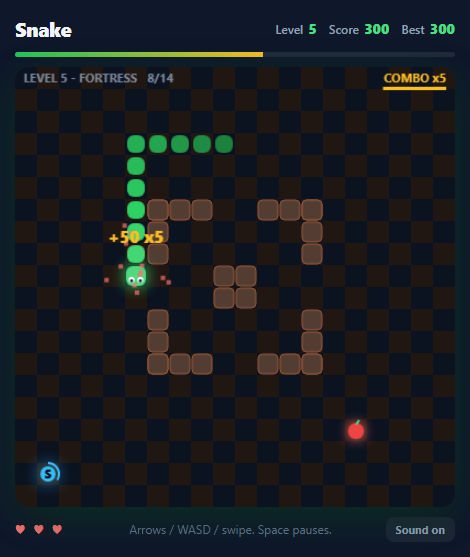
Snake is the archetypal grid game: a growing line of segments crosses a fixed grid, eating food while avoiding walls and its own body. This version turns that simple loop into a full run: eight unlockable levels with wall layouts, three lives, a combo multiplier, bonus pickups, sound and swipe controls, all in plain canvas code with no libraries or audio files.
Grid state, not pixels
The snake is an array of { x, y } cell coordinates (index 0 is the head) on a 20x20 grid, and walls are stored as a Set of "x,y" keys built from the [x, y, width, height] rectangles in each level's definition. Collision tests are therefore plain lookups, and draw() is the only place where cells are converted to pixels. The canvas buffer is scaled by devicePixelRatio, so the board stays sharp on retina screens.
Eight levels defined as data
The LEVELS array holds everything about a level: its name, how many apples clear it (goal), its starting move interval (tick), a wall tint (hue) and its wall rectangles. Levels run from an open Meadow through Pillars, Crossroads, Corridors, a Fortress with four gates, a Zigzag and a Maze to a dense Inferno. Adding a level is one more object in the array. Every apple eaten also shortens the move interval a little, so each level speeds up while you play it.
Fixed-step loop with a tick accumulator
Gameplay is discrete (one cell per step), but animation is not. A requestAnimationFrame loop adds the elapsed time to an accumulator and calls tick() each time it reaches the current move interval, while particles, floating text, the pulsing food and the screen shake update every frame. The loop also drives pause (Space or P, and automatically when the tab is hidden) and the 1.6x slowdown from the slow-mo pickup.
A direction buffer that never loses a quick turn
steer() compares a new direction with the last buffered one, not only with the current direction. Two quick key presses (for example up and then left) both count, because up is compared with the current direction and left with up. A reversal is ignored, so a mistimed key can never turn the snake into its own neck. The buffer holds at most two turns. The same function is used by the keyboard, by swipes on touch screens (a short drag on the canvas) and by a tap, which starts the snake moving.
Lives, combos and bonus pickups
A crash costs a life and puts the snake back at the start of the same level with your apple progress kept, so a mistake hurts without wiping a whole level. Eating apples within 3.5 seconds of each other raises a combo multiplier up to x5, which multiplies the 10 points per apple. After an apple, a golden coin (worth 50 points times your combo, with two extra segments of growth) or a blue slow-mo pickup can appear for a few seconds with a shrinking ring that shows its remaining time. Clearing a level gives a bonus of 100 points plus 50 per life left, and restores one life.
Progress, sound and sandbox safety
The highest unlocked level and the best score are saved to localStorage inside try/catch helpers, so the game also runs in sandboxed iframes where storage is blocked, it just does not remember progress there. Sound is a tiny Web Audio synth (an oscillator and a gain node per note) whose apple pitch rises with the combo, and a mute button turns it off. The AudioContext is only created inside the Start click, which is what browsers require.
What's included
Features
Step by step
How to Use
- 1Pick a level and startOnly level 1 is open at first. Click "Start Game", read the level banner (name and how many apples to eat), then press an arrow key, a WASD key, swipe on the board, or tap to get the snake moving.
- 2Steer around walls and yourselfUse Arrow keys or WASD, or swipe on a touch screen. Two quick turns are buffered so tight corners work, and a reversal into your own neck is ignored. Space or P pauses.
- 3Eat apples and build a comboEach apple gives 10 points. Eat the next one within 3.5 seconds to raise the combo multiplier up to x5. The progress bar above the board shows how close you are to clearing the level.
- 4Grab the bonus pickupsAfter some apples a golden coin ($) or a blue slow-mo (S) pickup appears for a few seconds. Gold is worth 50 points times your combo and adds growth, slow-mo slows the snake for 6 seconds.
- 5Use your three lives wiselyHitting a wall or your own body costs a life and puts the snake back at the start of the level, keeping your apple count. At zero lives the run ends and you can try again.
- 6Clear levels to unlock the next onesEating the level's apple goal clears it for a bonus of 100 points plus 50 per life left, restores one life and unlocks the next level. There are 8 levels in total, and your best score is saved.
Real-world uses
Common Use Cases
Got questions?
Frequently Asked Questions
Edit the LEVELS array. Each entry has a name, an apple goal, a starting tick in milliseconds, a hue for the wall colour and a list of [x, y, width, height] wall rectangles on the 20x20 grid. Keep row 10 free for the first five columns, which is where the snake starts, and make sure every open area stays reachable. Then add a matching numbered button in the HTML and update the level count.
steer() compares each new direction with the last buffered turn, or with the current direction if the buffer is empty. A direction equal to or opposite of that is ignored. Up to two turns are buffered, so two quick key presses both count, but a reversal never does.
Snake moves one cell per step, but the glow, particles, floating text, screen shake and pause all need to run every frame. The loop adds the elapsed time to an accumulator and runs tick() whenever it reaches the current move interval. That keeps movement on a steady grid rhythm while rendering stays smooth, and the interval can change on the fly for speed-ups and slow-mo.
You start a run with three lives. A crash costs one life and restarts the snake at the level start while keeping the apples you already ate. Clearing a level restores one life. Apples eaten within 3.5 seconds of each other raise a combo from x1 to x5, which multiplies the 10 points per apple, and the combo drops back to zero when the timer runs out or you crash.
Yes. Swipes on the canvas steer the snake and a tap starts it, and pointer events and touch-action: none keep the page from scrolling. localStorage reads and writes are wrapped in try/catch, so a blocked storage only means that your best score and unlocked levels are not remembered, and every sound call is wrapped too, so a blocked audio device never stops the game.
Copy & paste
Source Code
<div class="sn-wrap">
<div class="sn-header">
<h2>Snake</h2>
<div class="sn-scores">
<span>Level <strong id="sn-level">1</strong></span>
<span>Score <strong id="sn-score">0</strong></span>
<span>Best <strong id="sn-best">0</strong></span>
</div>
</div>
<div class="sn-progress"><div class="sn-progress-bar" id="sn-progress"></div></div>
<div class="sn-canvas-wrap">
<canvas id="sn-canvas" width="400" height="400"></canvas>
<div class="sn-overlay" id="sn-overlay">
<p class="sn-overlay-title" id="sn-overlay-title">Snake</p>
<p class="sn-overlay-sub" id="sn-overlay-sub">Eat the apples to clear each level. Walls get trickier and the snake gets faster. You have 3 lives.</p>
<div class="sn-levels" id="sn-levels" role="group" aria-label="Level">
<button class="sn-level active" data-level="1" type="button" aria-pressed="true" aria-label="Level 1">1</button>
<button class="sn-level" data-level="2" type="button" aria-pressed="false" aria-label="Level 2">2</button>
<button class="sn-level" data-level="3" type="button" aria-pressed="false" aria-label="Level 3">3</button>
<button class="sn-level" data-level="4" type="button" aria-pressed="false" aria-label="Level 4">4</button>
<button class="sn-level" data-level="5" type="button" aria-pressed="false" aria-label="Level 5">5</button>
<button class="sn-level" data-level="6" type="button" aria-pressed="false" aria-label="Level 6">6</button>
<button class="sn-level" data-level="7" type="button" aria-pressed="false" aria-label="Level 7">7</button>
<button class="sn-level" data-level="8" type="button" aria-pressed="false" aria-label="Level 8">8</button>
</div>
<p class="sn-level-name" id="sn-level-name">Level 1: Meadow</p>
<button class="sn-new-btn" id="sn-new-btn" type="button">Start Game</button>
</div>
</div>
<div class="sn-footer">
<span class="sn-lives" id="sn-lives" aria-label="Lives">♥ ♥ ♥</span>
<span class="sn-hint">Arrows / WASD / swipe. Space pauses.</span>
<button class="sn-mute" id="sn-mute" type="button" aria-pressed="false">Sound on</button>
</div>
</div>* { box-sizing: border-box; margin: 0; padding: 0; }
body { font-family: system-ui, sans-serif; background: #0f172a; min-height: 100vh; display: flex; align-items: center; justify-content: center; padding: 24px; }
.sn-wrap { display: flex; flex-direction: column; align-items: center; gap: 10px; width: 100%; max-width: 440px; }
.sn-header { width: 100%; display: flex; align-items: center; justify-content: space-between; }
.sn-header h2 { color: #f1f5f9; font-size: 20px; font-weight: 800; letter-spacing: -0.02em; }
.sn-scores { display: flex; gap: 12px; font-size: 12px; color: #94a3b8; font-weight: 600; }
.sn-scores strong { color: #4ade80; font-size: 14px; margin-left: 2px; }
.sn-progress { width: 100%; height: 5px; background: rgba(255,255,255,0.08); border-radius: 5px; overflow: hidden; }
.sn-progress-bar { height: 100%; width: 0; background: linear-gradient(90deg, #22c55e, #fbbf24); transition: width 0.25s; }
.sn-canvas-wrap { position: relative; width: 100%; aspect-ratio: 1 / 1; border-radius: 14px; overflow: hidden; box-shadow: 0 10px 40px rgba(34,197,94,0.18), 0 10px 30px rgba(0,0,0,0.4); }
#sn-canvas { width: 100%; height: 100%; display: block; background: #0b1220; touch-action: none; }
.sn-overlay {
position: absolute; inset: 0;
background: rgba(2, 6, 23, 0.9);
display: flex; flex-direction: column; align-items: center; justify-content: center; gap: 10px;
text-align: center; padding: 20px;
}
.sn-overlay.hidden { display: none; }
.sn-overlay-title { color: #f1f5f9; font-size: 24px; font-weight: 800; text-shadow: 0 0 18px #22c55e; }
.sn-overlay-sub { color: #94a3b8; font-size: 13px; max-width: 320px; line-height: 1.5; }
.sn-levels { display: flex; gap: 6px; flex-wrap: wrap; justify-content: center; }
.sn-level {
width: 34px; height: 34px; font-size: 13px; font-weight: 800; border-radius: 8px;
border: 1.5px solid #334155; background: transparent; color: #94a3b8; cursor: pointer; font-family: inherit;
transition: background 0.15s, color 0.15s, border-color 0.15s;
}
.sn-level:hover:not(:disabled) { border-color: #4ade80; color: #e2e8f0; }
.sn-level.active { background: #4ade80; border-color: #4ade80; color: #052e16; }
.sn-level:disabled { opacity: 0.35; cursor: not-allowed; }
.sn-level-name { color: #fbbf24; font-size: 12px; font-weight: 700; letter-spacing: 0.4px; text-transform: uppercase; }
.sn-new-btn {
padding: 10px 22px; font-size: 13px; font-weight: 700; border-radius: 9px;
border: none; background: #4ade80; color: #052e16; cursor: pointer;
font-family: inherit; transition: background 0.15s, transform 0.1s;
}
.sn-new-btn:hover { background: #86efac; }
.sn-new-btn:active { transform: scale(0.96); }
.sn-footer { width: 100%; display: flex; align-items: center; justify-content: space-between; gap: 10px; }
.sn-lives { color: #f87171; font-size: 15px; letter-spacing: 2px; min-width: 60px; }
.sn-hint { color: #64748b; font-size: 12px; text-align: center; }
.sn-mute {
background: rgba(255,255,255,0.06); color: #94a3b8; border: none; border-radius: 8px;
padding: 5px 10px; font-size: 11px; font-weight: 700; cursor: pointer; font-family: inherit;
}
.sn-mute:hover { background: rgba(255,255,255,0.12); }const GRID = 20, SIZE = 400, CELL = SIZE / GRID;
const MAX_LIVES = 3;
const COMBO_MS = 3500, GOLD_MS = 6000, SLOW_MS = 6000;
const START_CELLS = [{ x: 3, y: 10 }, { x: 2, y: 10 }, { x: 1, y: 10 }];
// Eight levels. walls are [x, y, width, height] rectangles in grid cells, goal is how many apples clear the level,
// tick is the starting milliseconds per move (it also speeds up with every apple), hue tints the walls.
const LEVELS = [
{ name: 'Meadow', goal: 8, tick: 150, hue: 140, walls: [] },
{ name: 'Pillars', goal: 10, tick: 140, hue: 200, walls: [[5,4,2,2],[13,4,2,2],[5,14,2,2],[13,14,2,2],[9,8,2,4]] },
{ name: 'Crossroads', goal: 12, tick: 130, hue: 260, walls: [[2,5,7,1],[11,5,7,1],[2,14,7,1],[11,14,7,1],[9,1,1,3],[9,16,1,3]] },
{ name: 'Corridors', goal: 12, tick: 125, hue: 300, walls: [[3,4,15,1],[2,15,15,1],[10,7,8,1],[2,12,8,1]] },
{ name: 'Fortress', goal: 14, tick: 118, hue: 20, walls: [[6,6,3,1],[11,6,3,1],[6,13,3,1],[11,13,3,1],[6,6,1,3],[6,11,1,3],[13,6,1,3],[13,11,1,3],[9,9,2,2]] },
{ name: 'Zigzag', goal: 14, tick: 110, hue: 50, walls: [[6,0,1,13],[10,7,1,13],[14,0,1,13]] },
{ name: 'Maze', goal: 16, tick: 100, hue: 0, walls: [[4,3,12,1],[4,3,1,5],[15,3,1,9],[8,6,5,1],[8,6,1,5],[8,13,8,1],[3,16,12,1],[18,8,1,8]] },
{ name: 'Inferno', goal: 18, tick: 92, hue: 330, walls: [[4,3,2,2],[8,3,2,2],[12,3,2,2],[16,3,2,2],[4,15,2,2],[8,15,2,2],[12,15,2,2],[16,15,2,2],[8,7,2,2],[12,7,2,2],[8,12,2,2],[12,12,2,2],[16,9,2,2]] },
];
const BEST_KEY = 'snake-best-score';
const LEVEL_KEY = 'snake-unlocked-level';
const canvas = document.getElementById('sn-canvas');
const ctx = canvas.getContext('2d');
// Sharp on retina screens: the buffer is bigger, the drawing coordinates stay 400 x 400
const dpr = Math.min(2, window.devicePixelRatio || 1);
canvas.width = SIZE * dpr;
canvas.height = SIZE * dpr;
ctx.scale(dpr, dpr);
const levelEl = document.getElementById('sn-level');
const scoreEl = document.getElementById('sn-score');
const bestEl = document.getElementById('sn-best');
const progressEl = document.getElementById('sn-progress');
const livesEl = document.getElementById('sn-lives');
const overlayEl = document.getElementById('sn-overlay');
const overlayTitleEl = document.getElementById('sn-overlay-title');
const overlaySubEl = document.getElementById('sn-overlay-sub');
const levelNameEl = document.getElementById('sn-level-name');
const newBtn = document.getElementById('sn-new-btn');
const muteBtn = document.getElementById('sn-mute');
const levelBtns = document.querySelectorAll('.sn-level');
// localStorage can throw in sandboxed iframes / private mode, so guard it
function loadNumber(key, fallback) {
try { return parseInt(localStorage.getItem(key) || String(fallback), 10) || fallback; } catch (e) { return fallback; }
}
function saveNumber(key, v) {
try { localStorage.setItem(key, String(v)); } catch (e) { /* ignore */ }
}
function clamp(v, min, max) { return Math.max(min, Math.min(max, v)); }
function cellKey(x, y) { return x + ',' + y; }
let snake, direction, inputQueue, growth;
let food, bonus; // bonus: { type: 'gold' | 'slow', x, y, left }
let wallSet = new Set(), wallCells = [];
let level = 1, unlocked = clamp(loadNumber(LEVEL_KEY, 1), 1, LEVELS.length);
let score = 0, best = loadNumber(BEST_KEY, 0), lives = MAX_LIVES;
let eaten = 0, combo = 0, comboMs = 0, slowMs = 0;
let carry = false; // true after clearing a level: the next run keeps score and lives
let state = 'menu'; // menu | ready | playing | paused
let acc = 0, lastTime = 0, frameCount = 0, shake = 0;
let particles = [], texts = [];
function currentLevel() { return LEVELS[level - 1]; }
/* ---------- Sound (tiny Web Audio synth, no files) ---------- */
let audioCtx = null, muted = false;
function getAudio() {
if (!audioCtx) {
try { audioCtx = new (window.AudioContext || window.webkitAudioContext)(); } catch (e) { audioCtx = null; }
}
if (audioCtx && audioCtx.state === 'suspended') audioCtx.resume();
return audioCtx;
}
function tone(freq, dur, type, vol, slideTo, delay) {
if (muted) return;
const ac = getAudio();
if (!ac) return;
try {
const t0 = ac.currentTime + (delay || 0);
const osc = ac.createOscillator();
const gain = ac.createGain();
osc.type = type;
osc.frequency.setValueAtTime(freq, t0);
if (slideTo) osc.frequency.exponentialRampToValueAtTime(slideTo, t0 + dur);
gain.gain.setValueAtTime(vol, t0);
gain.gain.exponentialRampToValueAtTime(0.0001, t0 + dur);
osc.connect(gain);
gain.connect(ac.destination);
osc.start(t0);
osc.stop(t0 + dur);
} catch (e) { /* audio is optional */ }
}
muteBtn.addEventListener('click', () => {
muted = !muted;
muteBtn.textContent = muted ? 'Sound off' : 'Sound on';
muteBtn.setAttribute('aria-pressed', String(muted));
});
/* ---------- Effects ---------- */
function burst(cx, cy, color, count) {
for (let i = 0; i < count; i++) {
const a = Math.random() * Math.PI * 2;
const sp = 1 + Math.random() * 3;
particles.push({ x: cx, y: cy, vx: Math.cos(a) * sp, vy: Math.sin(a) * sp, life: 1, color });
}
}
function addText(text, cx, cy, color) {
texts.push({ text, x: clamp(cx, 40, SIZE - 40), y: cy, life: 1, color });
}
function cellCenter(c) { return { x: c.x * CELL + CELL / 2, y: c.y * CELL + CELL / 2 }; }
/* ---------- Levels ---------- */
function buildWalls() {
wallSet = new Set();
wallCells = [];
currentLevel().walls.forEach(([x, y, w, h]) => {
for (let i = x; i < x + w; i++) {
for (let j = y; j < y + h; j++) {
wallSet.add(cellKey(i, j));
wallCells.push({ x: i, y: j });
}
}
});
}
function randomFreeCell() {
const taken = new Set(wallSet);
snake.forEach(s => taken.add(cellKey(s.x, s.y)));
if (food) taken.add(cellKey(food.x, food.y));
if (bonus) taken.add(cellKey(bonus.x, bonus.y));
const free = [];
for (let x = 0; x < GRID; x++) {
for (let y = 0; y < GRID; y++) {
if (!taken.has(cellKey(x, y))) free.push({ x, y });
}
}
return free.length ? free[Math.floor(Math.random() * free.length)] : null;
}
function resetSnake() {
snake = START_CELLS.map(c => ({ x: c.x, y: c.y }));
direction = { x: 1, y: 0 };
inputQueue = [];
growth = 0;
acc = 0;
if (food && snake.some(s => s.x === food.x && s.y === food.y)) { food = null; food = randomFreeCell(); }
if (bonus && snake.some(s => s.x === bonus.x && s.y === bonus.y)) bonus = null;
}
function loadLevel() {
buildWalls();
eaten = 0; combo = 0; comboMs = 0; slowMs = 0;
bonus = null; food = null;
particles = []; texts = [];
resetSnake();
food = randomFreeCell();
state = 'ready';
updateHud();
}
function syncLevelUi() {
levelBtns.forEach(btn => {
const n = parseInt(btn.dataset.level, 10);
btn.classList.toggle('active', n === level);
btn.setAttribute('aria-pressed', String(n === level));
btn.disabled = n > unlocked; // levels unlock one by one as you clear them
btn.title = n > unlocked ? 'Clear level ' + (n - 1) + ' to unlock' : LEVELS[n - 1].name;
});
levelNameEl.textContent = 'Level ' + level + ': ' + currentLevel().name;
}
levelBtns.forEach(btn => btn.addEventListener('click', () => {
level = parseInt(btn.dataset.level, 10);
carry = false; // picking a level yourself starts a fresh run
syncLevelUi();
}));
function updateHud() {
levelEl.textContent = level;
scoreEl.textContent = score;
bestEl.textContent = best;
livesEl.textContent = Array.from({ length: MAX_LIVES }, (_, i) => (i < lives ? '♥' : '♡')).join(' ');
progressEl.style.width = Math.min(100, (eaten / currentLevel().goal) * 100) + '%';
}
function updateBest() {
if (score > best) { best = score; saveNumber(BEST_KEY, best); }
updateHud();
}
function showOverlay(title, sub, button) {
overlayTitleEl.textContent = title;
overlaySubEl.textContent = sub;
newBtn.textContent = button;
syncLevelUi();
overlayEl.classList.remove('hidden');
}
/* ---------- Game flow ---------- */
function startGame() {
getAudio(); // created inside the click so the browser allows sound
if (!carry) { score = 0; lives = MAX_LIVES; }
carry = false;
overlayEl.classList.add('hidden');
loadLevel();
}
function currentTickMs() {
const base = Math.max(55, currentLevel().tick - eaten * 1.5); // every apple makes the snake a little faster
return slowMs > 0 ? base * 1.6 : base;
}
function frame(now) {
const dtMs = Math.min(50, now - lastTime);
lastTime = now;
frameCount++;
if (state === 'playing') {
comboMs = Math.max(0, comboMs - dtMs);
if (comboMs === 0) combo = 0;
slowMs = Math.max(0, slowMs - dtMs);
if (bonus) { bonus.left -= dtMs; if (bonus.left <= 0) bonus = null; }
acc += dtMs;
let step = currentTickMs();
while (acc >= step && state === 'playing') {
acc -= step;
tick();
step = currentTickMs();
}
}
shake *= Math.pow(0.85, dtMs / 16.667);
particles.forEach(p => { p.x += p.vx; p.y += p.vy; p.life -= 0.03; });
particles = particles.filter(p => p.life > 0);
texts.forEach(t => { t.y -= 0.4; t.life -= 0.016; });
texts = texts.filter(t => t.life > 0);
draw();
requestAnimationFrame(frame);
}
function tick() {
if (inputQueue.length) direction = inputQueue.shift();
const head = snake[0];
const nx = head.x + direction.x, ny = head.y + direction.y;
if (nx < 0 || nx >= GRID || ny < 0 || ny >= GRID || wallSet.has(cellKey(nx, ny))) return crash();
// the tail moves out of the way on this tick unless the snake is still growing
const body = growth > 0 ? snake : snake.slice(0, -1);
if (body.some(s => s.x === nx && s.y === ny)) return crash();
snake.unshift({ x: nx, y: ny });
if (nx === food.x && ny === food.y) {
eatFood();
} else if (bonus && nx === bonus.x && ny === bonus.y) {
eatBonus();
}
if (state !== 'playing') return; // the level may just have been cleared
if (growth > 0) growth--; else snake.pop();
}
function eatFood() {
combo = comboMs > 0 ? Math.min(5, combo + 1) : 1; // eat again within 3.5s to build a combo up to x5
comboMs = COMBO_MS;
const pts = 10 * combo;
score += pts;
eaten++;
growth += 1;
const c = cellCenter(food);
burst(c.x, c.y, '#f87171', 12);
addText('+' + pts + (combo > 1 ? ' x' + combo : ''), c.x, c.y - 6, '#fbbf24');
tone(380 + combo * 70, 0.09, 'square', 0.05);
updateBest();
if (eaten >= currentLevel().goal) { levelComplete(); return; }
food = null;
food = randomFreeCell();
if (!bonus) { // sometimes a bonus item appears for a few seconds
const r = Math.random();
const type = r < 0.22 ? 'gold' : (r < 0.34 ? 'slow' : null);
const cell = type ? randomFreeCell() : null;
if (cell) bonus = { type, x: cell.x, y: cell.y, left: type === 'gold' ? GOLD_MS : SLOW_MS };
}
}
function eatBonus() {
const c = cellCenter(bonus);
if (bonus.type === 'gold') {
const pts = 50 * Math.max(1, combo);
score += pts;
growth += 2;
burst(c.x, c.y, '#fbbf24', 22);
addText('+' + pts + '!', c.x, c.y - 6, '#fbbf24');
tone(660, 0.1, 'triangle', 0.06);
tone(990, 0.18, 'triangle', 0.06, null, 0.09);
} else {
slowMs = SLOW_MS;
burst(c.x, c.y, '#38bdf8', 22);
addText('Slow-mo!', c.x, c.y - 6, '#38bdf8');
tone(440, 0.25, 'sine', 0.06, 220);
}
bonus = null;
updateBest();
}
function crash() {
lives--;
shake = 10;
combo = 0; comboMs = 0;
const c = cellCenter(snake[0]);
burst(c.x, c.y, '#f87171', 24);
tone(180, 0.35, 'sawtooth', 0.07, 60);
updateHud();
if (lives <= 0) { gameOver(); return; }
addText('Ouch! ' + lives + (lives === 1 ? ' life left' : ' lives left'), SIZE / 2, SIZE / 2 - 60, '#f87171');
resetSnake();
state = 'ready'; // wait for the player before moving again
}
function levelComplete() {
const cleared = level;
const bonusPts = 100 + lives * 50;
score += bonusPts;
if (lives < MAX_LIVES) lives++; // a free life as a reward
updateBest();
tone(523, 0.12, 'triangle', 0.07);
tone(659, 0.12, 'triangle', 0.07, null, 0.12);
tone(784, 0.25, 'triangle', 0.07, null, 0.24);
state = 'menu';
if (cleared < LEVELS.length) {
unlocked = Math.max(unlocked, cleared + 1);
saveNumber(LEVEL_KEY, unlocked);
level = cleared + 1;
carry = true; // the next level keeps your score and lives
showOverlay('Level ' + cleared + ' Cleared!', 'Bonus +' + bonusPts + '. Score ' + score + '. Next up: ' + currentLevel().name + '.', 'Next Level');
} else {
level = 1;
carry = false;
showOverlay('You Beat Snake!', 'All ' + LEVELS.length + ' levels cleared. Final score ' + score + (score >= best ? ' (new best!)' : '') + '.', 'Play Again');
}
}
function gameOver() {
state = 'menu';
carry = false;
updateBest();
showOverlay('Game Over', 'You reached level ' + level + ' with ' + score + ' points (best ' + best + ').', 'Try Again');
}
/* ---------- Input ---------- */
function steer(dx, dy) {
if (state === 'ready') {
if (dx === -1) return; // the snake starts facing right, so left would be a reversal
direction = { x: dx, y: dy };
state = 'playing';
acc = 0;
return;
}
if (state !== 'playing') return;
// compare with the last buffered turn, so two quick key presses both count but a reversal never does
const last = inputQueue.length ? inputQueue[inputQueue.length - 1] : direction;
if (dx === last.x && dy === last.y) return;
if (dx === -last.x && dy === -last.y) return;
if (inputQueue.length < 2) inputQueue.push({ x: dx, y: dy });
}
function togglePause() {
if (state === 'playing') state = 'paused';
else if (state === 'paused') { state = 'playing'; lastTime = performance.now(); }
}
document.addEventListener('keydown', e => {
if (e.ctrlKey || e.metaKey || e.altKey) return;
const active = state === 'ready' || state === 'playing' || state === 'paused';
switch (e.key) {
case 'ArrowUp': case 'w': case 'W': steer(0, -1); break;
case 'ArrowDown': case 's': case 'S': steer(0, 1); break;
case 'ArrowLeft': case 'a': case 'A': steer(-1, 0); break;
case 'ArrowRight': case 'd': case 'D': steer(1, 0); break;
case ' ': case 'p': case 'P': if (!e.repeat) togglePause(); break;
default: return;
}
if (active) e.preventDefault();
});
document.addEventListener('visibilitychange', () => { if (document.hidden && state === 'playing') state = 'paused'; });
// Swipe to steer on touch screens (a tap starts the snake moving right)
let swipe = null;
canvas.addEventListener('pointerdown', e => { swipe = { x: e.clientX, y: e.clientY, moved: false }; });
canvas.addEventListener('pointermove', e => {
if (!swipe) return;
const dx = e.clientX - swipe.x, dy = e.clientY - swipe.y;
if (Math.max(Math.abs(dx), Math.abs(dy)) < 24) return;
if (Math.abs(dx) > Math.abs(dy)) steer(dx > 0 ? 1 : -1, 0); else steer(0, dy > 0 ? 1 : -1);
swipe = { x: e.clientX, y: e.clientY, moved: true };
});
canvas.addEventListener('pointerup', () => {
if (swipe && !swipe.moved) { if (state === 'ready') steer(1, 0); else if (state === 'paused') togglePause(); }
swipe = null;
});
canvas.addEventListener('pointercancel', () => { swipe = null; });
/* ---------- Drawing ---------- */
function roundRect(x, y, w, h, r) {
ctx.beginPath();
ctx.moveTo(x + r, y);
ctx.arcTo(x + w, y, x + w, y + h, r);
ctx.arcTo(x + w, y + h, x, y + h, r);
ctx.arcTo(x, y + h, x, y, r);
ctx.arcTo(x, y, x + w, y, r);
ctx.closePath();
}
function drawBoard() {
const hue = currentLevel().hue;
ctx.fillStyle = '#0b1220';
ctx.fillRect(0, 0, SIZE, SIZE);
ctx.fillStyle = 'hsl(' + hue + ',30%,10%)';
for (let x = 0; x < GRID; x++) {
for (let y = 0; y < GRID; y++) {
if ((x + y) % 2) ctx.fillRect(x * CELL, y * CELL, CELL, CELL);
}
}
wallCells.forEach(c => {
roundRect(c.x * CELL + 1, c.y * CELL + 1, CELL - 2, CELL - 2, 4);
ctx.fillStyle = 'hsl(' + hue + ',25%,26%)';
ctx.fill();
ctx.strokeStyle = 'hsl(' + hue + ',45%,42%)';
ctx.lineWidth = 1;
ctx.stroke();
});
}
function drawFood() {
const c = cellCenter(food);
const pulse = 1 + Math.sin(frameCount * 0.15) * 0.08;
ctx.shadowColor = '#f87171'; ctx.shadowBlur = 12;
ctx.fillStyle = '#ef4444';
ctx.beginPath(); ctx.arc(c.x, c.y + 1, CELL * 0.36 * pulse, 0, Math.PI * 2); ctx.fill();
ctx.shadowBlur = 0;
ctx.strokeStyle = '#4ade80'; ctx.lineWidth = 2;
ctx.beginPath(); ctx.moveTo(c.x, c.y - 5); ctx.lineTo(c.x + 3, c.y - 9); ctx.stroke();
}
function drawBonus() {
const c = cellCenter(bonus);
const color = bonus.type === 'gold' ? '#fbbf24' : '#38bdf8';
const total = bonus.type === 'gold' ? GOLD_MS : SLOW_MS;
if (bonus.left < 1800 && Math.floor(frameCount / 6) % 2) return; // blinks before it disappears
const pulse = 1 + Math.sin(frameCount * 0.2) * 0.12;
ctx.shadowColor = color; ctx.shadowBlur = 16;
ctx.fillStyle = color;
ctx.beginPath(); ctx.arc(c.x, c.y, CELL * 0.34 * pulse, 0, Math.PI * 2); ctx.fill();
ctx.shadowBlur = 0;
ctx.strokeStyle = color; ctx.lineWidth = 2;
ctx.beginPath(); ctx.arc(c.x, c.y, CELL * 0.5, -Math.PI / 2, -Math.PI / 2 + Math.PI * 2 * (bonus.left / total)); ctx.stroke();
ctx.fillStyle = '#0b1220';
ctx.font = '800 11px system-ui, sans-serif';
ctx.textAlign = 'center'; ctx.textBaseline = 'middle';
ctx.fillText(bonus.type === 'gold' ? '$' : 'S', c.x, c.y + 1);
ctx.textBaseline = 'alphabetic';
}
function drawSnake() {
const n = snake.length;
const hue = slowMs > 0 ? 195 : 140;
for (let i = n - 1; i >= 0; i--) {
const t = 1 - i / Math.max(n, 1); // 1 at the head, fading toward the tail
const s = snake[i];
ctx.fillStyle = 'hsl(' + hue + ',65%,' + (28 + 30 * t) + '%)';
if (i === 0) { ctx.shadowColor = 'hsl(' + hue + ',80%,55%)'; ctx.shadowBlur = 14; }
const pad = i === 0 ? 1 : 2;
roundRect(s.x * CELL + pad, s.y * CELL + pad, CELL - pad * 2, CELL - pad * 2, 6);
ctx.fill();
ctx.shadowBlur = 0;
}
// eyes look in the direction of travel
const h = cellCenter(snake[0]);
const d = direction, px = -d.y, py = d.x;
[-1, 1].forEach(side => {
const ex = h.x + d.x * 3.5 + px * side * 4, ey = h.y + d.y * 3.5 + py * side * 4;
ctx.fillStyle = '#f8fafc';
ctx.beginPath(); ctx.arc(ex, ey, 2.7, 0, Math.PI * 2); ctx.fill();
ctx.fillStyle = '#0f172a';
ctx.beginPath(); ctx.arc(ex + d.x * 0.9, ey + d.y * 0.9, 1.3, 0, Math.PI * 2); ctx.fill();
});
}
function drawBanner(lines) {
ctx.fillStyle = 'rgba(2,6,23,0.72)';
roundRect(SIZE / 2 - 150, SIZE / 2 - 54, 300, 108, 12);
ctx.fill();
ctx.textAlign = 'center';
ctx.fillStyle = '#f1f5f9'; ctx.font = '800 20px system-ui, sans-serif';
ctx.fillText(lines[0], SIZE / 2, SIZE / 2 - 18);
ctx.fillStyle = '#fbbf24'; ctx.font = '700 13px system-ui, sans-serif';
ctx.fillText(lines[1], SIZE / 2, SIZE / 2 + 6);
ctx.fillStyle = '#94a3b8'; ctx.font = '600 12px system-ui, sans-serif';
ctx.fillText(lines[2], SIZE / 2, SIZE / 2 + 32);
}
function draw() {
ctx.save();
if (shake > 0.2) ctx.translate((Math.random() - 0.5) * shake, (Math.random() - 0.5) * shake);
drawBoard();
if (food) drawFood();
if (bonus) drawBonus();
if (snake) drawSnake();
particles.forEach(p => {
ctx.globalAlpha = Math.max(0, p.life);
ctx.fillStyle = p.color;
ctx.fillRect(p.x - 2, p.y - 2, 4, 4);
});
ctx.globalAlpha = 1;
ctx.textAlign = 'center';
texts.forEach(t => {
ctx.globalAlpha = Math.max(0, Math.min(1, t.life * 1.5));
ctx.fillStyle = t.color;
ctx.font = '800 15px system-ui, sans-serif';
ctx.fillText(t.text, t.x, t.y);
});
ctx.globalAlpha = 1;
if (state === 'playing' || state === 'paused' || state === 'ready') {
ctx.textAlign = 'left';
ctx.font = '700 11px system-ui, sans-serif';
ctx.fillStyle = 'rgba(148,163,184,0.8)';
ctx.fillText('LEVEL ' + level + ' - ' + currentLevel().name.toUpperCase() + ' ' + eaten + '/' + currentLevel().goal, 8, 14);
if (slowMs > 0) { ctx.fillStyle = '#38bdf8'; ctx.fillText('SLOW-MO', 8, 28); }
if (combo > 1 && comboMs > 0) {
ctx.textAlign = 'right';
ctx.fillStyle = '#fbbf24';
ctx.fillText('COMBO x' + combo, SIZE - 8, 14);
ctx.fillRect(SIZE - 8 - 60 * (comboMs / COMBO_MS), 18, 60 * (comboMs / COMBO_MS), 3);
}
}
if (state === 'ready') {
drawBanner(['Level ' + level + ': ' + currentLevel().name, 'Eat ' + currentLevel().goal + ' apples', 'Arrow keys, WASD or swipe to go']);
}
if (state === 'paused') {
ctx.fillStyle = 'rgba(2,6,23,0.65)';
ctx.fillRect(0, 0, SIZE, SIZE);
ctx.textAlign = 'center';
ctx.fillStyle = '#f1f5f9'; ctx.font = '800 28px system-ui, sans-serif';
ctx.fillText('Paused', SIZE / 2, SIZE / 2);
ctx.fillStyle = '#94a3b8'; ctx.font = '600 12px system-ui, sans-serif';
ctx.fillText('Press Space or P to resume', SIZE / 2, SIZE / 2 + 24);
}
ctx.restore();
}
newBtn.addEventListener('click', startGame);
// Idle preview behind the menu: the first level's board with the snake waiting
buildWalls();
resetSnake();
food = randomFreeCell();
syncLevelUi();
updateHud();
lastTime = performance.now();
requestAnimationFrame(frame);
/* wdp-share:start */
(function () {
var TITLE = 'Classic Snake Game', URL = 'https://webdevpuneet.com/ui-snippets/snake-game/';
if (window.__wdpShare) return;
window.__wdpShare = true;
var blob = null, file = null, lastInfo = null;
/* ---- UI ---- */
var st = document.createElement('style');
st.textContent =
'.wdps-in,.wdps-btn,.wdps-box{touch-action:manipulation;-webkit-tap-highlight-color:transparent}.wdps-in{display:block;margin:12px auto 0;border:0;border-radius:12px;padding:11px 22px;font:800 15px/1 system-ui,sans-serif;background:#16a34a;color:#fff;cursor:pointer;box-shadow:0 3px 0 #11793a;pointer-events:auto;position:relative;z-index:5}' +
'.wdps-in:hover{background:#15803d}.wdps-in:active{transform:translateY(2px);box-shadow:0 1px 0 #11793a}' +
'.wdps-btn{position:fixed;right:12px;bottom:12px;z-index:2147483000;border:0;border-radius:99px;padding:9px 16px;font:700 13px/1 system-ui,sans-serif;background:#16a34a;color:#fff;cursor:pointer;box-shadow:0 3px 12px rgba(0,0,0,.3)}' +
'.wdps-btn.wdps-hot{animation:wdps-p 1.4s ease-in-out infinite}' +
'@keyframes wdps-p{0%,100%{box-shadow:0 0 0 0 rgba(22,163,74,.6),0 3px 12px rgba(0,0,0,.3)}50%{box-shadow:0 0 0 9px rgba(22,163,74,0),0 3px 12px rgba(0,0,0,.3)}}' +
'.wdps-btn:active{transform:translateY(1px)}' +
'.wdps-in[hidden],.wdps-btn[hidden],.wdps-box[hidden],.wdps-box [hidden]{display:none}' +
'.wdps-box{position:fixed;left:50%;bottom:12px;transform:translateX(-50%);z-index:2147483001;width:max-content;max-width:calc(100vw - 24px);box-sizing:border-box;background:#fff;color:#64748b;border:1px solid #d5e2ee;border-radius:12px;padding:8px 12px;font:700 12px/1.4 system-ui,sans-serif;box-shadow:0 8px 26px rgba(15,23,42,.25);display:flex;flex-wrap:wrap;gap:8px;align-items:center}' +
'.wdps-box button,.wdps-box a{border:1px solid #d5e2ee;background:#f8fafc;color:#1e293b;border-radius:99px;padding:5px 12px;font:700 12px system-ui,sans-serif;text-decoration:none;cursor:pointer}' +
'.wdps-box .wdps-x{border:0;background:none;font-size:19px;line-height:1;padding:0 4px;margin-left:auto;color:#475569}' +
'@media (max-width:700px){.wdps-box{width:calc(100vw - 24px);justify-content:center;padding:10px 12px}.wdps-box>span{width:100%;text-align:center}.wdps-box button,.wdps-box a{padding:9px 14px;font-size:13px}.wdps-box .wdps-x{position:absolute;top:4px;right:4px}.wdps-in{width:100%;max-width:320px}}';
document.head.appendChild(st);
var pill = document.createElement('button');
pill.type = 'button'; pill.className = 'wdps-btn'; pill.textContent = 'Share result';
var inl = document.createElement('button');
inl.type = 'button'; inl.className = 'wdps-in'; inl.textContent = 'Share result'; inl.hidden = true;
var box = document.createElement('div');
box.className = 'wdps-box'; box.hidden = true;
box.setAttribute('role', 'dialog'); box.setAttribute('aria-label', 'Share your result');
box.innerHTML =
'<span data-a="msg">Share your result:</span>' +
'<button type="button" data-a="copy">Copy image</button>' +
'<a data-a="dl" download="result.png">Download image</a>' +
'<button type="button" data-a="more" hidden>More…</button>' +
'<a data-a="wa" target="_blank" rel="noopener">WhatsApp</a>' +
'<a data-a="x" target="_blank" rel="noopener">X</a>' +
'<a data-a="fb" target="_blank" rel="noopener">Facebook</a>' +
'<button type="button" class="wdps-x" data-a="close" aria-label="Close share options">×</button>';
document.body.appendChild(box);
document.body.appendChild(pill);
function q(a) { return box.querySelector('[data-a="' + a + '"]'); }
function ours(el) { return el === inl || el === pill || !!el.closest('.wdps-box'); }
/* ---- reading the result from the screen ---- */
function shown(el) {
if (!el || !el.getClientRects().length) return false;
for (var n = el; n && n !== document.body; n = n.parentElement) {
var cs = getComputedStyle(n);
if (cs.display === 'none' || cs.visibility === 'hidden' || parseFloat(cs.opacity) < 0.1) return false;
if (n.hidden || n.getAttribute('aria-hidden') === 'true') return false;
}
return true;
}
function txt(el) { return (el.textContent || '').replace(/\s+/g, ' ').trim(); }
function sig(el) { return ((el.id || '') + ' ' + (typeof el.className === 'string' ? el.className : '')).toLowerCase(); }
var OUTCOME = /(you win|you won|win!|wins|victory|game over|time.?s up|cleared|complete|solved|defeat|you lose|you lost|lost|draw|crash|failed|success|congrat|score|result|finished|beat|all matched|well done|perfect|new best)/i;
var HEADSIG = /(title|headline|msg|message|banner|result|verdict|status)/;
var WIN = /(you win|you won|win!|wins|victory|cleared|complete|solved|success|congrat|beat|matched|perfect|new best|record)/i;
var LOSS = /(game over|time.?s up|defeat|you lose|you lost|lost|crash|failed|out of)/i;
var BOX = /(overlay|modal|banner|result|over|end|dialog|screen|popup|panel|card|finish|win)/;
function readResult() {
var head = '', sub = '', root = null, headEl = null;
var all = document.body.querySelectorAll('h1,h2,h3,h4,p,strong,div,span');
for (var i = 0; i < all.length && !head; i++) {
var el = all[i];
if (ours(el) || el.children.length > 2) continue;
if (!HEADSIG.test(sig(el))) continue;
/* a banner that holds its own title: use the title inside it instead */
var inner = false;
for (var c = 0; c < el.children.length; c++) if (HEADSIG.test(sig(el.children[c]))) inner = true;
if (inner) continue;
var t = txt(el);
if (t.length < 3 || t.length > 70 || !OUTCOME.test(t) || !shown(el)) continue;
head = t; headEl = el; root = el.parentElement;
}
if (root) {
var kids = root.querySelectorAll('p,span,div');
for (var j = 0; j < kids.length && !sub; j++) {
var k = kids[j];
if (ours(k) || k.children.length > 2 || !/(sub|text|summary|note|desc|detail)/.test(sig(k))) continue;
var tt = txt(k);
if (tt && tt !== head && tt.length >= 5 && tt.length <= 160 && shown(k)) sub = tt;
}
}
/* the result screen the button goes into: the nearest overlay / banner / result box around the headline */
var host = null;
for (var n = headEl, d = 0; n && n !== document.body && d < 4; n = n.parentElement, d++) {
if (d > 0 && BOX.test(sig(n)) && n.tagName !== 'BUTTON') { host = n; break; }
}
return { head: head, sub: sub, host: host };
}
var STATRE = /(score|moves|time|wpm|best|level|streak|accuracy|combo|coins|distance|height|points|stars|lives|wins|attempt|guess)/;
function readStats() {
var out = [], seen = {};
var all = document.body.querySelectorAll('span,strong,b,div,p,output');
for (var i = 0; i < all.length && out.length < 4; i++) {
var el = all[i];
if (ours(el) || el.children.length > 1) continue;
if (!STATRE.test(sig(el))) continue;
var t = txt(el);
if (!t || t.length > 28 || !/[0-9]/.test(t) || !shown(el)) continue;
if (!/[a-zA-Z]/.test(t) && el.parentElement) {
var parts = [], ch = el.parentElement.childNodes;
for (var p = 0; p < ch.length; p++) { var pv = (ch[p].textContent || '').replace(/\s+/g, ' ').trim(); if (pv) parts.push(pv); }
var pt = parts.join(' ');
if (pt.length <= 30 && /[a-zA-Z]/.test(pt)) t = pt;
}
var key = t.toLowerCase();
if (seen[key]) continue;
seen[key] = 1; out.push(t);
}
return out;
}
function bestCanvas() {
var cs = document.querySelectorAll('canvas'), best = null, area = 0;
for (var i = 0; i < cs.length; i++) {
var r = cs[i].getBoundingClientRect(), a = r.width * r.height;
if (a > area && a > 8000 && shown(cs[i])) { area = a; best = cs[i]; }
}
return best;
}
/* ---- show the button when a result is on screen ---- */
var lastHost = null, timer = 0;
function sync() {
timer = 0;
var r = readResult();
if (r.head && r.host) {
if (inl.parentElement !== r.host) r.host.appendChild(inl);
if (inl.hidden) inl.hidden = false;
if (!pill.hidden) pill.hidden = true;
} else {
if (!inl.hidden) inl.hidden = true;
if (pill.hidden) pill.hidden = false;
pill.classList.toggle('wdps-hot', !!r.head);
}
if (lastHost && !r.head && !box.hidden) box.hidden = true;
lastHost = r.head ? (r.host || document.body) : null;
}
function later() { if (!timer) timer = setTimeout(sync, 200); }
try {
new MutationObserver(function (list) {
for (var i = 0; i < list.length; i++) {
var t = list[i].target;
if (t.nodeType !== 1) t = t.parentElement;
if (t && !ours(t)) { later(); return; }
}
}).observe(document.body, { subtree: true, childList: true, characterData: true, attributes: true, attributeFilter: ['class', 'style', 'hidden'] });
} catch (e) {}
setInterval(later, 1500);
later();
/* ---- the card (1080 x 1080, drawn in memory, light like Pocket Artillery's) ---- */
var outline = 0;
function put(g, t, x, y) { if (outline) { g.lineJoin = 'round'; g.lineWidth = outline; g.strokeStyle = 'rgba(8,12,28,.85)'; g.strokeText(t, x, y); } g.fillText(t, x, y); }
function wrap(g, text, x, y, maxW, lh, maxLines) {
var words = text.split(' '), line = '', n = 0;
for (var i = 0; i < words.length; i++) {
var tst = line ? line + ' ' + words[i] : words[i];
if (g.measureText(tst).width > maxW && line) {
put(g, line, x, y); y += lh; n++; line = words[i];
if (n >= maxLines - 1) { line = words.slice(i).join(' '); break; }
} else line = tst;
}
if (line) {
while (line.length > 3 && g.measureText(line).width > maxW) line = line.slice(0, -2);
put(g, line, x, y); y += lh;
}
return y;
}
/* Biggest-screenshot card: the game frame fills the whole image, the text sits on top of it as an overlay. */
function bgOf(el) {
for (var n = el; n; n = n.parentElement) {
var c = getComputedStyle(n).backgroundColor;
if (c && c !== 'transparent' && c.slice(-4) !== ', 0)') return c;
}
return '#0f172a';
}
function drawBig(info, cv) {
var W = 1080, r = cv.width / cv.height, H = Math.max(810, Math.min(1350, Math.round(W / r)));
var c = document.createElement('canvas'); c.width = W; c.height = H;
var g = c.getContext('2d');
g.fillStyle = bgOf(cv.parentElement || cv); g.fillRect(0, 0, W, H);
var w = W, h = w / r;
if (h > H) { h = H; w = h * r; }
g.imageSmoothingEnabled = true; g.imageSmoothingQuality = 'high';
try { g.drawImage(cv, (W - w) / 2, (H - h) / 2, w, h); } catch (e) { return null; }
/* dark fades under the text so it stays readable on any game colours */
var g1 = g.createLinearGradient(0, 0, 0, H * 0.55); g1.addColorStop(0, 'rgba(8,12,28,.74)'); g1.addColorStop(1, 'rgba(8,12,28,0)');
g.fillStyle = g1; g.fillRect(0, 0, W, H * 0.55);
var g2 = g.createLinearGradient(0, H - 200, 0, H); g2.addColorStop(0, 'rgba(8,12,28,0)'); g2.addColorStop(1, 'rgba(8,12,28,.85)');
g.fillStyle = g2; g.fillRect(0, H - 200, W, 200);
var head = info.head || 'Can you beat me?';
var kind = /draw|tie/i.test(head) ? 'draw' : LOSS.test(head) && !WIN.test(head) ? 'loss' : 'win';
g.textAlign = 'center';
var y = 36;
g.fillStyle = 'rgba(255,255,255,.93)'; g.font = '800 34px system-ui, sans-serif'; outline = 7;
y = wrap(g, TITLE.toUpperCase(), W / 2, y + 34, 1000, 42, 1);
g.fillStyle = kind === 'draw' ? '#e2e8f0' : kind === 'loss' ? '#9db8ff' : '#ffc233';
var big = head.length > 22 ? 84 : 112; g.font = '900 ' + big + 'px system-ui, sans-serif'; outline = 16;
y = wrap(g, head, W / 2, y + big * 0.85, 1000, big * 1.05, 2);
if (info.sub) { g.fillStyle = '#fff'; g.font = '700 40px system-ui, sans-serif'; outline = 9; y = wrap(g, info.sub, W / 2, y + 6, 980, 50, 2); }
outline = 0;
if (info.stats.length) {
g.font = '800 38px system-ui, sans-serif';
var gap = 16, pad = 26, ws = [], tot = -gap;
for (var i = 0; i < info.stats.length; i++) { ws.push(g.measureText(info.stats[i]).width + pad * 2); tot += ws[i] + gap; }
var sc = tot > 960 ? 960 / tot : 1, px = (W - tot * sc) / 2, py = y + 14;
for (var k = 0; k < info.stats.length; k++) {
var w0 = ws[k] * sc;
g.fillStyle = 'rgba(8,12,28,.72)'; g.strokeStyle = 'rgba(255,255,255,.55)'; g.lineWidth = 3;
g.beginPath();
if (g.roundRect) g.roundRect(px, py, w0, 68, 34); else g.rect(px, py, w0, 68);
g.fill(); g.stroke();
g.fillStyle = '#fff'; g.font = '800 ' + Math.round(38 * sc) + 'px system-ui, sans-serif';
g.fillText(info.stats[k], px + w0 / 2, py + 47);
px += w0 + gap * sc;
}
}
outline = 8;
g.fillStyle = '#fff'; g.font = '900 52px system-ui, sans-serif'; put(g, 'Can you beat it?', W / 2, H - 84);
g.fillStyle = 'rgba(255,255,255,.92)'; g.font = '700 34px system-ui, sans-serif'; outline = 6; put(g, 'Play free at webdevpuneet.com', W / 2, H - 34);
outline = 0;
return c;
}
function finish(c, cb) {
var dataUrl = '';
try { dataUrl = c.toDataURL('image/png'); } catch (e) {}
try { c.toBlob(function (b) { cb(b, dataUrl); }, 'image/png'); } catch (e) { cb(null, dataUrl); }
}
function makeCard(info, cb) {
var cv0 = bestCanvas();
if (cv0) { var bc = drawBig(info, cv0); if (bc) { finish(bc, cb); return; } }
var S = 1080, c = document.createElement('canvas');
c.width = S; c.height = S;
var g = c.getContext('2d');
var gr = g.createLinearGradient(0, 0, 0, S);
gr.addColorStop(0, '#eaf4ff'); gr.addColorStop(1, '#fff3ef');
g.fillStyle = gr; g.fillRect(0, 0, S, S);
var cv = bestCanvas();
var head = info.head || 'Can you beat me?';
var kind = /draw|tie/i.test(head) ? 'draw' : LOSS.test(head) && !WIN.test(head) ? 'loss' : 'win';
g.textAlign = 'center';
g.fillStyle = '#1e293b'; g.font = '800 60px system-ui, sans-serif';
var y = wrap(g, TITLE, S / 2, cv ? 120 : 200, 980, 68, 1);
g.fillStyle = kind === 'draw' ? '#475569' : kind === 'loss' ? '#3b63e0' : '#e8553a';
g.font = '800 ' + (head.length > 22 ? 76 : 100) + 'px system-ui, sans-serif';
y = wrap(g, head, S / 2, y + (head.length > 22 ? 70 : 90), 980, head.length > 22 ? 84 : 108, 2);
if (info.sub) { g.fillStyle = '#475569'; g.font = '700 38px system-ui, sans-serif'; y = wrap(g, info.sub, S / 2, y + 4, 940, 48, 2); }
if (info.stats.length) {
g.font = '800 36px system-ui, sans-serif';
var gap = 18, pad = 26, ws = [], tot = -gap;
for (var i = 0; i < info.stats.length; i++) { ws.push(g.measureText(info.stats[i]).width + pad * 2); tot += ws[i] + gap; }
var sc = tot > 1000 ? 1000 / tot : 1, px = (S - tot * sc) / 2, py = y + 14;
for (var k = 0; k < info.stats.length; k++) {
var w0 = ws[k] * sc;
g.fillStyle = '#ffffff'; g.strokeStyle = '#d5e2ee'; g.lineWidth = 3;
g.beginPath();
if (g.roundRect) g.roundRect(px, py, w0, 64, 32); else g.rect(px, py, w0, 64);
g.fill(); g.stroke();
g.fillStyle = '#1e293b'; g.font = '800 ' + Math.round(36 * sc) + 'px system-ui, sans-serif';
g.fillText(info.stats[k], px + w0 / 2, py + 44);
px += w0 + gap * sc;
}
y = py + 64 + 10;
}
if (cv) {
try {
var maxW = 960, maxH = Math.max(180, 930 - y - 30), r = cv.width / cv.height;
var w = maxW, h = w / r;
if (h > maxH) { h = maxH; w = h * r; }
var x = (S - w) / 2, yy = y + 20 + Math.max(0, (maxH - h) / 2);
g.save(); g.shadowColor = 'rgba(60,100,140,0.3)'; g.shadowBlur = 30; g.shadowOffsetY = 10;
g.fillStyle = '#fff'; g.fillRect(x - 8, yy - 8, w + 16, h + 16); g.restore();
g.drawImage(cv, x, yy, w, h);
} catch (e) {}
}
g.fillStyle = '#1e293b'; g.font = '800 46px system-ui, sans-serif';
g.fillText('Can you beat it?', S / 2, 1000);
g.fillStyle = '#64748b'; g.font = '700 34px system-ui, sans-serif';
g.fillText('Play free at webdevpuneet.com', S / 2, 1050);
var dataUrl = '';
try { dataUrl = c.toDataURL('image/png'); } catch (e) {}
try { c.toBlob(function (b) { cb(b, dataUrl); }, 'image/png'); } catch (e) { cb(null, dataUrl); }
}
function shareText(info) {
var bits = [];
if (info.head) bits.push(info.head);
if (info.stats.length) bits.push(info.stats.join(', '));
return TITLE + ': ' + (bits.length ? bits.join(' - ') + '. ' : '') + 'Can you beat it? ' + URL;
}
function msg(t) { q('msg').textContent = t; }
function openFallback() {
var t = encodeURIComponent(shareText(lastInfo));
q('wa').href = 'https://wa.me/?text=' + t;
q('x').href = 'https://twitter.com/intent/tweet?text=' + t;
q('fb').href = 'https://www.facebook.com/sharer/sharer.php?u=' + encodeURIComponent(URL) + '"e=' + t;
box.hidden = false;
}
function nativeShare() {
/* a user cancel does nothing; anything else (blocked in an iframe, no permission) shows Copy / Download / links */
try {
navigator.share({ files: [file], title: TITLE, text: shareText(lastInfo) }).catch(function (e) { if (!e || e.name !== 'AbortError') openFallback(); });
} catch (e) { openFallback(); }
}
function onShare() {
var info = readResult(); info.stats = readStats();
lastInfo = info;
msg('Share your result:');
makeCard(info, function (b, dataUrl) {
blob = b; file = null;
if (b) { try { file = new File([b], 'result.png', { type: 'image/png' }); } catch (e) {} }
if (dataUrl) q('dl').href = dataUrl;
q('dl').hidden = !dataUrl;
var canNative = !!(file && navigator.share && navigator.canShare && navigator.canShare({ files: [file] }));
var touch = !!(window.matchMedia && window.matchMedia('(pointer: coarse)').matches);
q('more').hidden = !canNative;
if (canNative && touch) nativeShare();
else openFallback();
});
}
/* Games often have document/window level touch and pointer handlers (some call preventDefault, which cancels the tap's
click on phones, others restart the game on touchstart). So: keep every pointer event on our controls away from the
game, and fire on touchend as well as click (guarded so one tap shares once). */
var busy = 0;
function trigger() { if (busy) return; busy = 1; setTimeout(function () { busy = 0; }, 700); onShare(); }
function guard(el, act) {
var evs = ['pointerdown', 'pointerup', 'mousedown', 'mouseup', 'touchstart', 'touchend', 'click'];
for (var i = 0; i < evs.length; i++) el.addEventListener(evs[i], function (e) { e.stopPropagation(); });
if (act) {
el.addEventListener('touchend', function (e) { if (e.cancelable) e.preventDefault(); act(); });
el.addEventListener('click', function () { act(); });
}
}
guard(pill, trigger);
guard(inl, trigger);
guard(box);
q('more').addEventListener('click', function () { if (file) nativeShare(); });
q('close').addEventListener('click', function () { box.hidden = true; });
document.addEventListener('keydown', function (e) { if (e.key === 'Escape' && !box.hidden) box.hidden = true; });
q('copy').addEventListener('click', function () {
try {
navigator.clipboard.write([new ClipboardItem({ 'image/png': blob })]).then(
function () { msg('Image copied. Paste it into your chat or post.'); },
function () { msg('Could not copy here. Try Download image.'); }
);
} catch (e) { msg('Copying images is not supported here. Try Download image.'); }
});
})();
/* wdp-share:end */Extend with AI
Take This Snippet Further With AI
Paste this snippet's HTML, CSS, and JS into an AI coding assistant like Claude and ask it to explain how the tick accumulator in frame() separates move speed from frame rate, how steer() buffers two turns without allowing a reversal, and why tick() leaves the tail out of the self-collision check unless the snake is still growing. It is also a good snippet to extend with AI help: ask for a level editor that saves custom wall layouts, a wrap-around mode where the edges teleport, a second snake controlled by an AI that chases the apples, or a daily challenge with a seeded random apple order. You can also ask it to check every level for unreachable areas with a flood fill.
Prompt to recreate it
Copy this into your AI assistant of choice to build the effect from scratch, or as a jumping-off point for your own variant:
Build a Snake game with levels using the HTML5 Canvas API in plain HTML, CSS and JavaScript, with no frameworks and no audio files.

Requirements:
- A 20x20 grid on a 400x400 logical canvas (sharp on retina screens by scaling the buffer with devicePixelRatio). The snake is an array of {x, y} cells and walls are a Set of "x,y" keys built from [x, y, width, height] rectangles.
- Eight levels defined in an array (name, apple goal, starting tick in ms, wall tint hue, wall rectangles), from an open board to dense mazes. Every apple eaten makes the snake slightly faster. Level 1 is open at first, clearing a level unlocks the next, and the highest unlocked level is saved to localStorage inside try/catch. Show a level select on the start screen with locked levels disabled.
- A requestAnimationFrame loop with a time accumulator that calls a tick() function every current move interval, so movement stays on the grid while particles and effects animate every frame.
- Controls: Arrow keys and WASD, swipe on the canvas for touch, a tap to start, Space or P to pause, and auto-pause when the tab is hidden. Buffer up to two turns and ignore any turn that is the same as or the opposite of the last buffered direction.
- Collision with the outer border, a wall or the snake's own body costs a life (three lives per run). The tail should be treated as free on the same tick unless the snake is still growing. After a crash the snake restarts at the level start and waits for input, while the apples eaten so far are kept. At zero lives show a game-over screen with a retry button.
- Apples give 10 points times a combo multiplier (up to x5) when eaten within 3.5 seconds of the previous one. After an apple, sometimes spawn a bonus pickup with a visible timer ring: a golden coin (50 points times the combo plus extra growth) or a slow-mo pickup (the snake moves slower for 6 seconds).
- Clearing a level gives 100 points plus 50 per life left, restores one life (up to the maximum) and shows a "Next Level" button that keeps the score and lives. Beating level 8 shows a win screen. Show a progress bar for the apple goal, the lives, the level, the score and a best score saved to localStorage.
- Game feel: glowing head with eyes that face the direction of travel, particles on eating, floating score text, screen shake on a crash, a level banner before each level, and Web Audio synth sounds (oscillator plus gain node) with a mute button, created inside the Start click.
Want to tighten it up first? Run this prompt through the AI Prompt Studio to score it across 8 quality dimensions, catch anti-patterns, and tune the wording for Claude, ChatGPT, or Gemini before you paste it in.