
Three.js Scroll Planet Approach — Orbit Into a Sunrise
Three.js Scroll Planet Approach · Scroll · Plain HTML, CSS & JS · Live preview
About this UI Snippet
How to Build a Scroll-Driven Planet Approach With Three.js and GSAP
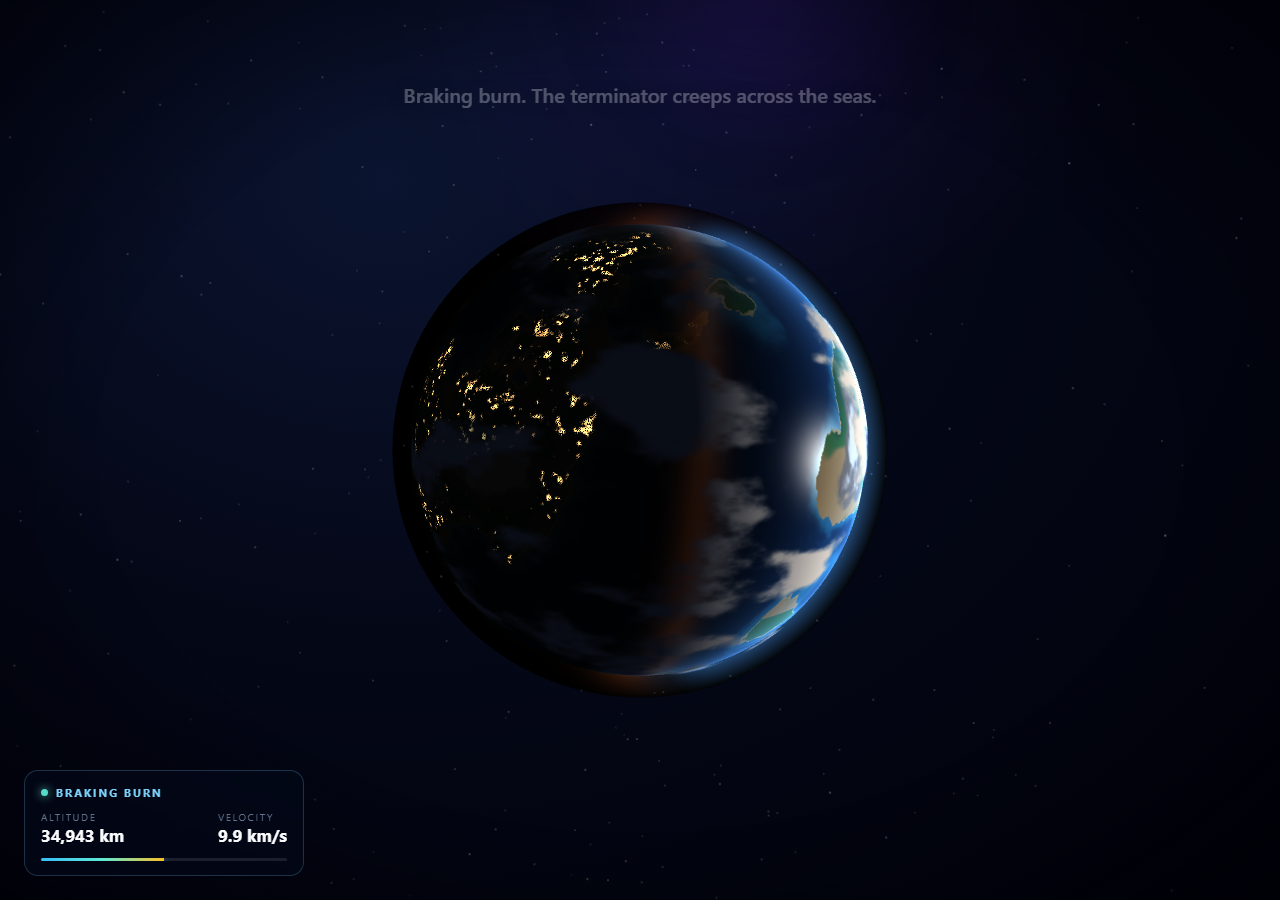
The Three.js Scroll Planet Approach snippet flies the camera from deep space into low orbit around Thalassa, a fictional ocean world, and ends on a sunrise breaking over the planet's limb. GSAP's ScrollTrigger scrubs one 0–1 progress value. Every other quantity is derived from it each frame: camera distance, orbit angle, view direction, altitude and velocity readouts, captions and mission phase. It is the "arrival" counterpart to the starfield warp: instead of racing past stars forever, the scroll ends somewhere.
A planet generated in the browser
Nothing is downloaded. Three equirectangular canvas textures are painted at load time by sampling 3D value-noise fBm on the unit sphere, so they wrap with no seam. The day map uses domain-warped elevation for coastlines and thresholds it into deep and shallow ocean, sand, grass, forest, desert, rock and snow, with noisy polar ice caps. A second "data" map stores city lights in red and an ocean mask in green. A third map is banded cloud cover used as an alphaMap.
A day/night shader
The planet uses a small ShaderMaterial. Diffuse light follows the sun direction, and the ocean mask gets a Blinn-Phong glint so seas sparkle where the sun reflects. On the night side city lights fade in, broken into fine speckle by a per-texel hash so they read as cities rather than blobs. A narrow orange band marks the terminator, and a fresnel term adds blue haze at the limb. Clouds are a slightly larger Lambert sphere lit by the same sun, so they darken on the night side too.
An atmosphere that glows like one
The atmosphere is a back-face shell 9% larger than the planet with additive blending. Its intensity comes from the view-space normal, so it is brightest right at the limb and fades outward. Each fragment also checks the sun direction: the sunlit side glows blue, the dawn edge turns warm, and the night side stays almost dark. That is what makes the final sunrise frame work.
A flight path that ends on a sunrise
Distance follows a braking curve, D1 + (D0 − D1)(1 − p)^2.4, so the planet grows fast at first and settles on arrival. The camera also swings 1.35 radians around the planet and descends from above the orbital plane. That moves the view from the lit face, across the terminator and over the night side. For the last third of the scroll the view direction blends from "look at the planet" to "look along the horizon toward the sun". camera.up blends from world Y to the local radial direction, so the horizon ends level. The sun is placed just beyond the limb from the final position, a sprite with a large halo that the planet hides until it clears the horizon.
Story and HUD
A title card opens the scene. Captions cross-fade at set progress points, and a glass HUD shows the mission phase, altitude, velocity (braking from 14 to 7.6 km/s), and a progress bar that turns gold at orbit insertion. Planet spin, cloud drift and the textured moon's orbit run on clock time, so the scene keeps moving when scrolling stops. Scrolling back up reverses everything exactly, as in the scroll camera path.
What's included
Features
Step by step
How to Use
- 1Load the three CDN scriptsAdd three.min.js, gsap.min.js, and ScrollTrigger.min.js in that order before the snippet JS.
- 2Paste HTML, CSS, and JSA pinned starfield opens with the "Approach Thalassa" title card, the small planet and its moon, and a HUD reading 168,000 km.
- 3Scroll to descendThe planet grows and turns, the terminator sweeps across the oceans, and captions and the mission phase update as you go.
- 4Cross the night sideAround 70% the city lights glow across the dark hemisphere while the atmosphere rim brightens on the sunlit limb.
- 5Arrive in orbitThe camera turns to the horizon and the sun rises over the edge of the planet. The HUD turns gold: orbit established.
- 6Make your own worldEdit the colour constants (DEEP, GRASS, SNOW…) or the sea-level offset in the day map to change continents, and SUN_A to move the dawn.
Real-world uses
Common Use Cases
Got questions?
Frequently Asked Questions
Canvas textures are painted at load time. For each pixel the latitude and longitude become a point on the unit sphere, and 3D fBm noise at that point gives elevation and moisture, which map to ocean, sand, forest, desert, rock and snow. Sampling in 3D means the left and right edges match, so there is no seam. City lights and an ocean mask go into a second map.
The planet shader computes dot(normal, sunDirection). Where it is negative the day colour fades to near black and the city-light channel is added in a warm orange. A hash of the texel position breaks each lit area into fine speckle, so close up it reads as many small towns instead of a smooth blob.
The sun direction is chosen so that, from the final orbit position, it sits just above the limb. In the last third of the scroll the view blends from the planet centre to a horizon direction facing the sun, and camera.up blends to the local radial so the horizon lies level. The sun sprite is depth-tested, so the planet hides it until it clears the edge.
The tween stays ease "none" so one linear 0–1 value drives everything. Distance uses a braking power curve, orbit angle uses a softer one, and the camera turn only starts at 62%. Each property gets its own easing from the same scrub, which a single eased tween cannot do.
Yes. Use the JSX, Vue or Angular export. Build the scene in a mount effect against a canvas ref; the textures take a moment to generate, so do it once. On cleanup kill the ScrollTrigger, dispose geometries, materials and canvas textures, and call renderer.dispose().
Copy & paste
Source Code
<section class="pla-stage" id="plaStage">
  <canvas id="plaCanvas"></canvas>
  <div class="pla-vignette"></div>
  <div class="pla-intro" id="plaIntro">
    <p class="pla-kicker">Destination · ocean world</p>
    <h2>Approach Thalassa</h2>
    <p class="pla-hint">Scroll to begin descent <span class="pla-mouse"><i></i></span></p>
  </div>
  <p class="pla-caption" id="plaCaption"></p>
  <div class="pla-hud">
    <p class="pla-phase"><span class="pla-dot"></span><b id="plaPhase">Deep space</b></p>
    <div class="pla-stats">
      <div><small>Altitude</small><b><span id="plaDist">168,000</span> km</b></div>
      <div><small>Velocity</small><b><span id="plaVel">0.0</span> km/s</b></div>
    </div>
    <div class="pla-bar"><i id="plaBar"></i></div>
  </div>
</section>
<section class="pla-bottom">
  <p class="pla-kicker">Orbit established</p>
  <h2>Welcome to Thalassa. Mind the sunrise.</h2>
</section>*{box-sizing:border-box;margin:0;padding:0}
html,body{background:#01020a;color:#fff;font-family:system-ui,-apple-system,sans-serif}
.pla-stage{height:100vh;position:relative;overflow:hidden;background:radial-gradient(ellipse at 30% 20%,#0b1430 0%,#040716 45%,#01020a 100%)}
#plaCanvas{display:block;width:100%;height:100%}
.pla-vignette{position:absolute;inset:0;pointer-events:none;background:radial-gradient(ellipse at center,transparent 60%,rgba(0,0,6,.7) 100%)}
.pla-intro{position:absolute;inset:0;display:flex;flex-direction:column;align-items:center;justify-content:flex-end;gap:14px;padding:0 24px 18vh;text-align:center;pointer-events:none;z-index:5;transition:opacity .6s ease,transform .6s ease}
.pla-intro.is-hidden{opacity:0;transform:translateY(-24px)}
.pla-intro h2{font-size:clamp(34px,6vw,76px);font-weight:800;letter-spacing:-.02em;line-height:1;background:linear-gradient(180deg,#fff 30%,#7dd3fc);-webkit-background-clip:text;background-clip:text;color:transparent}
.pla-kicker{font-size:12px;letter-spacing:.32em;text-transform:uppercase;color:#7dd3fc}
.pla-hint{display:flex;align-items:center;gap:10px;font-size:13px;letter-spacing:.14em;text-transform:uppercase;color:#cbd5e1}
.pla-mouse{width:18px;height:28px;border:2px solid #cbd5e1;border-radius:10px;position:relative}
.pla-mouse i{position:absolute;left:50%;top:5px;width:3px;height:6px;margin-left:-1.5px;border-radius:2px;background:#7dd3fc;animation:plaWheel 1.4s ease-in-out infinite}
@keyframes plaWheel{0%{opacity:0;transform:translateY(0)}30%{opacity:1}100%{opacity:0;transform:translateY(9px)}}
.pla-caption{position:absolute;left:50%;top:9%;transform:translateX(-50%);width:min(90%,560px);text-align:center;font-size:clamp(15px,2vw,20px);font-weight:600;color:#f1f5f9;text-shadow:0 2px 18px rgba(0,0,0,.9);pointer-events:none;z-index:4;opacity:0;transition:opacity .4s ease}
.pla-hud{position:absolute;left:24px;bottom:24px;width:min(calc(100% - 48px),280px);padding:14px 16px;border-radius:14px;background:rgba(4,10,28,.55);border:1px solid rgba(125,211,252,.22);backdrop-filter:blur(8px);-webkit-backdrop-filter:blur(8px);z-index:4;font-variant-numeric:tabular-nums}
.pla-phase{display:flex;align-items:center;gap:8px;font-size:11px;letter-spacing:.18em;text-transform:uppercase;color:#7dd3fc}
.pla-phase b{font-weight:700}
.pla-dot{width:7px;height:7px;border-radius:50%;background:#5eead4;box-shadow:0 0 10px #5eead4;animation:plaBlink 1.6s ease-in-out infinite}
@keyframes plaBlink{50%{opacity:.3}}
.pla-stats{display:flex;justify-content:space-between;gap:12px;margin-top:10px}
.pla-stats small{display:block;font-size:10px;letter-spacing:.16em;text-transform:uppercase;color:#64748b}
.pla-stats b{font-size:17px;font-weight:700;color:#f8fafc}
.pla-bar{height:3px;margin-top:12px;border-radius:3px;background:rgba(255,255,255,.1);overflow:hidden}
.pla-bar i{display:block;height:100%;width:0;background:linear-gradient(90deg,#38bdf8,#5eead4,#fbbf24);box-shadow:0 0 10px #38bdf8}
.pla-hud.is-orbit{border-color:rgba(251,191,36,.45)}
.pla-hud.is-orbit .pla-phase{color:#fbbf24}
.pla-hud.is-orbit .pla-dot{background:#fbbf24;box-shadow:0 0 10px #fbbf24;animation:none}
.pla-bottom{min-height:80vh;display:flex;flex-direction:column;gap:14px;justify-content:center;align-items:center;text-align:center;padding:0 24px;background:linear-gradient(#01020a,#0a1530)}
.pla-bottom h2{max-width:640px;font-size:clamp(24px,3.6vw,40px);font-weight:700;line-height:1.2;color:#f1f5f9}
@media (max-width:600px){.pla-hud{left:16px;right:16px;top:16px;bottom:auto;width:auto;padding:10px 12px}.pla-caption{top:20%}.pla-stats b{font-size:15px}}
@media (prefers-reduced-motion:reduce){.pla-mouse i,.pla-dot{animation:none}}const canvas = document.getElementById('plaCanvas');
const introEl = document.getElementById('plaIntro');
const captionEl = document.getElementById('plaCaption');
const hudEl = document.querySelector('.pla-hud');
const phaseEl = document.getElementById('plaPhase');
const distEl = document.getElementById('plaDist');
const velEl = document.getElementById('plaVel');
const barEl = document.getElementById('plaBar');
const renderer = new THREE.WebGLRenderer({ canvas, antialias: true, alpha: true });
renderer.setPixelRatio(Math.min(window.devicePixelRatio, 2));
renderer.setClearColor(0x000000, 0);
const scene = new THREE.Scene();
const camera = new THREE.PerspectiveCamera(55, 1, 0.1, 2000);
// ---------- Layout of the flight ----------
// The camera ends in low orbit at angle A1 looking along the horizon toward
// the sun, which sits just past the limb: a sunrise over the night side.
// It starts at A0, where the sun lights most of the visible face.
const RADIUS = 10, A1 = 0.4, A0 = A1 + 1.35, SUN_A = A1 + 2.2;
const SUN = new THREE.Vector3(Math.sin(SUN_A), -0.08, Math.cos(SUN_A)).normalize();
const radial = a => new THREE.Vector3(Math.sin(a), 0, Math.cos(a));
const sunLight = new THREE.DirectionalLight(0xfff1dc, 1.3);
sunLight.position.copy(SUN).multiplyScalar(100);
scene.add(sunLight, new THREE.AmbientLight(0x1a2440, 0.35));
// ---------- Procedural textures (no downloads) ----------
// 3D value noise sampled on the unit sphere, so the maps wrap seamlessly.
function hash(x, y, z) {
const h = Math.sin(x * 127.1 + y * 311.7 + z * 74.7) * 43758.5453;
return h - Math.floor(h);
}
function noise3(x, y, z) {
const xi = Math.floor(x), yi = Math.floor(y), zi = Math.floor(z);
const xf = x - xi, yf = y - yi, zf = z - zi;
const u = xf * xf * (3 - 2 * xf), v = yf * yf * (3 - 2 * yf), w = zf * zf * (3 - 2 * zf);
const l = (a, b, t) => a + (b - a) * t;
return l(
l(l(hash(xi, yi, zi), hash(xi + 1, yi, zi), u), l(hash(xi, yi + 1, zi), hash(xi + 1, yi + 1, zi), u), v),
l(l(hash(xi, yi, zi + 1), hash(xi + 1, yi, zi + 1), u), l(hash(xi, yi + 1, zi + 1), hash(xi + 1, yi + 1, zi + 1), u), v),
w) * 2 - 1;
}
function fbm(x, y, z, oct) {
let s = 0, a = 0.5, f = 1;
for (let i = 0; i < oct; i++) { s += a * noise3(x * f, y * f, z * f); f *= 2.03; a *= 0.5; }
return s;
}
function sphereMap(w, h, fn) {
const c = document.createElement('canvas');
c.width = w; c.height = h;
const ctx = c.getContext('2d'), img = ctx.createImageData(w, h), out = [0, 0, 0, 255];
for (let y = 0; y < h; y++) {
const lat = (0.5 - (y + 0.5) / h) * Math.PI, cl = Math.cos(lat), sy = Math.sin(lat);
for (let x = 0; x < w; x++) {
const lon = ((x + 0.5) / w) * Math.PI * 2;
fn(-Math.cos(lon) * cl, sy, Math.sin(lon) * cl, lat, out);
img.data.set(out, (y * w + x) * 4);
}
}
ctx.putImageData(img, 0, 0);
const tex = new THREE.CanvasTexture(c);
tex.anisotropy = renderer.capabilities.getMaxAnisotropy();
return tex;
}
const mixc = (a, b, t) => [a[0] + (b[0] - a[0]) * t, a[1] + (b[1] - a[1]) * t, a[2] + (b[2] - a[2]) * t];
const sstep = (a, b, x) => { const t = Math.min(1, Math.max(0, (x - a) / (b - a))); return t * t * (3 - 2 * t); };
const DEEP = [6, 26, 66], SHALLOW = [22, 96, 150], SAND = [196, 180, 132], GRASS = [52, 112, 56],
FOREST = [28, 74, 42], DESERT = [176, 142, 92], ROCK = [112, 100, 92], SNOW = [236, 242, 248];
// Day map (rgb) and a "night" data map: r = city lights, g = ocean mask.
const nightData = [];
const dayTex = sphereMap(1024, 512, (x, y, z, lat, out) => {
const wx = fbm(x * 1.4, y * 1.4, z * 1.4, 3) * 0.6;
const e = fbm(x * 1.8 + wx, y * 1.8 + wx, z * 1.8 - wx, 6) - 0.04;
const moist = fbm(x * 3 + 7, y * 3, z * 3, 3);
let c, ocean = 0, city = 0;
if (e < 0) { c = mixc(DEEP, SHALLOW, sstep(-0.22, 0, e)); ocean = 1; }
else {
c = e < 0.02 ? SAND : mixc(GRASS, FOREST, sstep(-0.1, 0.3, moist));
if (moist < -0.12 && Math.abs(lat) < 0.6) c = mixc(c, DESERT, sstep(-0.12, -0.28, moist));
c = mixc(c, ROCK, sstep(0.22, 0.34, e));
c = mixc(c, SNOW, sstep(0.36, 0.44, e));
const cn = fbm(x * 46, y * 46, z * 46, 2) + fbm(x * 9, y * 9, z * 9, 2) * 0.5;
if (moist > -0.15 && e < 0.28) city = sstep(0.2, 0.42, cn) * (0.5 + 0.5 * sstep(0, 0.05, e));
}
const ice = sstep(1.12, 1.26, Math.abs(lat) + fbm(x * 6, y * 6, z * 6, 3) * 0.25);
c = mixc(c, SNOW, ice);
nightData.push(city * (1 - ice) * 255, ocean * (1 - ice) * 255);
out[0] = c[0]; out[1] = c[1]; out[2] = c[2];
});
let ni = 0;
const nightTex = sphereMap(1024, 512, (x, y, z, lat, out) => {
out[0] = nightData[ni++]; out[1] = nightData[ni++]; out[2] = 0;
});
const cloudTex = sphereMap(1024, 512, (x, y, z, lat, out) => {
const band = Math.sin(lat * 3) * 0.15;
const n = fbm(x * 2.6 + band, y * 5.5, z * 2.6 - band, 6);
const a = sstep(0.02, 0.32, n) * 255;
out[0] = out[1] = out[2] = a;
});
// ---------- Planet: day/night shader ----------
// Day side lit by the sun with ocean glints, city lights on the night side,
// an orange band at the terminator and a blue fresnel haze at the limb.
const planetMat = new THREE.ShaderMaterial({
uniforms: { dayMap: { value: dayTex }, nightMap: { value: nightTex }, sunDir: { value: SUN } },
vertexShader: [
'varying vec2 vUv; varying vec3 vN; varying vec3 vP;',
'void main(){ vUv = uv; vN = normalize(mat3(modelMatrix) * normal);',
' vec4 wp = modelMatrix * vec4(position, 1.0); vP = wp.xyz;',
' gl_Position = projectionMatrix * viewMatrix * wp; }',
].join('\n'),
fragmentShader: [
'uniform sampler2D dayMap; uniform sampler2D nightMap; uniform vec3 sunDir;',
'varying vec2 vUv; varying vec3 vN; varying vec3 vP;',
'float hash(vec2 p){ return fract(sin(dot(p, vec2(12.9898, 78.233))) * 43758.5453); }',
'void main(){',
' vec3 N = normalize(vN); vec3 V = normalize(cameraPosition - vP);',
' vec3 day = texture2D(dayMap, vUv).rgb; vec2 nd = texture2D(nightMap, vUv).rg;',
' float ndl = dot(N, sunDir);',
' float lit = smoothstep(-0.08, 0.35, ndl);',
' vec3 col = day * (0.03 + 1.15 * max(ndl, 0.0));',
' vec3 H = normalize(sunDir + V);',
' col += vec3(1.0, 0.92, 0.8) * pow(max(dot(N, H), 0.0), 70.0) * nd.g * 0.9 * lit;',
' float night = 1.0 - smoothstep(-0.2, 0.06, ndl);',
' float grain = hash(floor(vUv * vec2(6144.0, 3072.0)));',
' float cityL = pow(nd.r, 1.4) * smoothstep(0.35, 0.9, grain + nd.r * 0.35);',
' col += vec3(1.0, 0.74, 0.42) * cityL * night * 1.5;',
' col += vec3(1.0, 0.42, 0.15) * exp(-pow((ndl - 0.03) * 12.0, 2.0)) * 0.12;',
' float fres = pow(1.0 - max(dot(N, V), 0.0), 3.0);',
' col += vec3(0.35, 0.65, 1.0) * fres * smoothstep(-0.3, 0.5, ndl) * 0.9;',
' gl_FragColor = vec4(col, 1.0); }',
].join('\n'),
});
const planet = new THREE.Mesh(new THREE.SphereGeometry(RADIUS, 160, 120), planetMat);
scene.add(planet);
// Clouds: lit by the same sun, alpha from the cloud map.
const clouds = new THREE.Mesh(
new THREE.SphereGeometry(RADIUS * 1.012, 128, 96),
new THREE.MeshLambertMaterial({ color: 0xffffff, alphaMap: cloudTex, transparent: true, depthWrite: false })
);
scene.add(clouds);
// Atmosphere: back-face shell with a view-space fresnel glow, brighter on
// the sunlit side and warm where it meets the terminator.
const atmoMat = new THREE.ShaderMaterial({
uniforms: { sunDir: { value: SUN } },
vertexShader: [
'varying vec3 vNv; varying vec3 vNw;',
'void main(){ vNv = normalize(normalMatrix * normal); vNw = normalize(mat3(modelMatrix) * normal);',
' gl_Position = projectionMatrix * modelViewMatrix * vec4(position, 1.0); }',
].join('\n'),
fragmentShader: [
'uniform vec3 sunDir; varying vec3 vNv; varying vec3 vNw;',
'void main(){',
' float i = pow(clamp(0.72 + dot(vNv, vec3(0.0, 0.0, 1.0)) * -1.0 - 0.32, 0.0, 1.0), 2.2);',
' float s = dot(normalize(vNw), sunDir);',
' float day = smoothstep(-0.35, 0.4, s);',
' vec3 c = mix(vec3(1.0, 0.45, 0.18), vec3(0.3, 0.62, 1.0), smoothstep(-0.05, 0.3, s));',
' float warm = exp(-pow((s + 0.02) * 6.0, 2.0));',
' gl_FragColor = vec4(c * i * (0.02 + 1.6 * day * (0.35 + 0.65 * max(warm, smoothstep(0.1, 0.4, s)))), 1.0); }',
].join('\n'),
side: THREE.BackSide, blending: THREE.AdditiveBlending, transparent: true, depthWrite: false,
});
const atmo = new THREE.Mesh(new THREE.SphereGeometry(RADIUS * 1.09, 96, 72), atmoMat);
scene.add(atmo);
// ---------- Sun, moon, stars, nebula ----------
function glowTex(stops) {
const c = document.createElement('canvas');
c.width = c.height = 128;
const g = c.getContext('2d'), gr = g.createRadialGradient(64, 64, 0, 64, 64, 64);
stops.forEach(s => gr.addColorStop(s[0], s[1]));
g.fillStyle = gr; g.fillRect(0, 0, 128, 128);
return new THREE.CanvasTexture(c);
}
const sprite = (tex, size, color, opacity) => {
const s = new THREE.Sprite(new THREE.SpriteMaterial({ map: tex, color, transparent: true, opacity, blending: THREE.AdditiveBlending, depthWrite: false }));
s.scale.set(size, size, 1);
return s;
};
const sunCore = sprite(glowTex([[0, '#fff'], [0.18, 'rgba(255,248,230,1)'], [0.32, 'rgba(255,210,140,.35)'], [1, 'rgba(255,170,80,0)']]), 70, 0xffffff, 1);
const sunHalo = sprite(glowTex([[0, 'rgba(255,220,170,.5)'], [0.4, 'rgba(255,170,90,.12)'], [1, 'rgba(255,140,60,0)']]), 380, 0xffffff, 0.8);
sunCore.position.copy(SUN).multiplyScalar(800);
sunHalo.position.copy(SUN).multiplyScalar(790);
scene.add(sunHalo, sunCore);
const nebTex = glowTex([[0, 'rgba(255,255,255,.55)'], [0.5, 'rgba(255,255,255,.15)'], [1, 'rgba(255,255,255,0)']]);
[[-0.6, 0.35, -0.7, 0x6d28d9, 700], [0.8, -0.2, -0.55, 0x0e7490, 600], [-0.2, -0.5, 0.85, 0x9d174d, 520]].forEach(n => {
const s = sprite(nebTex, n[4], n[3], 0.35);
s.position.set(n[0], n[1], n[2]).normalize().multiplyScalar(900);
scene.add(s);
});
const STARS = 3000, spos = new Float32Array(STARS * 3), scol = new Float32Array(STARS * 3);
const tint = [new THREE.Color(0xffffff), new THREE.Color(0xbcd4ff), new THREE.Color(0xffe2b8)], tv = new THREE.Vector3();
for (let i = 0; i < STARS; i++) {
tv.set(Math.random() - 0.5, Math.random() - 0.5, Math.random() - 0.5).normalize().multiplyScalar(700 + Math.random() * 400);
spos.set([tv.x, tv.y, tv.z], i * 3);
const c = tint[i % 3], b = 0.4 + Math.random() * 0.6;
scol.set([c.r * b, c.g * b, c.b * b], i * 3);
}
const starGeo = new THREE.BufferGeometry();
starGeo.setAttribute('position', new THREE.BufferAttribute(spos, 3));
starGeo.setAttribute('color', new THREE.BufferAttribute(scol, 3));
scene.add(new THREE.Points(starGeo, new THREE.PointsMaterial({
size: 3.6, map: glowTex([[0, '#fff'], [0.3, 'rgba(255,255,255,.7)'], [1, 'rgba(255,255,255,0)']]),
vertexColors: true, transparent: true, depthWrite: false, blending: THREE.AdditiveBlending,
})));
const moonTex = sphereMap(256, 128, (x, y, z, lat, out) => {
const n = fbm(x * 4, y * 4, z * 4, 5), cr = fbm(x * 12 + 3, y * 12, z * 12, 2);
const g = 150 + n * 70 - sstep(0.2, 0.35, cr) * 40;
out[0] = g; out[1] = g * 0.97; out[2] = g * 0.93;
});
const moon = new THREE.Mesh(new THREE.SphereGeometry(1.6, 48, 32), new THREE.MeshLambertMaterial({ map: moonTex }));
scene.add(moon);
// ---------- Scroll ----------
gsap.registerPlugin(ScrollTrigger);
const flight = { p: 0 };
gsap.to(flight, {
p: 1, ease: 'none',
scrollTrigger: { trigger: '#plaStage', start: 'top top', end: '+=500%', scrub: 1, pin: true },
});
const CAPTIONS = [
[0.04, ''],
[0.24, 'Thalassa. Nine-tenths ocean, 168,000 km out.'],
[0.5, 'Braking burn. The terminator creeps across the seas.'],
[0.76, 'Crossing into night — the coastal cities are awake.'],
[0.95, 'Turn to face the dawn…'],
[Infinity, 'Orbit established. Sunrise over Thalassa.'],
];
const PHASES = [[0.04, 'Deep space'], [0.45, 'Approach'], [0.8, 'Braking burn'], [0.97, 'Orbit insertion'], [Infinity, 'Orbit established']];
let lastCaption = null, captionTimer = 0;
function setCaption(p) {
const text = CAPTIONS.find(c => p < c[0])[1];
if (text === lastCaption) return;
lastCaption = text;
captionEl.style.opacity = '0';
clearTimeout(captionTimer);
captionTimer = setTimeout(() => { captionEl.textContent = text; captionEl.style.opacity = text ? '1' : '0'; }, 250);
}
function resize() {
const w = canvas.clientWidth, h = canvas.clientHeight;
renderer.setSize(w, h, false);
camera.aspect = w / h;
camera.fov = camera.aspect < 0.8 ? 72 : 55;
camera.updateProjectionMatrix();
}
// Distance follows a braking curve: fast while the planet is small, slow
// on arrival. Its derivative gives the velocity readout.
const D0 = 150, D1 = 13.2, K = 2.4;
const distAt = p => D1 + (D0 - D1) * Math.pow(1 - p, K);
const clock = new THREE.Clock();
const C = new THREE.Vector3(), look = new THREE.Vector3(), toC = new THREE.Vector3(), fwd = new THREE.Vector3(), UPV = new THREE.Vector3();
// Final view direction: along the horizon toward the sun, tilted down.
const R1 = radial(A1), T1 = new THREE.Vector3(Math.cos(A1), 0, -Math.sin(A1));
const FINAL = T1.clone().multiplyScalar(Math.cos(0.5)).addScaledVector(R1, -Math.sin(0.5)).normalize();
function animate() {
requestAnimationFrame(animate);
const t = clock.getElapsedTime(), p = flight.p;
introEl.classList.toggle('is-hidden', p > 0.015);
const d = distAt(p);
const e = 1 - Math.pow(1 - p, 1.6);
const a = A0 + (A1 - A0) * e;
C.copy(radial(a)).multiplyScalar(d);
C.y = 22 * Math.pow(1 - p, 2) + 0.6 + Math.sin(t * 0.4) * 0.15 * (1 - p);
camera.position.copy(C);
// Look at the planet for most of the ride, then swing toward the dawn.
const s = sstep(0.62, 1, p);
toC.copy(C).negate().normalize();
fwd.copy(toC).lerp(FINAL, s).normalize();
// Up blends from world Y to the local radial, so the horizon ends level.
camera.up.set(0, 1, 0).lerp(UPV.copy(C).normalize(), s).normalize();
camera.lookAt(look.copy(C).add(fwd));
planet.rotation.y = t * 0.01 + p * 0.6;
clouds.rotation.y = t * 0.016 + p * 0.75;
const ma = t * 0.12 + p * 2.2;
moon.position.set(Math.cos(ma) * 34, Math.sin(ma * 0.8) * 8, Math.sin(ma) * 34);
sunCore.material.opacity = 0.92 + Math.sin(t * 3) * 0.04;
const vel = 7.6 + 6.4 * Math.pow(1 - p, 1.5);
distEl.textContent = Math.round((d - RADIUS) * 1200).toLocaleString();
velEl.textContent = vel.toFixed(1);
barEl.style.width = (p * 100) + '%';
phaseEl.textContent = PHASES.find(x => p < x[0])[1];
hudEl.classList.toggle('is-orbit', p >= 0.97);
setCaption(p);
renderer.render(scene, camera);
}
resize();
window.addEventListener('resize', resize);
animate();Extend with AI
Take This Snippet Further With AI
You do not need to work out sphere-mapped noise textures, day/night shading, or the sunrise camera turn on your own — this snippet already does all three. Paste its HTML, CSS, and JS into an AI assistant like Claude and ask it to explain how the equirectangular maps wrap without a seam, how the atmosphere shell picks blue or warm colours, or how camera.up is blended so the horizon ends level. The same assistant can extend it: add a ring system with a shadow, cloud shadows on the surface, a lens-flare streak when the sun clears the limb, a ship that slides into frame at orbit, or a second destination planet. Treat the code as a starting point to interrogate and reshape, not a finished artifact.
Prompt to recreate it
Copy this into your AI assistant of choice to build the effect from scratch, or as a jumping-off point for your own variant:
Build a "scroll-scrubbed planet approach that ends on a sunrise" in plain HTML, CSS, and JavaScript using Three.js (r128) and GSAP's ScrollTrigger, all from a CDN (no bundler, no build step).

Requirements:
- A pinned full-viewport section with a transparent WebGLRenderer over a dark-blue radial-gradient background, a vignette, and a PerspectiveCamera (55° FOV, 72° when the aspect is below 0.8).
- Procedural textures painted on canvases at load: 3D value noise + fBm sampled on the unit sphere for each equirectangular pixel. Day map (1024×512): domain-warped elevation → deep/shallow ocean, sand, grass/forest by moisture, desert in dry low latitudes, rock, snow, noisy polar ice. Data map: red = city lights on habitable land, green = ocean mask. Cloud map: banded fBm used as an alphaMap. Moon map (256×128) with crater noise.
- The planet (radius 10) as a ShaderMaterial: diffuse from dot(N, sunDir), a Blinn-Phong ocean glint, city lights on the night side broken into speckle with a per-texel hash, a narrow orange terminator band, and blue fresnel haze at the limb.
- Clouds: a sphere at 1.012R with a white MeshLambertMaterial, alphaMap = cloud map, transparent, depthWrite false.
- Atmosphere: a BackSide additive shell at 1.09R whose glow comes from the view-space normal (brightest at the limb) and is tinted by the sun: blue by day, warm at the dawn edge, nearly dark at night.
- Sun as two additive sprites (core + large halo) far along the sun direction and depth-tested so the planet hides it; a DirectionalLight from the same direction; a textured moon on a clock-driven orbit; 3000 coloured round-sprite stars; three large faint nebula sprites.
- Flight: one GSAP tween (ease "none") scrubbing p 0→1 (pin, scrub 1, end +=500%). Distance = 13.2 + (150 − 13.2)(1 − p)^2.4; the orbit angle swings 1.35 rad from a sunlit view to a final position where the sun sits just past the limb; height falls from about 22 to 0.6.
- From p = 0.62 the view direction blends from the planet centre to a direction along the horizon toward the sun (tilted about 0.5 rad down), and camera.up blends from world Y to the local radial, so the final frame is a level horizon with the sun rising over it.
- UI: an intro title card ("Approach Thalassa"), story captions cross-fading at set progress points, and a glass HUD with a phase label, altitude in km, velocity braking from 14 to 7.6 km/s, a progress bar, and a gold "orbit established" state. Mobile puts the HUD at the top.
- Scrolling back must reverse everything exactly.
Want to tighten it up first? Run this prompt through the AI Prompt Studio to score it across 8 quality dimensions, catch anti-patterns, and tune the wording for Claude, ChatGPT, or Gemini before you paste it in.