
Tic-Tac-Toe vs Computer with 15 Levels & Ultimate Mode
Tic-Tac-Toe vs Computer · Games · Plain HTML, CSS & JS · Live preview
About this UI Snippet
Tic-Tac-Toe vs Computer — Minimax AI, Bigger Boards, Ultimate Tic-Tac-Toe and a Daily Forced-Win Puzzle
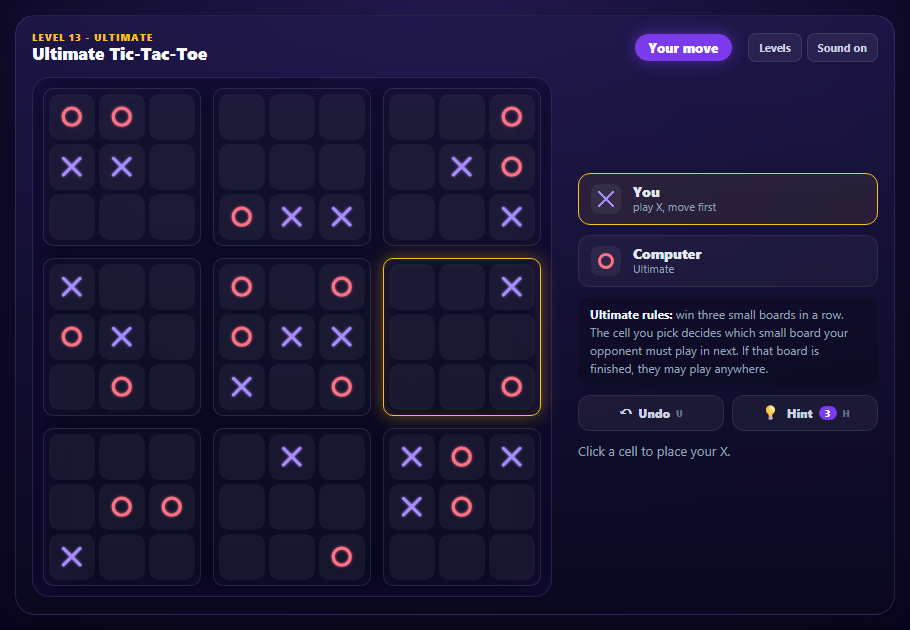
Tic-Tac-Toe is the smallest complete game with a computer opponent, and it is the best first lesson in game AI. This version goes much further than the classic board. It has 15 levels in three tiers: the classic 3x3 game against computers that get steadily sharper, bigger 4x4 and 5x5 boards where you need four in a row, and Ultimate Tic-Tac-Toe, nine boards in one, with the full rules. A Daily Puzzle gives you a position with a forced win to find, and a two-player mode is included. It is plain HTML, CSS and JavaScript with no libraries, images or audio files.
One interface for every game type
Each game type is a small object with the same functions: moves(), play(), winner() and evaluate(). makeRowRules(n, k) builds any square board where k in a row wins by listing every winning line once, which covers 3x3, 4x4 and 5x5 with one piece of code. makeUltimateRules() adds the extra rules: the cell you choose decides which small board your opponent must play in, a won small board counts as one mark on the big board, and if you are sent to a finished board you may play anywhere. Because both types look the same to the search, the computer, the hints and the daily puzzle work on every board.
A computer that gets stronger on purpose
The opponent is a negamax search with alpha-beta pruning (negamax()), which scores a position by playing every continuation to a set depth. At the end of the search a position is judged by evaluate(), which rewards lines that are still open and nearly complete. Each level in the LEVELS array sets the depth, a chance that the computer plays a random move instead (a human-like slip) and who starts. The first level is almost random, the second only wins and blocks, the third sees forks, and level 5 searches the whole 3x3 game, which makes it impossible to beat, so a draw passes that level. The search has a time limit, so the page stays responsive on the larger boards.
A daily puzzle built by the solver
The Daily Puzzle is generated, not stored. makePuzzle() plays a few seeded random moves, then asks the solver whether X has a forced win and how long it takes. It keeps only positions where the win needs two or three of your moves and only one or two first moves work, so the solution is a real fork. The computer defends perfectly, always choosing the move that loses most slowly. Three stars for the fastest win, two for any win, and clearing the puzzle on consecutive days builds a streak.
Hints, undo and stars
The Hint button runs the same search for you and highlights the best cell. Undo takes back your move and the computer's reply. Winning gives one star, a second for no hints or undos and a third for finishing within the par number of moves. A win (or a draw on the levels where a draw is enough) unlocks the next level, and progress is saved to localStorage inside try/catch.
Feel
Marks are drawn as SVG strokes that animate as if written by hand, a line is drawn through the winning cells, the last move is highlighted, and in Ultimate the board you must play in glows. Sounds come from a Web Audio synth, the keyboard works (number keys 1 to 9 on the classic board, arrow keys and Enter everywhere), and the whole game scales to short preview areas.
What's included
Features
Step by step
How to Use
- 1Pick a level, the Daily Puzzle or two playersThe menu shows 15 levels in three tiers: classic 3x3, bigger boards, and Ultimate Tic-Tac-Toe. Level 1 is open at first and passing a level unlocks the next. The gold card is the Daily Puzzle and the purple card is a two-player game on one screen.
- 2Place your marksYou play X. Click a cell to place your mark. On the classic board you can also press 1 to 9 (1 is the top left, 9 the bottom right), and on every board the arrow keys move a cursor and Enter places a mark.
- 3Get your lineGet the required number in a row, column or diagonal: three on the 3x3 board, four on the 4x4 and 5x5 boards. The winning line is drawn through your marks. A full board with no line is a draw.
- 4Learn the Ultimate ruleIn Ultimate Tic-Tac-Toe the cell you pick sends your opponent to the matching small board. Win a small board to claim it, and win three claimed boards in a row to win the game. The glowing board is where you must play, unless it is finished, then you may play anywhere.
- 5Use hints and undoHint (H) highlights a strong move and tells you if it leads to a forced win. Undo (U) takes back your move and the reply. Both are useful for learning, but they cost the unassisted star.
- 6Earn stars and keep your streakOne star for winning, one more for no hints or undos, one more for a win within the par number of moves. The Daily Puzzle asks you to find a forced win: win in the fastest way for three stars and build a streak by solving it every day.
Real-world uses
Common Use Cases
Got questions?
Frequently Asked Questions
On levels 1 to 4 yes, because it looks only a few moves ahead and sometimes plays a random move. On level 5 it searches the whole 3x3 game and never slips, so Tic-Tac-Toe against it is always a draw at best, which is why a draw passes that level. On the bigger boards and in Ultimate the computer is strong but not perfect, so it can still be beaten.
chooseMove() usually runs negamax(), a search that tries every move to a set depth, assumes the opponent also plays well, and uses alpha-beta pruning to skip moves that cannot matter. At the depth limit evaluate() scores the position. With a small chance set by the level, it plays a random move instead. In the daily puzzle it always picks the move that delays its loss the longest.
The board is nine small boards in a 3x3 grid. The cell you play in a small board decides which small board your opponent must play in next. If that small board is already won or full, they can play in any open board. Winning a small board marks it for you, and winning three small boards in a row wins the game. The glowing board shows where the next move must be.
makePuzzle() plays a few random moves from a seed based on the date, then uses the solver to check that X has a forced win that needs two or three of your moves and that only one or two first moves lead to it. That guarantees a position with a real fork. The same date always gives the same puzzle.
Edit the LEVELS array: type is row or ultimate, n and k are the board size and the line length, depth is how many plies the computer searches, blunder is the chance of a random move, first is who starts, par is the number of your moves for the speed star and goal says whether a draw passes. The menu shows five levels per tier.
Yes. All localStorage access is in try/catch, so a blocked storage only means that progress is not saved, and every sound call is wrapped. Cells respond to pointer events, so touch works, and on narrow screens the side panel moves under the board and the page scrolls. The computer thinks within a time cap, so the page stays responsive.
Copy & paste
Source Code
<div class="tt-fit" id="tt-fit"><div class="tt-wrap" id="tt-wrap">
<div class="tt-panel" id="tt-panel">
<div class="tt-hud">
<div class="tt-hud-left">
<span class="tt-kicker" id="tt-kicker">Tic-Tac-Toe</span>
<span class="tt-name" id="tt-name">Pick a level</span>
</div>
<div class="tt-turn" id="tt-turn"></div>
<div class="tt-hud-btns">
<button class="tt-btn-sm" id="tt-levels-btn" type="button" title="Levels (Esc)">Levels</button>
<button class="tt-btn-sm" id="tt-mute" type="button" aria-pressed="false">Sound on</button>
</div>
</div>
<div class="tt-main">
<div class="tt-board-col"><div class="tt-board-wrap" id="tt-board-wrap"><div class="tt-board" id="tt-board" role="grid" aria-label="Game board"></div><svg class="tt-winline" id="tt-winline" viewBox="0 0 100 100" preserveAspectRatio="none"></svg></div></div>
<aside class="tt-side">
<div class="tt-player" id="tt-p-you"><i class="tt-chip tt-x"></i><div><b>You</b><span id="tt-you-sub">play X</span></div></div>
<div class="tt-player" id="tt-p-cpu"><i class="tt-chip tt-o"></i><div><b id="tt-cpu-name">Computer</b><span id="tt-cpu-sub">plays O</span></div></div>
<div class="tt-rule" id="tt-rule"></div>
<div class="tt-tools">
<button class="tt-tool" id="tt-undo" type="button"><span class="tt-tool-ico">↶</span>Undo <em>U</em></button>
<button class="tt-tool" id="tt-hint" type="button"><span class="tt-tool-ico">💡</span>Hint <i id="tt-hint-count">3</i><em>H</em></button>
</div>
<p class="tt-msg" id="tt-msg"></p>
</aside>
</div>
<div class="tt-overlay show" id="tt-menu">
<p class="tt-logo">Tic-Tac-Toe</p>
<p class="tt-tagline">Beat a computer that thinks ahead. Start with the classic board, move up to bigger boards, and finish on Ultimate Tic-Tac-Toe, nine boards in one.</p>
<div class="tt-menu-row">
<button class="tt-daily" id="tt-daily" type="button">
<span class="tt-daily-title" id="tt-daily-title">Daily Puzzle</span>
<span class="tt-daily-sub" id="tt-daily-sub">Find the forced win. Same position for everyone.</span>
</button>
<button class="tt-daily tt-pvp" id="tt-pvp" type="button">
<span class="tt-daily-title">Two players</span>
<span class="tt-daily-sub">Pass and play on one screen</span>
</button>
<div class="tt-totals"><span><b id="tt-star-total">0</b> / 45 stars</span><span>Daily streak <b id="tt-streak">0</b></span><span id="tt-record"></span></div>
</div>
<div class="tt-tiers" id="tt-tiers"></div>
</div>
<div class="tt-overlay" id="tt-result">
<p class="tt-result-title" id="tt-result-title">You win!</p>
<div class="tt-result-stars" id="tt-result-stars"><span>★</span><span>★</span><span>★</span></div>
<p class="tt-result-sub" id="tt-result-sub"></p>
<div class="tt-result-btns">
<button class="tt-btn" id="tt-next" type="button">Next level</button>
<button class="tt-btn tt-btn-ghost" id="tt-retry" type="button">Play again</button>
<button class="tt-btn tt-btn-ghost" id="tt-share" type="button">Copy result</button>
<button class="tt-btn tt-btn-ghost" id="tt-menu-back" type="button">Levels</button>
</div>
</div>
</div>
</div></div>* { box-sizing: border-box; margin: 0; padding: 0; }
body {
font-family: system-ui, -apple-system, 'Segoe UI', sans-serif; color: #e2e8f0;
background: radial-gradient(ellipse at top, #231a4d 0%, #0b0a24 60%, #05051a 100%);
min-height: 100vh; display: flex; align-items: center; justify-content: center; padding: 12px 14px; overflow: hidden;
}
/* The game scales itself to the space it is given (fitToView): .tt-fit takes the scaled size, .tt-wrap is laid out at its
natural size and then shrunk with transform. */
.tt-fit { flex: none; }
.tt-wrap { width: 880px; transform-origin: top left; }
.tt-panel {
position: relative; display: flex; flex-direction: column; gap: 12px; padding: 16px; border-radius: 20px; overflow: hidden; min-height: 600px;
background: linear-gradient(180deg, rgba(34,26,80,0.74), rgba(10,9,32,0.95));
border: 1px solid rgba(167,139,250,0.18); box-shadow: 0 30px 80px rgba(0,0,0,0.55), 0 0 90px rgba(124,58,237,0.16);
}
.tt-hud { display: flex; align-items: center; gap: 16px; flex-wrap: wrap; }
.tt-hud-left { display: flex; flex-direction: column; line-height: 1.15; margin-right: auto; min-width: 0; }
.tt-kicker { font-size: 10px; font-weight: 800; letter-spacing: 0.09em; text-transform: uppercase; color: #fbbf24; }
.tt-name { font-size: 17px; font-weight: 800; color: #f8fafc; white-space: nowrap; }
.tt-turn { font-size: 13px; font-weight: 800; padding: 5px 14px; border-radius: 999px; background: rgba(255,255,255,0.06); color: #94a3b8; }
.tt-turn.you { color: #fff; background: #7c3aed; box-shadow: 0 0 16px rgba(124,58,237,0.55); }
.tt-turn.cpu { color: #422006; background: #fbbf24; animation: tt-pulse 0.8s ease-in-out infinite alternate; }
@keyframes tt-pulse { to { opacity: 0.6; } }
.tt-hud-btns { display: flex; gap: 5px; }
.tt-btn-sm { background: rgba(255,255,255,0.06); color: #cbd5e1; border: 1px solid rgba(255,255,255,0.1); border-radius: 8px; padding: 6px 10px; font: inherit; font-size: 11px; font-weight: 700; cursor: pointer; }
.tt-btn-sm:hover { background: rgba(255,255,255,0.14); }
.tt-main { display: flex; gap: 26px; align-items: center; justify-content: center; flex: 1; }
.tt-board-col { flex: none; width: 520px; }
.tt-board-wrap { position: relative; width: 520px; height: 520px; }
.tt-board { display: grid; gap: 8px; width: 100%; height: 100%; padding: 10px; border-radius: 18px; background: rgba(5,5,26,0.6); border: 1px solid rgba(167,139,250,0.2); box-shadow: inset 0 0 40px rgba(124,58,237,0.12); }
.tt-board.ultimate { gap: 12px; }
.tt-sub { position: relative; display: grid; gap: 4px; padding: 5px; border-radius: 10px; border: 1px solid rgba(148,163,184,0.18); background: rgba(255,255,255,0.02); transition: box-shadow 0.2s, border-color 0.2s, opacity 0.2s; }
.tt-sub.active { border-color: #fbbf24; box-shadow: 0 0 18px rgba(251,191,36,0.4), inset 0 0 14px rgba(251,191,36,0.12); }
.tt-sub.decided .tt-cell { opacity: 0.28; }
.tt-sub .tt-big { position: absolute; inset: 8%; display: none; z-index: 3; pointer-events: none; }
.tt-sub.won-x .tt-big.x, .tt-sub.won-o .tt-big.o { display: block; }
.tt-sub.won-x { border-color: rgba(167,139,250,0.7); } .tt-sub.won-o { border-color: rgba(251,113,133,0.7); }
.tt-sub.drawn { opacity: 0.55; }
.tt-board.cells-only .tt-sub { display: contents; }
.tt-cell { position: relative; display: flex; align-items: center; justify-content: center; border: none; border-radius: 10px; background: rgba(255,255,255,0.05); cursor: pointer; padding: 0; outline: none; transition: background 0.12s, transform 0.1s, box-shadow 0.12s; }
.tt-cell:hover:not(.taken):not(.locked) { background: rgba(167,139,250,0.22); transform: scale(1.03); }
.tt-cell.cur { box-shadow: inset 0 0 0 3px #fde68a; }
.tt-cell.last { background: rgba(251,191,36,0.14); }
.tt-cell.hint { box-shadow: inset 0 0 0 3px #4ade80, 0 0 16px rgba(74,222,128,0.7); animation: tt-hint 0.8s ease-in-out infinite alternate; }
@keyframes tt-hint { to { transform: scale(1.06); } }
.tt-cell.taken { cursor: default; }
.tt-cell.locked { cursor: default; }
.tt-cell.win { background: rgba(74,222,128,0.22); }
.tt-cell svg { width: 64%; height: 64%; overflow: visible; }
.tt-mark path, .tt-mark circle { fill: none; stroke-width: 11; stroke-linecap: round; }
.tt-mark.x path { stroke: #a78bfa; filter: drop-shadow(0 0 5px rgba(167,139,250,0.7)); }
.tt-mark.o circle { stroke: #fb7185; filter: drop-shadow(0 0 5px rgba(251,113,133,0.7)); }
.tt-cell.new .tt-mark path { stroke-dasharray: 80; stroke-dashoffset: 80; animation: tt-draw 0.28s ease-out forwards; }
.tt-cell.new .tt-mark path + path { animation-delay: 0.14s; }
.tt-cell.new .tt-mark circle { stroke-dasharray: 190; stroke-dashoffset: 190; animation: tt-draw 0.4s ease-out forwards; }
@keyframes tt-draw { to { stroke-dashoffset: 0; } }
.tt-big .tt-mark path, .tt-big .tt-mark circle { stroke-width: 9; }
.tt-winline { position: absolute; inset: 0; width: 100%; height: 100%; pointer-events: none; z-index: 5; }
.tt-winline line { stroke: #4ade80; stroke-width: 1.6; stroke-linecap: round; filter: drop-shadow(0 0 4px #4ade80); stroke-dasharray: 160; stroke-dashoffset: 160; animation: tt-draw 0.5s ease-out forwards; vector-effect: non-scaling-stroke; stroke-width: 7px; }
.tt-board.shake { animation: tt-shake 0.4s ease; }
@keyframes tt-shake { 25% { transform: translateX(-6px); } 75% { transform: translateX(6px); } }
.tt-side { flex: 1; min-width: 0; display: flex; flex-direction: column; gap: 10px; }
.tt-player { display: flex; align-items: center; gap: 12px; padding: 10px 12px; border-radius: 12px; background: rgba(255,255,255,0.04); border: 1px solid rgba(255,255,255,0.08); transition: border-color 0.2s, background 0.2s; }
.tt-player.active { border-color: #fbbf24; background: rgba(251,191,36,0.08); }
.tt-player div { display: flex; flex-direction: column; line-height: 1.2; }
.tt-player b { font-size: 14px; font-weight: 800; }
.tt-player span { font-size: 11px; color: #94a3b8; }
.tt-chip { width: 30px; height: 30px; border-radius: 8px; flex: none; position: relative; background: rgba(255,255,255,0.06); }
.tt-chip::before { content: ''; position: absolute; inset: 7px; }
.tt-chip.tt-x::before { background: linear-gradient(45deg, transparent 44%, #a78bfa 44% 56%, transparent 56%), linear-gradient(-45deg, transparent 44%, #a78bfa 44% 56%, transparent 56%); }
.tt-chip.tt-o::before { border: 3px solid #fb7185; border-radius: 50%; }
.tt-rule { font-size: 12px; line-height: 1.5; color: #94a3b8; padding: 8px 12px; border-radius: 10px; background: rgba(0,0,0,0.2); }
.tt-rule b { color: #f1f5f9; }
.tt-tools { display: grid; grid-template-columns: 1fr 1fr; gap: 8px; }
.tt-tool { display: flex; align-items: center; justify-content: center; gap: 6px; padding: 9px 0; border-radius: 12px; cursor: pointer; font: inherit; font-size: 12px; font-weight: 800; color: #cbd5e1; background: rgba(255,255,255,0.05); border: 1px solid rgba(255,255,255,0.09); transition: background 0.12s, border-color 0.12s; }
.tt-tool:hover:not(:disabled) { background: rgba(255,255,255,0.1); border-color: rgba(167,139,250,0.55); }
.tt-tool:disabled { opacity: 0.35; cursor: not-allowed; }
.tt-tool-ico { font-size: 15px; line-height: 1; }
.tt-tool em { font-style: normal; font-size: 9px; color: #64748b; }
.tt-tool i { font-style: normal; font-size: 10px; background: #7c3aed; color: #fff; border-radius: 8px; padding: 0 6px; }
.tt-msg { min-height: 60px; font-size: 13px; line-height: 1.5; color: #94a3b8; }
.tt-msg b { color: #4ade80; }
.tt-msg.warn { color: #fca5a5; }
.tt-overlay { position: absolute; inset: 0; z-index: 30; display: flex; flex-direction: column; align-items: center; justify-content: center; gap: 12px; padding: 18px; text-align: center; overflow-y: auto; background: radial-gradient(ellipse at center, rgba(10,9,32,0.965), rgba(5,5,22,0.985)); opacity: 0; pointer-events: none; transition: opacity 0.25s; }
.tt-overlay.show { opacity: 1; pointer-events: auto; }
.tt-logo { font-size: 46px; font-weight: 900; letter-spacing: -0.02em; line-height: 1.05; background: linear-gradient(90deg, #a78bfa, #fb7185, #fbbf24); -webkit-background-clip: text; background-clip: text; color: transparent; }
.tt-tagline { font-size: 13px; color: #94a3b8; max-width: 540px; line-height: 1.5; }
.tt-menu-row { display: flex; align-items: center; justify-content: center; gap: 14px; flex-wrap: wrap; }
.tt-daily { display: flex; flex-direction: column; align-items: flex-start; gap: 2px; padding: 10px 18px; border-radius: 12px; cursor: pointer; font: inherit; text-align: left; color: #fef3c7; border: 1px solid rgba(250,204,21,0.45); background: linear-gradient(135deg, rgba(250,204,21,0.18), rgba(251,146,60,0.1)); transition: transform 0.15s, box-shadow 0.15s; }
.tt-daily:hover { transform: translateY(-2px); box-shadow: 0 8px 24px rgba(250,204,21,0.2); }
.tt-pvp { color: #ede9fe; border-color: rgba(167,139,250,0.5); background: linear-gradient(135deg, rgba(167,139,250,0.18), rgba(124,58,237,0.1)); }
.tt-pvp .tt-daily-sub { color: #c4b5fd; }
.tt-daily-title { font-size: 14px; font-weight: 800; }
.tt-daily-sub { font-size: 11px; color: #fcd34d; max-width: 200px; }
.tt-totals { display: flex; flex-direction: column; gap: 3px; font-size: 12px; color: #94a3b8; text-align: left; }
.tt-totals b { color: #f8fafc; }
.tt-tiers { display: flex; flex-direction: column; gap: 8px; width: 100%; max-width: 760px; }
.tt-tier { display: grid; grid-template-columns: 150px 1fr; align-items: center; gap: 12px; }
.tt-tier-name { font-size: 12px; font-weight: 800; letter-spacing: 0.04em; text-transform: uppercase; color: var(--g); text-align: left; line-height: 1.2; }
.tt-tier-name small { display: block; font-size: 10px; font-weight: 600; color: #64748b; text-transform: none; letter-spacing: 0; }
.tt-tier-tiles { display: grid; grid-template-columns: repeat(5, 1fr); gap: 6px; }
.tt-tile { position: relative; height: 52px; border-radius: 10px; cursor: pointer; font: inherit; color: #e2e8f0; border: 1px solid rgba(148,163,184,0.22); background: rgba(255,255,255,0.04); display: flex; flex-direction: column; align-items: center; justify-content: center; gap: 1px; transition: transform 0.12s, border-color 0.12s; }
.tt-tile:hover:not(:disabled) { transform: translateY(-2px); border-color: var(--g); }
.tt-tile::after { content: ''; position: absolute; left: 10px; right: 10px; bottom: 4px; height: 2px; border-radius: 2px; background: var(--g); opacity: 0.7; }
.tt-tile-num { font-size: 14px; font-weight: 800; }
.tt-tile-num small { display: block; font-size: 9px; font-weight: 600; color: #94a3b8; line-height: 1.1; }
.tt-tile-stars { font-size: 9px; letter-spacing: 1px; color: #334155; }
.tt-tile-stars .on { color: #facc15; }
.tt-tile:disabled { opacity: 0.32; cursor: not-allowed; }
.tt-tile.perfect { border-color: rgba(250,204,21,0.55); box-shadow: inset 0 0 12px rgba(250,204,21,0.15); }
.tt-result-title { font-size: 38px; font-weight: 900; color: #f8fafc; }
.tt-result-stars { display: flex; gap: 10px; font-size: 52px; line-height: 1; }
.tt-result-stars span { color: #1e293b; transform: scale(0.4); opacity: 0; }
.tt-result-stars span.on { color: #facc15; text-shadow: 0 0 22px rgba(250,204,21,0.75); }
.tt-overlay.show .tt-result-stars span { animation: tt-star 0.45s cubic-bezier(0.2, 1.6, 0.4, 1) forwards; }
.tt-overlay.show .tt-result-stars span:nth-child(2) { animation-delay: 0.18s; }
.tt-overlay.show .tt-result-stars span:nth-child(3) { animation-delay: 0.36s; }
@keyframes tt-star { to { transform: scale(1); opacity: 1; } }
.tt-result-sub { font-size: 14px; color: #94a3b8; line-height: 1.7; max-width: 460px; }
.tt-result-btns { display: flex; gap: 8px; flex-wrap: wrap; justify-content: center; }
.tt-btn { padding: 10px 18px; border: none; border-radius: 10px; cursor: pointer; font: inherit; font-size: 14px; font-weight: 800; color: #fff; background: linear-gradient(135deg, #7c3aed, #db2777); box-shadow: 0 6px 18px rgba(124,58,237,0.35); transition: transform 0.12s; }
.tt-btn:hover { transform: translateY(-1px); }
.tt-btn-ghost { background: rgba(255,255,255,0.06); box-shadow: none; border: 1px solid rgba(255,255,255,0.12); color: #cbd5e1; }
.tt-btn[hidden] { display: none; }
.tt-confetti { position: absolute; top: -12px; width: 8px; height: 14px; border-radius: 2px; z-index: 40; pointer-events: none; animation: tt-fall linear forwards; }
@keyframes tt-fall { to { transform: translate(var(--dx), 720px) rotate(var(--rot)); opacity: 0.9; } }
.tt-narrow .tt-main { flex-direction: column; }
.tt-narrow .tt-board-col, .tt-narrow .tt-board-wrap { width: 100%; }
.tt-narrow .tt-board-wrap { height: auto; aspect-ratio: 1 / 1; }
.tt-narrow .tt-side { width: 100%; }
.tt-narrow .tt-tier { grid-template-columns: 1fr; gap: 4px; }
.tt-narrow .tt-logo { font-size: 34px; }const SAVE_KEY = 'tic-tac-toe-save-v1';
const DAY0 = Date.UTC(2026, 10, 11); // Daily Puzzle #1
const MAX_HINTS = 3;
const YOU = 1, CPU = -1; // you are X (+1), the computer is O (-1); who moves first depends on the level
const TIERS = [
{ name: 'Classic', note: '3x3, three in a row', color: '#a78bfa' },
{ name: 'Big boards', note: '4x4 and 5x5, four in a row', color: '#60a5fa' },
{ name: 'Ultimate', note: 'nine boards in one', color: '#fb923c' },
];
// type: 'row' (a board of n x n, k in a row wins) or 'ultimate'. depth: how many plies the computer looks ahead. blunder: chance that it
// plays a random move instead. first: who starts. goal 'draw': a draw is enough to pass (the computer is too strong to beat every time).
// par: the number of your own moves for the speed star.
const LEVELS = [
{ type: 'row', n: 3, k: 3, depth: 0, blunder: 0.85, first: YOU, par: 4, goal: 'win', label: 'Random' },
{ type: 'row', n: 3, k: 3, depth: 1, blunder: 0.4, first: YOU, par: 4, goal: 'win', label: 'Blocks' },
{ type: 'row', n: 3, k: 3, depth: 2, blunder: 0.25, first: YOU, par: 4, goal: 'win', label: 'Sees forks' },
{ type: 'row', n: 3, k: 3, depth: 9, blunder: 0.18, first: YOU, par: 4, goal: 'win', label: 'Sharp' },
{ type: 'row', n: 3, k: 3, depth: 9, blunder: 0, first: CPU, par: 4, goal: 'draw', label: 'Perfect' },
{ type: 'row', n: 4, k: 4, depth: 2, blunder: 0.25, first: YOU, par: 6, goal: 'win', label: '4x4' },
{ type: 'row', n: 4, k: 4, depth: 3, blunder: 0.12, first: YOU, par: 6, goal: 'win', label: '4x4' },
{ type: 'row', n: 5, k: 4, depth: 2, blunder: 0.2, first: YOU, par: 6, goal: 'win', label: '5x5' },
{ type: 'row', n: 5, k: 4, depth: 3, blunder: 0.1, first: YOU, par: 6, goal: 'win', label: '5x5' },
{ type: 'row', n: 5, k: 4, depth: 4, blunder: 0, first: CPU, par: 6, goal: 'draw', label: '5x5' },
{ type: 'ultimate', depth: 1, blunder: 0.35, first: YOU, par: 20, goal: 'win', label: 'Ultimate' },
{ type: 'ultimate', depth: 2, blunder: 0.2, first: YOU, par: 20, goal: 'win', label: 'Ultimate' },
{ type: 'ultimate', depth: 3, blunder: 0.1, first: YOU, par: 20, goal: 'win', label: 'Ultimate' },
{ type: 'ultimate', depth: 4, blunder: 0.04, first: CPU, par: 20, goal: 'win', label: 'Ultimate' },
{ type: 'ultimate', depth: 5, blunder: 0, first: CPU, par: 20, goal: 'win', label: 'Ultimate' },
];
const LEVEL_COUNT = LEVELS.length;
const $ = id => document.getElementById(id);
const boardEl = $('tt-board'), boardWrap = $('tt-board-wrap'), winLine = $('tt-winline'), msgEl = $('tt-msg'), turnEl = $('tt-turn'), panelEl = $('tt-panel');
const menuEl = $('tt-menu'), resultEl = $('tt-result'), undoBtn = $('tt-undo'), hintBtn = $('tt-hint'), nextBtn = $('tt-next'), shareBtn = $('tt-share'), muteBtn = $('tt-mute');
/* ---------- Saved progress (localStorage can throw in sandboxed iframes, so every access is guarded) ---------- */
function freshSave() {
return { stars: Array(LEVEL_COUNT).fill(0), wins: 0, losses: 0, draws: 0, daily: { day: 0, stars: 0, streak: 0, lastDay: 0 } };
}
function loadSave() {
const f = freshSave();
try {
const s = JSON.parse(localStorage.getItem(SAVE_KEY) || 'null');
if (s && Array.isArray(s.stars)) {
f.stars = f.stars.map((_, i) => s.stars[i] || 0); f.wins = s.wins || 0; f.losses = s.losses || 0; f.draws = s.draws || 0; Object.assign(f.daily, s.daily || {});
}
} catch (e) { /* storage blocked */ }
return f;
}
function persist() { try { localStorage.setItem(SAVE_KEY, JSON.stringify(save)); } catch (e) { /* storage blocked */ } }
let save = loadSave();
function mulberry32(a) {
return function () {
a |= 0; a = a + 0x6D2B79F5 | 0;
let t = Math.imul(a ^ a >>> 15, 1 | a);
t = t + Math.imul(t ^ t >>> 7, 61 | t) ^ t;
return ((t ^ t >>> 14) >>> 0) / 4294967296;
};
}
function todayNumber() {
const d = new Date();
return Math.max(1, Math.floor((Date.UTC(d.getFullYear(), d.getMonth(), d.getDate()) - DAY0) / 86400000) + 1);
}
/* ---------- Sound: a tiny Web Audio synth, no files ---------- */
let audioCtx = null, muted = false;
function getAudio() {
if (!audioCtx) { try { audioCtx = new (window.AudioContext || window.webkitAudioContext)(); } catch (e) { audioCtx = null; } }
if (audioCtx && audioCtx.state === 'suspended') audioCtx.resume();
return audioCtx;
}
function tone(freq, dur, type, vol, slideTo, delay) {
if (muted || !audioCtx) return;
try {
const t0 = audioCtx.currentTime + (delay || 0);
const osc = audioCtx.createOscillator(), gain = audioCtx.createGain();
osc.type = type;
osc.frequency.setValueAtTime(freq, t0);
if (slideTo) osc.frequency.exponentialRampToValueAtTime(slideTo, t0 + dur);
gain.gain.setValueAtTime(vol, t0);
gain.gain.exponentialRampToValueAtTime(0.0001, t0 + dur);
osc.connect(gain); gain.connect(audioCtx.destination);
osc.start(t0); osc.stop(t0 + dur);
} catch (e) { /* audio is optional */ }
}
const sfx = {
x() { tone(520, 0.09, 'triangle', 0.07); tone(780, 0.07, 'triangle', 0.05, null, 0.05); },
o() { tone(330, 0.12, 'triangle', 0.07); tone(247, 0.1, 'triangle', 0.05, null, 0.05); },
big() { tone(660, 0.12, 'sine', 0.06); tone(990, 0.2, 'sine', 0.06, null, 0.1); },
bad() { tone(160, 0.16, 'sawtooth', 0.04, 100); },
hint() { tone(880, 0.1, 'sine', 0.05); tone(1320, 0.16, 'sine', 0.05, null, 0.09); },
win() { [523, 659, 784, 1046].forEach((f, i) => tone(f, 0.22, 'triangle', 0.07, null, i * 0.12)); },
lose() { tone(330, 0.3, 'sawtooth', 0.05, 160); tone(220, 0.45, 'sawtooth', 0.05, 110, 0.25); },
draw() { tone(440, 0.2, 'triangle', 0.06); tone(440, 0.2, 'triangle', 0.06, null, 0.22); },
};
muteBtn.addEventListener('click', () => {
muted = !muted;
muteBtn.textContent = muted ? 'Sound off' : 'Sound on';
muteBtn.setAttribute('aria-pressed', String(muted));
});
/* ---------- Rules: every game type exposes the same small interface, so one search works for all of them ---------- */
// state: { cells: Int8Array, turn: +1 or -1 (who moves next), ... }. winner(s) is 0 or the mark that has won.
function makeRowRules(n, k) {
const lines = [];
const dirs = [[0, 1], [1, 0], [1, 1], [1, -1]];
for (let r = 0; r < n; r++) for (let c = 0; c < n; c++) dirs.forEach(([dr, dc]) => {
const er = r + dr * (k - 1), ec = c + dc * (k - 1);
if (er < 0 || er >= n || ec < 0 || ec >= n) return;
lines.push(Array.from({ length: k }, (_, i) => (r + dr * i) * n + (c + dc * i)));
});
const order = Array.from({ length: n * n }, (_, i) => i).sort((a, b) => { const d = i => Math.abs((i / n | 0) - (n - 1) / 2) + Math.abs((i % n) - (n - 1) / 2); return d(a) - d(b); }); // centre first
const rules = {
kind: 'row', n, k, lines,
newState(first) { return { cells: new Int8Array(n * n), turn: first }; },
moves(s) { return order.filter(i => !s.cells[i]); },
play(s, m) { const cells = s.cells.slice(); cells[m] = s.turn; return { cells, turn: -s.turn }; },
winner(s) { for (const l of lines) { const v = s.cells[l[0]]; if (v && l.every(i => s.cells[i] === v)) return v; } return 0; },
winLine(s) { for (const l of lines) { const v = s.cells[l[0]]; if (v && l.every(i => s.cells[i] === v)) return l; } return null; },
evaluate(s) { // positive is good for you (X): open lines count more the fuller they are
let sc = 0;
for (const l of lines) { let a = 0, b = 0; for (const i of l) { if (s.cells[i] === 1) a++; else if (s.cells[i] === -1) b++; } if (a && !b) sc += Math.pow(8, a); else if (b && !a) sc -= Math.pow(8, b); }
return sc;
},
};
return rules;
}
function makeUltimateRules() {
const WIN = [[0, 1, 2], [3, 4, 5], [6, 7, 8], [0, 3, 6], [1, 4, 7], [2, 5, 8], [0, 4, 8], [2, 4, 6]];
const lineWinner = (get, l) => { const v = get(l[0]); return v === 1 || v === -1 ? (v === get(l[1]) && v === get(l[2]) ? v : 0) : 0; };
return {
kind: 'ultimate', lines: WIN,
newState(first) { return { cells: new Int8Array(81), boards: new Int8Array(9), active: -1, turn: first }; },
moves(s) {
const out = [];
const boards = s.active >= 0 && s.boards[s.active] === 0 ? [s.active] : [0, 1, 2, 3, 4, 5, 6, 7, 8].filter(b => s.boards[b] === 0);
boards.forEach(b => { for (let i = 0; i < 9; i++) if (!s.cells[b * 9 + i]) out.push(b * 9 + i); });
return out;
},
play(s, m) {
const cells = s.cells.slice(), boards = s.boards.slice(), b = (m / 9) | 0, local = m % 9;
cells[m] = s.turn;
let won = 0; for (const l of WIN) { const w = lineWinner(i => cells[b * 9 + i], l); if (w) { won = w; break; } }
if (won) boards[b] = won; else if (!Array.from({ length: 9 }, (_, i) => cells[b * 9 + i]).some(v => !v)) boards[b] = 2; // 2 = drawn board
return { cells, boards, active: boards[local] === 0 ? local : -1, turn: -s.turn };
},
winner(s) { for (const l of WIN) { const w = lineWinner(i => (s.boards[i] === 1 || s.boards[i] === -1 ? s.boards[i] : 0), l); if (w) return w; } return 0; },
winLine(s) { for (const l of WIN) { const w = lineWinner(i => (s.boards[i] === 1 || s.boards[i] === -1 ? s.boards[i] : 0), l); if (w) return l; } return null; },
evaluate(s) {
let sc = 0;
const val = i => (s.boards[i] === 1 ? 1 : s.boards[i] === -1 ? -1 : 0);
for (let b = 0; b < 9; b++) {
const w = b === 4 ? 1.4 : (b % 2 === 0 ? 1.15 : 1); // the centre board and the corners matter most
if (s.boards[b] === 1 || s.boards[b] === -1) sc += s.boards[b] * 60 * w;
else if (s.boards[b] === 0) {
for (const l of WIN) { let a = 0, c = 0; for (const i of l) { if (s.cells[b * 9 + i] === 1) a++; else if (s.cells[b * 9 + i] === -1) c++; } if (a && !c) sc += a * a * w; else if (c && !a) sc -= c * c * w; }
if (s.cells[b * 9 + 4] === 1) sc += 3 * w; else if (s.cells[b * 9 + 4] === -1) sc -= 3 * w;
}
}
for (const l of WIN) { let a = 0, c = 0; for (const i of l) { if (val(i) === 1) a++; else if (val(i) === -1) c++; } if (a && !c) sc += Math.pow(a, 3) * 25; else if (c && !a) sc -= Math.pow(c, 3) * 25; }
return sc;
},
};
}
/* ---------- The computer: negamax with alpha-beta pruning ---------- */
let nodes = 0, deadline = 0;
function negamax(rules, s, depth, alpha, beta, ply) {
if ((++nodes & 1023) === 0 && Date.now() > deadline) throw 'timeout';
const w = rules.winner(s);
if (w) return w === s.turn ? 100000 - ply : -(100000 - ply);
const moves = rules.moves(s);
if (!moves.length) return 0; // a full board is a draw
if (depth <= 0) return s.turn * rules.evaluate(s);
let best = -Infinity;
for (const m of moves) {
const v = -negamax(rules, rules.play(s, m), depth - 1, -beta, -alpha, ply + 1);
if (v > best) best = v;
if (v > alpha) alpha = v;
if (alpha >= beta) break;
}
return best;
}
function scoreMoves(rules, s, depth, ms) { // [{ m, v }] for every move, from the point of view of the side to move
const moves = rules.moves(s);
let result = null;
deadline = Date.now() + ms;
for (let d = 1; d <= Math.max(1, depth); d++) {
nodes = 0;
try { result = moves.map(m => ({ m, v: -negamax(rules, rules.play(s, m), d - 1, -Infinity, Infinity, 1) })); } catch (e) { break; }
}
return result || moves.map(m => ({ m, v: 0 }));
}
function chooseMove(rules, s, level, R) {
const moves = rules.moves(s);
if (!moves.length) return null;
if (R() < level.blunder) return moves[Math.floor(R() * moves.length)]; // a human-like slip
if (level.depth <= 0) return moves[Math.floor(R() * moves.length)];
const scored = scoreMoves(rules, s, level.depth, level.type === 'ultimate' ? 900 : 700);
const bestV = Math.max(...scored.map(x => x.v)), top = scored.filter(x => x.v === bestV);
return top[Math.floor(R() * top.length)].m;
}
/* ---------- Daily puzzle: a 3x3 position where you (X, to move) have a forced win that needs more than one move ---------- */
function makePuzzle(seed) {
const rules = makeRowRules(3, 3), R = mulberry32(seed);
const want = R() < 0.5 ? 3 : 5; // a win on your 2nd move (3 plies) or on your 3rd move (5 plies): the date picks which
let fallback = null;
for (let attempt = 0; attempt < 4000; attempt++) {
let s = rules.newState(YOU), ok = true;
const plies = 4 + Math.floor(R() * 3) * 2; // 4, 6 or 8 marks on the board with you to move (even number of plies)
for (let i = 0; i < plies && ok; i++) { const ms = rules.moves(s); if (!ms.length || rules.winner(s)) { ok = false; break; } s = rules.play(s, ms[Math.floor(R() * ms.length)]); }
if (!ok || rules.winner(s) || s.turn !== YOU || rules.moves(s).length < 3) continue;
const scored = scoreMoves(rules, s, 9, 600), wins = scored.filter(x => x.v > 90000), best = Math.max(...scored.map(x => x.v));
if (!wins.length || best <= 90000) continue;
const dist = 100000 - best; // plies until the win with best play from both sides
if (dist >= 3 && dist <= 5 && wins.length <= 2) {
if (dist === want) return { state: s, par: (dist + 1) / 2, dist };
if (!fallback) fallback = { state: s, par: (dist + 1) / 2, dist };
}
}
return fallback || { state: rules.newState(YOU), par: 3, dist: 5 };
}
/* ---------- Game state ---------- */
let spec = null, mode = 'ai', levelIndex = 0, dailyNum = 0, rules = null, state = null;
let history = [], hintsLeft = MAX_HINTS, hintsUsed = 0, undosUsed = 0, ownMoves = 0, lastMove = -1;
let phase = 'menu', busy = false, runId = 0, cursor = -1, rng = Math.random, puzzlePar = 0;
let cellEls = [], subEls = [], newAt = {};
function buildBoard() {
boardEl.innerHTML = ''; cellEls = []; subEls = [];
winLine.innerHTML = '';
boardEl.className = 'tt-board';
if (rules.kind === 'row') {
boardEl.style.gridTemplateColumns = 'repeat(' + rules.n + ', 1fr)'; boardEl.style.gridTemplateRows = 'repeat(' + rules.n + ', 1fr)';
for (let i = 0; i < rules.n * rules.n; i++) { const el = makeCell(i); boardEl.appendChild(el); cellEls[i] = el; }
} else {
boardEl.classList.add('ultimate');
boardEl.style.gridTemplateColumns = 'repeat(3, 1fr)'; boardEl.style.gridTemplateRows = 'repeat(3, 1fr)';
for (let b = 0; b < 9; b++) {
const sub = document.createElement('div'); sub.className = 'tt-sub';
sub.style.gridTemplateColumns = 'repeat(3, 1fr)'; sub.style.gridTemplateRows = 'repeat(3, 1fr)';
for (let i = 0; i < 9; i++) { const el = makeCell(b * 9 + i); sub.appendChild(el); cellEls[b * 9 + i] = el; }
sub.insertAdjacentHTML('beforeend', '<div class="tt-big x">' + markSvg(1) + '</div><div class="tt-big o">' + markSvg(-1) + '</div>');
boardEl.appendChild(sub); subEls[b] = sub;
}
}
}
function markSvg(v) { return v === 1 ? '<svg class="tt-mark x" viewBox="0 0 100 100"><path d="M22 22L78 78"/><path d="M78 22L22 78"/></svg>' : '<svg class="tt-mark o" viewBox="0 0 100 100"><circle cx="50" cy="50" r="29"/></svg>'; }
function makeCell(i) {
const el = document.createElement('button');
el.type = 'button'; el.className = 'tt-cell'; el.setAttribute('role', 'gridcell');
el.addEventListener('pointerdown', e => { if (e.button === 0) onCell(i); });
return el;
}
const label = i => rules.kind === 'row' ? String.fromCharCode(65 + (i % rules.n)) + ((i / rules.n | 0) + 1) : 'board ' + (((i / 9) | 0) + 1) + ', cell ' + ((i % 9) + 1);
function setupGame(s, opening) {
spec = s; mode = s.mode; runId++; busy = false;
rules = s.type === 'ultimate' ? makeUltimateRules() : makeRowRules(s.n, s.k);
state = opening || rules.newState(s.first);
newAt = {}; history = []; hintsLeft = MAX_HINTS; hintsUsed = 0; undosUsed = 0; ownMoves = 0; lastMove = -1; cursor = -1;
rng = s.seed ? mulberry32(s.seed) : Math.random;
buildBoard(); phase = 'play';
menuEl.classList.remove('show'); resultEl.classList.remove('show');
if (document.activeElement && document.activeElement.blur) document.activeElement.blur();
const you = mode === 'pvp' ? 'Player 1 (X)' : 'You';
$('tt-you-sub').textContent = mode === 'pvp' ? 'plays X, moves first' : 'play X' + (s.first === YOU && mode !== 'daily' ? ', move first' : s.first === CPU ? ', move second' : '');
$('tt-cpu-name').textContent = mode === 'pvp' ? 'Player 2' : 'Computer'; $('tt-cpu-sub').textContent = mode === 'pvp' ? 'plays O' : (s.mode === 'daily' ? 'defends perfectly' : s.label);
$('tt-rule').innerHTML = s.type === 'ultimate'
? '<b>Ultimate rules:</b> win three small boards in a row. The cell you pick decides which small board your opponent must play in next. If that board is finished, they may play anywhere.'
: '<b>Goal:</b> get ' + s.k + ' in a row on the ' + s.n + 'x' + s.n + ' board' + (s.mode === 'daily' ? '. You are X and it is your move: there is a forced win, but only if you find it.' : '.');
setMsg(mode === 'pvp' ? 'Take turns. X goes first.' : s.mode === 'daily' ? 'Find the forced win. Think about creating two threats at once (a fork).' : 'Click a cell to place your X.');
fitToView(); render();
if (!isHuman(state.turn)) aiTurn();
}
function startLevel(i) {
getAudio(); levelIndex = i;
const L = LEVELS[i];
setupGame(Object.assign({ mode: 'ai' }, L));
$('tt-kicker').textContent = 'Level ' + (i + 1) + ' - ' + TIERS[Math.floor(i / 5)].name;
$('tt-name').textContent = L.type === 'ultimate' ? 'Ultimate Tic-Tac-Toe' : L.n + 'x' + L.n + ', ' + L.k + ' in a row' + (L.goal === 'draw' ? ' (a draw passes)' : '');
}
function startDaily() {
getAudio(); dailyNum = todayNumber();
const p = makePuzzle(dailyNum * 104729 + 5);
puzzlePar = p.par;
setupGame({ mode: 'daily', type: 'row', n: 3, k: 3, depth: 9, blunder: 0, first: YOU, par: p.par, goal: 'win', label: 'Perfect defence' }, p.state);
$('tt-kicker').textContent = 'Daily puzzle'; $('tt-name').textContent = 'Daily Puzzle #' + dailyNum + ' - win in ' + p.par + ' moves';
}
function startPvp() {
getAudio();
setupGame({ mode: 'pvp', type: 'row', n: 3, k: 3, depth: 0, blunder: 0, first: YOU, par: 0, goal: 'win', label: '' });
$('tt-kicker').textContent = 'Two players'; $('tt-name').textContent = 'Pass and play';
}
function restart() { if (mode === 'pvp') startPvp(); else if (mode === 'daily') startDaily(); else startLevel(levelIndex); }
function showMenu() {
runId++; busy = false; phase = 'menu';
resultEl.classList.remove('show'); menuEl.classList.add('show');
renderMenu();
$('tt-kicker').textContent = 'Tic-Tac-Toe'; $('tt-name').textContent = 'Pick a level';
}
/* ---------- Rendering ---------- */
function setMsg(html, warn) { msgEl.innerHTML = html; msgEl.classList.toggle('warn', !!warn); }
function isHuman(side) { return mode === 'pvp' || side === YOU; }
function render() {
const now = performance.now();
const legal = new Set(phase === 'play' && !busy ? rules.moves(state) : []);
for (let i = 0; i < cellEls.length; i++) {
const v = state.cells[i], el = cellEls[i];
const was = el.dataset.v;
el.dataset.v = String(v);
el.className = 'tt-cell' + (v ? ' taken' : '') + (!v && !legal.has(i) ? ' locked' : '') + (i === lastMove ? ' last' : '') + (i === cursor ? ' cur' : '') + (newAt[i] && now - newAt[i] < 700 ? ' new' : ''); // the draw-in animation keeps its class while it runs
if (was !== String(v)) el.innerHTML = v ? markSvg(v) : '';
el.setAttribute('aria-label', label(i) + ': ' + (v === 1 ? 'X' : v === -1 ? 'O' : 'empty'));
}
if (rules.kind === 'ultimate') subEls.forEach((sub, b) => {
const bv = state.boards[b];
sub.className = 'tt-sub' + (bv === 1 ? ' won-x decided' : bv === -1 ? ' won-o decided' : bv === 2 ? ' drawn decided' : '') + (phase === 'play' && !busy && bv === 0 && (state.active === b || state.active === -1) ? ' active' : '');
});
$('tt-p-you').classList.toggle('active', phase === 'play' && state.turn === YOU);
$('tt-p-cpu').classList.toggle('active', phase === 'play' && state.turn === CPU);
const thinking = phase === 'play' && busy && !isHuman(state.turn);
turnEl.className = 'tt-turn' + (phase !== 'play' ? '' : thinking ? ' cpu' : ' you');
turnEl.textContent = phase !== 'play' ? '' : thinking ? 'Computer thinking...' : mode === 'pvp' ? (state.turn === YOU ? 'X to move' : 'O to move') : 'Your move';
hintBtn.disabled = phase !== 'play' || busy || mode === 'pvp' || state.turn !== YOU || hintsLeft <= 0;
undoBtn.disabled = phase !== 'play' || busy || history.length === 0;
hintBtn.style.display = mode === 'pvp' ? 'none' : '';
$('tt-hint-count').textContent = hintsLeft;
}
function renderMenu() {
const today = todayNumber(), d = save.daily;
if (d.lastDay && d.lastDay < today - 1) d.streak = 0; // a missed day resets the streak
const wrap = $('tt-tiers'); wrap.innerHTML = '';
TIERS.forEach((t, ti) => {
const row = document.createElement('div');
row.className = 'tt-tier'; row.style.setProperty('--g', t.color);
row.innerHTML = '<div class="tt-tier-name">' + t.name + '<small>' + t.note + '</small></div>';
const tiles = document.createElement('div'); tiles.className = 'tt-tier-tiles';
for (let k = 0; k < 5; k++) {
const i = ti * 5 + k, unlocked = i === 0 || save.stars[i - 1] > 0; // passing a level unlocks the next one
const b = document.createElement('button');
b.type = 'button'; b.className = 'tt-tile' + (save.stars[i] === 3 ? ' perfect' : '');
b.disabled = !unlocked; b.title = unlocked ? LEVELS[i].label : 'Pass level ' + i + ' to unlock';
b.innerHTML = '<span class="tt-tile-num">' + (i + 1) + '<small>' + LEVELS[i].label + '</small></span><span class="tt-tile-stars">' + [0, 1, 2].map(n => '<span class="' + (n < save.stars[i] ? 'on' : '') + '">\u2605</span>').join('') + '</span>';
b.addEventListener('click', () => startLevel(i));
tiles.appendChild(b);
}
row.appendChild(tiles); wrap.appendChild(row);
});
$('tt-star-total').textContent = save.stars.reduce((s, v) => s + v, 0);
$('tt-streak').textContent = d.streak;
$('tt-record').textContent = 'Record ' + save.wins + 'W ' + save.losses + 'L ' + save.draws + 'D';
$('tt-daily-title').textContent = 'Daily Puzzle #' + today;
$('tt-daily-sub').textContent = d.day === today && d.stars > 0 ? 'Solved today: ' + '\u2605'.repeat(d.stars) + '\u2606'.repeat(3 - d.stars) : 'Find the forced win. The same position for everyone. Keep your streak!';
}
/* ---------- Playing ---------- */
function onCell(i) {
if (phase !== 'play' || busy || !isHuman(state.turn)) return;
if (!rules.moves(state).includes(i)) {
sfx.bad(); boardEl.classList.remove('shake'); void boardEl.offsetWidth; boardEl.classList.add('shake');
setMsg(rules.kind === 'ultimate' && !state.cells[i] ? 'You have to play in the highlighted board.' : 'That cell is taken.', true); return;
}
if (isHuman(state.turn)) history.push(state);
playMove(i);
}
function playMove(i) {
const mover = state.turn, prevBoards = rules.kind === 'ultimate' ? state.boards : null;
state = rules.play(state, i); lastMove = i; cursor = -1; newAt[i] = performance.now();
if (mover === YOU) ownMoves++;
if (mover === YOU) sfx.x(); else sfx.o();
if (prevBoards && state.boards.some((v, b) => v !== prevBoards[b])) sfx.big();
setMsg('');
render();
const w = rules.winner(state), moves = rules.moves(state);
if (w) { finish(w); return; }
if (!moves.length) { finish(0); return; }
if (!isHuman(state.turn)) aiTurn();
}
function aiTurn() {
busy = true; render();
const id = runId;
setTimeout(() => {
if (id !== runId || phase !== 'play') return;
busy = false;
let m;
if (mode === 'daily') { // a perfect defender: it picks the move that loses most slowly
const scored = scoreMoves(rules, state, 9, 700), bestV = Math.max(...scored.map(x => x.v)), top = scored.filter(x => x.v === bestV);
m = top[Math.floor(rng() * top.length)].m;
} else m = chooseMove(rules, state, spec, rng);
if (m === null) { finish(0); return; }
playMove(m);
}, 520);
}
function undo() {
if (phase !== 'play' || busy || !history.length) return;
state = history.pop(); lastMove = -1; cursor = -1; undosUsed++;
ownMoves = Math.max(0, ownMoves - 1);
setMsg('Undone. Using undo costs you the unassisted star.');
render();
}
function hint() {
if (phase !== 'play' || busy || mode === 'pvp' || state.turn !== YOU || hintsLeft <= 0) return;
setMsg('Looking for a strong move...');
const id = runId;
setTimeout(() => {
if (id !== runId) return;
const scored = scoreMoves(rules, state, rules.kind === 'ultimate' ? 5 : 9, 800), bestV = Math.max(...scored.map(x => x.v)), top = scored.filter(x => x.v === bestV);
const m = top[0].m;
hintsLeft--; hintsUsed++;
cellEls[m].classList.add('hint');
setTimeout(() => { if (id === runId) cellEls[m].classList.remove('hint'); }, 2800);
setMsg('<b>Hint:</b> try ' + label(m) + (bestV > 90000 ? '. It leads to a forced win.' : bestV < -90000 ? '. Every move loses against perfect play, this one lasts longest.' : '.'));
sfx.hint(); render();
}, 30);
}
function finish(w) { // w: +1 you (X), -1 the computer (O), 0 draw
if (phase !== 'play') return;
phase = 'over'; busy = false;
const line = rules.winLine(state);
if (line) drawWinLine(line);
render();
let stars = 0, title, sub;
const assisted = hintsUsed + undosUsed > 0;
if (mode === 'pvp') {
title = w === 0 ? 'Draw' : (w === YOU ? 'X' : 'O') + ' wins!'; sub = w === 0 ? 'Nobody found a way through.' : 'Well played.';
stars = 0;
} else if (mode === 'daily') {
if (w === YOU) {
stars = ownMoves <= puzzlePar ? (assisted ? 2 : 3) : 2;
title = ownMoves <= puzzlePar ? 'Forced win found!' : 'Solved!';
sub = 'You won in ' + ownMoves + ' move' + (ownMoves === 1 ? '' : 's') + '. The fastest win takes ' + puzzlePar + '.' + (assisted ? ' Hints and undos cost the third star.' : '');
save.wins++;
const d = save.daily; if (d.day !== dailyNum) { d.day = dailyNum; d.stars = 0; }
d.stars = Math.max(d.stars, stars);
if (d.lastDay !== dailyNum) { d.streak = d.lastDay === dailyNum - 1 ? d.streak + 1 : 1; d.lastDay = dailyNum; }
} else { title = w === 0 ? 'A draw, not a win' : 'The computer won'; sub = 'This puzzle has a forced win for X. Try again and look for a move that makes two threats at once.'; if (w === 0) save.draws++; else save.losses++; }
} else if (w === YOU || (w === 0 && spec.goal === 'draw')) {
const fast = ownMoves <= spec.par;
stars = w === YOU ? 1 + (assisted ? 0 : 1) + (fast ? 1 : 0) : 1 + (assisted ? 0 : 1);
if (w === YOU && spec.goal === 'draw') stars = 3;
title = w === YOU ? (stars === 3 ? 'Flawless win!' : 'You win!') : 'You held the draw!';
sub = (w === YOU ? 'You won in ' + ownMoves + ' move' + (ownMoves === 1 ? '' : 's') + (fast ? ' (par ' + spec.par + ' or better).' : ' (par ' + spec.par + ').') : 'A draw is enough on this level: the computer plays almost perfectly.') + (assisted ? '<br>Hints and undos used: ' + (hintsUsed + undosUsed) + ' (they cost the unassisted star).' : '<br>No hints or undos used.');
if (w === YOU) save.wins++; else save.draws++;
save.stars[levelIndex] = Math.max(save.stars[levelIndex], stars);
} else if (w === CPU) { title = 'The computer wins'; sub = 'Use the hint button, or undo a move, to see where it went wrong.'; save.losses++; }
else { title = 'Draw'; sub = 'A draw does not pass this level. The computer blocked every line.'; save.draws++; }
persist();
if (w === YOU || (mode === 'pvp' && w !== 0)) { sfx.win(); confetti(); } else if (w === CPU) sfx.lose(); else sfx.draw();
$('tt-result-title').textContent = title; $('tt-result-sub').innerHTML = sub;
[...$('tt-result-stars').children].forEach((el, i) => el.classList.toggle('on', i < stars));
$('tt-result-stars').style.visibility = mode === 'pvp' || stars === 0 ? 'hidden' : 'visible';
nextBtn.hidden = mode !== 'ai' || stars === 0 || levelIndex >= LEVEL_COUNT - 1;
shareBtn.hidden = mode !== 'daily' || w !== YOU; shareBtn.textContent = 'Copy result';
const id = runId;
setTimeout(() => { if (id === runId && phase === 'over') resultEl.classList.add('show'); }, 1100);
}
function drawWinLine(line) { // draw a line through the winning cells (or winning boards in Ultimate)
const els = rules.kind === 'row' ? line.map(i => cellEls[i]) : line.map(b => subEls[b]);
els.forEach(e => { if (rules.kind === 'row') e.classList.add('win'); });
const wrapRect = boardWrap.getBoundingClientRect(), pt = e => { const r = e.getBoundingClientRect(); return [(r.left + r.width / 2 - wrapRect.left) / wrapRect.width * 100, (r.top + r.height / 2 - wrapRect.top) / wrapRect.height * 100]; };
const a = pt(els[0]), b = pt(els[els.length - 1]);
winLine.innerHTML = '<line x1="' + a[0].toFixed(1) + '" y1="' + a[1].toFixed(1) + '" x2="' + b[0].toFixed(1) + '" y2="' + b[1].toFixed(1) + '"/>';
}
function confetti() {
const colors = ['#a78bfa', '#fb7185', '#fbbf24', '#4ade80', '#60a5fa', '#f472b6'];
for (let i = 0; i < 46; i++) {
const p = document.createElement('div');
p.className = 'tt-confetti'; p.style.left = Math.random() * 100 + '%'; p.style.background = colors[i % colors.length];
p.style.setProperty('--dx', (Math.random() * 160 - 80) + 'px'); p.style.setProperty('--rot', (Math.random() * 720 - 360) + 'deg');
p.style.animationDuration = (1.8 + Math.random() * 1.4) + 's'; p.style.animationDelay = (Math.random() * 0.5) + 's';
panelEl.appendChild(p); setTimeout(() => p.remove(), 4200);
}
}
/* ---------- Controls ---------- */
undoBtn.addEventListener('click', () => { undo(); undoBtn.blur(); });
hintBtn.addEventListener('click', () => { hint(); hintBtn.blur(); });
$('tt-levels-btn').addEventListener('click', showMenu);
$('tt-daily').addEventListener('click', startDaily);
$('tt-pvp').addEventListener('click', startPvp);
$('tt-retry').addEventListener('click', restart);
$('tt-menu-back').addEventListener('click', showMenu);
nextBtn.addEventListener('click', () => startLevel(levelIndex + 1));
shareBtn.addEventListener('click', () => {
const d = save.daily;
const text = 'Tic-Tac-Toe Daily Puzzle #' + dailyNum + ' ' + '\u2605'.repeat(d.stars) + '\u2606'.repeat(3 - d.stars) + ', streak ' + d.streak;
const done = () => { shareBtn.textContent = 'Copied!'; };
try { navigator.clipboard.writeText(text).then(done, () => { shareBtn.textContent = text; }); } catch (e) { shareBtn.textContent = text; }
});
document.addEventListener('keydown', e => {
if (e.ctrlKey || e.metaKey || e.altKey) return;
const k = e.key;
if (k === 'Escape' && phase !== 'menu') { showMenu(); return; }
if (phase !== 'play') return;
if ((k === 'u' || k === 'U') && !e.repeat) undo();
else if ((k === 'h' || k === 'H') && !e.repeat) hint();
else if (/^[1-9]$/.test(k) && rules.kind === 'row' && rules.n === 3) onCell(Number(k) - 1); // number keys follow the board: 1 top left ... 9 bottom right
else if (/^Arrow/.test(k)) {
e.preventDefault();
const W = rules.kind === 'row' ? rules.n : 9, pos = i => rules.kind === 'row' ? [(i / W) | 0, i % W] : [(((i / 9) | 0) / 3 | 0) * 3 + ((i % 9) / 3 | 0), (((i / 9) | 0) % 3) * 3 + (i % 3)];
const at = (r, c) => rules.kind === 'row' ? r * W + c : (((r / 3) | 0) * 3 + ((c / 3) | 0)) * 9 + (r % 3) * 3 + (c % 3);
const cur = cursor < 0 ? at(Math.floor(W / 2), Math.floor(W / 2)) : cursor, [r, c] = pos(cur);
const nr = Math.max(0, Math.min(W - 1, r + (k === 'ArrowUp' ? -1 : k === 'ArrowDown' ? 1 : 0))), nc = Math.max(0, Math.min(W - 1, c + (k === 'ArrowLeft' ? -1 : k === 'ArrowRight' ? 1 : 0)));
cursor = cursor < 0 ? cur : at(nr, nc); render();
}
else if ((k === 'Enter' || k === ' ') && cursor >= 0) { e.preventDefault(); onCell(cursor); }
});
/* ---------- Fit the game into the space available ---------- */
const fitEl = $('tt-fit'), wrapEl = $('tt-wrap');
function fitToView() {
const availW = Math.max(240, window.innerWidth - 28), availH = Math.max(240, window.innerHeight - 24);
const narrow = availW < 760;
wrapEl.classList.toggle('tt-narrow', narrow);
document.body.style.overflow = narrow ? 'auto' : 'hidden';
document.body.style.alignItems = narrow ? 'flex-start' : 'center';
if (narrow) { wrapEl.style.transform = 'none'; wrapEl.style.width = Math.min(560, availW) + 'px'; fitEl.style.width = wrapEl.style.width; fitEl.style.height = wrapEl.offsetHeight + 'px'; return; }
wrapEl.style.transform = 'none'; wrapEl.style.width = '880px';
const natH = wrapEl.offsetHeight || 1, k = Math.max(0.4, Math.min(1, availW / 880, availH / natH));
wrapEl.style.transform = k < 1 ? 'scale(' + k + ')' : 'none';
fitEl.style.width = Math.round(880 * k) + 'px'; fitEl.style.height = Math.round(natH * k) + 'px';
}
window.addEventListener('resize', fitToView);
if (typeof ResizeObserver !== 'undefined') new ResizeObserver(fitToView).observe(wrapEl);
setupGame(Object.assign({ mode: 'ai' }, LEVELS[0]));
showMenu();
fitToView();
/* wdp-share:start */
(function () {
var TITLE = 'Tic-Tac-Toe vs Computer', URL = 'https://webdevpuneet.com/ui-snippets/tic-tac-toe-game/';
if (window.__wdpShare) return;
window.__wdpShare = true;
var blob = null, file = null, lastInfo = null;
/* ---- UI ---- */
var st = document.createElement('style');
st.textContent =
'.wdps-in,.wdps-btn,.wdps-box{touch-action:manipulation;-webkit-tap-highlight-color:transparent}.wdps-in{display:block;margin:12px auto 0;border:0;border-radius:12px;padding:11px 22px;font:800 15px/1 system-ui,sans-serif;background:#16a34a;color:#fff;cursor:pointer;box-shadow:0 3px 0 #11793a;pointer-events:auto;position:relative;z-index:5}' +
'.wdps-in:hover{background:#15803d}.wdps-in:active{transform:translateY(2px);box-shadow:0 1px 0 #11793a}' +
'.wdps-btn{position:fixed;right:12px;bottom:12px;z-index:2147483000;border:0;border-radius:99px;padding:9px 16px;font:700 13px/1 system-ui,sans-serif;background:#16a34a;color:#fff;cursor:pointer;box-shadow:0 3px 12px rgba(0,0,0,.3)}' +
'.wdps-btn.wdps-hot{animation:wdps-p 1.4s ease-in-out infinite}' +
'@keyframes wdps-p{0%,100%{box-shadow:0 0 0 0 rgba(22,163,74,.6),0 3px 12px rgba(0,0,0,.3)}50%{box-shadow:0 0 0 9px rgba(22,163,74,0),0 3px 12px rgba(0,0,0,.3)}}' +
'.wdps-btn:active{transform:translateY(1px)}' +
'.wdps-in[hidden],.wdps-btn[hidden],.wdps-box[hidden],.wdps-box [hidden]{display:none}' +
'.wdps-box{position:fixed;left:50%;bottom:12px;transform:translateX(-50%);z-index:2147483001;width:max-content;max-width:calc(100vw - 24px);box-sizing:border-box;background:#fff;color:#64748b;border:1px solid #d5e2ee;border-radius:12px;padding:8px 12px;font:700 12px/1.4 system-ui,sans-serif;box-shadow:0 8px 26px rgba(15,23,42,.25);display:flex;flex-wrap:wrap;gap:8px;align-items:center}' +
'.wdps-box button,.wdps-box a{border:1px solid #d5e2ee;background:#f8fafc;color:#1e293b;border-radius:99px;padding:5px 12px;font:700 12px system-ui,sans-serif;text-decoration:none;cursor:pointer}' +
'.wdps-box .wdps-x{border:0;background:none;font-size:19px;line-height:1;padding:0 4px;margin-left:auto;color:#475569}' +
'@media (max-width:700px){.wdps-box{width:calc(100vw - 24px);justify-content:center;padding:10px 12px}.wdps-box>span{width:100%;text-align:center}.wdps-box button,.wdps-box a{padding:9px 14px;font-size:13px}.wdps-box .wdps-x{position:absolute;top:4px;right:4px}.wdps-in{width:100%;max-width:320px}}';
document.head.appendChild(st);
var pill = document.createElement('button');
pill.type = 'button'; pill.className = 'wdps-btn'; pill.textContent = 'Share result';
var inl = document.createElement('button');
inl.type = 'button'; inl.className = 'wdps-in'; inl.textContent = 'Share result'; inl.hidden = true;
var box = document.createElement('div');
box.className = 'wdps-box'; box.hidden = true;
box.setAttribute('role', 'dialog'); box.setAttribute('aria-label', 'Share your result');
box.innerHTML =
'<span data-a="msg">Share your result:</span>' +
'<button type="button" data-a="copy">Copy image</button>' +
'<a data-a="dl" download="result.png">Download image</a>' +
'<button type="button" data-a="more" hidden>More…</button>' +
'<a data-a="wa" target="_blank" rel="noopener">WhatsApp</a>' +
'<a data-a="x" target="_blank" rel="noopener">X</a>' +
'<a data-a="fb" target="_blank" rel="noopener">Facebook</a>' +
'<button type="button" class="wdps-x" data-a="close" aria-label="Close share options">×</button>';
document.body.appendChild(box);
document.body.appendChild(pill);
function q(a) { return box.querySelector('[data-a="' + a + '"]'); }
function ours(el) { return el === inl || el === pill || !!el.closest('.wdps-box'); }
/* ---- reading the result from the screen ---- */
function shown(el) {
if (!el || !el.getClientRects().length) return false;
for (var n = el; n && n !== document.body; n = n.parentElement) {
var cs = getComputedStyle(n);
if (cs.display === 'none' || cs.visibility === 'hidden' || parseFloat(cs.opacity) < 0.1) return false;
if (n.hidden || n.getAttribute('aria-hidden') === 'true') return false;
}
return true;
}
function txt(el) { return (el.textContent || '').replace(/\s+/g, ' ').trim(); }
function sig(el) { return ((el.id || '') + ' ' + (typeof el.className === 'string' ? el.className : '')).toLowerCase(); }
var OUTCOME = /(you win|you won|win!|wins|victory|game over|time.?s up|cleared|complete|solved|defeat|you lose|you lost|lost|draw|crash|failed|success|congrat|score|result|finished|beat|all matched|well done|perfect|new best)/i;
var HEADSIG = /(title|headline|msg|message|banner|result|verdict|status)/;
var WIN = /(you win|you won|win!|wins|victory|cleared|complete|solved|success|congrat|beat|matched|perfect|new best|record)/i;
var LOSS = /(game over|time.?s up|defeat|you lose|you lost|lost|crash|failed|out of)/i;
var BOX = /(overlay|modal|banner|result|over|end|dialog|screen|popup|panel|card|finish|win)/;
function readResult() {
var head = '', sub = '', root = null, headEl = null;
var all = document.body.querySelectorAll('h1,h2,h3,h4,p,strong,div,span');
for (var i = 0; i < all.length && !head; i++) {
var el = all[i];
if (ours(el) || el.children.length > 2) continue;
if (!HEADSIG.test(sig(el))) continue;
/* a banner that holds its own title: use the title inside it instead */
var inner = false;
for (var c = 0; c < el.children.length; c++) if (HEADSIG.test(sig(el.children[c]))) inner = true;
if (inner) continue;
var t = txt(el);
if (t.length < 3 || t.length > 70 || !OUTCOME.test(t) || !shown(el)) continue;
head = t; headEl = el; root = el.parentElement;
}
if (root) {
var kids = root.querySelectorAll('p,span,div');
for (var j = 0; j < kids.length && !sub; j++) {
var k = kids[j];
if (ours(k) || k.children.length > 2 || !/(sub|text|summary|note|desc|detail)/.test(sig(k))) continue;
var tt = txt(k);
if (tt && tt !== head && tt.length >= 5 && tt.length <= 160 && shown(k)) sub = tt;
}
}
/* the result screen the button goes into: the nearest overlay / banner / result box around the headline */
var host = null;
for (var n = headEl, d = 0; n && n !== document.body && d < 4; n = n.parentElement, d++) {
if (d > 0 && BOX.test(sig(n)) && n.tagName !== 'BUTTON') { host = n; break; }
}
return { head: head, sub: sub, host: host };
}
var STATRE = /(score|moves|time|wpm|best|level|streak|accuracy|combo|coins|distance|height|points|stars|lives|wins|attempt|guess)/;
function readStats() {
var out = [], seen = {};
var all = document.body.querySelectorAll('span,strong,b,div,p,output');
for (var i = 0; i < all.length && out.length < 4; i++) {
var el = all[i];
if (ours(el) || el.children.length > 1) continue;
if (!STATRE.test(sig(el))) continue;
var t = txt(el);
if (!t || t.length > 28 || !/[0-9]/.test(t) || !shown(el)) continue;
if (!/[a-zA-Z]/.test(t) && el.parentElement) {
var parts = [], ch = el.parentElement.childNodes;
for (var p = 0; p < ch.length; p++) { var pv = (ch[p].textContent || '').replace(/\s+/g, ' ').trim(); if (pv) parts.push(pv); }
var pt = parts.join(' ');
if (pt.length <= 30 && /[a-zA-Z]/.test(pt)) t = pt;
}
var key = t.toLowerCase();
if (seen[key]) continue;
seen[key] = 1; out.push(t);
}
return out;
}
function bestCanvas() {
var cs = document.querySelectorAll('canvas'), best = null, area = 0;
for (var i = 0; i < cs.length; i++) {
var r = cs[i].getBoundingClientRect(), a = r.width * r.height;
if (a > area && a > 8000 && shown(cs[i])) { area = a; best = cs[i]; }
}
return best;
}
/* ---- show the button when a result is on screen ---- */
var lastHost = null, timer = 0;
function sync() {
timer = 0;
var r = readResult();
if (r.head && r.host) {
if (inl.parentElement !== r.host) r.host.appendChild(inl);
if (inl.hidden) inl.hidden = false;
if (!pill.hidden) pill.hidden = true;
} else {
if (!inl.hidden) inl.hidden = true;
if (pill.hidden) pill.hidden = false;
pill.classList.toggle('wdps-hot', !!r.head);
}
if (lastHost && !r.head && !box.hidden) box.hidden = true;
lastHost = r.head ? (r.host || document.body) : null;
}
function later() { if (!timer) timer = setTimeout(sync, 200); }
try {
new MutationObserver(function (list) {
for (var i = 0; i < list.length; i++) {
var t = list[i].target;
if (t.nodeType !== 1) t = t.parentElement;
if (t && !ours(t)) { later(); return; }
}
}).observe(document.body, { subtree: true, childList: true, characterData: true, attributes: true, attributeFilter: ['class', 'style', 'hidden'] });
} catch (e) {}
setInterval(later, 1500);
later();
/* ---- the card (1080 x 1080, drawn in memory, light like Pocket Artillery's) ---- */
var outline = 0;
function put(g, t, x, y) { if (outline) { g.lineJoin = 'round'; g.lineWidth = outline; g.strokeStyle = 'rgba(8,12,28,.85)'; g.strokeText(t, x, y); } g.fillText(t, x, y); }
function wrap(g, text, x, y, maxW, lh, maxLines) {
var words = text.split(' '), line = '', n = 0;
for (var i = 0; i < words.length; i++) {
var tst = line ? line + ' ' + words[i] : words[i];
if (g.measureText(tst).width > maxW && line) {
put(g, line, x, y); y += lh; n++; line = words[i];
if (n >= maxLines - 1) { line = words.slice(i).join(' '); break; }
} else line = tst;
}
if (line) {
while (line.length > 3 && g.measureText(line).width > maxW) line = line.slice(0, -2);
put(g, line, x, y); y += lh;
}
return y;
}
/* Biggest-screenshot card: the game frame fills the whole image, the text sits on top of it as an overlay. */
function bgOf(el) {
for (var n = el; n; n = n.parentElement) {
var c = getComputedStyle(n).backgroundColor;
if (c && c !== 'transparent' && c.slice(-4) !== ', 0)') return c;
}
return '#0f172a';
}
function drawBig(info, cv) {
var W = 1080, r = cv.width / cv.height, H = Math.max(810, Math.min(1350, Math.round(W / r)));
var c = document.createElement('canvas'); c.width = W; c.height = H;
var g = c.getContext('2d');
g.fillStyle = bgOf(cv.parentElement || cv); g.fillRect(0, 0, W, H);
var w = W, h = w / r;
if (h > H) { h = H; w = h * r; }
g.imageSmoothingEnabled = true; g.imageSmoothingQuality = 'high';
try { g.drawImage(cv, (W - w) / 2, (H - h) / 2, w, h); } catch (e) { return null; }
/* dark fades under the text so it stays readable on any game colours */
var g1 = g.createLinearGradient(0, 0, 0, H * 0.55); g1.addColorStop(0, 'rgba(8,12,28,.74)'); g1.addColorStop(1, 'rgba(8,12,28,0)');
g.fillStyle = g1; g.fillRect(0, 0, W, H * 0.55);
var g2 = g.createLinearGradient(0, H - 200, 0, H); g2.addColorStop(0, 'rgba(8,12,28,0)'); g2.addColorStop(1, 'rgba(8,12,28,.85)');
g.fillStyle = g2; g.fillRect(0, H - 200, W, 200);
var head = info.head || 'Can you beat me?';
var kind = /draw|tie/i.test(head) ? 'draw' : LOSS.test(head) && !WIN.test(head) ? 'loss' : 'win';
g.textAlign = 'center';
var y = 36;
g.fillStyle = 'rgba(255,255,255,.93)'; g.font = '800 34px system-ui, sans-serif'; outline = 7;
y = wrap(g, TITLE.toUpperCase(), W / 2, y + 34, 1000, 42, 1);
g.fillStyle = kind === 'draw' ? '#e2e8f0' : kind === 'loss' ? '#9db8ff' : '#ffc233';
var big = head.length > 22 ? 84 : 112; g.font = '900 ' + big + 'px system-ui, sans-serif'; outline = 16;
y = wrap(g, head, W / 2, y + big * 0.85, 1000, big * 1.05, 2);
if (info.sub) { g.fillStyle = '#fff'; g.font = '700 40px system-ui, sans-serif'; outline = 9; y = wrap(g, info.sub, W / 2, y + 6, 980, 50, 2); }
outline = 0;
if (info.stats.length) {
g.font = '800 38px system-ui, sans-serif';
var gap = 16, pad = 26, ws = [], tot = -gap;
for (var i = 0; i < info.stats.length; i++) { ws.push(g.measureText(info.stats[i]).width + pad * 2); tot += ws[i] + gap; }
var sc = tot > 960 ? 960 / tot : 1, px = (W - tot * sc) / 2, py = y + 14;
for (var k = 0; k < info.stats.length; k++) {
var w0 = ws[k] * sc;
g.fillStyle = 'rgba(8,12,28,.72)'; g.strokeStyle = 'rgba(255,255,255,.55)'; g.lineWidth = 3;
g.beginPath();
if (g.roundRect) g.roundRect(px, py, w0, 68, 34); else g.rect(px, py, w0, 68);
g.fill(); g.stroke();
g.fillStyle = '#fff'; g.font = '800 ' + Math.round(38 * sc) + 'px system-ui, sans-serif';
g.fillText(info.stats[k], px + w0 / 2, py + 47);
px += w0 + gap * sc;
}
}
outline = 8;
g.fillStyle = '#fff'; g.font = '900 52px system-ui, sans-serif'; put(g, 'Can you beat it?', W / 2, H - 84);
g.fillStyle = 'rgba(255,255,255,.92)'; g.font = '700 34px system-ui, sans-serif'; outline = 6; put(g, 'Play free at webdevpuneet.com', W / 2, H - 34);
outline = 0;
return c;
}
function finish(c, cb) {
var dataUrl = '';
try { dataUrl = c.toDataURL('image/png'); } catch (e) {}
try { c.toBlob(function (b) { cb(b, dataUrl); }, 'image/png'); } catch (e) { cb(null, dataUrl); }
}
function makeCard(info, cb) {
var cv0 = bestCanvas();
if (cv0) { var bc = drawBig(info, cv0); if (bc) { finish(bc, cb); return; } }
var S = 1080, c = document.createElement('canvas');
c.width = S; c.height = S;
var g = c.getContext('2d');
var gr = g.createLinearGradient(0, 0, 0, S);
gr.addColorStop(0, '#eaf4ff'); gr.addColorStop(1, '#fff3ef');
g.fillStyle = gr; g.fillRect(0, 0, S, S);
var cv = bestCanvas();
var head = info.head || 'Can you beat me?';
var kind = /draw|tie/i.test(head) ? 'draw' : LOSS.test(head) && !WIN.test(head) ? 'loss' : 'win';
g.textAlign = 'center';
g.fillStyle = '#1e293b'; g.font = '800 60px system-ui, sans-serif';
var y = wrap(g, TITLE, S / 2, cv ? 120 : 200, 980, 68, 1);
g.fillStyle = kind === 'draw' ? '#475569' : kind === 'loss' ? '#3b63e0' : '#e8553a';
g.font = '800 ' + (head.length > 22 ? 76 : 100) + 'px system-ui, sans-serif';
y = wrap(g, head, S / 2, y + (head.length > 22 ? 70 : 90), 980, head.length > 22 ? 84 : 108, 2);
if (info.sub) { g.fillStyle = '#475569'; g.font = '700 38px system-ui, sans-serif'; y = wrap(g, info.sub, S / 2, y + 4, 940, 48, 2); }
if (info.stats.length) {
g.font = '800 36px system-ui, sans-serif';
var gap = 18, pad = 26, ws = [], tot = -gap;
for (var i = 0; i < info.stats.length; i++) { ws.push(g.measureText(info.stats[i]).width + pad * 2); tot += ws[i] + gap; }
var sc = tot > 1000 ? 1000 / tot : 1, px = (S - tot * sc) / 2, py = y + 14;
for (var k = 0; k < info.stats.length; k++) {
var w0 = ws[k] * sc;
g.fillStyle = '#ffffff'; g.strokeStyle = '#d5e2ee'; g.lineWidth = 3;
g.beginPath();
if (g.roundRect) g.roundRect(px, py, w0, 64, 32); else g.rect(px, py, w0, 64);
g.fill(); g.stroke();
g.fillStyle = '#1e293b'; g.font = '800 ' + Math.round(36 * sc) + 'px system-ui, sans-serif';
g.fillText(info.stats[k], px + w0 / 2, py + 44);
px += w0 + gap * sc;
}
y = py + 64 + 10;
}
if (cv) {
try {
var maxW = 960, maxH = Math.max(180, 930 - y - 30), r = cv.width / cv.height;
var w = maxW, h = w / r;
if (h > maxH) { h = maxH; w = h * r; }
var x = (S - w) / 2, yy = y + 20 + Math.max(0, (maxH - h) / 2);
g.save(); g.shadowColor = 'rgba(60,100,140,0.3)'; g.shadowBlur = 30; g.shadowOffsetY = 10;
g.fillStyle = '#fff'; g.fillRect(x - 8, yy - 8, w + 16, h + 16); g.restore();
g.drawImage(cv, x, yy, w, h);
} catch (e) {}
}
g.fillStyle = '#1e293b'; g.font = '800 46px system-ui, sans-serif';
g.fillText('Can you beat it?', S / 2, 1000);
g.fillStyle = '#64748b'; g.font = '700 34px system-ui, sans-serif';
g.fillText('Play free at webdevpuneet.com', S / 2, 1050);
var dataUrl = '';
try { dataUrl = c.toDataURL('image/png'); } catch (e) {}
try { c.toBlob(function (b) { cb(b, dataUrl); }, 'image/png'); } catch (e) { cb(null, dataUrl); }
}
function shareText(info) {
var bits = [];
if (info.head) bits.push(info.head);
if (info.stats.length) bits.push(info.stats.join(', '));
return TITLE + ': ' + (bits.length ? bits.join(' - ') + '. ' : '') + 'Can you beat it? ' + URL;
}
function msg(t) { q('msg').textContent = t; }
function openFallback() {
var t = encodeURIComponent(shareText(lastInfo));
q('wa').href = 'https://wa.me/?text=' + t;
q('x').href = 'https://twitter.com/intent/tweet?text=' + t;
q('fb').href = 'https://www.facebook.com/sharer/sharer.php?u=' + encodeURIComponent(URL) + '"e=' + t;
box.hidden = false;
}
function nativeShare() {
/* a user cancel does nothing; anything else (blocked in an iframe, no permission) shows Copy / Download / links */
try {
navigator.share({ files: [file], title: TITLE, text: shareText(lastInfo) }).catch(function (e) { if (!e || e.name !== 'AbortError') openFallback(); });
} catch (e) { openFallback(); }
}
function onShare() {
var info = readResult(); info.stats = readStats();
lastInfo = info;
msg('Share your result:');
makeCard(info, function (b, dataUrl) {
blob = b; file = null;
if (b) { try { file = new File([b], 'result.png', { type: 'image/png' }); } catch (e) {} }
if (dataUrl) q('dl').href = dataUrl;
q('dl').hidden = !dataUrl;
var canNative = !!(file && navigator.share && navigator.canShare && navigator.canShare({ files: [file] }));
var touch = !!(window.matchMedia && window.matchMedia('(pointer: coarse)').matches);
q('more').hidden = !canNative;
if (canNative && touch) nativeShare();
else openFallback();
});
}
/* Games often have document/window level touch and pointer handlers (some call preventDefault, which cancels the tap's
click on phones, others restart the game on touchstart). So: keep every pointer event on our controls away from the
game, and fire on touchend as well as click (guarded so one tap shares once). */
var busy = 0;
function trigger() { if (busy) return; busy = 1; setTimeout(function () { busy = 0; }, 700); onShare(); }
function guard(el, act) {
var evs = ['pointerdown', 'pointerup', 'mousedown', 'mouseup', 'touchstart', 'touchend', 'click'];
for (var i = 0; i < evs.length; i++) el.addEventListener(evs[i], function (e) { e.stopPropagation(); });
if (act) {
el.addEventListener('touchend', function (e) { if (e.cancelable) e.preventDefault(); act(); });
el.addEventListener('click', function () { act(); });
}
}
guard(pill, trigger);
guard(inl, trigger);
guard(box);
q('more').addEventListener('click', function () { if (file) nativeShare(); });
q('close').addEventListener('click', function () { box.hidden = true; });
document.addEventListener('keydown', function (e) { if (e.key === 'Escape' && !box.hidden) box.hidden = true; });
q('copy').addEventListener('click', function () {
try {
navigator.clipboard.write([new ClipboardItem({ 'image/png': blob })]).then(
function () { msg('Image copied. Paste it into your chat or post.'); },
function () { msg('Could not copy here. Try Download image.'); }
);
} catch (e) { msg('Copying images is not supported here. Try Download image.'); }
});
})();
/* wdp-share:end */Extend with AI
Take This Snippet Further With AI
Paste this snippet's HTML, CSS and JS into an AI coding assistant like Claude and ask it to explain how makeRowRules() and makeUltimateRules() give the search a common interface, how negamax() uses the win score minus the ply to prefer faster wins, and how makePuzzle() finds a position with a forced fork. It is also a good base to extend: ask for a transposition table, an opening book, a misere (reverse) mode, a 3D 4x4x4 board, an online two-player mode, or a hint that explains why a move works (for example "this creates two threats"). You can also ask it to review the busy flag and run id that guard clicks while the computer thinks.
Prompt to recreate it
Copy this into your AI assistant of choice to build the effect from scratch, or as a jumping-off point for your own variant:
Build a Tic-Tac-Toe game against the computer with levels in plain HTML, CSS and JavaScript, with no libraries, images or audio files.

Requirements:
- A generic rules interface (moves, play, winner, evaluate) with two implementations: a square board of n x n where k in a row wins (3x3 with 3, 4x4 with 4, 5x5 with 4), generated from a list of winning lines, and full Ultimate Tic-Tac-Toe (nine small boards; the cell you play decides the small board your opponent must play in; a won small board counts for the big board; if the target board is finished the player may play anywhere; three small boards in a row win).
- A computer using negamax with alpha-beta pruning, a time cap and an evaluation of open lines, with 15 levels defined as data (type, board size, search depth, chance of a random slip, who starts, par moves, whether a draw passes). Make level 5 a perfect 3x3 player that goes first, where a draw passes.
- Draw X and O as SVG strokes that animate as if written (stroke-dasharray), highlight the last move, draw a line through the winning cells, show the active small board in Ultimate with a glow, show the computer thinking, and confetti on a win.
- Stars: 1 for a win (or a draw where it passes), +1 for no hints or undos, +1 for a win within par moves. Hint (3 per game) shows the best move from the search and says whether it forces a win. Undo takes back your move and the computer reply. Level unlocking, a win/loss/draw record and the daily result saved to localStorage inside try/catch.
- A Daily Puzzle: a 3x3 position generated from a date seed where X to move has a forced win that needs a fork (the solver finds it, with the win 3 to 5 plies away and only one or two winning first moves), against a perfect defender, with a day streak and a copy result button. A two-player pass-and-play mode.
- Keyboard play (number keys 1 to 9 on 3x3, arrow keys and Enter on every board), aria labels on the cells, Web Audio synth sounds with a mute button, and a busy flag plus run id that guard clicks and timers while the computer thinks.
- Scale the whole game to fit the available area (down to 40 percent) and stack the layout on narrow screens.
Want to tighten it up first? Run this prompt through the AI Prompt Studio to score it across 8 quality dimensions, catch anti-patterns, and tune the wording for Claude, ChatGPT, or Gemini before you paste it in.