
Word Guess Game (Wordle-Style) with Daily Word & Levels
Word Guess Game (Wordle-Style) · Games · Plain HTML, CSS & JS · Live preview
About this UI Snippet
Word Guess — A Wordle-Style Game with a Daily Word, 20 Levels, Hard Mode, Hints and Shareable Results
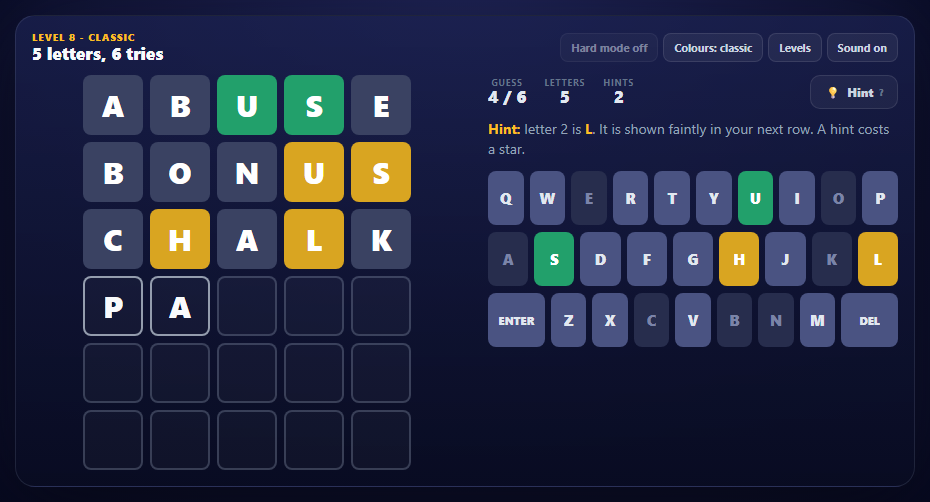
Word Guess is a Wordle-style game: you have a limited number of tries to find a hidden word, and after each guess every letter is marked green (right letter, right place), yellow (the letter is in the word, but somewhere else) or grey (not in the word). This version is a complete game with real word lists, a Daily Word with a streak, 20 levels in four tiers, words of four, five and six letters, hard mode, hints, statistics and an emoji result you can copy and share. It is plain HTML, CSS and JavaScript with no libraries, images or audio files.
Scoring repeated letters correctly
The classic bug in word games is how repeated letters are coloured. scoreGuess() works in two passes. The first pass marks every exact match green and counts the letters of the answer that are still unmatched. The second pass then gives a yellow only while an unmatched copy of that letter remains. So guessing "SPEED" against "ABIDE" colours only one E, exactly as the original game does, and the on-screen keyboard keeps the best status each letter has ever had (green beats yellow beats grey).
Word lists that scale
The RAW object holds three lists, one per word length. Each has "answers" (common words that can be the hidden word) and "extra" words (valid guesses that will never be the answer, so rare words never feel unfair). A guess must be in the list, otherwise the row shakes and a message tells you. Plurals of the shorter answer lists are accepted as guesses automatically. words() normalises, de-duplicates and checks the length of every entry at start-up, so adding a word is just adding it to the string.
The same word for everyone
Levels and the Daily Word pick their answer with a small seeded random generator (mulberry32). Level i always uses the same seed, so level 7 is the same word for every player, and the Daily Word uses the day number, so everyone plays the same word on the same day. Clearing the daily word on consecutive days builds a streak, and the Practice buttons give you an endless supply of random words of any length.
Hard mode and hints
In hard mode, hardViolation() checks your guess against every earlier row: a green letter has to stay in its position, and a yellow letter has to appear in the guess (with the right number of copies). Four of the five-letter levels and the later six-letter levels force it. The Hint button tells you the letter at one position you have not found yet and shows it faintly in your next row. You get three hints per game and each one costs a star.
Stars, stats and sharing
Solving a level in the par number of guesses or fewer earns three stars, one more guess earns two, and any win earns one, minus one star when a hint was used. Solving a level unlocks the next. A statistics screen tracks games played, win rate, the current and best win streak and a guess-distribution chart that highlights your result. Copy result builds the familiar grid of green, yellow and black squares (orange and blue in high contrast mode) so you can share it without spoiling the word.
Feel and accessibility
Tiles pop as you type, the row shakes on an invalid word, tiles flip one by one to reveal their colours and bounce when you win, with matching sounds from a Web Audio synth. A high contrast colour option replaces green and yellow with orange and blue for colour-blind players. The game works with the physical keyboard and the on-screen keyboard, scales to short preview areas, and stacks on phones. Progress, statistics, the streak and your settings are saved to localStorage inside try/catch.
What's included
Features
Step by step
How to Use
- 1Pick a level, the Daily Word or practiceThe menu shows 20 levels in four tiers: 4-letter words, 5-letter words, 5-letter words in hard mode, and 6-letter words with 7 tries. Level 1 is open at first and each solved level unlocks the next. The gold card is the Daily Word, and the Practice buttons give a random word of 4, 5 or 6 letters.
- 2Type a guessUse your keyboard or the on-screen keys, press Enter to submit and Backspace to delete. A guess has to be a real word from the list, otherwise the row shakes and a message tells you why.
- 3Read the coloursGreen means the right letter in the right place. Yellow means the letter is in the word but in a different place. Grey means it is not in the word (or all its copies are already accounted for). The on-screen keyboard keeps track of the best result for every letter.
- 4Use hard mode and hintsIn hard mode you must reuse the greens and yellows you have found. The Hint button (or the ? key) reveals one letter position and shows it faintly in the next row. You get three hints per game and each one costs a star.
- 5Earn stars and keep your streakSolve in the par number of guesses for three stars. Solve the Daily Word on consecutive days to build a streak. The result screen shows your guess-distribution chart and a Copy result button that makes a shareable emoji grid.
- 6Make it easier on the eyesThe colour button switches to a high contrast palette of orange and blue, and the sound button mutes the game. Your settings, stars and statistics are saved in this browser.
Real-world uses
Common Use Cases
Got questions?
Frequently Asked Questions
scoreGuess() uses two passes. The first marks exact matches green and counts the letters of the answer that were not matched. The second pass marks a letter yellow only while an unmatched copy remains in that count, so a letter is never marked yellow more times than it appears in the answer. This is the same rule as the original game.
Yes. Add words to the strings in the RAW object: put common words in the "a" string for that length (they can become the hidden word) and rare words in the "x" string (they are only accepted as guesses). words() filters anything that is the wrong length or not lowercase letters, so a typo cannot break the game.
A guess must be in the word list for that length, which has several thousand words. Very rare words and some inflected forms are missing, and the game tells you "is not in the word list" instead of wasting a try. You can add more words to the "x" strings.
hardViolation() compares your new guess with every earlier guess and its colours. A letter that was green has to be in the same position, and a letter that was yellow has to appear in the guess, as many times as it was marked green or yellow. If a rule is broken the row shakes and a message names the letter. Some levels force hard mode, and you can switch it on yourself before your first guess.
Each level has a par pair, for example 3 and 4 guesses. Solving within the first number gives three stars, within the second gives two and any win gives one, minus one star if you used a hint. The daily streak goes up when you solve the Daily Word on the day after your last daily solve and resets after a missed day. Statistics (games played, win rate, win streak) count every finished game.
Yes. All localStorage access is wrapped in try/catch, so a blocked storage only means that your progress is not saved, and every sound call is wrapped too. The on-screen keyboard works by touch, and on narrow screens the layout stacks and the page scrolls.
Copy & paste
Source Code
<div class="wg-fit" id="wg-fit"><div class="wg-wrap" id="wg-wrap">
<div class="wg-panel" id="wg-panel">
<div class="wg-hud">
<div class="wg-hud-left">
<span class="wg-kicker" id="wg-kicker">Word Guess</span>
<span class="wg-name" id="wg-name">Pick a level</span>
</div>
<div class="wg-hud-btns">
<button class="wg-btn-sm" id="wg-hard" type="button" aria-pressed="false" title="Hard mode: you must reuse the hints you have found">Hard mode off</button>
<button class="wg-btn-sm" id="wg-contrast" type="button" aria-pressed="false" title="High contrast colours">Colours: classic</button>
<button class="wg-btn-sm" id="wg-levels-btn" type="button" title="Levels (Esc)">Levels</button>
<button class="wg-btn-sm" id="wg-mute" type="button" aria-pressed="false">Sound on</button>
</div>
</div>
<div class="wg-main">
<div class="wg-board-col"><div class="wg-board" id="wg-board" role="grid" aria-label="Guess grid"></div></div>
<div class="wg-side">
<div class="wg-info">
<div class="wg-stat"><span class="wg-label">Guess</span><b id="wg-guess">0 / 6</b></div>
<div class="wg-stat"><span class="wg-label">Letters</span><b id="wg-len">5</b></div>
<div class="wg-stat"><span class="wg-label">Hints</span><b id="wg-hints">3</b></div>
<button class="wg-tool" id="wg-hint" type="button"><span>💡</span> Hint <em>?</em></button>
</div>
<p class="wg-msg" id="wg-msg">Type a word and press Enter.</p>
<div class="wg-keys" id="wg-keys"></div>
</div>
</div>
<div class="wg-overlay show" id="wg-menu">
<p class="wg-logo">Word Guess</p>
<p class="wg-tagline">Find the hidden word. After each guess, green means the right letter in the right place, yellow means the letter is in the word somewhere else, grey means it is not in the word.</p>
<div class="wg-menu-row">
<button class="wg-daily" id="wg-daily" type="button">
<span class="wg-daily-title" id="wg-daily-title">Daily Word</span>
<span class="wg-daily-sub" id="wg-daily-sub">One new word a day, the same for everyone</span>
</button>
<div class="wg-practice">
<span class="wg-practice-label">Practice (random word)</span>
<div><button class="wg-chip" data-len="4" type="button">4 letters</button><button class="wg-chip" data-len="5" type="button">5 letters</button><button class="wg-chip" data-len="6" type="button">6 letters</button></div>
</div>
<div class="wg-totals"><span><b id="wg-star-total">0</b> / 60 stars</span><span>Daily streak <b id="wg-streak">0</b></span><span id="wg-record"></span></div>
</div>
<div class="wg-tiers" id="wg-tiers"></div>
</div>
<div class="wg-overlay" id="wg-result">
<p class="wg-result-title" id="wg-result-title">Solved!</p>
<div class="wg-result-stars" id="wg-result-stars"><span>★</span><span>★</span><span>★</span></div>
<p class="wg-result-sub" id="wg-result-sub"></p>
<div class="wg-dist" id="wg-dist"></div>
<div class="wg-result-btns">
<button class="wg-btn" id="wg-next" type="button">Next level</button>
<button class="wg-btn wg-btn-ghost" id="wg-retry" type="button">Play again</button>
<button class="wg-btn wg-btn-ghost" id="wg-share" type="button">Copy result</button>
<button class="wg-btn wg-btn-ghost" id="wg-menu-back" type="button">Levels</button>
</div>
</div>
</div>
</div></div>* { box-sizing: border-box; margin: 0; padding: 0; }
body {
font-family: system-ui, -apple-system, 'Segoe UI', sans-serif; color: #e2e8f0;
background: radial-gradient(ellipse at top, #1d2250 0%, #0a0d26 60%, #05071a 100%);
min-height: 100vh; display: flex; align-items: center; justify-content: center; padding: 12px 14px; overflow: hidden;
}
/* The game scales itself to the space it is given (fitToView): .wg-fit takes the scaled size, .wg-wrap is laid out at its
natural size and then shrunk with transform. */
.wg-fit { flex: none; }
.wg-wrap { width: 900px; transform-origin: top left; }
.wg-panel {
--c-correct: #22a06b; --c-present: #d9a521; --c-absent: #3a4262;
position: relative; display: flex; flex-direction: column; gap: 12px; padding: 16px; border-radius: 20px; overflow: hidden;
background: linear-gradient(180deg, rgba(28,34,82,0.74), rgba(9,12,34,0.95));
border: 1px solid rgba(148,163,184,0.16); box-shadow: 0 30px 80px rgba(0,0,0,0.55), 0 0 90px rgba(99,102,241,0.14);
}
.wg-panel.contrast { --c-correct: #f5793a; --c-present: #85c0f9; --c-absent: #3a4262; }
.wg-hud { display: flex; align-items: center; gap: 14px; flex-wrap: wrap; }
.wg-hud-left { display: flex; flex-direction: column; line-height: 1.15; margin-right: auto; min-width: 0; }
.wg-kicker { font-size: 10px; font-weight: 800; letter-spacing: 0.09em; text-transform: uppercase; color: #fbbf24; }
.wg-name { font-size: 17px; font-weight: 800; color: #f8fafc; white-space: nowrap; }
.wg-hud-btns { display: flex; gap: 5px; flex-wrap: wrap; }
.wg-btn-sm { background: rgba(255,255,255,0.06); color: #cbd5e1; border: 1px solid rgba(255,255,255,0.1); border-radius: 8px; padding: 6px 10px; font: inherit; font-size: 11px; font-weight: 700; cursor: pointer; }
.wg-btn-sm:hover { background: rgba(255,255,255,0.14); }
.wg-btn-sm[aria-pressed="true"] { background: #4f46e5; border-color: #818cf8; color: #fff; }
.wg-btn-sm:disabled { opacity: 0.55; cursor: not-allowed; }
.wg-main { display: flex; gap: 26px; align-items: flex-start; }
.wg-board-col { flex: none; width: 430px; display: flex; justify-content: center; }
.wg-board { display: grid; gap: 7px; }
.wg-row { display: grid; gap: 7px; }
.wg-row.shake { animation: wg-shake 0.45s ease; }
@keyframes wg-shake { 20%, 60% { transform: translateX(-7px); } 40%, 80% { transform: translateX(7px); } }
.wg-cell {
width: 60px; height: 60px; display: flex; align-items: center; justify-content: center; font-size: 30px; font-weight: 900; text-transform: uppercase;
border: 2px solid rgba(148,163,184,0.3); border-radius: 8px; background: rgba(255,255,255,0.03); color: #f8fafc; user-select: none;
}
.wg-cell.filled { border-color: rgba(203,213,225,0.7); animation: wg-pop 0.12s ease; }
@keyframes wg-pop { 50% { transform: scale(1.12); } }
.wg-cell.ghost { color: rgba(251,191,36,0.55); border-color: rgba(251,191,36,0.45); border-style: dashed; }
.wg-cell.flip { animation: wg-flip 0.5s ease; }
@keyframes wg-flip { 0% { transform: rotateX(0); } 50% { transform: rotateX(90deg); } 100% { transform: rotateX(0); } }
.wg-cell.correct, .wg-cell.present, .wg-cell.absent { color: #fff; border-color: transparent; }
.wg-cell.correct { background: var(--c-correct); }
.wg-cell.present { background: var(--c-present); }
.wg-cell.absent { background: var(--c-absent); }
.wg-cell.win { animation: wg-bounce 0.6s ease; }
@keyframes wg-bounce { 0%, 100% { transform: translateY(0); } 40% { transform: translateY(-14px); } 60% { transform: translateY(2px); } }
.wg-side { flex: 1; min-width: 0; display: flex; flex-direction: column; gap: 10px; }
.wg-info { display: flex; align-items: center; gap: 18px; }
.wg-stat { display: flex; flex-direction: column; align-items: center; line-height: 1.15; }
.wg-label { font-size: 9px; font-weight: 700; letter-spacing: 0.08em; text-transform: uppercase; color: #64748b; }
.wg-stat b { font-size: 17px; font-weight: 800; font-variant-numeric: tabular-nums; }
.wg-tool { margin-left: auto; display: flex; align-items: center; gap: 6px; padding: 8px 14px; border-radius: 10px; cursor: pointer; font: inherit; font-size: 12px; font-weight: 800; color: #cbd5e1; background: rgba(255,255,255,0.05); border: 1px solid rgba(255,255,255,0.1); }
.wg-tool:hover:not(:disabled) { background: rgba(255,255,255,0.1); border-color: rgba(251,191,36,0.6); }
.wg-tool:disabled { opacity: 0.35; cursor: not-allowed; }
.wg-tool em { font-style: normal; font-size: 9px; color: #64748b; }
.wg-msg { min-height: 42px; font-size: 14px; line-height: 1.45; color: #94a3b8; }
.wg-msg b { color: #fbbf24; }
.wg-msg.warn { color: #fca5a5; }
.wg-keys { display: flex; flex-direction: column; gap: 7px; }
.wg-key-row { display: flex; gap: 6px; justify-content: center; }
.wg-key {
flex: 1; max-width: 46px; height: 54px; border: none; border-radius: 8px; cursor: pointer; font: inherit; font-size: 15px; font-weight: 800; color: #e2e8f0;
background: #4a5382; text-transform: uppercase; transition: background 0.2s, transform 0.06s;
}
.wg-key:active { transform: scale(0.94); }
.wg-key.wide { flex: 1.6; max-width: 72px; font-size: 11px; }
.wg-key.correct { background: var(--c-correct); color: #fff; }
.wg-key.present { background: var(--c-present); color: #fff; }
.wg-key.absent { background: #272d4d; color: #7b84a8; }
.wg-overlay { position: absolute; inset: 0; z-index: 30; display: flex; flex-direction: column; align-items: center; justify-content: center; gap: 12px; padding: 18px; text-align: center; overflow-y: auto; background: radial-gradient(ellipse at center, rgba(9,12,34,0.965), rgba(4,6,20,0.985)); opacity: 0; pointer-events: none; transition: opacity 0.25s; }
.wg-overlay.show { opacity: 1; pointer-events: auto; }
.wg-logo { font-size: 46px; font-weight: 900; letter-spacing: -0.02em; line-height: 1.05; background: linear-gradient(90deg, #22c55e, #fbbf24, #818cf8); -webkit-background-clip: text; background-clip: text; color: transparent; }
.wg-tagline { font-size: 13px; color: #94a3b8; max-width: 540px; line-height: 1.5; }
.wg-menu-row { display: flex; align-items: center; justify-content: center; gap: 16px; flex-wrap: wrap; }
.wg-daily { display: flex; flex-direction: column; align-items: flex-start; gap: 2px; padding: 10px 18px; border-radius: 12px; cursor: pointer; font: inherit; text-align: left; color: #fef3c7; border: 1px solid rgba(250,204,21,0.45); background: linear-gradient(135deg, rgba(250,204,21,0.18), rgba(251,146,60,0.1)); transition: transform 0.15s, box-shadow 0.15s; }
.wg-daily:hover { transform: translateY(-2px); box-shadow: 0 8px 24px rgba(250,204,21,0.2); }
.wg-daily-title { font-size: 14px; font-weight: 800; }
.wg-daily-sub { font-size: 11px; color: #fcd34d; max-width: 210px; }
.wg-practice { display: flex; flex-direction: column; gap: 5px; align-items: flex-start; }
.wg-practice-label { font-size: 11px; font-weight: 700; color: #94a3b8; }
.wg-chip { margin-right: 5px; padding: 7px 12px; border-radius: 9px; cursor: pointer; font: inherit; font-size: 12px; font-weight: 800; color: #d1fae5; border: 1px solid rgba(52,211,153,0.45); background: rgba(52,211,153,0.1); }
.wg-chip:hover { background: rgba(52,211,153,0.22); }
.wg-totals { display: flex; flex-direction: column; gap: 3px; font-size: 12px; color: #94a3b8; text-align: left; }
.wg-totals b { color: #f8fafc; }
.wg-tiers { display: flex; flex-direction: column; gap: 8px; width: 100%; max-width: 740px; }
.wg-tier { display: grid; grid-template-columns: 140px 1fr; align-items: center; gap: 12px; }
.wg-tier-name { font-size: 12px; font-weight: 800; letter-spacing: 0.04em; text-transform: uppercase; color: var(--g); text-align: left; line-height: 1.2; }
.wg-tier-name small { display: block; font-size: 10px; font-weight: 600; color: #64748b; text-transform: none; letter-spacing: 0; }
.wg-tier-tiles { display: grid; grid-template-columns: repeat(5, 1fr); gap: 6px; }
.wg-tile { position: relative; height: 46px; border-radius: 10px; cursor: pointer; font: inherit; color: #e2e8f0; border: 1px solid rgba(148,163,184,0.22); background: rgba(255,255,255,0.04); display: flex; flex-direction: column; align-items: center; justify-content: center; gap: 1px; transition: transform 0.12s, border-color 0.12s; }
.wg-tile:hover:not(:disabled) { transform: translateY(-2px); border-color: var(--g); }
.wg-tile::after { content: ''; position: absolute; left: 10px; right: 10px; bottom: 4px; height: 2px; border-radius: 2px; background: var(--g); opacity: 0.7; }
.wg-tile-num { font-size: 15px; font-weight: 800; }
.wg-tile-stars { font-size: 9px; letter-spacing: 1px; color: #334155; }
.wg-tile-stars .on { color: #facc15; }
.wg-tile:disabled { opacity: 0.32; cursor: not-allowed; }
.wg-tile.perfect { border-color: rgba(250,204,21,0.55); box-shadow: inset 0 0 12px rgba(250,204,21,0.15); }
.wg-result-title { font-size: 36px; font-weight: 900; color: #f8fafc; }
.wg-result-stars { display: flex; gap: 10px; font-size: 50px; line-height: 1; }
.wg-result-stars span { color: #1e293b; transform: scale(0.4); opacity: 0; }
.wg-result-stars span.on { color: #facc15; text-shadow: 0 0 22px rgba(250,204,21,0.75); }
.wg-overlay.show .wg-result-stars span { animation: wg-star 0.45s cubic-bezier(0.2, 1.6, 0.4, 1) forwards; }
.wg-overlay.show .wg-result-stars span:nth-child(2) { animation-delay: 0.18s; }
.wg-overlay.show .wg-result-stars span:nth-child(3) { animation-delay: 0.36s; }
@keyframes wg-star { to { transform: scale(1); opacity: 1; } }
.wg-result-sub { font-size: 14px; color: #94a3b8; line-height: 1.7; }
.wg-result-sub b { color: #f8fafc; letter-spacing: 0.08em; text-transform: uppercase; }
.wg-dist { display: flex; flex-direction: column; gap: 3px; width: 260px; }
.wg-dist div { display: flex; align-items: center; gap: 6px; font-size: 11px; color: #94a3b8; }
.wg-dist span { width: 10px; text-align: right; }
.wg-dist i { display: block; height: 14px; min-width: 14px; border-radius: 3px; background: #3a4262; color: #fff; font-style: normal; font-size: 10px; font-weight: 800; text-align: right; padding-right: 4px; line-height: 14px; }
.wg-dist i.you { background: var(--c-correct, #22a06b); }
.wg-result-btns { display: flex; gap: 8px; flex-wrap: wrap; justify-content: center; }
.wg-btn { padding: 10px 18px; border: none; border-radius: 10px; cursor: pointer; font: inherit; font-size: 14px; font-weight: 800; color: #fff; background: linear-gradient(135deg, #16a34a, #0d9488); box-shadow: 0 6px 18px rgba(22,163,74,0.35); transition: transform 0.12s; }
.wg-btn:hover { transform: translateY(-1px); }
.wg-btn-ghost { background: rgba(255,255,255,0.06); box-shadow: none; border: 1px solid rgba(255,255,255,0.12); color: #cbd5e1; }
.wg-btn[hidden] { display: none; }
.wg-confetti { position: absolute; top: -12px; width: 8px; height: 14px; border-radius: 2px; z-index: 40; pointer-events: none; animation: wg-fall linear forwards; }
@keyframes wg-fall { to { transform: translate(var(--dx), 720px) rotate(var(--rot)); opacity: 0.9; } }
.wg-narrow .wg-main { flex-direction: column; align-items: center; }
.wg-narrow .wg-board-col { width: 100%; }
.wg-narrow .wg-side { width: 100%; }
.wg-narrow .wg-cell { width: 50px; height: 50px; font-size: 26px; }
.wg-narrow .wg-tier { grid-template-columns: 1fr; gap: 4px; }
.wg-narrow .wg-logo { font-size: 34px; }/* ---------- Word lists: answers are common words, "extra" words are only accepted as guesses ---------- */
const RAW = {
4: {
a: 'able acid aged also area army away baby back ball band bank base bath bear beat beer bell belt bend best bike bill bird bite blow blue boat body bomb bond bone book boot born boss both bowl bulk burn bush busy cafe cake call calm came camp card care cart case cash cast cave cell chip city clap clay clip club coal coat code coin cold come cook cool cope copy cord core corn cost crew crop cute damp dare dark dash data date dawn dead deaf deal dear debt deep deer desk dial dice diet dine dirt dish dive dock dome done door dose down drag draw drip drop drum duck dust duty each earn ease east easy edge else even ever evil exam face fact fade fail fair fall fame farm fast fate fear feed feel feet fell felt fill film find fine fire firm fish fist five flag flat flew flip flow foam fold folk food foot fork form fort four free from fuel full fund gain game gate gave gear gift girl give glad glow glue goal goat gold golf gone good grab gray grew grid grin grip grow gulf hair half hall hand hang hard harm hate have head heal hear heat heel held hell help herb here hero hide high hill hint hire hold hole holy home hope horn host hour huge hung hunt hurt idea inch into iron item jack jazz join joke jump jury just keen keep kept kick kill kind king kiss knee knew know lack lady laid lake lamp land lane last late lawn lead leaf lean left lend less life lift like line link lion list live load loan lock lone long look loop lord lose loss lost loud love luck lump lung made mail main make male mall many mark mask mass mate math meal mean meat meet melt menu mess mild mile milk mill mind mine mint miss mist mode mood moon more most move much must myth nail name navy near neat neck need nest news next nice nine node none noon nose note once only onto open oral oven over pace pack page paid pain pair pale palm park part pass past path peak pick pile pill pine pink pipe plan play plot plug plus poem poet pole poll pond pool poor port pose post pour pray pull pump pure push quit quiz race rack rage rail rain rank rare rate read real rear rely rent rest rice rich ride ring rise risk road roar rock role roll roof room root rope rose rule rush safe sail sake sale salt same sand save seat seed seek seem seen self sell send sent shed ship shoe shop shot show shut sick side sign silk sing sink site size skin skip slam slap slip slow snap snow soap soft soil sold sole some song soon sort soul soup sour span spin spot star stay stem step stir stop such suit sure swim tail take tale talk tall tank tape task taxi team tear teen tell tend tent term test text than that them then they thin this thus tide tidy tied tier tile till time tiny tire toad told toll tone took tool tore torn tour town trap tray tree trim trip true tube tune turn twin type ugly unit upon urge used user vary vast verb very vest view vote wage wait wake walk wall want warm warn wash wave weak wear week well went were west what when whom wide wife wild will wind wine wing wire wise wish with wolf wood wool word wore work worm worn wrap yard yarn year yell your zero zone',
x: 'arch arms ants atom aunt axis bags bait bake bald bark barn beam bean beef beep bias bike bind bite blur boil bolt bump cage chat chef chop cola cone crab crow cube curl dame dart deck dent dies dive dolls dove dozen drum dull dune dusk earl echo emit envy epic exit fare fern fist flap flax flea flex foil fond fuzz gaze gems glow gown gram gust gym hail hamm harp hawk haze hike hive hobby hood hook hose hush icon idle inks jail jeep jets jobs jolt keys kids kite knit knot lace lamb lend lens lily limb lime limp lips loaf logo loom lure maid mane maze mild mole moss moth mule nuts oats odds oils owls pads pals pans pawn pear peas pest pets pigs pint plum pods pony pops prey prop pubs rats rays reed rely rids rims ripe rods rubs rugs rung ruin runs rust sack sage sang sans seal sets sews shin sins sips sirs skit slab slid slim slot snow sofa soar sock sons spec spit spur stab stew sung swan swap sway tabs tags tame tang taps tart teak tide tips toes tofu toil tomb tops toss tote tots tram trek trio trod tuck tusk twig vase veil vein vent vets vial vine void wail wand wasp watt weed weld whip wick wink wits yawn yoga zinc zoom',
},
5: {
a: 'about above abuse actor acute admit adopt adult after again agent agree ahead alarm album alert alike alive allow alone along alter among anger angle angry ankle apart apple apply arena argue arise armed array arrow aside asset avoid awake award aware badly baker basic basis beach begin being below bench berry birth black blade blame blank blast blaze bleed blend bless blind block blood bloom board boast bonus boost booth bound brain brake brand brass brave bread break breed brick bride brief bring broad broke brown brush build built bunch burst buyer cabin cable candy carry carve catch cause chain chair chalk charm chart chase cheap check cheek cheer chess chest chief child chill choir chunk civic civil claim class clean clear clerk click cliff climb clock close cloth cloud clown coach coast coral count court cover crack craft crane crash crawl crazy cream crime crisp cross crowd crown crush curve cycle daily dairy dance death debut delay dense depth diary dirty doubt dozen draft drain drama dream dress drift drill drink drive eager eagle early earth eight elbow elder elect elite email empty enemy enjoy enter entry equal error essay event every exact exist extra fable faint fairy faith false fancy fatal fault favor feast fence fever fiber field fifth fifty fight final first flame flash fleet flesh float flock flood floor flour fluid flush focus force forge forth forty forum found frame fraud fresh front frost fruit fully funny ghost giant given glass globe glory glove going grace grade grain grand grant grape graph grasp grass grave great green greet grief grill grind gross group grown guard guess guest guide guilt habit happy harsh haste haven heart heavy hello hence hobby honey honor horse hotel house human humor hurry ideal image imply index inner input issue ivory jelly jewel joint judge juice juicy knife knock known label labor large laser later laugh layer learn lease least leave legal lemon level light limit linen liver lobby local logic loose lover lower loyal lucky lunch magic major maker march match maybe mayor meant medal media melon mercy merge merit metal meter might minor minus mixed model money month moral motor mount mouse mouth movie music naive nerve never newly night noble noise north novel nurse occur ocean offer often olive onion opera orbit order organ other ought outer owner paint panel panic paper party pasta patch pause peace peach pearl pedal penny phase phone photo piano piece pilot pitch pizza place plain plane plant plate plaza point polar porch pound power press price pride prime print prior prize proof proud prove pulse punch pupil queen query quest quick quiet quite quote radar radio raise rally ranch range rapid ratio reach react ready realm rebel refer relax reply rider ridge rifle right rigid risky rival river roast robot rocky rough round route royal rural sadly saint salad sauce scale scare scarf scene scent scope score scout screw sense serve seven shade shake shall shame shape share shark sharp sheep sheet shelf shell shift shine shirt shock shoot shore short shout shown sight silly since sixth sixty skill skirt slave sleep slice slide slope small smart smell smile smoke snake solar solid solve sorry sound south space spare spark speak speed spell spend spice spike spine split spoke spoon sport spray squad stack staff stage stair stake stamp stand stare start state steak steal steam steel steep stern stick stiff still stock stone stood store storm story stove strap straw strip stuck study stuff style sugar suite sunny super sweet swept swift swing sword table taste teach tease thank theme there thick thing think third thorn those three throw thumb tiger tight timer tired title toast today token tooth topic torch total touch tough tower toxic trace track trade trail train trait trash treat trend trial tribe trick troop truck truly trunk trust truth tulip twice twist uncle under union unite unity until upper upset urban usage usual valid value valve vapor vault verse video viral virus visit vital vivid vocal voice voter wagon waist waste watch water weary weave wedge weigh weird whale wheat wheel where which while white whole whose widow width witch woman world worry worse worst worth wound wrist write wrong yacht young youth zebra adapt agile aging alley amaze amber ample anvil apron attic audio audit awful bacon badge bagel barge baron basil batch beard beast beige belly bible bingo birch bison blush bluff boxer brace brawl bribe brisk broom brook broth bugle bully camel canal canoe cargo carol cedar chaos cheat chime chord chose cider cigar clash clamp clasp cling clump coast cobra comet comic couch cough craze creek creep crest crumb cruel cubic cupid curry cyber dealt decay decor decoy demon dodge donor drawn dried drone drown dwarf eagle easel elbow ember empty endow enjoy ethic evade evoke exile fairy feral ferry fetch fiery filth finch flair flaky flask flint flora flute foggy folly forum fossil foyer frail frown frost fungi gamer gauge gavel genre gland glare gleam glide gloom gloss gnome goose gorge grail gravy greed gripe grove growl gruel guava gypsy hatch hazel heron hinge hippo hoist holly hound hover hyena icing idiom igloo inbox index irony jolly joker jumbo karma kayak kiosk knead kneel koala lance lapse latch lathe lemur lilac llama lodge lofty lunar lurch lyric macro madam mango manor maple marsh mason mauve meadow? medic melee mirth moist molar money moose motel mound mourn mulch mural myrrh nadir nasal nasty niche nifty ninja noisy nomad notch nutty oasis ocelot? odder omega opium otter ounce ought outdo ovary oxide ozone paddy pagan paste patio pecan penal perch petal phase pixel plaid plank plumb plume plump plush poach polka poppy poser prank prawn prism privy prone prune psalm pudgy pygmy quack quail quake qualm quart quilt quirk quota rabbi rainy raven rayon razor realm reign relic remix renew repay retro rhino rhyme rigor rinse ripen risen roost rouge rowdy ruddy ruler rumor rusty sabre saucy sauna savor scalp scamp scary scoop scorn scrap seize shady shaft shawl sheer shrub shrug siege sigma silky sinew skate skull slang slash sleek slick sling slump smash smirk snack snare sneak sniff snore snort solemn? soggy sonic spade spasm spawn spear spill spoil spree sprig squid stain stale stalk stark stash stern stink stoic stomp stool stoop stout strut stump stung sulky sunup surge swamp swarm swear sweep swell swirl syrup tabby taffy tango taper tardy tempo tenor tepid thief thigh thorn thump tiara timid tonic topaz trawl tread trophy? trout truce tuber tuxedo? twang tweak twice udder ulcer ultra umbra unfit unlit unzip usher utter vague valor vegan venom venue verge vigor vinyl viola viper vogue vowel wacky wager waltz warty weedy whack whiff whisk wince windy wispy witty woken woody wreck wring yearn yield yodel zesty',
x: 'abbey abide acorn adage adept aglow alien align allot aloft aloha amend amuse angel annex antic anyway? aorta aroma arose ashen aside atlas atoms atone attic avert bacon baggy balmy banjo barge basic bathe baton bayou beech befit begun belch bento berth bezel bible bigot binge biome bleak bliss bloke blown bluff blurb blurt bongo borax bossy bowel brace braid brawn bread bribe briar brine broil brood brunt budge bugle bulge bulky bumpy burly cadet caper carat cargo catty cease cedar chafe chant chaos chasm chide chili chimp chirp choke chomp chore churn cinch clack clank cleat clove cluck clunk coach cocoa comma conch cough coven cover crass creak creed crepe crypt cumin curio daddy dandy datum dazed debug decal deity delta delve depot derby deter dingo diner dizzy dolly dowdy dowel dread drool droop dross drove drunk duvet dying earn? ebony edict eerie eject elate elegy elude elves emcee emote endow envoy epoch equip erase erect erode evict exalt excel expel extol exult fable fanny farce fauna favor feign fella femur fewer fiend fifty filly flail flank flick fling flint flirt flock flora flung flunk foamy folio forte forty foxes frack fried frisk frond fryer fuzzy gaudy gaunt gawky geeky ghoul giddy gizmo glaze glint gloat glove glyph gnash godly golem gonad goofy gouda grail graze grime groan groom grope gruff grunt gumbo gusto gusty gypsy haiku hairy handy hardy harem harpy hefty heist helix hertz hippy hitch hived hokey homer hoopla humid humus husky hydra hyper icily igloo imbue impel inane incur inert infer ingot inlet input irate islet jaunt jazzy jerky jiffy joust juror kebab khaki kinky knack knave knelt koala kudos label lanky larch larva laser lasso lathe laxly leach leafy leaky ledge leech leery lefty legit lemon liken lilac limbo lipid livid llama loamy loath lobby loner loopy louse lover lowly lucid lumen lumpy lusty lying macho madly mafia maize mambo mange mania manly maple marry masse matey mealy mecca melee mercy metro midst milky mimic mince miner minty mirth miser mocha modem moldy mommy money monks moody mopey morph mossy motto mourn mucus muddy mulch mummy murky mushy musky musty myrrh nanny naval navel nerdy nexus nicer niece ninth nobly nodal noisy nutty nylon oaken oasis occur oddly offal offer ogled olden olive ombre onset oozed opine optic orbit ought ounce outdo outgo overt owing oxbow oxide pacer paddy pagan paint palsy panda pansy papal parka parry patty pause payee peaky pearl peppy perky pesky petty phony piety piggy pinch pious pixie pleat plied plumb plush poker polka porky posit posse pouch prick prime privy probe prone prong prowl proxy prude psalm pubic puffy pudgy pulpy pupal purge pushy putty quaff queen quell query quill quirk quite quota quoth rabid racer radii radon rainy rajah ramen ranch randy raspy ratty ravel rayon rebut recap recur reedy reeve regal rehab reign relic remit renal repel reset resin retch revel revue rhyme ridge rigid rinse ritzy rival rivet roach roast rocky rogue roomy rooty rouge rouse rover rowdy ruddy rugby ruled rumba runny rural rusty sadly salty salvo sandy sappy sassy satyr scald scaly scant scare scoff scold scone scoop scour scowl scram scrub scuba scuff seamy sedan seedy segue serum setup sever sewer shack shaky shank shard shave shear sheik shiny shire shirk shoal shone shook shrew shrub shuck shyly sieve sixes skiff skimp slant slate sleet slept slimy sloop sloth slosh slunk slurp slush smack smelt smite smock smoky snafu snail snarl sneer snide snipe snoop snout soapy sober soggy solve sooty sophs soupy spank spawn spazz spiel spiny spiky spire spite splat spool spore spout spunk squat squib stack staid stank stave stead stein stilt sting stint stoke stork stray strum stunk stunt suave sudsy sulky sumac sunny surly swami swash swath sweat swoon swoop swore sworn swung synod tacit tacky taboo tally talon tamer tangy taunt tawny tease teddy teeth tempo tenet tense tenth tepee thank thaw? their theft theme thick thine thong thrum thud? tidal tilde timer tipsy titan toady tonal toner topaz torso totem touch tower toxin tract trash trawl treed trill trite troll troop trove trump tryst tubby tulip tunic turbo tutor twain tweed twerp twine twirl tying udder ulcer umbra uncut under undue unify unlit unset untie upper upset urine usurp utile vacuum? valet vapid vault veery venal vicar vinyl viola viper vireo visor vista vital vixen vodka vomit voila vouch vowel wacko wafer wager waltz warty waspy weary weave wedge weepy weird whack whale wheat whelp whiff whine whirl whisk widen wield wimpy wince winch windy wispy witty woken wooly woozy wordy world worry wound wrack wrath wring wrist wryly yacht yearn yeast yield yodel young yummy zebra zesty zilch zippy',
},
6: {
a: 'absent accept access accord across action active actual advice affair affect afford agency agenda almost always amount animal annual answer anyone appeal appear around arrive artist aspect assume attack attend august author autumn avenue backup barely barrel basket battle beauty become before behind belief belong beside better beyond bigger bitter border bottle bottom bounce branch breath bridge bright broken budget bundle burden button camera cancel candle carbon career carpet castle casual center change charge cheese cherry choice choose chosen church circle client closer coffee column combat comedy coming commit common copper corner cotton county couple course cousin create credit crisis custom damage dancer danger dealer debate decade decide defeat defend degree demand depend design desire detail device dinner direct doctor dollar domain double dragon drawer driver during easily eating editor effect effort eighth either eleven emerge empire employ enable ending energy engage engine enough ensure entire escape estate evolve exceed except excuse expand expect expert export extend fabric factor fairly fallen family famous farmer father fellow figure filter finger finish fiscal flavor flight flower follow forest forget formal former foster fourth friend frozen future galaxy garage garden gather gender gentle global golden govern ground growth guitar handle happen hardly hazard health heaven height hidden holder honest hunger hunter ignore impact import income indeed injury inside intend invent invite island itself jacket jersey jungle junior kernel kidney kitten ladder launch lawyer leader league legend length lesson letter liable likely linear liquid listen little living lonely lovely mainly manage manual marble margin market master matter medium member memory mental merely method middle minute mirror mobile modern modest moment monkey mostly mother motion motive museum mutual myself narrow nation nature nearby nearly needle neither nephew nobody normal notice number object obtain office online option orange origin output oxygen palace parade parent partly patent patrol pencil people pepper period permit person phrase picnic pillow planet player please pledge plenty pocket poetry police policy polite poster potato powder prefer pretty prince prison profit prompt proper public purple pursue puzzle rabbit random rarely rather reader really reason recall recent record reduce reform refuse region reject relate relief remain remedy remote remove repair repeat report rescue resort result retail retire return reveal review reward riding rocket roller rubber ruling sacred safety salary sample school screen script search season second secret sector secure select senior serial series server settle severe shadow shield shower signal silent silver simple simply single sister sketch slight smooth soccer social soften spirit spread spring square stable static status steady stolen stream street stress strict strike string stripe strong studio submit sudden suffer summer summit supply surely survey switch symbol system tablet talent target tenant thanks theory thirty though thread threat thrive throne ticket timber tissue toggle tomato tongue toward travel treaty trophy tunnel twelve twenty unique unless update upload urgent useful valley varied vendor verify vessel victim vision visual volume wander warmth wealth weapon weekly weight window winter wisdom within wonder wooden worker worthy yellow',
x: 'abroad absorb accent accuse acorns adjust admire adrift advent aghast agreed airway alcove allied allure alpine amulet anchor angled ankles anthem antler anyhow apathy appeal arcade archer ardent argued armpit arrays ascent ashore aspire assert assist assure astute atomic attach attire augment auntie aurora autumn avatar avenge awhile awoken backed badger baffle bakery ballet banana bandit banner barbed barber barley barren bashful basics basil bathes batter bazaar beacon beaker beaten beauty beaver bedbug beetle begged behave beings belted bender benign beseech? bikini binder biscuit blazer bleach blithe blonde bloody blouse boiler bonfire bonus bother bounty bovine boxers breeze bridal briefs brisk bronze brooch browse bruise brunch brutal bubble bucket buckle buffer bulbs bumper bungle burial burrow bushel butler butter buzzer cactus cajole calmly candid canine cannon canopy canvas carpet carrot cartel carved casino cattle caught causal cavern celery cellar cement censor cereal chalet chapel charge charms chased cheery chewed chicks chilly chimes chisel choked chunky cinder circus clamor claret clause clergy clever cliche clicks cliffs climax clinic clones closet clothe clouds clumsy clutch coarse cobweb cocoon coerce coined colony combed comfort comics commas compel concur condor confer cookie coping cords corral cosmic cough? cradle craved crayon crazed creamy creeps crisis crowds cruise crumbs crunch crusty cuckoo cuddle cuffed curfew curled cursor cursed cutlet cymbal dagger dainty dampen dancer dandy darken dashed dazzle debris decent deckle decoy deeply deface deform delete demise denial dental depart deploy depths deputy detect detour devout dialog diaper differ digest dimple dingy dining dipped direly disarm dismal doable dodgy dogged donkey doodle dorsal dosage dotted dragon drains drapes drifts drowsy drummer? dubbed dugout duller duplex durian dusted dwelling? eagles earful earthy eaters eclair edging eerily eighty elbows elders elfin eluded embark embers emblem embody emerge emptor enamel encode endear endure engulf enigma enrich ensign entice entity envoys epoxy equals equine errand erupts eschew ethics evenly evoked exalts exempt exotic expose extras fables facets faction factory fading fainted? fakers falcon fallow fanned farmed fasten fathom faults fawned feared feeble feline fender ferret fervor fibers fiddle fierce fights filmed filthy finale finder finest fiesta fisher fitful flames flange flares flasks flatly flaunt flawed fleece fleets flinch flings floods floors floral floury flowed fluent fluids flurry flushed? folded folder folkways foggy fondly fondue footed forage forbid forced forges forked formed fortune? fossil fought fowled fragile? frames frantic? freely freeze french? frenzy fresco fridge frills fringe frisky frocks frolic frosty frowns frugal fruity fuddle fumble funnel furrow gadget gallon galore gamble gaming garlic garter gasket gasped gather gauged gazing gecko geezer gelled genial gentry gerbil gifted ginger giraffe glance glider glitch gloomy glossy gloved glycol gnawed goblin goggle gospel gossip gotten gouged grains granny grants grapes gravel graves graze greedy greens grille grimly grinds groove groped grouch grouse grovel grumpy guffaw guilty gutter hacked haggle hairdo halted halves hamper handed hangar hanger happen harbor harder hardly harness? harped hassle hasten hatred haunts hawker headed healer hearth hearty heated heater hectic hedges heists helmet helper hermit heroic herons hiccup hinges hipped hither hockey hollow homage homing hoofed hooked hoopla hornet horror hotdog hotels housed hovers howled hubbub huddle hugged hullos humane humble humbly hummed humors hunger hunted hurdle hurled hurtle hushed hustle hybrid hymnal iambic icicle iconic ignite iguana illegal? imaged impair impart impish impose improv inbred incite indoor infant infect inform inhale inject inlaid innate inroad insect insert insult intact intake intent intern invade irises ironic island isles itches jabbed jackal jagged jailer jammed jargon jaunty jerked jester jigsaw jingle jinxed jitter jostle jotted joyful judged jugged juggle jumble jumper kennel kettle kicked kidnap killer kindle kindly kinked kiosks kisses kitten knight knives knobby kudzu labels lacing lacked ladies lagoon lament lander lapsed larder larger lashes lastly latent latter laughs launch lavish lawful layers layout lazily leaded leaped learnt leaves lecture? legacy legion lender lenses lentil lessen lethal lettuce? levels levers levity liable liberal? lifted ligand lights likens liking limber limbed limits linens lineup lining linked lintel lioness? lipids liquor lisped listed litany litter lively livers lizard loaded loaves locals locate locked locker locust lodged lodger lofted logged logger lollop lonely longer looked looker loomed looped loosen looted lordly losers losing lotion lounge louder lovers lowers lugged lumber lunged lurked luster lyrics macaw madden madman magnet maiden mailed mailer maimed maker malice mammal manage manger mangle manner mantle mantra marble marched margin marina marked marker marlin marmot maroon marred marrow marsh martyr marvel masked masons massed master mating matrix matted mature mayhem meadow meager meekly melody melted member menace mended mender menial mental mentor mercy merger merino merits mermaid? meshed method metric mettle midday midget midway mighty mildew milder mildly milieu milled miller mimics mincer minded miners mingle minima minion minnow minted minute mirage mirror mirth? misery misfit mishap misled mister misty mitten mixers mixing moaned mobile mocked modals modems modern modest modify module moguls molars molded molten moment monies monkey monsoon? mooing moored morale morbid morgue morsel mortal mortar mosaic mosque mossed mother motifs motion motley mottos moused mouths movers movies moving mowing mucked muddle muffin muffle mugged mulled mumble mummy mumps munch murals murder murmur muscle museum musing muskrat? mussel mustang? mutant mutate mutely mutiny mutton mutual muzzle myriad myrtle naiver nailed namely napkin narrow nation native nature nausea navies nearby nearer nearly neatly nebula nectar needed needle negate neigh? nephew nerves nested nestle nettle neural neuter newest newish newton nibble nicely nickel nicest nickname? niggle nimbus nipple nitric nitwit nobler nobles nobody nodded noggin noises nomads nonfat noodle nooses normal norths nosing nostril notary notch? noted notify notion nougat novice nozzle nuance nudged nudity nugget nullify? number numbed nuncio nuptial nursed nurses nutmeg nutria nutter',
},
};
const BLOCK = new Set(['gypsy', 'pygmy', 'spazz', 'hamm', 'frack', 'pubic', 'gonad', 'nitwit', 'sophs', 'bimbo', 'tramp']); // never offered or accepted
function words(s, len) { const seen = new Set(), out = []; s.split(/\s+/).forEach(w => { if (w.length === len && /^[a-z]+$/.test(w) && !seen.has(w) && !BLOCK.has(w)) { seen.add(w); out.push(w); } }); return out; }
const DICT = {};
[4, 5, 6].forEach(len => {
const answers = words(RAW[len].a, len), extra = words(RAW[len].x, len);
const valid = new Set(answers.concat(extra));
if (len > 4) words(RAW[len - 1].a, len - 1).forEach(w => valid.add(w + 's')); // plurals are accepted as guesses
DICT[len] = { answers, valid };
});
const TIERS = [
{ name: 'Warm-up', note: '4 letters, 6 tries', color: '#4ade80' },
{ name: 'Classic', note: '5 letters, 6 tries', color: '#60a5fa' },
{ name: 'Hard mode', note: '5 letters, hints must be reused', color: '#c084fc' },
{ name: 'Master', note: '6 letters, 7 tries', color: '#fb923c' },
];
// len: word length, tries: guesses allowed, hard: hard mode is forced, par: guesses for 3 stars and for 2 stars
const LEVELS = [
...[0, 1, 2, 3, 4].map(() => ({ len: 4, tries: 6, hard: false, par: [3, 4] })),
...[0, 1, 2, 3, 4].map(() => ({ len: 5, tries: 6, hard: false, par: [3, 4] })),
...[0, 1, 2, 3, 4].map(() => ({ len: 5, tries: 6, hard: true, par: [4, 5] })),
...[0, 1, 2, 3, 4].map((_, k) => ({ len: 6, tries: 7, hard: k >= 2, par: [4, 5] })),
];
const LEVEL_COUNT = LEVELS.length;
const SAVE_KEY = 'word-guess-save-v1';
const DAY0 = Date.UTC(2026, 10, 11); // Daily Word #1
const MAX_HINTS = 3;
const KEY_ROWS = ['qwertyuiop'.split(''), 'asdfghjkl'.split(''), ['enter', ...'zxcvbnm'.split(''), 'del']];
const $ = id => document.getElementById(id);
const boardEl = $('wg-board'), keysEl = $('wg-keys'), msgEl = $('wg-msg'), panelEl = $('wg-panel'), menuEl = $('wg-menu'), resultEl = $('wg-result');
const hintBtn = $('wg-hint'), hardBtn = $('wg-hard'), contrastBtn = $('wg-contrast'), nextBtn = $('wg-next'), shareBtn = $('wg-share'), muteBtn = $('wg-mute');
/* ---------- Saved progress (localStorage can throw in sandboxed iframes, so every access is guarded) ---------- */
function freshSave() {
return {
stars: Array(LEVEL_COUNT).fill(0), hard: false, contrast: false,
stats: { played: 0, wins: 0, streak: 0, max: 0, dist: [0, 0, 0, 0, 0, 0, 0] },
daily: { day: 0, stars: 0, guesses: 0, streak: 0, lastDay: 0 },
};
}
function loadSave() {
const f = freshSave();
try {
const s = JSON.parse(localStorage.getItem(SAVE_KEY) || 'null');
if (s && Array.isArray(s.stars)) {
f.stars = f.stars.map((_, i) => s.stars[i] || 0);
f.hard = !!s.hard; f.contrast = !!s.contrast;
Object.assign(f.stats, s.stats || {}); Object.assign(f.daily, s.daily || {});
f.stats.dist = f.stats.dist.map((_, i) => (s.stats && s.stats.dist && s.stats.dist[i]) || 0);
}
} catch (e) { /* storage blocked */ }
return f;
}
function persist() { try { localStorage.setItem(SAVE_KEY, JSON.stringify(save)); } catch (e) { /* storage blocked */ } }
let save = loadSave();
function mulberry32(a) {
return function () {
a |= 0; a = a + 0x6D2B79F5 | 0;
let t = Math.imul(a ^ a >>> 15, 1 | a);
t = t + Math.imul(t ^ t >>> 7, 61 | t) ^ t;
return ((t ^ t >>> 14) >>> 0) / 4294967296;
};
}
function todayNumber() {
const d = new Date();
return Math.max(1, Math.floor((Date.UTC(d.getFullYear(), d.getMonth(), d.getDate()) - DAY0) / 86400000) + 1);
}
function pickWord(len, seed) { const list = DICT[len].answers; return list[Math.floor(mulberry32(seed)() * list.length)]; }
/* ---------- Sound: a tiny Web Audio synth, no files ---------- */
let audioCtx = null, muted = false;
function getAudio() {
if (!audioCtx) { try { audioCtx = new (window.AudioContext || window.webkitAudioContext)(); } catch (e) { audioCtx = null; } }
if (audioCtx && audioCtx.state === 'suspended') audioCtx.resume();
return audioCtx;
}
function tone(freq, dur, type, vol, slideTo, delay) {
if (muted || !audioCtx) return;
try {
const t0 = audioCtx.currentTime + (delay || 0);
const osc = audioCtx.createOscillator(), gain = audioCtx.createGain();
osc.type = type;
osc.frequency.setValueAtTime(freq, t0);
if (slideTo) osc.frequency.exponentialRampToValueAtTime(slideTo, t0 + dur);
gain.gain.setValueAtTime(vol, t0);
gain.gain.exponentialRampToValueAtTime(0.0001, t0 + dur);
osc.connect(gain); gain.connect(audioCtx.destination);
osc.start(t0); osc.stop(t0 + dur);
} catch (e) { /* audio is optional */ }
}
const sfx = {
key() { tone(700, 0.035, 'square', 0.025); },
del() { tone(420, 0.04, 'square', 0.025); },
flip(i, state) { tone(state === 'correct' ? 660 : state === 'present' ? 520 : 300, 0.12, 'triangle', 0.06, null, i * 0.25 + 0.2); },
bad() { tone(170, 0.2, 'sawtooth', 0.045, 100); },
win() { [523, 659, 784, 1046].forEach((f, i) => tone(f, 0.22, 'triangle', 0.07, null, 0.4 + i * 0.12)); },
lose() { tone(330, 0.3, 'sawtooth', 0.05, 160); tone(220, 0.45, 'sawtooth', 0.05, 110, 0.25); },
hint() { tone(880, 0.1, 'sine', 0.05); tone(1320, 0.16, 'sine', 0.05, null, 0.09); },
};
muteBtn.addEventListener('click', () => {
muted = !muted;
muteBtn.textContent = muted ? 'Sound off' : 'Sound on';
muteBtn.setAttribute('aria-pressed', String(muted));
});
/* ---------- Game state ---------- */
let spec = null, mode = 'level', levelIndex = 0, dailyNum = 0;
let answer = '', len = 5, tries = 6, hardForced = false;
let guesses = [], results = [], current = '', keyState = {}, hintPos = new Set(), hintsLeft = MAX_HINTS, hintsUsed = 0;
let phase = 'menu', busy = false, runId = 0;
let rowEls = [], cellEls = [];
function scoreGuess(guess, target) { // two passes, so repeated letters are scored correctly
const res = Array(guess.length).fill('absent'), left = {};
for (let i = 0; i < guess.length; i++) { if (guess[i] === target[i]) res[i] = 'correct'; else left[target[i]] = (left[target[i]] || 0) + 1; }
for (let i = 0; i < guess.length; i++) { if (res[i] !== 'correct' && left[guess[i]] > 0) { res[i] = 'present'; left[guess[i]]--; } }
return res;
}
function hardViolation(guess) { // hard mode: hints already found must be used in every later guess
for (let g = 0; g < guesses.length; g++) {
const prev = guesses[g], res = results[g];
for (let i = 0; i < prev.length; i++) {
if (res[i] === 'correct' && guess[i] !== prev[i]) return 'Letter ' + (i + 1) + ' must be ' + prev[i].toUpperCase();
}
for (let i = 0; i < prev.length; i++) {
if (res[i] === 'present') {
const need = prev.split('').filter((c, k) => c === prev[i] && res[k] !== 'absent').length;
if (guess.split('').filter(c => c === prev[i]).length < need) return 'Guess must contain ' + prev[i].toUpperCase();
}
}
}
return null;
}
function buildBoard() {
boardEl.innerHTML = '';
boardEl.style.width = (len * 60 + (len - 1) * 7) + 'px';
rowEls = []; cellEls = [];
for (let r = 0; r < tries; r++) {
const row = document.createElement('div');
row.className = 'wg-row'; row.style.gridTemplateColumns = 'repeat(' + len + ', 1fr)';
row.setAttribute('role', 'row');
const cells = [];
for (let c = 0; c < len; c++) { const cell = document.createElement('div'); cell.className = 'wg-cell'; cell.setAttribute('role', 'gridcell'); row.appendChild(cell); cells.push(cell); }
boardEl.appendChild(row); rowEls.push(row); cellEls.push(cells);
}
}
function buildKeys() {
keysEl.innerHTML = '';
KEY_ROWS.forEach(keys => {
const row = document.createElement('div');
row.className = 'wg-key-row';
keys.forEach(k => {
const b = document.createElement('button');
b.type = 'button'; b.className = 'wg-key' + (k.length > 1 ? ' wide' : ''); b.dataset.k = k;
b.textContent = k === 'del' ? 'Del' : k === 'enter' ? 'Enter' : k;
b.addEventListener('click', () => { onKey(k); b.blur(); });
row.appendChild(b);
});
keysEl.appendChild(row);
});
}
function setupGame(s) {
spec = s; mode = s.mode;
runId++; busy = false;
answer = s.answer; len = s.len; tries = s.tries; hardForced = !!s.hard;
guesses = []; results = []; current = ''; keyState = {}; hintPos = new Set(); hintsLeft = MAX_HINTS; hintsUsed = 0;
buildBoard(); buildKeys();
phase = 'play';
menuEl.classList.remove('show'); resultEl.classList.remove('show');
if (document.activeElement && document.activeElement.blur) document.activeElement.blur();
setMsg('Type a ' + len + '-letter word and press Enter.' + (hardForced ? ' <b>Hard mode:</b> use every hint you find.' : ''));
fitToView();
render();
}
function startLevel(i) {
getAudio(); levelIndex = i;
const L = LEVELS[i];
setupGame({ mode: 'level', len: L.len, tries: L.tries, hard: L.hard, par: L.par, answer: pickWord(L.len, 4000 + i * 7919) });
$('wg-kicker').textContent = 'Level ' + (i + 1) + ' - ' + TIERS[Math.floor(i / 5)].name;
$('wg-name').textContent = L.len + ' letters, ' + L.tries + ' tries' + (L.hard ? ', hard mode' : '');
}
function startDaily() {
getAudio(); dailyNum = todayNumber();
setupGame({ mode: 'daily', len: 5, tries: 6, hard: false, par: [3, 4], answer: pickWord(5, dailyNum * 104729 + 11) });
$('wg-kicker').textContent = 'Daily'; $('wg-name').textContent = 'Daily Word #' + dailyNum;
}
function startPractice(n) {
getAudio();
const list = DICT[n].answers;
setupGame({ mode: 'practice', len: n, tries: n === 6 ? 7 : 6, hard: false, par: n === 6 ? [4, 5] : [3, 4], answer: list[Math.floor(Math.random() * list.length)] });
$('wg-kicker').textContent = 'Practice'; $('wg-name').textContent = n + ' letters, random word';
}
function restart() { if (mode === 'daily') startDaily(); else if (mode === 'practice') startPractice(len); else startLevel(levelIndex); }
function showMenu() {
runId++; busy = false; phase = 'menu';
resultEl.classList.remove('show'); menuEl.classList.add('show');
renderMenu();
$('wg-kicker').textContent = 'Word Guess'; $('wg-name').textContent = 'Pick a level';
}
/* ---------- Rendering ---------- */
function setMsg(html, warn) { msgEl.innerHTML = html; msgEl.classList.toggle('warn', !!warn); }
function render() {
panelEl.classList.toggle('contrast', save.contrast);
for (let r = 0; r < tries; r++) {
for (let c = 0; c < len; c++) {
const cell = cellEls[r][c];
if (r < guesses.length) continue; // revealed rows are drawn by the flip animation
const typed = r === guesses.length && c < current.length;
const ghost = r === guesses.length && !typed && hintPos.has(c);
cell.textContent = typed ? current[c] : ghost ? answer[c] : '';
cell.className = 'wg-cell' + (typed ? ' filled' : '') + (ghost ? ' ghost' : '');
}
}
[...keysEl.querySelectorAll('.wg-key')].forEach(b => { const st = keyState[b.dataset.k]; b.classList.remove('correct', 'present', 'absent'); if (st) b.classList.add(st); });
$('wg-guess').textContent = Math.min(guesses.length + (phase === 'play' ? 1 : 0), tries) + ' / ' + tries;
$('wg-len').textContent = len;
$('wg-hints').textContent = hintsLeft;
hintBtn.disabled = phase !== 'play' || busy || hintsLeft <= 0;
const hard = save.hard || hardForced;
hardBtn.textContent = hardForced ? 'Hard mode (forced)' : 'Hard mode ' + (save.hard ? 'on' : 'off');
hardBtn.setAttribute('aria-pressed', String(hard));
hardBtn.disabled = hardForced || guesses.length > 0;
contrastBtn.textContent = save.contrast ? 'Colours: high contrast' : 'Colours: classic';
contrastBtn.setAttribute('aria-pressed', String(save.contrast));
}
function renderMenu() {
const today = todayNumber(), d = save.daily, st = save.stats;
if (d.lastDay && d.lastDay < today - 1) d.streak = 0; // a missed day resets the streak
const wrap = $('wg-tiers');
wrap.innerHTML = '';
TIERS.forEach((t, ti) => {
const row = document.createElement('div');
row.className = 'wg-tier'; row.style.setProperty('--g', t.color);
row.innerHTML = '<div class="wg-tier-name">' + t.name + '<small>' + t.note + '</small></div>';
const tiles = document.createElement('div');
tiles.className = 'wg-tier-tiles';
for (let k = 0; k < 5; k++) {
const i = ti * 5 + k, unlocked = i === 0 || save.stars[i - 1] > 0; // solving a level unlocks the next one
const b = document.createElement('button');
b.type = 'button'; b.className = 'wg-tile' + (save.stars[i] === 3 ? ' perfect' : '');
b.disabled = !unlocked; b.title = unlocked ? 'Level ' + (i + 1) : 'Solve level ' + i + ' to unlock';
b.innerHTML = '<span class="wg-tile-num">' + (i + 1) + '</span><span class="wg-tile-stars">' + [0, 1, 2].map(n => '<span class="' + (n < save.stars[i] ? 'on' : '') + '">\u2605</span>').join('') + '</span>';
b.addEventListener('click', () => startLevel(i));
tiles.appendChild(b);
}
row.appendChild(tiles); wrap.appendChild(row);
});
$('wg-star-total').textContent = save.stars.reduce((s, v) => s + v, 0);
$('wg-streak').textContent = d.streak;
$('wg-record').textContent = st.played ? 'Played ' + st.played + ', won ' + Math.round(st.wins / st.played * 100) + '%, best streak ' + st.max : 'No games played yet';
$('wg-daily-title').textContent = 'Daily Word #' + today;
$('wg-daily-sub').textContent = d.day === today && d.stars > 0 ? 'Solved today: ' + '\u2605'.repeat(d.stars) + '\u2606'.repeat(3 - d.stars) + ' in ' + d.guesses + ' (play again to improve)' : 'One new word a day, the same for everyone. Keep your streak!';
}
/* ---------- Playing ---------- */
function onKey(k) {
if (phase !== 'play' || busy) return;
if (k === 'enter') { submit(); return; }
if (k === 'del') { if (current.length) { current = current.slice(0, -1); sfx.del(); render(); } return; }
if (/^[a-z]$/.test(k) && current.length < len) { current += k; sfx.key(); render(); }
}
function shake(msg) {
const row = rowEls[guesses.length];
row.classList.remove('shake'); void row.offsetWidth; row.classList.add('shake');
sfx.bad(); setMsg(msg, true);
}
function submit() {
if (current.length < len) { shake('Not enough letters.'); return; }
if (!DICT[len].valid.has(current)) { shake('"' + current.toUpperCase() + '" is not in the word list.'); return; }
if (save.hard || hardForced) { const v = hardViolation(current); if (v) { shake(v + '.'); return; } }
const guess = current, res = scoreGuess(guess, answer), r = guesses.length;
guesses.push(guess); results.push(res); current = ''; busy = true; setMsg('');
const id = runId;
res.forEach((state, i) => { // reveal the tiles one by one: flip, then colour them at the middle of the flip
setTimeout(() => {
if (id !== runId) return;
const cell = cellEls[r][i];
cell.textContent = guess[i]; cell.classList.add('flip');
setTimeout(() => { if (id === runId) { cell.className = 'wg-cell flip ' + state; } }, 250);
}, i * 250);
sfx.flip(i, state);
});
setTimeout(() => {
if (id !== runId) return;
res.forEach((state, i) => { const rank = { absent: 1, present: 2, correct: 3 }; const k = guess[i]; if (!keyState[k] || rank[state] > rank[keyState[k]]) keyState[k] = state; });
busy = false;
const won = guess === answer;
if (won) { cellEls[r].forEach((c, i) => setTimeout(() => c.classList.add('win'), i * 90)); finish(true); }
else if (guesses.length >= tries) finish(false);
else setMsg(guesses.length === tries - 1 ? '<b>Last guess!</b>' : '');
render();
}, len * 250 + 300);
render();
}
function useHint() {
if (phase !== 'play' || busy || hintsLeft <= 0) return;
const found = new Set();
results.forEach(res => res.forEach((s, i) => { if (s === 'correct') found.add(i); }));
const unknown = []; for (let i = 0; i < len; i++) if (!found.has(i) && !hintPos.has(i)) unknown.push(i);
if (!unknown.length) { setMsg('You have already found every letter position.', true); return; }
const pos = unknown[Math.floor(Math.random() * unknown.length)];
hintPos.add(pos); hintsLeft--; hintsUsed++;
setMsg('<b>Hint:</b> letter ' + (pos + 1) + ' is <b>' + answer[pos].toUpperCase() + '</b>. It is shown faintly in your next row. A hint costs a star.');
sfx.hint(); render();
}
function finish(won) {
if (phase !== 'play') return;
phase = 'over';
const n = guesses.length, st = save.stats;
let stars = 0;
if (won) { stars = n <= spec.par[0] ? 3 : n <= spec.par[1] ? 2 : 1; if (hintsUsed > 0) stars = Math.max(1, stars - 1); }
st.played++;
if (won) { st.wins++; st.streak++; st.max = Math.max(st.max, st.streak); st.dist[Math.min(n, 7) - 1]++; } else st.streak = 0;
if (won && mode === 'level') save.stars[levelIndex] = Math.max(save.stars[levelIndex], stars);
if (won && mode === 'daily') {
const d = save.daily;
if (d.day !== dailyNum) { d.day = dailyNum; d.stars = 0; d.guesses = 0; }
if (stars > d.stars || (stars === d.stars && (!d.guesses || n < d.guesses))) { d.stars = stars; d.guesses = n; }
if (d.lastDay !== dailyNum) { d.streak = d.lastDay === dailyNum - 1 ? d.streak + 1 : 1; d.lastDay = dailyNum; }
}
persist();
if (won) { sfx.win(); confetti(); } else sfx.lose();
$('wg-result-title').textContent = won ? (n === 1 ? 'Genius!' : n <= 3 ? 'Brilliant!' : 'Solved!') : 'Out of guesses';
[...$('wg-result-stars').children].forEach((el, i) => el.classList.toggle('on', i < stars));
$('wg-result-stars').style.visibility = mode === 'level' || mode === 'daily' ? 'visible' : 'hidden';
$('wg-result-sub').innerHTML = (won ? 'You found <b>' + answer + '</b> in ' + n + ' guess' + (n === 1 ? '' : 'es') + '.' : 'The word was <b>' + answer + '</b>.') +
(won ? '<br>3 stars at ' + spec.par[0] + ' guesses or fewer, 2 stars at ' + spec.par[1] + (hintsUsed ? ', and a hint costs a star' : '') : '') +
(mode === 'daily' && won ? '<br>Streak ' + save.daily.streak : '');
const max = Math.max(1, ...st.dist);
$('wg-dist').innerHTML = st.dist.slice(0, tries).map((v, i) => '<div><span>' + (i + 1) + '</span><i class="' + (won && i === n - 1 ? 'you' : '') + '" style="width:' + Math.max(14, Math.round(v / max * 200)) + 'px">' + v + '</i></div>').join('');
nextBtn.hidden = mode !== 'level' || !won || levelIndex >= LEVEL_COUNT - 1;
shareBtn.hidden = !won && mode !== 'daily';
shareBtn.textContent = 'Copy result';
const id = runId;
setTimeout(() => { if (id === runId && phase === 'over') resultEl.classList.add('show'); }, won ? 1300 : 1000);
}
function shareText() {
const sq = { correct: save.contrast ? '\uD83D\uDFE7' : '\uD83D\uDFE9', present: save.contrast ? '\uD83D\uDFE6' : '\uD83D\uDFE8', absent: '\u2B1B' };
const head = mode === 'daily' ? 'Word Guess Daily #' + dailyNum : mode === 'level' ? 'Word Guess level ' + (levelIndex + 1) : 'Word Guess';
const won = guesses[guesses.length - 1] === answer;
return head + ' ' + (won ? guesses.length : 'X') + '/' + tries + '\n' + results.map(r => r.map(s => sq[s]).join('')).join('\n');
}
function confetti() {
const colors = ['#22c55e', '#fbbf24', '#818cf8', '#f472b6', '#38bdf8', '#fb923c'];
for (let i = 0; i < 46; i++) {
const p = document.createElement('div');
p.className = 'wg-confetti'; p.style.left = Math.random() * 100 + '%'; p.style.background = colors[i % colors.length];
p.style.setProperty('--dx', (Math.random() * 160 - 80) + 'px'); p.style.setProperty('--rot', (Math.random() * 720 - 360) + 'deg');
p.style.animationDuration = (1.8 + Math.random() * 1.4) + 's'; p.style.animationDelay = (Math.random() * 0.5) + 's';
panelEl.appendChild(p); setTimeout(() => p.remove(), 4200);
}
}
/* ---------- Controls ---------- */
hintBtn.addEventListener('click', () => { useHint(); hintBtn.blur(); });
hardBtn.addEventListener('click', () => { if (hardBtn.disabled) return; save.hard = !save.hard; persist(); render(); hardBtn.blur(); });
contrastBtn.addEventListener('click', () => { save.contrast = !save.contrast; persist(); render(); contrastBtn.blur(); });
$('wg-levels-btn').addEventListener('click', showMenu);
$('wg-daily').addEventListener('click', startDaily);
menuEl.querySelectorAll('.wg-chip').forEach(b => b.addEventListener('click', () => startPractice(Number(b.dataset.len))));
$('wg-retry').addEventListener('click', restart);
$('wg-menu-back').addEventListener('click', showMenu);
nextBtn.addEventListener('click', () => startLevel(levelIndex + 1));
shareBtn.addEventListener('click', () => {
const text = shareText();
const done = () => { shareBtn.textContent = 'Copied!'; };
try { navigator.clipboard.writeText(text).then(done, () => { shareBtn.textContent = 'Copy not allowed'; }); } catch (e) { shareBtn.textContent = 'Copy not allowed'; }
});
document.addEventListener('keydown', e => {
if (e.ctrlKey || e.metaKey || e.altKey) return;
const k = e.key;
if (k === 'Escape' && phase !== 'menu') { showMenu(); return; }
if (phase !== 'play') return;
if (k === 'Enter') { e.preventDefault(); onKey('enter'); }
else if (k === 'Backspace') { e.preventDefault(); onKey('del'); }
else if (k === '?') useHint();
else if (/^[a-zA-Z]$/.test(k)) onKey(k.toLowerCase());
});
/* ---------- Fit the game into the space available ---------- */
const fitEl = $('wg-fit'), wrapEl = $('wg-wrap');
function fitToView() {
const availW = Math.max(240, window.innerWidth - 28), availH = Math.max(240, window.innerHeight - 24);
const narrow = availW < 760;
wrapEl.classList.toggle('wg-narrow', narrow);
document.body.style.overflow = narrow ? 'auto' : 'hidden';
document.body.style.alignItems = narrow ? 'flex-start' : 'center';
if (narrow) { wrapEl.style.transform = 'none'; wrapEl.style.width = Math.min(520, availW) + 'px'; fitEl.style.width = wrapEl.style.width; fitEl.style.height = wrapEl.offsetHeight + 'px'; return; }
wrapEl.style.transform = 'none'; wrapEl.style.width = '900px';
const natH = wrapEl.offsetHeight || 1, k = Math.max(0.4, Math.min(1, availW / 900, availH / natH));
wrapEl.style.transform = k < 1 ? 'scale(' + k + ')' : 'none';
fitEl.style.width = Math.round(900 * k) + 'px'; fitEl.style.height = Math.round(natH * k) + 'px';
}
window.addEventListener('resize', fitToView);
if (typeof ResizeObserver !== 'undefined') new ResizeObserver(fitToView).observe(wrapEl);
setupGame({ mode: 'practice', len: 5, tries: 6, hard: false, par: [3, 4], answer: pickWord(5, 1) });
showMenu();
fitToView();
/* wdp-share:start */
(function () {
var TITLE = 'Word Guess Game (Wordle-Style)', URL = 'https://webdevpuneet.com/ui-snippets/word-guess-game/';
if (window.__wdpShare) return;
window.__wdpShare = true;
var blob = null, file = null, lastInfo = null;
/* ---- UI ---- */
var st = document.createElement('style');
st.textContent =
'.wdps-in,.wdps-btn,.wdps-box{touch-action:manipulation;-webkit-tap-highlight-color:transparent}.wdps-in{display:block;margin:12px auto 0;border:0;border-radius:12px;padding:11px 22px;font:800 15px/1 system-ui,sans-serif;background:#16a34a;color:#fff;cursor:pointer;box-shadow:0 3px 0 #11793a;pointer-events:auto;position:relative;z-index:5}' +
'.wdps-in:hover{background:#15803d}.wdps-in:active{transform:translateY(2px);box-shadow:0 1px 0 #11793a}' +
'.wdps-btn{position:fixed;right:12px;bottom:12px;z-index:2147483000;border:0;border-radius:99px;padding:9px 16px;font:700 13px/1 system-ui,sans-serif;background:#16a34a;color:#fff;cursor:pointer;box-shadow:0 3px 12px rgba(0,0,0,.3)}' +
'.wdps-btn.wdps-hot{animation:wdps-p 1.4s ease-in-out infinite}' +
'@keyframes wdps-p{0%,100%{box-shadow:0 0 0 0 rgba(22,163,74,.6),0 3px 12px rgba(0,0,0,.3)}50%{box-shadow:0 0 0 9px rgba(22,163,74,0),0 3px 12px rgba(0,0,0,.3)}}' +
'.wdps-btn:active{transform:translateY(1px)}' +
'.wdps-in[hidden],.wdps-btn[hidden],.wdps-box[hidden],.wdps-box [hidden]{display:none}' +
'.wdps-box{position:fixed;left:50%;bottom:12px;transform:translateX(-50%);z-index:2147483001;width:max-content;max-width:calc(100vw - 24px);box-sizing:border-box;background:#fff;color:#64748b;border:1px solid #d5e2ee;border-radius:12px;padding:8px 12px;font:700 12px/1.4 system-ui,sans-serif;box-shadow:0 8px 26px rgba(15,23,42,.25);display:flex;flex-wrap:wrap;gap:8px;align-items:center}' +
'.wdps-box button,.wdps-box a{border:1px solid #d5e2ee;background:#f8fafc;color:#1e293b;border-radius:99px;padding:5px 12px;font:700 12px system-ui,sans-serif;text-decoration:none;cursor:pointer}' +
'.wdps-box .wdps-x{border:0;background:none;font-size:19px;line-height:1;padding:0 4px;margin-left:auto;color:#475569}' +
'@media (max-width:700px){.wdps-box{width:calc(100vw - 24px);justify-content:center;padding:10px 12px}.wdps-box>span{width:100%;text-align:center}.wdps-box button,.wdps-box a{padding:9px 14px;font-size:13px}.wdps-box .wdps-x{position:absolute;top:4px;right:4px}.wdps-in{width:100%;max-width:320px}}';
document.head.appendChild(st);
var pill = document.createElement('button');
pill.type = 'button'; pill.className = 'wdps-btn'; pill.textContent = 'Share result';
var inl = document.createElement('button');
inl.type = 'button'; inl.className = 'wdps-in'; inl.textContent = 'Share result'; inl.hidden = true;
var box = document.createElement('div');
box.className = 'wdps-box'; box.hidden = true;
box.setAttribute('role', 'dialog'); box.setAttribute('aria-label', 'Share your result');
box.innerHTML =
'<span data-a="msg">Share your result:</span>' +
'<button type="button" data-a="copy">Copy image</button>' +
'<a data-a="dl" download="result.png">Download image</a>' +
'<button type="button" data-a="more" hidden>More…</button>' +
'<a data-a="wa" target="_blank" rel="noopener">WhatsApp</a>' +
'<a data-a="x" target="_blank" rel="noopener">X</a>' +
'<a data-a="fb" target="_blank" rel="noopener">Facebook</a>' +
'<button type="button" class="wdps-x" data-a="close" aria-label="Close share options">×</button>';
document.body.appendChild(box);
document.body.appendChild(pill);
function q(a) { return box.querySelector('[data-a="' + a + '"]'); }
function ours(el) { return el === inl || el === pill || !!el.closest('.wdps-box'); }
/* ---- reading the result from the screen ---- */
function shown(el) {
if (!el || !el.getClientRects().length) return false;
for (var n = el; n && n !== document.body; n = n.parentElement) {
var cs = getComputedStyle(n);
if (cs.display === 'none' || cs.visibility === 'hidden' || parseFloat(cs.opacity) < 0.1) return false;
if (n.hidden || n.getAttribute('aria-hidden') === 'true') return false;
}
return true;
}
function txt(el) { return (el.textContent || '').replace(/\s+/g, ' ').trim(); }
function sig(el) { return ((el.id || '') + ' ' + (typeof el.className === 'string' ? el.className : '')).toLowerCase(); }
var OUTCOME = /(you win|you won|win!|wins|victory|game over|time.?s up|cleared|complete|solved|defeat|you lose|you lost|lost|draw|crash|failed|success|congrat|score|result|finished|beat|all matched|well done|perfect|new best)/i;
var HEADSIG = /(title|headline|msg|message|banner|result|verdict|status)/;
var WIN = /(you win|you won|win!|wins|victory|cleared|complete|solved|success|congrat|beat|matched|perfect|new best|record)/i;
var LOSS = /(game over|time.?s up|defeat|you lose|you lost|lost|crash|failed|out of)/i;
var BOX = /(overlay|modal|banner|result|over|end|dialog|screen|popup|panel|card|finish|win)/;
function readResult() {
var head = '', sub = '', root = null, headEl = null;
var all = document.body.querySelectorAll('h1,h2,h3,h4,p,strong,div,span');
for (var i = 0; i < all.length && !head; i++) {
var el = all[i];
if (ours(el) || el.children.length > 2) continue;
if (!HEADSIG.test(sig(el))) continue;
/* a banner that holds its own title: use the title inside it instead */
var inner = false;
for (var c = 0; c < el.children.length; c++) if (HEADSIG.test(sig(el.children[c]))) inner = true;
if (inner) continue;
var t = txt(el);
if (t.length < 3 || t.length > 70 || !OUTCOME.test(t) || !shown(el)) continue;
head = t; headEl = el; root = el.parentElement;
}
if (root) {
var kids = root.querySelectorAll('p,span,div');
for (var j = 0; j < kids.length && !sub; j++) {
var k = kids[j];
if (ours(k) || k.children.length > 2 || !/(sub|text|summary|note|desc|detail)/.test(sig(k))) continue;
var tt = txt(k);
if (tt && tt !== head && tt.length >= 5 && tt.length <= 160 && shown(k)) sub = tt;
}
}
/* the result screen the button goes into: the nearest overlay / banner / result box around the headline */
var host = null;
for (var n = headEl, d = 0; n && n !== document.body && d < 4; n = n.parentElement, d++) {
if (d > 0 && BOX.test(sig(n)) && n.tagName !== 'BUTTON') { host = n; break; }
}
return { head: head, sub: sub, host: host };
}
var STATRE = /(score|moves|time|wpm|best|level|streak|accuracy|combo|coins|distance|height|points|stars|lives|wins|attempt|guess)/;
function readStats() {
var out = [], seen = {};
var all = document.body.querySelectorAll('span,strong,b,div,p,output');
for (var i = 0; i < all.length && out.length < 4; i++) {
var el = all[i];
if (ours(el) || el.children.length > 1) continue;
if (!STATRE.test(sig(el))) continue;
var t = txt(el);
if (!t || t.length > 28 || !/[0-9]/.test(t) || !shown(el)) continue;
if (!/[a-zA-Z]/.test(t) && el.parentElement) {
var parts = [], ch = el.parentElement.childNodes;
for (var p = 0; p < ch.length; p++) { var pv = (ch[p].textContent || '').replace(/\s+/g, ' ').trim(); if (pv) parts.push(pv); }
var pt = parts.join(' ');
if (pt.length <= 30 && /[a-zA-Z]/.test(pt)) t = pt;
}
var key = t.toLowerCase();
if (seen[key]) continue;
seen[key] = 1; out.push(t);
}
return out;
}
function bestCanvas() {
var cs = document.querySelectorAll('canvas'), best = null, area = 0;
for (var i = 0; i < cs.length; i++) {
var r = cs[i].getBoundingClientRect(), a = r.width * r.height;
if (a > area && a > 8000 && shown(cs[i])) { area = a; best = cs[i]; }
}
return best;
}
/* ---- show the button when a result is on screen ---- */
var lastHost = null, timer = 0;
function sync() {
timer = 0;
var r = readResult();
if (r.head && r.host) {
if (inl.parentElement !== r.host) r.host.appendChild(inl);
if (inl.hidden) inl.hidden = false;
if (!pill.hidden) pill.hidden = true;
} else {
if (!inl.hidden) inl.hidden = true;
if (pill.hidden) pill.hidden = false;
pill.classList.toggle('wdps-hot', !!r.head);
}
if (lastHost && !r.head && !box.hidden) box.hidden = true;
lastHost = r.head ? (r.host || document.body) : null;
}
function later() { if (!timer) timer = setTimeout(sync, 200); }
try {
new MutationObserver(function (list) {
for (var i = 0; i < list.length; i++) {
var t = list[i].target;
if (t.nodeType !== 1) t = t.parentElement;
if (t && !ours(t)) { later(); return; }
}
}).observe(document.body, { subtree: true, childList: true, characterData: true, attributes: true, attributeFilter: ['class', 'style', 'hidden'] });
} catch (e) {}
setInterval(later, 1500);
later();
/* ---- the card (1080 x 1080, drawn in memory, light like Pocket Artillery's) ---- */
var outline = 0;
function put(g, t, x, y) { if (outline) { g.lineJoin = 'round'; g.lineWidth = outline; g.strokeStyle = 'rgba(8,12,28,.85)'; g.strokeText(t, x, y); } g.fillText(t, x, y); }
function wrap(g, text, x, y, maxW, lh, maxLines) {
var words = text.split(' '), line = '', n = 0;
for (var i = 0; i < words.length; i++) {
var tst = line ? line + ' ' + words[i] : words[i];
if (g.measureText(tst).width > maxW && line) {
put(g, line, x, y); y += lh; n++; line = words[i];
if (n >= maxLines - 1) { line = words.slice(i).join(' '); break; }
} else line = tst;
}
if (line) {
while (line.length > 3 && g.measureText(line).width > maxW) line = line.slice(0, -2);
put(g, line, x, y); y += lh;
}
return y;
}
/* Biggest-screenshot card: the game frame fills the whole image, the text sits on top of it as an overlay. */
function bgOf(el) {
for (var n = el; n; n = n.parentElement) {
var c = getComputedStyle(n).backgroundColor;
if (c && c !== 'transparent' && c.slice(-4) !== ', 0)') return c;
}
return '#0f172a';
}
function drawBig(info, cv) {
var W = 1080, r = cv.width / cv.height, H = Math.max(810, Math.min(1350, Math.round(W / r)));
var c = document.createElement('canvas'); c.width = W; c.height = H;
var g = c.getContext('2d');
g.fillStyle = bgOf(cv.parentElement || cv); g.fillRect(0, 0, W, H);
var w = W, h = w / r;
if (h > H) { h = H; w = h * r; }
g.imageSmoothingEnabled = true; g.imageSmoothingQuality = 'high';
try { g.drawImage(cv, (W - w) / 2, (H - h) / 2, w, h); } catch (e) { return null; }
/* dark fades under the text so it stays readable on any game colours */
var g1 = g.createLinearGradient(0, 0, 0, H * 0.55); g1.addColorStop(0, 'rgba(8,12,28,.74)'); g1.addColorStop(1, 'rgba(8,12,28,0)');
g.fillStyle = g1; g.fillRect(0, 0, W, H * 0.55);
var g2 = g.createLinearGradient(0, H - 200, 0, H); g2.addColorStop(0, 'rgba(8,12,28,0)'); g2.addColorStop(1, 'rgba(8,12,28,.85)');
g.fillStyle = g2; g.fillRect(0, H - 200, W, 200);
var head = info.head || 'Can you beat me?';
var kind = /draw|tie/i.test(head) ? 'draw' : LOSS.test(head) && !WIN.test(head) ? 'loss' : 'win';
g.textAlign = 'center';
var y = 36;
g.fillStyle = 'rgba(255,255,255,.93)'; g.font = '800 34px system-ui, sans-serif'; outline = 7;
y = wrap(g, TITLE.toUpperCase(), W / 2, y + 34, 1000, 42, 1);
g.fillStyle = kind === 'draw' ? '#e2e8f0' : kind === 'loss' ? '#9db8ff' : '#ffc233';
var big = head.length > 22 ? 84 : 112; g.font = '900 ' + big + 'px system-ui, sans-serif'; outline = 16;
y = wrap(g, head, W / 2, y + big * 0.85, 1000, big * 1.05, 2);
if (info.sub) { g.fillStyle = '#fff'; g.font = '700 40px system-ui, sans-serif'; outline = 9; y = wrap(g, info.sub, W / 2, y + 6, 980, 50, 2); }
outline = 0;
if (info.stats.length) {
g.font = '800 38px system-ui, sans-serif';
var gap = 16, pad = 26, ws = [], tot = -gap;
for (var i = 0; i < info.stats.length; i++) { ws.push(g.measureText(info.stats[i]).width + pad * 2); tot += ws[i] + gap; }
var sc = tot > 960 ? 960 / tot : 1, px = (W - tot * sc) / 2, py = y + 14;
for (var k = 0; k < info.stats.length; k++) {
var w0 = ws[k] * sc;
g.fillStyle = 'rgba(8,12,28,.72)'; g.strokeStyle = 'rgba(255,255,255,.55)'; g.lineWidth = 3;
g.beginPath();
if (g.roundRect) g.roundRect(px, py, w0, 68, 34); else g.rect(px, py, w0, 68);
g.fill(); g.stroke();
g.fillStyle = '#fff'; g.font = '800 ' + Math.round(38 * sc) + 'px system-ui, sans-serif';
g.fillText(info.stats[k], px + w0 / 2, py + 47);
px += w0 + gap * sc;
}
}
outline = 8;
g.fillStyle = '#fff'; g.font = '900 52px system-ui, sans-serif'; put(g, 'Can you beat it?', W / 2, H - 84);
g.fillStyle = 'rgba(255,255,255,.92)'; g.font = '700 34px system-ui, sans-serif'; outline = 6; put(g, 'Play free at webdevpuneet.com', W / 2, H - 34);
outline = 0;
return c;
}
function finish(c, cb) {
var dataUrl = '';
try { dataUrl = c.toDataURL('image/png'); } catch (e) {}
try { c.toBlob(function (b) { cb(b, dataUrl); }, 'image/png'); } catch (e) { cb(null, dataUrl); }
}
function makeCard(info, cb) {
var cv0 = bestCanvas();
if (cv0) { var bc = drawBig(info, cv0); if (bc) { finish(bc, cb); return; } }
var S = 1080, c = document.createElement('canvas');
c.width = S; c.height = S;
var g = c.getContext('2d');
var gr = g.createLinearGradient(0, 0, 0, S);
gr.addColorStop(0, '#eaf4ff'); gr.addColorStop(1, '#fff3ef');
g.fillStyle = gr; g.fillRect(0, 0, S, S);
var cv = bestCanvas();
var head = info.head || 'Can you beat me?';
var kind = /draw|tie/i.test(head) ? 'draw' : LOSS.test(head) && !WIN.test(head) ? 'loss' : 'win';
g.textAlign = 'center';
g.fillStyle = '#1e293b'; g.font = '800 60px system-ui, sans-serif';
var y = wrap(g, TITLE, S / 2, cv ? 120 : 200, 980, 68, 1);
g.fillStyle = kind === 'draw' ? '#475569' : kind === 'loss' ? '#3b63e0' : '#e8553a';
g.font = '800 ' + (head.length > 22 ? 76 : 100) + 'px system-ui, sans-serif';
y = wrap(g, head, S / 2, y + (head.length > 22 ? 70 : 90), 980, head.length > 22 ? 84 : 108, 2);
if (info.sub) { g.fillStyle = '#475569'; g.font = '700 38px system-ui, sans-serif'; y = wrap(g, info.sub, S / 2, y + 4, 940, 48, 2); }
if (info.stats.length) {
g.font = '800 36px system-ui, sans-serif';
var gap = 18, pad = 26, ws = [], tot = -gap;
for (var i = 0; i < info.stats.length; i++) { ws.push(g.measureText(info.stats[i]).width + pad * 2); tot += ws[i] + gap; }
var sc = tot > 1000 ? 1000 / tot : 1, px = (S - tot * sc) / 2, py = y + 14;
for (var k = 0; k < info.stats.length; k++) {
var w0 = ws[k] * sc;
g.fillStyle = '#ffffff'; g.strokeStyle = '#d5e2ee'; g.lineWidth = 3;
g.beginPath();
if (g.roundRect) g.roundRect(px, py, w0, 64, 32); else g.rect(px, py, w0, 64);
g.fill(); g.stroke();
g.fillStyle = '#1e293b'; g.font = '800 ' + Math.round(36 * sc) + 'px system-ui, sans-serif';
g.fillText(info.stats[k], px + w0 / 2, py + 44);
px += w0 + gap * sc;
}
y = py + 64 + 10;
}
if (cv) {
try {
var maxW = 960, maxH = Math.max(180, 930 - y - 30), r = cv.width / cv.height;
var w = maxW, h = w / r;
if (h > maxH) { h = maxH; w = h * r; }
var x = (S - w) / 2, yy = y + 20 + Math.max(0, (maxH - h) / 2);
g.save(); g.shadowColor = 'rgba(60,100,140,0.3)'; g.shadowBlur = 30; g.shadowOffsetY = 10;
g.fillStyle = '#fff'; g.fillRect(x - 8, yy - 8, w + 16, h + 16); g.restore();
g.drawImage(cv, x, yy, w, h);
} catch (e) {}
}
g.fillStyle = '#1e293b'; g.font = '800 46px system-ui, sans-serif';
g.fillText('Can you beat it?', S / 2, 1000);
g.fillStyle = '#64748b'; g.font = '700 34px system-ui, sans-serif';
g.fillText('Play free at webdevpuneet.com', S / 2, 1050);
var dataUrl = '';
try { dataUrl = c.toDataURL('image/png'); } catch (e) {}
try { c.toBlob(function (b) { cb(b, dataUrl); }, 'image/png'); } catch (e) { cb(null, dataUrl); }
}
function shareText(info) {
var bits = [];
if (info.head) bits.push(info.head);
if (info.stats.length) bits.push(info.stats.join(', '));
return TITLE + ': ' + (bits.length ? bits.join(' - ') + '. ' : '') + 'Can you beat it? ' + URL;
}
function msg(t) { q('msg').textContent = t; }
function openFallback() {
var t = encodeURIComponent(shareText(lastInfo));
q('wa').href = 'https://wa.me/?text=' + t;
q('x').href = 'https://twitter.com/intent/tweet?text=' + t;
q('fb').href = 'https://www.facebook.com/sharer/sharer.php?u=' + encodeURIComponent(URL) + '"e=' + t;
box.hidden = false;
}
function nativeShare() {
/* a user cancel does nothing; anything else (blocked in an iframe, no permission) shows Copy / Download / links */
try {
navigator.share({ files: [file], title: TITLE, text: shareText(lastInfo) }).catch(function (e) { if (!e || e.name !== 'AbortError') openFallback(); });
} catch (e) { openFallback(); }
}
function onShare() {
var info = readResult(); info.stats = readStats();
lastInfo = info;
msg('Share your result:');
makeCard(info, function (b, dataUrl) {
blob = b; file = null;
if (b) { try { file = new File([b], 'result.png', { type: 'image/png' }); } catch (e) {} }
if (dataUrl) q('dl').href = dataUrl;
q('dl').hidden = !dataUrl;
var canNative = !!(file && navigator.share && navigator.canShare && navigator.canShare({ files: [file] }));
var touch = !!(window.matchMedia && window.matchMedia('(pointer: coarse)').matches);
q('more').hidden = !canNative;
if (canNative && touch) nativeShare();
else openFallback();
});
}
/* Games often have document/window level touch and pointer handlers (some call preventDefault, which cancels the tap's
click on phones, others restart the game on touchstart). So: keep every pointer event on our controls away from the
game, and fire on touchend as well as click (guarded so one tap shares once). */
var busy = 0;
function trigger() { if (busy) return; busy = 1; setTimeout(function () { busy = 0; }, 700); onShare(); }
function guard(el, act) {
var evs = ['pointerdown', 'pointerup', 'mousedown', 'mouseup', 'touchstart', 'touchend', 'click'];
for (var i = 0; i < evs.length; i++) el.addEventListener(evs[i], function (e) { e.stopPropagation(); });
if (act) {
el.addEventListener('touchend', function (e) { if (e.cancelable) e.preventDefault(); act(); });
el.addEventListener('click', function () { act(); });
}
}
guard(pill, trigger);
guard(inl, trigger);
guard(box);
q('more').addEventListener('click', function () { if (file) nativeShare(); });
q('close').addEventListener('click', function () { box.hidden = true; });
document.addEventListener('keydown', function (e) { if (e.key === 'Escape' && !box.hidden) box.hidden = true; });
q('copy').addEventListener('click', function () {
try {
navigator.clipboard.write([new ClipboardItem({ 'image/png': blob })]).then(
function () { msg('Image copied. Paste it into your chat or post.'); },
function () { msg('Could not copy here. Try Download image.'); }
);
} catch (e) { msg('Copying images is not supported here. Try Download image.'); }
});
})();
/* wdp-share:end */Extend with AI
Take This Snippet Further With AI
Paste this snippet's HTML, CSS and JS into an AI coding assistant like Claude and ask it to explain how scoreGuess() handles repeated letters in two passes, how hardViolation() counts copies of a yellow letter, and how the staggered flip animation colours each tile at the middle of the flip. It is also a good base to extend: ask for a "how many words are still possible" counter that filters the list after every guess, a solver that suggests the best next guess, a multiplayer race on the same daily word, a custom word challenge you can send as a link, or a bigger dictionary loaded on demand. You can also ask it to review the busy flag and run id that guard typing during the reveal animation.
Prompt to recreate it
Copy this into your AI assistant of choice to build the effect from scratch, or as a jumping-off point for your own variant:
Build a Wordle-style word guessing game in plain HTML, CSS and JavaScript, with no libraries, images or audio files.

Requirements:
- A grid with one row per guess and one tile per letter (4, 5 or 6 letters), plus an on-screen QWERTY keyboard and physical keyboard support (letters, Enter, Backspace). Tiles pop when typed, the row shakes for an invalid guess, tiles flip one by one to reveal green (right letter, right place), yellow (in the word, wrong place) or grey, and win tiles bounce.
- Score guesses with two passes so repeated letters are right: first mark exact matches and count the unmatched letters of the answer, then mark yellow only while an unmatched copy remains. The on-screen keys keep the best status of each letter (green over yellow over grey).
- Word lists for 4, 5 and 6 letters, each with "answers" (common words) and "extra" valid guesses, normalised and de-duplicated at start-up. Reject a guess that is too short or not in the list with a message. Accept plurals of the shorter answer lists as guesses.
- 20 levels in 4 tiers (4 letters, 5 letters, 5 letters in hard mode, 6 letters with 7 tries) defined as data, with a seeded random generator (mulberry32) choosing the answer so every player gets the same word. A Daily Word (5 letters) from the date with a day streak, and Practice buttons for random 4, 5 and 6 letter words.
- Hard mode (a toggle, forced on some levels): greens must stay in place and yellow letters must be reused with the right number of copies, otherwise the row shakes with a message.
- 3 hints per game that reveal one letter position and show it faintly in the next row. Stars: 3 for solving within the par number of guesses, 2 for one more, 1 for any win, minus one star if a hint was used. A level unlocks when the previous one has a star.
- Statistics: games played, win rate, win streak, best streak and a guess-distribution chart highlighting the current result. A Copy result button that copies a grid of coloured squares (orange and blue in high contrast mode). Save progress, stats, the streak and settings to localStorage inside try/catch.
- A high contrast colour option, Web Audio synth sounds with a mute button, confetti on a win, a result screen with the answer and stars, and a busy flag plus run id so typing and old timers are safe during the reveal.
- Scale the whole game to fit the available area (shrink with transform down to 40 percent) and stack the layout on narrow screens.
Want to tighten it up first? Run this prompt through the AI Prompt Studio to score it across 8 quality dimensions, catch anti-patterns, and tune the wording for Claude, ChatGPT, or Gemini before you paste it in.