
Cascading Select — Dependent Dropdowns in HTML, CSS & JS
Cascading Select · Forms · Plain HTML, CSS & JS · Live preview
About this UI Snippet
Cascading Select — Dependent Dropdowns with Progress Steps, Loading State and Safe Reset
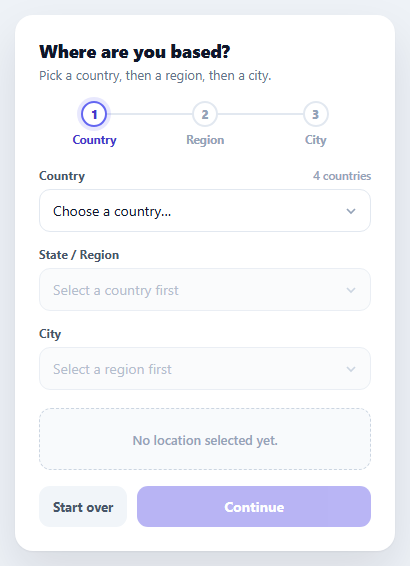
Cascading (dependent) selects appear wherever data is hierarchical: country then region then city, category then subcategory, make then model. Each choice fills the next list, and the important rule is that changing a parent must clear everything below it so nobody can submit an impossible combination. This version uses native <select> elements in plain HTML, CSS and vanilla JavaScript, and adds the parts a real form needs: a three-step progress indicator, a loading state for each level, protection against slow responses arriving late, a result card and a Continue button that stays disabled until the path is complete.
Native selects, custom-looking
The controls are real <select> elements, so they stay keyboard-accessible, screen-reader friendly and use the OS picker on mobile. The default arrow is removed with appearance: none and replaced by an SVG caret that swaps for a small spinner while a level loads. Each select has a name and required attribute, so new FormData(form) returns { country, state, city } directly on submit.
One reset rule, one load function
reset(from) clears a level and everything below it, restores the "Select a country first" placeholders, disables the selects and removes their hints. load(level) fetches the options for one level from the values above it and fills them in. Every change handler does the same two things in the same order: reset the levels below, then load the next one. That order is what keeps stale choices from surviving a parent change.
Loading and stale responses
getOptions() returns a promise after a short delay to imitate an API call, so you can see the spinner and replace the timeout with fetch(). Each level has a token that increases on every reset; when a response arrives, it is dropped if its token is no longer current. Without this guard, picking India and quickly switching to Australia could fill the region list with India's regions.
Progress steps and hints
A three-step indicator above the form marks the current step, turns finished steps into ticks and fills the connecting line as you move forward. Each label shows how many options are available ("3 regions"), and the select that just opened gets a soft pulse and keyboard focus so the flow continues without reaching for the mouse.
Result card, Start over and Continue
When all three are chosen, a card shows the city large, with region and country underneath and a country-code badge. Start over clears everything and refocuses the first field. Continue is disabled until the path is complete, then confirms with a short "Saved" state.
Your data
Edit the nested DATA object and the CODES badges, or replace getOptions() with a real request that takes the parent values. Pair this with a country selector when one searchable level is enough, or a multi-select dropdown for multi-value fields.
What's included
Features
Step by step
How to Use
- 1Paste HTML, CSS and JSCountry is ready; Region and City are disabled with "Select a country first" style placeholders, and step 1 is highlighted.
- 2Choose a countryA spinner shows briefly, then the Region list opens with a pulse and keyboard focus, and a hint says how many regions it has.
- 3Choose a region, then a cityEach choice fills the next level. Finished steps become ticks and the line between them fills in.
- 4Change a parentPick a different country and Region and City clear and disable again, so a city from the old country can never stay selected.
- 5Press Continue or Start overContinue is enabled only when all three are chosen and logs { country, state, city } from FormData. Start over clears everything.
- 6Load real dataReplace getOptions() with a fetch that takes the parent values. The reset and stale-response guard work unchanged.
Real-world uses
Common Use Cases
Got questions?
Frequently Asked Questions
Replace the body of getOptions() with a fetch that uses the parent values, for example the selected country to get its regions. load() already shows the spinner, keeps the select disabled until the promise resolves and fills the options, so only that one function changes.
Every reset increases a counter for each cleared level, and load() remembers the value it started with. When a response arrives and the counter has moved on, the visitor has changed the parent in the meantime, so the response is ignored instead of filling the select with options for the wrong parent.
Set the country, wait for its regions to load, set the region, wait for the cities, then set the city. Chain the promises from getOptions() so each level is filled before its value is assigned, and call update() once at the end to refresh the steps and card.
Keep country, state and city in state, load each level in an effect that depends on the parent value, and clear the children in the parent's change handler. Ignore stale responses with a cancelled flag or AbortController. Native selects with controlled values port directly.
Copy & paste
Source Code
<form class="cs-card" id="csForm" novalidate>
  <h2 class="cs-title">Where are you based?</h2>
  <p class="cs-lead">Pick a country, then a region, then a city.</p>

  <ol class="cs-steps" aria-hidden="true">
    <li class="is-now"><b>1</b><span>Country</span></li>
    <li><b>2</b><span>Region</span></li>
    <li><b>3</b><span>City</span></li>
  </ol>

  <div class="cs-field">
    <div class="cs-row"><label class="cs-label" for="csCountry">Country</label><span class="cs-hint"></span></div>
    <div class="cs-wrap">
      <select class="cs-select" id="csCountry" name="country" required></select>
      <span class="cs-spin" aria-hidden="true"></span>
      <svg class="cs-caret" viewBox="0 0 24 24" width="16" height="16" fill="none" stroke="currentColor" stroke-width="2.5" aria-hidden="true"><path d="m6 9 6 6 6-6"/></svg>
    </div>
  </div>

  <div class="cs-field">
    <div class="cs-row"><label class="cs-label" for="csState">State / Region</label><span class="cs-hint"></span></div>
    <div class="cs-wrap">
      <select class="cs-select" id="csState" name="state" required disabled></select>
      <span class="cs-spin" aria-hidden="true"></span>
      <svg class="cs-caret" viewBox="0 0 24 24" width="16" height="16" fill="none" stroke="currentColor" stroke-width="2.5" aria-hidden="true"><path d="m6 9 6 6 6-6"/></svg>
    </div>
  </div>

  <div class="cs-field">
    <div class="cs-row"><label class="cs-label" for="csCity">City</label><span class="cs-hint"></span></div>
    <div class="cs-wrap">
      <select class="cs-select" id="csCity" name="city" required disabled></select>
      <span class="cs-spin" aria-hidden="true"></span>
      <svg class="cs-caret" viewBox="0 0 24 24" width="16" height="16" fill="none" stroke="currentColor" stroke-width="2.5" aria-hidden="true"><path d="m6 9 6 6 6-6"/></svg>
    </div>
  </div>

  <div class="cs-summary" id="csSummary" aria-live="polite"></div>

  <div class="cs-actions">
    <button type="button" class="cs-clear" id="csClear">Start over</button>
    <button type="submit" class="cs-go" id="csGo" disabled>Continue</button>
  </div>
</form>*{box-sizing:border-box;margin:0;padding:0}
body{font-family:system-ui,-apple-system,sans-serif;background:#eef2f7;min-height:100vh;display:flex;align-items:flex-start;justify-content:center;padding:48px 20px}
button{font:inherit;cursor:pointer;border:0}
.cs-card{background:#fff;border-radius:18px;padding:24px;width:100%;max-width:380px;box-shadow:0 1px 2px rgba(15,23,42,.05),0 22px 48px rgba(15,23,42,.1)}
.cs-title{font-size:18px;font-weight:800;color:#0f172a;letter-spacing:-.01em}
.cs-lead{font-size:13px;color:#64748b;margin:3px 0 18px}
/* progress steps */
.cs-steps{display:flex;list-style:none;margin-bottom:20px}
.cs-steps li{flex:1;display:flex;flex-direction:column;align-items:center;gap:5px;position:relative;font-size:11.5px;font-weight:700;color:#94a3b8;transition:color .25s}
.cs-steps li+li::before{content:'';position:absolute;top:12px;right:50%;width:100%;height:2px;background:#e2e8f0;z-index:0;transition:background .3s}
.cs-steps li.is-done+li::before,.cs-steps li.is-done+li.is-now::before{background:#6366f1}
.cs-steps b{position:relative;z-index:1;width:26px;height:26px;border-radius:50%;display:flex;align-items:center;justify-content:center;font-size:12px;background:#fff;border:2px solid #e2e8f0;color:#94a3b8;transition:all .25s}
.cs-steps li.is-now{color:#4338ca}
.cs-steps li.is-now b{border-color:#6366f1;color:#4338ca;box-shadow:0 0 0 4px rgba(99,102,241,.15)}
.cs-steps li.is-done{color:#334155}
.cs-steps li.is-done b{background:#6366f1;border-color:#6366f1;color:transparent;font-size:0}
.cs-steps li.is-done b::after{content:'';width:9px;height:5px;border-left:2.5px solid #fff;border-bottom:2.5px solid #fff;transform:translateY(-1px) rotate(-45deg)}
.cs-field{margin-bottom:14px}
.cs-row{display:flex;align-items:baseline;justify-content:space-between;margin-bottom:6px}
.cs-label{font-size:12px;font-weight:700;color:#475569}
.cs-hint{font-size:11.5px;color:#94a3b8;font-weight:600}
.cs-wrap{position:relative}
.cs-select{width:100%;appearance:none;-webkit-appearance:none;padding:11px 38px 11px 13px;border:1.5px solid #e2e8f0;border-radius:11px;font-size:14px;font-family:inherit;color:#0f172a;background:#fff;cursor:pointer;outline:none;transition:border-color .15s,box-shadow .15s,background .15s,color .15s}
.cs-select:hover:not(:disabled){border-color:#cbd5e1}
.cs-select:focus-visible{border-color:#6366f1;box-shadow:0 0 0 3px rgba(99,102,241,.18)}
.cs-select:disabled{background:#f8fafc;color:#94a3b8;cursor:not-allowed}
.cs-caret{position:absolute;right:12px;top:50%;transform:translateY(-50%);color:#94a3b8;pointer-events:none;transition:opacity .15s}
.cs-select:disabled~.cs-caret{color:#cbd5e1}
.cs-field.is-loading .cs-caret{opacity:0}
.cs-spin{position:absolute;right:13px;top:50%;width:15px;height:15px;margin-top:-7.5px;border-radius:50%;border:2px solid #c7d2fe;border-top-color:#6366f1;opacity:0;pointer-events:none}
.cs-field.is-loading .cs-spin{opacity:1;animation:cs-spin .7s linear infinite}
.cs-field.is-ready .cs-wrap{animation:cs-pop .5s cubic-bezier(.2,.8,.2,1)}
.cs-summary{margin-top:18px;padding:13px 14px;border-radius:12px;background:#f8fafc;border:1px dashed #cbd5e1;font-size:13px;color:#94a3b8;font-weight:600;text-align:center;min-height:62px;display:flex;align-items:center;justify-content:center;gap:12px;transition:background .25s,border-color .25s}
.cs-summary.is-partial{color:#475569}
.cs-summary.is-done{background:#eef2ff;border:1px solid #c7d2fe;text-align:left;justify-content:flex-start;color:#4338ca}
.cs-code{flex:none;width:38px;height:38px;border-radius:10px;background:#6366f1;color:#fff;font-size:12px;font-weight:800;display:flex;align-items:center;justify-content:center;letter-spacing:.03em}
.cs-place strong{display:block;font-size:15px;font-weight:800;color:#0f172a}
.cs-place span{font-size:12.5px;color:#64748b;font-weight:600}
.cs-actions{display:flex;gap:10px;margin-top:16px}
.cs-clear{padding:11px 14px;border-radius:11px;background:#f1f5f9;color:#475569;font-size:13px;font-weight:700;transition:background .15s}
.cs-clear:hover{background:#e2e8f0}
.cs-go{flex:1;padding:11px 14px;border-radius:11px;background:#4f46e5;color:#fff;font-size:14px;font-weight:700;transition:background .15s,opacity .15s,transform .1s}
.cs-go:hover:not(:disabled){background:#4338ca}
.cs-go:active:not(:disabled){transform:scale(.98)}
.cs-go:disabled{opacity:.4;cursor:not-allowed}
.cs-go.is-ok{background:#16a34a}
.cs-clear:focus-visible,.cs-go:focus-visible{outline:2px solid #4338ca;outline-offset:2px}
@keyframes cs-spin{to{transform:rotate(360deg)}}
@keyframes cs-pop{0%{box-shadow:0 0 0 0 rgba(99,102,241,.4)}100%{box-shadow:0 0 0 8px rgba(99,102,241,0)}}
@media (prefers-reduced-motion:reduce){.cs-field.is-ready .cs-wrap,.cs-field.is-loading .cs-spin{animation:none}}// Your data: country -> region -> cities.
var DATA = {
'United States': { 'California': ['Los Angeles', 'San Francisco', 'San Diego'], 'Texas': ['Austin', 'Houston', 'Dallas'], 'New York': ['New York City', 'Buffalo'] },
'India': { 'Maharashtra': ['Mumbai', 'Pune', 'Nagpur'], 'Karnataka': ['Bengaluru', 'Mysuru'], 'Delhi': ['New Delhi'] },
'United Kingdom': { 'England': ['London', 'Manchester', 'Bristol'], 'Scotland': ['Edinburgh', 'Glasgow'] },
'Australia': { 'New South Wales': ['Sydney', 'Newcastle'], 'Victoria': ['Melbourne', 'Geelong'] }
};
var CODES = { 'United States': 'US', 'India': 'IN', 'United Kingdom': 'UK', 'Australia': 'AU' };
var LEVELS = [
{ placeholder: 'Choose a country\u2026', wait: '', noun: 'countries' },
{ placeholder: 'Choose a region\u2026', wait: 'Select a country first', noun: 'regions' },
{ placeholder: 'Choose a city\u2026', wait: 'Select a region first', noun: 'cities' },
];
var form = document.getElementById('csForm');
var sels = ['csCountry', 'csState', 'csCity'].map(function (id) { return document.getElementById(id); });
var fields = form.querySelectorAll('.cs-field');
var hints = form.querySelectorAll('.cs-hint');
var steps = form.querySelectorAll('.cs-steps li');
var summary = document.getElementById('csSummary');
var go = document.getElementById('csGo');
var token = [0, 0, 0]; // bumped on every reset, so a slow response for an old choice is ignored
// Pretend this is your API: replace the timeout with fetch('/api/regions?country=...').
function getOptions(level, parents) {
return new Promise(function (resolve) {
setTimeout(function () {
if (level === 0) resolve(Object.keys(DATA));
else if (level === 1) resolve(Object.keys(DATA[parents[0]]));
else resolve(DATA[parents[0]][parents[1]]);
}, level === 0 ? 0 : 350);
});
}
function option(value, label) {
var o = document.createElement('option');
o.value = value; o.textContent = label;
return o;
}
function setOptions(level, items) {
var s = sels[level];
s.innerHTML = '';
s.appendChild(option('', LEVELS[level].placeholder));
items.forEach(function (it) { s.appendChild(option(it, it)); });
}
// Clear level "from" and everything below it, and cancel any request still in flight for them.
function reset(from) {
for (var i = from; i < 3; i++) {
token[i]++;
sels[i].innerHTML = '';
sels[i].appendChild(option('', LEVELS[i].wait));
sels[i].disabled = true;
hints[i].textContent = '';
fields[i].classList.remove('is-loading', 'is-ready');
}
}
function load(level) {
var t = ++token[level], f = fields[level];
var parents = sels.slice(0, level).map(function (s) { return s.value; });
sels[level].innerHTML = '';
sels[level].appendChild(option('', 'Loading\u2026'));
sels[level].disabled = true;
f.classList.add('is-loading');
getOptions(level, parents).then(function (items) {
if (t !== token[level]) return; // the visitor changed the parent meanwhile
setOptions(level, items);
sels[level].disabled = false;
f.classList.remove('is-loading');
f.classList.add('is-ready');
hints[level].textContent = items.length + ' ' + LEVELS[level].noun;
if (level > 0) sels[level].focus(); // keyboard flow: land on the field that just opened
});
}
function update() {
var v = sels.map(function (s) { return s.value; });
var n = v.filter(Boolean).length;
steps.forEach(function (li, i) {
li.classList.toggle('is-done', !!v[i]);
li.classList.toggle('is-now', i === n);
});
summary.className = 'cs-summary' + (n === 3 ? ' is-done' : n ? ' is-partial' : '');
summary.innerHTML = '';
if (n === 3) {
var code = document.createElement('span'); code.className = 'cs-code'; code.textContent = CODES[v[0]] || v[0].slice(0, 2).toUpperCase();
var place = document.createElement('div'); place.className = 'cs-place';
var strong = document.createElement('strong'); strong.textContent = v[2];
var sub = document.createElement('span'); sub.textContent = v[1] + ', ' + v[0];
place.appendChild(strong); place.appendChild(sub);
summary.appendChild(code); summary.appendChild(place);
} else {
summary.textContent = n ? v.filter(Boolean).join(' \u203a ') + ' \u2026' : 'No location selected yet.';
}
go.disabled = n < 3;
}
// Changing a level clears everything below it, then loads the next level for the new value.
sels.forEach(function (sel, level) {
sel.addEventListener('change', function () {
reset(level + 1);
if (sel.value && level < 2) load(level + 1);
update();
});
});
document.getElementById('csClear').addEventListener('click', function () {
sels[0].value = '';
reset(1);
update();
sels[0].focus();
});
form.addEventListener('submit', function (e) {
e.preventDefault();
var data = new FormData(form); // { country, state, city } ready to send
console.log(Object.fromEntries(data));
go.textContent = 'Saved \u2713';
go.classList.add('is-ok');
setTimeout(function () { go.textContent = 'Continue'; go.classList.remove('is-ok'); }, 1600);
});
reset(1);
setOptions(0, Object.keys(DATA));
hints[0].textContent = Object.keys(DATA).length + ' ' + LEVELS[0].noun;
update();Extend with AI
Take This Snippet Further With AI
Paste this snippet's HTML, CSS and JS into an AI coding assistant like Claude and ask it to explain why reset(level + 1) must run before load(level + 1), and how the per-level token makes a slow response for an old choice harmless. Since the progress steps, loading spinner, option counts, result card and FormData submit already exist, ask for what is missing: restoring a saved selection by chaining the loads, a fourth level such as neighbourhood, a searchable combobox at each level that keeps the same reset rule, error handling with a Retry link when a request fails, or remembering the last choice in localStorage. It can also review whether auto-focusing the next select is right for touch devices.
Prompt to recreate it
Copy this into your AI assistant of choice to build the effect from scratch, or as a jumping-off point for your own variant:
Build a three-level cascading select (country, region, city) in plain HTML, CSS and vanilla JavaScript using native select elements and a form.

Requirements:
- Data is one nested object: country -> region -> array of cities. A getOptions(level, parents) function returns a promise (use a 350ms timeout to imitate an API) so loading can be shown.
- Selects have name and required attributes. Region and City start disabled with placeholders "Select a country first" and "Select a region first".
- Changing any select must first reset every level below it (clear options, restore the waiting placeholder, disable, clear its hint, cancel in-flight requests by bumping a per-level token), then load the next level if a value is chosen.
- While a level loads, show "Loading…" in the select and a spinner in place of the caret. When the response arrives, ignore it if the level's token has changed; otherwise fill the options, enable the select, show "N regions/cities" as a hint, pulse the field and move focus to it.
- Above the fields show three progress steps (Country, Region, City): the first unfinished step is highlighted, finished steps become ticks and the connector line between them fills.
- Below the fields show a summary card: a neutral message when nothing is chosen, a "A › B …" breadcrumb when partial, and when complete a country-code badge with the city in bold and "Region, Country" underneath. Build it with DOM text nodes, not innerHTML with data.
- Add a "Start over" button that clears everything and refocuses the country select, and a Continue button that is disabled until all three are chosen; on submit prevent the default, read FormData and briefly show "Saved ✓".
- Respect prefers-reduced-motion and give every control a visible focus style.
Want to tighten it up first? Run this prompt through the AI Prompt Studio to score it across 8 quality dimensions, catch anti-patterns, and tune the wording for Claude, ChatGPT, or Gemini before you paste it in.