
Cave Flyer Game: 6 Levels, Gems, Stars and Power-Ups
Cave Flyer Game · Games · Plain HTML, CSS & JS · Live preview
About this UI Snippet
Cave Flyer: Six Levels of One-Button Thrust Physics, Hazards and Game Feel
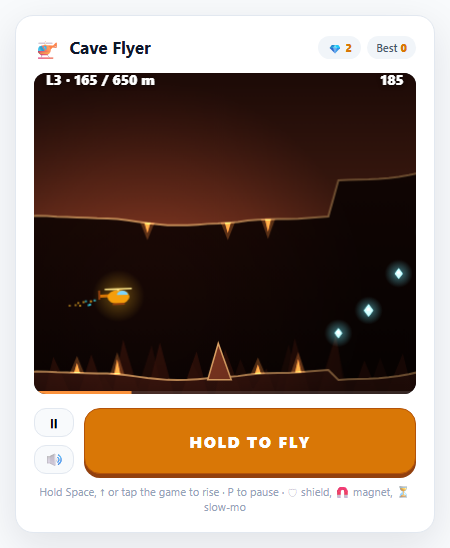
The one-button "helicopter" game is a lesson in doing the most with the least: one input (hold to rise, release to fall) against a tunnel that keeps tightening. This snippet builds a complete level-based version on one HTML5 <canvas> with no libraries and no image files. You fly a small helicopter through six procedurally generated caves, collect gems in chains for a combo multiplier, dodge spikes, sliding gates and bats, pick up a shield, a magnet or slow-motion, and reach the glowing exit portal at the end of each level to earn up to three stars. It plays with a hold button, Space or the up arrow, or a press anywhere on the game.
Levels are data
Each level is one object in the LEVELS array: a name, a colour theme (crystal, magma or abyss), a length in pixels, a gap that runs from a wide start value to a narrow end value, a speed that runs from slow to fast, and the chance per slice of spikes, gates, bats, power-ups and gem trails. Level 1 has only a few spikes and a wide cave; gates arrive in level 2, bats in level 3, and the last level has a gap down to 96 pixels at close to five pixels per frame. Adding a seventh level means adding one more object. A level ends when the craft crosses the portal at world x = length, and the last 250 pixels before it are kept free of hazards so the run-in feels like a reward.
Stars, level select and saved progress
When you reach the portal you get one star for finishing, a second for collecting at least half of the gems that were generated, and a third for 80% or more. Stars, the best score per level and the number of unlocked levels are saved as one JSON object in localStorage (inside try/catch). The start screen shows a six-button level grid with locks and stars, "Play" continues from the first level you have not cleared, and the clear screen offers "Next level" or "Levels". A crash gives a hint and lets you retry the same level.
Hold-to-thrust physics on one axis
The craft only moves vertically and is driven by one flag. Every frame, if flying is true an upward LIFT acceleration is added to its velocity, otherwise a downward GRAV is added, and the velocity is clamped and added to the position. The craft is never set to a height; it is always accelerating one way or the other, so you hover by feathering the button. The same flag is set by the hold button, the keyboard and a press on the canvas, and cleared on pointer up, cancel and leave, so thrust can never get stuck on.
A procedural cave from recycled slices
The cave is a list of thin vertical slices, each storing a ceiling and a floor height. genSlice() makes the next one by moving the cave's centre with a bounded random walk (so the tunnel curves instead of jittering), narrowing the gap along the level, and occasionally widening it into a calm chamber. Slices that scroll off the left are removed and new ones are added on the right, so memory stays constant. Hazards and pickups live in world coordinates and are spawned as each slice is made, kept out of gem trails and spaced with a cooldown so the cave stays fair.
Cheap, fair collision and a lot of game feel
The wall height is interpolated between slices at three points across the craft, so you cannot clip a corner. Each spike is tested as four circles from its base to its tip, gates as two rectangles and bats as one circle, and skimming a spike gives a "CLOSE!" bonus. A shield absorbs one hit and destroys the hazard. Gems chain into a x5 combo, the magnet pulls gems in, and slow-motion slows the world but not your craft. The screen shakes and the craft bursts into sparks when you crash, the darkness deepens along the level with only a circle of light around the helicopter, and glowing crystals, parallax silhouettes, a spinning rotor and a progress bar add depth. Sound effects and a rotor hum come from the Web Audio API, with a mute button, and the game pauses on P, a button or a tab switch.
What's included
Features
Step by step
How to Use
- 1Pick a level and take offPress Play to continue, or choose a level from the grid (later levels unlock as you clear earlier ones). Hold the HOLD TO FLY button, Space or the up arrow, or press anywhere on the game, to rise. Release to fall, and feather the button to hover.
- 2Grab gems and build a comboGem trails follow the middle of the cave in a wave. Collect them one after another within about two seconds to raise the multiplier up to x5.
- 3Dodge the hazardsAvoid spikes on the ceiling and floor, sliding gates (fly through the moving hole) and bats. Flying close to a spike without touching it gives a CLOSE! bonus.
- 4Use the power-upsA shield absorbs one hit, the magnet pulls gems in for seven seconds, and slow-motion slows the world for five seconds.
- 5Reach the portal for starsThe glowing portal ends the level. You get one star for finishing, two for collecting half of the gems and three for 80% or more, and the next level unlocks.
- 6Pause, retry and replayPress P or the pause button to pause (it also pauses when you switch tabs). A crash lets you retry the level, and your stars and best scores are saved in your browser.
Real-world uses
Common Use Cases
Got questions?
Frequently Asked Questions
Each level is an object in the LEVELS array with a name, a biome (0, 1 or 2), a length in pixels, gap and speed as [start, end] pairs, and spawn chances for spikes, gates, bats, power-ups and gem trails, plus a darkness value. The gap and speed are interpolated along the level, so the cave tightens and speeds up toward the portal. Add an object to add a level.
The game counts the gems it generates in a level and the ones you collect. Finishing gives one star, collecting at least half gives two, and 80% or more gives three. The best stars and score per level and the number of unlocked levels are stored in localStorage under cave-flyer-progress.
The craft is always accelerating, upward while the button is held and downward when it is released, and the velocity is clamped. Because it is acceleration rather than a fixed speed, short taps give small corrections and feathering the button lets you hover, which is what makes tight gaps possible.
The cave is a list of slices. Each frame the ones that have left the screen are removed from the front and new ones are generated at the back by moving the centre with a bounded random walk. Hazards and pickups are spawned with each new slice and removed once they are behind the camera, so only what is on screen is kept.
Change its gap pair (a bigger minimum is easier), its speed pair, and the spike, gate and bat chances. Setting gate or bat to 0 removes them, and a longer length makes a level longer. GRAV and LIFT near the top of the JS change how the craft handles in every level.
After the cave is drawn, a radial gradient is painted over the whole canvas, clear in a circle just ahead of the craft and fading to a dark colour at the edges. The darkness value grows along the level, so the end of a level is harder to read. Gems, crystals and sparks are drawn afterwards with additive blending so they glow in the dark.
Copy & paste
Source Code
<div class="game-card">
  <div class="game-header">
    <div class="game-title">
      <span class="game-icon">🚁</span>
      <h2>Cave Flyer</h2>
    </div>
    <div class="stat-badges">
      <span class="badge">💎 <b id="gem-count">0</b></span>
      <span class="badge">Best <b id="best-score">0</b></span>
    </div>
  </div>

  <div class="canvas-wrap">
    <canvas id="game-canvas" width="380" height="320"></canvas>
    <div class="hud"><span id="hud-dist">0 m</span><span class="combo" id="hud-combo"></span><span id="hud-score">0</span></div>
    <div class="overlay" id="start-overlay">
      <div class="overlay-card">
        <p class="overlay-title">Cave Flyer</p>
        <p class="overlay-sub">Hold to rise, release to fall. Grab gems, dodge spikes, gates and bats, and reach the exit portal in each of 6 levels. Earn up to 3 stars per level.</p>
        <div class="levels" id="level-grid"></div>
        <button class="btn btn-primary" id="btn-start">Play</button>
      </div>
    </div>
    <div class="overlay hidden" id="pause-overlay">
      <div class="overlay-card">
        <p class="overlay-title">Paused</p>
        <button class="btn btn-primary" id="btn-resume">Resume</button>
      </div>
    </div>
    <div class="overlay hidden" id="gameover-overlay">
      <div class="overlay-card">
        <p class="overlay-title" id="over-title">Crashed!</p>
        <p class="overlay-stars" id="over-stars"></p>
        <p class="overlay-sub" id="final-score">Distance 0</p>
        <p class="overlay-best" id="best-msg"></p>
        <div class="over-btns">
          <button class="btn btn-primary" id="btn-retry">Retry level</button>
          <button class="btn btn-ghost" id="btn-levels">Levels</button>
        </div>
      </div>
    </div>
  </div>

  <div class="controls">
    <div class="side-btns">
      <button class="mini-btn" id="btn-pause" type="button" aria-label="Pause">⏸</button>
      <button class="mini-btn" id="btn-mute" type="button" aria-label="Sound on" aria-pressed="false">🔊</button>
    </div>
    <button class="fly-btn" id="btn-fly" aria-label="Hold to fly">HOLD TO FLY</button>
  </div>

  <p class="hint-text">Hold Space, ↑ or tap the game to rise · P to pause · 🛡 shield, 🧲 magnet, ⏳ slow-mo</p>
</div>
* { box-sizing: border-box; margin: 0; padding: 0; }
body { font-family: system-ui, -apple-system, sans-serif; background: #f8fafc; min-height: 100vh; display: flex; align-items: center; justify-content: center; padding: 20px; }
.game-card { width: 100%; max-width: 420px; background: #fff; border-radius: 18px; border: 1px solid #e2e8f0; box-shadow: 0 12px 40px rgba(15,23,42,0.1); padding: 18px; user-select: none; -webkit-user-select: none; }
.game-header { display: flex; align-items: center; justify-content: space-between; margin-bottom: 12px; gap: 8px; }
.game-title { display: flex; align-items: center; gap: 8px; }
.game-icon { font-size: 20px; }
.game-title h2 { font-size: 17px; font-weight: 700; color: #0f172a; }
.stat-badges { display: flex; gap: 6px; }
.badge { font-size: 11px; font-weight: 600; color: #475569; background: #f1f5f9; padding: 4px 9px; border-radius: 20px; white-space: nowrap; }
.badge b { color: #d97706; }
.canvas-wrap { position: relative; border-radius: 12px; overflow: hidden; line-height: 0; touch-action: none; background: #05070f; }
canvas { display: block; width: 100%; height: auto; }
.hud { position: absolute; inset: 7px 12px auto 12px; display: flex; align-items: center; justify-content: space-between; gap: 8px; font-size: 14px; font-weight: 800; color: #fff; font-variant-numeric: tabular-nums; text-shadow: 0 1px 4px rgba(0,0,0,0.7); pointer-events: none; }
.combo { color: #fbbf24; font-size: 15px; }
.overlay { position: absolute; inset: 0; background: rgba(5,7,15,0.86); display: flex; align-items: center; justify-content: center; padding: 20px; line-height: 1.4; }
.overlay.hidden { display: none; }
.overlay-card { text-align: center; }
.overlay-title { font-size: 21px; font-weight: 800; color: #fff; margin-bottom: 8px; }
.overlay-sub { font-size: 13px; color: #d6d3d1; margin-bottom: 4px; max-width: 300px; }
.overlay-best { font-size: 12px; color: #fbbf24; font-weight: 700; margin: 6px 0 0; min-height: 16px; }
.overlay-stars { font-size: 26px; letter-spacing: 4px; color: #fbbf24; margin-bottom: 4px; min-height: 30px; line-height: 1.2; }
.levels { display: grid; grid-template-columns: repeat(6, 1fr); gap: 6px; margin: 10px auto 2px; max-width: 300px; }
.lvl-btn { display: flex; flex-direction: column; align-items: center; gap: 1px; padding: 6px 0 4px; border: 1px solid #44403c; border-radius: 9px; background: #1c1917; color: #fff; font-family: inherit; cursor: pointer; line-height: 1.1; }
.lvl-btn b { font-size: 15px; }
.lvl-btn span { font-size: 8px; color: #fbbf24; letter-spacing: 0.5px; }
.lvl-btn:hover:not(:disabled) { border-color: #d97706; }
.lvl-btn:disabled { opacity: 0.35; cursor: default; }
.over-btns { display: flex; gap: 8px; justify-content: center; }
.btn-ghost { background: transparent; color: #d6d3d1; border: 1px solid #57534e; }
.btn-ghost:hover { border-color: #d97706; color: #fff; }
.btn { padding: 11px 26px; font-size: 14px; font-weight: 700; border-radius: 10px; cursor: pointer; font-family: inherit; transition: background 0.15s; border: none; margin-top: 14px; }
.btn-primary { background: #d97706; color: #fff; }
.btn-primary:hover { background: #b45309; }
.controls { display: flex; align-items: stretch; gap: 10px; margin-top: 14px; }
.side-btns { display: flex; flex-direction: column; gap: 8px; }
.mini-btn { width: 40px; flex: 1; border: 1px solid #e2e8f0; background: #f8fafc; border-radius: 12px; font-size: 15px; line-height: 1; cursor: pointer; }
.mini-btn[aria-pressed="true"] { opacity: 0.55; }
.fly-btn { -webkit-tap-highlight-color: transparent; touch-action: none; cursor: pointer; font-family: inherit; display: block; flex: 1; height: 66px; border-radius: 16px; background: #d97706; color: #fff; font-size: 16px; font-weight: 800; letter-spacing: 1.5px; border: 1px solid #b45309; box-shadow: 0 4px 0 #92400e; transition: transform 0.06s, background 0.12s; }
.fly-btn:active { transform: translateY(4px); box-shadow: none; background: #b45309; }
.hint-text { font-size: 11px; color: #94a3b8; text-align: center; margin-top: 10px; }const $ = id => document.getElementById(id);
const canvas = $('game-canvas');
const ctx = canvas.getContext('2d');
const W = canvas.width, H = canvas.height;
const PROG_KEY = 'cave-flyer-progress';
// ── Tuning ──
const GRAV = 0.34, LIFT = -0.6, MAX_VY = 6.4; // hold = lift, release = gravity
const PLAYER_X = 84, PR = 7, SW = 10; // craft x on screen, craft radius, cave slice width
// ── Levels: plain data. Gap and speed run from the first value to the second along the level; the rest are spawn chances per slice ──
const LEVELS = [
{ name: 'Crystal Caves', biome: 0, length: 5000, gap: [180, 140], speed: [2.3, 3.0], spike: 0.02, gate: 0, bat: 0, power: 0.004, trail: 0.02, dark: 0.3 },
{ name: 'Glimmer Gorge', biome: 0, length: 6000, gap: [172, 125], speed: [2.5, 3.4], spike: 0.03, gate: 0.006, bat: 0, power: 0.003, trail: 0.018, dark: 0.38 },
{ name: 'Magma Depths', biome: 1, length: 6500, gap: [168, 118], speed: [2.7, 3.8], spike: 0.035, gate: 0.008, bat: 0.003, power: 0.003, trail: 0.016, dark: 0.46 },
{ name: 'Lava Tubes', biome: 1, length: 7000, gap: [160, 110], speed: [2.9, 4.1], spike: 0.04, gate: 0.009, bat: 0.005, power: 0.0028, trail: 0.015, dark: 0.52 },
{ name: 'The Abyss', biome: 2, length: 7500, gap: [150, 104], speed: [3.1, 4.4], spike: 0.045, gate: 0.01, bat: 0.006, power: 0.0026, trail: 0.014, dark: 0.6 },
{ name: 'Heart of the Abyss', biome: 2, length: 8500, gap: [140, 96], speed: [3.3, 4.8], spike: 0.05, gate: 0.011, bat: 0.008, power: 0.0025, trail: 0.013, dark: 0.66 },
];
const BIOMES = [
{ bgA: '#0b1226', bgB: '#05070f', far: '#111a33', wallA: '#4b5d86', wallB: '#222c49', rim: '#7dd3fc', glow: '#38bdf8' },
{ bgA: '#2a0e08', bgB: '#0c0403', far: '#3a140c', wallA: '#8a3b24', wallB: '#3a150e', rim: '#fdba74', glow: '#fb923c' },
{ bgA: '#1b1033', bgB: '#07040f', far: '#26164a', wallA: '#5b3b8f', wallB: '#231442', rim: '#d8b4fe', glow: '#e879f9' },
];
const clamp = (v, a, b) => Math.max(a, Math.min(b, v));
const lerp = (p, t) => p[0] + (p[1] - p[0]) * t;
const hash = n => { const s = Math.sin(n * 127.1) * 43758.5453; return s - Math.floor(s); };
const SPIKE_K = [0, 0.3, 0.62, 0.92]; // circles along a spike, from base to tip
let LV = LEVELS[0], levelIdx = 0, biomeAt = () => LV.biome;
let player, slices, camX, speed, elapsed, running = false, paused = false, rafId, lastFrame, phase = 'play', deathT, clearT;
let flying = false, muted = false, ac = null, hum = null, humOn = false, nextAction = null;
let genX, centerY, walkVy, cooldown, trail, chamberLeft;
let gemList, spikes, gates, bats, pickups, parts, pops, banner, gemSpawned;
let score, bonus, gemCount, combo, comboT, shield, invuln, magnetT, slowT, shake, tick;
const startOverlay = $('start-overlay'), pauseOverlay = $('pause-overlay'), gameoverOverlay = $('gameover-overlay');
const hudScore = $('hud-score'), hudDist = $('hud-dist'), hudCombo = $('hud-combo'), gemEl = $('gem-count');
const bestEl = $('best-score'), finalEl = $('final-score'), bestMsgEl = $('best-msg'), muteBtn = $('btn-mute');
const overTitle = $('over-title'), overStars = $('over-stars'), retryBtn = $('btn-retry'), levelGrid = $('level-grid');
// ── Progress: unlocked levels, stars and best score per level, kept in localStorage ──
function loadProg() {
try { const p = JSON.parse(localStorage.getItem(PROG_KEY)); if (p && p.stars && p.best) return p; } catch (e) {}
return { unlocked: 1, stars: [], best: [] };
}
function saveProg() { try { localStorage.setItem(PROG_KEY, JSON.stringify(prog)); } catch (e) {} }
let prog = loadProg();
const starText = n => '★'.repeat(n) + '☆'.repeat(3 - n);
function buildLevelGrid() {
levelGrid.innerHTML = '';
LEVELS.forEach((lv, i) => {
const b = document.createElement('button');
b.type = 'button'; b.className = 'lvl-btn'; b.disabled = i >= prog.unlocked; b.title = lv.name;
b.innerHTML = '<b>' + (i + 1) + '</b><span>' + starText(prog.stars[i] || 0) + '</span>';
b.addEventListener('click', () => startLevel(i));
levelGrid.appendChild(b);
});
}
const continueLevel = () => Math.min(prog.unlocked, LEVELS.length) - 1;
// ── Sound: a tiny Web Audio synth, no files ──
function audio() {
if (!ac) ac = new (window.AudioContext || window.webkitAudioContext)();
if (ac.state === 'suspended') ac.resume();
return ac;
}
function tone(f, dur, type, to, vol, delay) {
if (muted) return;
try {
const a = audio(), t0 = a.currentTime + (delay || 0), o = a.createOscillator(), g = a.createGain();
o.type = type || 'square'; o.frequency.setValueAtTime(f, t0);
if (to) o.frequency.exponentialRampToValueAtTime(to, t0 + dur);
g.gain.setValueAtTime(vol || 0.04, t0); g.gain.exponentialRampToValueAtTime(0.0001, t0 + dur);
o.connect(g); g.connect(a.destination); o.start(t0); o.stop(t0 + dur + 0.02);
} catch (e) {}
}
// A soft rotor hum that follows the thrust button
function setHum(on) {
if (on === humOn) return;
humOn = on;
try {
if (on && !muted) {
const a = audio();
if (!hum) { const o = a.createOscillator(), g = a.createGain(); o.type = 'sawtooth'; o.frequency.value = 58; g.gain.value = 0; o.connect(g); g.connect(a.destination); o.start(); hum = { o, g }; }
hum.g.gain.setTargetAtTime(0.012, a.currentTime, 0.04);
} else if (hum && ac) hum.g.gain.setTargetAtTime(0, ac.currentTime, 0.05);
} catch (e) {}
}
const sfx = {
gem: c => tone(660 + c * 110, 0.12, 'sine', 0, 0.06),
power: () => [523, 784, 1046].forEach((f, i) => tone(f, 0.1, 'triangle', 0, 0.05, i * 0.07)),
shield: () => tone(300, 0.3, 'sawtooth', 90, 0.06),
near: () => tone(900, 0.08, 'square', 1400, 0.03),
crash: () => { tone(160, 0.6, 'sawtooth', 40, 0.08); tone(90, 0.5, 'square', 30, 0.06); },
win: () => [523, 659, 784, 1046, 1318].forEach((f, i) => tone(f, 0.16, 'triangle', 0, 0.05, i * 0.1)),
go: () => [392, 494, 587].forEach((f, i) => tone(f, 0.14, 'triangle', 0, 0.045, i * 0.1)),
};
// ── World: the cave is a list of thin slices (ceiling and floor height); hazards and pickups live in world x ──
function currentGap(x) {
let g = lerp(LV.gap, clamp(x / LV.length, 0, 1)); // the cave narrows along the level
if (chamberLeft > 0) g += 46; // now and then, a wide chamber to catch your breath
return g;
}
function genSlice() {
const x = genX; genX += SW;
if (chamberLeft > 0) chamberLeft--; else if (x > 1000 && Math.random() < 0.0025) chamberLeft = 36;
const gap = x < 300 ? LV.gap[0] : currentGap(x);
if (x >= 300) { walkVy += (Math.random() - 0.5) * 1.2; walkVy = clamp(walkVy, -2.2, 2.2); }
centerY += walkVy;
const margin = gap / 2 + 14;
if (centerY < margin) { centerY = margin; walkVy = Math.abs(walkVy) * 0.6; }
if (centerY > H - margin) { centerY = H - margin; walkVy = -Math.abs(walkVy) * 0.6; }
const s = { x, top: centerY - gap / 2, bottom: centerY + gap / 2, cy: centerY, gap, b: LV.biome, crystal: Math.random() < 0.12 ? (Math.random() < 0.5 ? 't' : 'b') : null, cs: 8 + Math.random() * 8 };
slices.push(s);
spawn(s);
}
function spawn(s) {
const x = s.x;
if (x < 400 || x > LV.length - 250) return; // a calm start and a calm run-in to the portal
if (cooldown > 0) cooldown--;
// gem trails follow the middle of the cave in a wave, so staying on the line pays
if (trail.left > 0) {
if (--trail.skip <= 0) { gemList.push({ x, y: s.cy + Math.sin(trail.ph) * s.gap * 0.28, got: false, ph: Math.random() * 6 }); gemSpawned++; trail.ph += 0.7; trail.left--; trail.skip = 3; }
} else if (Math.random() < LV.trail + (s.gap > 150 ? 0.008 : 0)) trail = { left: 6 + ((Math.random() * 5) | 0), skip: 1, ph: Math.random() * 3 };
if (Math.random() < LV.power) pickups.push({ x, y: s.cy, type: ['shield', 'magnet', 'slow'][(Math.random() * 3) | 0], got: false });
if (trail.left > 0 || cooldown > 0 || s.gap < 86) return; // keep hazards out of gem trails, and spaced out
const r = Math.random();
if (r < LV.bat) { bats.push({ x, x0: x, baseY: s.cy, amp: 18 + Math.random() * 22, ph: Math.random() * 6, t: 0, vx: -0.7, dead: false }); cooldown = 10; }
else if (r < LV.bat + LV.gate) {
const h = Math.max(54, s.gap * 0.5);
gates.push({ x, w: 12, cy: s.cy, h, amp: Math.max(0, (s.gap - h) / 2 - 6), ph: Math.random() * 6, sp: 0.05, t: 0, dead: false });
cooldown = 12;
} else if (r < LV.bat + LV.gate + LV.spike) {
spikes.push({ x, w: 16 + Math.random() * 8, len: 22 + Math.random() * s.gap * 0.33, top: Math.random() < 0.5, minGap: 99, chk: false, dead: false });
cooldown = 7;
}
}
function wallsAt(wx) {
const f = (wx - slices[0].x) / SW;
let i = Math.floor(f);
if (i < 0) i = 0; if (i > slices.length - 2) i = slices.length - 2;
const t = clamp(f - i, 0, 1), a = slices[i], b = slices[i + 1];
return { top: a.top + (b.top - a.top) * t, bottom: a.bottom + (b.bottom - a.bottom) * t, cy: a.cy + (b.cy - a.cy) * t };
}
function resetState() {
slices = []; genX = 0; centerY = H / 2; walkVy = 0; cooldown = 0; trail = { left: 0, skip: 0, ph: 0 }; chamberLeft = 0;
gemList = []; spikes = []; gates = []; bats = []; pickups = []; parts = []; pops = []; banner = null; gemSpawned = 0;
camX = 0; elapsed = 0; speed = LV.speed[0]; score = 0; bonus = 0; gemCount = 0; combo = 1; comboT = 0;
shield = false; invuln = 0; magnetT = 0; slowT = 0; shake = 0; tick = 0; deathT = 0; clearT = 0; phase = 'play'; flying = false;
player = { y: H / 2, vy: 0, ang: 0 };
while (genX < W + SW * 8) genSlice();
setHum(false); syncHud();
bestEl.textContent = prog.best[levelIdx] || 0;
}
function syncHud() {
hudScore.textContent = score;
hudDist.textContent = 'L' + (levelIdx + 1) + ' · ' + Math.floor(camX / 10) + ' / ' + Math.floor(LV.length / 10) + ' m';
hudCombo.textContent = combo > 1 ? 'x' + combo : '';
gemEl.textContent = gemCount;
}
// ── Effects ──
function burst(x, y, n, colors, spd) {
for (let i = 0; i < n && parts.length < 420; i++) {
const a = Math.random() * 6.283, v = (0.4 + Math.random()) * (spd || 3);
parts.push({ x, y, vx: Math.cos(a) * v, vy: Math.sin(a) * v, g: 0.05, life: 24 + Math.random() * 22, max: 46, c: colors[(Math.random() * colors.length) | 0], s: 1.5 + Math.random() * 2 });
}
}
function popup(x, y, text, color) { pops.push({ x, y, text, color: color || '#fde68a', t: 50 }); }
function crash() {
if (phase !== 'play') return;
phase = 'dying'; deathT = 0; shake = 14; setHum(false); sfx.crash();
burst(camX + PLAYER_X, player.y, 50, ['#fbbf24', '#f97316', '#ef4444', '#fff7ed'], 4.2);
}
function hazardHit(h, x, y) {
if (invuln > 0) return;
if (shield) { shield = false; invuln = 1.3; h.dead = true; sfx.shield(); shake = 6; burst(x, y, 22, ['#67e8f9', '#e0f2fe'], 3); popup(x, y - 10, 'SHIELD BROKEN', '#67e8f9'); return; }
crash();
}
function wallHit(top, bot) {
if (shield || invuln > 0) {
if (shield) { shield = false; invuln = 1.3; sfx.shield(); shake = 6; popup(camX + PLAYER_X, player.y - 12, 'SHIELD BROKEN', '#67e8f9'); }
player.y = clamp(player.y, top + PR + 1, Math.max(top + PR + 1, bot - PR - 1)); player.vy = 0;
return;
}
crash();
}
function reachPortal() {
phase = 'clear'; clearT = 0; setHum(false); flying = false; sfx.win();
burst(camX + PLAYER_X, player.y, 60, ['#fde68a', '#67e8f9', '#f0abfc', '#fff'], 4.5);
banner = { text: 'LEVEL CLEAR!', t: 150 };
}
const circleRect = (cx, cy, r, rx, ry, rw, rh) => Math.hypot(cx - clamp(cx, rx, rx + rw), cy - clamp(cy, ry, ry + rh)) < r;
// ── Frame update ──
function update(dt) {
const step = dt * 60;
elapsed += dt; tick += step;
const slow = slowT > 0 ? 0.55 : 1, ramp = Math.min(1, 0.55 + elapsed / 2.5), ws = step * slow * ramp; // world time (slowed by slow-mo, eased in at the start)
speed = lerp(LV.speed, clamp(camX / LV.length, 0, 1));
if (comboT > 0) { comboT -= dt; if (comboT <= 0) combo = 1; }
if (magnetT > 0) magnetT -= dt;
if (slowT > 0) slowT -= dt;
if (invuln > 0) invuln -= dt;
// Craft: hold = lift, release = gravity (the craft is always accelerating one way)
player.vy = clamp(player.vy + (flying ? LIFT : GRAV) * step, -MAX_VY, MAX_VY);
player.y += player.vy * step;
player.ang += (clamp(player.vy * 0.07, -0.35, 0.45) - player.ang) * 0.2;
camX += speed * ws;
while (slices[0].x < camX - SW * 3) slices.shift();
while (slices[slices.length - 1].x < camX + W + SW * 6) genSlice();
const px = camX + PLAYER_X;
if (flying) {
parts.push({ x: px - 9, y: player.y + 3, vx: -1.4 - Math.random(), vy: (Math.random() - 0.4) * 1.2, g: 0.02, life: 16, max: 16, c: Math.random() < 0.5 ? '#fbbf24' : '#22d3ee', s: 2 });
}
// Cave walls (sampled at three points so the craft can't clip a corner)
const wl = wallsAt(px - PR * 0.6), wm = wallsAt(px), wr = wallsAt(px + PR * 0.6);
const top = Math.max(wl.top, wm.top, wr.top), bot = Math.min(wl.bottom, wm.bottom, wr.bottom);
if (player.y - PR < top || player.y + PR > bot) { wallHit(top, bot); if (phase !== 'play') return; }
if (player.y < -20 || player.y > H + 20) { crash(); return; }
// Spikes (a few circles along each one), with a bonus for a near miss
for (const sp of spikes) {
if (sp.dead) continue;
const cx = sp.x + sp.w / 2;
if (Math.abs(px - cx) > sp.w / 2 + PR + 8) {
if (px > cx && !sp.chk) { sp.chk = true; if (sp.minGap > 0 && sp.minGap < 6) { bonus += 25; sfx.near(); popup(px, player.y - 14, 'CLOSE! +25', '#fbbf24'); } }
continue;
}
const w = wallsAt(cx), base = sp.top ? w.top : w.bottom, dir = sp.top ? 1 : -1;
let hit = false;
for (const k of SPIKE_K) {
const r = (sp.w / 2) * (1 - k) + 1.5, d = Math.hypot(px - cx, player.y - (base + dir * sp.len * k)) - PR - r;
if (d < sp.minGap) sp.minGap = d;
if (d < 0) hit = true;
}
if (hit) { hazardHit(sp, cx, base + dir * sp.len * 0.5); if (phase !== 'play') return; }
}
// Moving gates: two rock pistons with a hole that slides up and down
for (const g of gates) {
if (g.dead) continue;
g.t += ws;
if (Math.abs(px - (g.x + g.w / 2)) > g.w / 2 + PR + 2) continue;
const hc = g.cy + Math.sin(g.ph + g.t * g.sp) * g.amp, ht = hc - g.h / 2, hb = hc + g.h / 2;
if (circleRect(px, player.y, PR, g.x, -20, g.w, ht + 20) || circleRect(px, player.y, PR, g.x, hb, g.w, H - hb + 20)) { hazardHit(g, g.x + g.w / 2, player.y); if (phase !== 'play') return; }
}
// Bats
for (const b of bats) {
if (b.dead) continue;
b.t += ws; b.x += b.vx * ws;
const w = wallsAt(b.x);
b.y = clamp(b.baseY + Math.sin(b.ph + b.t * 0.08) * b.amp, w.top + 10, w.bottom - 10);
if (Math.hypot(px - b.x, player.y - b.y) < PR + 7) { hazardHit(b, b.x, b.y); if (phase !== 'play') return; }
}
// Gems: chain them for a combo multiplier (up to x5); the magnet pulls them in
for (const g of gemList) {
if (g.got) continue;
if (magnetT > 0) { const dx = px - g.x, dy = player.y - g.y; if (Math.hypot(dx, dy) < 120) { g.x += dx * 0.14 * step; g.y += dy * 0.14 * step; } }
if (Math.hypot(px - g.x, player.y - g.y) < PR + 8) {
g.got = true; gemCount++;
combo = comboT > 0 ? Math.min(5, combo + 1) : 1; comboT = 1.8;
const pts = 10 * combo; bonus += pts;
sfx.gem(combo); burst(g.x, g.y, 6, ['#67e8f9', '#f0abfc', '#fff'], 2); popup(g.x, g.y - 8, '+' + pts, combo > 2 ? '#fbbf24' : '#a5f3fc');
}
}
// Power-ups
for (const p of pickups) {
if (p.got || Math.hypot(px - p.x, player.y - p.y) > PR + 11) continue;
p.got = true; sfx.power(); burst(p.x, p.y, 16, ['#fff', '#fde68a'], 3);
if (p.type === 'shield') { shield = true; popup(p.x, p.y - 12, 'SHIELD!', '#67e8f9'); }
else if (p.type === 'magnet') { magnetT = 7; popup(p.x, p.y - 12, 'MAGNET!', '#f87171'); }
else { slowT = 5; popup(p.x, p.y - 12, 'SLOW-MO!', '#c4b5fd'); }
}
// Tidy up
const gone = camX - 80;
gemList = gemList.filter(g => !g.got && g.x > gone); spikes = spikes.filter(s => !s.dead && s.x > gone);
gates = gates.filter(g => !g.dead && g.x > gone); bats = bats.filter(b => !b.dead && b.x > gone); pickups = pickups.filter(p => !p.got && p.x > gone);
score = Math.floor(camX / 10) + bonus;
syncHud();
if (px >= LV.length) reachPortal(); // the exit portal ends the level
}
function updateFx(dt) {
const step = dt * 60;
parts.forEach(p => { p.x += p.vx * step; p.y += p.vy * step; p.vy += p.g * step; p.life -= step; });
parts = parts.filter(p => p.life > 0);
pops.forEach(p => { p.t -= step; p.y -= 0.4 * step; });
pops = pops.filter(p => p.t > 0);
if (banner) { banner.t -= step; if (banner.t <= 0) banner = null; }
if (shake > 0.3) shake *= Math.pow(0.88, step); else shake = 0;
}
// ── Drawing ──
function drawFar(B) {
[[0.25, 46, 0.8], [0.55, 34, 1]].forEach((layer, li) => {
const f = layer[0], sp = layer[1], base = camX * f, i0 = Math.floor(base / sp);
ctx.fillStyle = B.far; ctx.globalAlpha = layer[2] * (li ? 0.7 : 0.55);
ctx.beginPath();
for (let i = i0 - 1; i < i0 + Math.ceil(W / sp) + 2; i++) {
const x = i * sp - base, h = 20 + hash(i + li * 31) * 56, j = (hash(i + 99) - 0.5) * 12;
ctx.moveTo(x - 14, -2); ctx.lineTo(x + 14, -2); ctx.lineTo(x + j, h);
ctx.moveTo(x + sp / 2 - 14, H + 2); ctx.lineTo(x + sp / 2 + 14, H + 2); ctx.lineTo(x + sp / 2 + j, H - h * 0.8);
}
ctx.fill();
});
ctx.globalAlpha = 1;
}
function drawWalls(B) {
const n = slices.length - 1;
const gt = ctx.createLinearGradient(0, 0, 0, H * 0.55); gt.addColorStop(0, B.wallB); gt.addColorStop(1, B.wallA);
const gb = ctx.createLinearGradient(0, H * 0.45, 0, H); gb.addColorStop(0, B.wallA); gb.addColorStop(1, B.wallB);
ctx.beginPath(); ctx.moveTo(slices[0].x - camX, -6);
for (let k = 0; k <= n; k++) ctx.lineTo(slices[k].x - camX, slices[k].top);
ctx.lineTo(slices[n].x - camX, -6); ctx.closePath(); ctx.fillStyle = gt; ctx.fill();
ctx.beginPath(); ctx.moveTo(slices[0].x - camX, slices[0].top);
for (let k = 1; k <= n; k++) ctx.lineTo(slices[k].x - camX, slices[k].top);
ctx.strokeStyle = B.rim; ctx.lineWidth = 2; ctx.globalAlpha = 0.8; ctx.stroke();
ctx.beginPath(); ctx.moveTo(slices[0].x - camX, H + 6);
for (let k = 0; k <= n; k++) ctx.lineTo(slices[k].x - camX, slices[k].bottom);
ctx.lineTo(slices[n].x - camX, H + 6); ctx.closePath(); ctx.fillStyle = gb; ctx.fill();
ctx.beginPath(); ctx.moveTo(slices[0].x - camX, slices[0].bottom);
for (let k = 1; k <= n; k++) ctx.lineTo(slices[k].x - camX, slices[k].bottom);
ctx.stroke(); ctx.globalAlpha = 1;
}
function drawHazards(B) {
spikes.forEach(sp => {
const cx = sp.x + sp.w / 2, w = wallsAt(cx), base = sp.top ? w.top : w.bottom, dir = sp.top ? 1 : -1, x = cx - camX;
ctx.fillStyle = B.wallA; ctx.strokeStyle = B.rim; ctx.lineWidth = 1.5;
ctx.beginPath(); ctx.moveTo(x - sp.w / 2, base - dir * 2); ctx.lineTo(x + sp.w / 2, base - dir * 2); ctx.lineTo(x + (hash(sp.x) - 0.5) * 3, base + dir * sp.len); ctx.closePath(); ctx.fill(); ctx.stroke();
});
gates.forEach(g => {
const x = g.x - camX, hc = g.cy + Math.sin(g.ph + g.t * g.sp) * g.amp, ht = hc - g.h / 2, hb = hc + g.h / 2;
ctx.fillStyle = B.wallA; ctx.fillRect(x, -4, g.w, ht + 4); ctx.fillRect(x, hb, g.w, H - hb + 4);
ctx.fillStyle = B.rim; ctx.fillRect(x, ht - 3, g.w, 3); ctx.fillRect(x, hb, g.w, 3);
ctx.strokeStyle = B.rim; ctx.globalAlpha = 0.5; ctx.lineWidth = 1; ctx.strokeRect(x + 0.5, -4, g.w - 1, ht + 4); ctx.strokeRect(x + 0.5, hb, g.w - 1, H - hb + 4); ctx.globalAlpha = 1;
});
bats.forEach(b => {
const x = b.x - camX, y = b.y || b.baseY, f = Math.sin(tick * 0.5 + b.ph) * 5;
ctx.fillStyle = '#1c1917'; ctx.strokeStyle = '#a8a29e'; ctx.lineWidth = 1;
ctx.beginPath(); ctx.ellipse(x, y, 4.5, 5, 0, 0, 6.3); ctx.fill();
ctx.beginPath(); ctx.moveTo(x - 3, y); ctx.quadraticCurveTo(x - 11, y - 8 - f, x - 15, y - 1 + f); ctx.quadraticCurveTo(x - 9, y + 1, x - 3, y + 4);
ctx.moveTo(x + 3, y); ctx.quadraticCurveTo(x + 11, y - 8 - f, x + 15, y - 1 + f); ctx.quadraticCurveTo(x + 9, y + 1, x + 3, y + 4); ctx.fill(); ctx.stroke();
ctx.fillStyle = '#ef4444'; ctx.fillRect(x - 3, y - 2, 2, 2); ctx.fillRect(x + 1, y - 2, 2, 2);
});
}
// The exit portal: a glowing band across the cave at the end of the level
function drawPortal(B) {
const x = LV.length - camX;
if (x < -30 || x > W + 30) return;
const w = wallsAt(LV.length), pulse = 0.7 + Math.sin(tick * 0.12) * 0.2;
ctx.globalCompositeOperation = 'lighter';
const g = ctx.createLinearGradient(x - 22, 0, x + 22, 0);
g.addColorStop(0, 'rgba(255,255,255,0)'); g.addColorStop(0.5, B.glow); g.addColorStop(1, 'rgba(255,255,255,0)');
ctx.globalAlpha = pulse * 0.8; ctx.fillStyle = g; ctx.fillRect(x - 22, w.top, 44, w.bottom - w.top);
ctx.globalAlpha = 1; ctx.fillStyle = '#fff'; ctx.fillRect(x - 1.5, w.top, 3, w.bottom - w.top);
for (let i = 0; i < 6; i++) { const yy = w.top + ((tick * 1.2 + i * 37) % Math.max(10, w.bottom - w.top)); ctx.fillRect(x - 6 + Math.sin(i + tick * 0.1) * 6, yy, 2, 2); }
ctx.globalCompositeOperation = 'source-over';
}
function drawGlows() {
ctx.globalCompositeOperation = 'lighter';
slices.forEach(s => { // glowing crystals on the walls
if (!s.crystal) return;
const B = BIOMES[s.b], x = s.x - camX, up = s.crystal === 't', y = up ? s.top : s.bottom, d = up ? 1 : -1;
ctx.fillStyle = B.glow; ctx.globalAlpha = 0.28; ctx.beginPath(); ctx.moveTo(x - 7, y); ctx.lineTo(x + 7, y); ctx.lineTo(x, y + d * (s.cs + 7)); ctx.fill();
ctx.globalAlpha = 0.9; ctx.beginPath(); ctx.moveTo(x - 3, y); ctx.lineTo(x + 3, y); ctx.lineTo(x, y + d * s.cs); ctx.fill();
});
ctx.globalAlpha = 1;
gemList.forEach(g => {
const x = g.x - camX, y = g.y + Math.sin(tick * 0.08 + g.ph) * 2, s = 5.5 + Math.sin(tick * 0.15 + g.ph) * 0.8;
const grd = ctx.createRadialGradient(x, y, 0, x, y, 14); grd.addColorStop(0, 'rgba(103,232,249,0.5)'); grd.addColorStop(1, 'rgba(103,232,249,0)');
ctx.fillStyle = grd; ctx.fillRect(x - 14, y - 14, 28, 28);
ctx.fillStyle = '#a5f3fc'; ctx.beginPath(); ctx.moveTo(x, y - s); ctx.lineTo(x + s * 0.75, y); ctx.lineTo(x, y + s); ctx.lineTo(x - s * 0.75, y); ctx.fill();
ctx.fillStyle = '#fff'; ctx.fillRect(x - 1, y - 2, 2, 2);
});
pickups.forEach(p => {
const x = p.x - camX, y = p.y + Math.sin(tick * 0.07) * 3, c = p.type === 'shield' ? '#67e8f9' : p.type === 'magnet' ? '#f87171' : '#c4b5fd';
const grd = ctx.createRadialGradient(x, y, 0, x, y, 20); grd.addColorStop(0, c); grd.addColorStop(1, 'rgba(0,0,0,0)');
ctx.globalAlpha = 0.45; ctx.fillStyle = grd; ctx.fillRect(x - 20, y - 20, 40, 40); ctx.globalAlpha = 1;
});
ctx.globalCompositeOperation = 'source-over';
ctx.font = '14px serif'; ctx.textAlign = 'center'; ctx.textBaseline = 'middle';
pickups.forEach(p => { ctx.fillText(p.type === 'shield' ? '🛡' : p.type === 'magnet' ? '🧲' : '⏳', p.x - camX, p.y + Math.sin(tick * 0.07) * 3 + 1); });
}
function drawShip() {
const x = PLAYER_X, y = player.y;
if (invuln > 0 && Math.floor(invuln * 12) % 2) return;
ctx.save(); ctx.translate(x, y); ctx.rotate(player.ang);
const halo = ctx.createRadialGradient(0, 0, 2, 0, 0, 26); halo.addColorStop(0, 'rgba(251,191,36,0.35)'); halo.addColorStop(1, 'rgba(251,191,36,0)');
ctx.fillStyle = halo; ctx.fillRect(-26, -26, 52, 52);
ctx.fillStyle = '#d97706'; ctx.fillRect(-19, -2, 11, 3); // tail boom
ctx.fillStyle = '#92400e'; ctx.fillRect(-20, -6, 2, 9); // tail fin
ctx.fillStyle = '#f59e0b'; ctx.beginPath(); ctx.ellipse(0, 1, 11, 7, 0, 0, 6.3); ctx.fill(); // body
ctx.fillStyle = '#7dd3fc'; ctx.beginPath(); ctx.ellipse(4, -1, 5.5, 4, 0, Math.PI, 0); ctx.fill(); // canopy
ctx.fillStyle = '#92400e'; ctx.fillRect(-6, 7, 12, 2); // skid
ctx.strokeStyle = '#fde68a'; ctx.lineWidth = 1.5; ctx.beginPath(); // spinning rotor
const rw = 15 * Math.abs(Math.cos(tick * 1.3)); ctx.moveTo(-rw, -7); ctx.lineTo(rw, -7); ctx.moveTo(0, -7); ctx.lineTo(0, -5); ctx.stroke();
ctx.restore();
if (shield) {
ctx.strokeStyle = '#67e8f9'; ctx.lineWidth = 2; ctx.globalAlpha = 0.6 + Math.sin(tick * 0.2) * 0.25;
ctx.beginPath(); ctx.arc(x, y, 15, 0, 6.3); ctx.stroke(); ctx.globalAlpha = 1;
}
}
function draw() {
const B = BIOMES[LV.biome];
const bg = ctx.createLinearGradient(0, 0, 0, H); bg.addColorStop(0, B.bgA); bg.addColorStop(1, B.bgB);
ctx.fillStyle = bg; ctx.fillRect(0, 0, W, H);
ctx.save();
if (shake) ctx.translate((Math.random() - 0.5) * shake, (Math.random() - 0.5) * shake);
drawFar(B);
drawWalls(B);
drawHazards(B);
drawPortal(B);
// Darkness: it deepens along the level, with a lit circle around the craft
const dark = Math.min(0.85, LV.dark + clamp(camX / LV.length, 0, 1) * 0.2);
const lx = PLAYER_X + 30, rg = ctx.createRadialGradient(lx, player.y, 26, lx, player.y, 215);
rg.addColorStop(0, 'rgba(0,0,0,0)'); rg.addColorStop(0.55, 'rgba(0,0,0,' + (dark * 0.45).toFixed(3) + ')'); rg.addColorStop(1, 'rgba(0,0,0,' + dark.toFixed(3) + ')');
ctx.fillStyle = rg; ctx.fillRect(-10, -10, W + 20, H + 20);
drawGlows();
ctx.globalCompositeOperation = 'lighter';
parts.forEach(p => { ctx.globalAlpha = clamp(p.life / p.max, 0, 1); ctx.fillStyle = p.c; ctx.fillRect(p.x - camX - p.s / 2, p.y - p.s / 2, p.s, p.s); });
ctx.globalAlpha = 1; ctx.globalCompositeOperation = 'source-over';
if (phase !== 'dying') drawShip();
ctx.font = 'bold 10px system-ui, sans-serif'; ctx.textAlign = 'center'; ctx.textBaseline = 'middle';
pops.forEach(p => { ctx.globalAlpha = clamp(p.t / 25, 0, 1); ctx.fillStyle = p.color; ctx.fillText(p.text, p.x - camX, p.y); });
ctx.globalAlpha = 1;
ctx.restore();
// Level progress bar along the bottom
ctx.fillStyle = 'rgba(255,255,255,0.12)'; ctx.fillRect(0, H - 3, W, 3);
ctx.fillStyle = B.glow; ctx.fillRect(0, H - 3, W * clamp(camX / LV.length, 0, 1), 3);
if (banner) {
ctx.globalAlpha = clamp(banner.t / 40, 0, 1) * clamp((150 - banner.t) / 20, 0, 1);
ctx.textAlign = 'center'; ctx.fillStyle = '#fff'; ctx.strokeStyle = 'rgba(0,0,0,0.6)'; ctx.lineWidth = 4;
ctx.font = '800 22px system-ui, sans-serif'; ctx.strokeText(banner.text, W / 2, 64); ctx.fillText(banner.text, W / 2, 64);
if (banner.sub) { ctx.font = '700 12px system-ui, sans-serif'; ctx.strokeText(banner.sub, W / 2, 86); ctx.fillText(banner.sub, W / 2, 86); }
ctx.globalAlpha = 1;
}
const tags = [];
if (magnetT > 0) tags.push('🧲 ' + Math.ceil(magnetT));
if (slowT > 0) tags.push('⏳ ' + Math.ceil(slowT));
if (tags.length) { ctx.font = '700 11px system-ui, sans-serif'; ctx.textAlign = 'left'; ctx.fillStyle = '#fff'; ctx.fillText(tags.join(' '), 12, H - 14); }
}
// ── Game flow ──
function loop(ts) {
if (!running) return;
if (!lastFrame) lastFrame = ts;
const dt = Math.min((ts - lastFrame) / 1000, 1 / 30);
lastFrame = ts;
if (phase === 'dying') { deathT += dt; updateFx(dt); if (deathT > 0.9) { failLevel(); return; } }
else if (phase === 'clear') { clearT += dt; updateFx(dt); if (clearT > 1.3) { winLevel(); return; } }
else { update(dt); updateFx(dt); setHum(flying && phase === 'play'); }
if (running) { draw(); rafId = requestAnimationFrame(loop); }
}
function startLevel(i) {
levelIdx = i; LV = LEVELS[i];
resetState();
banner = { text: 'LEVEL ' + (i + 1), sub: LV.name, t: 150 };
running = true; paused = false; lastFrame = 0; sfx.go();
startOverlay.classList.add('hidden'); pauseOverlay.classList.add('hidden'); gameoverOverlay.classList.add('hidden');
rafId = requestAnimationFrame(loop);
}
function setPaused(p) {
if (!running && !paused) return;
if (p === paused) return;
paused = p;
if (p) { running = false; cancelAnimationFrame(rafId); setHum(false); flying = false; draw(); pauseOverlay.classList.remove('hidden'); }
else { pauseOverlay.classList.add('hidden'); running = true; lastFrame = 0; rafId = requestAnimationFrame(loop); }
}
function stopRun() { running = false; cancelAnimationFrame(rafId); setHum(false); draw(); }
function showMenu() {
buildLevelGrid();
gameoverOverlay.classList.add('hidden');
startOverlay.classList.remove('hidden');
}
function failLevel() {
stopRun();
const pct = Math.floor(clamp(camX / LV.length, 0, 1) * 100);
overTitle.textContent = 'Crashed!'; overStars.textContent = '';
finalEl.textContent = 'Level ' + (levelIdx + 1) + ' · ' + pct + '% · 💎 ' + gemCount + '/' + gemSpawned;
bestMsgEl.textContent = 'Tip: ' + (pct < 40 ? 'ease off the button and feather it to hover.' : 'try the shield, it absorbs one hit.');
retryBtn.textContent = 'Retry level'; nextAction = () => startLevel(levelIdx);
gameoverOverlay.classList.remove('hidden');
}
function winLevel() {
stopRun();
const ratio = gemSpawned ? gemCount / gemSpawned : 1, stars = 1 + (ratio >= 0.5 ? 1 : 0) + (ratio >= 0.8 ? 1 : 0);
const finalScore = score + 100;
const isBest = finalScore > (prog.best[levelIdx] || 0);
prog.stars[levelIdx] = Math.max(prog.stars[levelIdx] || 0, stars);
if (isBest) prog.best[levelIdx] = finalScore;
prog.unlocked = Math.max(prog.unlocked, Math.min(LEVELS.length, levelIdx + 2));
saveProg();
bestEl.textContent = prog.best[levelIdx];
const last = levelIdx === LEVELS.length - 1;
overTitle.textContent = last ? '🏆 All caves cleared!' : '🏁 Level ' + (levelIdx + 1) + ' clear!';
overStars.textContent = starText(stars);
finalEl.textContent = elapsed.toFixed(1) + 's · 💎 ' + gemCount + '/' + gemSpawned + ' · Score ' + finalScore;
bestMsgEl.textContent = isBest ? '🏆 New best score!' : (stars < 3 ? 'Collect 80% of the gems for 3 stars.' : '');
retryBtn.textContent = last ? 'Replay level ' + (levelIdx + 1) : 'Next level ▶';
nextAction = last ? () => startLevel(levelIdx) : () => startLevel(levelIdx + 1);
gameoverOverlay.classList.remove('hidden');
}
// ── Input: one control, many surfaces (button, keyboard, tap on the game) ──
const setFly = v => { if (running) flying = v; };
const flyBtn = $('btn-fly');
flyBtn.addEventListener('pointerdown', e => { e.preventDefault(); setFly(true); });
flyBtn.addEventListener('pointerup', e => { e.preventDefault(); setFly(false); });
flyBtn.addEventListener('pointercancel', () => setFly(false));
flyBtn.addEventListener('pointerleave', () => setFly(false));
flyBtn.addEventListener('contextmenu', e => e.preventDefault());
canvas.addEventListener('pointerdown', e => { e.preventDefault(); setFly(true); });
canvas.addEventListener('pointerup', () => setFly(false));
canvas.addEventListener('pointercancel', () => setFly(false));
canvas.addEventListener('pointerleave', () => setFly(false));
const isFlyKey = e => e.key === ' ' || e.key === 'ArrowUp' || e.key === 'w' || e.key === 'W';
document.addEventListener('keydown', e => {
if (e.key === 'p' || e.key === 'P' || e.key === 'Escape') { if (running || paused) setPaused(!paused); return; }
if (isFlyKey(e)) {
e.preventDefault();
if (running) setFly(true);
else if (!e.repeat) {
if (paused) setPaused(false);
else if (!gameoverOverlay.classList.contains('hidden')) nextAction && nextAction();
else if (!startOverlay.classList.contains('hidden')) startLevel(continueLevel());
}
}
});
document.addEventListener('keyup', e => { if (isFlyKey(e)) flying = false; });
document.addEventListener('visibilitychange', () => { if (document.hidden && running) setPaused(true); });
$('btn-start').addEventListener('click', () => startLevel(continueLevel()));
retryBtn.addEventListener('click', () => nextAction && nextAction());
$('btn-levels').addEventListener('click', showMenu);
$('btn-resume').addEventListener('click', () => setPaused(false));
$('btn-pause').addEventListener('click', () => { if (running || paused) setPaused(!paused); });
muteBtn.addEventListener('click', () => {
muted = !muted; muteBtn.textContent = muted ? '🔇' : '🔊';
muteBtn.setAttribute('aria-pressed', String(muted)); muteBtn.setAttribute('aria-label', muted ? 'Sound off' : 'Sound on');
if (muted) setHum(false);
});
buildLevelGrid();
levelIdx = continueLevel(); LV = LEVELS[levelIdx];
resetState();
draw();
/* wdp-share:start */
(function () {
var TITLE = 'Cave Flyer Game', URL = 'https://webdevpuneet.com/ui-snippets/cave-flyer-game/';
if (window.__wdpShare) return;
window.__wdpShare = true;
var blob = null, file = null, lastInfo = null;
/* ---- UI ---- */
var st = document.createElement('style');
st.textContent =
'.wdps-in,.wdps-btn,.wdps-box{touch-action:manipulation;-webkit-tap-highlight-color:transparent}.wdps-in{display:block;margin:12px auto 0;border:0;border-radius:12px;padding:11px 22px;font:800 15px/1 system-ui,sans-serif;background:#16a34a;color:#fff;cursor:pointer;box-shadow:0 3px 0 #11793a;pointer-events:auto;position:relative;z-index:5}' +
'.wdps-in:hover{background:#15803d}.wdps-in:active{transform:translateY(2px);box-shadow:0 1px 0 #11793a}' +
'.wdps-btn{position:fixed;right:12px;bottom:12px;z-index:2147483000;border:0;border-radius:99px;padding:9px 16px;font:700 13px/1 system-ui,sans-serif;background:#16a34a;color:#fff;cursor:pointer;box-shadow:0 3px 12px rgba(0,0,0,.3)}' +
'.wdps-btn.wdps-hot{animation:wdps-p 1.4s ease-in-out infinite}' +
'@keyframes wdps-p{0%,100%{box-shadow:0 0 0 0 rgba(22,163,74,.6),0 3px 12px rgba(0,0,0,.3)}50%{box-shadow:0 0 0 9px rgba(22,163,74,0),0 3px 12px rgba(0,0,0,.3)}}' +
'.wdps-btn:active{transform:translateY(1px)}' +
'.wdps-in[hidden],.wdps-btn[hidden],.wdps-box[hidden],.wdps-box [hidden]{display:none}' +
'.wdps-box{position:fixed;left:50%;bottom:12px;transform:translateX(-50%);z-index:2147483001;width:max-content;max-width:calc(100vw - 24px);box-sizing:border-box;background:#fff;color:#64748b;border:1px solid #d5e2ee;border-radius:12px;padding:8px 12px;font:700 12px/1.4 system-ui,sans-serif;box-shadow:0 8px 26px rgba(15,23,42,.25);display:flex;flex-wrap:wrap;gap:8px;align-items:center}' +
'.wdps-box button,.wdps-box a{border:1px solid #d5e2ee;background:#f8fafc;color:#1e293b;border-radius:99px;padding:5px 12px;font:700 12px system-ui,sans-serif;text-decoration:none;cursor:pointer}' +
'.wdps-box .wdps-x{border:0;background:none;font-size:19px;line-height:1;padding:0 4px;margin-left:auto;color:#475569}' +
'@media (max-width:700px){.wdps-box{width:calc(100vw - 24px);justify-content:center;padding:10px 12px}.wdps-box>span{width:100%;text-align:center}.wdps-box button,.wdps-box a{padding:9px 14px;font-size:13px}.wdps-box .wdps-x{position:absolute;top:4px;right:4px}.wdps-in{width:100%;max-width:320px}}';
document.head.appendChild(st);
var pill = document.createElement('button');
pill.type = 'button'; pill.className = 'wdps-btn'; pill.textContent = 'Share result';
var inl = document.createElement('button');
inl.type = 'button'; inl.className = 'wdps-in'; inl.textContent = 'Share result'; inl.hidden = true;
var box = document.createElement('div');
box.className = 'wdps-box'; box.hidden = true;
box.setAttribute('role', 'dialog'); box.setAttribute('aria-label', 'Share your result');
box.innerHTML =
'<span data-a="msg">Share your result:</span>' +
'<button type="button" data-a="copy">Copy image</button>' +
'<a data-a="dl" download="result.png">Download image</a>' +
'<button type="button" data-a="more" hidden>More…</button>' +
'<a data-a="wa" target="_blank" rel="noopener">WhatsApp</a>' +
'<a data-a="x" target="_blank" rel="noopener">X</a>' +
'<a data-a="fb" target="_blank" rel="noopener">Facebook</a>' +
'<button type="button" class="wdps-x" data-a="close" aria-label="Close share options">×</button>';
document.body.appendChild(box);
document.body.appendChild(pill);
function q(a) { return box.querySelector('[data-a="' + a + '"]'); }
function ours(el) { return el === inl || el === pill || !!el.closest('.wdps-box'); }
/* ---- reading the result from the screen ---- */
function shown(el) {
if (!el || !el.getClientRects().length) return false;
for (var n = el; n && n !== document.body; n = n.parentElement) {
var cs = getComputedStyle(n);
if (cs.display === 'none' || cs.visibility === 'hidden' || parseFloat(cs.opacity) < 0.1) return false;
if (n.hidden || n.getAttribute('aria-hidden') === 'true') return false;
}
return true;
}
function txt(el) { return (el.textContent || '').replace(/\s+/g, ' ').trim(); }
function sig(el) { return ((el.id || '') + ' ' + (typeof el.className === 'string' ? el.className : '')).toLowerCase(); }
var OUTCOME = /(you win|you won|win!|wins|victory|game over|time.?s up|cleared|complete|solved|defeat|you lose|you lost|lost|draw|crash|failed|success|congrat|score|result|finished|beat|all matched|well done|perfect|new best)/i;
var HEADSIG = /(title|headline|msg|message|banner|result|verdict|status)/;
var WIN = /(you win|you won|win!|wins|victory|cleared|complete|solved|success|congrat|beat|matched|perfect|new best|record)/i;
var LOSS = /(game over|time.?s up|defeat|you lose|you lost|lost|crash|failed|out of)/i;
var BOX = /(overlay|modal|banner|result|over|end|dialog|screen|popup|panel|card|finish|win)/;
function readResult() {
var head = '', sub = '', root = null, headEl = null;
var all = document.body.querySelectorAll('h1,h2,h3,h4,p,strong,div,span');
for (var i = 0; i < all.length && !head; i++) {
var el = all[i];
if (ours(el) || el.children.length > 2) continue;
if (!HEADSIG.test(sig(el))) continue;
/* a banner that holds its own title: use the title inside it instead */
var inner = false;
for (var c = 0; c < el.children.length; c++) if (HEADSIG.test(sig(el.children[c]))) inner = true;
if (inner) continue;
var t = txt(el);
if (t.length < 3 || t.length > 70 || !OUTCOME.test(t) || !shown(el)) continue;
head = t; headEl = el; root = el.parentElement;
}
if (root) {
var kids = root.querySelectorAll('p,span,div');
for (var j = 0; j < kids.length && !sub; j++) {
var k = kids[j];
if (ours(k) || k.children.length > 2 || !/(sub|text|summary|note|desc|detail)/.test(sig(k))) continue;
var tt = txt(k);
if (tt && tt !== head && tt.length >= 5 && tt.length <= 160 && shown(k)) sub = tt;
}
}
/* the result screen the button goes into: the nearest overlay / banner / result box around the headline */
var host = null;
for (var n = headEl, d = 0; n && n !== document.body && d < 4; n = n.parentElement, d++) {
if (d > 0 && BOX.test(sig(n)) && n.tagName !== 'BUTTON') { host = n; break; }
}
return { head: head, sub: sub, host: host };
}
var STATRE = /(score|moves|time|wpm|best|level|streak|accuracy|combo|coins|distance|height|points|stars|lives|wins|attempt|guess)/;
function readStats() {
var out = [], seen = {};
var all = document.body.querySelectorAll('span,strong,b,div,p,output');
for (var i = 0; i < all.length && out.length < 4; i++) {
var el = all[i];
if (ours(el) || el.children.length > 1) continue;
if (!STATRE.test(sig(el))) continue;
var t = txt(el);
if (!t || t.length > 28 || !/[0-9]/.test(t) || !shown(el)) continue;
if (!/[a-zA-Z]/.test(t) && el.parentElement) {
var parts = [], ch = el.parentElement.childNodes;
for (var p = 0; p < ch.length; p++) { var pv = (ch[p].textContent || '').replace(/\s+/g, ' ').trim(); if (pv) parts.push(pv); }
var pt = parts.join(' ');
if (pt.length <= 30 && /[a-zA-Z]/.test(pt)) t = pt;
}
var key = t.toLowerCase();
if (seen[key]) continue;
seen[key] = 1; out.push(t);
}
return out;
}
function bestCanvas() {
var cs = document.querySelectorAll('canvas'), best = null, area = 0;
for (var i = 0; i < cs.length; i++) {
var r = cs[i].getBoundingClientRect(), a = r.width * r.height;
if (a > area && a > 8000 && shown(cs[i])) { area = a; best = cs[i]; }
}
return best;
}
/* ---- show the button when a result is on screen ---- */
var lastHost = null, timer = 0;
function sync() {
timer = 0;
var r = readResult();
if (r.head && r.host) {
if (inl.parentElement !== r.host) r.host.appendChild(inl);
if (inl.hidden) inl.hidden = false;
if (!pill.hidden) pill.hidden = true;
} else {
if (!inl.hidden) inl.hidden = true;
if (pill.hidden) pill.hidden = false;
pill.classList.toggle('wdps-hot', !!r.head);
}
if (lastHost && !r.head && !box.hidden) box.hidden = true;
lastHost = r.head ? (r.host || document.body) : null;
}
function later() { if (!timer) timer = setTimeout(sync, 200); }
try {
new MutationObserver(function (list) {
for (var i = 0; i < list.length; i++) {
var t = list[i].target;
if (t.nodeType !== 1) t = t.parentElement;
if (t && !ours(t)) { later(); return; }
}
}).observe(document.body, { subtree: true, childList: true, characterData: true, attributes: true, attributeFilter: ['class', 'style', 'hidden'] });
} catch (e) {}
setInterval(later, 1500);
later();
/* ---- the card (1080 x 1080, drawn in memory, light like Pocket Artillery's) ---- */
var outline = 0;
function put(g, t, x, y) { if (outline) { g.lineJoin = 'round'; g.lineWidth = outline; g.strokeStyle = 'rgba(8,12,28,.85)'; g.strokeText(t, x, y); } g.fillText(t, x, y); }
function wrap(g, text, x, y, maxW, lh, maxLines) {
var words = text.split(' '), line = '', n = 0;
for (var i = 0; i < words.length; i++) {
var tst = line ? line + ' ' + words[i] : words[i];
if (g.measureText(tst).width > maxW && line) {
put(g, line, x, y); y += lh; n++; line = words[i];
if (n >= maxLines - 1) { line = words.slice(i).join(' '); break; }
} else line = tst;
}
if (line) {
while (line.length > 3 && g.measureText(line).width > maxW) line = line.slice(0, -2);
put(g, line, x, y); y += lh;
}
return y;
}
/* Biggest-screenshot card: the game frame fills the whole image, the text sits on top of it as an overlay. */
function bgOf(el) {
for (var n = el; n; n = n.parentElement) {
var c = getComputedStyle(n).backgroundColor;
if (c && c !== 'transparent' && c.slice(-4) !== ', 0)') return c;
}
return '#0f172a';
}
function drawBig(info, cv) {
var W = 1080, r = cv.width / cv.height, H = Math.max(810, Math.min(1350, Math.round(W / r)));
var c = document.createElement('canvas'); c.width = W; c.height = H;
var g = c.getContext('2d');
g.fillStyle = bgOf(cv.parentElement || cv); g.fillRect(0, 0, W, H);
var w = W, h = w / r;
if (h > H) { h = H; w = h * r; }
g.imageSmoothingEnabled = true; g.imageSmoothingQuality = 'high';
try { g.drawImage(cv, (W - w) / 2, (H - h) / 2, w, h); } catch (e) { return null; }
/* dark fades under the text so it stays readable on any game colours */
var g1 = g.createLinearGradient(0, 0, 0, H * 0.55); g1.addColorStop(0, 'rgba(8,12,28,.74)'); g1.addColorStop(1, 'rgba(8,12,28,0)');
g.fillStyle = g1; g.fillRect(0, 0, W, H * 0.55);
var g2 = g.createLinearGradient(0, H - 200, 0, H); g2.addColorStop(0, 'rgba(8,12,28,0)'); g2.addColorStop(1, 'rgba(8,12,28,.85)');
g.fillStyle = g2; g.fillRect(0, H - 200, W, 200);
var head = info.head || 'Can you beat me?';
var kind = /draw|tie/i.test(head) ? 'draw' : LOSS.test(head) && !WIN.test(head) ? 'loss' : 'win';
g.textAlign = 'center';
var y = 36;
g.fillStyle = 'rgba(255,255,255,.93)'; g.font = '800 34px system-ui, sans-serif'; outline = 7;
y = wrap(g, TITLE.toUpperCase(), W / 2, y + 34, 1000, 42, 1);
g.fillStyle = kind === 'draw' ? '#e2e8f0' : kind === 'loss' ? '#9db8ff' : '#ffc233';
var big = head.length > 22 ? 84 : 112; g.font = '900 ' + big + 'px system-ui, sans-serif'; outline = 16;
y = wrap(g, head, W / 2, y + big * 0.85, 1000, big * 1.05, 2);
if (info.sub) { g.fillStyle = '#fff'; g.font = '700 40px system-ui, sans-serif'; outline = 9; y = wrap(g, info.sub, W / 2, y + 6, 980, 50, 2); }
outline = 0;
if (info.stats.length) {
g.font = '800 38px system-ui, sans-serif';
var gap = 16, pad = 26, ws = [], tot = -gap;
for (var i = 0; i < info.stats.length; i++) { ws.push(g.measureText(info.stats[i]).width + pad * 2); tot += ws[i] + gap; }
var sc = tot > 960 ? 960 / tot : 1, px = (W - tot * sc) / 2, py = y + 14;
for (var k = 0; k < info.stats.length; k++) {
var w0 = ws[k] * sc;
g.fillStyle = 'rgba(8,12,28,.72)'; g.strokeStyle = 'rgba(255,255,255,.55)'; g.lineWidth = 3;
g.beginPath();
if (g.roundRect) g.roundRect(px, py, w0, 68, 34); else g.rect(px, py, w0, 68);
g.fill(); g.stroke();
g.fillStyle = '#fff'; g.font = '800 ' + Math.round(38 * sc) + 'px system-ui, sans-serif';
g.fillText(info.stats[k], px + w0 / 2, py + 47);
px += w0 + gap * sc;
}
}
outline = 8;
g.fillStyle = '#fff'; g.font = '900 52px system-ui, sans-serif'; put(g, 'Can you beat it?', W / 2, H - 84);
g.fillStyle = 'rgba(255,255,255,.92)'; g.font = '700 34px system-ui, sans-serif'; outline = 6; put(g, 'Play free at webdevpuneet.com', W / 2, H - 34);
outline = 0;
return c;
}
function finish(c, cb) {
var dataUrl = '';
try { dataUrl = c.toDataURL('image/png'); } catch (e) {}
try { c.toBlob(function (b) { cb(b, dataUrl); }, 'image/png'); } catch (e) { cb(null, dataUrl); }
}
function makeCard(info, cb) {
var cv0 = bestCanvas();
if (cv0) { var bc = drawBig(info, cv0); if (bc) { finish(bc, cb); return; } }
var S = 1080, c = document.createElement('canvas');
c.width = S; c.height = S;
var g = c.getContext('2d');
var gr = g.createLinearGradient(0, 0, 0, S);
gr.addColorStop(0, '#eaf4ff'); gr.addColorStop(1, '#fff3ef');
g.fillStyle = gr; g.fillRect(0, 0, S, S);
var cv = bestCanvas();
var head = info.head || 'Can you beat me?';
var kind = /draw|tie/i.test(head) ? 'draw' : LOSS.test(head) && !WIN.test(head) ? 'loss' : 'win';
g.textAlign = 'center';
g.fillStyle = '#1e293b'; g.font = '800 60px system-ui, sans-serif';
var y = wrap(g, TITLE, S / 2, cv ? 120 : 200, 980, 68, 1);
g.fillStyle = kind === 'draw' ? '#475569' : kind === 'loss' ? '#3b63e0' : '#e8553a';
g.font = '800 ' + (head.length > 22 ? 76 : 100) + 'px system-ui, sans-serif';
y = wrap(g, head, S / 2, y + (head.length > 22 ? 70 : 90), 980, head.length > 22 ? 84 : 108, 2);
if (info.sub) { g.fillStyle = '#475569'; g.font = '700 38px system-ui, sans-serif'; y = wrap(g, info.sub, S / 2, y + 4, 940, 48, 2); }
if (info.stats.length) {
g.font = '800 36px system-ui, sans-serif';
var gap = 18, pad = 26, ws = [], tot = -gap;
for (var i = 0; i < info.stats.length; i++) { ws.push(g.measureText(info.stats[i]).width + pad * 2); tot += ws[i] + gap; }
var sc = tot > 1000 ? 1000 / tot : 1, px = (S - tot * sc) / 2, py = y + 14;
for (var k = 0; k < info.stats.length; k++) {
var w0 = ws[k] * sc;
g.fillStyle = '#ffffff'; g.strokeStyle = '#d5e2ee'; g.lineWidth = 3;
g.beginPath();
if (g.roundRect) g.roundRect(px, py, w0, 64, 32); else g.rect(px, py, w0, 64);
g.fill(); g.stroke();
g.fillStyle = '#1e293b'; g.font = '800 ' + Math.round(36 * sc) + 'px system-ui, sans-serif';
g.fillText(info.stats[k], px + w0 / 2, py + 44);
px += w0 + gap * sc;
}
y = py + 64 + 10;
}
if (cv) {
try {
var maxW = 960, maxH = Math.max(180, 930 - y - 30), r = cv.width / cv.height;
var w = maxW, h = w / r;
if (h > maxH) { h = maxH; w = h * r; }
var x = (S - w) / 2, yy = y + 20 + Math.max(0, (maxH - h) / 2);
g.save(); g.shadowColor = 'rgba(60,100,140,0.3)'; g.shadowBlur = 30; g.shadowOffsetY = 10;
g.fillStyle = '#fff'; g.fillRect(x - 8, yy - 8, w + 16, h + 16); g.restore();
g.drawImage(cv, x, yy, w, h);
} catch (e) {}
}
g.fillStyle = '#1e293b'; g.font = '800 46px system-ui, sans-serif';
g.fillText('Can you beat it?', S / 2, 1000);
g.fillStyle = '#64748b'; g.font = '700 34px system-ui, sans-serif';
g.fillText('Play free at webdevpuneet.com', S / 2, 1050);
var dataUrl = '';
try { dataUrl = c.toDataURL('image/png'); } catch (e) {}
try { c.toBlob(function (b) { cb(b, dataUrl); }, 'image/png'); } catch (e) { cb(null, dataUrl); }
}
function shareText(info) {
var bits = [];
if (info.head) bits.push(info.head);
if (info.stats.length) bits.push(info.stats.join(', '));
return TITLE + ': ' + (bits.length ? bits.join(' - ') + '. ' : '') + 'Can you beat it? ' + URL;
}
function msg(t) { q('msg').textContent = t; }
function openFallback() {
var t = encodeURIComponent(shareText(lastInfo));
q('wa').href = 'https://wa.me/?text=' + t;
q('x').href = 'https://twitter.com/intent/tweet?text=' + t;
q('fb').href = 'https://www.facebook.com/sharer/sharer.php?u=' + encodeURIComponent(URL) + '"e=' + t;
box.hidden = false;
}
function nativeShare() {
/* a user cancel does nothing; anything else (blocked in an iframe, no permission) shows Copy / Download / links */
try {
navigator.share({ files: [file], title: TITLE, text: shareText(lastInfo) }).catch(function (e) { if (!e || e.name !== 'AbortError') openFallback(); });
} catch (e) { openFallback(); }
}
function onShare() {
var info = readResult(); info.stats = readStats();
lastInfo = info;
msg('Share your result:');
makeCard(info, function (b, dataUrl) {
blob = b; file = null;
if (b) { try { file = new File([b], 'result.png', { type: 'image/png' }); } catch (e) {} }
if (dataUrl) q('dl').href = dataUrl;
q('dl').hidden = !dataUrl;
var canNative = !!(file && navigator.share && navigator.canShare && navigator.canShare({ files: [file] }));
var touch = !!(window.matchMedia && window.matchMedia('(pointer: coarse)').matches);
q('more').hidden = !canNative;
if (canNative && touch) nativeShare();
else openFallback();
});
}
/* Games often have document/window level touch and pointer handlers (some call preventDefault, which cancels the tap's
click on phones, others restart the game on touchstart). So: keep every pointer event on our controls away from the
game, and fire on touchend as well as click (guarded so one tap shares once). */
var busy = 0;
function trigger() { if (busy) return; busy = 1; setTimeout(function () { busy = 0; }, 700); onShare(); }
function guard(el, act) {
var evs = ['pointerdown', 'pointerup', 'mousedown', 'mouseup', 'touchstart', 'touchend', 'click'];
for (var i = 0; i < evs.length; i++) el.addEventListener(evs[i], function (e) { e.stopPropagation(); });
if (act) {
el.addEventListener('touchend', function (e) { if (e.cancelable) e.preventDefault(); act(); });
el.addEventListener('click', function () { act(); });
}
}
guard(pill, trigger);
guard(inl, trigger);
guard(box);
q('more').addEventListener('click', function () { if (file) nativeShare(); });
q('close').addEventListener('click', function () { box.hidden = true; });
document.addEventListener('keydown', function (e) { if (e.key === 'Escape' && !box.hidden) box.hidden = true; });
q('copy').addEventListener('click', function () {
try {
navigator.clipboard.write([new ClipboardItem({ 'image/png': blob })]).then(
function () { msg('Image copied. Paste it into your chat or post.'); },
function () { msg('Could not copy here. Try Download image.'); }
);
} catch (e) { msg('Copying images is not supported here. Try Download image.'); }
});
})();
/* wdp-share:end */Extend with AI
Take This Snippet Further With AI
Paste this snippet's HTML, CSS and JS into an AI assistant like Claude and ask it to explain the LEVELS data format, the one-axis thrust physics, the world-coordinate spawner and the star and progress storage. It is a good base to extend: ask for more levels, a boss at the end of the last level, a forking cave with two paths, collectible fuel, a daily seeded level shared by everyone, a ghost of your best run, gamepad support, or a port to a React component with the game state in a ref. Treat it as a working prototype to question and rebuild.
Prompt to recreate it
Copy this into your AI assistant of choice to build the effect from scratch, or as a jumping-off point for your own variant:
Build a complete, level-based, mobile-friendly one-button cave-flying game on an HTML5 canvas in plain HTML, CSS and JavaScript, with no libraries and no image files.

Requirements:
- A helicopter that moves only vertically: while the control is held add an upward lift acceleration, otherwise a downward gravity acceleration, clamp the velocity, and tilt the sprite with it. Use one boolean flag set by a hold button, a press on the canvas and Space / Up / W, and clear it on pointerup, pointercancel, pointerleave and keyup so it can never stick.
- Six levels defined as data: name, theme (crystal, magma, abyss), length, a gap range and a speed range that interpolate along the level, and spawn chances for spikes, gates, bats, power-ups and gem trails. Each level ends at a glowing exit portal, with a calm hazard-free run-in.
- A procedural cave stored as thin vertical slices (ceiling and floor). Move the centre with a bounded random walk, narrow the gap along the level, add occasional wide chambers, and recycle slices so memory stays constant. Store hazards and pickups in world coordinates and spawn them as slices are generated.
- Pickups and hazards: gem trails that follow a wave along the cave centre with a combo multiplier up to x5; spikes tested as circles along their length with a near-miss bonus; moving gates with a hole that slides up and down; bats on a sine path; and shield, magnet and slow-motion power-ups.
- Stars: 1 for finishing, 2 for collecting half of the generated gems, 3 for 80%. A level-select grid with locks and stars on the start screen, a clear screen with Next level and Levels buttons, a crash screen with Retry, and the unlocked levels, stars and best scores saved in localStorage (with try/catch).
- Game feel: parallax silhouettes, glowing crystals, a darkness (radial gradient) that deepens along the level with a lit circle around the craft, screen shake and a particle burst on a crash, thrust sparks, floating score text, a level progress bar, and a delta-time loop that eases in at the start. Pause with P, a button and when the tab is hidden. Add Web Audio sound effects and a rotor hum with a mute button.
Want to tighten it up first? Run this prompt through the AI Prompt Studio to score it across 8 quality dimensions, catch anti-patterns, and tune the wording for Claude, ChatGPT, or Gemini before you paste it in.