
About this UI Snippet
Dots and Boxes: A Line-Based Grid, an Extra-Turn Rule and a CPU That Solves the Endgame
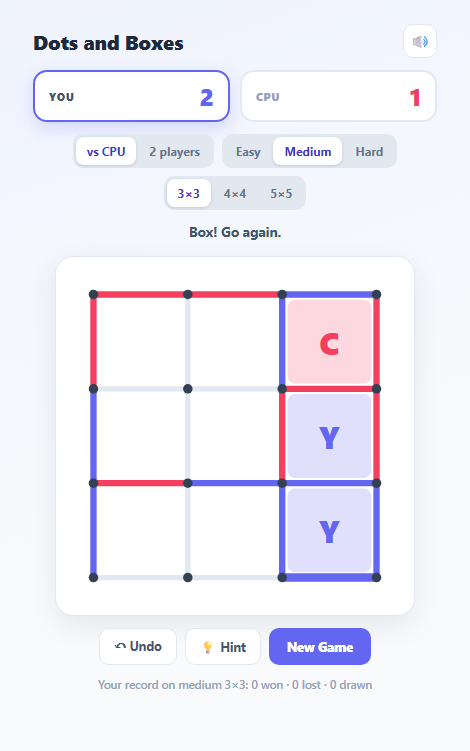
Dots and Boxes is a pencil-and-paper classic: two players take turns drawing one line between two neighbouring dots, and whoever draws the fourth side of a box claims it, marks it and goes again. This snippet is a complete version in plain HTML, CSS and JavaScript on an inline SVG board, with three board sizes (3×3, 4×4 and 5×5 boxes), a computer opponent on three levels, a two-player mode on one screen, undo, hints and a win record that is kept in the browser.
The game state is the lines, not the cells
Most grid games store a value for every cell. Here the lines between dots are what players take, so the state is one array of lines (horizontals numbered first, then verticals) plus a counter of how many sides each box has. buildGeometry() creates the line list and, for each box, its four lines (top, bottom, left, right); each line also remembers the one or two boxes it touches. Taking a line adds one to those boxes' counters, and a counter that reaches four means the box is closed and belongs to the player who took the last side. A line shared by two boxes can close both at once.
The extra-turn rule
Closing a box gives the same player another move, and the turn only passes after a move that closes nothing. That single rule creates the whole strategy of the game: drawing a box's third side hands the opponent a box and another turn. doMove() returns the list of boxes the move closed, and the turn switches only when that list is empty.
A computer player in three levels
Easy takes a box some of the time and otherwise plays a random line, so it makes mistakes you can punish. Medium always takes a box when one is available, otherwise plays a line that gives nothing away (no box reaches three sides), and when every line gives something away it picks the line that gives away the fewest boxes. Hard plays like Medium until 18 or fewer lines are left, then switches to an exact solver. The solver treats the remaining lines as the bits of a number, scores every position once with a memo table (my boxes minus yours, with the extra-turn rule), and picks the best line. Because it searches the real rules, it finds the "double-cross" sacrifice (leaving the opponent two boxes to keep control of the rest of a chain) without that strategy being coded in. On the 3×3 board that means Hard plays almost perfectly from about the middle of the game.
Built to feel good
The board is built once and moves only change classes, so lines draw themselves with a stroke animation, boxes pop in with the owner's letter, the last line played is thickened, and the hover colour matches whose turn it is. Each line has a wide invisible hit line on top of the thin visible one, so it is easy to tap on a phone, and every line is also reachable with the keyboard (Tab, then Enter or Space). Undo restores a saved copy of the state, and Hint asks the Hard solver for a good move and flashes it. Sound effects are made with the Web Audio API and can be muted.
What's included
Features
Step by step
How to Use
- 1Choose how to playPick vs CPU or 2 players, a difficulty (Easy, Medium or Hard for the CPU) and a board size (3×3, 4×4 or 5×5 boxes). Changing a setting starts a new game.
- 2Draw a lineClick or tap the gap between two neighbouring dots. The line is drawn in your colour, and the last line played is highlighted so you can follow the game.
- 3Close a box and go againThe player who draws the fourth side of a box claims it, marks it with their letter and plays again. Avoid drawing a box’s third side, because that gives the opponent a free box.
- 4Use Undo and HintUndo takes back your last move (or the last move in 2-player mode). Hint flashes a strong line, picked by the Hard solver.
- 5Win the boardThe game ends when every box is claimed, and whoever has more boxes wins. Against the CPU your won, lost and drawn games are kept for each difficulty and size.
- 6Customise itThe sizes, the EXACT_MAX number (how late Hard starts solving exactly) and the colours are plain constants and CSS values, and the three CPU levels live in one function, chooseMove().
Real-world uses
Common Use Cases
Got questions?
Frequently Asked Questions
That is the real rule of Dots and Boxes. doMove() collects the boxes the move closed, and the turn only passes to the other player when that list is empty. It is also why drawing a box’s third side is a mistake: it lets the opponent close that box and keep playing.
Easy takes an available box 60% of the time and otherwise plays a random line. Medium always takes a box, otherwise plays a line that does not give a box its third side, and when it has to give something away it picks the line that gives away the fewest boxes. Hard plays like Medium until 18 or fewer lines are left and then solves the rest of the game exactly.
It looks at every way the remaining lines can be played, with the extra-turn rule, and scores each position as (my boxes minus your boxes). The remaining lines are the bits of a number, so each position is stored once in a typed-array memo table. This is why Hard finds the double-cross sacrifice, where it leaves you two boxes on purpose to keep control of the rest of a chain.
Yes. A line between two boxes adds a side to both, and if both reach four sides the move closes both. applyMove() returns every box it closed, and each one is scored and animated.
The size buttons set cfg.n, and buildGeometry(n) builds the lines and boxes for any n. To offer 6×6, add a button with data-v="6" and add 6 to the allowed sizes. Hard still solves exactly at 18 or fewer lines left, which is a fast search; with larger boards it plays like Medium for longer.
Each line is drawn twice: a thin visible line and a 22px-wide invisible hit line on top. The hit line takes the clicks, the Enter and Space keys and the focus ring, so a line is easy to tap and reachable with the keyboard.
Copy & paste
Source Code
<div class="db-app">
  <div class="db-header">
    <h2>Dots and Boxes</h2>
    <button class="icon-btn" id="db-mute" type="button" aria-label="Sound on" aria-pressed="false">🔊</button>
  </div>

  <div class="db-stats">
    <div class="stat p1" id="db-card1"><span class="stat-label" id="db-name1">You</span><span class="stat-val" id="db-p1">0</span></div>
    <div class="stat p2" id="db-card2"><span class="stat-label" id="db-name2">CPU</span><span class="stat-val" id="db-p2">0</span></div>
  </div>

  <div class="db-opts">
    <div class="seg" id="db-mode" role="group" aria-label="Opponent">
      <button type="button" data-v="cpu">vs CPU</button>
      <button type="button" data-v="2p">2 players</button>
    </div>
    <div class="seg" id="db-diff" role="group" aria-label="Difficulty">
      <button type="button" data-v="easy">Easy</button>
      <button type="button" data-v="medium">Medium</button>
      <button type="button" data-v="hard">Hard</button>
    </div>
    <div class="seg" id="db-size" role="group" aria-label="Board size">
      <button type="button" data-v="3">3×3</button>
      <button type="button" data-v="4">4×4</button>
      <button type="button" data-v="5">5×5</button>
    </div>
  </div>

  <p class="db-turn" id="db-turn" aria-live="polite">Your turn — pick a line.</p>

  <div class="db-board-wrap">
    <svg id="db-board" class="db-board" viewBox="0 0 320 320" xmlns="http://www.w3.org/2000/svg"></svg>
  </div>

  <div class="db-actions">
    <button class="ghost-btn" id="db-undo" type="button">↶ Undo</button>
    <button class="ghost-btn" id="db-hint" type="button">💡 Hint</button>
    <button class="primary-btn" id="db-reset" type="button">New Game</button>
  </div>
  <p class="db-record" id="db-record"></p>
</div>
* { box-sizing: border-box; margin: 0; padding: 0; }
body { font-family: system-ui, -apple-system, sans-serif; background: linear-gradient(160deg, #eef2ff, #f8fafc 55%); min-height: 100vh; }
.db-app { max-width: 440px; margin: 0 auto; padding: 24px 18px 28px; display: flex; flex-direction: column; align-items: center; gap: 12px; user-select: none; -webkit-user-select: none; }
.db-header { width: 100%; display: flex; align-items: center; justify-content: space-between; }
.db-header h2 { font-size: 20px; font-weight: 800; color: #1e293b; letter-spacing: -0.2px; }
.icon-btn { width: 34px; height: 34px; border: 1.5px solid #e2e8f0; background: #fff; border-radius: 10px; font-size: 15px; cursor: pointer; line-height: 1; }
.icon-btn[aria-pressed="true"] { opacity: 0.55; }
.db-stats { width: 100%; display: grid; grid-template-columns: 1fr 1fr; gap: 10px; }
.stat { background: #fff; border: 2px solid #e2e8f0; border-radius: 14px; padding: 8px 14px; display: flex; align-items: center; justify-content: space-between; transition: border-color 0.2s, box-shadow 0.2s, transform 0.2s; }
.stat-label { font-size: 11px; font-weight: 800; letter-spacing: 0.05em; text-transform: uppercase; color: #94a3b8; }
.stat-val { font-size: 24px; font-weight: 800; font-variant-numeric: tabular-nums; }
.stat.p1 .stat-val { color: #6366f1; }
.stat.p2 .stat-val { color: #f43f5e; }
.stat.active.p1 { border-color: #6366f1; box-shadow: 0 6px 18px rgba(99,102,241,0.22); }
.stat.active.p2 { border-color: #f43f5e; box-shadow: 0 6px 18px rgba(244,63,94,0.22); }
.stat.active .stat-label { color: #475569; }
.stat.winner { transform: scale(1.04); }
.db-opts { width: 100%; display: flex; flex-wrap: wrap; gap: 8px; justify-content: center; }
.seg { display: inline-flex; background: #e2e8f0; border-radius: 10px; padding: 3px; gap: 2px; }
.seg.hidden { display: none; }
.seg button { border: none; background: transparent; padding: 6px 11px; border-radius: 8px; font: 700 12px system-ui, sans-serif; color: #64748b; cursor: pointer; }
.seg button[aria-pressed="true"] { background: #fff; color: #4338ca; box-shadow: 0 1px 3px rgba(15,23,42,0.15); }
.db-turn { font-size: 13.5px; font-weight: 700; color: #475569; text-align: center; min-height: 22px; }
.db-turn.wait { color: #f59e0b; }
.db-turn.win { color: #16a34a; font-size: 15px; font-weight: 800; }
.db-board-wrap { width: 100%; max-width: 360px; background: #fff; border: 1px solid #e2e8f0; border-radius: 18px; padding: 10px; box-shadow: 0 10px 30px rgba(15,23,42,0.08); }
.db-board { width: 100%; display: block; touch-action: manipulation; }
.db-dot { fill: #334155; }
.db-line { stroke: #e2e8f0; stroke-width: 5; stroke-linecap: round; transition: stroke 0.12s, stroke-width 0.12s; }
.db-edge:hover .db-line:not(.taken) { stroke-width: 8; }
.db-board.turn-p1 .db-edge:hover .db-line:not(.taken) { stroke: #a5b4fc; }
.db-board.turn-p2 .db-edge:hover .db-line:not(.taken) { stroke: #fda4af; }
.db-line.taken { stroke-width: 6; }
.db-line.p1 { stroke: #6366f1; }
.db-line.p2 { stroke: #f43f5e; }
.db-line.new { stroke-dasharray: var(--len); animation: db-draw 0.28s ease-out; }
.db-line.last { stroke-width: 8; }
.db-line.hint { stroke: #f59e0b; stroke-width: 8; animation: db-pulse 0.7s ease-in-out infinite; }
.db-hit { stroke: transparent; stroke-width: 22; stroke-linecap: round; cursor: pointer; pointer-events: stroke; outline: none; }
.db-hit.done { cursor: default; pointer-events: none; }
.db-hit:focus-visible { stroke: rgba(99,102,241,0.3); }
.db-board.locked .db-hit { pointer-events: none; cursor: default; }
.db-box { fill: transparent; transition: fill 0.2s; }
.db-box.p1 { fill: rgba(99,102,241,0.2); }
.db-box.p2 { fill: rgba(244,63,94,0.2); }
.db-box.pop { transform-box: fill-box; transform-origin: center; animation: db-pop 0.35s cubic-bezier(.2,1.6,.4,1); }
.db-label { font-weight: 800; text-anchor: middle; dominant-baseline: central; pointer-events: none; }
.db-label.p1 { fill: #6366f1; }
.db-label.p2 { fill: #f43f5e; }
@keyframes db-draw { from { stroke-dashoffset: var(--len); } to { stroke-dashoffset: 0; } }
@keyframes db-pop { from { transform: scale(0.4); opacity: 0.2; } to { transform: scale(1); opacity: 1; } }
@keyframes db-pulse { 50% { opacity: 0.35; } }
.db-actions { display: flex; gap: 8px; flex-wrap: wrap; justify-content: center; }
.ghost-btn { background: #fff; border: 1.5px solid #e2e8f0; border-radius: 10px; padding: 9px 14px; font: 700 12.5px system-ui, sans-serif; color: #475569; cursor: pointer; transition: border-color 0.15s, color 0.15s; }
.ghost-btn:hover:not(:disabled) { border-color: #6366f1; color: #6366f1; }
.ghost-btn:disabled { opacity: 0.45; cursor: default; }
.primary-btn { background: #6366f1; border: none; border-radius: 10px; padding: 9px 18px; font: 800 12.5px system-ui, sans-serif; color: #fff; cursor: pointer; }
.primary-btn:hover { background: #4f46e5; }
.primary-btn.pulse { animation: db-pulse 0.9s ease-in-out infinite; }
.db-record { font-size: 11.5px; color: #94a3b8; font-weight: 600; min-height: 16px; text-align: center; }const svgNS = 'http://www.w3.org/2000/svg';
const $ = id => document.getElementById(id);
const boardEl = $('db-board'), turnEl = $('db-turn'), p1El = $('db-p1'), p2El = $('db-p2');
const card1 = $('db-card1'), card2 = $('db-card2'), name1 = $('db-name1'), name2 = $('db-name2');
const undoBtn = $('db-undo'), hintBtn = $('db-hint'), resetBtn = $('db-reset'), muteBtn = $('db-mute'), recEl = $('db-record');
const CFG_KEY = 'dots-boxes-settings', REC_KEY = 'dots-boxes-record';
const VB = 320, PAD = 26;
const EXACT_MAX = 18; // Hard plays perfectly once this few lines are left
const cfg = { n: 3, mode: 'cpu', diff: 'medium' };
try { Object.assign(cfg, JSON.parse(localStorage.getItem(CFG_KEY) || '{}')); } catch (e) {}
let N, H, E, STEP, edges, boxesDef; // geometry (rebuilt when the board size changes)
let S, scores, current, bonus, over, thinking, history, lastEdge, cpuTimer, hintTimer;
let lineEls, hitEls, boxEls, labelEls;
let muted = false, ac = null;
// ── Geometry: lines are numbered horizontals first, then verticals; boxes list their 4 lines ──
function buildGeometry(n) {
N = n; H = (N + 1) * N; E = H + N * (N + 1); STEP = (VB - PAD * 2) / N;
edges = []; boxesDef = [];
for (let r = 0; r <= N; r++) for (let c = 0; c < N; c++) edges.push({ t: 'h', r, c, x1: PAD + c * STEP, y1: PAD + r * STEP, x2: PAD + (c + 1) * STEP, y2: PAD + r * STEP, boxes: [] });
for (let r = 0; r < N; r++) for (let c = 0; c <= N; c++) edges.push({ t: 'v', r, c, x1: PAD + c * STEP, y1: PAD + r * STEP, x2: PAD + c * STEP, y2: PAD + (r + 1) * STEP, boxes: [] });
for (let r = 0; r < N; r++) for (let c = 0; c < N; c++) {
const b = r * N + c;
const es = [r * N + c, (r + 1) * N + c, H + r * (N + 1) + c, H + r * (N + 1) + c + 1]; // top, bottom, left, right
boxesDef.push({ r, c, edges: es });
es.forEach(e => edges[e].boxes.push(b));
}
}
// ── Game state: who took each line, how many sides each box has, who owns each box ──
const newState = () => ({ taken: new Uint8Array(E), cnt: new Uint8Array(N * N), owner: new Uint8Array(N * N) });
const cloneState = s => ({ taken: s.taken.slice(), cnt: s.cnt.slice(), owner: s.owner.slice() });
function applyMove(s, e, p) {
s.taken[e] = p;
const done = [];
edges[e].boxes.forEach(b => { s.cnt[b]++; if (s.cnt[b] === 4) { s.owner[b] = p; done.push(b); } });
return done;
}
// ── The computer player ──
const freeLines = s => { const m = []; for (let e = 0; e < E; e++) if (!s.taken[e]) m.push(e); return m; };
const completes = (s, e) => edges[e].boxes.some(b => s.cnt[b] === 3); // this line closes a box
const givesThird = (s, e) => edges[e].boxes.some(b => s.cnt[b] === 2); // this line gives a box its 3rd side (a free box for the opponent)
const pick = a => a[Math.floor(Math.random() * a.length)];
// How many boxes the opponent grabs (greedily) after this line
function sacrifice(s, e) {
const t = cloneState(s); applyMove(t, e, 1);
let n = 0, again = true;
while (again) {
again = false;
for (let x = 0; x < E; x++) if (!t.taken[x] && completes(t, x)) { n += applyMove(t, x, 2).length; again = true; break; }
}
return n;
}
// Exact endgame search: the best line by (my boxes - their boxes), with the extra-turn rule. It finds the "double-cross"
// sacrifices by itself. The remaining lines become bits of a mask, and every position is solved once (memo).
function solveExact(s) {
const rem = freeLines(s), n = rem.length, bit = {};
rem.forEach((e, i) => { bit[e] = i; });
const perBit = rem.map(() => []);
boxesDef.forEach((bd, b) => {
if (s.owner[b]) return;
let m = 0;
bd.edges.forEach(e => { if (!s.taken[e]) m |= 1 << bit[e]; });
for (let i = 0; i < n; i++) if (m & (1 << i)) perBit[i].push(m);
});
const full = (1 << n) - 1, memo = new Int8Array(1 << n).fill(-128);
const gainOf = (i, m2) => { let g = 0; const pb = perBit[i]; for (let k = 0; k < pb.length; k++) if ((m2 & pb[k]) === pb[k]) g++; return g; };
function val(mask) {
if (mask === full) return 0;
if (memo[mask] !== -128) return memo[mask];
let best = -127;
for (let i = 0; i < n; i++) {
if (mask & (1 << i)) continue;
const m2 = mask | (1 << i), g = gainOf(i, m2);
const v = g ? g + val(m2) : -val(m2);
if (v > best) best = v;
}
memo[mask] = best;
return best;
}
let bestV = -127, pool = [];
for (let i = 0; i < n; i++) {
const m2 = 1 << i, g = gainOf(i, m2);
const v = g ? g + val(m2) : -val(m2);
if (v > bestV) { bestV = v; pool = [rem[i]]; } else if (v === bestV) pool.push(rem[i]);
}
return pick(pool);
}
function chooseMove(s, level) {
const moves = freeLines(s);
if (level === 'hard' && moves.length <= EXACT_MAX) return solveExact(s);
const caps = moves.filter(e => completes(s, e));
if (level === 'easy') return caps.length && Math.random() < 0.6 ? pick(caps) : pick(moves);
if (caps.length) return pick(caps); // 1. take a box if there is one
const safe = moves.filter(e => !givesThird(s, e));
if (safe.length) return pick(safe); // 2. otherwise a line that gives nothing away
let best = Infinity, pool = []; // 3. forced: give away as little as possible
moves.forEach(e => { const k = sacrifice(s, e); if (k < best) { best = k; pool = [e]; } else if (k === best) pool.push(e); });
return pick(pool);
}
// ── Sound: a tiny Web Audio synth, no files ──
function tone(f, dur, type, to, vol, delay) {
if (muted) return;
try {
if (!ac) ac = new (window.AudioContext || window.webkitAudioContext)();
if (ac.state === 'suspended') ac.resume();
const t0 = ac.currentTime + (delay || 0), o = ac.createOscillator(), g = ac.createGain();
o.type = type || 'sine'; o.frequency.setValueAtTime(f, t0);
if (to) o.frequency.exponentialRampToValueAtTime(to, t0 + dur);
g.gain.setValueAtTime(vol || 0.05, t0); g.gain.exponentialRampToValueAtTime(0.0001, t0 + dur);
o.connect(g); g.connect(ac.destination); o.start(t0); o.stop(t0 + dur + 0.02);
} catch (e) {}
}
const sfxLine = p => tone(p === 1 ? 520 : 400, 0.07, 'triangle', 0, 0.05);
const sfxBox = () => { tone(784, 0.1, 'sine', 0, 0.06); tone(1175, 0.18, 'sine', 0, 0.06, 0.08); };
const sfxEnd = win => (win ? [523, 659, 784, 1046] : [392, 330, 262]).forEach((f, i) => tone(f, 0.2, 'triangle', 0, 0.06, i * 0.13));
// ── Drawing: the board is built once, moves only change classes ──
function svgEl(tag, attrs) {
const e = document.createElementNS(svgNS, tag);
Object.keys(attrs).forEach(k => e.setAttribute(k, attrs[k]));
return e;
}
function buildBoard() {
boardEl.innerHTML = '';
boardEl.setAttribute('viewBox', '0 0 ' + VB + ' ' + VB);
boxEls = []; labelEls = []; lineEls = []; hitEls = [];
boxesDef.forEach(bd => {
const x = PAD + bd.c * STEP, y = PAD + bd.r * STEP;
const rect = svgEl('rect', { x: x + 5, y: y + 5, width: STEP - 10, height: STEP - 10, rx: 7, class: 'db-box' });
const label = svgEl('text', { x: x + STEP / 2, y: y + STEP / 2, class: 'db-label', 'font-size': Math.round(STEP * 0.34) });
boardEl.appendChild(rect); boardEl.appendChild(label);
boxEls.push(rect); labelEls.push(label);
});
edges.forEach((ed, e) => {
const g = svgEl('g', { class: 'db-edge' });
const line = svgEl('line', { x1: ed.x1, y1: ed.y1, x2: ed.x2, y2: ed.y2, class: 'db-line' });
line.style.setProperty('--len', String(Math.round(STEP)));
const hit = svgEl('line', { x1: ed.x1, y1: ed.y1, x2: ed.x2, y2: ed.y2, class: 'db-hit', tabindex: '0', role: 'button', 'aria-label': 'Draw line ' + (e + 1) });
hit.addEventListener('click', () => onLine(e));
hit.addEventListener('keydown', ev => { if (ev.key === 'Enter' || ev.key === ' ') { ev.preventDefault(); onLine(e); } });
g.appendChild(line); g.appendChild(hit); boardEl.appendChild(g);
lineEls.push(line); hitEls.push(hit);
});
const dotR = Math.max(3.5, 6 - N * 0.5);
for (let r = 0; r <= N; r++) for (let c = 0; c <= N; c++) boardEl.appendChild(svgEl('circle', { cx: PAD + c * STEP, cy: PAD + r * STEP, r: dotR, class: 'db-dot' }));
}
const letter = p => (cfg.mode === 'cpu' ? (p === 1 ? 'Y' : 'C') : String(p));
function paintLine(e, p, anim) {
lineEls[e].setAttribute('class', 'db-line taken p' + p + (anim ? ' new' : ''));
hitEls[e].setAttribute('class', 'db-hit done');
hitEls[e].setAttribute('tabindex', '-1');
}
function paintBox(b, p, anim) {
boxEls[b].setAttribute('class', 'db-box p' + p + (anim ? ' pop' : ''));
labelEls[b].setAttribute('class', 'db-label p' + p);
labelEls[b].textContent = letter(p);
}
function paintAll() {
for (let e = 0; e < E; e++) {
if (S.taken[e]) paintLine(e, S.taken[e], false);
else { lineEls[e].setAttribute('class', 'db-line'); hitEls[e].setAttribute('class', 'db-hit'); hitEls[e].setAttribute('tabindex', '0'); }
}
for (let b = 0; b < N * N; b++) {
if (S.owner[b]) paintBox(b, S.owner[b], false);
else { boxEls[b].setAttribute('class', 'db-box'); labelEls[b].setAttribute('class', 'db-label'); labelEls[b].textContent = ''; }
}
if (lastEdge !== null && S.taken[lastEdge]) lineEls[lastEdge].classList.add('last');
}
function names() { return cfg.mode === 'cpu' ? ['You', 'CPU'] : ['Player 1', 'Player 2']; }
function updateUi() {
const nm = names();
name1.textContent = nm[0]; name2.textContent = nm[1];
p1El.textContent = String(scores[1]); p2El.textContent = String(scores[2]);
card1.classList.toggle('active', !over && current === 1);
card2.classList.toggle('active', !over && current === 2);
boardEl.setAttribute('class', 'db-board turn-p' + current + (thinking || over ? ' locked' : ''));
undoBtn.disabled = !history.length;
hintBtn.disabled = over || thinking || (cfg.mode === 'cpu' && current !== 1);
if (over) return;
let t, cls = 'db-turn';
if (cfg.mode === 'cpu') {
if (current === 1) t = bonus ? 'Box! Go again.' : 'Your turn — pick a line.';
else { t = 'CPU is thinking…'; cls += ' wait'; }
} else t = bonus ? 'Box! ' + nm[current - 1] + ', go again.' : nm[current - 1] + '’s turn.';
turnEl.textContent = t; turnEl.className = cls;
}
function renderSettings() {
[['db-mode', cfg.mode], ['db-diff', cfg.diff], ['db-size', String(cfg.n)]].forEach(pair => {
$(pair[0]).querySelectorAll('button').forEach(b => b.setAttribute('aria-pressed', String(b.getAttribute('data-v') === pair[1])));
});
$('db-diff').classList.toggle('hidden', cfg.mode !== 'cpu');
}
// ── Record against the CPU (kept per difficulty) ──
function getRec() { try { return JSON.parse(localStorage.getItem(REC_KEY) || '{}'); } catch (e) { return {}; } }
function showRecord() {
if (cfg.mode !== 'cpu') { recEl.textContent = ''; return; }
const r = getRec()[cfg.diff + cfg.n] || { w: 0, l: 0, d: 0 };
recEl.textContent = 'Your record on ' + cfg.diff + ' ' + cfg.n + '×' + cfg.n + ': ' + r.w + ' won · ' + r.l + ' lost · ' + r.d + ' drawn';
}
function saveResult(res) {
try {
const all = getRec(), k = cfg.diff + cfg.n, r = all[k] || { w: 0, l: 0, d: 0 };
r[res]++; all[k] = r; localStorage.setItem(REC_KEY, JSON.stringify(all));
} catch (e) {}
}
// ── Turn flow ──
function snapshot() { return { s: cloneState(S), a: scores[1], b: scores[2], cur: current, bonus, last: lastEdge }; }
function clearHint() { clearTimeout(hintTimer); document.querySelectorAll('.db-line.hint').forEach(l => l.classList.remove('hint')); }
function onLine(e) {
if (over || thinking || S.taken[e]) return;
if (cfg.mode === 'cpu' && current !== 1) return;
history.push(snapshot());
doMove(e, current);
}
function doMove(e, p) {
clearHint();
if (lastEdge !== null) lineEls[lastEdge].classList.remove('last');
const done = applyMove(S, e, p);
lastEdge = e;
paintLine(e, p, true);
lineEls[e].classList.add('last');
done.forEach(b => { scores[p]++; paintBox(b, p, true); });
if (done.length) sfxBox(); else sfxLine(p);
if (scores[1] + scores[2] === N * N) { updateUi(); finish(); return; }
bonus = done.length > 0;
if (!bonus) current = p === 1 ? 2 : 1;
if (cfg.mode === 'cpu' && current === 2) { thinking = true; updateUi(); scheduleCpu(done.length > 0); return; }
updateUi();
}
function scheduleCpu(afterBox) {
cpuTimer = setTimeout(() => {
const e = chooseMove(S, cfg.diff);
thinking = false;
doMove(e, 2);
}, afterBox ? 650 : 480);
}
function finish() {
over = true; thinking = false; clearTimeout(cpuTimer);
const a = scores[1], b = scores[2], nm = names();
let msg;
if (a === b) msg = 'A draw, ' + a + '–' + b + '.';
else if (cfg.mode === 'cpu') msg = a > b ? 'You win ' + a + '–' + b + '! 🎉' : 'CPU wins ' + b + '–' + a + '.';
else msg = nm[a > b ? 0 : 1] + ' wins ' + Math.max(a, b) + '–' + Math.min(a, b) + '! 🎉';
turnEl.textContent = msg; turnEl.className = 'db-turn win';
card1.classList.toggle('winner', a > b); card2.classList.toggle('winner', b > a);
card1.classList.remove('active'); card2.classList.remove('active');
boardEl.setAttribute('class', 'db-board locked');
if (cfg.mode === 'cpu') { saveResult(a === b ? 'd' : a > b ? 'w' : 'l'); showRecord(); }
sfxEnd(a >= b);
resetBtn.classList.add('pulse');
hintBtn.disabled = true;
}
function undo() {
if (!history.length) return;
clearTimeout(cpuTimer); clearHint(); thinking = false;
if (lastEdge !== null && lineEls[lastEdge]) lineEls[lastEdge].classList.remove('last');
const h = history.pop();
S = cloneState(h.s); scores = { 1: h.a, 2: h.b }; current = h.cur; bonus = h.bonus; lastEdge = h.last;
over = false; card1.classList.remove('winner'); card2.classList.remove('winner'); resetBtn.classList.remove('pulse');
paintAll(); updateUi();
}
function hint() {
if (over || thinking || (cfg.mode === 'cpu' && current !== 1)) return;
clearHint();
const e = chooseMove(S, 'hard');
lineEls[e].classList.add('hint');
hintTimer = setTimeout(clearHint, 2200);
}
function newGame(rebuild) {
clearTimeout(cpuTimer); clearHint();
if (rebuild || !boxesDef || boxesDef.length !== cfg.n * cfg.n) { buildGeometry(cfg.n); buildBoard(); }
S = newState(); scores = { 1: 0, 2: 0 }; current = 1; bonus = false; over = false; thinking = false;
history = []; lastEdge = null;
card1.classList.remove('winner'); card2.classList.remove('winner'); resetBtn.classList.remove('pulse');
renderSettings(); paintAll(); updateUi(); showRecord();
}
function setOpt(key, value) {
cfg[key] = value;
try { localStorage.setItem(CFG_KEY, JSON.stringify(cfg)); } catch (e) {}
newGame(key === 'n');
}
$('db-mode').addEventListener('click', e => { const v = e.target.getAttribute && e.target.getAttribute('data-v'); if (v) setOpt('mode', v); });
$('db-diff').addEventListener('click', e => { const v = e.target.getAttribute && e.target.getAttribute('data-v'); if (v) setOpt('diff', v); });
$('db-size').addEventListener('click', e => { const v = e.target.getAttribute && e.target.getAttribute('data-v'); if (v) setOpt('n', parseInt(v, 10)); });
undoBtn.addEventListener('click', undo);
hintBtn.addEventListener('click', hint);
resetBtn.addEventListener('click', () => newGame(false));
muteBtn.addEventListener('click', () => {
muted = !muted; muteBtn.textContent = muted ? '🔇' : '🔊';
muteBtn.setAttribute('aria-pressed', String(muted)); muteBtn.setAttribute('aria-label', muted ? 'Sound off' : 'Sound on');
});
cfg.n = [3, 4, 5].indexOf(cfg.n) >= 0 ? cfg.n : 3;
newGame(true);
/* wdp-share:start */
(function () {
var TITLE = 'Dots and Boxes Game', URL = 'https://webdevpuneet.com/ui-snippets/dots-and-boxes-game/';
if (window.__wdpShare) return;
window.__wdpShare = true;
var blob = null, file = null, lastInfo = null;
/* ---- UI ---- */
var st = document.createElement('style');
st.textContent =
'.wdps-in,.wdps-btn,.wdps-box{touch-action:manipulation;-webkit-tap-highlight-color:transparent}.wdps-in{display:block;margin:12px auto 0;border:0;border-radius:12px;padding:11px 22px;font:800 15px/1 system-ui,sans-serif;background:#16a34a;color:#fff;cursor:pointer;box-shadow:0 3px 0 #11793a;pointer-events:auto;position:relative;z-index:5}' +
'.wdps-in:hover{background:#15803d}.wdps-in:active{transform:translateY(2px);box-shadow:0 1px 0 #11793a}' +
'.wdps-btn{position:fixed;right:12px;bottom:12px;z-index:2147483000;border:0;border-radius:99px;padding:9px 16px;font:700 13px/1 system-ui,sans-serif;background:#16a34a;color:#fff;cursor:pointer;box-shadow:0 3px 12px rgba(0,0,0,.3)}' +
'.wdps-btn.wdps-hot{animation:wdps-p 1.4s ease-in-out infinite}' +
'@keyframes wdps-p{0%,100%{box-shadow:0 0 0 0 rgba(22,163,74,.6),0 3px 12px rgba(0,0,0,.3)}50%{box-shadow:0 0 0 9px rgba(22,163,74,0),0 3px 12px rgba(0,0,0,.3)}}' +
'.wdps-btn:active{transform:translateY(1px)}' +
'.wdps-in[hidden],.wdps-btn[hidden],.wdps-box[hidden],.wdps-box [hidden]{display:none}' +
'.wdps-box{position:fixed;left:50%;bottom:12px;transform:translateX(-50%);z-index:2147483001;width:max-content;max-width:calc(100vw - 24px);box-sizing:border-box;background:#fff;color:#64748b;border:1px solid #d5e2ee;border-radius:12px;padding:8px 12px;font:700 12px/1.4 system-ui,sans-serif;box-shadow:0 8px 26px rgba(15,23,42,.25);display:flex;flex-wrap:wrap;gap:8px;align-items:center}' +
'.wdps-box button,.wdps-box a{border:1px solid #d5e2ee;background:#f8fafc;color:#1e293b;border-radius:99px;padding:5px 12px;font:700 12px system-ui,sans-serif;text-decoration:none;cursor:pointer}' +
'.wdps-box .wdps-x{border:0;background:none;font-size:19px;line-height:1;padding:0 4px;margin-left:auto;color:#475569}' +
'@media (max-width:700px){.wdps-box{width:calc(100vw - 24px);justify-content:center;padding:10px 12px}.wdps-box>span{width:100%;text-align:center}.wdps-box button,.wdps-box a{padding:9px 14px;font-size:13px}.wdps-box .wdps-x{position:absolute;top:4px;right:4px}.wdps-in{width:100%;max-width:320px}}';
document.head.appendChild(st);
var pill = document.createElement('button');
pill.type = 'button'; pill.className = 'wdps-btn'; pill.textContent = 'Share result';
var inl = document.createElement('button');
inl.type = 'button'; inl.className = 'wdps-in'; inl.textContent = 'Share result'; inl.hidden = true;
var box = document.createElement('div');
box.className = 'wdps-box'; box.hidden = true;
box.setAttribute('role', 'dialog'); box.setAttribute('aria-label', 'Share your result');
box.innerHTML =
'<span data-a="msg">Share your result:</span>' +
'<button type="button" data-a="copy">Copy image</button>' +
'<a data-a="dl" download="result.png">Download image</a>' +
'<button type="button" data-a="more" hidden>More…</button>' +
'<a data-a="wa" target="_blank" rel="noopener">WhatsApp</a>' +
'<a data-a="x" target="_blank" rel="noopener">X</a>' +
'<a data-a="fb" target="_blank" rel="noopener">Facebook</a>' +
'<button type="button" class="wdps-x" data-a="close" aria-label="Close share options">×</button>';
document.body.appendChild(box);
document.body.appendChild(pill);
function q(a) { return box.querySelector('[data-a="' + a + '"]'); }
function ours(el) { return el === inl || el === pill || !!el.closest('.wdps-box'); }
/* ---- reading the result from the screen ---- */
function shown(el) {
if (!el || !el.getClientRects().length) return false;
for (var n = el; n && n !== document.body; n = n.parentElement) {
var cs = getComputedStyle(n);
if (cs.display === 'none' || cs.visibility === 'hidden' || parseFloat(cs.opacity) < 0.1) return false;
if (n.hidden || n.getAttribute('aria-hidden') === 'true') return false;
}
return true;
}
function txt(el) { return (el.textContent || '').replace(/\s+/g, ' ').trim(); }
function sig(el) { return ((el.id || '') + ' ' + (typeof el.className === 'string' ? el.className : '')).toLowerCase(); }
var OUTCOME = /(you win|you won|win!|wins|victory|game over|time.?s up|cleared|complete|solved|defeat|you lose|you lost|lost|draw|crash|failed|success|congrat|score|result|finished|beat|all matched|well done|perfect|new best)/i;
var HEADSIG = /(title|headline|msg|message|banner|result|verdict|status)/;
var WIN = /(you win|you won|win!|wins|victory|cleared|complete|solved|success|congrat|beat|matched|perfect|new best|record)/i;
var LOSS = /(game over|time.?s up|defeat|you lose|you lost|lost|crash|failed|out of)/i;
var BOX = /(overlay|modal|banner|result|over|end|dialog|screen|popup|panel|card|finish|win)/;
function readResult() {
var head = '', sub = '', root = null, headEl = null;
var all = document.body.querySelectorAll('h1,h2,h3,h4,p,strong,div,span');
for (var i = 0; i < all.length && !head; i++) {
var el = all[i];
if (ours(el) || el.children.length > 2) continue;
if (!HEADSIG.test(sig(el))) continue;
/* a banner that holds its own title: use the title inside it instead */
var inner = false;
for (var c = 0; c < el.children.length; c++) if (HEADSIG.test(sig(el.children[c]))) inner = true;
if (inner) continue;
var t = txt(el);
if (t.length < 3 || t.length > 70 || !OUTCOME.test(t) || !shown(el)) continue;
head = t; headEl = el; root = el.parentElement;
}
if (root) {
var kids = root.querySelectorAll('p,span,div');
for (var j = 0; j < kids.length && !sub; j++) {
var k = kids[j];
if (ours(k) || k.children.length > 2 || !/(sub|text|summary|note|desc|detail)/.test(sig(k))) continue;
var tt = txt(k);
if (tt && tt !== head && tt.length >= 5 && tt.length <= 160 && shown(k)) sub = tt;
}
}
/* the result screen the button goes into: the nearest overlay / banner / result box around the headline */
var host = null;
for (var n = headEl, d = 0; n && n !== document.body && d < 4; n = n.parentElement, d++) {
if (d > 0 && BOX.test(sig(n)) && n.tagName !== 'BUTTON') { host = n; break; }
}
return { head: head, sub: sub, host: host };
}
var STATRE = /(score|moves|time|wpm|best|level|streak|accuracy|combo|coins|distance|height|points|stars|lives|wins|attempt|guess)/;
function readStats() {
var out = [], seen = {};
var all = document.body.querySelectorAll('span,strong,b,div,p,output');
for (var i = 0; i < all.length && out.length < 4; i++) {
var el = all[i];
if (ours(el) || el.children.length > 1) continue;
if (!STATRE.test(sig(el))) continue;
var t = txt(el);
if (!t || t.length > 28 || !/[0-9]/.test(t) || !shown(el)) continue;
if (!/[a-zA-Z]/.test(t) && el.parentElement) {
var parts = [], ch = el.parentElement.childNodes;
for (var p = 0; p < ch.length; p++) { var pv = (ch[p].textContent || '').replace(/\s+/g, ' ').trim(); if (pv) parts.push(pv); }
var pt = parts.join(' ');
if (pt.length <= 30 && /[a-zA-Z]/.test(pt)) t = pt;
}
var key = t.toLowerCase();
if (seen[key]) continue;
seen[key] = 1; out.push(t);
}
return out;
}
function bestCanvas() {
var cs = document.querySelectorAll('canvas'), best = null, area = 0;
for (var i = 0; i < cs.length; i++) {
var r = cs[i].getBoundingClientRect(), a = r.width * r.height;
if (a > area && a > 8000 && shown(cs[i])) { area = a; best = cs[i]; }
}
return best;
}
/* ---- show the button when a result is on screen ---- */
var lastHost = null, timer = 0;
function sync() {
timer = 0;
var r = readResult();
if (r.head && r.host) {
if (inl.parentElement !== r.host) r.host.appendChild(inl);
if (inl.hidden) inl.hidden = false;
if (!pill.hidden) pill.hidden = true;
} else {
if (!inl.hidden) inl.hidden = true;
if (pill.hidden) pill.hidden = false;
pill.classList.toggle('wdps-hot', !!r.head);
}
if (lastHost && !r.head && !box.hidden) box.hidden = true;
lastHost = r.head ? (r.host || document.body) : null;
}
function later() { if (!timer) timer = setTimeout(sync, 200); }
try {
new MutationObserver(function (list) {
for (var i = 0; i < list.length; i++) {
var t = list[i].target;
if (t.nodeType !== 1) t = t.parentElement;
if (t && !ours(t)) { later(); return; }
}
}).observe(document.body, { subtree: true, childList: true, characterData: true, attributes: true, attributeFilter: ['class', 'style', 'hidden'] });
} catch (e) {}
setInterval(later, 1500);
later();
/* ---- the card (1080 x 1080, drawn in memory, light like Pocket Artillery's) ---- */
var outline = 0;
function put(g, t, x, y) { if (outline) { g.lineJoin = 'round'; g.lineWidth = outline; g.strokeStyle = 'rgba(8,12,28,.85)'; g.strokeText(t, x, y); } g.fillText(t, x, y); }
function wrap(g, text, x, y, maxW, lh, maxLines) {
var words = text.split(' '), line = '', n = 0;
for (var i = 0; i < words.length; i++) {
var tst = line ? line + ' ' + words[i] : words[i];
if (g.measureText(tst).width > maxW && line) {
put(g, line, x, y); y += lh; n++; line = words[i];
if (n >= maxLines - 1) { line = words.slice(i).join(' '); break; }
} else line = tst;
}
if (line) {
while (line.length > 3 && g.measureText(line).width > maxW) line = line.slice(0, -2);
put(g, line, x, y); y += lh;
}
return y;
}
/* Biggest-screenshot card: the game frame fills the whole image, the text sits on top of it as an overlay. */
function bgOf(el) {
for (var n = el; n; n = n.parentElement) {
var c = getComputedStyle(n).backgroundColor;
if (c && c !== 'transparent' && c.slice(-4) !== ', 0)') return c;
}
return '#0f172a';
}
function drawBig(info, cv) {
var W = 1080, r = cv.width / cv.height, H = Math.max(810, Math.min(1350, Math.round(W / r)));
var c = document.createElement('canvas'); c.width = W; c.height = H;
var g = c.getContext('2d');
g.fillStyle = bgOf(cv.parentElement || cv); g.fillRect(0, 0, W, H);
var w = W, h = w / r;
if (h > H) { h = H; w = h * r; }
g.imageSmoothingEnabled = true; g.imageSmoothingQuality = 'high';
try { g.drawImage(cv, (W - w) / 2, (H - h) / 2, w, h); } catch (e) { return null; }
/* dark fades under the text so it stays readable on any game colours */
var g1 = g.createLinearGradient(0, 0, 0, H * 0.55); g1.addColorStop(0, 'rgba(8,12,28,.74)'); g1.addColorStop(1, 'rgba(8,12,28,0)');
g.fillStyle = g1; g.fillRect(0, 0, W, H * 0.55);
var g2 = g.createLinearGradient(0, H - 200, 0, H); g2.addColorStop(0, 'rgba(8,12,28,0)'); g2.addColorStop(1, 'rgba(8,12,28,.85)');
g.fillStyle = g2; g.fillRect(0, H - 200, W, 200);
var head = info.head || 'Can you beat me?';
var kind = /draw|tie/i.test(head) ? 'draw' : LOSS.test(head) && !WIN.test(head) ? 'loss' : 'win';
g.textAlign = 'center';
var y = 36;
g.fillStyle = 'rgba(255,255,255,.93)'; g.font = '800 34px system-ui, sans-serif'; outline = 7;
y = wrap(g, TITLE.toUpperCase(), W / 2, y + 34, 1000, 42, 1);
g.fillStyle = kind === 'draw' ? '#e2e8f0' : kind === 'loss' ? '#9db8ff' : '#ffc233';
var big = head.length > 22 ? 84 : 112; g.font = '900 ' + big + 'px system-ui, sans-serif'; outline = 16;
y = wrap(g, head, W / 2, y + big * 0.85, 1000, big * 1.05, 2);
if (info.sub) { g.fillStyle = '#fff'; g.font = '700 40px system-ui, sans-serif'; outline = 9; y = wrap(g, info.sub, W / 2, y + 6, 980, 50, 2); }
outline = 0;
if (info.stats.length) {
g.font = '800 38px system-ui, sans-serif';
var gap = 16, pad = 26, ws = [], tot = -gap;
for (var i = 0; i < info.stats.length; i++) { ws.push(g.measureText(info.stats[i]).width + pad * 2); tot += ws[i] + gap; }
var sc = tot > 960 ? 960 / tot : 1, px = (W - tot * sc) / 2, py = y + 14;
for (var k = 0; k < info.stats.length; k++) {
var w0 = ws[k] * sc;
g.fillStyle = 'rgba(8,12,28,.72)'; g.strokeStyle = 'rgba(255,255,255,.55)'; g.lineWidth = 3;
g.beginPath();
if (g.roundRect) g.roundRect(px, py, w0, 68, 34); else g.rect(px, py, w0, 68);
g.fill(); g.stroke();
g.fillStyle = '#fff'; g.font = '800 ' + Math.round(38 * sc) + 'px system-ui, sans-serif';
g.fillText(info.stats[k], px + w0 / 2, py + 47);
px += w0 + gap * sc;
}
}
outline = 8;
g.fillStyle = '#fff'; g.font = '900 52px system-ui, sans-serif'; put(g, 'Can you beat it?', W / 2, H - 84);
g.fillStyle = 'rgba(255,255,255,.92)'; g.font = '700 34px system-ui, sans-serif'; outline = 6; put(g, 'Play free at webdevpuneet.com', W / 2, H - 34);
outline = 0;
return c;
}
function finish(c, cb) {
var dataUrl = '';
try { dataUrl = c.toDataURL('image/png'); } catch (e) {}
try { c.toBlob(function (b) { cb(b, dataUrl); }, 'image/png'); } catch (e) { cb(null, dataUrl); }
}
function makeCard(info, cb) {
var cv0 = bestCanvas();
if (cv0) { var bc = drawBig(info, cv0); if (bc) { finish(bc, cb); return; } }
var S = 1080, c = document.createElement('canvas');
c.width = S; c.height = S;
var g = c.getContext('2d');
var gr = g.createLinearGradient(0, 0, 0, S);
gr.addColorStop(0, '#eaf4ff'); gr.addColorStop(1, '#fff3ef');
g.fillStyle = gr; g.fillRect(0, 0, S, S);
var cv = bestCanvas();
var head = info.head || 'Can you beat me?';
var kind = /draw|tie/i.test(head) ? 'draw' : LOSS.test(head) && !WIN.test(head) ? 'loss' : 'win';
g.textAlign = 'center';
g.fillStyle = '#1e293b'; g.font = '800 60px system-ui, sans-serif';
var y = wrap(g, TITLE, S / 2, cv ? 120 : 200, 980, 68, 1);
g.fillStyle = kind === 'draw' ? '#475569' : kind === 'loss' ? '#3b63e0' : '#e8553a';
g.font = '800 ' + (head.length > 22 ? 76 : 100) + 'px system-ui, sans-serif';
y = wrap(g, head, S / 2, y + (head.length > 22 ? 70 : 90), 980, head.length > 22 ? 84 : 108, 2);
if (info.sub) { g.fillStyle = '#475569'; g.font = '700 38px system-ui, sans-serif'; y = wrap(g, info.sub, S / 2, y + 4, 940, 48, 2); }
if (info.stats.length) {
g.font = '800 36px system-ui, sans-serif';
var gap = 18, pad = 26, ws = [], tot = -gap;
for (var i = 0; i < info.stats.length; i++) { ws.push(g.measureText(info.stats[i]).width + pad * 2); tot += ws[i] + gap; }
var sc = tot > 1000 ? 1000 / tot : 1, px = (S - tot * sc) / 2, py = y + 14;
for (var k = 0; k < info.stats.length; k++) {
var w0 = ws[k] * sc;
g.fillStyle = '#ffffff'; g.strokeStyle = '#d5e2ee'; g.lineWidth = 3;
g.beginPath();
if (g.roundRect) g.roundRect(px, py, w0, 64, 32); else g.rect(px, py, w0, 64);
g.fill(); g.stroke();
g.fillStyle = '#1e293b'; g.font = '800 ' + Math.round(36 * sc) + 'px system-ui, sans-serif';
g.fillText(info.stats[k], px + w0 / 2, py + 44);
px += w0 + gap * sc;
}
y = py + 64 + 10;
}
if (cv) {
try {
var maxW = 960, maxH = Math.max(180, 930 - y - 30), r = cv.width / cv.height;
var w = maxW, h = w / r;
if (h > maxH) { h = maxH; w = h * r; }
var x = (S - w) / 2, yy = y + 20 + Math.max(0, (maxH - h) / 2);
g.save(); g.shadowColor = 'rgba(60,100,140,0.3)'; g.shadowBlur = 30; g.shadowOffsetY = 10;
g.fillStyle = '#fff'; g.fillRect(x - 8, yy - 8, w + 16, h + 16); g.restore();
g.drawImage(cv, x, yy, w, h);
} catch (e) {}
}
g.fillStyle = '#1e293b'; g.font = '800 46px system-ui, sans-serif';
g.fillText('Can you beat it?', S / 2, 1000);
g.fillStyle = '#64748b'; g.font = '700 34px system-ui, sans-serif';
g.fillText('Play free at webdevpuneet.com', S / 2, 1050);
var dataUrl = '';
try { dataUrl = c.toDataURL('image/png'); } catch (e) {}
try { c.toBlob(function (b) { cb(b, dataUrl); }, 'image/png'); } catch (e) { cb(null, dataUrl); }
}
function shareText(info) {
var bits = [];
if (info.head) bits.push(info.head);
if (info.stats.length) bits.push(info.stats.join(', '));
return TITLE + ': ' + (bits.length ? bits.join(' - ') + '. ' : '') + 'Can you beat it? ' + URL;
}
function msg(t) { q('msg').textContent = t; }
function openFallback() {
var t = encodeURIComponent(shareText(lastInfo));
q('wa').href = 'https://wa.me/?text=' + t;
q('x').href = 'https://twitter.com/intent/tweet?text=' + t;
q('fb').href = 'https://www.facebook.com/sharer/sharer.php?u=' + encodeURIComponent(URL) + '"e=' + t;
box.hidden = false;
}
function nativeShare() {
/* a user cancel does nothing; anything else (blocked in an iframe, no permission) shows Copy / Download / links */
try {
navigator.share({ files: [file], title: TITLE, text: shareText(lastInfo) }).catch(function (e) { if (!e || e.name !== 'AbortError') openFallback(); });
} catch (e) { openFallback(); }
}
function onShare() {
var info = readResult(); info.stats = readStats();
lastInfo = info;
msg('Share your result:');
makeCard(info, function (b, dataUrl) {
blob = b; file = null;
if (b) { try { file = new File([b], 'result.png', { type: 'image/png' }); } catch (e) {} }
if (dataUrl) q('dl').href = dataUrl;
q('dl').hidden = !dataUrl;
var canNative = !!(file && navigator.share && navigator.canShare && navigator.canShare({ files: [file] }));
var touch = !!(window.matchMedia && window.matchMedia('(pointer: coarse)').matches);
q('more').hidden = !canNative;
if (canNative && touch) nativeShare();
else openFallback();
});
}
/* Games often have document/window level touch and pointer handlers (some call preventDefault, which cancels the tap's
click on phones, others restart the game on touchstart). So: keep every pointer event on our controls away from the
game, and fire on touchend as well as click (guarded so one tap shares once). */
var busy = 0;
function trigger() { if (busy) return; busy = 1; setTimeout(function () { busy = 0; }, 700); onShare(); }
function guard(el, act) {
var evs = ['pointerdown', 'pointerup', 'mousedown', 'mouseup', 'touchstart', 'touchend', 'click'];
for (var i = 0; i < evs.length; i++) el.addEventListener(evs[i], function (e) { e.stopPropagation(); });
if (act) {
el.addEventListener('touchend', function (e) { if (e.cancelable) e.preventDefault(); act(); });
el.addEventListener('click', function () { act(); });
}
}
guard(pill, trigger);
guard(inl, trigger);
guard(box);
q('more').addEventListener('click', function () { if (file) nativeShare(); });
q('close').addEventListener('click', function () { box.hidden = true; });
document.addEventListener('keydown', function (e) { if (e.key === 'Escape' && !box.hidden) box.hidden = true; });
q('copy').addEventListener('click', function () {
try {
navigator.clipboard.write([new ClipboardItem({ 'image/png': blob })]).then(
function () { msg('Image copied. Paste it into your chat or post.'); },
function () { msg('Could not copy here. Try Download image.'); }
);
} catch (e) { msg('Copying images is not supported here. Try Download image.'); }
});
})();
/* wdp-share:end */Extend with AI
Take This Snippet Further With AI
Paste this snippet's HTML, CSS and JS into an AI assistant like Claude and ask it to explain how the line arrays map to each box's four sides, why the turn passes only when a move closes nothing, and how the exact solver uses a bitmask and a memo table. It is a good base to extend: ask for an online or shared-link two-player mode, a smarter Hard level for 4×4 and 5×5 using chain and loop counting, an animated replay of the finished game, a tournament mode that tracks several rounds, themes or avatars for the players, or a port to a React component with the state in useReducer. Treat it as a working prototype to question and rebuild.
Prompt to recreate it
Copy this into your AI assistant of choice to build the effect from scratch, or as a jumping-off point for your own variant:
Build a complete Dots and Boxes game in plain HTML, CSS and JavaScript on an inline SVG board, with no libraries.

Requirements:
- Board sizes of 3x3, 4x4 and 5x5 boxes, chosen with buttons. The board is built once with SVG and moves only change classes.
- Model the game as lines, not cells: one list of lines (horizontals then verticals), a counter of how many sides each box has, and an owner per box. Each line knows which one or two boxes it touches, so a single line can close two boxes at once.
- Two players alternate drawing a line between neighbouring dots. A player who closes a box claims it, shows their letter in it, and plays again; the turn passes only after a move that closes no box. Show a "go again" message.
- Modes: vs CPU and 2 players on one screen. Show a score card for each player with the active player highlighted.
- Three CPU levels. Easy: takes a box 60% of the time, otherwise a random line. Medium: always takes a box if one exists, else a line that does not give a box its third side, else the line that gives away the fewest boxes. Hard: like Medium until 18 or fewer lines remain, then an exact solver using a bitmask of the remaining lines, a typed-array memo table and the extra-turn rule (value = my boxes minus the opponent's), which finds the double-cross sacrifice.
- Undo (restores a saved copy of the state), a Hint button that flashes a strong line, and a New Game button. A line should draw itself with a stroke-dashoffset animation, boxes should pop in, the last line played should be highlighted, and the hover colour should follow whose turn it is.
- Give every line a wide invisible hit line on top of the thin visible one for easy tapping, and make lines reachable with Tab and Enter or Space.
- Save the settings and a won, lost and drawn record for each difficulty and size in localStorage (with try/catch). Add Web Audio sound effects with a mute button.
Want to tighten it up first? Run this prompt through the AI Prompt Studio to score it across 8 quality dimensions, catch anti-patterns, and tune the wording for Claude, ChatGPT, or Gemini before you paste it in.